


Every successful business runs on accurate financial data. Whether you’re managing an eCommerce store, running a wholesale operation, or manufacturing products, understanding the accounting cycle is fundamental to maintaining financial health and making informed business decisions.
The accounting cycle is the systematic process businesses use to record, classify, and summarize financial transactions from beginning to end. This cyclical process repeats every accounting period, ensuring your financial statements accurately reflect your business activities.
In this comprehensive guide, we’ll walk you through each step of the accounting cycle, explain why it matters for your business, and show you how modern technology can streamline the entire process.
What Is the Accounting Cycle?
The accounting cycle is a multi-step process that begins when a business transaction occurs and ends with the preparation of financial statements and closing of the books. Think of it as a complete loop that your financial data travels through to transform raw transaction information into meaningful financial reports.
This standardized process ensures consistency, accuracy, and compliance with Generally Accepted Accounting Principles (GAAP). By following the accounting cycle, businesses can:
- Maintain accurate and complete financial records
- Detect errors and discrepancies early
- Generate reliable financial statements for decision-making
- Meet regulatory and tax reporting requirements
- Provide transparency for stakeholders and investors
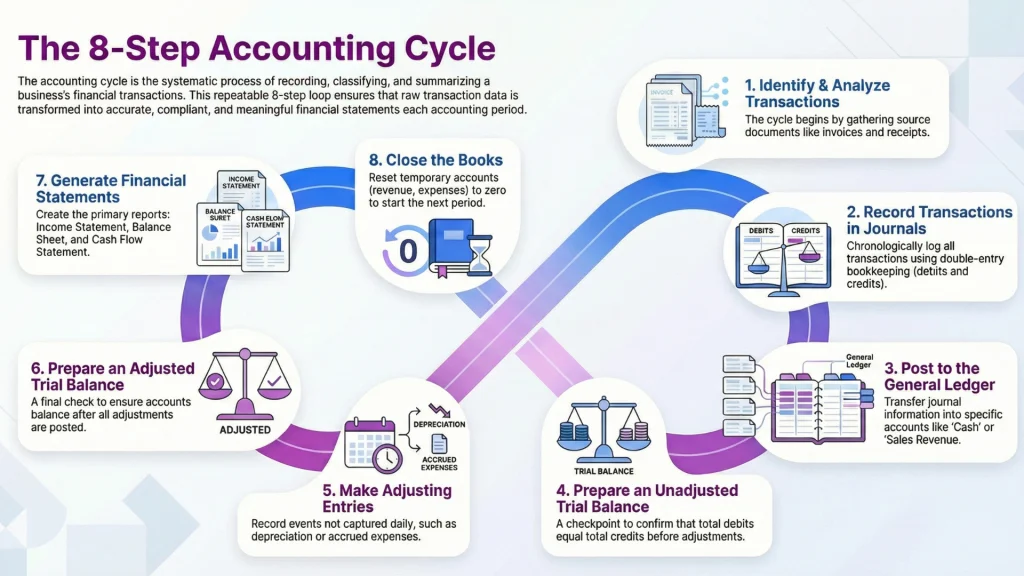
The accounting cycle typically consists of eight distinct steps, though some businesses may combine or modify certain steps based on their specific needs and software capabilities.
Why the Accounting Cycle Matters for Your Business
Understanding and properly executing the accounting cycle isn’t just an exercise in compliance. It directly impacts your ability to run and grow your business effectively.
Financial Accuracy and Integrity
Following the accounting cycle systematically reduces the risk of errors in your financial records. Each step includes built-in checks and balances that help catch mistakes before they compound. For businesses managing inventory, accurate accounting is essential for understanding true product costs, profit margins, and inventory valuation.
Timely Business Intelligence
When executed efficiently, the accounting cycle provides real-time visibility into your financial position. You can quickly answer critical questions: Are we profitable this month? Which products have the highest margins? Do we have enough cash to fulfill that large order?
Strategic Decision Support
Accurate, up-to-date financial information enables better business decisions. Whether you’re considering expanding into new markets, launching new products, or negotiating with suppliers, your financial statements provide the data you need.
Audit Readiness and Compliance
A well-documented accounting cycle creates a clear audit trail. If you ever face an audit or need to secure financing, having organized, accurate records following standard accounting practices demonstrates professionalism and reduces risk.
The 8 Steps of the Accounting Cycle Explained
Let’s break down each step of the accounting cycle, exploring what happens, why it matters, and how it works in practice.
Step 1: Identify and Analyze Transactions
The accounting cycle begins the moment a financial transaction occurs. A transaction is any economic event that affects your business’s financial position, such as:
- Selling products to customers
- Purchasing inventory from suppliers
- Paying employee salaries
- Receiving payments from customers
- Paying rent or utilities
- Taking out a business loan
What Happens in This Step
Your team must identify which events qualify as financial transactions and gather the necessary documentation. Source documents provide evidence of transactions and include:
- Sales invoices and receipts
- Purchase orders and supplier invoices
- Bank statements
- Payroll records
- Contracts and agreements
Practical Example
Imagine you run an eCommerce business selling cosmetics. When a customer places a $500 order on your Shopify store, several transactions occur:
- You make a sale (revenue increases)
- Inventory decreases (assets decrease)
- You incur the cost of goods sold (expenses increase)
- You may collect payment immediately or extend credit (cash or accounts receivable increases)
Each of these requires proper identification and documentation before moving to the next step.
Modern Automation
Today’s integrated business management systems automatically capture transaction data. When you fulfill a sales order in Qoblex, the system simultaneously records the sale, updates inventory levels, and captures the cost of goods sold—eliminating manual transaction identification for these routine events.
Step 2: Record Transactions in Journals
Once transactions are identified, they must be recorded chronologically in journals. This is where the principle of double-entry bookkeeping comes into play.
Understanding Double-Entry Bookkeeping
Every transaction affects at least two accounts: one debit and one credit. This ensures the fundamental accounting equation always balances:
Assets = Liabilities + Equity
Debits and credits aren’t “good” or “bad”—they simply represent the two sides of every transaction. Here’s a simplified view:
| Account Type | Increases With | Decreases With |
| Assets | Debit | Credit |
| Liabilities | Credit | Debit |
| Equity | Credit | Debit |
| Revenue | Credit | Debit |
| Expenses | Debit | Credit |
Journal Entry Example
Using our cosmetics sale example, the journal entry might look like this:
Date: October 29, 2025
Debit: Cash $500
Credit: Sales Revenue $500
(To record sale of cosmetics to customer)
Debit: Cost of Goods Sold $200
Credit: Inventory $200
(To record cost of inventory sold)
Why This Step Matters
Journal entries create the first formal record of transactions in your accounting system. They establish a chronological record (audit trail) and ensure every transaction is recorded using consistent methodology.
Software Advantage
Modern accounting software creates journal entries automatically when transactions are processed. When you integrate your inventory management system like Qoblex with accounting platforms like Xero or QuickBooks, sales orders, purchase orders, and inventory adjustments automatically generate the appropriate journal entries.
Step 3: Post to the General Ledger
After recording transactions in journals, the next step transfers this information to the general ledger. The general ledger is your business’s master accounting record, organizing all transactions by account.
Understanding Ledger Structure
While journals record transactions chronologically, the general ledger organizes them by account category:
- Assets (Cash, Accounts Receivable, Inventory, Equipment)
- Liabilities (Accounts Payable, Loans, Accrued Expenses)
- Equity (Owner’s Equity, Retained Earnings)
- Revenue (Sales, Service Income, Interest Income)
- Expenses (Cost of Goods Sold, Salaries, Rent, Utilities)
The Posting Process
Posting involves transferring each debit and credit from journal entries to the corresponding accounts in the general ledger. Each ledger account shows:
- Beginning balance
- All debits and credits posted during the period
- Running balance after each transaction
- Ending balance
Practical Application
For a wholesale business managing multiple product lines and warehouses, the general ledger provides a comprehensive view of financial activity across all locations. Your inventory account in the general ledger reflects the total value of all products across all warehouses, while subsidiary ledgers might track individual locations or product categories.
Real-Time Updates
Cloud-based accounting systems update the general ledger in real-time as transactions occur. This means you always have current account balances rather than waiting for periodic posting processes.
Step 4: Prepare an Unadjusted Trial Balance
After posting all transactions to the general ledger, it’s time to prepare an unadjusted trial balance. This is a key checkpoint in the accounting cycle.
What Is a Trial Balance?
A trial balance is a report listing all general ledger accounts with their debit or credit balances. The total debits must equal total credits, confirming that posting was done correctly.
Example Unadjusted Trial Balance
| Account | Debit | Credit |
| Cash | $25,000 | |
| Accounts Receivable | $18,500 | |
| Inventory | $45,000 | |
| Equipment | $30,000 | |
| Accounts Payable | $15,000 | |
| Loans Payable | $40,000 | |
| Owner’s Equity | $35,000 | |
| Sales Revenue | $85,000 | |
| Cost of Goods Sold | $42,000 | |
| Operating Expenses | $14,500 | |
| Totals | $175,000 | $175,000 |
Why “Unadjusted”?
This trial balance includes only the transactions that have been recorded so far. It doesn’t yet include adjustments for items like depreciation, accrued expenses, or prepaid items—those come in the next step.
What If It Doesn’t Balance?
If your trial balance doesn’t balance (debits don’t equal credits), you have an error somewhere. Common causes include:
- Posting a debit as a credit or vice versa
- Transposition errors in numbers
- Omitting one side of a journal entry
- Mathematical errors in calculating account balances
Time-Saving Technology
When using integrated business management software, the trial balance is automatically generated and always balanced because the system enforces double-entry rules. You can run a trial balance report at any time to check your current financial position.
Step 5: Make Adjusting Entries
Not all financial events are captured in daily transactions. Adjusting entries record economic events that occurred during the accounting period but haven’t yet been documented through normal transaction processing.
Types of Adjusting Entries
Accrued Revenues
Revenue earned but not yet recorded. Example: You completed a manufacturing order in October but won’t invoice until November. An adjusting entry recognizes the October revenue.
Debit: Accounts Receivable
Credit: Sales Revenue
Accrued Expenses
Expenses incurred but not yet recorded. Example: Employee wages earned in October but paid in November.
Debit: Wages Expense
Credit: Wages Payable
Deferred Revenues
Cash received before revenue is earned. Example: Customer pays in advance for a large wholesale order to be delivered next month.
Debit: Unearned Revenue (Liability)
Credit: Sales Revenue
Prepaid Expenses
Expenses paid in advance. Example: You paid $12,000 for annual insurance. Each month, adjust to recognize one month’s expense.
Debit: Insurance Expense
Credit: Prepaid Insurance
Depreciation
Allocating the cost of long-term assets over their useful life. Example: Manufacturing equipment costing $120,000 with a 10-year life requires monthly depreciation.
Debit: Depreciation Expense
Credit: Accumulated Depreciation
Why Adjusting Entries Matter
Adjusting entries ensure your financial statements follow the accrual method of accounting, which matches revenues with the expenses incurred to generate them. This provides a more accurate picture of profitability than simply recording cash in and out.
Inventory-Specific Adjustments
For businesses managing physical inventory, adjusting entries might include:
- Write-downs for obsolete or damaged inventory
- Adjustments based on physical inventory counts
- Accruals for inventory in transit
- Landed cost adjustments for import fees and shipping
Step 6: Prepare an Adjusted Trial Balance
After making all necessary adjusting entries, prepare a new trial balance called the adjusted trial balance. This report includes all the accounts from the unadjusted trial balance plus the effects of adjusting entries.
Continuing Our Example
| Account | Debit | Credit |
| Cash | $25,000 | |
| Accounts Receivable | $18,500 | |
| Inventory | $43,500 | |
| Prepaid Insurance | $11,000 | |
| Equipment | $30,000 | |
| Accumulated Depreciation | $2,500 | |
| Accounts Payable | $15,000 | |
| Wages Payable | $3,500 | |
| Loans Payable | $40,000 | |
| Owner’s Equity | $35,000 | |
| Sales Revenue | $85,000 | |
| Cost of Goods Sold | $42,000 | |
| Operating Expenses | $14,500 | |
| Insurance Expense | $1,000 | |
| Wages Expense | $3,500 | |
| Depreciation Expense | $2,500 | |
| Totals | $181,000 | $181,000 |
Quality Check
The adjusted trial balance serves as your final verification before preparing financial statements. If it balances, you can proceed with confidence that your accounts are accurate and complete.
Step 7: Generate Financial Statements
Now comes the payoff: transforming all that organized financial data into meaningful reports that tell the story of your business’s financial performance and position.
The Four Primary Financial Statements
Step 8: Close the Books
The final step in the accounting cycle is closing the books, which prepares your accounting system for the next period.
Understanding Temporary vs. Permanent Accounts
Temporary Accounts accumulate data for a single accounting period and are reset to zero:
- Revenue accounts
- Expense accounts
- Dividends or drawings accounts
Permanent Accounts carry their balances forward to the next period:
- Asset accounts
- Liability accounts
- Equity accounts
The Closing Process
Closing entries transfer balances from temporary accounts to permanent accounts, specifically to retained earnings (for corporations) or owner’s equity (for sole proprietorships and partnerships).
Example Closing Entries
1. Close Revenue Accounts:
Debit: Sales Revenue $85,000
Credit: Income Summary $85,000
2. Close Expense Accounts:
Debit: Income Summary $63,500
Credit: Cost of Goods Sold $42,000
Credit: Operating Expenses $14,500
Credit: Wages Expense $3,500
Credit: Insurance Expense $1,000
Credit: Depreciation Expense $2,500
3. Close Income Summary:
Debit: Income Summary $21,500
Credit: Retained Earnings $21,500
4. Close Drawings (if applicable):
Debit: Retained Earnings $10,000
Credit: Drawings $10,000
Post-Closing Trial Balance
After closing entries, prepare one final trial balance containing only permanent accounts (assets, liabilities, and equity). This becomes the starting point for the next accounting period.
Why Close the Books?
Closing the books:
- Resets temporary accounts to zero for the new period
- Prevents mixing data from different periods
- Calculates net income or loss for the period
- Updates equity accounts to reflect period results
- Establishes clean starting point for next cycle
Software Automation
Many accounting systems automate the closing process. With proper configuration, the system can generate closing entries and carry forward balances automatically, reducing manual work and errors.
Accounting Cycle vs. Accounting Period: Understanding the Difference
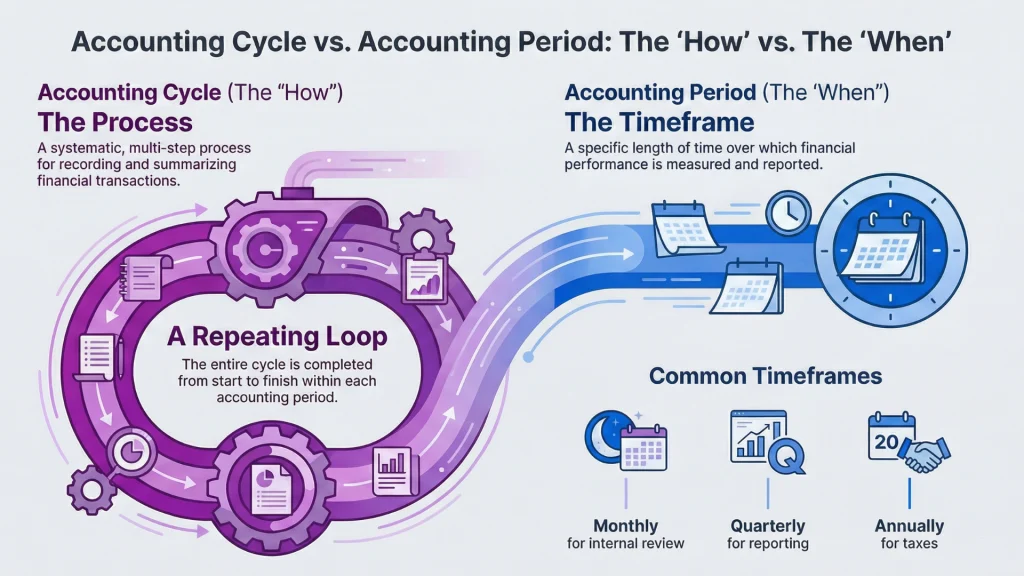
While related, the accounting cycle and accounting period are distinct concepts.
Accounting Period
The accounting period is the specific timeframe for which you’re measuring financial performance. Common accounting periods include:
- Monthly (most common for internal management)
- Quarterly (required for some regulatory reporting)
- Annually (required for tax purposes and external reporting)
- Custom periods (4-4-5 retail calendar, 13-period year)
Accounting Cycle
The accounting cycle is the process you follow during and at the end of each accounting period. The cycle repeats each period.
How They Work Together
Think of the accounting period as the “when” and the accounting cycle as the “how.” For a business using monthly accounting periods:
- Throughout the month: Steps 1-3 occur continuously as transactions happen
- End of month: Steps 4-8 occur to close out the period
- Next month begins: The cycle starts fresh with step 1
Choosing Your Accounting Period
The right accounting period depends on your business needs:
- Monthly: Provides frequent financial insights, ideal for businesses with significant month-to-month changes
- Quarterly: Balances administrative effort with timely information
- Annual: Minimum requirement for most businesses, but limits management visibility
Most growing businesses benefit from monthly accounting periods with quarterly deep-dive reviews and annual audited statements.
How Modern Accounting Software Streamlines the Accounting Cycle
Technology has transformed the accounting cycle from a time-consuming manual process into an automated, real-time system.
Real-Time Financial Visibility
Unlike traditional month-end accounting cycles, modern integrated systems provide continuous visibility into your financial position. Every sale, purchase, and inventory movement immediately updates your financial records.
Integration Advantages
The most powerful automation comes from integrating your operational systems with your accounting platform. When your inventory management, order processing, and accounting systems communicate:
- Sales orders automatically create revenue journal entries
- Purchase orders generate accounts payable entries
- Inventory movements update cost of goods sold
- Payment processing updates cash and receivables
- Multi-currency transactions handle exchange rates automatically
Qoblex Integration Example
When you use Qoblex connected to Xero or QuickBooks:
- Customer places order in your eCommerce store
- Order automatically creates in Qoblex
- Fulfillment updates inventory levels
- System generates appropriate journal entries
- Accounting platform updates general ledger
- Financial statements reflect the transaction immediately
This integration eliminates data entry errors, saves hours of manual work, and provides real-time financial insights.
Accuracy Improvements
Automated systems dramatically reduce errors:
- Enforced double-entry ensures balanced entries
- Calculated fields eliminate math errors
- Automated posting prevents missed transactions
- Real-time reconciliation highlights discrepancies immediately
- Audit trails track every change
Common Accounting Cycle Mistakes to Avoid
Even with good systems, businesses can stumble in executing the accounting cycle effectively.
Skipping the Trial Balance
Some businesses rush through the accounting cycle without proper checkpoints. The trial balance is essential for catching errors before they affect financial statements. Always verify your accounts balance before proceeding to adjusting entries.
Inadequate Documentation
Poor record-keeping creates problems throughout the accounting cycle. Maintain organized files of source documents, properly labeled and easily retrievable. For digital businesses, this means systematic electronic filing, not scattered emails and downloads.
Inconsistent Timing
Closing the books at irregular intervals or delaying the process creates problems:
- Financial information becomes outdated and less useful
- Adjusting entries are forgotten or incorrectly applied
- Comparing periods becomes difficult
- Tax deadlines may be missed
Establish and maintain a consistent accounting calendar.
Ignoring Necessary Adjustments
Failing to record adjusting entries distorts your financial picture. Common overlooked adjustments include:
- Depreciation on fixed assets
- Inventory shrinkage or obsolescence
- Accrued expenses like interest or payroll
- Prepaid expense allocation
- Unearned revenue recognition
Mixing Personal and Business Transactions
For sole proprietors and small partnerships, personal and business finances sometimes blur. This creates nightmares in the accounting cycle. Maintain separate bank accounts and credit cards, and record any personal transactions as owner draws, not business expenses.
Poor Communication Between Operations and Accounting
Your operations team must communicate with accounting about events that create adjusting entries:
- Inventory received but not invoiced yet
- Services provided but not billed
- Returns and allowances
- Warranty obligations
- Damaged or obsolete inventory
Neglecting Reconciliation
Bank reconciliation should happen monthly as part of the accounting cycle. Reconciling ensures your records match bank statements and identifies errors, missing transactions, and potential fraud.
Best Practices for Managing Your Accounting Cycle
Implementing these practices will strengthen your accounting cycle execution and improve financial data quality.
Establish a Clear Timeline
Create an accounting calendar with specific deadlines for each step:
- Daily: Record transactions, process invoices
- Weekly: Review accounts payable/receivable aging
- Month-end days 1-3: Reconcile accounts, identify adjusting entries
- Month-end days 4-5: Complete adjusting entries and trial balance
- Month-end days 6-7: Generate and review financial statements
- Month-end day 8: Close the period
Maintain Comprehensive Documentation
Develop a systematic approach to financial documentation:
- Standardized filing system (digital and physical)
- Clear naming conventions for electronic files
- Retention policies for various document types
- Backup systems for critical financial data
- Access controls and security measures
Leverage Technology Appropriately
Choose software that matches your business complexity:
- Entry-level businesses: Cloud accounting software with bank feeds
- Growing businesses: Integrated inventory and accounting systems
- Complex operations: ERP systems with multi-location capabilities
Ensure your systems integrate rather than creating data silos.
Implement Internal Controls
Even small businesses benefit from basic controls:
- Separation of duties (different people handle cash, recording, and reconciliation)
- Approval requirements for large transactions
- Regular account reconciliation
- Physical inventory counts
- Access logs and audit trails
Regular Training and Updates
Accounting standards and software capabilities evolve. Invest in:
- Ongoing training for staff handling financial transactions
- Updates when software releases new features
- Annual review of accounting policies and procedures
- Professional development for key financial personnel
Build in Review Processes
Don’t rely on a single person for financial accuracy:
- Management review of monthly financial statements
- Quarterly deep-dive analysis of trends and anomalies
- Annual external review or audit
- Regular comparison to budgets and forecasts
Focus on Inventory Accuracy
For businesses dealing with physical products, inventory accuracy directly impacts financial statement accuracy:
- Conduct regular cycle counts
- Investigate and resolve variances promptly
- Track and minimize shrinkage
- Properly value inventory with all landed costs
- Implement barcode or RFID tracking for real-time accuracy
Frequently Asked Questions About the Accounting Cycle
How long does an accounting cycle take?
The timeframe depends on your accounting period and business complexity. For a monthly cycle:
- Ongoing transactions: Record continuously throughout the month
- Period-end process: 3-7 days for adjustments, trial balance, and closing
- With automation: Real-time transaction recording, 1-2 days for period-end
Larger businesses with complex operations may require longer closing periods, while automated systems significantly reduce the time required.
Can the accounting cycle be automated?
Yes, substantial portions of the accounting cycle can be automated:
- Fully Automatable: Transaction recording, posting to ledgers, trial balance preparation, basic closing entries
- Partially Automatable: Recurring adjusting entries, standard depreciation calculations, bank reconciliation
- Requires Judgment: Unusual adjusting entries, inventory write-downs, allowance for doubtful accounts, error corrections
Most businesses can automate 70-80% of routine accounting cycle tasks, freeing staff to focus on analysis and strategic activities.
What’s the difference between the accounting cycle and the operating cycle?
The accounting cycle is the process of recording and reporting financial transactions for a specific period.
The operating cycle is the time it takes for a business to convert cash into inventory, sell that inventory, and collect payment from customers. For example:
- Day 1: Purchase inventory for $1,000
- Day 30: Sell inventory for $2,000 on credit
- Day 60: Collect payment from customer
This 60-day operating cycle might span two monthly accounting cycles. Understanding both cycles helps businesses manage cash flow and working capital effectively.
Do small businesses need to follow all steps?
While the fundamental principles apply to all businesses, small businesses can simplify certain steps:
- Cash basis accounting: May skip some accrual adjusting entries
- Simple operations: Fewer accounts mean faster trial balance review
- Automation: Software handles posting and trial balance automatically
However, all businesses benefit from systematic transaction recording, regular reconciliation, and periodic financial statement preparation. The formality and detail level can scale with business size.
How does the accounting cycle relate to tax preparation?
The accounting cycle creates the foundation for tax compliance:
- Annual tax returns: Based on financial statements from your accounting cycle
- Quarterly estimates: Use interim financial statements
- Sales tax: Monthly or quarterly reporting from sales data
- Payroll taxes: Regular reporting from payroll processing
Accurate, timely completion of the accounting cycle makes tax preparation significantly easier and reduces the risk of errors or missed deductions. Businesses that maintain strong accounting cycles throughout the year face much simpler tax seasons.
How often should we complete the accounting cycle?
Most businesses benefit from monthly accounting cycles for management purposes, even if they only prepare annual statements for external parties. Monthly cycles provide:
- Timely identification of problems or opportunities
- Regular checkpoints for accuracy
- Basis for operational decisions
- Easier annual closing (12 months vs. one large year-end process)
Some businesses supplement monthly cycles with weekly or even daily metrics for critical accounts like cash and accounts receivable.
Simplify Your Accounting Cycle with Integrated Business Management
The accounting cycle doesn’t have to be a burden. When your operational systems seamlessly connect with your accounting platform, the process becomes automatic and accurate.
How Qoblex Streamlines Your Financial Management
Qoblex integrates inventory management, order processing, and financial data to automate key aspects of the accounting cycle:
Automatic Transaction Recording
Every sale, purchase, and inventory movement automatically generates the appropriate accounting entries. When you fulfill a sales order, the system simultaneously:
- Records revenue at the correct amount
- Updates inventory quantities and values
- Calculates and records cost of goods sold
- Adjusts accounts receivable or cash
Real-Time Financial Visibility
Access current financial information anytime without waiting for month-end closing. View profitability by product, customer, or sales channel in real-time.
Multi-Location Accounting
Track financial performance across multiple warehouses or locations, with consolidated reporting and location-specific analysis.
Accurate Inventory Valuation
Proper inventory accounting is critical for accurate financial statements. Qoblex tracks:
- Moving average cost (MAC) for precise COGS calculation
- Landed costs including freight and duties
- Multi-currency purchasing with proper exchange rates
- Inventory adjustments with clear audit trails
Seamless Integration with Xero and QuickBooks
Connect Qoblex with leading accounting platforms for complete automation:
- Automatic sync of invoices and bills
- Two-way payment updates
- Configurable sync rules for different transaction types
- Reconciliation reports to verify accuracy
Manufacturing Cost Tracking
For businesses with production operations, track and properly account for:
- Bills of materials with component costs
- Labor and overhead allocation
- Work-in-process inventory
- Finished goods costing
E-commerce Integration
Your store orders flow directly into your accounting system with proper customer-specific pricing, payment terms, and tax calculations.
Take Control of Your Financial Accuracy
Understanding the accounting cycle is just the beginning. The real value comes from executing it consistently and efficiently. Modern integrated business management systems transform the accounting cycle from a time-consuming manual process into an automatic, accurate, and insightful financial engine.
Ready to Streamline Your Accounting Cycle?
Experience how Qoblex can simplify your financial management while providing the inventory and order management capabilities your growing business needs.
Start your free 14-day trial today and discover how integrated business management can transform your accounting cycle from a periodic chore into a continuous source of business intelligence.