

Batch Tracking Software
You need two answers about a batch, and usually you need them in a hurry: which units came from this delivery, and where did they go. A spreadsheet holds the first. It rarely holds the second, because the link between a lot number and the orders it shipped on sits in someone’s memory, or in a folder of delivery notes. Qoblex records the batch every time stock moves, so the history is built while your team does its normal work. When you have to answer for a batch, you look it up.
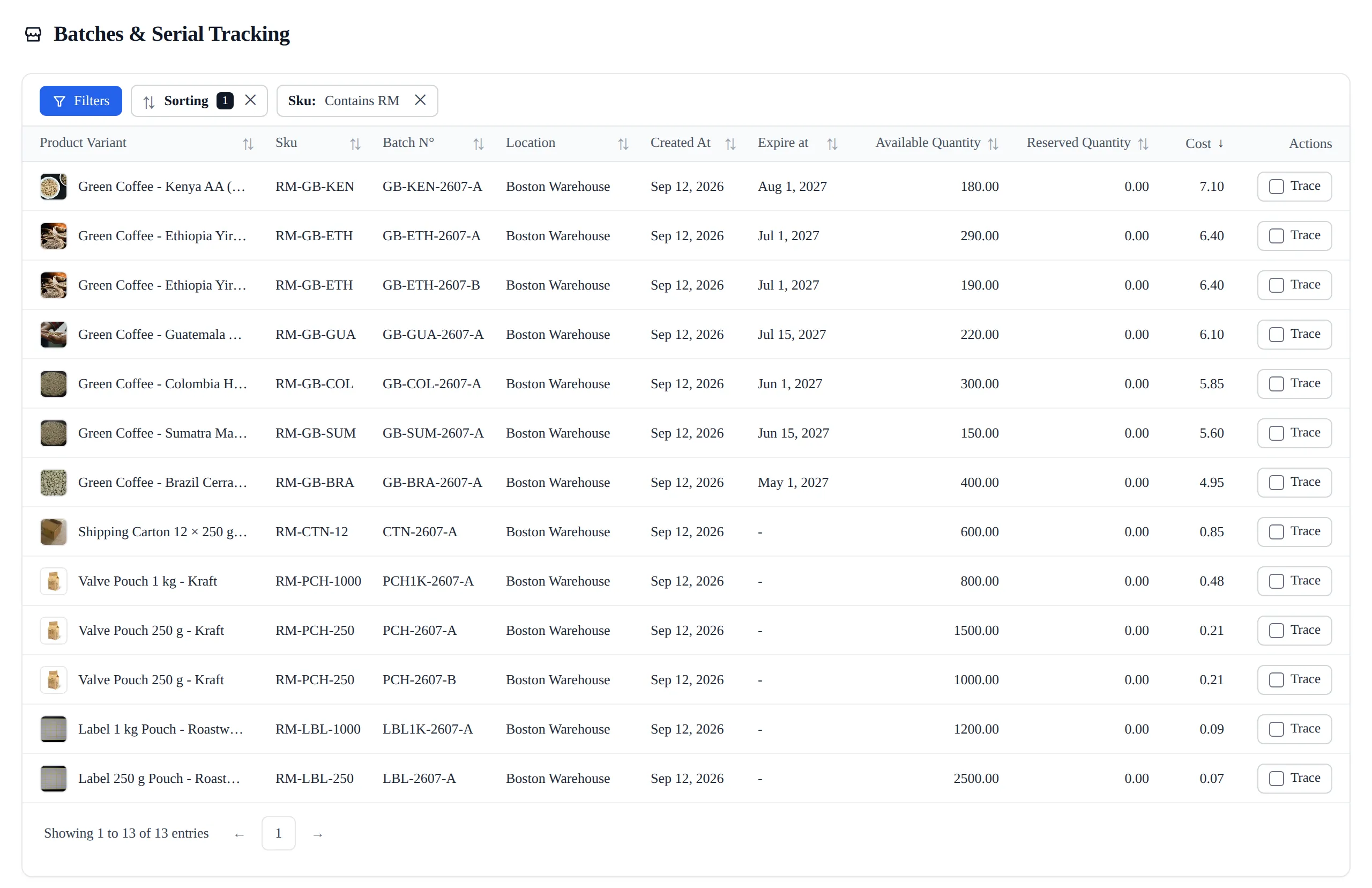
Every batch you hold, on one screen
One row per batch or serial, across every location. The batch number as your supplier wrote it, where it is sitting, what it cost, when it expires, and how much of it is free rather than already promised to an order.
No spreadsheet, no walking the shelves, and any row answers where it went.
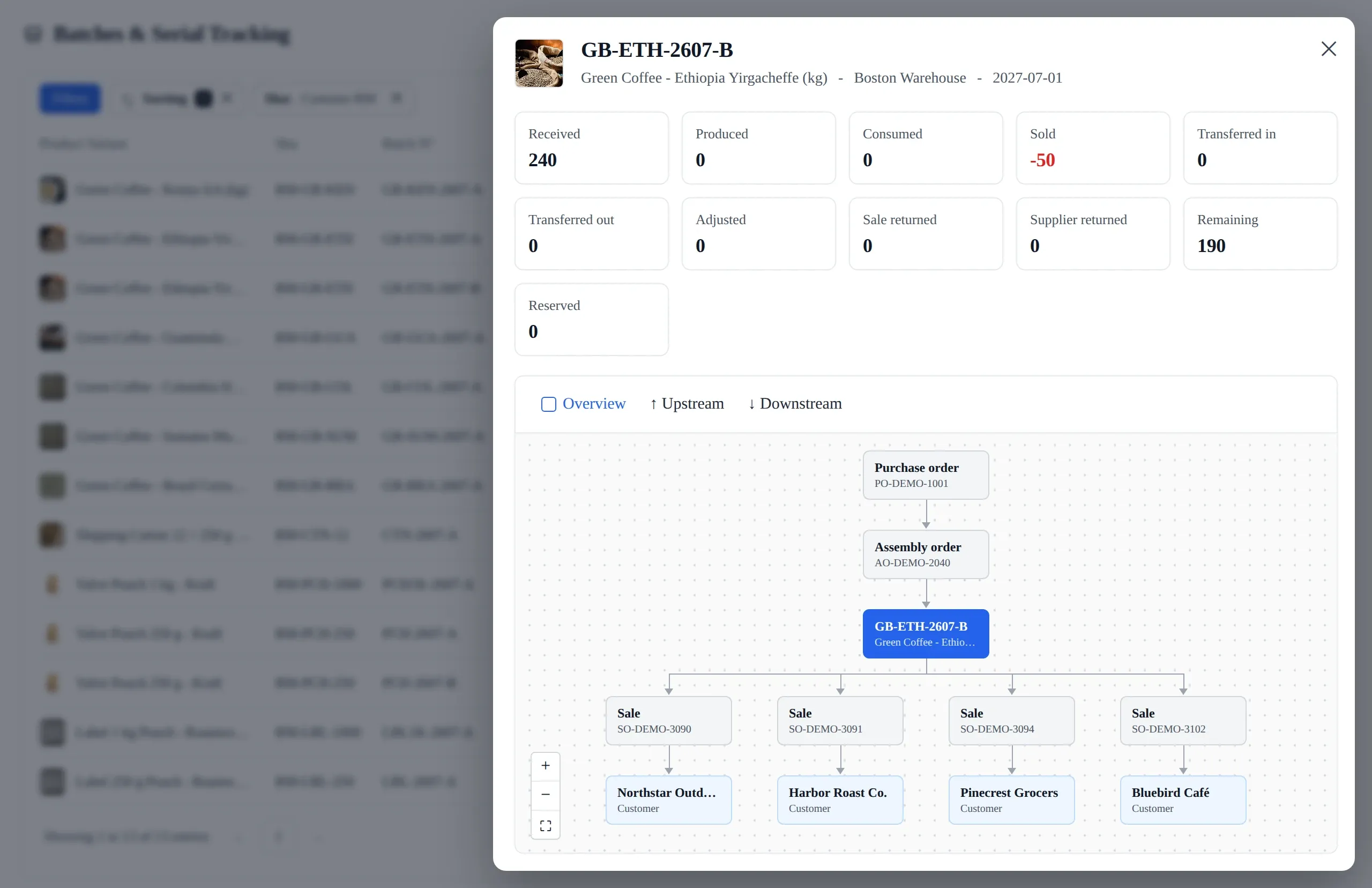
The recall question, in one view
You have the lot number. The totals say what became of it: received, sold, consumed, returned, what is left. The chart draws the path it took, upstream to where it came from and downstream to every order it reached.
No paperwork to reconstruct afterwards. See tracing a batch or serial.
Traceability builds itself while your team works
Every time stock changes hands, Qoblex asks which batch it was. The document will not authorize until every unit is accounted for. That is why the record is still complete months later, when you need it.
Track only the products that need it
Turn tracking on one product variant at a time, as batch or serial. Anything that does not need it carries no extra work. Switch it on before the variant holds stock: Qoblex has no history for units that moved while tracking was off, and it will not invent one.
No delivery gets booked in half-recorded
Receiving a tracked product opens a Collect Batch Information step. A counter shows how many units still have no number against them. Enter them one at a time, as a range, or split a line. The goods receipt will not authorize until every unit is covered.
The stock nearest its date goes out first
On lots with an expiry date, Qoblex picks first-expired-first-out. Nobody has to remember which batch is oldest. Each batch shows its expiry date while you pick, and you can override the choice when an order needs a longer shelf life.
See expiring stock while you can still sell it
Every batch has an expiry date and a status: Active, Expiring soon, or Expired. Warning icons show on the Batches list, and a filter pulls up whatever is close to its date. The point is to move that stock in time, not to write it off later.
Answer for a batch without digging
Open any batch and see where it came from and everywhere it went. The receipt that brought it in, the transfers between locations, the adjustments, and the orders it shipped on are all on one record, each linked to the document behind it.
Find the finished goods a bad batch went into
An assembly order that used a batch, and the batch it produced, both appear on the trace and link to the production order. A problem in a raw material can be followed forward into the finished goods it went into, and a finished batch traced back to what went into it.
No gaps where the stocktakes were
Moving tracked stock between locations, or correcting a count, asks which batches are involved. It does not move an unnamed quantity. Most systems skip this step, which is why their history has holes in exactly the places someone counted.
Bring in the batches you already have
Opening balances, or a warehouse full of existing lots, come in from a spreadsheet. Download the template, fill in the batch, quantity and expiry columns, and upload it. It is the way in for a business that already records batches somewhere else.
Every batch you hold, on one screen
The Batches list shows every batch and serial across all your locations. Available and reserved quantities are kept apart, so stock promised to an order is not counted twice. Sort and filter by product, location, status or expiry.
Fix a typo without breaking the history
A mistyped lot number or a missing expiry date can be corrected on the list. Quantities are deliberately harder to change: they move through adjustments, so the movement history stays true. The help article says plainly when not to edit or delete.

I am a paying customer that utilizes the integration with Shopify to Qoblex to Xero… What I trialed: TradeGecko, Cin7, and Dear Inventory… the value and service are insanely good. The number of integrations and ease of use is something I haven’t found even for triple their price.
Frequently asked questions
Batches, expiry dates, recalls, and audit history.
What is batch tracking software?
Batch tracking software records which units of a product came from which delivery or production run, and follows them until they are sold. It means you can answer where a batch came from, and where it went, without going through paperwork.
Is this the same as lot tracking?
Yes. “Batch” and “lot” tracking are often used interchangeably. Both refer to the process of grouping products or materials and tracking their movement, usage, and history.
We already use spreadsheets. Why do we need something like Qoblex?
Spreadsheets are great, until they aren’t. They break at scale, lack audit trails, and are nearly impossible to manage across teams. Qoblex automates traceability, reduces risk, and gives you real-time visibility into your inventory.
Can Qoblex handle expiry dates too?
Yes, and it acts on them. Every batch can carry an expiry date and shows as Active, Expiring soon, or Expired, with a filter to find what is close to its date. On lots with an expiry date, picking is first-expired-first-out: the batch nearest its date is the one that goes out. You can override that when an order needs a longer shelf life.
What happens in a recall?
Open the batch and read the recall chart. It fans the lot out to the orders it shipped on and the customers on them, the transfers between your locations, and the assembly orders that used it. It runs the other way too, back to the goods receipt and the supplier. It is drawn from the stock movements, so it is right when you open it rather than something you have to put together.
Does Qoblex support manufacturing and BOM tracking?
Absolutely. You can connect raw materials to finished goods with batch-level traceability. Know exactly what went into every item and which batches were affected downstream.
Do we need IT or consultants to set this up?
Nope. Qoblex is built for growing businesses, not giant enterprises. You can get started quickly without hiring a full-time ERP team.
Is there a free trial for Qoblex?
Yes, Qoblex offers a free 14-day trial that doesn’t require a credit card.
Compare Us to Other Solutions
| Feature | Qoblex | Spreadsheets | ERP Add-Ons |
|---|---|---|---|
| Real-time batch traceability | Yes | Manual only | Limited, complex |
| FEFO picking on expiry lots | Automatic, overridable | Error-prone | Not standardized |
| Recall chart, upstream & down | One view, live | Not possible | Requires customization |
| Audit-ready batch logs | Full history | No traceability | Hard to export |
| Easy setup & user-friendly UI | Intuitive | Manual workflows | Steep learning curve |
| Pricing transparency | Clear monthly plans | N/A | Often hidden fees |
How it works
Be up and running in a fraction of the time you’re expecting it to take.
- 1
Talk to an expert
Our experts have helped hundreds of product sellers just like you.
Book a demo - 2
Bring in a specialist
Engage an onboarding specialist to make it much easier for you.
Book a demo - 3
Go live fast
Unlike other systems, we can get you up and running within 1 week.