


The best Fishbowl Inventory alternatives in 2026 are Qoblex, Katana, MRPeasy, Unleashed, inFlow, Cin7 Core, Zoho Inventory, and Odoo. Fishbowl is a capable manufacturing and inventory platform with strong QuickBooks ties, but SMBs that want cloud-native setup, lot and expiry traceability in the base of the tool, flexible accounting sync to Xero or QuickBooks, and month-to-month billing without a formal implementation project often find themselves looking for an alternative. Qoblex is the top pick for that buyer.
Why look for a Fishbowl alternative?
Fishbowl earns its place in the market, especially for manufacturers deeply committed to QuickBooks. Most people who go looking for an alternative have run into one of a small set of specific walls rather than being broadly unhappy with the product.
What Fishbowl does well, and where it hits its limits
Fishbowl Manufacturing is built for depth. It ships multi-level BOMs, manufacture orders, work orders, MRP, and lot, batch, serial, and expiry tracking as built-in part-tracking types, and it connects to both QuickBooks and Xero natively. For a manufacturer whose world already revolves around QuickBooks, that is a coherent package.
The friction that sends people looking usually falls into one of three places.
Setup weight. Fishbowl Advanced, the manufacturing-depth product, requires a mandatory implementation package: an implementation specialist, data migration, a 6-8 week training certification, and dedicated go-live support. That is the right level of hand-holding for a complex manufacturing setup. For a small team that wants to be operational in days rather than months, it is more than the job requires.
Deployment model. Fishbowl Advanced runs cloud-hosted or on-premise, with the on-premise edition using a heavier upfront model rather than a simple monthly subscription. Fishbowl Inventory (the cloud-native tier, also referred to as Fishbowl Drive in some Fishbowl integration documentation) is a lighter subscription product, but it does not carry the full manufacturing depth of Advanced. Teams that want cloud-native simplicity and full manufacturing capability in the same product find themselves caught between the two.
Accounting tether. QuickBooks is Fishbowl’s best-known accounting integration and the reason most buyers evaluate it. Fishbowl does also integrate natively with Xero, but the brand’s heritage and positioning lean QuickBooks-first. A team whose accounting is on Xero, or that wants equal-depth sync to either platform, may find the fit less natural.
None of this makes Fishbowl the wrong choice. It makes it a specific choice, for a specific kind of operation. The question is whether that is you.
What is the difference between Fishbowl Advanced and Fishbowl Inventory?
Fishbowl Advanced is the full manufacturing and warehouse platform, available cloud-hosted or on-premise, and requires a mandatory implementation package. Fishbowl Inventory (previously marketed as Fishbowl Drive) is the cloud-native line, offered in Essentials, Growth, and Scale subscription tiers billed annually, with a lighter feature set that does not carry Advanced’s full manufacturing depth.
The trade-off inside Fishbowl’s own lineup is clear: the cloud-native tier is lighter on manufacturing, and the manufacturing-deep tier expects the implementation project. If you want cloud-native and real traceability and light manufacturing together, that is the gap the alternatives below are competing to fill.
What should a Fishbowl alternative include?
Before you compare tools, get clear on what you actually need to run. For an SMB that outgrew a spreadsheet but is not ready for an ERP-scale implementation, a good alternative usually covers most of this:
- Cloud-native setup with self-serve onboarding. No mandatory implementation project. You should be able to import your data and be operational in days.
- Traceability in the base of the tool. If you handle food, beverage, supplements, or any product with an expiry date, lot and batch tracking with expiry dates is not optional.
- Flexible accounting sync. A real two-way connection to Xero or QuickBooks Online, not just QuickBooks. Your books stay your book of record regardless of which platform you are on.
- Light manufacturing when you need it. Bill of materials and production orders for real assembly work, without paying for a full manufacturing ERP you will not staff.
- Native multichannel. Two-way sync with Shopify, Amazon, and WooCommerce if you sell online.
- Month-to-month billing. So you are not locked in while you are still deciding.
Most tools on this list clear the basics. What separates them for a regulated buyer is that second point: whether traceability lives in the base of the tool or in a separate layer.
The 8 best Fishbowl alternatives in 2026: quick comparison
Here is the shortlist at a glance, ranked and compared on the capabilities that actually decide the choice. Capability details for each tool are based on their published product documentation, verified in July 2026; confirm current scope with each vendor before you commit.
A note on cost. The lighter tools here are self-serve, so you can import your data and be operational without a formal implementation, while Fishbowl Advanced and Cin7 Core are heavier platforms that expect a setup effort to match their depth. We are keeping specific figures off this page because they move; check each vendor’s own pricing page for current numbers, and Qoblex’s pricing here.
Detailed reviews
1. Qoblex, the best Fishbowl alternative for cloud-native SMBs
Qoblex is the operational system between a spreadsheet and a bloated ERP. It handles inventory, purchasing, order management, light manufacturing, and traceability in one place, and it connects natively to Shopify, WooCommerce, Amazon, Xero, and QuickBooks Online. That last part is the point for a Fishbowl shopper: Qoblex closes your inventory and traceability gap while your existing accounting and sales channels stay your book of record, whether those books are on Xero or QuickBooks.
For the operator who needs to be operational without a multi-month implementation, the fit is the whole story. You get lot and batch tracking, expiry dates, serial number tracking, purchase orders, multi-warehouse, and native lightweight MRP and bill of materials in one platform. Traceability comes as a paid tracking add-on rather than in the base plan; the structure and current figures are on the pricing page. Setup is self-serve, and there is a 14-day free trial with no credit card.
Best for: food, beverage, supplement, and cosmetics brands, and other SMBs that need real traceability alongside purchasing and light manufacturing, cloud-native, without a formal implementation project.
The trade-off, honestly: Qoblex ships lightweight MRP, not a heavy shop-floor scheduler or deep WMS. If your core problem is complex production scheduling with real-time capacity planning and shop-floor routing, or you need enterprise WMS automation, Fishbowl Advanced or MRPeasy may be the better engine. That is covered below.
2. Katana
Katana is manufacturing-first. It is built around a real-time production scheduler, BOM management, and shop-floor visibility, and for a maker whose core problem is production it does that job well. It also connects natively to Shopify, WooCommerce, Amazon, Xero, and QuickBooks Online. Worth knowing for the regulated buyer: batch, serial, and expiry tracking live in the Full Traceability add-on, a separate module purchased on top of the Core base plan. For a food or supplement brand where traceability is the reason for buying software, that split is a real consideration. We cover it in detail in our Katana alternatives comparison.
Best for: small manufacturers whose center of gravity is production scheduling and who are comfortable adding the traceability module on top.
3. MRPeasy
MRPeasy is the closest like-for-like if what attracted you to Fishbowl was the manufacturing engine but you want lot and serial traceability with expiry dates without treating it as a separate layer. It is a genuine MRP tool for small manufacturers, with production planning, BOM, and stock control, and it connects natively to Xero and QuickBooks Online. If production scheduling is your center of gravity and traceability is a close second, it is worth a serious look.
Best for: lean manufacturers who want MRP depth with traceability included in the same tool.
4. Unleashed
Unleashed is a long-standing wholesale and manufacturing platform with batch tracking, expiry dates and FEFO batch selection, serial number tracking, and a deep native Xero relationship. Its multi-level BOM with assembly and disassembly makes it a capable, slightly more traditional B2B tool. For a team anchored on Xero that wants traceability and light manufacturing without the depth of Fishbowl Advanced, it is a strong candidate.
Best for: wholesale and light-manufacturing teams anchored on Xero.
5. inFlow Inventory
inFlow is a clean, approachable tool for small teams. Its serial number tracking is generally available, while lot/batch tracking with expiry dates is in beta as of mid-2026, so if lot traceability is your reason for buying, confirm its current availability with the vendor before you commit. It offers BOM and multi-level assembly through manufacture orders and a built-in B2B showroom for wholesale orders. It bills monthly with no mandatory long-term contract.
Best for: small teams wanting a simple lot tracking tool alongside a B2B ordering portal.
6. Cin7 Core
Cin7 Core is a step up in weight: a mid-market inventory and warehouse platform with batch, serial and expiry tracking on all plans and real warehouse depth. Worth knowing for a regulated buyer: FEFO enforcement, the pick validation that blocks a non-FEFO pick, sits in the higher-tier WMS rather than the entry plan, and full MRP is a higher-tier feature too. That depth is the appeal and the friction: it expects a setup effort and a team to run it. We cover it in detail in our Cin7 alternatives comparison.
Best for: growing businesses that need mid-market WMS depth and are ready to invest in setup.
7. Zoho Inventory
If your business already runs on Zoho, Zoho Inventory is the path of least resistance. It handles multichannel orders, batch tracking with expiry dates and FEFO batch selection, and warehouse basics, and it slots neatly into Zoho Books and the wider Zoho suite. There is a free tier for very small operations. The catch is that its manufacturing is limited to kits and bundles via composite items, with no BOM or MRP module, so a maker who needs real production workflows will feel the ceiling.
Best for: small teams already committed to the Zoho ecosystem.
8. Odoo Manufacturing
Odoo is an open-source business platform with a modular inventory app covering lot and serial tracking with four expiry-date categories, plus a full Manufacturing module with multi-level BOMs, routings, and capacity planning. One thing to check for your stack: only Amazon connects through a native Odoo module, while Shopify, Xero, and QuickBooks are reached through third-party App Store connectors, so confirm the sync depth you need before you commit. Odoo rewards teams with the technical appetite to configure it.
Best for: tech-savvy teams that want open-source and are willing to configure.
Does Fishbowl include lot and expiry tracking, and what does that mean for regulated buyers?
Fishbowl does include traceability. That is worth being accurate about before the comparison goes any further. The part tracking page confirms lot number, batch number, serial number, and expiration date tracking as built-in types. For a QuickBooks-tied manufacturer running Fishbowl Advanced, that coverage is real.
The gap is not in the traceability features themselves. It is in what surrounds them.
What Fishbowl’s part-tracking covers
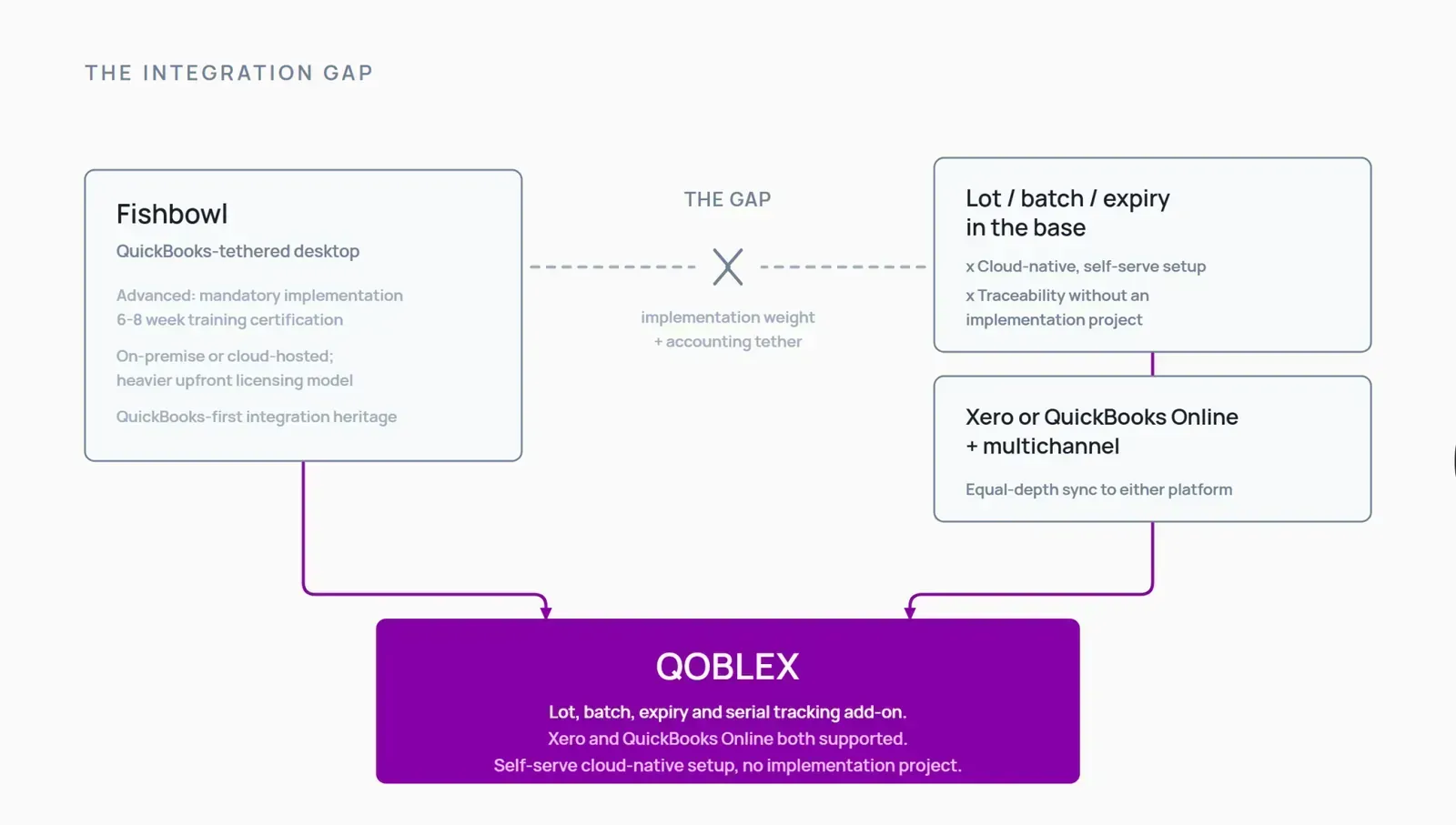
Fishbowl has traceability built in. Its part-tracking types include lot number, batch number, serial number, and expiration date, so as a capability, lot and expiry tracking are genuinely there. If you have already implemented Fishbowl and configured part tracking, you are covered on the feature itself. The gap for a regulated SMB is not “Fishbowl can’t do lots.” It is the model you go through to get there.
Where the gap is for a cloud-native, self-serve regulated SMB
Fishbowl Advanced, the product that carries the full manufacturing and traceability depth, requires a mandatory implementation package: a specialist, data migration, a 6-8 week training certification, and dedicated go-live support. Pricing is by quote and varies by deployment. That is appropriate for a complex manufacturing operation with the time and budget to do it properly. For a small food brand or supplement maker who needs to be traceable and operational quickly, it is more than the job requires.
The cloud-native tier, Fishbowl Inventory (also known as Fishbowl Drive in Fishbowl’s integration documentation), is lighter and available on annual subscription plans without a formal implementation, but it does not carry the same manufacturing depth as Advanced. Teams that want both cloud-native simplicity and full manufacturing capability in one product find themselves caught between the two tiers.
There is also the accounting angle. Fishbowl’s best-known integration is QuickBooks, and that heritage shapes the product. The Xero integration is real and two-way, but a team on Xero as its book of record may find Fishbowl a less natural fit than a product built with equal-depth sync to both platforms from the start.
What a food brand or regulated SMB actually needs
The real-world requirement runs as a chain: capture the lot on receipt or production, attach an expiry date, pick so the soonest-to-expire stock goes first (FEFO, which orders picking by expiry rather than by receipt date the way FIFO does), and keep the trace intact so that a recall question can be answered quickly: which lots are affected, and where did they go?
That chain has to survive production. The link from raw-material lot to finished-goods batch needs to live inside the system, not in a spreadsheet beside it. If you want the fuller picture of that vertical, see our guides to lot and batch tracking, expiry and FEFO management, and food and beverage inventory management.
How Qoblex covers it at SMB scale
Qoblex gives you lot, batch, serial, and expiry tracking as a paid tracking add-on on top of its base plan, with self-serve setup and no mandatory implementation. Because Qoblex also ships lightweight MRP and bill of materials, the trace passes through production rather than stopping at the finished-goods shelf, and your purchasing and multichannel sync sit in the same system. The current structure and figures are on the pricing page. The point is not just traceability. It is that you can be traceable and recall-ready at SMB scale, quickly, while your Shopify, Xero, or QuickBooks Online stay your book of record.
How to pick your Fishbowl alternative
A quick way to narrow it down:
- You sell food, beverage, supplements, or cosmetics and need lot and expiry traceability, cloud-native, without an implementation project: Qoblex, then Unleashed depending on your accounting platform.
- Your core problem is production scheduling and you want full MRP: MRPeasy, or Katana if you also want tight Shopify integration and are happy to add the traceability module.
- You want the lowest-cost start and are already in Zoho: Zoho Inventory.
- You take a lot of wholesale or B2B orders: inFlow or Unleashed.
- You have genuinely grown into mid-market WMS needs: Cin7 Core.
- You want open-source and have the technical appetite: Odoo.
- QuickBooks is central and you want deep manufacturing integration with it: Fishbowl remains a strong fit, and the honest section below says so directly.
When Fishbowl is genuinely the right call
Fishbowl earns its place, and it is worth being straight about who it is built for. Choose or stay on Fishbowl when:
- QuickBooks is the center of your accounting world and you want the deepest possible inventory and manufacturing integration with it. Fishbowl’s QuickBooks connection is mature and well-documented, and if QuickBooks is non-negotiable, that matters.
- You need on-premise deployment. Fishbowl Advanced supports on-premise for IT, security, or compliance reasons where cloud hosting is not acceptable.
- You have a genuine manufacturing operation that benefits from multi-level BOM, work orders, MRP, and the manufacturing depth Fishbowl Advanced carries, and you are ready to invest in a proper implementation to get it right.
- You have already implemented Fishbowl and it is working. Switching cost is real. If the system fits and your team knows it, a marginal improvement elsewhere does not justify the disruption.
- Your operation is large enough to absorb the implementation investment and will genuinely use the depth: warehouse management, manufacturing modules, advanced part tracking, and QuickBooks integration across a team.
If that is you, Fishbowl is a sound choice, and no shortlist should talk you out of it. The question this page answers is the other one: if you want cloud-native setup, flexible accounting sync to Xero or QuickBooks, and self-serve onboarding without a mandatory implementation project, that is where the alternatives on this list come in.
How to move from Fishbowl to a new platform
If you decide to move, a controlled transition beats a rushed one. A sequence that works:
- Export everything before you cancel. Pull your products, stock levels, suppliers, customers, BOMs, and open orders while you still have full access.
- Reconcile your stock first. Run a full stocktake so you migrate accurate numbers, not accumulated drift.
- Map your accounting ledgers. Identify the accounts your new tool will post to, so the accounting sync lands cleanly from day one.
- Run both systems in parallel for a week or two. Confirm the new platform agrees with reality before you fully cut over.
- Train the team in short, role-based sessions. Purchasing, warehouse, and production each need a focused walkthrough, not one long generic demo.
Done in this order, a switch is a controlled project, not a leap.
FAQ
What is the difference between Fishbowl Advanced and Fishbowl Inventory (Drive)? Fishbowl Advanced is the manufacturing-depth product, available cloud-hosted or on-premise, and requires a mandatory implementation package. Fishbowl Inventory (also referred to as Fishbowl Drive in Fishbowl’s integration documentation) is the cloud-native-only tier with three subscription plans (Essentials, Growth, Scale), and does not carry the full manufacturing depth of Advanced.
Does Fishbowl require QuickBooks? No. Fishbowl’s QuickBooks Online integration page explicitly states it integrates with QuickBooks Desktop, QuickBooks Online, and other accounting solutions. It does not require QuickBooks. That said, QuickBooks is Fishbowl’s best-known accounting integration and the reason most buyers evaluate it.
Is Fishbowl cloud-based or desktop? Both options exist. Fishbowl Inventory is cloud-native (subscription, accessible anywhere). Fishbowl Advanced offers cloud-hosted or on-premise deployment. The on-premise edition uses a heavier upfront licensing model rather than a simple monthly subscription.
Does Fishbowl include lot and expiry tracking? Yes. Fishbowl’s part tracking page confirms lot number, batch number, serial number, and expiration date as built-in tracking types. This applies to Fishbowl Advanced; confirm availability on the Fishbowl Inventory cloud tiers with the vendor.
What does Fishbowl’s implementation package include? For Fishbowl Advanced, the pricing page states that a mandatory implementation package is required, covering an implementation specialist, data migration, a 6-8 week training certification, and dedicated go-live support. Fishbowl Inventory cloud tiers do not state a mandatory implementation requirement.
Which Fishbowl alternatives integrate with Xero AND QuickBooks Online? Qoblex, Katana, MRPeasy, Unleashed, inFlow, and Zoho Inventory all connect to both Xero and QuickBooks Online. Confirm the direction and depth of each sync against the vendor’s current documentation for your setup.
Which Fishbowl alternative is best for food and beverage? Qoblex is the top pick for food and beverage SMBs: cloud-native, self-serve, with lot, batch, and expiry tracking available as an add-on, lightweight MRP, and native Xero and QuickBooks Online sync. For the full picture see our food and beverage inventory guide.
Does Fishbowl integrate with Shopify? Yes. Fishbowl’s Shopify integration page describes two methods: a direct Plugin module within Fishbowl Advanced, and the Fishbowl Commerce hub available for both Fishbowl Advanced and Fishbowl Inventory.
What is the best Fishbowl alternative for a small business? Qoblex for an SMB needing traceability and light manufacturing without an implementation project. Zoho Inventory for a very small team already on Zoho. inFlow for simple lot tracking and a B2B ordering portal. Match the tool to the specific need rather than the brand name.
Can I try Qoblex before switching from Fishbowl? Yes. Qoblex offers a 14-day free trial with no credit card required, so you can load your own data and confirm the fit before committing. See qoblex.com/pricing for current terms.
Conclusion: your next move
Fishbowl is a genuinely capable platform for the operation it is built for. If your world is QuickBooks-tied manufacturing and you are ready for a proper implementation, it can be exactly right. But if the reason you are looking is the setup weight, the deployment model, the QuickBooks tether, or a billing structure that does not fit a lean SMB budget, then the honest question is whether the platform around the traceability features matches how you want to work.
Start by writing down the one operational problem that made you search for an alternative. If it is getting traceable and cloud-native quickly, without a six-week certification and an implementation specialist, that is the gap to close first, and it is the gap Qoblex was built for.