


Automated purchase order software helps businesses create, approve, send, and track purchase orders with less manual work. But for ecommerce brands, wholesalers, and manufacturers, the real value goes beyond approvals. The best purchase order automation starts with inventory signals: reorder points, safety stock, lead times, supplier performance, and forecast demand.
If your team still creates purchase orders from spreadsheets, email threads, or last-minute stock checks, purchasing can quickly become reactive. That leads to stockouts, overbuying, delayed replenishment, and poor visibility across operations.
This guide explains how automated purchase order software works, which features matter most, what tools to compare, and how to choose the right system for your business.
What Is Automated Purchase Order Software?
Automated purchase order software is a system that helps businesses create, approve, manage, and track purchase orders automatically based on purchasing rules, inventory levels, supplier data, or approval workflows.
A purchase order, or PO, is a formal document sent to a supplier to request products, materials, or services. It usually includes item details, quantities, prices, delivery dates, payment terms, and supplier information.
Traditional purchase order management often relies on manual tasks:
- Checking inventory levels
- Calculating what to reorder
- Creating purchase orders
- Sending them for approval
- Emailing suppliers
- Receiving goods
- Matching invoices
Automated purchase order software reduces that manual effort. It standardizes the purchasing workflow and helps teams avoid errors, delays, and duplicate work.
For product-based businesses, the strongest systems connect purchase order automation with inventory management software. That means purchase orders can be triggered by real operational needs, not just manual requests.
Why Businesses Automate Purchase Orders
Purchase order automation is not only about saving time. It helps businesses create a more controlled, accurate, and scalable purchasing process.
Reduce Manual Work
Manual purchase order creation is slow and error-prone.
Teams often copy data from spreadsheets, check supplier prices manually, and send approval requests by email. As order volume grows, this process becomes difficult to control.
Automation reduces repetitive work by generating purchase orders from predefined rules, reorder points, or replenishment recommendations.
Improve Purchasing Accuracy
Small purchasing errors can create large operational problems.
Ordering the wrong SKU, wrong quantity, or wrong supplier item can delay fulfillment and increase costs. Automated purchase orders reduce those errors by pulling product, supplier, pricing, and inventory data from a centralized system.
This creates a cleaner purchasing workflow and improves inventory accuracy.
Prevent Stockouts
For ecommerce and wholesale businesses, purchase orders should not be created only when someone notices stock is low.
Automated purchase order software can help trigger replenishment before products run out. It can use reorder points, safety stock, lead time, and forecast demand to recommend when to buy.
This is especially important for products with long supplier lead times or seasonal demand.
Control Spending
Finance teams often care most about approval workflows, budget control, and audit trails.
Purchase order automation helps standardize who can approve purchases, how much they can approve, and which budgets are affected.
This creates better spend control without slowing down operational purchasing.
How Automated Purchase Order Software Works
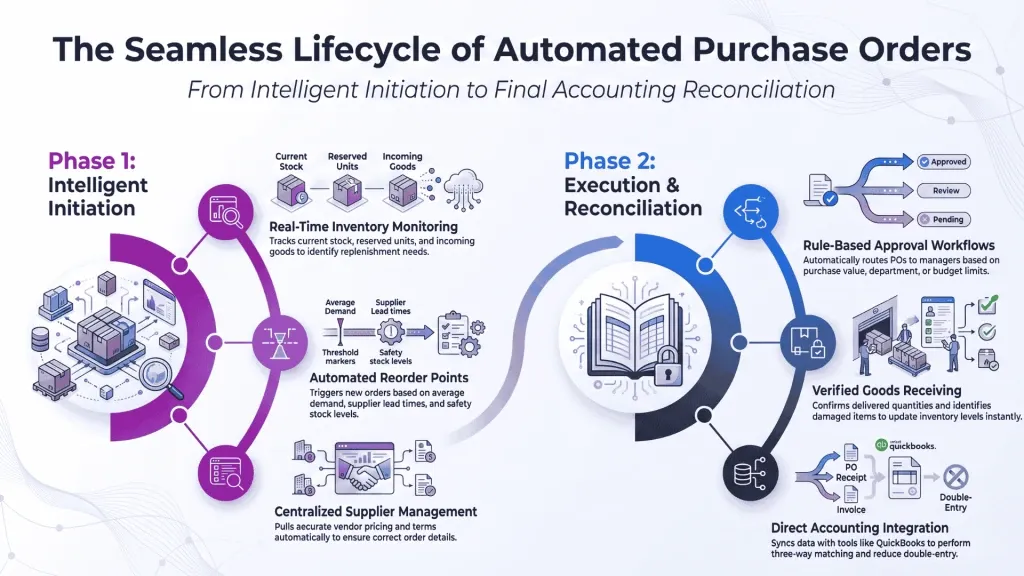
Automated purchase order software connects procurement, inventory, suppliers, receiving, and accounting. The exact workflow depends on your business, but most systems follow a similar structure.
Inventory Monitoring
For product-based businesses, purchasing starts with inventory visibility.
The system monitors current stock, available-to-sell inventory, incoming inventory, reserved inventory, and warehouse-level quantities.
When inventory falls below a defined threshold, the system can recommend or generate a purchase order.
Reorder Points
A reorder point is the stock level that triggers a new purchase.
For example, if a product sells 20 units per week and your supplier lead time is three weeks, you need to reorder before stock drops too low.
A simple reorder point formula considers:
- Average demand
- Supplier lead time
- Safety stock
- Current inventory
- Incoming purchase orders
Automated purchase order software uses this logic to reduce last-minute purchasing.
Purchase Request
In some businesses, the process starts with a purchase request.
A team member requests goods, materials, or services. The system then routes the request to the right manager or department based on rules.
This is common in procurement-focused companies where approval control matters more than inventory replenishment.
Approval Workflow
An approval workflow determines who must approve a purchase order before it is sent to a supplier.
Rules may be based on:
- Purchase value
- Department
- Supplier
- Product category
- Warehouse location
- Budget owner
For example, purchase orders under $1,000 may be approved automatically, while larger purchases require finance approval.
Supplier Management
Supplier management stores vendor information, pricing, lead times, payment terms, and performance history.
This helps teams choose the right supplier and avoid relying on outdated information.
For inventory-driven purchasing, supplier lead time is especially important. If lead times are inaccurate, automated replenishment recommendations will also be inaccurate.
Goods Receiving
Once the supplier delivers goods, the receiving process confirms what actually arrived.
The system updates inventory when products are received. It can also identify partial shipments, quantity differences, or damaged items.
This step connects purchase order management with warehouse management and inventory accuracy.
Accounting Integration
After goods are received, purchase order data often flows into accounting tools such as QuickBooks or Xero.
This supports invoice matching, accounts payable, and financial reporting.
The goal is to avoid entering the same purchase data multiple times across procurement, inventory, and accounting systems.
Key Features to Look For
Not all purchase order systems are built for the same use case. Some focus on finance approvals. Others focus on inventory replenishment. The right choice depends on how your business buys, stores, and sells products.
Automatic PO Creation
Automatic PO creation allows the system to generate purchase orders based on inventory rules, forecast demand, or replenishment needs.
This is essential for businesses that want automated replenishment.
Look for tools that can account for current stock, incoming stock, supplier lead time, safety stock, and reorder points.
Approval Workflows
Approval workflows help businesses control spending without relying on email approvals.
Strong purchase order software should support approval rules, approval limits, budget owners, notifications, and audit trails.
This is especially important for finance teams and growing companies with multiple departments.
Purchase Order Management
Purchase order management should cover the full PO lifecycle.
That includes draft purchase orders, approvals, supplier communication, order status, receiving, partial deliveries, and closed purchase orders.
A good system makes it easy to see what has been ordered, what has arrived, and what is still pending.
Inventory Integration
For ecommerce brands, wholesalers, and manufacturers, inventory integration is one of the most important features.
The system should connect purchasing with live inventory data. This allows teams to reorder based on real stock levels instead of disconnected spreadsheets.
Inventory integration also helps prevent overbuying and late replenishment.
Supplier Management
Supplier management helps teams store vendor details, product pricing, minimum order quantities, lead times, and terms.
This creates a single place for purchasing information.
It also helps businesses compare suppliers and improve purchase planning over time.
Multi-Warehouse Support
If you operate multiple warehouses, your purchase order software should support location-specific inventory.
A product may need replenishment in one warehouse while another location has enough stock.
Multi-warehouse support helps teams create more accurate purchase orders and avoid unnecessary inventory transfers.
Reporting and Analytics
Purchase order analytics help teams understand spending, supplier performance, order status, and purchasing trends.
Useful reports include:
- Open purchase orders
- Purchase order aging
- Supplier lead time
- Spend by supplier
- Stockout risk
- Reorder recommendations
- Purchase history
- Inventory turnover
These insights help teams improve procurement and inventory planning.
ERP and Accounting Integrations
Purchase order software should integrate with your existing business systems.
Common integrations include QuickBooks, Xero, ERP systems, WMS tools, Shopify, and inventory management software.
The goal is to reduce duplicate data entry and keep purchasing, inventory, and accounting aligned.
Comparison Table of Leading Automated Purchase Order Software
| Software | Best For | Key Strengths | Considerations |
| Qoblex | Ecommerce, wholesale, and manufacturing businesses | Inventory-driven purchase orders, replenishment, forecasting, supplier management, QuickBooks integration | Best fit for teams that want purchasing connected to inventory operations |
| Precoro | Procurement and finance teams | Approval workflows, spend control, procurement automation | More procurement-focused than inventory-focused |
| Procurify | Companies managing spend approvals | Purchase requests, approvals, budget visibility | May require integration with inventory tools |
| Coupa | Large enterprises | Procure-to-pay, supplier management, enterprise spend control | Higher complexity for SMBs |
| ProcureDesk | SMB procurement teams | PO workflows, approvals, accounting integrations | Less focused on advanced inventory operations |
| Zoho Inventory | Small businesses | Basic inventory and purchase order management | Limited for advanced manufacturing or forecasting |
| Odoo | Businesses needing modular ERP features | Procurement, inventory, accounting, manufacturing modules | Setup can require configuration and implementation support |
Best Automated Purchase Order Software
The right solution depends on whether your main challenge is procurement control, inventory replenishment, finance approvals, or end-to-end operations.
Qoblex
Qoblex is designed for growing product-based businesses that need purchasing connected to inventory management.
It helps teams manage purchase orders, suppliers, inventory, warehouses, manufacturing workflows, and demand forecasting from one operational platform.
Qoblex is especially useful when purchase orders need to be driven by inventory signals such as reorder points, safety stock, lead times, and forecast demand.
It also integrates with Shopify, WooCommerce, QuickBooks, Xero, Amazon, and other business tools. This makes it a strong fit for ecommerce businesses, wholesalers, and manufacturers that want to simplify purchasing without adopting an overly complex ERP.
Precoro
Precoro is a procurement-focused platform built around purchase requests, approval workflows, supplier management, and spend control.
It can work well for companies that need more structure around purchasing approvals and finance visibility.
Businesses that need deep inventory-driven replenishment should evaluate how Precoro fits with their inventory management system.
Procurify
Procurify focuses on spend management and purchasing approvals.
It helps teams control requests, budgets, approvals, and purchase orders in a centralized workflow.
It is a strong fit for organizations where budget control and approval visibility are the main purchasing challenges.
Coupa
Coupa is an enterprise-level procurement and spend management platform.
It supports procure-to-pay processes, supplier management, compliance, and large-scale purchasing operations.
It is generally better suited for larger organizations with complex procurement needs and dedicated implementation resources.
ProcureDesk
ProcureDesk is built for SMB procurement teams that want to manage purchase requests, approvals, purchase orders, and accounting workflows.
It is a practical option for companies moving away from email-based purchasing.
Inventory-heavy businesses should confirm whether it supports the level of replenishment automation they need.
Zoho Inventory
Zoho Inventory includes purchase order management as part of its inventory and order management features.
It can be useful for small businesses that need a simple purchasing workflow.
However, teams with advanced forecasting, manufacturing, or multi-warehouse purchasing needs may eventually require a more specialized platform.
Odoo
Odoo offers purchase order features as part of a modular ERP system.
It can support procurement, inventory, accounting, manufacturing, and sales workflows.
The main advantage is flexibility. The main consideration is setup complexity, since Odoo often requires configuration to match the business process.
How to Choose the Right Software
Choosing automated purchase order software should start with your business model.
A finance team controlling office purchases does not need the same system as a manufacturer buying components or an ecommerce brand replenishing fast-moving products.
| Business Type | Priority Features | Recommended Focus |
| Ecommerce businesses | Reorder points, supplier lead times, Shopify and QuickBooks integrations | Inventory-driven replenishment |
| Manufacturers | BOMs, component purchasing, supplier planning | Materials and production purchasing |
| Wholesalers | Bulk purchasing, supplier management, inventory allocation | Fast replenishment and order reliability |
| Finance teams | Approval workflows, budget control, audit trail | Spend visibility and compliance |
| Multi-warehouse operations | Location-level inventory, transfer planning, warehouse-specific purchasing | Stock availability by location |
Ecommerce Businesses
Ecommerce businesses should prioritize purchase order automation that connects directly to inventory levels.
The system should help teams reorder before products run out, manage supplier lead times, and keep accounting data synchronized.
For Shopify brands, integrations with Shopify, QuickBooks, and inventory management software are especially important.
Manufacturers
Manufacturers need purchasing workflows that account for raw materials, components, packaging, and finished goods.
Look for software that supports Bills of Materials, supplier planning, and manufacturing inventory.
A simple approval-based PO tool may not be enough if production depends on accurate material availability.
Wholesalers
Wholesalers often manage large purchase volumes and supplier relationships.
They need purchase order software that supports bulk orders, supplier terms, inventory allocation, and reliable replenishment.
The goal is to fulfill customer orders without tying too much cash in excess stock.
Finance Teams
Finance teams should prioritize approval control, audit trails, budget visibility, and accounting integrations.
Automated approval workflows can reduce unauthorized spending and make accounts payable easier to manage.
However, finance teams should still coordinate with operations to ensure purchasing reflects real inventory needs.
Multi-Warehouse Operations
Multi-warehouse businesses need purchase order automation by location.
A product may be overstocked in one warehouse and understocked in another.
The software should help teams plan replenishment, transfers, and supplier deliveries by warehouse.
Common Purchase Order Automation Mistakes
Purchase order automation can fail if the workflow is poorly designed.
Avoid these common mistakes:
- Automating purchase orders before cleaning product and supplier data
- Using outdated reorder points
- Ignoring supplier lead times
- Creating approval workflows that are too slow
- Separating purchasing from inventory management
- Not testing goods receiving workflows
- Failing to connect accounting tools
- Treating automation as a replacement for purchasing judgment
Automation should improve decision-making, not remove operational oversight.
Purchase Order Automation Checklist
Before implementing automated purchase order software, prepare your purchasing process.
| Area | What to Check | Why It Matters |
| Product data | SKUs, supplier items, units of measure | Prevents incorrect purchase orders |
| Supplier data | Pricing, lead times, minimum order quantities | Improves purchase planning |
| Inventory data | Current stock, reserved stock, incoming stock | Supports accurate replenishment |
| Approval rules | Who approves what and when | Prevents delays and unauthorized purchases |
| Receiving process | How goods are checked and recorded | Keeps inventory accurate |
| Accounting setup | QuickBooks, Xero, or ERP integration | Reduces duplicate data entry |
| Forecasting | Demand trends and reorder logic | Helps automate purchase orders intelligently |
A clean setup creates better automation. Poor data creates faster mistakes.
Frequently Asked Questions
What is automated purchase order software?
Automated purchase order software helps businesses create, approve, send, receive, and track purchase orders automatically. It can generate purchase orders from inventory levels, reorder points, approval rules, supplier data, or replenishment recommendations.
Can purchase orders be generated automatically?
Yes. Purchase orders can be generated automatically when inventory drops below reorder points, demand forecasts show future need, or approved purchase requests meet predefined rules. This works best when inventory data, supplier lead times, and product information are accurate.
Does purchase order software integrate with QuickBooks?
Many purchase order software platforms integrate with QuickBooks. This allows purchase orders, bills, suppliers, and receiving data to flow into accounting. For inventory-heavy businesses, the best setup also connects QuickBooks with inventory management software.
What is three-way matching?
Three-way matching compares the purchase order, goods receipt, and supplier invoice before payment. It helps confirm that the business ordered the right items, received the correct quantities, and is being billed accurately.
How does PO automation reduce costs?
PO automation reduces costs by lowering manual work, preventing duplicate orders, improving approval control, reducing stockouts, and helping teams buy at the right time. It also improves visibility into supplier spending and purchasing patterns.
What features should I prioritize?
Prioritize automatic PO creation, approval workflows, inventory integration, supplier management, goods receiving, reporting, and accounting integrations. Product-based businesses should also prioritize reorder points, safety stock, demand forecasting, and multi-warehouse purchasing.
How long does implementation take?
Implementation time depends on product data, supplier records, approval workflows, integrations, and inventory complexity. A simple setup can be completed quickly, while multi-warehouse or manufacturing businesses may need more time for testing and configuration.
How much does purchase order software cost?
Purchase order software pricing varies by users, features, approval workflows, integrations, and business complexity. Simple tools are usually more affordable, while advanced systems with inventory management, forecasting, and ERP features cost more.
Final Thoughts
Automated purchase order software is most valuable when it connects purchasing with real inventory needs.
For finance teams, automation improves approval control and spend visibility. For ecommerce businesses, wholesalers, and manufacturers, it also improves replenishment, supplier planning, inventory accuracy, and stock availability.
The key is to choose software that matches your workflow. If your main challenge is inventory-driven purchasing, look for a platform that connects purchase order management with inventory visibility, forecasting, warehouse management, and accounting integrations.
Qoblex helps growing businesses automate purchase orders as part of a complete inventory operations workflow, with support for purchasing, suppliers, warehouses, manufacturing, demand forecasting, Shopify, QuickBooks, Xero, and more.
Start your 14-day free trial and see how Qoblex can simplify purchase order automation for your business.