



Running out of stock during peak season. Overproducing items that sit in your warehouse for months. Missing delivery deadlines because nobody knew what to prioritize. These problems share a common root cause: the absence of a solid production schedule.
Research shows that manufacturers who implement structured production planning can achieve up to 30% improvement in operational efficiency. The difference comes down to one document that coordinates everything your team does.
A production schedule is your roadmap for turning raw materials into finished goods on time and within budget. It tells your team exactly what to produce, how much to make, and when each order needs to ship. Without one, even small manufacturing operations quickly spiral into chaos.
This guide walks you through practical production schedule examples tailored to eCommerce brands, B2B wholesalers, and small manufacturers. You will learn the essential components every schedule needs, a step-by-step process for building your own, and techniques to match production with actual customer demand. By the end, you will have everything required to create a production schedule that keeps your operations running smoothly.
What Is a Production Schedule?
Production Schedule Definition: A production schedule is a detailed plan that outlines which products your business will manufacture, the quantities required, and the timeline for completion. It coordinates materials, labor, and equipment to meet customer orders and maintain healthy inventory levels.
Think of it as a calendar specifically designed for your shop floor. Unlike a simple to-do list, a production schedule accounts for dependencies between tasks, resource constraints, and external factors like supplier lead times. It answers three fundamental questions:
- What products need to be made?
- How many units of each product are required?
- When must production start and finish to meet deadlines?
Effective production schedules connect directly with your inventory management system. When a sales order comes in through Shopify or WooCommerce, your schedule should reflect that demand and trigger the necessary manufacturing orders. This integration prevents the disconnect between what customers want and what your team actually produces.
For larger operations, the production schedule feeds into a master production schedule (MPS), which provides a higher-level view across multiple product lines and longer time horizons.
Production Schedule vs. Production Plan: Key Differences
These two terms often get used interchangeably, but they serve distinct purposes in your operations.
| Aspect | Production Plan | Production Schedule |
| Scope | High-level strategy | Detailed execution |
| Time horizon | Months to years | Days to weeks |
| Focus | What and how much to produce | When and in what sequence |
| Detail level | Product families or categories | Individual SKUs and batches |
| Primary users | Management, finance | Shop floor, operations |
A production plan determines that you need to manufacture 10,000 units of a product line next quarter. A production schedule breaks that down into weekly batches, assigns specific start dates, and sequences operations so your team knows exactly what to work on each day.
Both documents matter. The plan sets direction; the schedule makes it happen.
Why Your Business Needs a Production Schedule
Small and mid-sized businesses often operate without formal production schedules, relying instead on intuition and scrambling to meet orders as they arrive. This reactive approach works until it doesn’t. Growth exposes the cracks.
Studies indicate that SMBs implementing structured manufacturing schedules reduce their average lead time by 15-25% within the first year. A structured production calendar delivers concrete benefits that directly impact your bottom line.
Prevent Stockouts and Overproduction
Stockouts cost more than lost sales. They damage customer trust and push buyers toward competitors. Overproduction ties up capital in inventory that might never sell, especially for seasonal or trend-sensitive products.
Production schedules balance these risks by aligning output with actual demand. When you know exactly what to produce and when, you maintain optimal inventory levels without the guesswork. Low stock alerts become actionable because your schedule already accounts for replenishment lead times.
Reduce Lead Times and Manufacturing Costs
Every hour your production line sits idle or switches between products costs money. Setup times, changeovers, and waiting for materials all extend lead times and inflate costs.
A well-designed manufacturing schedule minimizes these inefficiencies. By batching similar products together and sequencing operations logically, you reduce setup frequency and keep materials flowing. The result: faster fulfillment and lower cost per unit.
Improve Team Coordination Across Locations
When your business operates from multiple warehouse locations, coordination becomes exponentially harder. Without a shared schedule, teams duplicate work, compete for the same resources, or leave orders unfulfilled because everyone assumed someone else was handling them.
A centralized production schedule gives every location visibility into the overall plan. Teams understand their responsibilities, dependencies between sites become clear, and managers can balance workloads across the organization.
Key Components of a Production Schedule
Every effective production schedule includes four core elements. Missing any of these creates blind spots that lead to delays, waste, or customer disappointment.
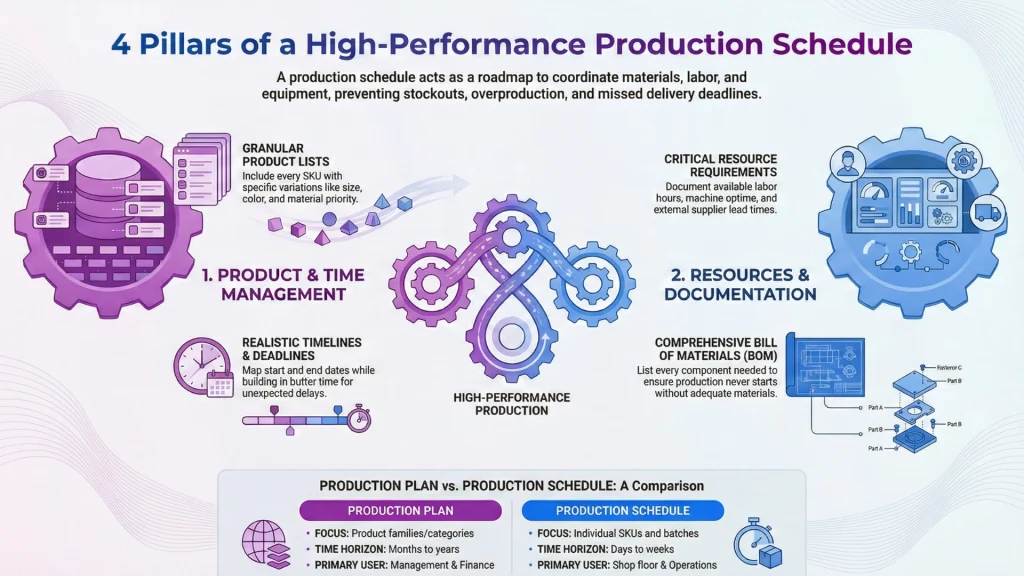
Product List and Variations
Start with a complete inventory of what you manufacture. List every product by name or SKU, then break down variations like size, color, or material. Your schedule needs this granularity because producing 100 units of a backpack means nothing if you don’t specify how many in each color.
Organize products by popularity or strategic priority. Items that drive most of your revenue deserve prominent placement and careful attention to stock levels.
Production Timeline and Deadlines
Map out when production activities occur. Include start dates, end dates, and milestones for each batch or order. Your timeline should account for:
- Manufacturing lead time for each product
- Supplier delivery windows for raw materials
- Quality inspection requirements
- Shipping cutoff dates for customer orders
Build buffer time into your schedule for unexpected delays. A realistic timeline beats an optimistic one that falls apart at first contact with reality.
Resource Requirements (Materials, Labor, Equipment)
Production cannot happen without resources. Your schedule must specify the raw materials and components needed for each production run, along with labor hours and skills required.
Additionally, document equipment and machine availability, plus any outsourced processes or third-party dependencies.
Resource planning prevents the frustrating scenario where your team is ready to produce but waiting on materials that weren’t ordered in time.
Bills of Materials (BOM)
A bill of materials lists every component required to manufacture a finished product. Your BOM connects directly to your production schedule, determining what raw materials need to be available and when.
For example, if you manufacture custom gift boxes, your BOM might include:
- Cardboard sheets (2 per box)
- Ribbon (0.5 meters per box)
- Tissue paper (3 sheets per box)
- Label stickers (1 per box)
When your production schedule calls for 500 gift boxes, the BOM automatically calculates that you need 1,000 cardboard sheets, 250 meters of ribbon, and so on. This integration eliminates manual calculations and ensures you never start production without adequate materials.
With these components defined, you are ready to build your schedule step by step.
How to Create a Production Schedule in 5 Steps
Building a production schedule from scratch can feel overwhelming. Break the process into these five sequential steps to make it manageable.
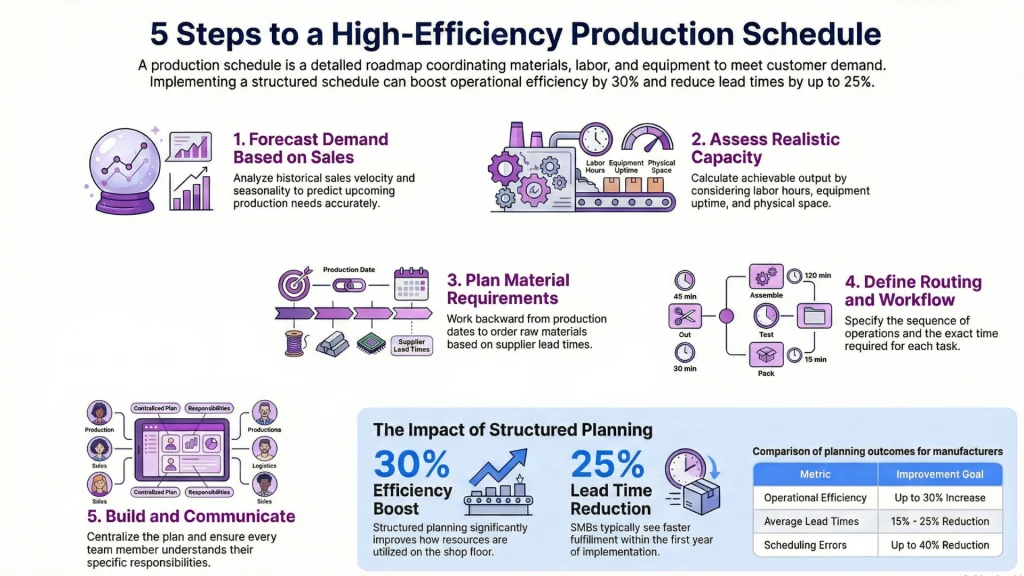
Step 1: Forecast Demand Based on Sales Data
Production planning starts with understanding what customers will buy. Analyze your historical sales data to identify patterns, seasonality, and trends. Look at:
- Sales velocity for each product over the past 6-12 months
- Seasonal peaks and valleys
- Impact of promotions or marketing campaigns
- Year-over-year growth rates
Use this data to forecast demand for the upcoming period. Your forecast doesn’t need to be perfect, but it should be grounded in evidence rather than wishful thinking.
Pro tip: Review and adjust your demand forecast weekly. Market conditions change, and your schedule should respond accordingly.
Step 2: Assess Your Production Capacity
Capacity determines what is actually achievable. Calculate your realistic output by considering:
- Available labor hours per day or week
- Equipment uptime and throughput rates
- Physical space constraints
- Existing commitments and work-in-progress
If your forecast exceeds capacity, you have decisions to make: prioritize certain products, add shifts, outsource production, or extend lead times. Knowing your constraints upfront prevents over-promising to customers.
Step 3: Plan Your Material Requirements
With demand forecast and capacity understood, determine what materials you need and when. Work backward from your production dates to identify order points for raw materials, accounting for supplier lead times.
Cross-reference material requirements against current inventory. If you need 5,000 units of a component but only have 2,000 in stock, create a purchase order with enough lead time to avoid production delays.
This step is where inventory management and production planning intersect. Automated systems can trigger reorder points based on your schedule, eliminating the manual tracking that causes stockouts.
Step 4: Define Production Routing and Workflow
Routing specifies the path materials take through your production process. Define the sequence of operations, who performs each task, and how long each step takes.
For a t-shirt manufacturer, routing might look like:
- Fabric cutting (30 minutes per batch)
- Printing/embroidery (45 minutes per batch)
- Sewing (60 minutes per batch)
- Quality inspection (15 minutes per batch)
- Packaging (20 minutes per batch)
Clear routing reduces confusion on the shop floor and makes it easier to identify bottlenecks that slow overall throughput.
Step 5: Build and Communicate the Schedule
Compile your forecast, capacity, materials, and routing into a unified schedule. Use whatever format works for your team: spreadsheet, production scheduling software, or visual board.
Communication matters as much as the schedule itself. Ensure every team member understands what they are responsible for producing and when their tasks must be completed.
Clarify who to notify if problems arise and how changes to the schedule will be communicated. A brilliant schedule that nobody follows is worthless. Invest time in making your schedule accessible and keeping it updated.
Production Schedule Examples for Different Business Types
Abstract concepts become clearer with concrete examples. Here are three production schedule examples tailored to businesses that commonly face scheduling challenges.
Example 1: eCommerce Brand with Seasonal Demand
An online skincare brand sells through Shopify and experiences significant demand spikes during holiday seasons. Their production calendar for Q4 might look like this:
| Week | Product | Quantity | Materials Required | Start Date | Ship-Ready Date |
| 1 | Vitamin C Serum | 2,000 | Serum base, bottles, labels | Oct 1 | Oct 7 |
| 1 | Holiday Gift Set | 500 | Boxes, ribbon, products | Oct 3 | Oct 10 |
| 2 | Moisturizer | 1,500 | Cream base, jars, labels | Oct 8 | Oct 14 |
| 2 | Vitamin C Serum | 1,000 | Serum base, bottles, labels | Oct 10 | Oct 16 |
| 3 | Holiday Gift Set | 1,500 | Boxes, ribbon, products | Oct 15 | Oct 22 |
Key considerations for this schedule:
- Gift sets require finished products as components, so their production depends on completing serums and moisturizers first
- Higher quantities are scheduled earlier to build safety stock before peak demand
- Ship-ready dates account for quality checks and packaging
Example 2: B2B Wholesaler Managing Multiple Product Lines
A wholesale distributor supplies hardware stores with tools and accessories across three product categories. Their weekly manufacturing schedule balances competing demands:
| Day | Category | Products | Priority | Notes |
| Monday | Hand Tools | Screwdriver sets, pliers | High | Replenishing low stock |
| Tuesday | Hand Tools | Wrenches, hammers | Medium | Standard restock |
| Wednesday | Power Accessories | Drill bit sets | High | Large order due Friday |
| Thursday | Power Accessories | Sanding discs, blades | Low | Building inventory |
| Friday | Safety Equipment | Gloves, goggles | High | Seasonal demand increase |
This schedule reflects the wholesaler’s need to serve multiple customer segments while managing production capacity constraints. Priority levels help the team make decisions when unexpected changes occur.
Example 3: Small Manufacturer with Make-to-Order Workflow
A custom furniture maker produces items only after receiving customer orders. Their production schedule tracks individual orders rather than inventory replenishment:
| Order ID | Customer | Product | Order Date | Production Start | Due Date | Status |
| ORD-1042 | Smith | Oak dining table | Sep 15 | Sep 18 | Oct 10 | In progress |
| ORD-1043 | Johnson | Walnut bookshelf | Sep 17 | Oct 1 | Oct 25 | Scheduled |
| ORD-1044 | Williams | Cherry desk | Sep 20 | Oct 8 | Nov 5 | Pending materials |
| ORD-1045 | Brown | Oak coffee table | Sep 22 | Sep 25 | Oct 15 | In progress |
This make-to-order schedule shows production starts only after orders arrive. The “Pending materials” status for Order 1044 flags a dependency that could cause delays if not addressed quickly.
Production Scheduling Techniques
Different situations call for different scheduling approaches. Understanding these techniques helps you choose the right method for your business.
Forward Scheduling vs. Backward Scheduling
Forward scheduling starts from today and plans forward. You begin work as soon as resources become available and calculate when production will complete.
Best for: Businesses prioritizing resource utilization over specific delivery dates.
Backward scheduling starts from the deadline and plans backward. You identify when each task must begin to meet the required delivery date.
Best for: Businesses with firm customer deadlines or just-in-time delivery requirements.
Most businesses use a combination. Forward scheduling determines capacity utilization; backward scheduling ensures deadlines are met. A master production schedule often incorporates both approaches across different product lines.
Make-to-Stock vs. Make-to-Order Scheduling
Make-to-stock (MTS) produces goods before customer orders arrive. Products go into inventory and ship when purchased. This approach requires accurate demand forecasting and accepts the risk of unsold inventory.
Make-to-order (MTO) produces goods only after receiving customer orders. This eliminates inventory risk but extends lead times for customers.
| Factor | Make-to-Stock | Make-to-Order |
| Inventory risk | Higher | Lower |
| Customer lead time | Shorter | Longer |
| Customization | Limited | High |
| Forecasting importance | Critical | Less critical |
| Best for | Standard products, high volume | Custom products, variable demand |
Many businesses operate hybrid models, keeping popular items in stock while producing specialized variants on order.
Finite vs. Infinite Capacity Planning
Finite capacity planning acknowledges real-world limits. Your schedule respects actual machine capacity, labor availability, and material constraints.
Infinite capacity planning ignores constraints and schedules based purely on demand. This approach identifies where capacity needs to expand but produces unrealistic schedules if constraints are not eventually addressed.
Smaller manufacturers benefit from finite capacity planning because it produces achievable schedules. As you grow, infinite capacity planning helps identify bottlenecks and investment priorities.
Free Production Schedule Template
Creating a production schedule from scratch takes time. A template gives you a starting point that you can customize for your specific operations.
An effective production schedule Excel template includes:
- Product list with SKU codes and variations
- Weekly or daily time blocks for scheduling
- Columns for quantities, status, and deadlines
- Space for resource allocation notes
- Color coding to distinguish priorities or categories
Download a production schedule template to begin organizing your manufacturing workflow. Customize the columns to match your products and processes, then update it regularly as orders come in and production progresses.
Pro tip: Templates work well for businesses producing fewer than 50 orders per week. Beyond that volume, consider production scheduling software that automates updates and integrates with your sales channels.
How Production Scheduling Software Simplifies the Process
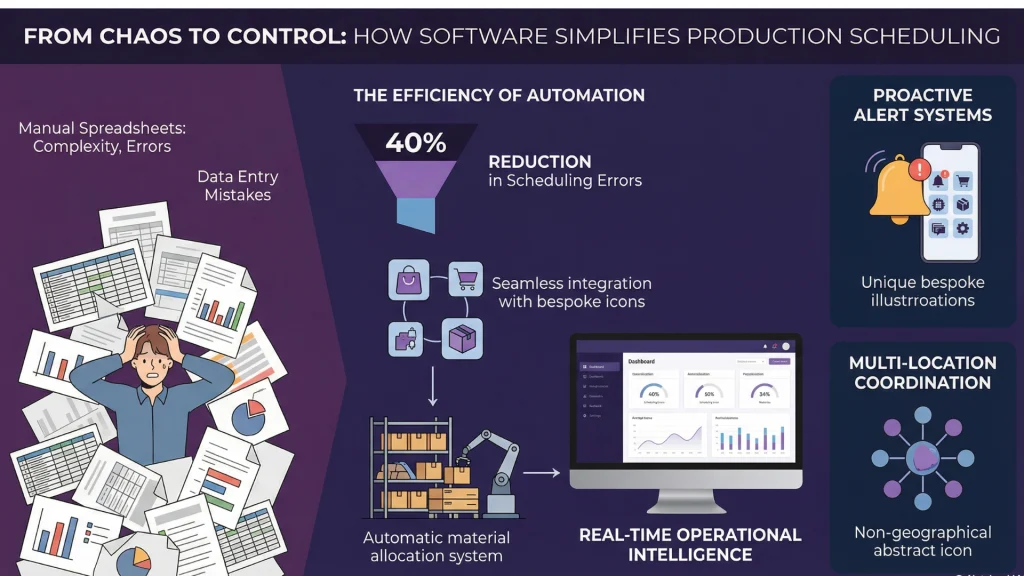
Spreadsheets have limits. As your business grows, manual production schedules become harder to maintain and more prone to errors. Production scheduling software addresses these challenges through automation and integration.
Modern inventory management platforms offer production scheduling as part of a unified system. Instead of managing separate spreadsheets for inventory, orders, and production, everything connects in a single platform. Businesses using integrated software report reducing scheduling errors by up to 40% compared to manual methods.
Key benefits include:
Real-time visibility: See current inventory levels, incoming orders, and production status in one dashboard. Your master production schedule updates automatically as conditions change.
Automatic material allocation: When you create a production order, the system checks available raw materials and reserves what you need.
Sales channel integration: Orders from Shopify, WooCommerce, or Amazon automatically flow into your production queue without manual data entry.
Multi-location coordination: Manage production across multiple warehouse locations with synchronized inventory data and centralized scheduling.
Alert systems: Receive notifications when stock runs low, materials need reordering, or deadlines approach.
The right software is designed specifically for small and mid-sized businesses. It eliminates the administrative burden of maintaining schedules manually, freeing you to focus on decisions that actually require human expertise.
Frequently Asked Questions
What is the difference between MRP and a production schedule?
Material Requirements Planning (MRP) calculates what materials you need based on your production schedule and bills of materials. The production schedule determines when products will be manufactured; MRP ensures you have the components to make them. MRP is a planning tool that feeds into scheduling decisions, not a replacement for scheduling itself.
How often should I update my production schedule?
Review your production schedule at least weekly, with daily updates during busy periods. Adjustments become necessary when customer orders change, materials arrive late, or equipment goes down. The goal is keeping your schedule accurate enough to guide daily decisions without spending excessive time on updates.
Can I manage production schedules in Excel?
Excel works for small-scale production with relatively few products and orders. The limitations become apparent as complexity grows: manual data entry creates errors, formulas break, and there is no integration with sales channels or inventory systems. Businesses processing more than 50 production orders per week typically benefit from dedicated software.
What should a production schedule include for eCommerce businesses?
eCommerce production schedules must account for multichannel sales, variable demand, and fast shipping expectations. Include columns for sales channel source, order priority, and ship-by dates. Integrate with your eCommerce platforms so new orders automatically appear in your production queue rather than requiring manual entry.
Key Takeaways
Before implementing your production schedule, remember these essential points:
- A production schedule coordinates what to produce, how much, and when—transforming reactive operations into proactive planning
- The four core components are product lists, timelines, resource requirements, and bills of materials
- Follow the five-step process: forecast demand, assess capacity, plan materials, define routing, then build and communicate the schedule
- Choose scheduling techniques (forward vs. backward, MTS vs. MTO) based on your specific business model
- Start with a template for small operations; transition to integrated software as you scale beyond 50 weekly orders
- Update your schedule weekly at minimum, daily during peak periods
Take Control of Your Production Workflow
A production schedule transforms manufacturing from reactive firefighting into proactive planning. You know what to produce, when to produce it, and what resources you need. Your team works from a shared plan rather than competing priorities.
Start with the basics: list your products, understand your capacity, and document the sequence of operations. Use the examples in this guide as models for your own schedule. Whether you choose a spreadsheet template or dedicated software, the discipline of scheduling pays dividends in efficiency, cost reduction, and customer satisfaction.
The businesses that outperform competitors in fulfillment speed and reliability are not working harder. They are working from better plans. Your production schedule is the foundation of that planning.
Ready to streamline your production scheduling alongside inventory management, order tracking, and sales channel integration? Explore how an all-in-one platform can simplify your operations and support your business growth.