


You sell on Shopify. You also list on Amazon. Maybe there’s a WooCommerce store, a wholesale channel, and a spreadsheet holding it all together at 11 p.m. on a Sunday. Sound familiar? When your systems don’t talk to each other, you oversell stock, retype the same order three times, and lose hours reconciling numbers that should already match.
Ecommerce integration fixes that. In this guide, you’ll learn exactly what ecommerce integration is, how it works behind the scenes, the main types you can put to work, and a clear framework for choosing between building, buying, or connecting your tools natively. By the end, you’ll know how to turn a tangle of disconnected apps into one system that runs itself.
What Is Ecommerce Integration?
Ecommerce integration is the process of connecting your online store to the back-end systems that run your business, such as inventory, order management, accounting, and shipping, so data flows automatically between them. The result is a single source of truth that removes manual entry, prevents errors, and keeps every channel in sync.
Think of your front-end store as the place customers see and your back-end systems as the machinery behind it. Without integration, those two sides operate in separate silos. You update stock in one place, then rush to update it everywhere else before someone buys an item you no longer have.
With e-commerce integration in place, a single action ripples through your whole operation. A sale on one channel updates your master inventory, triggers fulfillment, and posts to your books, all without a human touching a keyboard. That shift from manual reconciliation to automated data flow is the entire point.
How Does Ecommerce Integration Work?
Ecommerce integration works by passing data between systems through connectors, usually built on APIs (application programming interfaces, the standard way software talks to other software). When something happens in one system, a signal called a webhook tells the others to update in real time. Good integrations are bidirectional, meaning data flows both ways.
Here is what happens the moment a customer clicks “Buy”:
- The order is captured. Your storefront records the sale and sends the order details to your central platform.
- Inventory updates instantly. Stock levels drop across every connected channel, so the same unit can’t be sold twice. This is real-time inventory sync in action.
- Fulfillment kicks off. A pick list, packing slip, or shipping label is generated, and the warehouse or your 3PL (third-party logistics provider) is notified.
- The customer is kept informed. Order confirmations and tracking updates go out automatically.
- The books are reconciled. The sale, taxes, and cost of goods sold post to your accounting system.
No spreadsheets. No copy-paste. No 11 p.m. reconciliation. Each connected system does its job the instant it’s needed, and everyone from your warehouse staff to your accountant sees the same accurate data.
The Main Types of Ecommerce Integration
Ecommerce integration isn’t one thing. It’s a family of connections, each solving a specific operational headache. Most growing businesses need several, working together around a central hub. The table below maps the main types.
| Integration type | What it syncs | Example tools | Who needs it most |
| Inventory and order management | Stock levels, orders, fulfillment status | Qoblex | Every multichannel seller |
| Accounting | Invoices, payments, COGS, tax | Xero, QuickBooks Online | Anyone tired of manual bookkeeping |
| Marketplace and multichannel | Products, orders, stock across channels | Shopify, WooCommerce, Amazon | Sellers on two or more channels |
| CRM | Customer profiles, order history | Salesforce, HubSpot | Teams focused on retention |
| Shipping and fulfillment | Labels, tracking, carrier rates | ShipStation, 3PL partners | High-volume shippers |
| Payment and POS | Transactions, in-store sales | Stripe, Shopify POS | Retailers selling online and offline |
Inventory and order management integration
This is the hub the rest of your stack revolves around, and it’s the piece most guides underplay. Your inventory and order management system holds the master record of what you have, where it sits, and what’s committed to open orders. When it’s the source of truth, every other integration simply reads from and writes to it.
Connect it well, and overselling largely disappears. Qoblex, for example, uses an allocated-stock concept that reserves committed units the moment an order is placed, so the same goods are never promised to two customers across Shopify, WooCommerce, Amazon, and B2B channels at once.
Accounting integration (Xero, QuickBooks)
Accounting integration pushes your sales, purchases, payments, and cost of goods sold straight into your books. Instead of exporting CSVs and re-keying figures, your ledger updates as orders and invoices flow through.
The payoff is accuracy at scale. With a connected system, returns and refunds from your sales channels sync automatically to Xero or QuickBooks Online, and smart sync rules let you decide exactly which ledger account each transaction lands in. Month-end stops being a scramble.
Marketplace and multichannel integration (Shopify, WooCommerce, Amazon)
Marketplace integration keeps products, prices, and stock consistent everywhere you sell. Create a product once, choose where to publish it, and let the connector handle descriptions, images, and inventory across each channel.
This matters because most sellers start on a marketplace, then add their own store. Running Shopify and Amazon side by side without a central hub fragments your data and invites overselling. Centralize inventory first, then sync outward to each channel, and the chaos evaporates.
CRM integration
CRM (customer relationship management) integration unifies customer data, so purchase history, contact details, and support tickets live in one place. Your team sees the full picture of every buyer instead of hunting across tools.
That unified view drives smarter marketing and faster service. When a customer asks about an order, your rep can answer in seconds because the data is right there, synced from your sales channels.
Shipping and fulfillment integration
Shipping integration connects your orders to carriers and fulfillment partners, automating labels, rates, and tracking. It’s the difference between hand-typing addresses and printing a batch of labels in one click.
For businesses shipping dozens or hundreds of orders a day, this integration protects your fulfillment KPIs. Customers get accurate tracking, your team saves hours, and errors from manual entry drop sharply.
Payment gateway and POS integration
Payment integration links your checkout to gateways that process transactions securely, while POS (point-of-sale) integration ties in-store sales to the same inventory as your online channels. Sell a unit at the register, and your webstore reflects it instantly.
This closes the loop between online and offline. A retailer running Shopify POS alongside a webstore sees one accurate stock figure, no matter where the sale happens.
Key Benefits of Ecommerce Integration
The business case for ecommerce integration is straightforward: less manual work, fewer errors, faster growth. Here’s what that looks like in practice.
- No more duplicate data entry. Enter a product or order once and let it sync everywhere, freeing your team for higher-value work.
- Accurate stock, always. Real-time inventory sync prevents overselling and stockouts, protecting both revenue and customer trust.
- Faster fulfillment. Automated pick lists, labels, and notifications move orders out the door quicker.
- Cleaner books. Sales, costs, and taxes post automatically, cutting reconciliation time and reducing accounting errors.
- Easier scaling. Adding a new channel or warehouse becomes a setting to configure, not a system to rebuild.
- Better decisions. With unified, real-time data, you can forecast demand and spot your best-selling products instead of guessing.
These gains compound as you grow. Analysts project the global ecommerce platform software market will climb from roughly $8 billion in 2025 to over $21 billion by 2033, and the businesses pulling ahead are the ones whose systems keep pace. In 2024, mobile commerce alone made up 57% of total ecommerce sales, which means data inconsistencies across channels hit more of your customers than ever.
How to Connect Your Systems: Build vs. Buy vs. iPaaS vs. Native Connectors
There are four ways to actually connect your tools, and the right choice depends on your budget, your technical resources, and how fast you need results. Most guides describe these in vague prose. Here they are side by side.
| Method | Setup cost | Maintenance | Scalability | Technical skill required | Best for |
| Custom build | High | High (you own it) | High, if resourced | Developer team | Unique workflows no tool supports |
| Point-to-point (buy a single connector) | Low | Medium | Low, breaks at scale | Minimal | One simple app-to-app link |
| iPaaS (integration platform) | Medium | Medium | High | Some technical setup | Complex stacks with many systems |
| Native connectors | Low | Low (vendor maintains it) | High | None to minimal | SMBs wanting fast, reliable results |
Custom build means writing your own code. It offers total flexibility but is expensive to create and maintain, and you’re on the hook when an API changes. Point-to-point connectors link two apps directly, which is fine for one connection but becomes a fragile web as you add more.
iPaaS (integration platform as a service) sits in the middle and coordinates many connections from one place, ideal for larger or more complex stacks. Native connectors are pre-built integrations maintained by the vendor, ready to switch on with little or no technical work.
Pro tip: If you’re an SMB running Shopify, WooCommerce, or Amazon, native connectors almost always win. You get reliability without the maintenance burden, and you’re live in days instead of months. Reserve custom builds for the rare workflow no platform supports.
Common Ecommerce Integration Challenges (and How to Avoid Them)
Integrations don’t fail for mysterious reasons. They fail in predictable ways, and each has a fix.
- Connecting every channel straight to accounting. Wiring Shopify, Amazon, and WooCommerce each separately into Xero fragments your data and makes reconciliation a nightmare. Fix: centralize inventory and orders in one hub first, then sync that hub to your books.
- One-way sync gaps. If data only flows in one direction, a refund on Amazon may never reach your inventory. Fix: insist on bidirectional (two-way) sync so every system stays current.
- Dirty data at launch. Duplicate SKUs and mismatched product names cause sync errors on day one. Fix: clean and standardize your product data before you connect anything.
- Compatibility conflicts. Tools from different vendors with clashing APIs can break unexpectedly. Fix: favor native connectors or a single platform that supports your core apps.
- No monitoring after go-live. Integrations drift when nobody watches them, and problems surface during peak season. Fix: set success metrics and review sync health regularly.
Notice the theme: most failures trace back to a missing central source of truth. Solve that, and the rest gets far easier.
How to Choose the Right Ecommerce Integration
Before you commit to any platform or connector, work through these seven questions. They’ll surface the gaps that cause buyer’s remorse later.
- Does it connect natively to my core channels? Look for ready-made connectors for the platforms you already use, such as Shopify, WooCommerce, and Amazon.
- Is the sync bidirectional and real time? One-way or delayed sync reintroduces the errors you’re trying to eliminate.
- Can it handle my complexity? Multiple warehouses, currencies, B2B pricing, or manufacturing should be supported, not bolted on.
- Who maintains the integration? Vendor-maintained native connectors save you from breakage when APIs change.
- How fast can I go live? Time-to-value matters. Some platforms take months; others get you running in about a week.
- Does it scale with me? Adding a channel or location should be simple, not a re-implementation.
- What does support look like? Onboarding help and responsive, ideally around-the-clock support prevent small issues from becoming outages.
How to Get Started: A Step-by-Step Implementation Plan
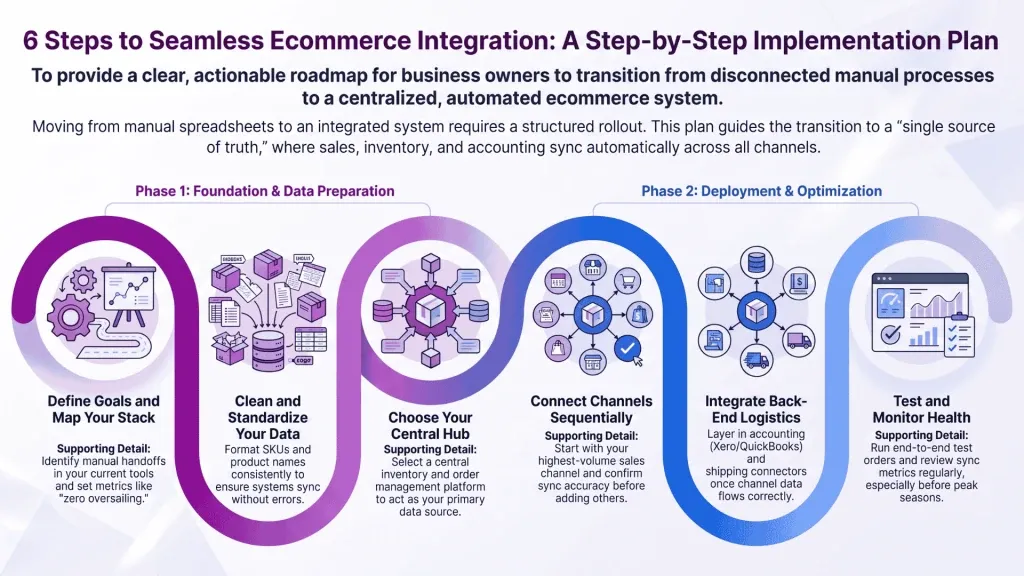
Once you’ve chosen a solution, a clear rollout keeps the project on track. Follow these steps.
- Define your goals and metrics. Decide what success looks like, whether that’s zero overselling, faster fulfillment, or cleaner books, and set numbers to measure against.
- Map your current stack. List every tool you use and where data currently moves by hand. Those manual handoffs are your integration priorities.
- Clean your data. Standardize SKUs, product names, and pricing so your systems sync cleanly from the start.
- Pick your hub. Choose a central inventory and order management platform to act as your single source of truth.
- Connect one channel at a time. Start with your highest-volume sales channel, confirm the sync is accurate, then add the next.
- Add accounting and fulfillment. Layer in Xero or QuickBooks and your shipping connectors once channel data is flowing correctly.
- Test, then monitor. Run test orders end to end, then keep an eye on sync health, especially before busy seasons.
Ecommerce Integration in Action: An Inventory-First Example
Theory is easy. Here’s how it plays out for a real multichannel business.
Picture a footwear brand that sells direct on a Shopify store, lists bestsellers on Amazon, runs a separate WooCommerce site, and supplies boutiques through a wholesale channel. Before integration, each channel had its own stock count. A pair sold on Amazon wouldn’t reflect on Shopify for hours, so oversells were routine and the wholesale team worked off a stale spreadsheet.
With an inventory-first setup, the brand puts a central platform at the core. Every product is created once and published to each channel. The moment a pair sells anywhere, allocated stock reserves those units and the master count updates across all four channels in real time. A retail buyer placing a wholesale order sees only what’s genuinely available, at their own negotiated price, through a private B2B storefront.
Behind the scenes, each sale, its cost, and any refunds flow straight into Xero, so the books reconcile themselves. Demand forecasting then reads the unified sales history and recommends what to reorder, so the brand avoids both stockouts and dead inventory. This is exactly the kind of multichannel and B2B operation Qoblex was built to run, connecting inventory, orders, accounting, and forecasting in one place, and it’s the reason the platform now helps manage billions of dollars in goods for sellers in over 40 countries.
Frequently Asked Questions
What is an example of ecommerce integration?
A common example is connecting a Shopify store to an inventory management system. When a customer buys a product, the integration instantly reduces stock across every sales channel, generates a fulfillment task, and posts the sale to your accounting software, all automatically. This prevents overselling and eliminates manual data entry.
What’s the difference between an API and an ecommerce integration?
An API is the technical interface that lets two software systems exchange data. An ecommerce integration is the complete connection built on top of one or more APIs to sync specific information, like orders or inventory, between your store and other tools. Put simply, the API is the pipe; the integration is the working connection.
How much does ecommerce integration cost?
Costs vary widely by method. Custom builds run highest because of development and maintenance, while native connectors are the most affordable and often included in a platform’s subscription. Many inventory platforms offer a free trial with no credit card required, so you can test the fit before committing budget.
What is the best ecommerce integration platform?
The best platform is the one that connects natively to your channels, syncs in real time, and scales with your complexity. For SMBs selling across Shopify, WooCommerce, and Amazon while managing wholesale or manufacturing, an inventory-first platform that also links to Xero and QuickBooks usually delivers the most value with the least effort.
Is ecommerce integration the same as an ERP?
No. An ERP (enterprise resource planning) system is a large, all-in-one suite that runs an entire enterprise, often at high cost and complexity. Ecommerce integration connects your existing best-fit tools so they work together. Many growing businesses find a focused inventory and order platform far more practical than a full ERP.
Key Takeaways
- Ecommerce integration connects your storefront to your back-end systems so data flows automatically and you work from a single source of truth.
- Inventory and order management is the hub. Centralize stock first, then sync outward to every channel and to accounting.
- Native connectors beat custom builds for most SMBs, offering reliability, low maintenance, and a go-live measured in days.
- Most integration failures come from a missing central source of truth. Fix that, and overselling, dirty data, and reconciliation pain largely disappear.
- Real-time, bidirectional sync is non-negotiable. It’s what keeps every channel, from Shopify to Amazon to wholesale, accurate.
Ready to turn a tangle of disconnected apps into one system that runs itself? Start a 14-day free trial of Qoblex, no credit card required, and see how quickly your channels can sync.