


You started building product with a bill of materials that lived in a spreadsheet. It listed the components, the quantities, and what went into what, and for a while that was exactly the right tool: fast, free, and it bent to whatever you needed. Then the products got more involved. A finished item turned out to be built from a sub-assembly that had its own parts list. A component got committed to two runs in the same week because nothing said it was already spoken for. You changed one ingredient and realized six other sheets referenced it. A run stopped because a shortage was invisible until the moment it wasn’t.
The spreadsheet did not fail. It just stopped being able to keep the picture straight as the picture got more complicated. When a change in one place has to ripple through five others by hand, the version you are looking at is rarely the version that is true.
That is the coordination problem BOM software is built for. Not to replace the way you make things, but to hold the structure, the commitments, and the trace that used to live across your tabs and your memory.
What is BOM software?
Bill of materials (BOM) software organizes the structured recipe for every product you make: the components, ingredients, or sub-assemblies and the quantity of each. For small manufacturers, it connects those recipes to production orders, raw-material stock, and purchasing, so you can commit materials to a job, track a run from input to output, and know what to buy before a shortage stops production. It is the layer between a spreadsheet and a full ERP.
That definition covers the mechanics. The reason it matters is more concrete. A bill of materials is not just a list; it is the thing every downstream decision reads from. When it is accurate and connected, your stock, your purchasing, and your production all agree with each other. When it lives in a spreadsheet someone has to remember to update, they drift, and the drift is where the mistakes come from.
What does BOM software actually manage: the core jobs
Strip away the category noise and BOM software does five connected jobs:
- Holds the recipe. It knows the components, quantities, and structure of each product, including multi-level BOMs where a product is built from sub-assemblies that have their own parts.
- Commits the materials. When you open a production order, it reserves the raw materials that job needs against the BOM, so they stop showing as available to other jobs.
- Completes the build. When the job closes, the raw materials are consumed and the finished goods appear in available stock, with no manual journal entry.
- Plans the buying. Given your BOMs, current stock, and open orders, it works out what you are short and when, so a shortage surfaces as a purchase order to raise rather than a run that stops.
- Keeps the trace. It records which raw-material lots were issued into a run and which finished batch they produced, so the link from input to output survives.
Each of those is doable in a spreadsheet on its own. The value is in connecting them, so a change in one updates the rest instead of waiting for someone to catch it.
What is the difference between single-level and multi-level BOM?
A single-level BOM is a flat list: the components that go directly into the finished product, with quantities. A multi-level BOM describes a product built from sub-assemblies that are themselves manufactured, each with its own component list. If any part of what you make is itself built rather than simply purchased, you have a multi-level structure, whether or not your current spreadsheet models it that way. You will also see engineering BOM (EBOM), the product as designed, and manufacturing BOM (MBOM), the product as it is actually built on the floor; for most small manufacturers the two are close, but the distinction matters when you compare engineering-focused tools against production-floor tools.
What is the difference between a BOM and a recipe or formula?
For food, beverage, supplement, and cosmetics makers, the bill of materials is the recipe by another name. The mechanics are identical: a structured list of inputs, a quantity for each, and an output yield. A batch of sauce is a BOM; a run of lip balm is a BOM. Process manufacturers often call it a formula, but the software treats it the same way, and the same commit-build-trace flow applies. If you make product from a repeatable list of ingredients, BOM software is describing your work whether the industry calls it a recipe, a formula, or a bill of materials.
Who needs dedicated BOM software, and who can manage without it?
What are the signs a small manufacturer needs BOM software?
You do not need a framework to know you have hit the wall; you feel it. The signs are consistent across small manufacturers:
- A component gets double-committed to two runs because nothing flagged that it was already reserved.
- Version control on the spreadsheet BOM has quietly broken down, and you are no longer certain which copy is current.
- A shortage becomes visible only when a run stops, not a week out when you could still have ordered.
- Finished-goods stock does not reflect what production actually made, so someone recounts before every decision.
- You cannot trace a raw-material lot to the finished batch it went into, and a customer or auditor has started asking.
Any one of these is manageable. Two or three at once is the spreadsheet turning into the bottleneck it was meant to prevent.
When you might not need dedicated BOM software
It would be dishonest to pretend every maker needs this. Spreadsheets got a lot of good manufacturers off the ground, and there is no prize for buying software before the problem is real.
If you make a small number of simple products from a short, stable component list, with no sub-assemblies, no traceability requirement, and a low run frequency, a spreadsheet BOM may genuinely be enough for now. When your whole product range fits on one tab and rarely changes, the manual effort of keeping it current is small. Start with what works. The moment to move is specific: when components get double-committed, when shortages appear mid-run rather than in advance, when finished-goods counts stop matching the floor, or when you need to trace a raw-material lot to the batch it produced. Until one of those is true, keep the setup you have.
What must BOM software handle? The non-negotiable capability set
When you evaluate options, these capabilities separate a real BOM system from a parts list with a “components” field bolted on:
- Multi-level BOM management. Most products are built from sub-assemblies that have their own components. If the software only handles single-level BOMs, it cannot model how you actually make things, and every calculation downstream inherits that gap.
- Work order creation and material commitment. Opening a production order should reserve the raw materials that job needs against the BOM, so those parts stop showing as available to other jobs. This is the single feature that ends the double-promised-components problem.
- Finished-goods auto-update. When a work order closes, the raw materials should be consumed and the finished goods should appear in available stock in the same motion, with no manual adjustment.
- Material requirements planning (MRP). Given your BOMs, current stock, and open orders, MRP calculates what to buy and when, respecting lead times, so a shortage shows up a week out instead of mid-run. For a deeper look at the planning engine itself, see our companion guide to MRP software for small business.
- Lot and batch traceability through production. The system should record which raw-material lots were issued into each run and which finished batch they produced. This is where most lightweight tools stop: they track a finished good but lose the thread at the bill of materials.
The difference between a BOM and MRP is worth holding onto: the BOM is the recipe, the record of what a product is made of; MRP is the engine that reads the BOM, plus current stock and open orders, to work out what to buy and when. In a good system they are the same platform, because MRP is only as accurate as the BOM it reads.
The accounting platform gap: why QuickBooks Online and Xero stop at the office door
This is the situation most people reading this page are actually in. Your accounting platform runs your books well. It was just never built to run your production floor.
Can QuickBooks Online or Xero manage bills of materials or MRP?
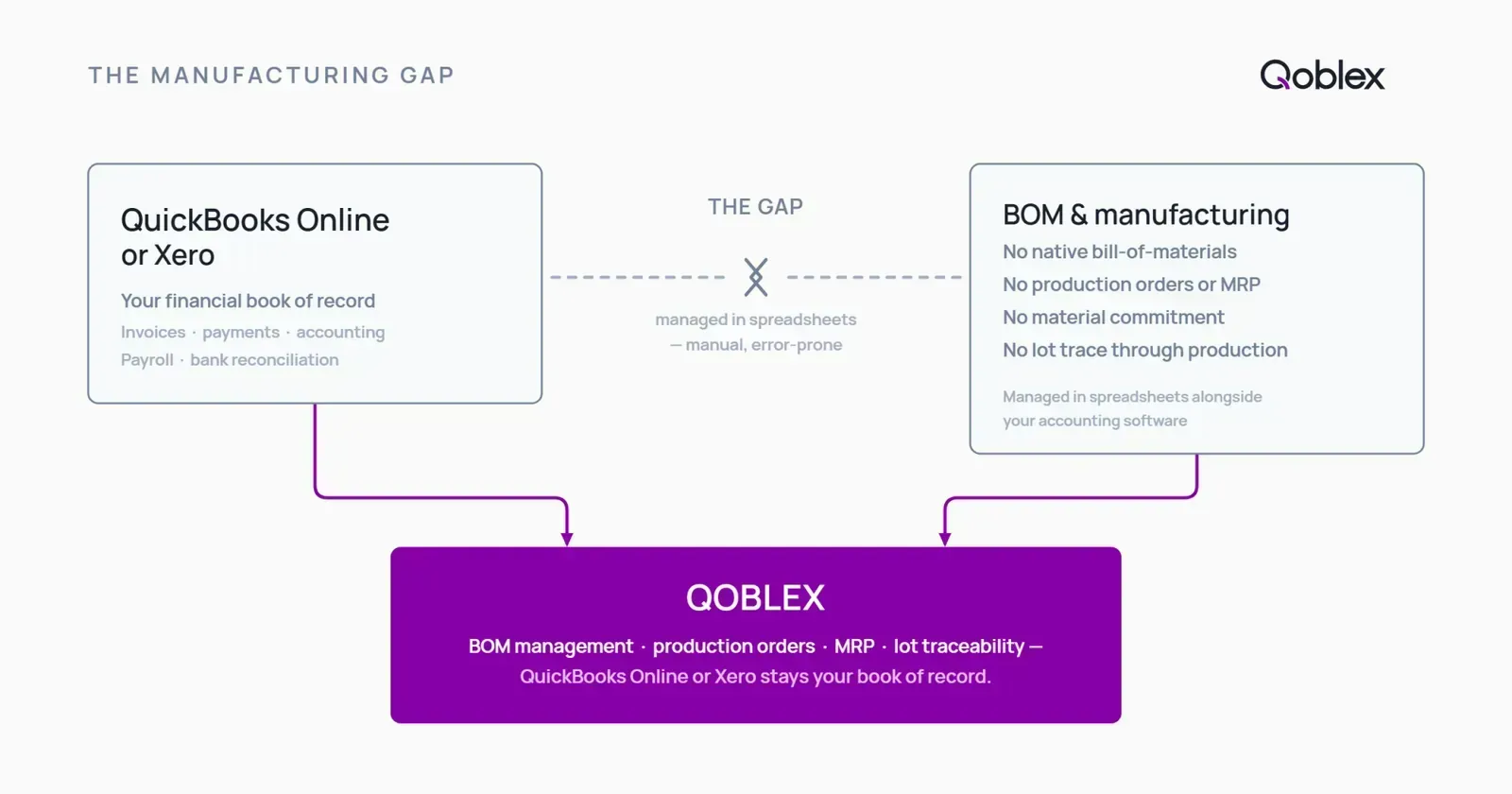
Neither QuickBooks Online nor Xero provides bill-of-materials management or material requirements planning natively. That is not a criticism; they are accounting platforms, and they do that job well. But the manufacturing layer, the BOMs, the material commitments, the MRP calculation, is not something they were built to hold. Xero users have an open, long-standing feature request on Xero’s own Product Ideas board asking for native bill-of-materials support, which tells you it does not exist in the core product today. Xero does offer Inventory Plus, but it is US-only and adds standard costing, not BOM management or MRP. QuickBooks Online is the same: BOM and assembly builds are a Desktop feature, not part of QuickBooks Online. Which is why, for most small manufacturers, the manufacturing layer has lived in a spreadsheet alongside the accounting software rather than inside it.
How do you keep your accounting software and add real BOM management?
The instinct when you hit this wall is to assume you need to rip out your accounting system and move to a full ERP. You usually do not. The gap here is operational, not financial: your books are fine; your production layer is missing.
The better middle path is to keep QuickBooks Online or Xero as your book of record and add a dedicated operations layer on top. That layer owns the BOMs, the production orders, and the MRP calculation, and it syncs the financial results back to your accounting platform. You get real BOM management without re-implementing your accounting or retraining your bookkeeper.
Qoblex is built for exactly that role: the operational system between a spreadsheet and a bloated ERP, integrated with QuickBooks Online and Xero rather than replacing them. Manufacturing lives in Qoblex, including bills of materials, production orders, and the material planning behind them; your accounting stays where it is. For the wider stock picture, see our guide to manufacturing inventory software, and for the scheduling side, production planning software.
How does BOM software connect to lot traceability?
For some operations, managing the BOM is only half the requirement. You also have to be able to trace it.
Why traceability starts at the BOM, not the shipment
If you make food, supplements, cosmetics, or medical devices, traceability starts at the production order, not the shipping desk. The link that matters is the one between the raw-material lots you issued into a run and the finished batch that came out of it. If your system does not capture that link at the work order, no amount of shipment-level tracking can reconstruct it afterward. Traceability that begins at the BOM can trace a raw-material lot forward to every finished batch it went into, and a finished batch backward to every input lot. Traceability bolted on at the shipment cannot.
That connection is also what lets you run first-expired, first-out (FEFO) picking, where the oldest-expiring stock ships first rather than the plain first-in, first-out order most systems assume. FEFO only works when the system knows the expiry and lot of each input, which is exactly what the BOM-level trace records.
What should you look for if lot traceability is a requirement?
The key check is simple: is traceability native to the same system that runs the BOM and production orders, or is it a separate product you have to integrate? Two systems means two records to reconcile and a seam where the trace can break. One system means the trace is a query. If lot control is central to your operation, our dedicated guide to lot control software goes deeper, and for food and beverage makers, the food and beverage inventory management guide covers the recipe-and-trace picture end to end.
How Qoblex handles BOM management in practice
Here is the workflow, without embellishment.
- Building and managing BOMs. You define the bill of materials for each product once, the components and quantities that go into it. That recipe is what every downstream calculation reads from.
- Creating a production order from demand. Demand becomes a work order. Qoblex checks the required materials against current stock, so you can see immediately whether a run is buildable now or waiting on a component, and the materials that job needs are reserved against the BOM. See how this fits the wider build flow in Qoblex’s make-to-order guide.
- Planning what to buy before a run is short. Qoblex’s MRP reads your BOMs, current stock, and open orders, and works out what raw materials to buy and when, so a shortage shows up as a purchasing action a week out rather than a stalled run.
- Marking the job complete. When you close the work order, the raw materials are consumed from stock and the finished goods are added to available inventory in the same step, so your on-hand and available-to-promise numbers stay honest without a manual count.
- Tracing the run. If lot and batch traceability is enabled, the raw-material lots issued into the run are recorded against the finished batch produced, so the trace passes cleanly through production instead of stopping at the finished-goods shelf.
What does Qoblex include on the base plan?
Bill-of-materials management and MRP are included in Qoblex’s plans, with no separate manufacturing module to unlock (see qoblex.com/pricing). You do not buy a higher tier to get the BOM and MRP core; it is there from the start.
Lot, batch, serial, and expiry traceability is a paid add-on rather than part of the base plan. You add it only if your operation needs the trace. Demand forecasting, predicting how much to make from historical sales, is available on higher-tier plans. See qoblex.com/pricing for current figures; we keep dollar amounts on the pricing page so they stay correct when they change.
What does Qoblex not cover: the honest limits
Qoblex is the operations layer between your accounting software and your production floor. It is not a heavyweight enterprise system, and it is not the right tool for every manufacturer. If you run finite-capacity scheduling across many work centers with advanced planning and scheduling (APS), operate a multi-site plant network that needs full MES integration, or require deep multi-entity manufacturing-cost accounting, you are likely past the middle Qoblex serves. That is genuinely ERP or specialist-MRP territory, and we would rather say so than oversell. For the large middle, small manufacturers who have outgrown spreadsheets but cannot justify an ERP, Qoblex is the fit.
How to choose BOM software for a small manufacturer
Before you weigh any vendor, confirm the non-negotiables against your own operation rather than a feature list:
- Multi-level BOM support if any part of your product is itself built from components.
- Production-order material commitment, so opening a job reserves its materials and ends double-committing.
- MRP that respects lead times, so shortages surface as purchase orders in advance.
- Lot and batch traceability, if your category requires the raw-material-to-finished-batch link.
- Integration with your existing accounting, so QuickBooks Online or Xero stays your book of record instead of being replaced.
- Implementation time. Ask honestly how long it takes to get to a working BOM and a first production order. A middle-market operations layer should be days to weeks, not the multi-month rollout a full ERP demands.
The table below is about which capabilities are bundled versus charged separately, not a vendor scorecard.
| Capability | Spreadsheet | QBO / Xero native | Qoblex |
|---|---|---|---|
| Bill of materials (BOM) management | Manual | No | Yes |
| Multi-level BOM (sub-assemblies) | Manual | No | Yes |
| Work order creation and material commitment | Manual | No | Yes |
| MRP (material requirements planning) | Manual | No | Yes |
| Finished-goods auto-update on work-order close | Manual | No | Yes |
| Lot/batch traceability through production orders | Manual | No | Paid add-on (see qoblex.com/pricing) |
| Integration with QBO or Xero (keeps accounting as book of record) | n/a | n/a | Yes |
| Starting price | n/a | (accounting only) | See qoblex.com/pricing |
BOM and MRP are part of Qoblex’s plans, so there is nothing to unlock. Kitting and assembly, for products bundled from stock rather than manufactured through a run, are covered separately in our guide to kitting software.
FAQ
What is BOM software? Bill of materials (BOM) software organizes the structured recipe for every product you make: the components, ingredients, or sub-assemblies and their quantities. It connects those recipes to production orders, raw-material stock, and purchasing, so it can commit materials to a job when a run opens, consume them and create finished goods when the job closes, and tell you what to buy before a shortage stops production.
What is the difference between single-level and multi-level BOM? A single-level BOM is a flat list of the components that go directly into a finished product. A multi-level BOM describes a product built from sub-assemblies that themselves have component lists, for example a finished good built from a sub-assembly that is made from two parts. Multi-level support matters when any part of your product is itself manufactured rather than simply purchased.
Can BOM software work with QuickBooks Online or Xero? Yes, when the BOM software integrates with QuickBooks Online or Xero as book of record. Qoblex connects to both: it runs the BOM and production layer and syncs the financial results back to accounting. You are not replacing your accounting platform; you are adding the manufacturing layer it does not provide natively.
How does BOM software track lot and batch traceability through production? When a production order opens, the software records which raw-material lots are issued into the run. When the order closes, the finished batch inherits those lot assignments. That link lets you trace a suspect raw-material lot forward to every finished batch it went into, or trace a finished batch back to every input lot. In Qoblex, lot and batch traceability is a paid add-on rather than part of the base plan (see qoblex.com/pricing).
What is the difference between BOM software and MRP software? A BOM is the recipe, the record of what a product is made of. MRP is the planning engine that reads the BOM plus current stock and open orders to calculate what to buy and when. Most dedicated manufacturing systems include both. In Qoblex, BOM management and MRP are the same system, because MRP is only as accurate as the BOM it reads.
Does Qoblex include BOM and MRP? Yes. Bill-of-materials management and MRP are included in Qoblex’s plans, with no separate manufacturing module to unlock. Lot, batch, serial, and expiry traceability is a paid add-on rather than part of the base plan. Demand forecasting is available on higher-tier plans. See qoblex.com/pricing for current figures.
When is a spreadsheet BOM still enough? If you make a small number of simple products from a short, stable component list, with no sub-assemblies, no traceability requirement, and a low run frequency, a spreadsheet BOM may genuinely be enough for now. The moment to upgrade is when components get double-committed, when shortages appear mid-run rather than in advance, or when you need to trace a raw-material lot to the finished batch it went into.