



You make, blend, bottle, pack, or distribute food. For a while, a spreadsheet and the stock fields in your accounting software kept up. Then things got harder in ways that are specific to food and drink. A batch of raw material came in with a best-before date, and you needed to use it before the older stock. A retailer’s onboarding form asked for lot and expiry data on every line. A recall in your category made you ask the one question that keeps F&B operators up at night: if that were our product, which units would we pull, from which customers, and how fast?
That is the point where general inventory tools stop being enough. Food and beverage inventory has requirements that most software was never built for: perishability, lot and batch traceability, first-expired-first-out picking, compliance records, and recipe-level manufacturing. This page is a map of what a food inventory system actually needs to do, who genuinely needs one (and who does not yet), and where a tool like Qoblex fits. It is written for the product manufacturer, brand, and distributor, not the restaurant, and we will come back to that distinction because it matters.
Food and beverage inventory software manages the requirements specific to F&B businesses: lot and batch tracking, expiry date monitoring, FEFO picking, supplier-to-customer traceability, recall readiness, and recipe-level manufacturing. Unlike generic inventory tools, it handles perishability and compliance records, so an operator can trace a lot in minutes, cut waste through smarter picking, and build the records FSMA 204 and retailer audits require.
What makes inventory management for food and beverage different from other industries?
Most inventory software counts units and tells you when to reorder. That is enough for a business selling identical, shelf-stable widgets. Food and beverage is not that. Two cases of the same product are not interchangeable if one expires next month and the other next year, and if one came from a supplier lot that later gets flagged, you need to know exactly where every unit of that lot went. The difference between food inventory software and general inventory software is that food software tracks identity, dates, and lineage at the lot level, not just quantity on a shelf.
The perishability problem: why expiry dates and FEFO picking matter
Perishable stock has a clock on it. If you pick by whatever is closest to the door, you ship the wrong units and let good stock expire on the shelf, which is waste you paid for. The answer is FEFO, First Expired First Out: pick the stock with the nearest expiry date first, regardless of when it arrived. That is different from FIFO, which picks by arrival order. For perishable goods, expiry order is the one that matters, and enforcing it depends on recording an expiry date at the lot level and surfacing the right lot at the moment of picking. Do that well and you cut waste and keep out-of-date stock from reaching a customer.
Lot and batch traceability: what it is and why food businesses need it
A lot number (or batch number, the same idea at different points in the chain) identifies a group of units that share an origin or a production run: a pallet from one supplier delivery, or a thousand jars from Tuesday’s run. Food businesses need lot tracking because it is the thread that connects what a supplier sent to what a customer received. Without it, a contamination report from a supplier becomes an afternoon of detective work; with it, the answer is a report you run. This is the food-and-beverage expression of lot control software, tuned for perishables and shelf life. For the full vertical picture of tracing a batch end to end, see food traceability software.
Compliance records: FSMA 204, retailer audits, and the 24-hour trace requirement
The records that make traceability real are the same records regulators and retailers ask for. In the US, the FDA’s Food Safety Modernization Act Section 204 requires certain foods to carry a documented trail (more on that below), and it expects the relevant records to be available within 24 hours of a request. Retailers and distributors increasingly ask for the same thing as a condition of doing business, often on a faster timeline than the regulation. A food traceability audit trail is simply the queryable history of every lot: where it came from, where it moved, and where it went. Building that by hand at the moment you are asked is the workflow food inventory software exists to replace.
What should food and beverage inventory software actually do? (the capability checklist)
Here is the working checklist. Each of these is a genuine requirement for a lot-tracked, perishable food operation, and each links down to a page with more depth where one exists.
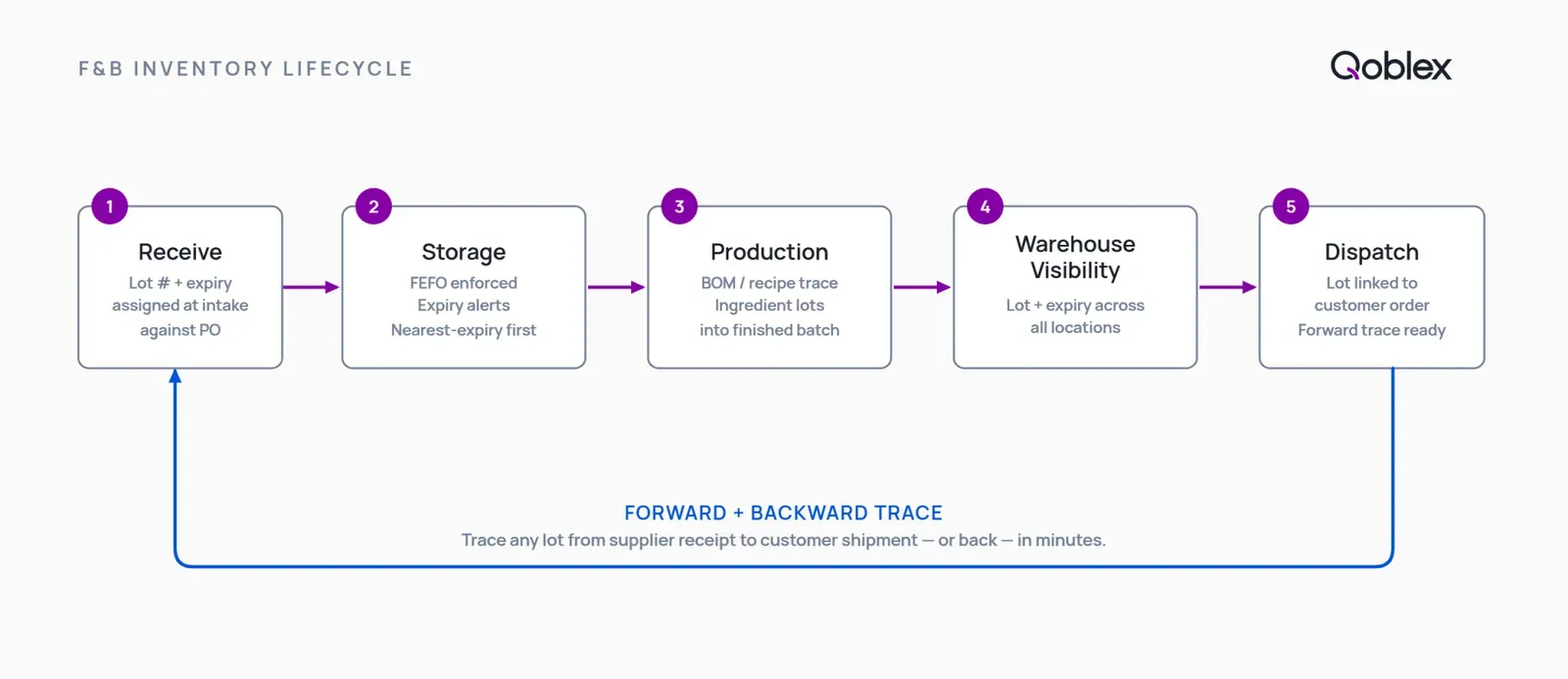
1. Lot and batch tracking: assign and trace every unit from receipt to shipment. The system should capture a lot or batch number and expiry date the moment stock arrives against a purchase order, and assign a batch number to each production run, so every unit is tied to its origin from the start. In food distribution, this is what lets you answer “which supplier lot is this case from?” without opening a filing cabinet. The broad capability lives on lot control software; the F&B-specific detail will live on a dedicated food lot and batch page.
2. Expiry date management and FEFO picking: reduce waste, stay compliant. Recording an expiry date is not enough on its own. The software has to surface it at pick time so FEFO actually happens on the floor, not just in theory. Done properly, FEFO picking reduces food waste because near-dated stock moves first, and it keeps expired product from shipping. The dedicated FEFO and expiry page will carry the workflow detail.
3. Recall readiness: isolate an affected lot in minutes, not hours. When a lot is flagged, you need a forward trace to every customer who received it and a backward trace to the supplier batch it came from, plus a clear read on what is still on hand and where. A software trace should take minutes; a spreadsheet reconstruction can take hours or days. Running it as a mock recall before you ever need it is how you find out whether your records hold together. See food traceability software for how the trace works, and a dedicated recall readiness page will go deeper.
4. Multi-location stock: one view across warehouses, 3PLs, and production sites. Multi-warehouse inventory management for food businesses means seeing lot and expiry quantities across every location at once, so FEFO works across sites and you are not blind to stock sitting in a co-packer or a 3PL. Growth almost always adds a second location before it adds anything else, and that is usually where “someone remembers” quietly stops working.
5. Purchasing and supplier management: purchase orders, lead times, reorder rules. Supplier management software for food businesses ties purchase orders to the lots they bring in, tracks lead times, and applies reorder rules so you buy perishable stock in quantities you can actually use before it expires. It also anchors the backward trace: every lot points back to the purchase order and supplier it arrived on.
6. Recipe and BOM manufacturing: from raw ingredient to finished product. If you make product rather than just distribute it, you need a bill of materials (BOM), the recipe that says which raw-material lots go into a finished batch. A BOM in food manufacturing is what lets a recall on an ingredient trace forward to every finished product that contains it. This is where a lot of lightweight tools stop, losing the thread at the recipe. Qoblex ships lightweight MRP and BOM natively, which connects to manufacturing inventory software and production planning software for the deeper manufacturing workflow. A food-manufacturing-specific page will follow.
7. COGS and landed cost: what inventory actually costs, not just what you paid. How food inventory software tracks cost of goods sold matters because the true cost of a case includes freight, duty, and handling, not just the invoice price. Landed cost gives you a real margin per product. The dedicated food COGS and landed cost page will cover the mechanics.
Those seven are the core of what food and beverage inventory software needs. A tool that stores a lot number in a text field but cannot tie it to movements, recipes, and shipments is a label, not a traceability system.
FSMA 204 and food traceability: what every F&B operator needs to know
If you sell food in the US, the most common regulatory reason to formalise traceability is FSMA Section 204, the Food Traceability Rule. It is worth understanding plainly, without the alarm that usually surrounds it.
What the rule requires: Traceability Lot Codes, CTEs, and KDEs
FSMA 204 requires businesses that manufacture, process, pack, or hold covered foods to keep records of specific Key Data Elements (KDEs) at defined Critical Tracking Events (CTEs). A CTE is a point where food is received, transformed, created, or shipped. The KDEs are the standardized data captured at each of those points, including a Traceability Lot Code (TLC) that identifies the lot, along with quantities, locations, and dates. In practice, at each key handoff you record a consistent set of data tied to a lot code, so the food can be traced quickly during a safety event. The authoritative description of the requirements is on the FDA’s FSMA 204 rule page.
Who is covered: the Food Traceability List (FTL) and its key categories
The rule applies to foods on the FDA’s Food Traceability List. The FTL includes fresh produce (leafy greens, cucumbers, herbs, melons, peppers, sprouts, tomatoes, and tropical fruits), shell eggs, soft and semi-soft cheeses, nut butters, seafood (finfish, crustaceans, and molluscan bivalves), fresh-cut fruits and vegetables, and ready-to-eat deli salads. Those are examples; the FDA’s Food Traceability List is the authoritative source for whether a specific food is covered. Whether FSMA 204 applies to a small food business depends on the food and on the exemptions in the rule, not simply on company size, so check your products against the FTL and the rule’s exemptions rather than assuming you are too small to be covered.
The enforcement date: July 20, 2028, and why major retailers are moving faster
The compliance date is July 20, 2028. It was originally set for January 20, 2026; the FDA proposed a 30-month extension in August 2025, and a Congressional appropriations act enacted in November 2025 directed the FDA not to enforce before the later date. The rule itself did not change; only the compliance date moved. The practical read for an operator is that this is a preparation window, not a fire drill. The commercial timeline can arrive sooner, though: major food retailers and foodservice distributors are already building FSMA 204 expectations into supplier contracts on timelines earlier than July 2028, so the business consequence of not being ready can precede FDA enforcement. A dedicated FSMA 204 guide will carry the full detail.
How inventory software produces the traceability records FSMA 204 requires
The reason software helps here is that the KDEs (lot code, quantity, location, dates, linked supplier and shipment) are captured as a byproduct of normal receiving, production, and shipping. When you receive, transform, or ship a covered food, the data is already recorded, so producing the records for an FDA request or a retailer audit is a report you run rather than a project you staff. That is the difference between a 24-hour deadline being routine and being a lost weekend. For the vertical detail on building that trail, see food traceability software.
Who F&B inventory software is for, and who it is not for
Being honest about who should not buy this is how you buy the right tool. Here is the straight version.
The F&B businesses that benefit most
Dedicated food inventory software earns its place for growth-stage food brands, beverage makers, perishables distributors, co-packers, specialty food producers, commissary kitchens, and supplements or nutraceutical brands: operators whose stock carries a shelf life, whose customers expect lot and expiry records, or who manufacture from recipes and need to trace an ingredient lot into a finished batch. The businesses that use lot tracking software are, broadly, the ones for whom a recall, an audit, or a retailer requirement is a real possibility rather than a hypothetical. Some food-adjacent regulated products (medical nutrition and certain supplements) are tracked by serial number rather than by lot; if that is you, see serial number tracking software.
When a spreadsheet or your accounting software is sufficient for now
A spreadsheet or your accounting software’s stock fields may be genuinely sufficient if you sell a single non-perishable SKU, have no lot-number or expiry requirement from a customer or regulator, have no recall history or traceability obligation, and are at a stage where the manual overhead is still manageable. Spreadsheets got a lot of good food businesses off the ground, and there is no prize for buying software before you need it. The moment to look is when a customer or auditor asks you to trace a lot and you cannot answer from a report, when you start picking perishable stock by guesswork, when you add a second location, or when a retailer makes lot and expiry data a condition of the relationship.
When a full food ERP (or a HACCP platform) is the right call instead
At the other end, a full food ERP (Aptean, Infor M3, Oracle Food and Beverage, and similar) may be the better fit if you are a mid-market food manufacturer with EDI obligations, catch-weight processing, integrated nutritional compliance, or HACCP quality management built in at the ERP level. That is a bigger, more expensive, slower-to-implement system, and for a large enough operation it is the right one. The difference between food inventory software and a food ERP is scope: the ERP runs the whole enterprise; food inventory software runs the operations layer (lot tracking, expiry, FEFO, BOM, purchasing, multi-warehouse) without the implementation cost and complexity. Separately, if your real gap is a documented food-safety program, the difference between food inventory software and HACCP software matters: HACCP platforms (FoodReady, FoodDocs, SafetyChain) build HACCP plans, supplier audit questionnaires, and food-safety inspection forms. That is a different tool. Many operations run both, a HACCP platform for the safety program and an inventory layer for the physical trace. Qoblex fills the middle between a spreadsheet and a full food ERP: more capable than an accounting add-on, far lighter and less expensive than an ERP.
The restaurant and foodservice buyer: why this page is not for you
One honest boundary before you spend more time here. If you run a restaurant, bar, or foodservice kitchen and you are searching for recipe costing, menu engineering, POS-linked food cost management, or par-level ordering, this is not the right page. Restaurant inventory software (MarketMan, BevSpot, and similar) is built for back-of-house food cost, and it is a different category from food manufacturing inventory software, which is built to track lots, batches, expiry, and production from receipt to dispatch. The requirements overlap in vocabulary but not in purpose. Qoblex serves the product manufacturer, brand, and distributor, not the restaurant back office.
The integration gap: why your accounting or ecommerce platform is not enough
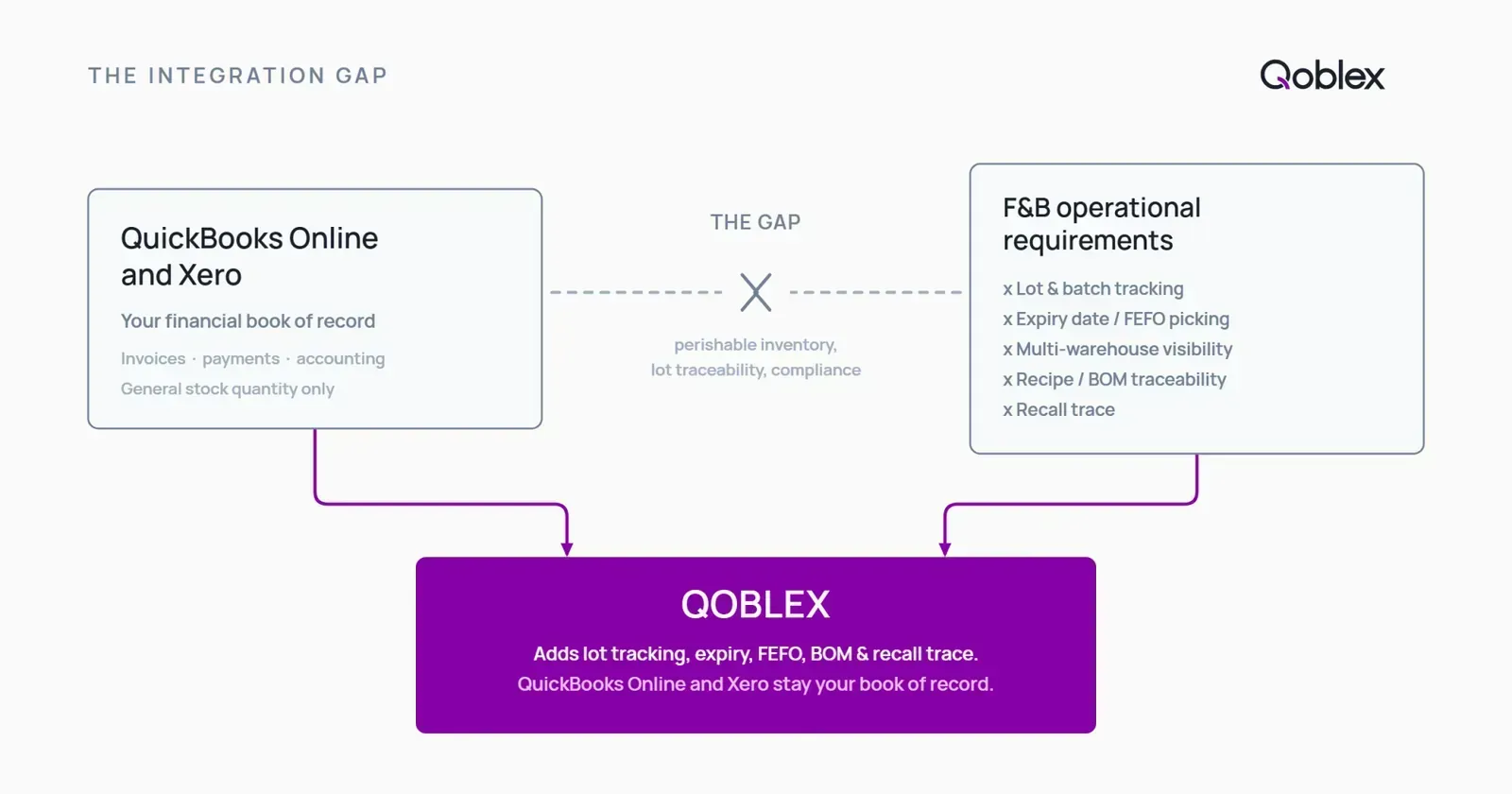
Most operators who need this already have a stack that works: accounting in QuickBooks Online or Xero, orders through Shopify or WooCommerce or a wholesale channel. Those tools are good at their jobs. The gap is that none of them was built to hold lot identity, expiry dates, and the physical trace, so the food layer has to sit alongside them.
QuickBooks Online: handles your books, not your lots or expiry dates
QuickBooks Online does not natively track lot or batch numbers, record expiry dates, or enforce FEFO picking. That is not a criticism; it is an accounting platform doing accounting well. But the trail of which units came from which supplier lot, and which went to which customer, is not something it holds. US operators can see the detail on lot and expiry tracking for QuickBooks Online.
Xero: no native lot, batch, or expiry tracking, even with Inventory Plus
Xero does not natively track lot or batch numbers, record expiry dates, or enforce FEFO. Even the Xero Inventory Plus add-on, which is US-only and USD-only, adds no lot, batch, or expiry capability, so the traceability gap is the same whether you are on core Xero or the paid add-on. AU, NZ, and UK operators can see the detail on lot tracking for Xero users.
Shopify: no lot or expiry tracking natively
Shopify’s inventory model treats every unit of a variant as identical. There is no native lot or batch identity, no expiry date field, and no FEFO. Your storefront knows how many units you have; it does not know which lot they belong to or when they expire. See lot and expiry tracking for Shopify.
WooCommerce: lot and expiry tracking requires a dedicated operations layer
WooCommerce has no native lot or batch tracking and no expiry date tracking, so batch tracking for food products needs a dedicated operations layer on top. WooCommerce does handle other parts of the job well, and the broader picture is on WooCommerce inventory management.
How to add food inventory software without replacing your accounting platform
The good news is that adding lot tracking to your existing accounting software does not mean ripping it out. The better middle path is to keep QuickBooks Online or Xero as your book of record, keep Shopify or WooCommerce as your storefront, and add a dedicated inventory operations layer between them that owns lots, batches, expiry dates, locations, purchasing, and manufacturing traceability, then syncs the financial results back. That is exactly the role Qoblex is built for.
How Qoblex works as the inventory layer for F&B businesses
With the requirement clear, here is where Qoblex fits. It is the operational system between a spreadsheet and a bloated ERP: structured enough to support a growing food brand, light enough to run without an IT team.
What Qoblex does for F&B operators: lot tracking, expiry, FEFO, recall, BOM/MRP
Qoblex captures lot or batch numbers and expiry dates at receiving, surfaces nearest-expiry lots first so FEFO happens at pick time, and holds lot and expiry quantities across every location at once. When a lot is flagged, you trace backward to the supplier batch and forward to every customer shipment, and read off what is still on hand and where. Because Qoblex ships lightweight MRP and a bill of materials natively, a finished batch carries the lots of every ingredient in it, so a recall trace passes cleanly through production instead of stopping at the finished-goods shelf. For the deep-dive workflow, see food traceability software and, for the manufacturing angle, manufacturing inventory software.
How it connects to your existing accounting and ecommerce stack
Qoblex integrates with QuickBooks Online and Xero and keeps them as your book of record, and it connects to Shopify, WooCommerce, and other sales channels so stock and orders stay in agreement without re-keying. You add traceability and operations; you do not switch accounting or retrain your bookkeeper.
Getting started: what the setup looks like
Manufacturing (MRP and BOM) is included on every Qoblex tier. Lot, batch, serial, and expiry tracking is a paid add-on (see Qoblex pricing for current tier figures). Forecasting is available on Business and above. There is no setup fee, no contract, and a 14-day free trial.
How to choose food and beverage inventory software: a practical checklist
If you are evaluating options (Qoblex or otherwise), here is how to cut through a vendor demo.
Must-have capabilities for an F&B operator (the non-negotiables)
Start from the seven capabilities above. The non-negotiables for a lot-tracked, perishable operation are: lot and batch assignment at receiving, expiry recording with FEFO enforced at pick time, forward and backward trace in a single query, recall isolation in minutes, BOM traceability from ingredient lot to finished batch if you manufacture, multi-location visibility, and the ability to produce the records FSMA 204 and retailer audits expect.
Questions to ask any software vendor before you commit
A few questions separate real traceability from a lot-number field. Can you trace a lot both directions in one query? Does FEFO surface at pick time, or is expiry only stored? Does the trace pass through the bill of materials to raw-ingredient lots? Can it produce FSMA 204 records? What is included versus a paid add-on, and at which tier? How long does implementation take, and is there a contract? Most cloud-based food inventory software runs without on-premise servers and can be live in days to weeks rather than the months a full ERP takes, but confirm the timeline for your own data volume.
Integration requirements: what your software stack needs to connect
The integrations food inventory software needs are the ones that stop you re-keying data: your accounting platform (QuickBooks Online or Xero) so financial results flow back, and your sales channels (Shopify, WooCommerce, wholesale) so stock and orders agree. If a tool cannot connect to the systems you already run, the “operations layer” becomes another silo.
Food and beverage inventory capability checklist
This table is for self-qualification, not a competitor scorecard. It shows what a full-featured F&B inventory system covers and how Qoblex maps to each requirement.
| Capability | Why it matters for F&B | Qoblex |
|---|---|---|
| Lot / batch number assignment and tracking | Ties every unit to its origin; the basis of any trace | Yes |
| Expiry date recording and alerting | Perishable stock has a clock; you need to see it | Yes |
| FEFO picking enforcement | Picks nearest-expiry first, cutting waste and expired shipments | Yes |
| Forward trace (lot to customer shipment) | Find every customer who received a flagged lot | Yes |
| Backward trace (lot to supplier) | Find the supplier batch behind a problem | Yes |
| Recall isolation (minutes, not hours) | Turns a recall from a lost day into a routine query | Yes |
| Multi-warehouse / multi-location stock | One view of lots and expiry across sites, 3PLs, production | Yes |
| Purchase orders and supplier management | Buy perishable stock in usable quantities; anchor the backward trace | Yes |
| Recipe / BOM management | Connect ingredient lots to finished batches | Yes (all tiers) |
| Lightweight MRP (production planning) | Plan production from demand and recipes | Yes (all tiers) |
| COGS and landed-cost tracking | Real margin per product, not just invoice price | Yes |
| Integration with QuickBooks Online and Xero | Keep your book of record; add operations on top | Yes |
| FSMA 204 traceability records (KDEs at CTEs) | Produce audit and FDA records as a report, not a project | Yes |
FAQ
What is food and beverage inventory software? Food and beverage inventory software manages the requirements specific to F&B businesses: lot and batch tracking, expiry date monitoring, FEFO picking, supplier-to-customer traceability, recall readiness, and recipe or BOM manufacturing. Unlike generic inventory tools and accounting platforms, it handles perishability and the compliance records that food operators actually need.
What is the difference between food inventory software and a food ERP? A food ERP (Aptean, Infor M3, Oracle Food and Beverage) covers the full enterprise: accounting, procurement, production, quality management, nutritional compliance, EDI, and often catch-weight and HACCP integration. Food inventory software covers the operations layer (lot tracking, expiry, FEFO, BOM, purchasing, multi-warehouse) without the ERP’s implementation cost and complexity. The right choice depends on your size and regulatory depth; food inventory software is not a full ERP.
Do I need food inventory software if I already use QuickBooks Online or Xero? QuickBooks Online and Xero handle your accounting well. Neither provides native lot tracking, expiry date management, or FEFO picking, which is what a perishable or lot-tracked food business needs. A tool like Qoblex adds those capabilities while keeping QBO or Xero as your book of record, so you add traceability rather than replace your accounting.
What is FEFO and why do food businesses use it? FEFO (First Expired, First Out) picks the stock with the nearest expiry date first, regardless of when it arrived. It is the correct method for perishable goods, and it differs from FIFO, which picks by arrival order. Food inventory software enforces FEFO by recording expiry at the lot level and surfacing the right lot at pick time, which reduces waste and keeps out-of-date stock from reaching customers.
What is FSMA 204 and when does it apply to my business? FSMA Section 204 (the Food Traceability Rule) requires businesses that manufacture, process, pack, or hold foods on the FDA’s Food Traceability List to record Key Data Elements at Critical Tracking Events and provide them to the FDA within 24 hours of a request. The list includes leafy greens, other fresh produce, shell eggs, nut butters, seafood, soft cheeses, and ready-to-eat deli salads. The compliance date is July 20, 2028. Check your products against the FDA’s FSMA 204 rule page.
How does food inventory software help with product recalls? When an affected lot is identified, the system runs a forward trace to every customer shipment and a backward trace to the supplier batch, and shows what is still on hand and where. A software trace should take minutes; a spreadsheet reconstruction can take hours or days. Running the trace as a mock recall before you need it is how you confirm the records hold together.
How much does food and beverage inventory software cost? For Qoblex, manufacturing (MRP and BOM) is included on all tiers at no extra cost. Lot, batch, serial, and expiry tracking is a paid add-on; the price varies by plan. See Qoblex pricing for current figures and what is included on each tier. There is no setup fee, no contract, and a 14-day free trial.
What is lot tracking in food manufacturing? Lot tracking assigns a unique lot number to every batch of raw materials or finished goods, recording the supplier, receipt date, expiry date, and every subsequent movement. In manufacturing, it connects raw-ingredient lots to the finished batch through the bill of materials, so when a supplier reports a contamination issue you can identify exactly which finished goods are affected. See lot control software for more.
Is Qoblex a food safety or HACCP platform? No. Qoblex is an inventory operations platform, not a food-safety or HACCP audit tool. HACCP platforms (FoodReady, FoodDocs, SafetyChain) specialise in HACCP plan templates, supplier audit questionnaires, and inspection forms. Qoblex specialises in inventory operations: lot tracking, expiry, FEFO, recall isolation, purchasing, BOM and MRP, and multichannel integration. Many F&B businesses run both.