



You run your books in QuickBooks Online or Xero. You sell through Shopify, or a spreadsheet still holds the parts nobody else tracks. For a long time that stack was fine. Then a customer asked which supplier lot went into an order shipped three months ago, or a distributor started requiring lot and expiry data on every line, or you looked at a recall notice from a competitor and realized you couldn’t answer the one question that matters: if that were us, which units would we have to pull, and how fast?
That is the wall. Your accounting platform is good at accounting. Your storefront is good at selling. Neither was built to trace a batch from a supplier receipt through production to the customer who bought it. That gap is what lot control software closes.
What is lot control software?
Lot control software assigns a unique identifier, a lot or batch number, to every group of inventory that shares an origin, production date, or quality status. It records where each lot came from, where it went, and when it expires, so operators can enforce FEFO picking, isolate a recalled batch in minutes, and produce an audit trail on demand. Food, supplement, pharmaceutical, and medical-device businesses typically require it for regulatory compliance.
That definition covers the mechanics. The reason it matters is more concrete: without lot control, the link between “what a supplier sent you” and “what a customer received” lives in people’s heads, email threads, and paper packing slips. Lot control software makes that link a queryable record instead of a memory.
What is the difference between lot, batch, and serial number tracking?
These three words describe the same underlying idea, tracking inventory in traceable groups, at different levels of granularity.
- A lot number (or batch number) identifies a group of units that share an origin or production run. One lot might be a thousand jars from the same production day, or a pallet of raw material from a single supplier delivery. “Lot” is the more common term in food distribution and pharmaceuticals; “batch” is more common in food and beverage manufacturing and process industries. The capability behind both is identical.
- A serial number identifies a single unit. You use serials when each individual item has to be traced on its own, a specific medical device, a specific piece of electronics, rather than as part of a group.
Most operations need lot or batch tracking. A smaller set, usually regulated goods where each unit is warrantied, registered, or individually recalled, need serial numbers on top of that. Many businesses use both: lot tracking for raw materials and consumables, serials for the high-value finished units.
What does lot control software actually record?
At minimum, real lot control captures, for every lot: the supplier and inbound receipt it came from, the quantity received and remaining, its expiry or best-before date, the locations it is stored in, the production run it fed into (if you manufacture), and every outbound shipment it left on. That set of records is what makes forward and backward traceability, FEFO picking, and recall isolation possible. If a system stores a lot number in a text field but cannot tie it to movements, it is not lot control. It is a label.
Who actually needs lot control software, and who doesn’t yet?
Which industries treat lot control as a non-negotiable requirement?
If you make or distribute food, beverages, dietary supplements, cosmetics, pharmaceuticals, or medical devices, lot or batch traceability is usually not optional. It shows up as a regulatory obligation, a condition of a food-safety certification, or a flat requirement from the retailers and distributors you sell to. Grocery and pharmacy buyers increasingly will not onboard a supplier who cannot provide lot-level records on demand. For a broader view of food and beverage inventory software needs in this space, including traceability requirements by segment, see our dedicated guide.
In the United States, the FDA’s Food Safety Modernization Act Section 204 Food Traceability Rule introduces recordkeeping requirements for businesses that handle foods on the FDA’s Food Traceability List. It centers on capturing standardized data as food moves through the supply chain, so that a product can be traced quickly during a food-safety event. If you are on that list, the practical question is whether you can produce those records without a fire drill, which is exactly what lot control software is for.
Standards bodies such as GS1 have published traceability standards that define how lot and batch information flows between trading partners, and a growing number of retailer portals require structured lot data on advance ship notices as a condition of doing business. Certification schemes such as BRCGS Global Standard for Food Safety include documented traceability as a scored requirement that auditors verify, not a best-practice recommendation.
For food businesses specifically, see our guide to food traceability software for how these requirements map to day-to-day operations.
When is a simpler approach genuinely sufficient?
Not every business needs lot control software, and it would be dishonest to suggest otherwise.
If you sell a small range of non-perishable goods, ship orders within days of receiving stock, have never faced a recall scenario, and are not in a regulated category, your platform’s native inventory fields, or a well-kept spreadsheet, may genuinely be enough for now. Spreadsheets got many good businesses off the ground, and there is no prize for buying software before you need it.
Lot control starts paying for itself at a specific set of moments:
- A customer or auditor asks you to trace a batch back to a supplier, and you cannot answer from a report.
- You carry stock with expiry or best-before dates and you are picking by guesswork instead of by expiry.
- You have added a second location, a contract manufacturer, or enough SKUs that “someone remembers” has stopped being a system.
- A distributor makes lot and expiry data a condition of doing business.
If none of those describe your operation, keep your spreadsheet. If one or more do, the manual workarounds have quietly become the risk.
What must lot control software do? Five non-negotiable capabilities
When you evaluate options, these five separate real lot control from an inventory tool that happens to have a lot-number field.
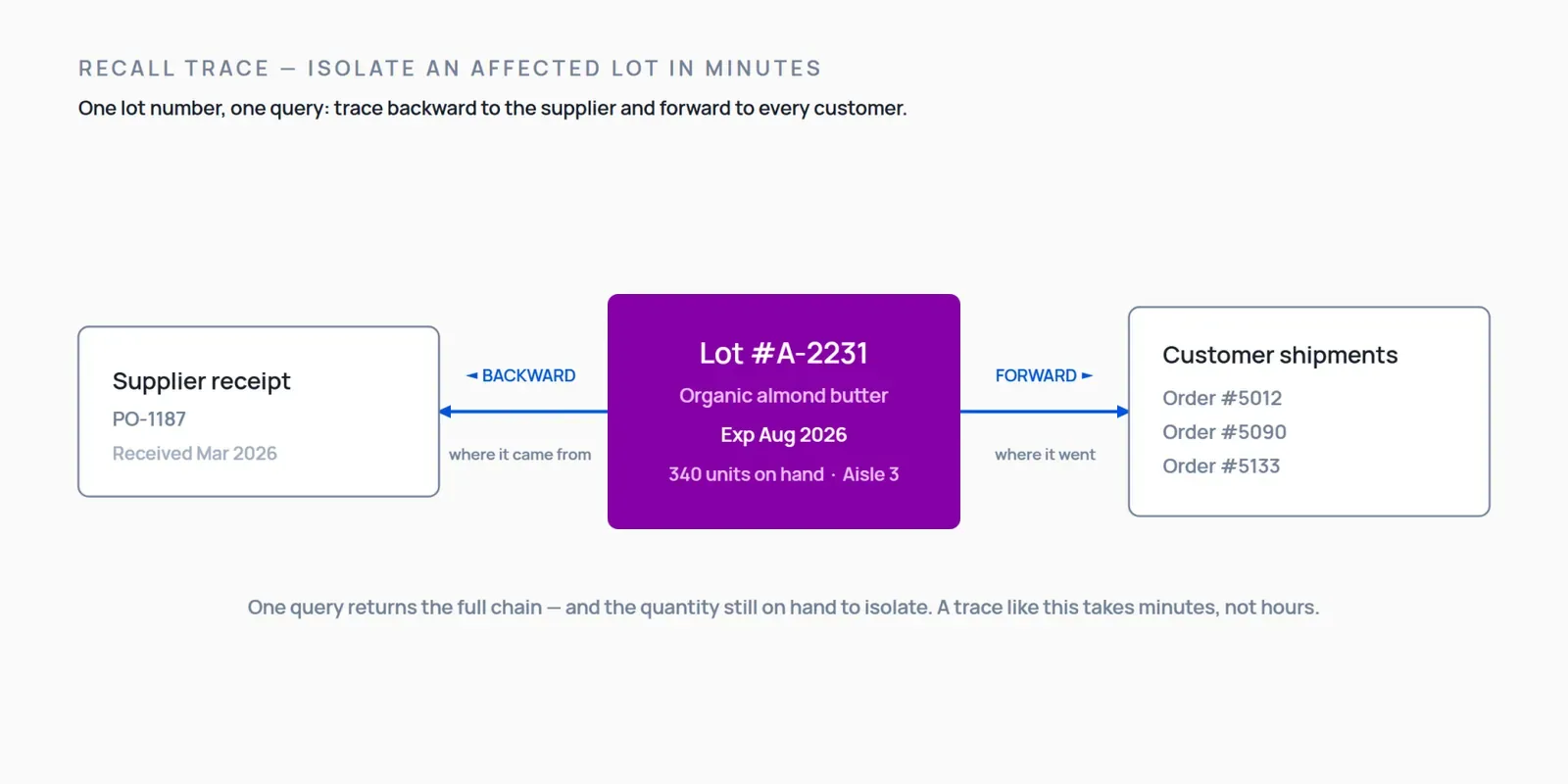
1. Forward and backward traceability. Backward: from a finished unit or shipment, trace to the supplier lot it came from. Forward: from a supplier lot, trace to every customer who received it. You need both, because a recall can start at either end: a supplier flags a bad ingredient (trace forward to your customers) or a customer reports a problem (trace backward to the source).
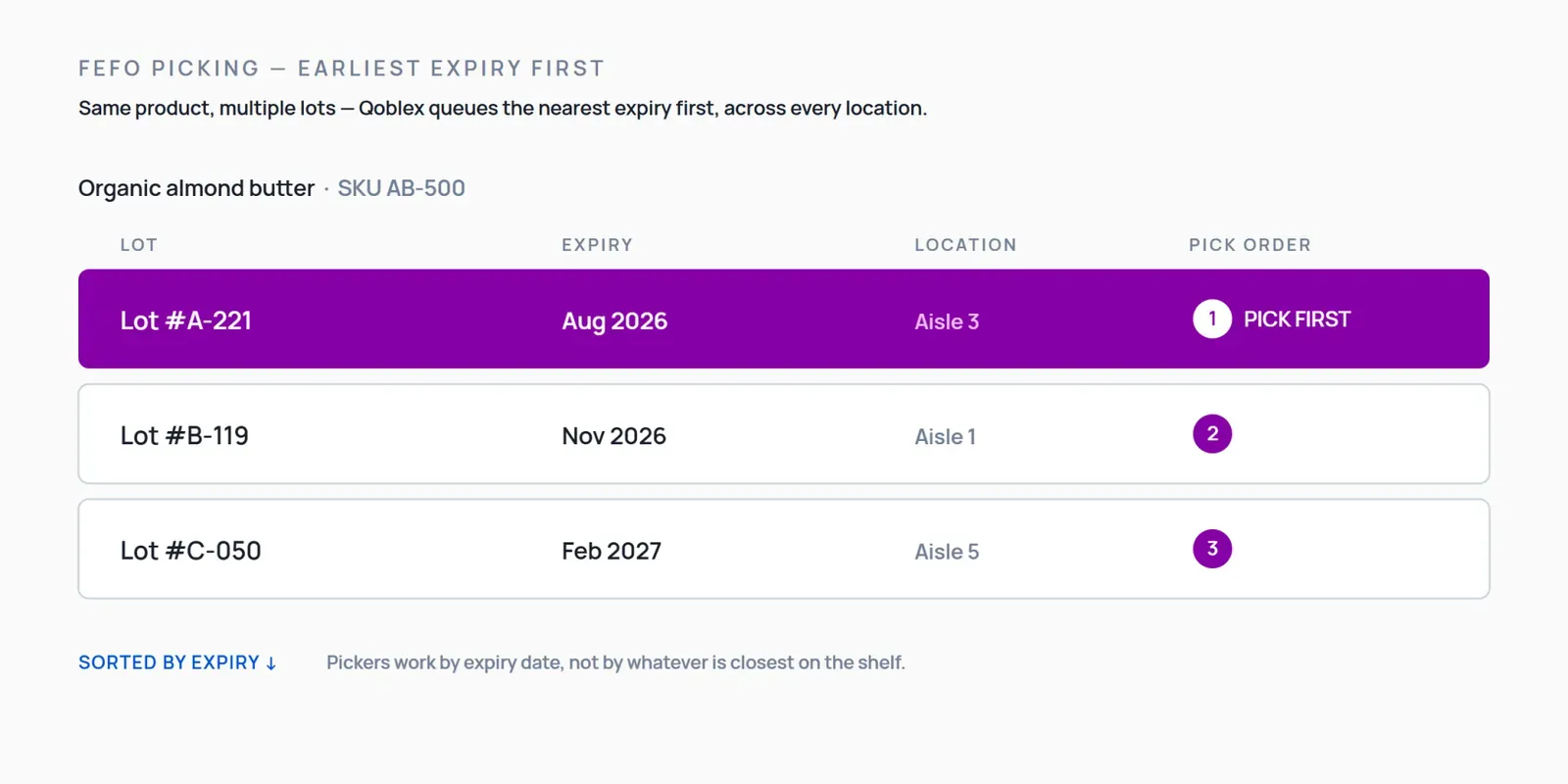
2. Expiry date tracking and FEFO picking enforcement. FEFO, First Expired First Out, means the stock with the nearest expiry date gets picked first, regardless of when it arrived. It is distinct from FIFO, which uses arrival order. For anything with a shelf life, FEFO is the correct strategy, and the software has to surface expiry at the moment of picking, not just store it in a record nobody looks at.
3. Recall isolation in minutes, not hours. Given a lot number, the system should return every inbound and outbound movement of that lot and the quantity still on hand, fast enough that a mock recall is a routine exercise rather than a lost afternoon.
4. Audit-ready reports on demand. The traceability record has to come out as a report for an auditor, a distributor, or your own quality review, without someone stitching spreadsheets together the night before.
5. Lot-level BOM traceability. If you manufacture, the system has to connect raw-material lots to the finished-goods batch they went into. Without that link, a recall on an ingredient cannot be traced forward to the products that contain it. This is where most lightweight tools stop: they track finished goods but lose the thread at the bill of materials.
Why don’t QuickBooks Online and Xero cover lot control natively?
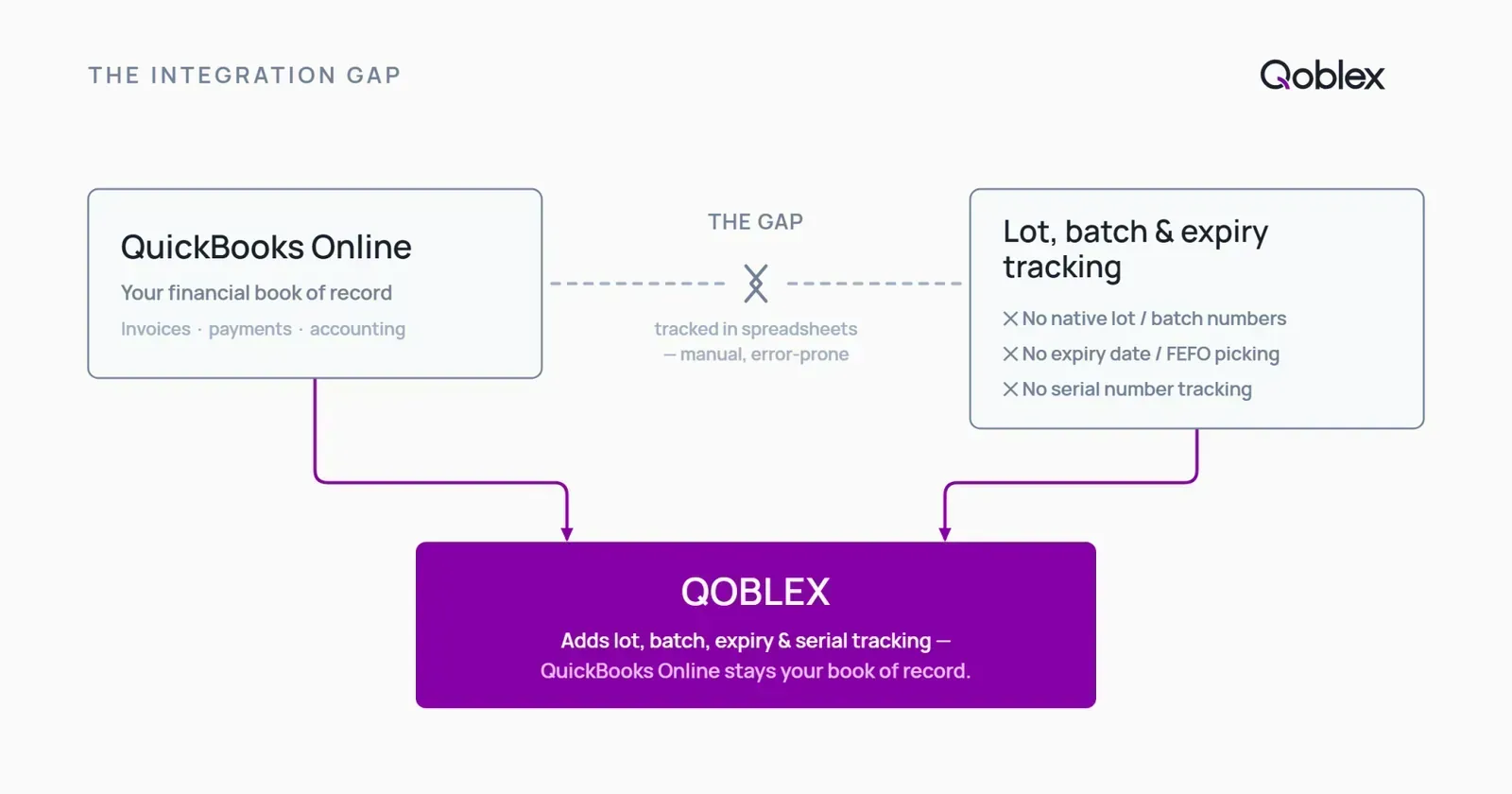
This is the situation most buyers on this page are actually in: your accounting platform is working fine for accounting. It was not built for lot-level operations.
Does QuickBooks Online support lot tracking?
QuickBooks Online does not track lot numbers, serial numbers, or expiry dates natively, and it does not enforce FEFO picking on the warehouse floor. That is not a knock on QBO: it is an accounting platform, and it does that job well. But the physical traceability of which units came from which supplier lot, and which of those went to which customer, is not something it was built to hold. That is the layer you add on top, while QBO stays your book of record. For the step-by-step detail on closing that gap, see our guide to batch and expiry tracking for QuickBooks Online.
Does Xero support lot tracking?
Xero does not natively track lot numbers, batch numbers, expiry dates, or serial numbers, and it does not enforce FEFO picking. The Xero Inventory Plus add-on, which as of mid-2026 is US-only and USD-only, does not close the traceability gap either: it adds no lot tracking, batch tracking, expiry date tracking, serial number tracking, or multi-warehouse bin management. Whether you are on core Xero or the paid add-on, the physical traceability layer is still missing. For the full picture on this gap, see our guide to lot tracking for Xero users.
How do you keep your existing accounting platform and add real lot control?
The instinct when you hit this wall is to assume you need to replace your accounting system and move to a full ERP. You usually do not. The gap is operational, not financial: your books are fine; your operations layer is missing.
The better middle path is to keep QuickBooks Online or Xero as your book of record and add a dedicated inventory operations layer on top of it. That layer owns lots, batches, serials, expiry dates, locations, purchasing, and manufacturing traceability, and it syncs the financial results back to your accounting platform. You get real lot control without re-implementing your accounting or retraining your bookkeeper.
Qoblex is built for exactly that role: the operational system between a spreadsheet and a bloated ERP, integrated with QuickBooks Online and Xero rather than replacing them.
Is “batch tracking software” the same as lot control software?
Yes. If you have been searching for “batch tracking software,” you are looking for the same capability this page describes. “Batch” and “lot” are used interchangeably across most industries. “Batch” tends to dominate in food and beverage manufacturing and process industries; “lot” is more common in distribution and pharma. The underlying capability is identical: group inventory by a shared production run or origin, and track that group end to end.
For a food or beverage manufacturer, batch tracking is where the raw-material-to-finished-good link becomes concrete. A batch of product carries the lots of every ingredient that went into it. If a supplier flags a contaminated ingredient lot, you trace forward to every batch that used it, and from there to every customer who received those batches. Handled properly, that is a query. Handled with spreadsheets, it is the reason people dread the phone ringing.
When does serial number tracking replace or extend lot control?
Lot and batch tracking group units together. Serial number tracking goes one level finer: a unique identifier per individual unit.
You reach for serials when each item has to be traced, warrantied, registered, or recalled on its own rather than as part of a group. That is common in electronics, medical devices, and certain regulated or high-value goods, where a single unit’s history, where it came from, where it went, which revision it is, has to stand alone. Medical device manufacturers in particular often need item-level traceability to meet unique-device-identification and recall expectations.
The difference from lot tracking is granularity: lot answers “which group did this come from?”; serial answers “where is this specific unit and what is its history?” Many operations run both: lots for consumables and raw materials, serials for the finished units that need individual accountability.
How does Qoblex lot control work in practice?
What follows is what Qoblex’s lot tracking software does once it is running, walked in the order a unit actually moves: the delivery it arrived on, the shelf it waited on, and the order it left on.
Assigning lot, batch, or serial numbers at receiving. When stock comes in against a purchase order, you capture the lot or batch number and expiry date at the point of receipt, the moment the information is actually in front of you. Serialized items get their serials recorded the same way. From that point on, every unit is tied to its origin.
FEFO picking across multiple locations. As orders come in, Qoblex surfaces the lots with the nearest expiry first, across all your warehouse locations, so pickers work by expiry rather than by memory or by whatever is closest on the shelf. Multi-location visibility means you see lot quantities everywhere at once, not one site at a time.
Running a recall simulation. This is the moment the whole system earns its place. To trace a lot:
- Enter the affected lot or batch number.
- Trace backward to the supplier and inbound receipt it came from.
- Trace forward to every customer shipment, and, if you manufacture, every finished batch it fed into via the bill of materials.
- See the quantity still on hand and where it is located, so you know exactly what to isolate.
A trace like that should take minutes. Running it as a mock recall before you ever need it for real is how you find out whether your records actually hold together.
The BOM traceability link. Because Qoblex ships lightweight MRP and bill-of-materials support natively, the raw-material lot to finished-goods batch link is part of the system, not a bolt-on. That is what lets a recall trace pass cleanly through production instead of stopping at the finished-goods shelf.
How does Qoblex compare to other lot control software options?
You may be weighing several tools: the lot-control category includes full ERPs, dedicated inventory systems, and manufacturing-focused platforms. Rather than rank products, here is the honest way to compare them: against your current stack and against the capabilities that actually matter for traceability.
| Capability | Spreadsheet | QBO / Xero native | Dedicated lot-control software (e.g. Qoblex) |
|---|---|---|---|
| Lot / batch number assignment | Manual, error-prone | No | Yes |
| Expiry date tracking | Manual | No | Yes |
| FEFO picking enforcement | No | No | Yes |
| Forward traceability (lot to customer) | Manual reconstruction | No | Yes |
| Backward traceability (lot to supplier) | Manual reconstruction | No | Yes |
| Recall isolation in minutes | Hours | No | Yes |
| BOM-level lot traceability (raw material to finished good) | No | No | Yes |
| Serial number tracking | Manual | No | Yes |
| Multi-warehouse lot visibility | Manual | Limited | Yes |
| Audit-ready reports on demand | Manual assembly | No | Yes |
Third-party competitors are deliberately not scored here: a fair comparison requires independently verifying each product’s current capability set. The QBO and Xero columns reflect native inventory behavior: neither tracks lots, batches, serials, or expiry natively.
ERP vs dedicated lot-control software: what is right for an SMB?
A full ERP will do lot control. It will also ask you to re-platform your accounting, run a months-long implementation, and pay for modules you will not touch. For a large, complex organization, that can be the right call. For an SMB that has outgrown spreadsheets and native platform fields, it is usually more system than the problem requires.
A dedicated lot-control layer that integrates with your existing books gives you the traceability without the re-platforming. That is the middle path Qoblex is built for.
What does Qoblex do, and where are the honest limits?
Qoblex is the operations layer: lot, batch, serial, and expiry tracking; FEFO picking; multi-warehouse visibility; purchasing; and lightweight MRP and BOM with raw-material-to-finished-good traceability, syncing to QuickBooks Online or Xero as your book of record.
What it is not: a replacement for your accounting platform, and not a heavyweight enterprise ERP. If you need deep financial consolidation across many legal entities, complex multi-currency manufacturing accounting, or the full breadth of an enterprise suite, you may genuinely need an ERP, and we would rather tell you that than oversell.
Pricing is a supporting detail here, not the pitch. Lot, batch, serial and expiry tracking is a paid add-on, not part of the base plan. See qoblex.com/pricing for current plan details.
FAQ
What is the difference between lot tracking and batch tracking? In practice, none. The terms are used interchangeably: “lot” is more common in pharmaceuticals and food distribution, “batch” in food manufacturing and process industries. Both describe grouping inventory by a shared origin or production run and tracking that group end to end. Qoblex handles both phrasings in the same module.
Does QuickBooks Online support lot tracking? No. QuickBooks Online does not track lot numbers, serial numbers, or expiry dates natively, and it does not enforce FEFO picking. That gap is what a dedicated layer like Qoblex fills while QBO stays your book of record.
Is lot tracking required by the FDA for food businesses? For foods on the FDA’s Food Traceability List, FSMA Section 204 introduces traceability recordkeeping requirements built around capturing standardized data as food moves through the supply chain. Whether it applies to you depends on the specific foods you handle. Beyond the FDA, many distributors and certification schemes require lot traceability regardless of regulatory status.
Can lot tracking software work with my existing accounting software? Yes. Qoblex integrates with QuickBooks Online and Xero, acting as the inventory operations layer while your accounting stays in the platform you already use. You do not switch accounting software to get lot control.
How much does lot tracking software cost? Lot, batch, serial and expiry tracking is a paid add-on, not part of the base plan. See qoblex.com/pricing for full plan details.
What is FEFO and why does it matter for lot tracking? FEFO, First Expired First Out, is a picking strategy where stock with the nearest expiry date is picked first, regardless of arrival order. It differs from FIFO, which uses arrival order. FEFO is the correct approach for perishable and shelf-life-limited goods, and lot control software enables it by recording expiry at the lot level and surfacing it at pick time.
How do I run a mock lot recall with inventory software? Enter the affected lot number; trace backward to the supplier and inbound receipt; trace forward to every customer shipment (and every finished batch it fed into, if you manufacture); then read off the quantity still on hand and where it is stored. In a system with real traceability, that sequence takes minutes, which is why running it as a mock exercise before a real event is worth doing.