


You sell a kit. Maybe it’s a starter set, a gift box, a subscription build, or a bundle you put together for a promotion. To your customer it’s one product with one SKU. On your bench it’s five or ten separate components that live on separate shelves and get counted separately, until the moment someone assembles them into the finished thing.
For a while, tracking that in a spreadsheet worked. You knew roughly how many kits you could build, and when you weren’t sure, you counted the components. Then kit sales grew. Now you assemble a batch and forget to draw the components down, so the system still thinks you have parts you’ve already used. A component that two different kits depend on shows as available for both. Someone asks how many kits you can promise this week, and the honest answer is “let me count the shelf.” The spreadsheet didn’t break. It just stopped being able to tell you the truth about component stock fast enough to act on it.
That gap, the space between “the finished kit I sell” and “the components that actually get consumed when I build it,” is what kitting software closes.
What is kitting software?
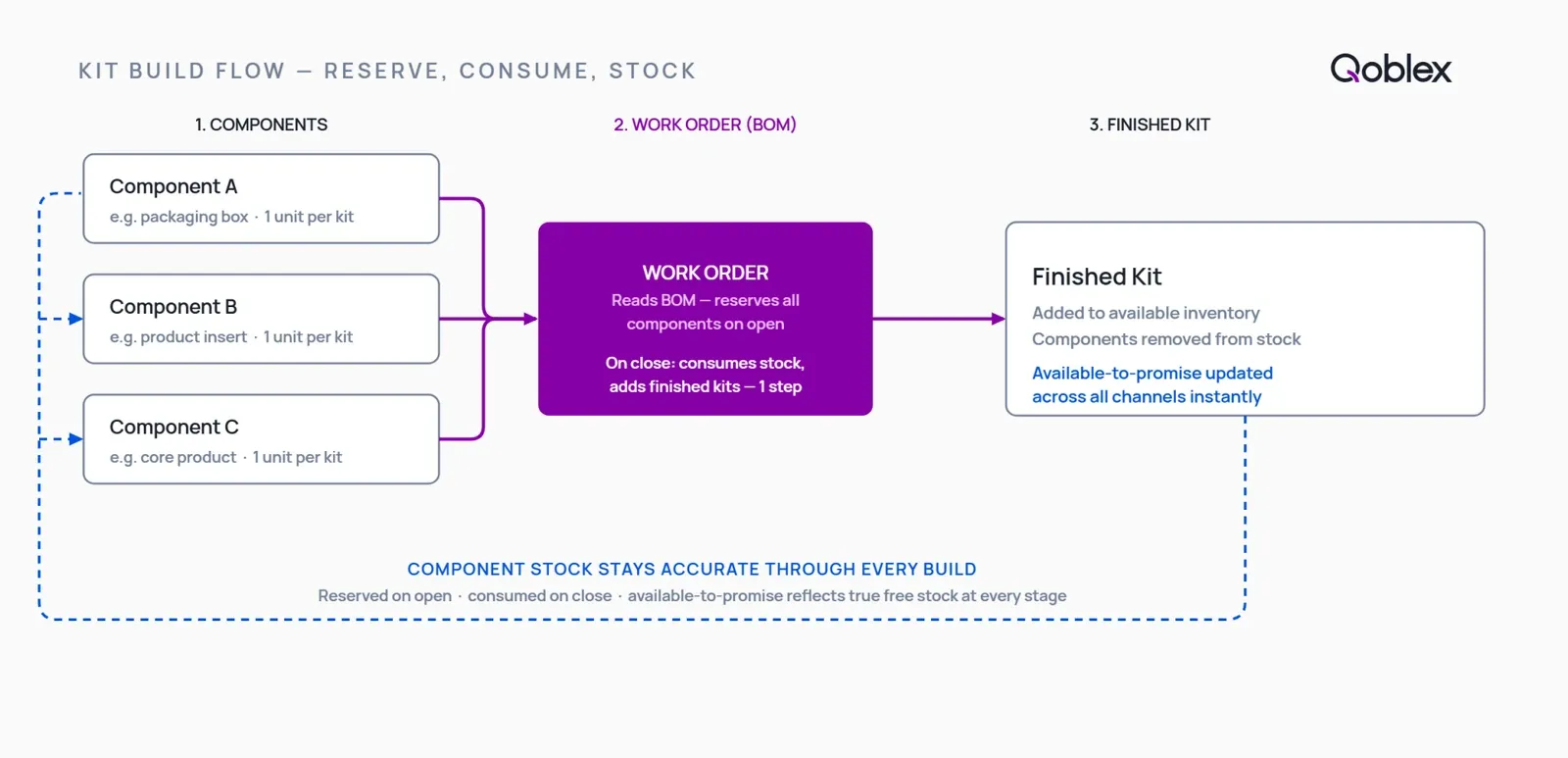
Kitting software manages the component inventory behind product kits and assemblies. When a kit is built, the system reserves the required components and removes them from available stock. When the build is complete, it consumes those components and adds the finished kits to inventory in one step, keeping your component counts and your available-to-promise numbers accurate on every build without a manual adjustment.
That definition covers the mechanics. The reason it matters is more concrete: a kit is not one unit of stock, it’s a relationship between several units. The finished kit only exists because other stock disappeared to make it. Kitting software is what keeps both sides of that relationship, the components before the build and the finished kit after, agreeing with each other.
What is the difference between kitting and bundling?
The two words get used interchangeably, but operationally they are different. Bundling groups finished SKUs at the cart or checkout level: sell product A and product B together as one listing, and both come off their own shelves as normal sales. There’s no new physical thing and no separate component math. Kitting is when you physically assemble a kit from parts, and the stock math happens at the component level. The parts get consumed, and a new finished item, the kit, comes into stock. If nobody ever has to open a box and put components in it, you’re probably bundling. If someone does, you’re kitting.
What is the difference between kitting and assembly?
Very little, in practice. Assembly usually implies a bit more transformation (you’re building a product from parts), and kitting often implies grouping finished or semi-finished items into a set. But the inventory behaviour is the same in both cases: components are committed, then consumed, and a finished good appears. That’s why the same software layer, built around a bill of materials and a build record, handles kitting, assembly, and light manufacturing without needing three different tools.
What is a bill of materials for a kit?
A bill of materials, or BOM, is simply the component list for a kit: which parts, and how many of each, go into one finished kit. It’s the recipe. When a build runs, the system reads the BOM to know exactly what to reserve and what to consume. A kit with a candle, a matchbook, and a printed card has a three-line BOM. Get the BOM right once and every build after that draws down the correct components automatically.
When does spreadsheet-based kit management break down?
You don’t need a framework to know you’ve hit this. The signs are specific:
- You assemble a batch of kits and forget to deduct the components, so the system shows parts you’ve already used up.
- A component shared across two kits shows as available to both, because nothing reserves it when a build is planned.
- You can’t answer “how many kits can I promise?” without walking to the shelf and counting parts.
- A component runs out mid-build, and you only find out when the bench stops.
- Your finished-kit count and your component count drift apart, so someone recounts before every decision that depends on them.
Any one of these is manageable. Two or three at once is the spreadsheet quietly turning into the risk it was meant to prevent. The root cause is always the same: a spreadsheet can hold either the component counts or the finished-kit counts accurately, but it can’t keep them in sync through every build unless a person remembers to update both sides every single time.
What happens to component stock when you build a kit manually?
In a manual process, the components sit in stock until someone assembles the kit, and then two things have to happen by hand: the components have to be deducted, and the finished kit has to be added. If either step is missed or delayed, your numbers are wrong until the next physical count. There’s also no concept of a build being in progress, so components earmarked for a kit you’re about to assemble still show as fully available to sell, which is how the same parts get promised twice.
What should kitting software actually do?
When you evaluate options, these are the capabilities that separate real kitting software from a stock tool with a “bundle” checkbox.
How does kitting software handle component stock when a kit is built?
This is the core job, and it happens in two moves. When a kit build opens, the software reserves (commits) the components that build needs against the BOM, so they stop showing as available to other orders or builds. That’s what ends the double-promising problem: a component committed to an open build can’t also be sold out from under it. Then, when the build is marked complete, those components are consumed from stock and the finished kits are added to available inventory in the same motion. No separate manual adjustment, no gap between “the kits are built” and “the system knows.”
Between those two moves, your available-to-promise number for the components stays honest. You can see, at any moment, how many of a component you truly have free, versus how many are already committed to builds that haven’t closed yet.
Can kitting software track kits across multiple sales channels?
If you sell the same kit on Shopify, WooCommerce, and Amazon, each channel needs to know how many kits are available, and that number depends on component stock you may also be selling as standalone items. Good kitting software sits behind all your channels as one source of truth: when components are consumed by a build, or when a kit sells on one channel, the available count updates everywhere. Without that single view, you end up overselling a kit on one channel because another channel already consumed the components.
How does a bill of materials work for a kit, and can kits contain sub-assemblies?
The BOM is the list the software reads on every build. For a simple kit it’s a flat list of parts. For a more involved product it can be multi-level: a kit built from sub-assemblies that are themselves built from components. A gift set might contain a pre-assembled candle (itself a build of wax, wick, and vessel) plus a card and a box. A multi-level BOM lets you model that the way you actually make it, rather than flattening everything into one list and losing the sub-assembly stock in the process.
How Qoblex handles kitting and assembly in practice
Here is where Qoblex fits, without embellishment. Qoblex is the operational system between a spreadsheet and a bloated ERP, and it manages kitting and assembly through its bill-of-materials and production-order flow. There’s no separate manufacturing module to unlock: BOM and lightweight production planning are included in Qoblex’s plans. It connects to QuickBooks Online and Xero as the accounting layer they already are, so your books stay your book of record.
How does Qoblex reserve and consume component stock?
You define the BOM for a kit once: the components and quantities, including sub-assemblies where a kit is built from parts that are themselves built. When you open a build for that kit, Qoblex reserves the required components against the BOM, so those parts stop showing as available to other orders. When you mark the build complete, Qoblex consumes the components from stock and adds the finished kits to available inventory in one step. The commit-and-consume cycle is automatic, which is what keeps your component counts and your kit counts honest through every build.
Does kitting work with QuickBooks Online or Xero?
Yes. You almost certainly already run QuickBooks Online or Xero for your books, and there’s no reason to change that. Qoblex owns the operations layer, the BOMs, builds, component stock, and finished kits, and syncs the financial results back to your accounting platform. You’re not replacing your books; you’re adding the kit-and-assembly layer they were never built to hold.
How does multichannel sync fit in?
Because Qoblex sits behind your sales channels, the same layer that runs your builds also holds the stock your Shopify, WooCommerce, and Amazon sales draw from. When a build consumes components or a kit sells on one channel, the available numbers sync out to your Shopify and WooCommerce stores, and Amazon orders are deducted from the same pool as they arrive (Amazon’s own listing quantities stay managed in Seller Central), so you’re working from one accurate available-to-promise view rather than reconciling three.
What does Qoblex include on the base plan?
BOM and the production-order layer that drives kit builds are included in Qoblex’s plans, so you don’t need a higher tier to get the kitting core. For current plan structure and figures, see qoblex.com/pricing. One thing to be precise about: if you need to trace lot, batch, serial, or expiry through a kit build (common in food, beverage, or supplements), that traceability is a paid add-on rather than part of the base plan. It rides on the same BOM structure as the build, which is what lets a trace pass cleanly through the kit rather than stopping at the finished-kit shelf. If traceability is your main concern, our guide to lot and batch traceability and the food and beverage inventory management hub go deeper.
When a simple bundle feature is enough
It would be dishonest to pretend every store needs dedicated kitting software. Plenty don’t, and there’s no prize for buying more than the problem requires.
If you only occasionally group two finished SKUs together for a promotion, you don’t physically assemble anything, and your bundle volumes are low, a Shopify or WooCommerce bundle app (or your cart’s built-in bundle feature) is very likely enough. Those tools handle the “sell A and B together” case well, and if you don’t need to track a separate component depleting, adding a whole operations layer would be overkill.
Dedicated kitting software earns its place when the picture changes in one of a few specific ways:
- The components behind the kit need to be tracked as stock in their own right, because you also sell them separately or buy them on their own lead times.
- You build kits in volume, and the component math (what’s committed, what’s consumed, what’s left) actually affects what you can promise.
- You sell across multiple channels and need one accurate available-to-promise view instead of three that disagree.
- You need lot, batch, serial, or expiry traceability through the build, for example in food, beverage, or supplements.
If none of those describe you today, keep the bundle feature you have. When one becomes true, the manual gap has become the problem to solve, and that’s the moment kitting software pays for itself.
FAQ
What is kitting software? Kitting software manages the component inventory behind product kits and assemblies. When a kit build opens, it reserves the components that build needs so they can’t be promised elsewhere. When the build closes, it consumes those components from stock and adds the finished kits to available inventory, keeping your counts accurate on every build without a manual adjustment.
What is the difference between kitting and bundling? Bundling groups finished SKUs at the cart or checkout level, and each product comes off its own shelf as a normal sale, so no component depletion is tracked. Kitting is when you physically assemble a kit from parts: the components are consumed and a new finished item comes into stock. The stock math in kitting happens at the component level, not the finished-SKU level.
What happens to component stock when you build a kit? When a kit build opens, the required components are reserved (committed) against the bill of materials, so they stop showing as available to other orders. When the build is marked complete, those components are consumed from stock and the finished kit is added to available inventory in the same step. In between, your available-to-promise reflects what’s truly free versus committed.
Does kitting software work with QuickBooks Online or Xero? Yes, when the kitting software integrates with your accounting platform. Qoblex sits on top of QuickBooks Online or Xero as the operations layer, owning the bill of materials and build flow while your books stay in your accounting platform. Financial results sync back, so you’re adding the kit-and-assembly layer, not replacing your accounting.
What is a bill of materials for a kit? A bill of materials (BOM) is the component list for a kit: the parts, quantities, and any sub-assemblies needed to build one finished kit. It’s the recipe the system reads on every build to know exactly which components to reserve when the build opens and consume when it closes. Multi-level BOMs let a kit include sub-assemblies that are themselves built from parts.
When should I use dedicated kitting software instead of a bundle app? Use dedicated kitting software when component stock accuracy matters separately from finished-SKU counts, when you assemble kits in volume and the component math affects what you can promise, when you sell across multiple channels and need one accurate available view, or when you need lot or serial traceability through the build. For occasional promotional bundles with no assembly, a bundle app is usually enough.
Can kitting software track lot numbers through a kit build? Only when the kitting system has native traceability that rides on the same build structure. In Qoblex, lot, batch, serial, and expiry traceability is available as a paid add-on rather than part of the base plan. It sits on the same bill of materials as the kit build, so a lot can be traced through the finished kit rather than stopping at the finished-kit shelf.