


Most small manufacturers do not set out to run their operation from three separate places. It happens one reasonable decision at a time. The bill of materials starts in a spreadsheet, because that was the fastest way to write down what goes into each product. Purchasing gets its own tab, because someone needed to work out what to order before a run. And when a customer or an auditor first asks which ingredient lot went into which finished batch, a traceability log gets bolted on at the shipping desk, because that was the moment the question came up.
Each of those choices made sense on its own. The trouble is what happens between them. The BOM changes and the purchasing tab does not hear about it. A run consumes a component that the planning sheet still counts as available. The traceability log knows what left the building but not what went into the batch on the bench, so when someone needs to trace a problem back to its source, the thread stops at the finished-goods shelf. None of the three tools is wrong. They are just disconnected, and the seams between them are where the numbers drift and the trace breaks.
This page is about how those three layers fit together as one workflow. Not three products to buy, but one connected flow: a bill of materials feeds a production order, the production order exposes what you are short, the shortfall turns into a purchasing action, and the lot trace passes through production rather than starting at shipment. We will walk each step, and link out to the deeper guides on each capability along the way.
A bill of materials defines what a product is made of. Material requirements planning reads that BOM against current stock and open orders to calculate what to buy and when. Lot traceability records which raw-material batches were issued into each production run and which finished batch came out. In one connected system, a change in any layer updates the rest automatically instead of waiting for a manual reconciliation.
What is the difference between a BOM, MRP, and lot traceability?
These three terms get used together so often that they blur, but each does a distinct job, and the value comes from how they connect.
A bill of materials (BOM) is the recipe. It lists the components and quantities that go into a finished product, including multi-level structures where a product is built from sub-assemblies that have their own parts. The BOM is the record every downstream calculation reads from. If you want the full picture of what a BOM handles, our guide to BOM software for small manufacturers covers it in depth.
Material requirements planning (MRP) is the calculation engine. It reads the BOM alongside your current stock and open orders and works out a net requirement: what you need to buy or make, and by when. The BOM is the input; MRP is what turns it into a purchasing and production plan. The deeper mechanics live in our companion guide to MRP software for small business.
Lot traceability records which raw-material batches were issued into a production run and which finished batch came out of it. That link, from input lot to finished batch, is what lets you trace a problem in either direction later.
The reason they belong in one system is simple. MRP is only as accurate as the BOM it reads, and lot traceability is only useful if it captures the link at the point where materials are actually consumed. Keep them in separate tools and every handoff becomes a place where the record can fall out of sync.
How the workflow connects: from raw material to finished batch
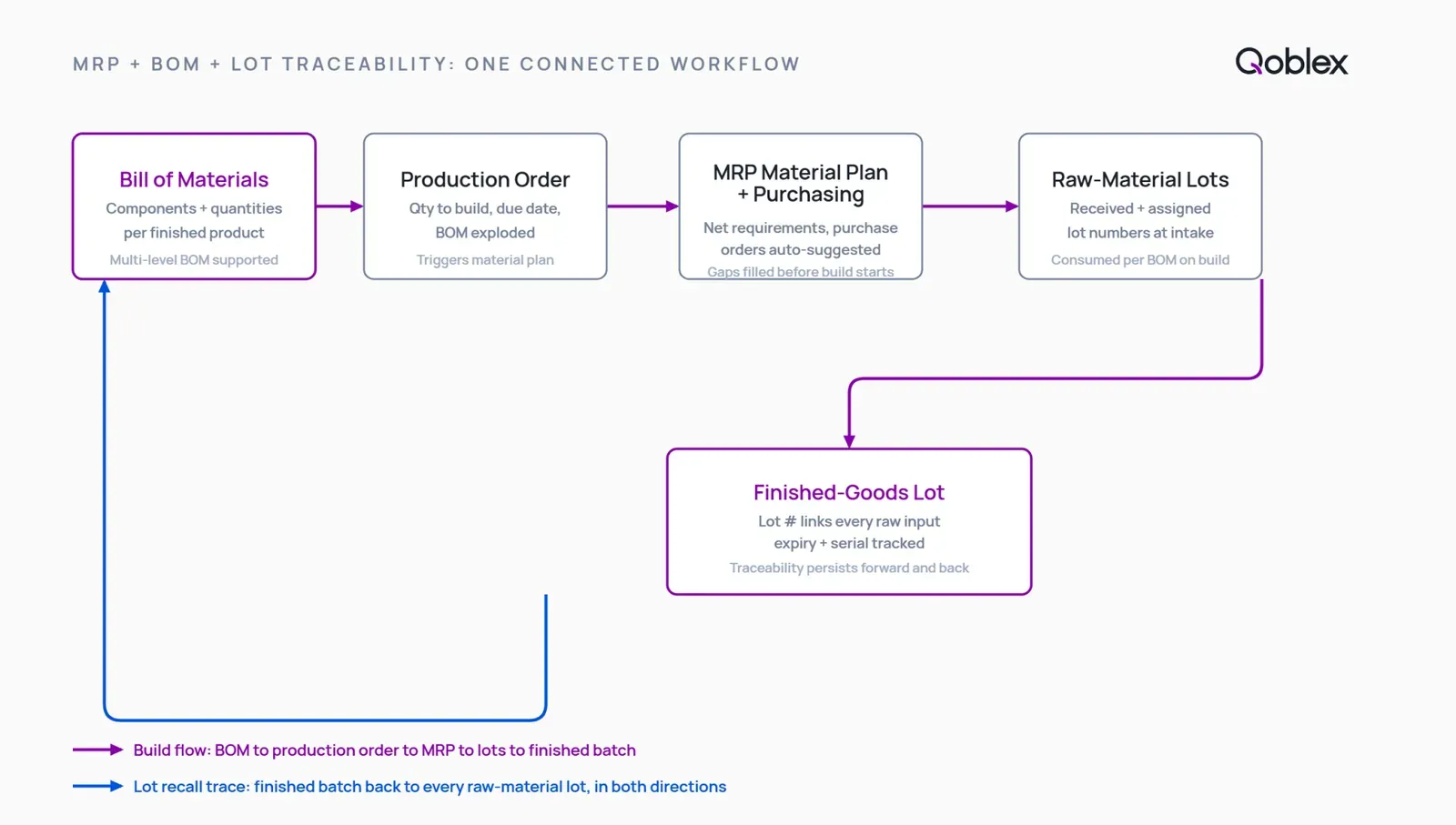
Here is the workflow as a single connected flow, one step feeding the next. Each step below cites the Qoblex behaviour it describes.
Step 1: Build the BOM
It starts with the recipe. You define the bill of materials for each product once: its complete list of component parts and the quantity of each. In Qoblex, you create and manage bills of materials and track assembly and disassembly workflows in one place. That single, structured recipe is what every step after this reads from, which is exactly why keeping it in a spreadsheet that other tools cannot see is where the drift begins.
Step 2: Open a production order against the BOM
When demand turns into a run, you open a production order against the BOM. The system reads the recipe and checks the required components against current stock, so you can see whether the run is buildable now or waiting on something. In Qoblex, if stock is insufficient, it notifies you so you can adjust the order and get additional components. This is the moment the BOM stops being a static list and becomes a live check against what you actually hold.
Step 3: Surface the shortfall and raise the purchase order
That insufficiency notification is where planning meets purchasing. When a run would leave you short, the system surfaces the shortfall so a purchase order can be raised, turning a material gap into a purchasing action rather than a stopped job. This is what “lightweight MRP” means in practice: not a heavyweight enterprise planning engine with finite-capacity scheduling, but the right-sized layer that reads your BOM against stock and tells you what to buy before a shortage stops a run. For the deeper planning picture, see our guide to MRP software for small business.
Step 4: Issue raw-material lots into the production run
For makers who track lots, this is where traceability attaches, and it attaches at the production order, not at shipment. When a run opens with batch tracking enabled, Qoblex lets you select batches for production orders and assign a batch to completed products. You choose which raw-material lots go into the run, and on completion you assign a lot number to the finished goods. That commitment of a specific input batch to a specific run is the link the whole trace depends on.
Step 5: Trace the finished batch forward and backward
Because the input-to-output link was captured at the run, the trace works in both directions. Qoblex’s traceable BOMs connect inputs to outputs, so you know exactly which raw materials went into which finished goods and can backtrack an issue to its source. And for a recall or an audit, you can instantly identify affected batches, see who received them, and take action, with every batch, serial, and inventory movement logged. The deeper treatment of trace and compliance lives in our guide to advanced lot tracking for visibility and compliance.
What is the difference between traceability bolted on at shipment and traceability through production?
This is the distinction that matters most for regulated makers, and it is easy to miss until it costs you.
Traceability that starts at the shipping desk knows what left the building and who it went to. What it cannot tell you is what went into it. The link between a raw-material lot and the finished batch it became is created during production, when materials are issued into a run. If your system does not capture that link at the production order, no amount of shipment-level logging can reconstruct it afterward. You end up knowing that batch 4471 shipped to a customer, but not which ingredient lots batch 4471 was made from.
A production-level trace closes that gap. It can follow a suspect raw-material lot forward to every finished batch it went into, and a finished batch backward to every input lot, because the link was recorded where the materials were actually consumed. That same production-level lot awareness is what makes first-expired, first-out (FEFO) picking possible, where the oldest-expiring stock ships first rather than plain arrival order. For food, supplements, cosmetics, and medical-device makers, this is the difference between a trace that answers the auditor’s question and one that stops halfway.
Can one system hold BOM, MRP, and lot traceability, or do you need separate tools?
You can absolutely build this from three separate tools. Plenty of manufacturers do, at least for a while. The question is what it costs you at the seams.
When the BOM, the planning, and the trace live in different systems, each handoff is a place where the record can fall out of sync. The BOM changes but the planning sheet keeps the old quantities. A run consumes stock that the purchasing tool still counts as available. The trace breaks where one system hands off to the next. None of this is dramatic on any single day. It shows up as small, cumulative drift: numbers that no longer agree, and a trace with a gap in the middle exactly where you need it whole.
One connected system removes the seams. The BOM feeds the production order directly, the production order checks live stock, the shortfall surfaces for purchasing, and the trace runs through the run itself. Qoblex is built for that middle: the operational layer between a spreadsheet and a full ERP, integrated with QuickBooks Online or Xero so your accounting stays your book of record rather than being replaced. For the wider stock picture around this layer, see our guide to manufacturing inventory software, and for the scheduling side, production planning software.
| Workflow layer | Spreadsheet stack (three separate tools) | One connected system (e.g. Qoblex) |
|---|---|---|
| BOM management | Manual; version control breaks | Native; single source of truth |
| MRP / material planning | Manual or separate tool; numbers drift | Reads the BOM live; net requirements current |
| Lot traceability through production | Manual or bolted on at shipment; trace breaks at the seam | Runs through the production order; input-to-output link intact |
| Integration with QBO or Xero | Manual sync; double-entry risk | Native integration; accounting stays as book of record |
When you do not need all three yet
It would be dishonest to pretend every maker needs this combination. Spreadsheets got a lot of good manufacturers off the ground, and there is no prize for buying integrated software before the problem is real.
If you make a small number of products from a short, stable parts list, with runs that rarely overlap and no obligation to trace lots, a spreadsheet BOM and a basic inventory tool may genuinely be enough for now. When your whole product range fits on one tab and rarely changes, the manual effort of keeping it current is small, and integrated MRP plus lot tracking would be answering a question you are not being asked.
The threshold is specific. It is worth moving when runs start competing for the same components and you double-commit without noticing; when a shortage is invisible until a job stops rather than a week out when you could still have ordered; or when a recall or audit requires reconstructing which raw-material lot went into which finished batch and you cannot.
Traceability in particular is worth being honest about. You only need it if your category demands it, such as food, supplements, cosmetics, or medical devices, or if a customer or auditor is actively asking. Do not carry the weight of a trace you have no obligation to keep. Until one of these thresholds is real, the simpler path is the right call, and moving early just adds process you do not yet need.
How Qoblex connects BOM, MRP, and lot traceability in one system
Here is where Qoblex fits, without embellishment. It is the operational system between a spreadsheet and a bloated ERP, holding the production, planning, and traceability layer above the accounting you already run. Your books stay in QuickBooks Online or Xero as your book of record; Qoblex adds the layer they were never built to hold.
The workflow follows the five steps above, as one connected flow:
- Build the BOM for each product, its components and quantities, using Qoblex’s bill-of-materials and assembly management.
- Open a production order against the BOM, and the required components are checked against current stock so you can see whether the run is buildable now.
- Surface the shortfall, so a purchase order can be raised before a shortage stops the run rather than after.
- Issue raw-material lots into the run, selecting which batches go into the production order and assigning a lot to the finished goods on completion.
- Trace the finished batch forward and backward through traceable BOMs, with a full logged audit trail for recalls and audits.
Bill-of-materials management and lightweight MRP are part of the Qoblex plans. Lot, batch, serial, and expiry traceability is a paid add-on rather than part of the base plan; you add it only if your operation needs the trace. We keep dollar amounts on the pricing page so they stay correct when they change. For the deep dive on each layer, see our guides to BOM software, MRP software, and advanced lot tracking.
FAQ
How do MRP, BOM, and lot traceability work together? The BOM is the recipe: what a product is made of. MRP reads that BOM against current stock and open orders to calculate what to buy and when. Lot traceability records which raw-material batches were issued into each run and which finished batch came out. In one connected system, the BOM feeds the production order, the production order exposes the shortfall, the shortfall informs purchasing, and the lot trace passes through production rather than stopping at the finished-goods shelf.
What is the difference between a BOM and MRP? A BOM is the structured recipe: the components and quantities that go into a product. MRP is the calculation engine that reads the BOM alongside current stock and open orders to produce a net requirement, what to buy or make and by when. The BOM is the input; MRP is the engine that turns it into a purchasing and production plan.
Can one system manage BOM, MRP, and lot traceability for a small manufacturer? Yes, when the system is built to hold all three natively. The risk with separate tools is the seam between them: the trace can break where the systems hand off, and stock numbers drift when updates are manual. Qoblex holds bill of materials, lightweight MRP, and lot traceability in one system, integrated with QuickBooks Online or Xero as book of record.
Where does lot tracking attach in the production workflow? At the production order, not at shipment. When a run opens with batch tracking enabled, the operator selects which raw-material batches are issued into the run, and on completion the finished goods are assigned a lot number. That link from input batch to finished batch is what makes the trace useful: it lets you trace backward from a finished batch to its raw-material lots, or forward from an affected lot to the customers who received it.
How does a material shortfall in MRP become a purchase order? When a production order is opened and the BOM is checked against current stock, Qoblex notifies you if stock is insufficient to complete the run. That notification surfaces the shortfall so a purchase order can be raised, turning a material gap into a purchasing action rather than a stopped job.
Does lot traceability work through the BOM? Yes. Qoblex’s traceable BOMs connect inputs to outputs, so you can know which raw materials went into which finished goods and backtrack an issue to its source. The link is recorded where materials are issued into the run, which is what lets the trace run through production rather than stopping at shipment.
When do you not need integrated MRP, BOM, and lot traceability? If you make a small number of products from a short, stable parts list, with runs that rarely overlap and no traceability obligation, a spreadsheet BOM and a basic inventory tool may be enough for now. The threshold is specific: when runs start competing for the same components, when shortages are invisible until a job stops, or when a recall or audit requires reconstructing which input lot went into which finished batch. Until one of those is true, the simpler path is the right call.
Is lot traceability included in Qoblex’s base plan? Lot, batch, serial, and expiry traceability is a paid add-on, not part of the base plan. Bill-of-materials management and lightweight MRP are included in the plans. See qoblex.com/pricing for current figures.