



You run your books on QuickBooks Online, and for most of what you sell, that has been enough. Then a customer emails asking which lot their protein powder came from. Or a health inspector wants to see traceability records. Or you find a case of product that quietly expired on the shelf because nobody knew it was next to go. You open QuickBooks Online to look up the lot and the expiry date, and there is simply no field for it.
That is not a mistake you made in setup. QuickBooks Online does not have native lot, batch, expiry-date, or serial-number tracking. It was built to be your accounting system, and it is a good one. But the moment you sell something perishable, lot-controlled, or individually serialized, you hit an operational wall that the accounting book was never designed to handle.
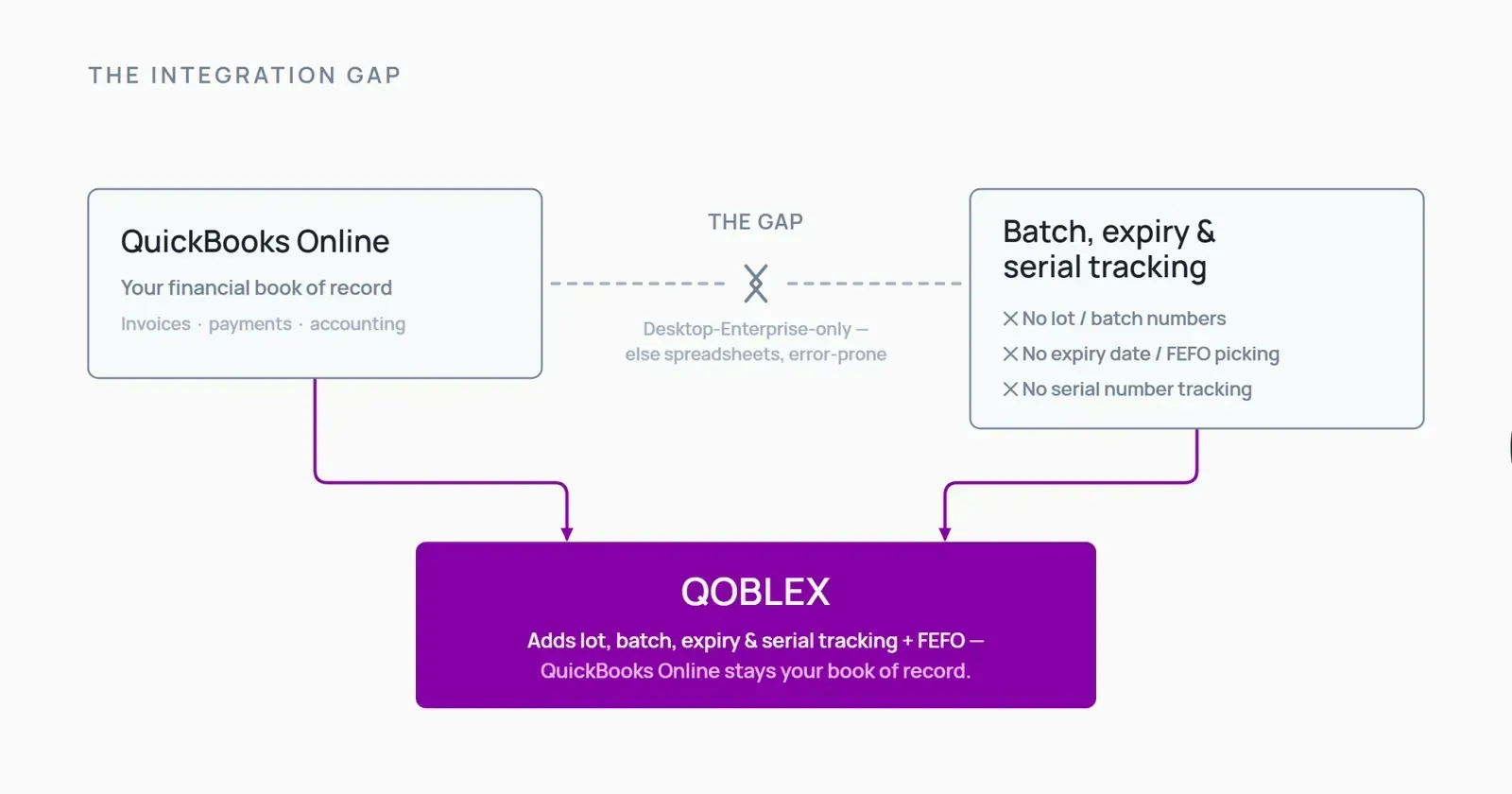
This page is for that operator. It names exactly what QuickBooks Online does and doesn’t track, why the usual workaround breaks, and how you can add real lot/batch/expiry/serial tracking and FEFO picking while QuickBooks Online stays your book of record.
Does QuickBooks Online track lot numbers and expiry dates? (the short answer)
Short answer: no. Not natively, and not with a workaround that holds up under pressure.
What QuickBooks Online does track natively
QuickBooks Online tracks your products and quantity on hand, and it values inventory using FIFO for accounting purposes. The first units you purchased are treated as the first ones sold, so your cost of goods sold and inventory value stay consistent. That is genuinely useful, and it is worth being precise here: QuickBooks Online does do FIFO. That part is not the gap.
What it doesn’t track
What QuickBooks Online does not do is track a physical lot number, a batch, an expiration date, or a serial number. QuickBooks Desktop is a separate product line, and some Desktop editions include lot, serial, and expiration tracking, but QuickBooks Online does not. So if you need to know which physical lot a unit belongs to, when it expires, and which one to ship first, QuickBooks Online has no place to put that information.
This is where FIFO and FEFO get confused, so it’s worth separating them cleanly. FIFO in QuickBooks Online is an accounting valuation rule: it decides how costs flow through your books. FEFO (first-expired-first-out) is a physical picking rule: it decides which actual lot leaves your shelf first. QuickBooks Online handles the first. It has nothing for the second. A knowledgeable operator feels that gap the first time they try to pick the soonest-to-expire batch and realize the system doesn’t know which one that is.
QBO vs Qoblex + QBO: capability gap at a glance
| Capability | QuickBooks Online (native) | Qoblex + QuickBooks Online |
|---|---|---|
| Lot / batch tracking | No (QuickBooks Desktop only) | Yes |
| Expiry date tracking | No (QuickBooks Desktop only) | Yes |
| FEFO picking | No | Yes |
| Serial number tracking | No (QuickBooks Desktop only) | Yes |
| Lot traceability / recall trace | No | Yes |
| FIFO accounting valuation | Yes (accounting only) | Stays in QuickBooks Online |
| Accounting / GL / invoicing | Yes (system of record) | Stays in QuickBooks Online |
Why the manual workaround breaks (typing batch/expiry into the item name)
Because there is no field for it, QuickBooks Online users improvise. The most common workaround is to type a batch number and expiry date into the product name or the description field: QuickBooks Online has no dedicated field for expiry-date tracking, so people put it wherever they can.
It works for a while. Then it doesn’t, and here is where it falls apart:
- No per-lot quantities. You can name an item “WheyVanilla-LOT2411-EXP0526”, but QuickBooks Online still counts it as one lump of quantity on hand. It can’t tell you that 40 units are from one lot and 60 from another.
- No expiry sorting. Nothing sorts your stock by expiration date, so nothing tells you what to sell first.
- No FEFO picking. When you pick and ship, the system can’t steer you to the soonest-to-expire lot. That’s a manual, memory-based decision every time.
- No recall trace. If a supplier flags a bad lot, you can’t ask the system which customer orders it went into. You’re reconstructing it by hand.
- Product-list bloat. Every new lot becomes a new item variant, and your product list quietly balloons into something no one can navigate.
- No reporting. None of this rolls up into a report you can hand to an inspector or an auditor.
The workaround wasn’t a bad idea. It’s a reasonable way to make an accounting tool hold a little operational data. It just doesn’t scale past the point where lots and expiries actually start to matter.
What proper batch & expiry tracking actually requires (the operator’s checklist)
If you sell perishable or regulated goods, here’s what “real” lot and expiry tracking means in practice: the checklist QuickBooks Online can’t tick on its own.
- Per-lot/batch stock with received and expiry dates. Each lot is its own tracked quantity, with the date it came in and the date it expires. You always know how much of which lot you’re holding.
- FEFO picking. When you fulfill an order, the system tells you to pick the soonest-to-expire lot first. That’s the difference between FEFO and FIFO: FIFO (in QuickBooks) is about how costs are valued; FEFO is a physical rule that keeps you from shipping product that will expire before it sells.
- Serial numbers. For individually tracked or high-value units, you record the specific serial that shipped to a specific customer.
- Forward and backward traceability. You can trace which supplier lot went into which customer order, in both directions. That is what recall readiness actually is, being able to run a mock recall and answer “where did this lot go?” without a two-day scramble.
None of these are exotic ERP features. They’re the baseline for anyone in food, supplements, cosmetics, or pharma. They’re just a different job than accounting, which is why the accounting system doesn’t do them.
How Qoblex adds lot, batch, expiry & serial tracking to QuickBooks Online (QuickBooks stays your books)
This is the part worth being clear about, because it’s easy to assume the fix is “replace QuickBooks.” It isn’t. Qoblex is the operations layer that sits on top of QuickBooks Online. QuickBooks Online stays your accounting system of record; Qoblex handles the inventory and traceability it was never built for.
Track stock by lot/batch with expiry dates, and pick by FEFO
In Qoblex, each lot or batch is its own tracked quantity with its received and expiry dates. When you fulfill an order, Qoblex picks by FEFO, the soonest-to-expire lot goes first, so product moves in the right order instead of relying on someone remembering which case is oldest.
Serial-number tracking for regulated or high-value units
For units you track individually, Qoblex records serial numbers through receiving, stock, and fulfillment, so you know exactly which serial went to which order.
How the QuickBooks Online sync works
Qoblex connects to QuickBooks Online and handles the operations side: inventory, lots, expiry, serials, purchasing, multi-warehouse, and picking. QuickBooks Online keeps doing what it’s good at: invoices, bills, and the general ledger. Your accounting stays in QuickBooks. You are adding a layer, not migrating off your books.
The regulated-vertical fit
This is built for businesses where traceability isn’t optional: food and beverage, supplements and nutraceuticals, cosmetics, and pharma. If you can be asked to prove which lot shipped where, this is the operational context you need, including the ability to run a mock recall and trace a lot end to end. Food manufacturers managing FSMA traceability obligations will find the fuller picture in our guide to food traceability software.
If you want the fuller picture of running inventory alongside QuickBooks Online, see our overview of inventory management software for QuickBooks Online. This page is the specific cut: lots, batches, expiry, serials, and FEFO.
When QuickBooks Online alone (or QuickBooks Online plus a simpler tool) is enough
Adding an operations layer isn’t the right move for everyone. Here’s when QuickBooks Online on its own, or QuickBooks Online plus something lighter, is genuinely the better call.
- You don’t sell anything perishable, lot-controlled, or serialized. If nothing you sell expires, gets recalled by batch, or needs a serial, you don’t have the problem this page describes. QuickBooks Online’s native inventory is fine.
- You track only a handful of SKUs. If a short spreadsheet beside QuickBooks Online still tells the truth about your stock, keep it. Spreadsheets are how a lot of good businesses started, and there’s no reason to add a platform before the workflow actually strains.
- You genuinely need Desktop-grade lot/expiry and are willing to move. Some QuickBooks Desktop editions do have native lot, serial, and expiration tracking. If you want that inside QuickBooks itself and you’re comfortable moving from Online to Desktop, that’s a legitimate path, just know it’s a different product line with a different footprint.
- You only need a light expiry reminder for a few products. If all you want is a nudge when a couple of items are near expiry, a narrow single-purpose app may cost less than a full operations platform.
If you sell real volume across many lots in a regulated category, those options run out fast, but it’s worth knowing where the line is.
Adding it up: what lot & expiry tracking on QuickBooks Online costs
A quick, honest note on cost, because it belongs near a decision even though it’s not the reason to make one.
In Qoblex, lot/batch/serial/expiry tracking is a paid add-on on top of the base plan, with no setup fee and no contract. It is an add-on, not something bundled into the base plan for free. See qoblex.com/pricing for current figures.
For fair context: the other inventory apps that add lot and expiry tracking to QuickBooks Online also carry a monthly cost. This is a category with a running price, not a one-time purchase; that’s true across the board, not specific to any one tool.
FAQ
Does QuickBooks Online track lot numbers and expiry dates?
No. QuickBooks Online has no native lot, batch, expiry, or serial tracking. QuickBooks Desktop is a separate product line and some Desktop editions include those features, but QuickBooks Online does not.
Does QuickBooks Online do FIFO?
Yes, for accounting valuation. QuickBooks Online treats the first units you purchased as the first ones sold when it values inventory and cost of goods sold. That’s accounting FIFO. It is not the same as physical lot tracking or FEFO picking, which QuickBooks Online doesn’t do.
How do I track expiry dates in QuickBooks Online without switching to Desktop?
Add a dedicated inventory app that syncs with QuickBooks Online, for example, Qoblex. QuickBooks Online stays your accounting system, and the app handles lot/batch, expiry dates, and FEFO picking.
What is FEFO and how is it different from FIFO?
FEFO is first-expired-first-out: you pick the soonest-to-expire lot first. It’s a physical picking rule for perishable goods. FIFO here means first-in-first-out and, in QuickBooks Online, refers to how inventory costs are valued for accounting. FEFO governs what physically ships; FIFO governs how costs flow through your books.
Does Qoblex replace QuickBooks Online?
No. Qoblex is the operations and inventory layer. QuickBooks Online stays your accounting system of record: invoices, bills, and the general ledger stay in QuickBooks. The two sync.
How much does it cost to add lot and expiry tracking with Qoblex?
Lot/batch/serial/expiry tracking is a paid add-on on top of the base plan, with no setup fee and no contract. See qoblex.com/pricing for current figures.