



As of mid-2026, Xero has no native lot number, batch, or expiry date fields, not in core Xero, and not via Xero Inventory Plus. Based on Xero’s published guidance and independent Xero inventory guides, the paid US-only Inventory Plus add-on adds FIFO costing and multi-location stock levels, but not lot numbers, batch codes, expiry dates, or FEFO picking. Food, supplement, and cosmetics sellers who run their books in Xero add Qoblex to handle lot and expiry operations, while Xero stays their accounting system of record.
Does Xero track lot numbers and expiry dates? (The short answer)
Lot and expiry are one part of the picture. For the whole of what sits between your stock and your books, see Xero inventory management software.
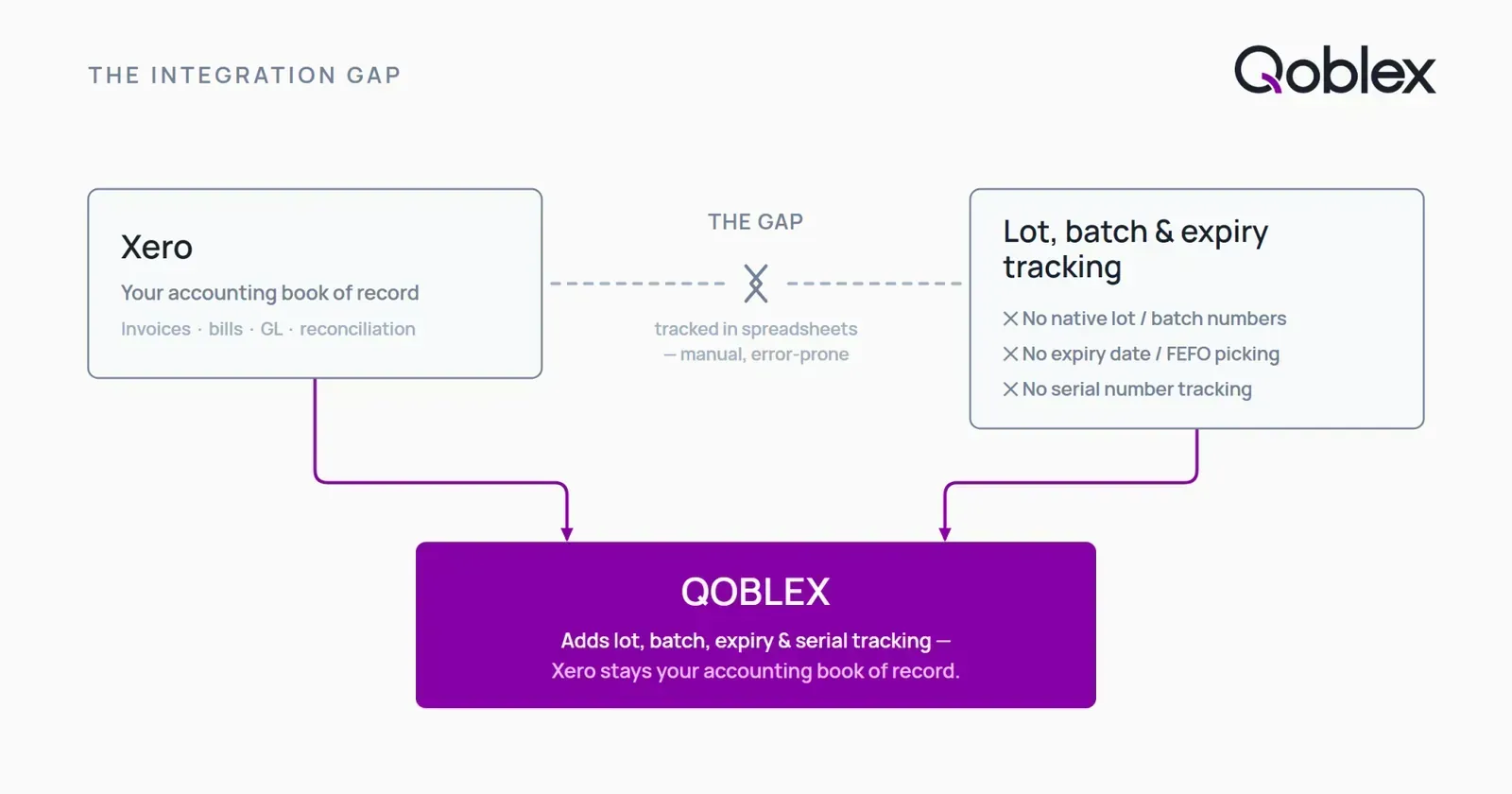
Short answer: no. Not natively, and not with any workaround that holds up under pressure.
What Xero does support natively
Xero’s tracked inventory automatically updates stock quantities when you raise purchase orders and sales invoices. It records the cost of goods sold (COGS) and integrates with your Xero balance sheet for inventory valuation. You can track a product as “tracked” or “untracked,” get basic stock-on-hand visibility, and run standard inventory reports. For accounting and financial management, journals, bank reconciliation, invoicing, bill payment, Xero is a capable system of record.
What Xero does NOT support: the lot, batch, and expiry gap
Xero has no native field for a lot number, batch code, or expiry date. It treats every unit of a SKU as identical: there is no way to receive a purchase order against a specific lot, record the received date or expiry date per batch, allocate specific lots to outgoing orders, or enforce FEFO (First Expiry, First Out) picking rules. This is confirmed by multiple independent Xero inventory guides (Katana, Unleashed, inFlow) and by Xero’s own product ideas forum, which shows an open, unacknowledged feature request for expiry date fields, no planned status assigned.
As of mid-2026, based on Xero’s published guidance and the independent guides above, here is where each specific question lands:
- Does Xero track lot numbers? No, there is no lot number field in Xero.
- Does Xero track expiry dates? No. No native expiry date field exists.
- Does Xero Inventory Plus add lot/batch tracking? No. Inventory Plus adds FIFO costing and multi-location levels (US-only), but no lot, batch, expiry, or serial fields.
- Is lot tracking available in a paid tier of Xero? No tier of Xero includes lot, batch, expiry, or serial tracking.
One important scope note: As of mid-2026, based on Xero’s published guidance and independent Xero inventory guides, Xero Inventory Plus, Xero’s own paid inventory add-on, available in the US only, adds FIFO costing method selection and basic multi-location stock levels. It does not add lot numbers, batch codes, expiry date fields, or FEFO picking. The lot/batch/expiry/serial gap is unchanged by Inventory Plus.
Xero native vs Qoblex + Xero: the capability gap at a glance
| Capability | Xero (native + Inventory Plus) | Qoblex + Xero |
|---|---|---|
| Lot / batch number tracking | No native lot number field | Yes, structured lot fields on every PO receipt |
| Expiry date tracking | No expiry date field | Yes, expiry date per lot, searchable and reportable |
| FEFO picking enforcement | No picking rules of any kind | Yes, FEFO allocation on pick lists |
| Serial number tracking | Not available | Yes (included in lot tracking add-on) |
| Forward/backward lot traceability | Not possible without manual workaround | Yes, trace lot to orders; trace order to lots |
| Expiry alerts and write-off prevention | No alert capability | Yes, configurable expiry alert thresholds |
| Multi-warehouse (bin-level) | Core Xero: single stock pool; Inventory Plus adds multi-location (US-only) | Yes, stock per warehouse, lot identity preserved on transfer |
| FIFO costing (accounting) | Yes via Inventory Plus (US-only) | Stays in Xero, syncs bidirectionally |
| Accounting / GL / invoicing | Yes (system of record) | Stays in Xero, syncs bidirectionally |
Xero Inventory Plus note: as of mid-2026, based on Xero’s published guidance and independent Xero inventory guides, the Inventory Plus add-on (US-only, USD-only) adds FIFO costing method and multi-location stock levels; it does not add lot, batch, expiry, or serial fields. The “No…” cells above reflect both core Xero and Inventory Plus. Neither provides those capabilities.
Why the manual workaround breaks
The workaround Xero users actually resort to
When a food or supplement brand grows beyond spreadsheets, Xero users typically resort to one or more of these:
- Typing lot numbers into the product description or note fields. A purchase order goes in with “Lot: 240901 / Exp: 2026-03-15” pasted into a line-item description. There is no structured field, just free text that only the person who typed it can find later.
- A parallel spreadsheet or Google Sheet tracking lot numbers, received dates, and expiry dates alongside Xero, manually kept in sync with each purchase and sale.
- Using Xero inventory items as proxies for lots, creating a new inventory item for each lot (e.g., “Protein Powder, Lot 24Q3”) and manually retiring old items. This balloons the product catalog and destroys reporting cohesion.
These are real, documented workarounds seen in Xero community forums and reported by third-party Xero inventory guides.
Where it falls apart
No reliable tracking means no reliable recall. If a supplier notifies you of a contamination issue with Lot 240901, you need to know: which purchase orders received that lot, which sales orders shipped it, and which customers still hold it. Free-text descriptions and spreadsheets cannot answer that question quickly or reliably.
Compliance exposure. For food businesses, FSMA 204 traceability requirements (FDA enforcement date: 2028-07-20) require Critical Tracking Events (CTEs) and Key Data Elements (KDEs) per lot. A paper or spreadsheet trail does not meet that standard.
Stock rotation errors. Without FEFO enforcement, pickers grab whatever is easiest to reach. Stock with a near-term expiry date sits at the back while fresher stock ships. Write-offs accumulate.
Data drift. The spreadsheet and Xero fall out of sync within weeks as the team grows. Adjustments made in one place don’t make it to the other. Month-end reconciliation becomes a guessing game.
What proper lot and expiry tracking actually requires (the operator’s checklist)
A real lot and expiry tracking system, one that stands up to a health inspection or an FDA audit, needs to do all of the following:
- Receive against a lot number. Each purchase order line records the supplier’s lot/batch code and the received date; every unit in that shipment carries that lot identity.
- Record an expiry date per lot. The system stores the expiry (or best-before) date on the lot itself, not on the product.
- FEFO picking enforcement. When a pick list is generated, the system allocates the lot whose expiry date is nearest, not the cheapest unit or the most accessible bin location.
- Forward and backward traceability. Given a lot number: show every sale that shipped from it. Given an order: show every lot that went into it.
- Expiry alerts. The system flags lots approaching expiry so you can discount, rotate, or quarantine before write-off.
- Recall simulation. Identify every customer who received units from a flagged lot within seconds, not hours.
Compliance context (food and beverage, supplements, cosmetics): FSMA 204 (FDA, enforcement 2028-07-20) requires traceability at the lot/batch level for foods on the Food Traceability List. GMP requirements for dietary supplements (21 CFR Part 111) require batch records including receipt, identity testing, and disposition. Cosmetics GMP (ISO 22716) requires batch traceability from raw material to finished product. None of these requirements can be met by typing lot numbers into Xero description fields.
How Qoblex adds lot and expiry tracking to Xero (Xero stays your books)
How Qoblex delivers lot and expiry tracking
Qoblex is an inventory and operations platform that handles the warehouse and production layer that Xero was never built for. On the lot and expiry side, Qoblex provides:
- Lot-level receiving: Each Qoblex purchase order records the supplier lot/batch number, received date, and expiry date per line, structured fields, not notes.
- FEFO allocation: When Qoblex generates pick lists for outgoing orders, it allocates stock from the lot with the nearest expiry date first.
- Expiry alerts and reporting: Qoblex surfaces lots approaching expiry so you can act before write-off.
- Forward and backward traceability: Trace a lot from supplier receipt through every shipment, or trace an order back to every lot that contributed to it.
- Serial number tracking: For products tracked unit-by-unit (medical devices, electronics, serialized supplements), Qoblex records a serial number per unit.
- Multi-warehouse: Stock moves between warehouse locations in Qoblex while lot identity is preserved throughout the transfer.
Qoblex also handles purchase orders, demand forecasting, multi-warehouse management, and lightweight MRP/BOM. So you’re not buying a narrow expiry widget; you’re adding the full operations layer built on proper lot control.
Note on pricing: Qoblex’s lot, serial, and expiry date tracking is available as an add-on to its base plan, see current pricing at qoblex.com/pricing.
How the Xero sync works: Qoblex handles operations, Xero stays the accounting system of record
Qoblex and Xero sync bidirectionally. The division of responsibility:
- Xero keeps: all accounting: general ledger, bank reconciliation, payroll, tax, invoicing to customers, bills from suppliers, financial reporting.
- Qoblex handles: inventory operations: lot receipt, stock on hand per lot per warehouse, FEFO picking, purchase order management, production (BOM/work orders), demand forecasting, warehouse transfers.
- What syncs: When a Qoblex sale is fulfilled, the corresponding invoice and COGS entry go to Xero. When a Qoblex purchase order is received, the supplier bill goes to Xero. Stock value adjustments flow to the Xero balance sheet. Your accountant never needs to leave Xero; your warehouse team never loses lot traceability. This two-way Qoblex–Xero sync covers invoices, bills, COGS, stock, and manufacturing costs.
The integration is two-way: invoices, bills, COGS, stock adjustments, and manufacturing costs all sync. You do not re-enter transactions in both systems.
The primary buyer vertical: who this is for
If you’re a food and beverage producer, supplement manufacturer, or cosmetics brand already running your books in Xero, and you’ve hit the wall Xero’s inventory was not built to clear, this is the gap you’re dealing with. Specifically:
- A food brand preparing for FSMA 204 compliance (enforcement 2028-07-20) that needs lot-level CTEs and KDEs.
- A supplement manufacturer whose GMP audit requires batch records tied to purchase receipts.
- A cosmetics producer whose retailer or distributor is asking for a lot traceability certificate.
- Any Xero user who has had a supplier recall notice and needed to find affected customers fast, and couldn’t.
When Xero alone (or Xero + a simpler tool) is enough
This section is genuinely important. Qoblex is not the right answer for everyone running Xero. Here is when you probably do not need it:
You don’t sell anything that requires lot or expiry tracking
If you sell non-perishable, non-regulated products with no batch identity requirement, software licenses, merchandise, standard hardware, stationery, Xero’s inventory tracking is adequate for quantity control. You have no FEFO obligation, no recall risk tied to lot numbers, no compliance audit requiring batch records. Xero plus a basic spreadsheet for purchase tracking may genuinely be enough.
You track a handful of SKUs and a spreadsheet still tells the truth
A very small operation, say, one product, one supplier, fewer than 10 active lots at any given time, may find that a well-maintained spreadsheet alongside Xero still provides reliable traceability. When the team is one or two people who both touch every shipment, informal systems can hold. The moment a third person joins the warehouse, or you run more than a dozen active lots simultaneously, the spreadsheet starts drifting.
You genuinely need enterprise-grade traceability and want a single dedicated system
If your scale requires a true ERP with warehouse management (WMS), advanced ATP (Available to Promise), complex multi-plant scheduling, or full EDI, a heavier system (DEAR/Cin7, Fishbowl, or a light ERP) may be more appropriate than Qoblex. Qoblex is built for SMBs; it is not a NetSuite replacement.
You only need a narrow lot-tracking widget
If the only gap you need to close is recording a lot number on inbound stock, and you have no pick-list workflow, no FEFO requirement, and no traceability reporting obligation, a lightweight Xero add-on from the Xero App Store (like inFlow at its lower tier) may cost less than a full operations platform. If your need genuinely is that narrow, a narrower tool may serve it. The right question to ask: will you need POs, multi-warehouse, FEFO picks, or demand forecasting within the next 18 months? If yes, the narrower tool will cap out before you’re ready.
Adding it up: what lot and expiry tracking on Xero costs
Qoblex pricing
Qoblex’s lot, serial, and expiry date tracking is available as an add-on to its base plan, see current pricing at qoblex.com/pricing.
This is not the same as paying for a single-purpose expiry-tracking widget. Qoblex’s base plan includes purchase order management, multi-warehouse, demand forecasting, and the Xero sync. The add-on unlocks the lot/serial/expiry layer on top.
Other Xero add-ons also carry a monthly cost
Dedicated inventory solutions that integrate with Xero, Unleashed, inFlow, Cin7 Core, Katana, all carry their own monthly subscription costs, and pricing scales with the tier and feature set you need. Narrow lot-tracking tools from the Xero App Store are generally cheaper but also narrower in scope. When you compare options, weigh the monthly cost against how much of the operations layer, POs, multi-warehouse, FEFO picking, forecasting, you actually need now and within the next year.
FAQ
Does Xero track lot numbers natively?
No. As of mid-2026, based on Xero’s published guidance and independent Xero inventory guides, Xero has no lot number field in any tier of its product, including Xero Inventory Plus. Xero tracked inventory records product quantities and costs, but every unit of a SKU is treated as identical, there is no structured lot or batch identity.
Does Xero Inventory Plus add lot or expiry tracking?
No. As of mid-2026, based on Xero’s published guidance and independent Xero inventory guides, Xero Inventory Plus (US-only, USD-only) adds FIFO costing method selection and basic multi-location stock levels. It does not add lot numbers, batch codes, expiry date fields, or FEFO picking rules. The lot/expiry gap is present in core Xero and in Inventory Plus.
How do I add lot and expiry tracking to Xero without switching away from Xero?
Add a dedicated inventory/operations app from the Xero App Store that syncs bidirectionally with Xero. Xero stays the accounting system; the app handles lot receipt, expiry tracking, and FEFO picking. Qoblex integrates with Xero via a two-way sync, invoices, bills, COGS, and stock adjustments all flow to Xero.
Does Qoblex replace Xero?
No. Qoblex is the operations and inventory layer. Xero stays the accounting system of record: general ledger, bank reconciliation, tax, payroll, invoicing. The two systems sync so neither team re-enters transactions manually.
How much does it cost to add lot and expiry tracking to Xero via Qoblex?
Qoblex offers lot, serial, and expiry date tracking as an add-on to its base plan. For current figures, see qoblex.com/pricing.
Is FEFO picking required for food and supplement businesses?
FEFO (First Expiry, First Out) is the standard stock rotation method for any product with an expiry or best-before date. It is an operational best practice and, for foods on the FDA’s Food Traceability List, a prerequisite for meeting FSMA 204 traceability obligations (enforcement date: 2028-07-20). Many food retailers and distributors also require documented FEFO compliance from their suppliers.