



You chose Xero because it makes accounting simple. But if you sell physical products, manage inventory across warehouses, or reconcile payouts from multiple sales channels, you have probably realized that accounting software alone cannot keep up with your operations.
That gap is exactly what integrations are designed to fill. With over 1,000 apps in the Xero App Marketplace and 4.6 million subscribers worldwide, Xero has built one of the largest integration ecosystems of any cloud accounting software. The challenge is not finding an app — it is finding the right apps for your business.
This guide covers the best Xero integrations across six core functions: inventory management, ecommerce accounting, payments, expenses, payroll, and reporting. Each recommendation includes what the tool does, how it connects to Xero, what it costs, and how easy it is to set up — so you can shortlist and trial the right tools without wasting time.
Written by Tahar Ouhrouche, CEO and co-founder of Qoblex, an inventory management platform that has helped businesses manage over $3.7 billion in goods. Qoblex is included in this guide alongside competing tools so you can compare options fairly.
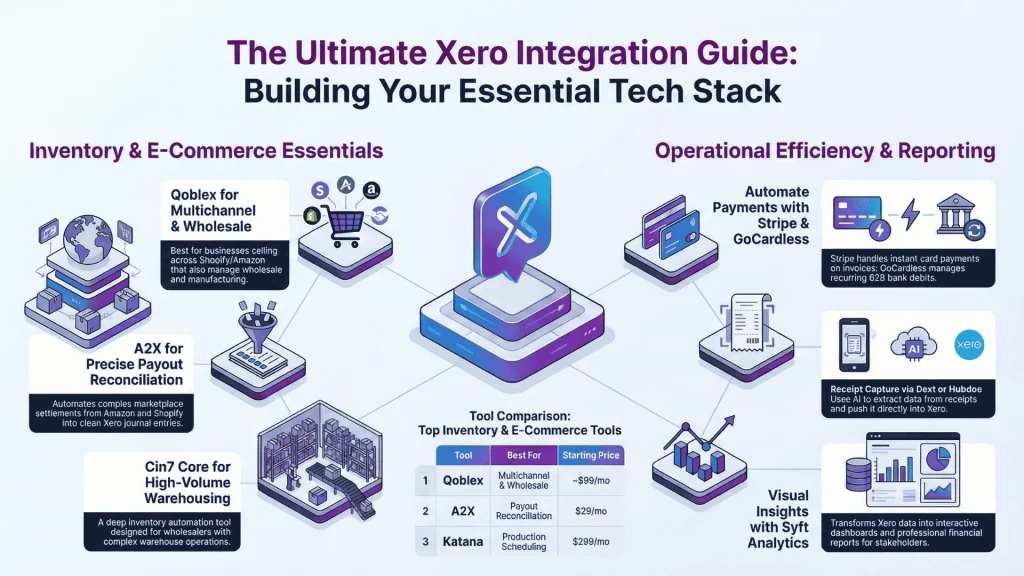
Here is a quick overview of every tool covered.
| Tool | Category | Best For | Starting Price | Setup |
| Qoblex | Inventory & Orders | Multichannel inventory, wholesale, manufacturing | 14-day free trial; paid plans from ~$99/mo | Guided |
| Cin7 Core | Inventory & Orders | High-volume warehousing | $349/mo | Complex |
| Katana | Inventory & Orders | Production scheduling for manufacturers | $299/mo | Guided |
| Xero Inventory Plus | Inventory & Orders | Shopify-only sellers getting started | Included with Xero | One-click |
| A2X | eCommerce Accounting | Marketplace payout reconciliation | $29/mo per channel | One-click |
| Webgility | eCommerce Accounting | Multichannel accounting automation | $24/mo | Guided |
| Shopify (Native) | eCommerce Accounting | Basic Shopify-to-Xero sync | Free with Xero | One-click |
| Stripe | Payments | Online invoice payments | Transaction fees only | One-click |
| GoCardless | Payments | Recurring B2B payments | Transaction fees only | One-click |
| Dext | Expense Management | Receipt capture and pre-accounting | ~$24/mo | One-click |
| Hubdoc | Expense Management | Free document capture (included with Xero) | Free with Xero | One-click |
| Expensify | Expense Management | Teams with travel and mileage | $5/mo per user | Guided |
| Gusto | Payroll & HR | US-based small businesses | $49/mo + $6/person | Guided |
| Syft Analytics | Reporting | Visual dashboards and KPIs | Free tier available | One-click |
| Fathom | Reporting | Accountants managing multiple clients | $49/mo | One-click |
What Are Xero Integrations and Why Do They Matter?
A Xero integration is any app or built-in tool that connects to your Xero account to share data automatically. Instead of entering the same invoice, payment, or stock adjustment in multiple systems, integrations keep everything synchronized — fewer errors, faster bank reconciliation, and financial data you can trust.
For product-based businesses, integrations are not optional. Your sales orders, purchase orders, cost of goods sold (COGS), and stock-on-hand values all need to flow into Xero without manual re-entry. When they do not, you end up with mismatched inventory counts, inaccurate profit margins, and month-end closes that drag on for days.
Add-Ons vs. Native Integrations vs. API Connections
Not all Xero integrations work the same way. Understanding the differences helps you pick the right type for your needs.
Xero add-ons are tools built and maintained by Xero itself. Xero Inventory Plus and Hubdoc are examples. Updates and support come directly from the Xero team.
Native integrations are direct connections built by third-party companies and listed in the Xero App Marketplace. These typically offer a one-click setup through Xero’s official API. Qoblex, A2X, Stripe, and Dext all fall into this category.
Middleware integrations use platforms like Zapier to connect Xero with tools that lack a direct integration. These are flexible but can break more easily and often add subscription costs.
For most small and mid-size businesses, native integrations from the Xero App Marketplace are the safest choice. They go through Xero’s review process and are maintained by companies with a direct stake in keeping the connection reliable.
Best Xero Integrations for Inventory and Order Management
If you sell physical products, this is the category that matters most. Xero includes basic inventory tracking — you can create tracked items, monitor stock-on-hand, and auto-populate product details on invoices. But those features were not designed for multichannel selling, multi-warehouse management, or manufacturing.
That is where dedicated inventory integrations come in. The right tool syncs your sales orders, purchase orders, stock levels, and COGS directly to Xero, so your books reflect reality without manual journal entries.
| Tool | Best For | Xero Sync Depth | Starting Price |
| Qoblex | Multichannel inventory, wholesale, manufacturing | Two-way (invoices, bills, COGS, stock, mfg costs) | Free trial; ~$99/mo |
| Cin7 Core | High-volume warehousing | Invoices, journal entries, bills | $349/mo |
| Katana | Production scheduling | Bills and invoices on fulfillment | $299/mo |
| Xero Inventory Plus | Shopify-only sellers | Daily batch journal entries | Included with Xero |
Qoblex — Best for Multichannel Inventory, Wholesale, and Manufacturing
Best for: Businesses selling across Shopify, WooCommerce, and Amazon that also manage wholesale orders or production.
Qoblex connects inventory, order management, purchasing, and accounting into a single platform that syncs with Xero in both directions. When a sales order is fulfilled, stock-on-hand values update in both Qoblex and Xero. When a purchase order is received, the stock and cost data flow through automatically. The two-way sync covers invoices, bills, COGS, stock-on-hand, manufacturing costs, and stock adjustments for shrinkage and write-offs.
What sets Qoblex apart is its breadth. It handles multichannel ecommerce (Shopify, WooCommerce, Amazon), B2B wholesale through a built-in private storefront with custom price lists per customer, manufacturing with bills of materials (BOM), production orders, and production reconciliation, as well as batch and serial number tracking. Most Xero inventory apps handle one or two of these workflows — not all three.
Other features include multi-currency purchasing with moving average cost (MAC) calculations, landed cost tracking, demand forecasting, and a three-way check that matches purchase orders against goods received and supplier invoices before closing. A mobile app supports barcode scanning, pick-and-pack, and point-of-sale operations.
Pricing: 14-day free trial, no credit card required. Paid plans start at approximately $99/month, tiered by features and users. Setup: Guided onboarding with dedicated support. Most businesses are operational within one week.
See how Qoblex connects your inventory to Xero — start a free trial
Pro tip: If you sell on both Shopify and Amazon, look for an integration that centralizes inventory across channels before syncing to Xero. Connecting each channel to Xero separately creates reconciliation headaches and risks overselling.
Cin7 Core — Best for High-Volume Warehousing
Best for: Businesses with complex warehouse operations and high SKU counts that need deep inventory automation.
Cin7 Core (formerly DEAR Inventory) is a full-featured inventory management system designed for wholesalers, distributors, and multichannel retailers. Its Xero integration syncs invoices, journal entries, and bills so that all inventory-related purchases, manufacturing, and sales flow into your accounting ledger automatically.
Cin7 Core handles batch and serial number tracking, multi-location stock management, and automated reorder points. Its integration network spans dozens of ecommerce platforms and shipping providers.
The trade-off is complexity. Cin7 Core has a steeper learning curve and a higher price point, which makes it a better fit for established businesses with dedicated operations staff.
Pricing: Starts at $349/month. Setup: Requires configuration time. Plan for a multi-week implementation depending on your catalog size.
Katana — Best for Manufacturers Needing Production Scheduling
Best for: Manufacturers who need visual production planning alongside inventory and accounting.
Katana is a cloud-based manufacturing MRP that gives production teams a visual, drag-and-drop floor schedule. Its Xero integration pushes bills and invoices to your ledger as soon as you complete a purchase order or fulfill a sales order.
Where Katana excels is its production-centric approach: raw material tracking, multi-level BOMs, and real-time shop floor visibility. If your business manufactures products and needs more production control than a general inventory tool provides, Katana fills that gap.
Pricing: Free plan available (limited to 30 SKUs), with paid plans starting at $299/month. Setup: Guided onboarding. Expect 1–2 weeks to configure production workflows.
Xero Inventory Plus — Best for Shopify-Only Sellers Getting Started
Best for: Small ecommerce sellers on Shopify or Amazon FBA who want basic inventory tracking without a separate subscription.
Xero Inventory Plus is Xero’s own add-on, available with Growing and Established plans in the US. It connects to Shopify and Amazon FBA, syncs orders and inventory levels, and records financial details as daily batch journal entries in Xero.
For sellers operating on a single channel, it is a low-cost entry point. However, it lacks the depth needed for multi-warehouse management, manufacturing, wholesale B2B, or complex purchasing workflows. As operations grow, most businesses graduate to a dedicated inventory platform.
Pricing: Included with Xero Standard and Premium plans. Setup: One-click activation from within your Xero account.
Best Xero Integrations for eCommerce Accounting
Even with a solid inventory system, ecommerce sellers face a distinct accounting challenge: marketplace payouts. Amazon, Shopify, eBay, and Etsy do not deposit your gross sales into your bank account. They deposit a net settlement that bundles sales, fees, refunds, taxes, and adjustments into a single lump sum. How do you reconcile that in Xero? These tools solve exactly that problem.
| Tool | Best For | Channels Supported | Starting Price |
| A2X | Payout reconciliation | Amazon, Shopify, eBay, Etsy, Walmart | $29/mo per channel |
| Webgility | Accounting + inventory automation | Shopify, Amazon, WooCommerce, Walmart, eBay, Etsy, TikTok Shop | $24/mo |
| Shopify (Native) | Basic Shopify sync | Shopify only | Free |
A2X — Best for Marketplace Payout Reconciliation
Best for: Ecommerce sellers who need marketplace settlements to reconcile perfectly in Xero.
A2X transforms messy payout data from Amazon, Shopify, eBay, Etsy, and Walmart into clean, summarized journal entries that match your bank deposits in Xero. It splits out sales, fees, taxes, refunds, and adjustments so your profit-and-loss statement reflects what actually happened. Over 10,000 businesses use A2X, and it won the Xero Practice App of the Year award — which explains why it is widely recommended by ecommerce accountants.
A2X does one thing and does it well. It is not an inventory tool or an order management platform. It is purely focused on getting your ecommerce financials right in Xero.
Pricing: Starts at $29/month per channel. Multi-channel plans from $89/month. Setup: One-click connection. Answer a few mapping questions and A2X recommends your chart of accounts configuration.
Pro tip: A2X handles accounting reconciliation, but it does not manage your stock levels. If you need both, pair A2X with a dedicated inventory platform (like Qoblex or Cin7 Core) for complete coverage.
Webgility — Best for Multichannel Accounting Automation
Best for: Sellers managing multiple online channels who want accounting automation, inventory sync, and reporting in one tool.
Webgility connects ecommerce platforms directly to Xero, automating order posting, fee tracking, COGS calculations, and payout reconciliation. It also includes multichannel inventory sync and financial reporting, which makes it a broader solution than A2X.
For businesses that want a single platform to handle both ecommerce accounting and basic inventory sync, Webgility is a strong contender. The trade-off is configuration complexity and a higher starting price.
Pricing: Starts at $24/month. Setup: Guided. Requires mapping your sales channels, tax rules, and Xero accounts — plan for a few hours of initial configuration.
Shopify (Native Xero Integration) — Best for Basic Shopify-to-Xero Sync
Best for: Shopify-only sellers who need basic financial data flowing into Xero without an additional subscription.
Xero offers a free native Shopify integration that syncs sales and financial data for accounting and reporting. Orders flow into Xero, and you can reconcile payments against your bank feed.
This Xero Shopify integration does not provide detailed sales tax information required for US tax filing, and it does not handle inventory management or COGS tracking. For anything beyond simple bookkeeping, pair it with A2X or an inventory management platform.
Pricing: Free with Xero. Setup: One-click from the Xero App Marketplace.
Best Xero Integrations for Payments and Invoicing
These Xero accounting integrations automate how customers pay your invoices and how those payments get recorded — so you spend less time chasing money and reconciling deposits.
Stripe — Best for Online Invoice Payments
Best for: Businesses that send invoices from Xero and want customers to pay by credit or debit card online.
Stripe is the most widely adopted online payment gateway, and its Xero integration lets you accept card payments directly on invoices sent from Xero. Payments are automatically matched, which eliminates manual reconciliation. The integration also supports Apple Pay, Google Pay, and recurring payment setups for repeat customers.
Pricing: No monthly fee. Standard processing fees apply (2.9% + 30 cents per transaction in the US). Setup: One-click activation in Xero’s payment settings.
GoCardless — Best for Recurring B2B Payments
Best for: B2B businesses that collect recurring payments via bank debit (ACH in the US).
GoCardless pulls payments directly from your customers’ bank accounts on a schedule — ideal for subscription services, retainers, or recurring wholesale orders. Its Xero integration creates payment requests, tracks collection status, and reconciles incoming funds automatically.
Bank-to-bank payments typically cost less than card processing, making GoCardless a cost-effective choice for high-value B2B transactions.
Pricing: Transaction fees vary by plan. No monthly subscription for the basic tier. Setup: One-click from the Xero App Marketplace.
Best Xero Integrations for Expense Management
Tracking receipts and employee expenses manually can eat hours every month. These best apps for Xero capture, categorize, and push expense data into your ledger so your bookkeeper spends time on analysis, not data entry.
Dext — Best for Receipt Capture and Pre-Accounting
Best for: Businesses and accounting firms that need to automate receipt collection, data extraction, and expense categorization.
Dext (formerly Receipt Bank) uses AI-powered data extraction to pull key details from bills, receipts, and invoices — supplier name, amount, date, tax — and publishes them directly to Xero. It syncs with your chart of accounts to categorize expenses correctly and stores all original documents for audit-readiness.
The workflow is simple: employees snap a photo of a receipt, send it to Dext, and the data flows into Xero coded and ready for reconciliation.
Pricing: Starts at approximately $24/month for small businesses. Setup: One-click Xero connection. Chart of accounts syncs automatically.
Hubdoc — Best Free Option (Included with Xero)
Best for: Xero users who want basic document capture without an additional subscription.
Hubdoc is a data capture tool that Xero acquired and now includes with all Xero plans at no extra cost. It collects and stores bills, receipts, and statements, extracts key data points, and pushes them to Xero with the original document attached.
For businesses that do not need the advanced automation of Dext or Expensify, Hubdoc covers the essentials.
Pricing: Free with all Xero plans. Setup: One-click activation from your Xero account.
Expensify — Best for Teams with Travel and Mileage
Best for: Companies with employees who travel frequently or need mileage and per-diem tracking alongside standard expense reporting.
Expensify automates the full expense reporting workflow: receipt scanning, mileage tracking, expense approval routing, and reimbursement. Its Xero integration syncs approved expenses directly to your ledger, coded to the correct accounts.
It is particularly strong for mid-size teams where multiple people submit expenses and managers need an approval layer before anything hits the books.
Pricing: Starts at $5/month per user with an Expensify card. Setup: Guided configuration. Allow 30-60 minutes to map expense categories and approval workflows.
Best Xero Integrations for Payroll and HR
Gusto — Best for US-Based Small Businesses
Best for: US-based businesses that need full-service payroll, benefits administration, and HR in one platform.
Gusto handles payroll processing, tax filings, benefits management, and compliance for US employees and contractors. Its Xero integration syncs payroll transactions to your ledger so books stay current and bank reconciliations stay accurate. Xero tracking categories let you see payroll costs by department or project without manually tagging each line.
Pricing: Starts at $49/month base + $6/month per employee. Setup: Guided onboarding. Payroll setup typically takes 1-2 hours.
Best Xero Integrations for Reporting and Forecasting
Xero’s built-in reports cover the basics, but growing businesses often need deeper analysis, better visualizations, or consolidated reporting across entities. These Xero add-ons extend your reporting capabilities without replacing your accounting system.
Syft Analytics — Best for Visual Dashboards and KPIs
Best for: Business owners and CFOs who want real-time financial dashboards, ratio analysis, and visual trend reporting.
Syft connects to Xero and generates interactive dashboards, financial statements, budgets, and industry benchmarks. Its visualizations are clean and presentation-ready — useful for board meetings, investor updates, or simply understanding your financial position at a glance.
Pricing: Free tier available for basic reports. Paid plans from $49/month. Setup: One-click Xero connection. Dashboards populate automatically.
Fathom — Best for Accountants Managing Multiple Clients
Best for: Accounting firms and fractional CFOs who need consolidated reporting, benchmarking, and forecasting across multiple Xero organizations.
Fathom provides deep financial analysis tools: KPI tracking, cash flow forecasting, multi-entity consolidation, and custom reporting templates. It is popular with advisory-focused accounting practices that want to deliver strategic insights beyond compliance work.
Pricing: Starts at $49/month for a single company. Setup: One-click connection per Xero organization.
How to Choose the Right Xero Integration for Your Business
The right integrations depend on what kind of business you run. Here is a decision framework organized by business type.
For eCommerce Sellers
Your priority is connecting your sales channels (Shopify, Amazon, WooCommerce) to Xero with accurate payout reconciliation. Start with A2X or Webgility for accounting automation. If you also need inventory management across channels, add a dedicated platform like Qoblex or Cin7 Core to centralize stock before it syncs to Xero. Avoid connecting each channel separately to Xero — that fragments your data and makes reconciliation harder.
For Wholesalers and Distributors
You need purchase order management, multi-warehouse stock tracking, custom price lists, and B2B ordering capabilities. Look for an inventory integration that handles purchasing workflows end-to-end: supplier management, partial billing and receiving, landed costs, and three-way matching (purchase order vs. goods receipt vs. supplier invoice). Both Qoblex and Cin7 Core cover this ground.
For Manufacturers
Manufacturing adds another layer: bills of materials, production orders, and production cost tracking that needs to reconcile with your Xero accounting. Katana is purpose-built for production scheduling and visual floor management. Qoblex covers manufacturing alongside inventory, wholesale, and ecommerce in a single platform — a better fit if your business sells direct-to-consumer or wholesale alongside manufacturing.
Frequently Asked Questions
How many integrations does Xero have?
The Xero App Marketplace lists over 1,000 integrations across more than 30 categories, including payments, payroll, inventory, CRM, and ecommerce. Xero reviews each app before publication, and new integrations are added regularly.
Are Xero integrations free?
Some are. Hubdoc and the native Shopify integration come included with your Xero subscription. Most third-party apps carry their own monthly fee, though many offer free trials.
Can I connect Xero to Shopify and Amazon at the same time?
Yes. You can run multiple integrations simultaneously. However, a better approach is to use a central inventory tool (like Qoblex or Cin7 Core) that consolidates data across channels and syncs a single, clean data feed to Xero.
What is the difference between a Xero add-on and a Xero integration?
An add-on is built and maintained by Xero itself (Xero Inventory Plus, Hubdoc). An integration is built by a third-party company that syncs data with Xero through the API. Both appear in the App Marketplace, but add-ons are supported directly by Xero.
Does Xero have built-in inventory management?
Xero includes basic inventory tracking: tracked items, stock-on-hand monitoring, and auto-populated product details on invoices. For multichannel selling, multi-location warehousing, manufacturing, or demand forecasting, you need a dedicated integration.
Key Takeaways
- Inventory and orders: Qoblex for multichannel and wholesale; Cin7 Core for large warehouses; Katana for production-focused manufacturers; Xero Inventory Plus for single-channel beginners.
- eCommerce accounting: A2X for payout reconciliation accuracy; Webgility for all-in-one channel management.
- Payments: Stripe for card payments on invoices; GoCardless for recurring B2B bank debits.
- Expenses: Dext for advanced receipt automation; Hubdoc for free basics; Expensify for travel-heavy teams.
- Payroll: Gusto for US-based businesses.
- Reporting: Syft for visual dashboards; Fathom for multi-client advisory.
Getting the Most Out of Xero with the Right Tech Stack
The best Xero integrations do more than save time on data entry. They give you a single source of truth across your sales channels, inventory, and accounting — so you can make decisions based on real numbers instead of spreadsheets and guesswork.
If you run a product business, start with inventory and order management. That is where disconnected systems create the most expensive problems: overselling, inaccurate COGS, and month-end reconciliation that stretches into month-end plus two weeks. Layer in ecommerce accounting and payment tools as your channels grow, and add expense management, payroll, and reporting as your team expands.
Every tool on this list offers a free trial or a free tier. Start with the integration that solves your most painful bottleneck today and build from there.