



You make, blend, pack, or distribute food, and you have more than one lot of the same product in stock at once. One case expires next month. Another case of the identical SKU, delivered more recently, expires in three weeks. Someone walks up to the shelf and picks. The question that decides whether you make money or write it off is simple: which case do they pull?
For a long time the answer lived in someone’s head, or on a shelf label, or in a spreadsheet a picker was supposed to check first. That was reasonable at small scale. It stops being reasonable once you have staff picking without checking the sheet, or more than a handful of SKUs with active lots, because the wrong pick has a real cost: the shorter-dated case gets left behind and expires on the shelf, and a customer gets product with less shelf life than expected. Your accounting software knows what you paid for that stock and your storefront knows you sold it, but neither one knows the expiry date, and neither tells the picker which lot to take. Closing that gap is what FEFO picking software does.
FEFO (First Expired, First Out) picking is an inventory allocation method that directs staff to pick the lot with the nearest expiry date first, regardless of when it arrived. FEFO picking software enforces this automatically: it records the expiry date against every lot at intake, ranks available lots by expiry date, and surfaces the soonest-expiring lot at pick time, reducing waste, keeping short-dated stock from reaching customers, and building the traceability record that retailer audits and FSMA 204 require.
What is FEFO picking, and how does it differ from FIFO?
First Expired, First Out: the one-sentence definition
FEFO stands for First Expired, First Out. In inventory management it is a picking rule: when several lots of the same product are available, you pick from the lot that expires soonest and only move to a later-expiring lot when the earlier one is used up. In a warehouse, FEFO picking means the person or system filling an order is directed to the nearest-expiry lot rather than whatever is easiest to reach. Food businesses use it because perishable stock has a clock on it, and the lot with the least time left is the one you want out the door first.
Why FEFO is not the same as FIFO, and when the difference matters
FIFO stands for First In, First Out: pick stock in the order it arrived, oldest delivery first. Often the two line up. If every delivery carries a later expiry date than the one before it, then the oldest stock is also the soonest to expire, and FIFO gives you the right answer by accident.
The difference matters when arrival order and expiry order disagree, which happens more than you would think with perishables. A supplier ships you a batch produced earlier, stored differently, or simply closer to its best-before date than a delivery you received weeks ago. Now your newest arrival is your soonest to expire. Pick by FIFO and you ship the wrong case and let the short-dated stock die on the shelf; pick by FEFO and you ship the case that needs to move. That is why the two rules have different names: FIFO tracks the arrival date, FEFO tracks the expiry date, and for food it is the expiry date that decides waste and customer risk. (This is about the physical picking order only. FIFO here is not the accounting or cost-valuation method that shares the name.)
When FEFO is the right picking rule, and when FIFO or no rule is fine
FEFO is the right rule when you carry perishable stock and regularly hold more than one lot of the same SKU with different expiry dates. If your product is shelf-stable, or you only ever have one open lot of a SKU at a time, or arrival order and expiry order never disagree, then a plain FIFO rule (or no formal rule at all) can serve you fine. FEFO exists to protect you from the case where the obvious pick is the wrong pick, and if that case does not happen in your operation yet, you do not need to solve it yet.
Why getting the picking order wrong costs food businesses money
The waste problem: longer-dated stock picked before shorter-dated stock
The most common failure is quiet. A picker grabs the case at the front, and it happens to be the longer-dated lot. The shorter-dated lot slides to the back, gets picked around, and eventually crosses its use-by date still sitting in your warehouse. You paid for that stock, stored it, and now you write it off. Do that across dozens of SKUs over a year and the leak adds up to real money that never shows up as a single visible event. FEFO reduces this waste by making the nearest-expiry lot the one that gets picked first, every time, so short-dated stock leaves the building while it still has value.
The customer risk: product arriving with less shelf life than expected
A wholesale or retail customer expects a certain amount of shelf life left on what you send. If your picking is not expiry-aware, you can ship the short-dated lot to a customer who needed the long-dated one, or scatter mixed dates across an order in a way that looks careless. At best it triggers a complaint; at worst the product reaches a shelf with too little time to sell and comes back to you.
The retailer compliance problem: short-dated stock returned at your cost
Retailers commonly set a minimum remaining shelf life on inbound deliveries: a product has to arrive with a set percentage of its life left, or they reject it. Miss that threshold and the stock is returned or refused, and you eat the freight and the write-off. Enforcing FEFO at pick time is how you make sure the lot you send always has the most life you can give it, which is what those retailer requirements ask for.
How FEFO picking works step by step
FEFO picking software turns the “which case do I pull” decision into a rule the system applies for you. Here is the sequence. It is the same workflow that sits under food traceability software and lot control software generally, focused here on the picking step.
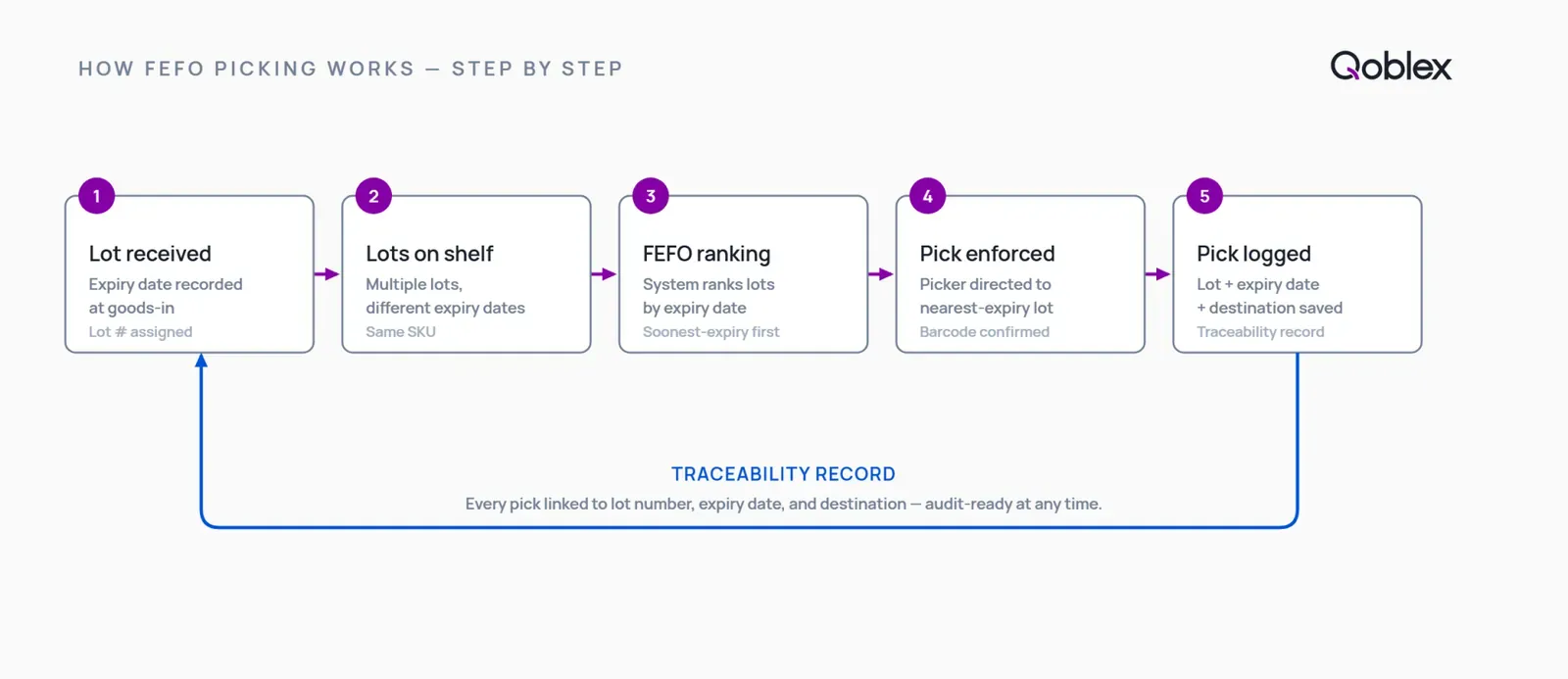
Step 1: Record the expiry date and lot number when stock arrives
FEFO starts at goods-in. When a delivery is received, each incoming group of units is assigned a lot number (or batch number) and its expiry, use-by, or best-before date is recorded against that lot. Without a lot-level expiry date captured at intake, there is nothing for the system to sort by later, so this step is the foundation the whole rule stands on.
Step 2: The system ranks available lots by expiry date
When an order needs filling, the system looks at every lot of that SKU currently in stock and sorts them by expiry date, soonest first. This ranking is the actual FEFO logic: instead of the picker eyeballing dates on a shelf, the software already knows which lot should go.
Step 3: The picker is directed to the soonest-expiring lot
The picker is directed to the nearest-expiry lot that has stock available, rather than choosing by whatever is closest to hand. On a barcode-scanning setup the scan confirms the right lot is being pulled, so the rule is checked at the point of picking rather than left advisory.
Step 4: Confirm the pick and update the lot’s movement record
When the pick is confirmed, the system decrements that lot’s available quantity and logs the movement against the lot number, the expiry date, and the destination. That record is what makes the pick traceable after the fact, and it feeds the trace you would run in a recall.
What happens when two lots share the same expiry date (the FEFO tiebreaker)
If two lots of the same SKU carry an identical expiry date, FEFO alone cannot separate them, so a secondary rule breaks the tie, commonly the earlier-received lot first (a FIFO fallback within the FEFO rule). The practical effect is the same: short-dated stock keeps moving before it turns into waste.
Across multiple warehouse locations the rule holds, but scope matters: the system ranks by expiry within the pool of stock it is allowed to pick from, so how you set up locations (whether an order can pull from any site or only its home warehouse) decides which lots enter the ranking.
FEFO picking for food manufacturers: from raw ingredient to finished product
If you manufacture rather than just distribute, FEFO applies at both ends of your process, not only to the finished case going out the door.
FEFO at goods-in: assigning expiry dates to raw ingredient lots
Raw ingredients have expiry dates too, and they arrive in lots the same way finished goods leave in lots. When a delivery of an ingredient comes in, it gets a lot number and an expiry date recorded at intake, exactly as in Step 1 above. That is what lets you apply an expiry-aware rule to your inputs, not just your outputs. It is the raw-material side of lot control software.
FEFO in production: which raw ingredient lot gets allocated to which run
When you start a production run, the system can allocate the soonest-expiring available lot of each ingredient to that run first, the same FEFO logic applied to consumption instead of shipping. This is where lot tracking connects to recipe and bill-of-materials management: the bill of materials (BOM) says which ingredients and quantities a product needs, and FEFO decides which lot of each ingredient is drawn down. Short-dated raw material gets used before it expires in the store room, which is the same waste problem solved one step earlier in the chain.
FEFO on finished goods: the expiry date inherited from the raw ingredient lots
A finished batch gets its own lot number and expiry date when it is produced, and that date governs FEFO when the finished product is later picked and shipped.
Traceability through the BOM: which raw lot went into which finished batch
Because each production run records the specific ingredient lots it consumed, you keep a link from the finished batch back to the raw lots inside it, and forward from a raw lot to every finished batch it touched. That is lot-level traceability through the bill of materials, and it turns “we think that ingredient went into these runs” into a report you can run. Qoblex ships a lightweight MRP with BOM support for this, and manufacturing (MRP and BOM) is included on every Qoblex plan rather than sold as a separate add-on. It is a lightweight MRP, not a full food ERP, and the honest limits of that are covered below.
The integration gap: why QBO, Xero, Shopify, and WooCommerce don’t enforce FEFO
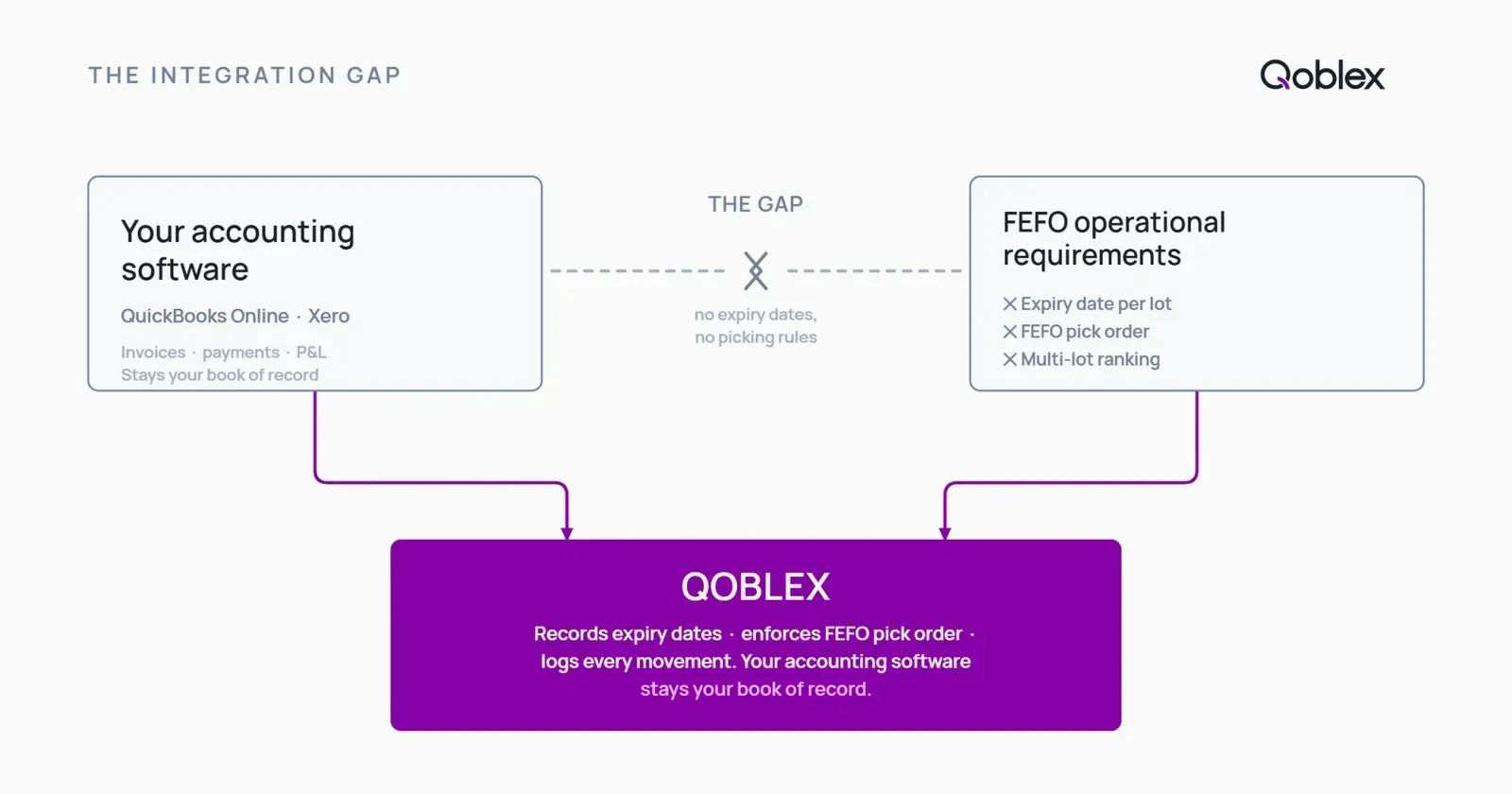
None of the platforms most food businesses already run were built to record expiry dates at the lot level or to enforce a picking order. That is not a knock on them; it is a scope difference. Here is where the gap sits.
| Capability | Spreadsheet | QBO / Xero native | Shopify / WooCommerce native | Qoblex |
|---|---|---|---|---|
| Expiry date recorded per lot at intake | Manual only | No | No | Yes |
| FEFO picking enforcement (system directs to nearest-expiry lot) | No | No | No | Yes |
| Multi-lot same-SKU FEFO ranking | No | No | No | Yes |
| Expiry date alerts (approaching use-by) | No | No | No | Yes |
| Lot-level movement record (pick logged with lot + expiry) | Manual only | No | No | Yes |
| FEFO enforcement across multiple warehouse locations | No | No | No | Yes |
| FEFO applied to raw ingredient allocation (manufacturing / BOM) | No | No | No | Yes |
| Traceability records for FSMA 204 / retailer audits | Manual only | No | No | Yes |
| Integration with existing accounting software | N/A | Native | N/A | Yes (syncs to QBO / Xero) |
QuickBooks Online: handles your accounts, not your expiry dates
QuickBooks Online does not natively track lot numbers, record expiry dates, or enforce FEFO picking. It handles your accounting and basic stock quantities well, which is what it is for. If you run QBO and need expiry-aware picking, you add an inventory operations layer that does the lot and expiry work and keeps QBO as your book of record. That is the path covered in lot and expiry tracking for QuickBooks Online.
Xero: no native expiry date tracking or FEFO picking (even with Inventory Plus)
Xero does not natively track lots or batches, record expiry dates, or enforce FEFO picking. Xero Inventory Plus, its add-on inventory product, is available in the US only and priced in USD only, and it does not add lot, batch, expiry, or serial tracking. So a Xero user who needs FEFO does not get there by turning on Inventory Plus; they get there with a dedicated inventory layer integrated with Xero, which is what lot tracking for Xero users walks through.
Shopify: no lot or expiry tracking natively
Shopify’s inventory model treats every unit of a SKU as identical: a quantity on hand, not a set of dated lots. It has no native concept of a lot number or an expiry date, and therefore no way to enforce FEFO picking. Shopify sells the order; it does not decide which dated case fills it.
WooCommerce: no native expiry date tracking or lot-level picking rules
WooCommerce does not natively track lot or batch numbers or record expiry dates, so it cannot enforce a FEFO picking order on its own. The gap here is specifically lot, batch, and expiry tracking; WooCommerce is capable in other areas that are simply not this problem.
Adding FEFO enforcement without replacing your existing tools
The pattern across all four is the same. Your accounting platform stays your book of record, your storefront stays where orders come in, and you add one operations layer between them that records expiry dates at the lot level and enforces the picking rule, syncing back to the tools you already run. You are closing a capability gap, not switching accounting systems or re-platforming your store.
How Qoblex enforces FEFO picking in practice
Once the problem and the gap are clear, here is how Qoblex does it. Qoblex records expiry dates at the lot level and surfaces the nearest-expiry lot at pick time, inside the same platform that handles your purchasing, BOM and MRP, and multichannel sync.
Receiving. When stock arrives, you assign it a lot number and record its expiry date against that lot as part of the receiving workflow. This intake step makes everything downstream possible.
Pick time. When an order is picked, Qoblex ranks the available lots of that SKU by expiry date and surfaces the soonest-expiring lot to pick from. That is the FEFO enforcement rule in practice: the system applies the order instead of leaving it to memory.
Across multiple warehouses. FEFO ranking holds across locations, within the pool of stock a given order is set up to draw from, so multi-site operations keep the same expiry-first discipline rather than losing it at the location boundary.
Expiry date alerts. Qoblex can flag stock approaching its use-by date so you can act, discount, redistribute, or use it in a production run, before it quietly becomes a write-off. That is the difference between finding out about short-dated stock and finding out about expired stock.
The traceability record. Every pick is logged against the lot number, the expiry date, and the destination. That record is what you lean on when a customer asks about a specific batch or when you need to isolate a lot quickly, and it is the same trail that a full food traceability software workflow builds on. For QBO or Xero users, Qoblex does the lot, expiry, and FEFO work and keeps your accounting platform as the book of record, so you are adding the operations layer, not replacing your accounts.
When FEFO picking software is worth it, and when it is not yet
The F&B operations where FEFO software pays for itself
FEFO picking software starts earning its keep when you carry multiple lots of the same SKU with different expiry dates, and getting the picking order wrong has a real cost: expired product dispatched to customers, short-dated stock written off, or a retailer compliance penalty. That usually means a food manufacturer, a beverage brand, or a perishables distributor past the point where one person can hold every lot and date in their head. If you ship to retailers with shelf-life requirements, or you manufacture from dated raw ingredients, the enforcement pays for itself in the waste it prevents and the audits it makes routine.
When a spreadsheet or a basic setup is still enough (no shame in it)
If you only ever have a single lot of each SKU open at a time, or your product’s shelf life is long enough that arrival order and expiry order are always the same, a simple FIFO rule (or no formal picking rule at all) may serve you fine. A spreadsheet with manual date checks can work at very small volume too. The point where it breaks is the point where you have staff picking without looking at the sheet, or more than a handful of SKUs with active lots. If none of those pressures exist yet, a simpler setup may be sufficient for now, and there is no shame in staying there until it is not.
When a full WMS or food ERP is the right call instead of Qoblex
Qoblex is an inventory operations layer with FEFO enforcement built in; it is not a full warehouse management system, and its manufacturing is a lightweight MRP, not a full food ERP. If you run a large, dense warehouse where the hard problem is directed put-away, wave picking, slotting, and labour management across many pickers, a dedicated WMS is the right tool for that layer. If your manufacturing needs deep process controls, quality-management modules, and full ERP finance, a food ERP is the right call. Qoblex fits the messy middle: the operator who has outgrown spreadsheets and their accounting software’s stock fields, but does not need enterprise warehouse and ERP complexity to get expiry-aware picking done properly.
FAQ
What is FEFO picking? FEFO (First Expired, First Out) picking is an inventory allocation method that directs pickers to select the lot with the nearest expiry date first, regardless of when it arrived. FEFO picking software records the expiry date against each lot at intake and surfaces the soonest-expiring lot whenever stock is picked, so short-dated stock moves before it expires.
What is the difference between FEFO and FIFO? FIFO (First In, First Out) picks stock in order of arrival date: the oldest-arrived stock goes first. FEFO picks in order of expiry date: the soonest-expiring lot goes first, regardless of arrival order. For most perishable goods FEFO is the correct rule, because a newer delivery can carry an earlier expiry date than stock that arrived before it. (This is about picking order only, not FIFO as an accounting or cost-valuation method.)
How does FEFO inventory software work? It captures a lot number and expiry date for every group of units at intake. When stock is picked, it ranks all available lots of the same SKU by expiry date and directs the picker to the soonest-expiring one. The pick is then logged against the lot number and expiry date, which builds the traceability record.
Does QuickBooks Online support FEFO picking? No. QuickBooks Online does not natively support lot tracking, expiry date recording, or FEFO picking. It handles accounting and basic stock quantities. For FEFO enforcement, QBO users add a dedicated inventory operations layer, such as Qoblex, that integrates with QBO while keeping accounting in QBO.
Does Xero support expiry date tracking? No. Xero does not natively support expiry date tracking, lot tracking, or FEFO picking. Xero Inventory Plus is available in the US only and in USD only, and it does not add expiry dates, lot numbers, or FEFO picking. Xero users who need FEFO enforcement add a dedicated inventory layer integrated with Xero.
How does FEFO reduce food waste? By ensuring the nearest-expiring lot is always picked first, FEFO stops longer-dated stock from being picked while shorter-dated stock is left to expire on the shelf. Because short-dated stock keeps moving while it still has value, less of it crosses its use-by date sitting in your warehouse.
Does FEFO picking software work with BOM and recipe management? Yes. When lot tracking and FEFO are integrated with bill-of-materials and recipe management, as in Qoblex, the rule applies not only to finished-goods picking but to raw ingredient allocation: the soonest-expiring ingredient lot is drawn into a production run first, and the finished batch keeps the traceability link to the raw lots that went into it. Qoblex manufacturing (MRP and BOM) is included on all tiers, not a separate add-on.
How much does FEFO picking software cost? In Qoblex, FEFO enforcement is part of lot, batch, serial, and expiry tracking, which varies by plan. See qoblex.com/pricing for current details.
Is FEFO required by FSMA 204? No. FSMA 204, the FDA Food Traceability Rule, requires traceability recordkeeping (key data elements captured at critical tracking events) for foods on the Food Traceability List, with records provided to the FDA within 24 hours of a request, and an enforcement date of July 20, 2028. It does not mandate a specific picking method. FEFO is industry best practice for perishables, and the records that FEFO picking software produces (every pick logged with lot number, expiry date, and destination) are exactly the kind of records FSMA 204 asks for, so FEFO and FSMA 204 recordkeeping tend to go hand in hand operationally.
For the full vertical picture, this page is one spoke of Qoblex’s inventory management software for food and beverage businesses.