



Selling on Shopify, Amazon, WooCommerce, eBay, Walmart, Etsy, or TikTok Shop can grow your business fast. But if your stock levels do not update correctly, that growth creates problems just as fast. Overselling, delayed fulfillment, manual stock updates, and mismatched inventory reports usually come from one issue: weak inventory sync.
To sync inventory across multiple platforms, you need more than a connector. You need clean product data, consistent SKUs, one source of truth, connected sales channels, mapped warehouses, and a process for monitoring sync errors.
This guide explains how inventory sync works, how to set it up step by step, which tools to consider, and how to avoid the most common mistakes.
What Does It Mean to Sync Inventory Across Multiple Platforms?
Inventory sync means keeping stock quantities updated across every system where products are sold, stored, fulfilled, or reported.
For example, if a product sells on Amazon, your Shopify store should know that stock decreased. If new inventory arrives at your warehouse, every connected sales channel should reflect the updated available quantity.
Inventory sync usually connects:
- Sales channels such as Shopify, Amazon, WooCommerce, eBay, Walmart, Etsy, and TikTok Shop
- Warehouses, 3PLs, or fulfillment centers
- Inventory management software
- Accounting tools such as QuickBooks or Xero
- Shipping and order management systems
The goal is simple: every platform should work from the same inventory data.
Without that alignment, your team ends up correcting numbers manually, canceling orders, and trying to understand which system is accurate.
Why Inventory Sync Matters for Growing Businesses
Inventory sync is not only a technical setup. It is an operational foundation.
When your stock data is reliable, your team can sell confidently, fulfill faster, and make better purchasing decisions.
Prevent Overselling
Overselling happens when a platform shows stock as available even though the item has already sold elsewhere.
For example, you may have five units available. Two sell on Shopify, three sell on Amazon, but eBay still shows five available. That creates a risk of selling stock you no longer have.
Real-time inventory sync reduces this risk by updating availability across channels after each sale, return, stock adjustment, or warehouse update.
Reduce Manual Stock Updates
Manual inventory updates may work when you sell on one platform with a small catalog. They quickly become unreliable when you manage hundreds of SKUs across several channels.
Manual work creates delays. Delays create inaccurate stock. Inaccurate stock creates customer issues.
A synced inventory workflow removes repetitive updates and gives your team more time for purchasing, fulfillment, and customer service.
Improve Inventory Accuracy
Inventory accuracy means your system reflects what is actually available to sell.
That includes:
- Stock on hand
- Reserved inventory
- Incoming stock
- Backordered items
- Warehouse transfers
- Damaged or unavailable inventory
Accurate inventory tracking helps you avoid both stockouts and overstock. It also improves cash flow because you can reorder based on real demand.
Scale Across Sales Channels
Adding a new channel should not break your operations.
If you want to expand from Shopify to Amazon, or from direct-to-consumer to wholesale, your inventory system must support that growth.
Inventory sync gives you a scalable structure. Instead of managing each platform separately, you centralize stock control and let each channel pull from the same source.
How Inventory Sync Works
A reliable inventory sync workflow usually has five core parts.
Source of Truth
The source of truth is the system that owns your inventory data.
This could be your inventory management software, ERP, WMS, or in very simple cases, your eCommerce platform.
The mistake many businesses make is letting multiple systems control inventory at the same time. Shopify updates stock, Amazon updates stock, QuickBooks updates stock, and a warehouse tool updates stock again.
That creates conflicting numbers.
Choose one source of truth, then let every other platform sync from it.
Sales Channels
Sales channels are where customers place orders.
Common channels include Shopify, WooCommerce, Amazon, eBay, Walmart Marketplace, Etsy, TikTok Shop, and wholesale portals.
Each channel needs to send order data to your central inventory system. It should also receive updated stock availability from that system.
Inventory Management System
Inventory management software acts as the operational hub.
It tracks product quantities, SKUs, warehouses, purchase orders, stock adjustments, returns, and sometimes manufacturing workflows.
For growing businesses, this is usually the best place to centralize inventory because it is built for operations, not only sales or accounting.
Warehouses and Fulfillment
Your inventory system must also know where stock is located.
If you use multiple warehouses, retail locations, or 3PL providers, inventory sync should track quantities by location.
This supports better order routing, faster fulfillment, and more accurate available-to-sell inventory.
Accounting Tools
Accounting tools such as QuickBooks or Xero are important, but they should not always control operational inventory.
Accounting software is designed for financial reporting. Inventory sync should send clean financial and stock data into accounting after operational events happen.
That separation keeps accounting accurate without forcing QuickBooks or Xero to become your warehouse system.
Step-by-Step: How to Sync Inventory Across Multiple Platforms
A good inventory sync setup starts before you install software. Clean data and clear rules matter as much as the tool you choose.
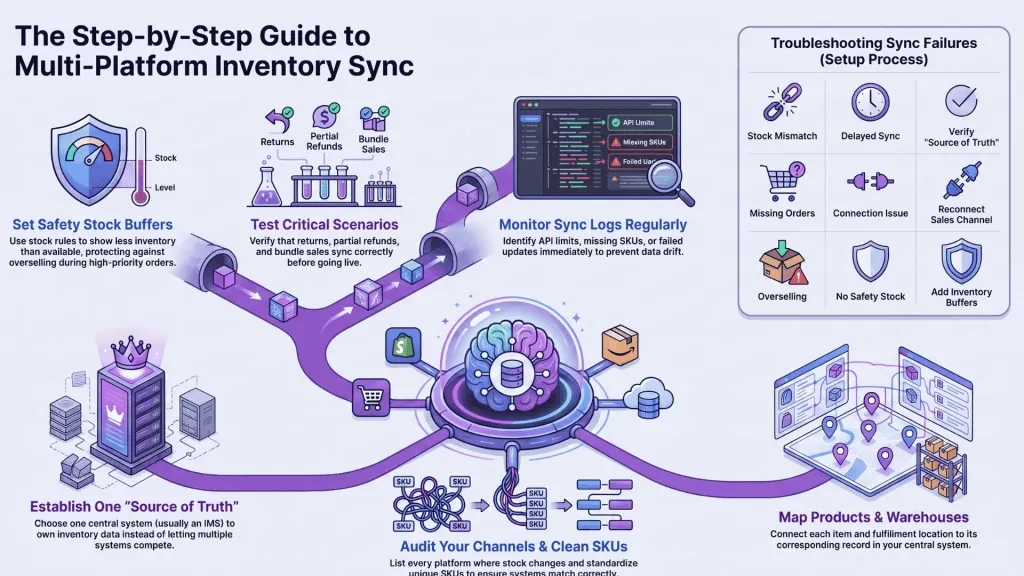
Step 1: Audit Your Sales Channels
Start by listing every platform where inventory changes can happen.
Include:
- Online stores
- Marketplaces
- Wholesale portals
- Retail locations
- Manual sales orders
- 3PL systems
- Accounting tools
- Shipping tools
Then identify which systems create orders, update inventory, process returns, or receive stock.
This audit helps you see where inventory data enters your business and where errors can occur.
Step 2: Clean and Standardize Your SKUs
SKU problems are one of the most common causes of inventory sync failure.
A SKU should uniquely identify one product or variant. If the same product has different SKUs across Shopify, Amazon, and WooCommerce, your systems may not match it correctly.
Before connecting platforms, standardize:
- SKU format
- Product names
- Variant names
- Units of measure
- Bundles and kits
- Discontinued products
Clean SKUs make product mapping easier and reduce duplicate items.
Step 3: Choose One Inventory Source of Truth
Decide which system will control inventory.
For small businesses, this may start with Shopify. But as operations grow, a dedicated inventory management software is usually more reliable.
Your source of truth should manage stock on hand, reserved inventory, incoming inventory, warehouse transfers, purchase orders, and adjustments.
Once you choose it, avoid updating stock manually in multiple systems.
Step 4: Connect Your Platforms
After cleaning your data, connect your sales channels and operational tools.
Typical integrations include:
- Shopify
- Amazon
- WooCommerce
- eBay
- Walmart Marketplace
- QuickBooks
- Xero
- 3PL or warehouse tools
- Shipping platforms
During setup, verify what each integration can sync. Some connectors only sync orders. Others sync products, stock levels, refunds, purchase orders, and accounting data.
Step 5: Map Products, Warehouses, and Stock Rules
Product mapping connects the same item across different systems.
Warehouse mapping connects each fulfillment location to the correct inventory record.
Stock rules define how much inventory is shown as available on each channel.
For example, you may want to keep a safety stock buffer of five units. If you have 50 units in the warehouse, your channels may only show 45 available.
This prevents overselling and protects high-priority orders.
Step 6: Test Orders, Returns, and Adjustments
Never assume inventory sync works after connecting platforms.
Test real scenarios before going fully live:
- New order from Shopify
- New order from Amazon
- Partial refund
- Full return
- Stock adjustment
- Warehouse transfer
- Purchase order received
- Bundle or kit sale
Testing helps you catch product mapping issues, warehouse errors, and stock synchronization delays before they affect customers.
Step 7: Monitor Sync Logs and Exceptions
Inventory sync needs monitoring.
Even strong systems can run into API limits, missing SKUs, failed orders, or incorrect permissions.
Review sync logs regularly. Look for failed updates, delayed jobs, duplicate records, and unmatched products.
The faster you identify exceptions, the easier they are to fix.
Manual vs Automated Inventory Sync
Manual inventory sync may seem cheaper at first, but it becomes risky as order volume grows.
| Method | Best For | Advantages | Limitations |
| Manual updates | Very small catalogs and low order volume | Low cost, simple to start | Slow, error-prone, hard to scale |
| Spreadsheet-based sync | Early-stage teams | Better structure than manual edits | Still requires frequent updates |
| Marketplace sync tools | Marketplace sellers | Good for channel-level stock updates | Limited purchasing and warehouse depth |
| Inventory management software | Growing eCommerce, wholesale, and manufacturing businesses | Centralized control, real-time sync, better reporting | Requires setup and data cleanup |
| ERP or custom API | Complex enterprise operations | Highly customizable | Expensive and slower to implement |
For most growing businesses, automated inventory management software offers the best balance between control, speed, and scalability.
Best Tools for Syncing Inventory Across Platforms
There is no single tool category that fits every business. The right choice depends on your operational complexity.
Inventory Management Software
Inventory management software is usually the best fit for growing eCommerce brands, wholesalers, and manufacturers.
It centralizes stock levels, sales channels, purchase orders, warehouses, returns, and reporting.
This is the right category if you need real-time inventory sync, multichannel inventory management, SKU control, purchase order management, demand forecasting, and accounting integrations.
WMS
A warehouse management system, or WMS, focuses on warehouse operations.
It helps with picking, packing, barcode scanning, bin locations, warehouse transfers, and fulfillment accuracy.
A WMS is useful when warehouse complexity is your main problem. However, it may not replace full inventory management across sales channels, purchasing, and accounting.
Marketplace Sync Tools
Marketplace sync tools are useful for sellers focused on Amazon, eBay, Walmart, or Etsy.
They help manage listings and stock synchronization between channels.
They are often simpler than inventory management software, but they may lack advanced purchasing, warehouse management, forecasting, or manufacturing features.
ERP Systems
ERP systems manage broader business operations, including finance, procurement, inventory, manufacturing, and reporting.
They can be powerful, but they may be too complex for many SMBs. Implementation can also take longer than dedicated inventory software.
ERP is usually better for larger companies with complex cross-department processes.
Custom API Integrations
Custom API integrations can work when your business has unique workflows.
They provide flexibility, but they require development resources, ongoing maintenance, and careful monitoring.
For most growing businesses, custom API work should support your inventory system, not replace it.
Inventory Sync Troubleshooting Table
Use this table when inventory is not syncing correctly across platforms.
| Problem | Likely Cause | How to Fix It |
| Stock differs between Shopify and Amazon | Delayed sync or wrong source of truth | Check sync logs and confirm which system controls inventory |
| Products do not match | SKU mismatch | Standardize SKUs and update product mapping |
| Orders are missing | Channel connection issue | Reconnect the sales channel and test a new order |
| Inventory updates only one warehouse | Incorrect warehouse mapping | Review location settings and fulfillment rules |
| Overselling continues | No safety stock rule | Add inventory buffers or channel-specific stock limits |
| Returns do not update stock | Return workflow not mapped | Test return scenarios and update return settings |
| Sync stopped completely | Expired permission or API issue | Refresh permissions and review API errors |
| Duplicate products appear | Products imported from multiple systems | Merge duplicates and define one product source |
Common Mistakes to Avoid
Inventory sync fails most often because the setup is rushed.
Avoid these mistakes:
- Connecting platforms before cleaning SKUs
- Letting multiple systems update inventory independently
- Treating Shopify, QuickBooks, and warehouse tools as equal sources of truth
- Ignoring warehouse mapping
- Forgetting to test returns and adjustments
- Using real-time sync without safety stock rules
- Not checking sync logs regularly
- Choosing software based only on price
The strongest inventory sync workflows are built on clear ownership, clean data, and repeatable processes.
How Qoblex Helps You Sync Inventory Across Platforms
Qoblex helps growing businesses sync inventory across sales channels, warehouses, and accounting tools from one operational hub.
Instead of managing stock separately in Shopify, Amazon, WooCommerce, QuickBooks, Xero, spreadsheets, and warehouse systems, Qoblex centralizes inventory visibility and keeps connected platforms aligned.
With Qoblex, businesses can:
- Sync inventory across Shopify, WooCommerce, Amazon, and other channels
- Manage real-time stock updates
- Track inventory across multiple warehouses
- Create and manage purchase orders
- Improve replenishment with demand forecasting
- Manage manufacturing workflows and Bills of Materials
- Connect with QuickBooks, Xero, and other business tools
- Reduce manual updates and improve inventory accuracy
- Track Serial& lot number and manage expiry dates
Qoblex is not just a connector. It is designed to help businesses simplify inventory operations, from sales channels to warehouses to accounting.
Start your 14-day free trial and see how Qoblex can help you build a more reliable inventory sync workflow.
Frequently Asked Questions
How do I sync inventory across multiple platforms?
To sync inventory across multiple platforms, choose one source of truth, standardize your SKUs, connect your sales channels, map products and warehouses, test orders and returns, and monitor sync logs. Inventory management software is usually the most scalable way to manage this process.
What is the best way to sync Shopify and Amazon inventory?
The best way to sync Shopify and Amazon inventory is to use a central inventory system that updates both platforms in real time. Avoid managing stock separately in each channel, because that increases the risk of overselling and mismatched quantities.
Can QuickBooks sync inventory across sales channels?
QuickBooks can track inventory, but it is primarily accounting software. Businesses selling across multiple platforms usually need dedicated inventory management software to handle real-time stock synchronization, warehouse management, order management, and sales channel integrations.
What is real-time inventory sync?
Real-time inventory sync means stock levels update automatically across connected platforms when an order, return, transfer, or stock adjustment happens. It helps prevent overselling and improves inventory accuracy across Shopify, Amazon, warehouses, and accounting systems.
How do I prevent overselling across platforms?
To prevent overselling, use one inventory source of truth, enable real-time stock synchronization, standardize SKUs, test channel mappings, and set safety stock buffers. This ensures every platform shows accurate available-to-sell inventory.
Do I need inventory management software or an ERP?
You need inventory management software if your main challenge is stock control, sales channel sync, purchasing, warehouses, or forecasting. You may need an ERP if you require broader finance, procurement, HR, and enterprise-level process management across departments.
Can I sync inventory across multiple warehouses?
Yes. To sync inventory across multiple warehouses, use software that supports multi-location inventory, warehouse mapping, stock transfers, fulfillment rules, and location-level reporting. This helps you track where inventory is stored and which warehouse should fulfill each order.
How long does inventory sync setup take?
Inventory sync setup depends on your SKU count, sales channels, warehouses, data quality, and integrations. A clean setup can be completed quickly, while complex businesses may need more time for SKU cleanup, product mapping, testing, and team training.
Key Takeaways
Learning how to sync inventory across multiple platforms starts with process, not software.
You need clean SKUs, one source of truth, mapped sales channels, clear warehouse rules, and a habit of monitoring sync exceptions. Once that foundation is in place, inventory management software can help you automate stock synchronization, reduce manual work, and scale with confidence.
For growing eCommerce businesses, wholesalers, and manufacturers, Qoblex provides a centralized way to manage inventory, orders, purchasing, warehouses, manufacturing, and accounting integrations from one platform.