


Your customer just clicked “Buy Now.” Within seconds, they expect an order confirmation. Within days, they expect a package at their door. What happens between those two moments determines whether they become a repeat buyer or leave a one-star review.
Sales order processing is the engine that powers this journey. When it works well, orders flow smoothly from your website to your warehouse to your customer’s hands. When it breaks down, you face shipping delays, inventory errors, and frustrated customers reaching out to support.
For growing businesses selling across multiple channels, getting sales order processing right becomes increasingly complex. You are juggling orders from your Shopify store, Amazon listings, and B2B customers simultaneously. Each channel has different requirements, and a single inventory mistake can create problems across all of them.
This guide breaks down exactly how sales order processing works, where most businesses struggle, and the practical steps you can take to build a faster, more accurate order fulfillment process.
What Is Sales Order Processing?
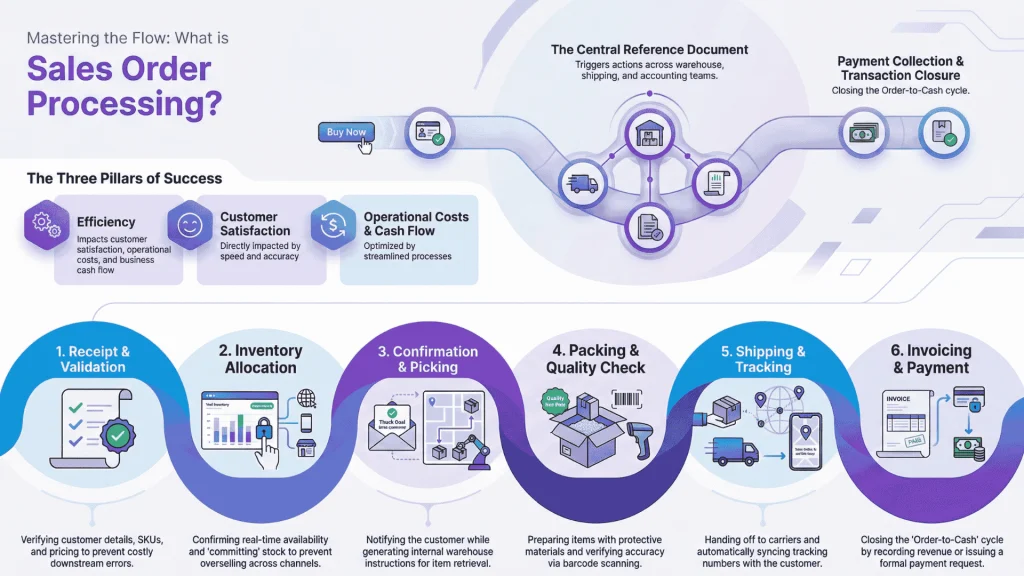
Sales order processing is the complete sequence of steps that occurs after a customer places an order, including order validation, inventory allocation, picking and packing, shipping, and invoicing.
Think of sales order processing as your internal workflow for turning a customer’s purchase intent into a delivered product. It starts the moment an order enters your system and ends when payment is collected and the transaction is closed.
The sales order itself is a document your business creates to confirm a transaction. It contains everything needed to fulfill the request: customer details, product information, quantities, pricing, shipping address, and payment terms. This document travels through your organization, triggering actions in your warehouse, shipping department, and accounting team.
For eCommerce businesses and wholesalers, sales order management happens dozens or hundreds of times daily. Each transaction follows the same general workflow, but the efficiency of that workflow varies dramatically between businesses. Some companies process orders in hours. Others take days for the same task.
Why Sales Order Processing Matters for Growing Businesses
Efficient sales order management directly impacts three areas that determine business success: customer satisfaction, operational costs, and cash flow.
When orders process quickly and accurately, customers receive their products faster and with fewer errors. Research from supply chain analysts shows that delivery speed and order accuracy rank among the top factors influencing repeat purchases, with fulfillment errors costing retailers up to 3% of annual revenue in returns, reshipments, and lost customers. A streamlined order processing system reduces order processing time between purchase and delivery, giving you a measurable competitive advantage.
On the cost side, manual order processing creates hidden expenses. Industry benchmarks suggest that manual data entry consumes 40-60% of order handling time in businesses without automation. Staff spend hours on data entry, error correction, and customer service inquiries about order status. Inventory discrepancies lead to overselling, backorders, and emergency restocking. These inefficiencies compound as order volume grows.
Cash flow improves when the order-to-cash cycle shortens. The faster you move from receiving an order to collecting payment, the healthier your working capital position. Delays at any stage extend the time your money remains tied up in inventory and receivables.
Sales Order vs. Purchase Order vs. Invoice: Key Differences
Three documents drive commercial transactions, and confusing them creates operational problems. Each serves a distinct purpose in the order lifecycle.
| Document | Created By | Purpose | When Issued |
| Purchase Order | Buyer | Formal request to buy goods or services | Before the sale is confirmed |
| Sales Order | Seller | Confirmation that the seller will fulfill the order | After receiving a purchase order or customer order |
| Invoice | Seller | Request for payment for delivered goods or services | After fulfillment, or according to payment terms |
A purchase order originates from the buyer. When a retailer wants to stock products from a wholesaler, they send a purchase order specifying what they want, quantities, and agreed pricing. The purchase order represents the buyer’s commitment to purchase.
A sales order is the seller’s response. When you receive a purchase order or an online customer places an order, you generate a sales order confirming you can fulfill the request. The sales order triggers your internal fulfillment process and serves as the reference document for picking, packing, and shipping.
An invoice requests payment. You send it after shipping the goods or according to agreed payment terms. The invoice matches the sales order details and specifies when payment is due (for example, net-30 or due upon receipt). In many accounting systems, a three-way match between purchase order, sales order, and invoice helps verify transaction accuracy before payment.
When Each Document Is Used in the Order Lifecycle
The typical B2B transaction follows this sequence: The buyer sends a purchase order, the seller responds with a sales order confirmation, the seller fulfills and ships the order, and finally the seller issues an invoice.
In B2C eCommerce, the process compresses. The customer’s checkout action serves as the purchase order. Your system automatically generates the sales order and often processes payment immediately, eliminating the separate invoicing step for prepaid transactions.
Understanding this distinction matters because your order processing system needs to handle all three documents and maintain consistency between them. Discrepancies between what was ordered, what was shipped, and what was billed create disputes and erode customer trust.
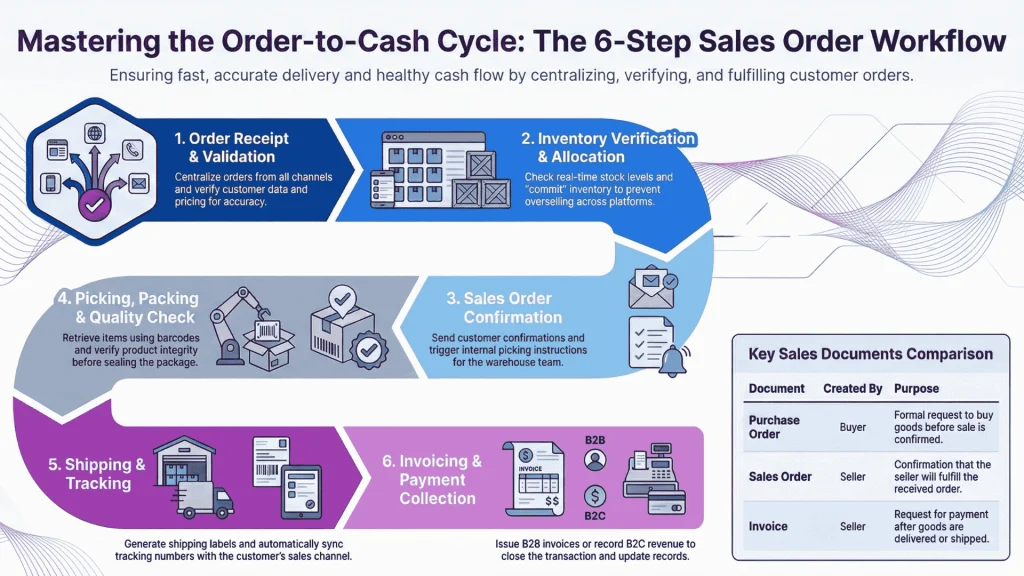
The 6-Step Sales Order Processing Workflow
Every sales order follows a predictable path from receipt to completion. Understanding each step helps you identify where bottlenecks occur in your operation and where automation can deliver the greatest impact.
[Insert process flow diagram: Order Receipt → Inventory Verification → Confirmation → Pick and Pack → Shipping → Invoicing]
Step 1: Order Receipt and Validation
The sales order workflow begins when an order enters your system. Orders arrive through multiple channels: your eCommerce platform, phone calls, email, EDI (electronic data interchange) from large buyers, or B2B portal submissions.
During validation, your system or staff verify the order details:
- Is the customer information complete and accurate?
- Are the products and SKUs valid?
- Do quantities and pricing match current catalog data?
- Are there any special instructions or customization requirements?
Orders with missing or incorrect information get flagged for review rather than entering the fulfillment queue. Catching errors at this stage prevents costly corrections later and improves overall order accuracy.
Pro Tip: Centralizing orders from all sales channels into a single order management system (OMS) eliminates the need to check multiple platforms and reduces the risk of overlooked orders.
Step 2: Inventory Verification and Allocation
Before confirming an order, you need to verify that the requested items are actually available. This step involves checking real-time inventory levels and allocating stock to the order.
Stock allocation is critical because it prevents overselling. When you allocate inventory to a sales order, those units become “committed stock” and are no longer available for other transactions. Without proper allocation, two customers might order the same last item, forcing you to cancel one order or scramble for additional stock.
For businesses with multiple warehouses or fulfillment centers, this step also determines which location will ship the order. The decision typically considers inventory availability, proximity to the shipping address, and shipping costs (including landed costs for international shipments).
If inventory is insufficient, the system should flag the item as a backorder or trigger a purchase order to your supplier. Transparent communication about expected availability helps maintain customer trust when items are temporarily out of stock.
Pro Tip: Set reorder points and safety stock levels for your fastest-moving SKUs. When available stock drops below the threshold, automated alerts ensure you replenish before customer orders are affected.
Step 3: Sales Order Confirmation
Once inventory is verified and allocated, the sales order is confirmed and moves into the fulfillment queue. At this point, the customer typically receives an order confirmation email containing:
- Order number for reference
- List of items ordered with quantities and prices
- Shipping address and method
- Estimated delivery date
- Payment confirmation or invoice details
Internally, the confirmed sales order generates picking instructions for your warehouse team. The order status changes to “processing” or “awaiting fulfillment” in your system.
The speed of this step depends heavily on your level of automation. Manual processes require staff to review orders, check inventory, and send confirmations individually. Automated systems complete these tasks in seconds, reducing order processing time dramatically and allowing orders placed in the morning to ship the same day.
Step 4: Picking, Packing, and Quality Check
The physical order fulfillment process begins in your warehouse. Picking involves locating and retrieving the ordered items from storage locations. Packing means preparing items for shipment with appropriate packaging materials and documentation.
Efficient picking relies on organized warehouse layout and clear location systems. Many businesses use barcode scanning to verify that the correct items are picked, reducing errors caused by similar-looking products or incorrect quantities. For a cosmetics brand with dozens of similar-sized products, scanning prevents shipping the wrong shade or formulation.
During packing, staff select appropriately sized packaging, add protective materials, include packing slips or promotional inserts, and seal the package. For businesses with quality-sensitive products (cosmetics, food and beverage items, electronics), a quality check before sealing ensures damaged or defective items do not ship. A specialty food company, for instance, might verify expiration dates and package integrity before dispatch.
The pick-and-pack phase generates crucial data. Scanning items updates inventory levels in real time, ensuring your available stock count remains accurate for subsequent orders and maintaining high order accuracy across all channels.
Step 5: Shipping and Tracking
With the package prepared, the next step is creating a shipping label and transferring the order to a carrier. Your shipping process should include:
- Selecting the appropriate carrier and service level based on delivery requirements
- Generating the shipping label with correct address and tracking barcode
- Recording the tracking number in your order system
- Physically handing off the package to the carrier
Customers expect tracking information. Sending a shipment notification email with the tracking number and estimated delivery date manages expectations and reduces “where is my order?” inquiries. This delivery confirmation communication is essential for customer satisfaction.
For multichannel sellers, shipping notifications need to reach customers through the appropriate channel. Amazon orders require updating the Amazon system with tracking data within specific timeframes. Shopify orders update through the Shopify integration. Failing to sync tracking information across channels creates confusion, can affect your seller ratings on marketplaces, and increases cycle time for your support team.
Step 6: Invoicing and Payment Collection
The final step in the sales order workflow is invoicing and payment collection. For prepaid eCommerce transactions, payment was captured at checkout, so this step involves recording the revenue and closing the order.
For B2B transactions with payment terms, you issue an invoice after shipment. The invoice references the original sales order and specifies:
- Payment amount due
- Payment terms (net-30, net-60, or other agreed terms)
- Accepted payment methods
- Bank details or payment portal link
Modern order processing systems integrate with accounting software like QuickBooks or Xero. This integration automatically syncs invoices, tracks receivables, and reconciles payments without manual data entry. Invoice generation becomes part of the automated workflow rather than a separate manual step.
Once payment is received, the sales order is marked complete. The transaction contributes to your sales reporting, and the order record is archived for future reference.
Pro Tip: Track your average order-to-cash cycle time monthly. If it is lengthening, investigate whether delays occur at fulfillment, shipping, or payment collection.
Common Sales Order Processing Challenges (and How to Solve Them)
Even established businesses encounter friction in their sales order workflow. Recognizing common challenges is the first step toward solving them.
| Challenge | Root Cause | Solution |
| Manual data entry errors | Rekeying information between systems | System integration and barcode scanning |
| Inventory discrepancies | Disconnected channel updates | Centralized real-time inventory sync |
| Slow approval workflows | Manual reviews and email chains | Rules-based auto-approval with exception flagging |
| Lack of order visibility | Information scattered across platforms | Unified dashboard with real-time status |
Manual Data Entry Errors
When staff manually transfer order information between systems, errors inevitably occur. A mistyped SKU sends the wrong product. An incorrect address delays delivery. A pricing mistake affects profitability or customer trust.
The solution is reducing manual touchpoints through integration and sales order automation. When your eCommerce platform connects directly to your order management system, order data flows automatically without rekeying. Barcode scanning during picking eliminates errors from reading product codes incorrectly and significantly improves order accuracy rates.
Inventory Discrepancies Across Channels
Multichannel sellers face a particular challenge: keeping inventory counts synchronized across all sales platforms. Without real-time sync, you risk selling the same item twice or showing products as available when they are actually sold out.
This problem intensifies during high-volume periods. A flash sale on your Shopify store might deplete stock before your Amazon listing updates, leading to orders you cannot fulfill. A fashion brand running a seasonal promotion across three channels needs inventory updates within seconds, not hours.
Centralized inventory management solves this by maintaining a single source of truth for stock levels. When a sale occurs on any channel, the inventory count updates everywhere within minutes or seconds.
Slow Approval Workflows
B2B orders often require approval steps, whether for credit checks, large order reviews, or custom pricing verification. When these approvals depend on manual review and email chains, orders stall in queues for hours or days, extending the order-to-cash process unnecessarily.
Automating approval workflows accelerates processing. Set rules that auto-approve orders meeting certain criteria (existing customers, orders under a threshold amount, standard pricing) while flagging exceptions for human review. This approach applies scrutiny where needed without slowing down routine orders.
Lack of Visibility Into Order Status
When customers ask about their order and your staff cannot quickly provide an answer, everyone loses time. The customer feels ignored, and your team scrambles to locate information across multiple systems.
A unified order management dashboard showing real-time status for every transaction solves this visibility problem. Staff can instantly see whether an order is awaiting fulfillment, in picking, shipped, or delivered. Customer-facing order tracking portals let buyers check status themselves, reducing support inquiries.
How to Optimize Your Sales Order Process
Moving from identifying problems to implementing solutions requires a systematic approach. These optimization strategies address the root causes of sales order processing inefficiency.
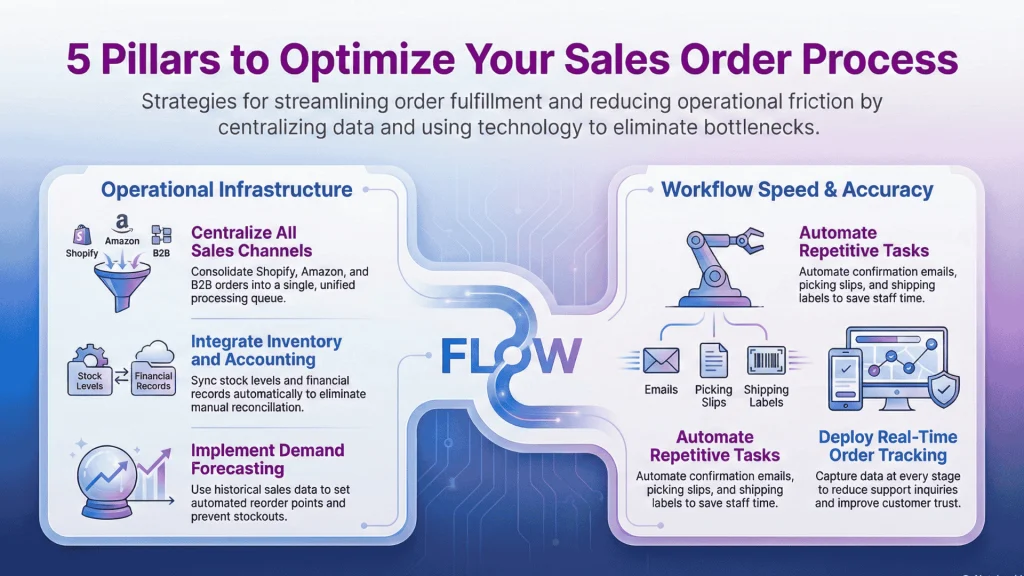
Centralize Orders From All Sales Channels
Managing orders through separate platforms for each sales channel is unsustainable as volume grows. Logging into Shopify, Amazon Seller Central, WooCommerce, and your B2B portal separately wastes time and increases the chance of overlooked orders.
A centralized order processing system pulls orders from all channels into a single queue. Your team works from one interface regardless of where the order originated. This consolidation simplifies training, standardizes the order fulfillment process, and ensures consistent fulfillment quality across channels.
When evaluating sales order software, prioritize platforms with native integrations for your existing sales channels. Avoiding custom development reduces implementation time and ongoing maintenance.
Automate Repetitive Tasks
Sales order automation targets the high-volume, rules-based tasks that consume staff time without adding value. Prime candidates for automation include:
- Order confirmation emails
- Inventory allocation and stock updates
- Picking slip generation
- Shipping label creation
- Invoice generation and sending
- Tracking number updates to sales channels
Automation does not mean eliminating human judgment. Instead, it frees your team to focus on exceptions, customer relationships, and continuous improvement rather than repetitive data entry.
Integrate Inventory and Accounting Systems
Disconnected systems create reconciliation headaches. When your order system, inventory counts, and financial records do not match, staff spend hours identifying discrepancies instead of fulfilling orders.
Integration ensures data consistency. When a sales order ships, the inventory count decreases and the revenue records in your accounting system simultaneously. When payment arrives, the receivable clears automatically. This real-time sync eliminates the monthly scramble to reconcile mismatched records.
Pro Tip: Look for sales order software that offers two-way sync with your accounting platform. This ensures invoices created in either system remain consistent and payments recorded anywhere update everywhere.
Use Demand Forecasting to Prevent Stockouts
Reactive inventory management leads to cycles of stockouts and overstocking. When you only reorder after running out, customers face backorder delays. When you overcompensate, capital sits tied up in excess inventory.
Demand forecasting uses historical sales data to predict future needs. By analyzing sales patterns, seasonality, and trends, you can set reorder points that trigger replenishment before stock runs critically low while avoiding unnecessary surplus.
Effective forecasting integrates with your sales order data. The same system processing orders can analyze which products sell fastest, which have lengthening lead times, and where safety stock levels need adjustment.
Implement Real-Time Order Tracking
Order tracking benefits both customers and your operations team. Customers gain visibility into when their package will arrive, reducing anxiety and support inquiries. Your team can monitor fulfillment progress and identify bottlenecks as they develop.
Real-time tracking requires accurate data capture at each stage. Scanning items during picking, recording package handoff to carriers, and receiving carrier tracking updates creates a complete timeline. This data feeds customer-facing tracking pages and internal dashboards simultaneously, providing delivery confirmation automatically.
Sales Order Processing for Multichannel Businesses
Selling across multiple channels amplifies both opportunity and complexity. Each additional sales channel brings new customers but also new integration requirements and synchronization challenges.
Managing Orders From Shopify, WooCommerce, and Amazon
Each eCommerce platform has unique order data formats, status fields, and API behaviors. Shopify orders include tags and notes that might not map directly to Amazon’s structured fields. WooCommerce custom fields may not have equivalents elsewhere.
Effective multichannel sales order management normalizes these differences. Orders from all platforms convert to a consistent internal format for processing while preserving channel-specific details needed for fulfillment and reporting.
Beyond data format differences, marketplace rules add constraints. Amazon requires confirming shipment and uploading tracking within specific timeframes to maintain account health. Late shipment confirmations affect your seller metrics. For businesses using dropshipping arrangements, order processing time becomes even more critical since you depend on supplier fulfillment speed.
Your order processing system needs to accommodate these requirements automatically, updating each channel with the correct information in the expected format.
Synchronizing Inventory Across Warehouses
Multi-location inventory adds another layer of complexity. The question shifts from “do we have this item?” to “do we have this item at a location that can efficiently ship to this customer?”
Distributed inventory optimization involves:
- Maintaining accurate stock counts at each location
- Routing orders to the optimal fulfillment location based on inventory availability, shipping cost, and delivery speed
- Transferring stock between locations to balance inventory and minimize stockouts
- Reserving inventory for specific channels or customers when needed
This level of sophistication requires warehouse management capabilities beyond basic stock counting. Look for systems that support multi-warehouse operations with intelligent order routing.
Choosing Sales Order Processing Software
The right software can transform your sales order workflow from a bottleneck into a competitive advantage. The wrong choice adds complexity without solving underlying problems.
Essential Features to Look For
When evaluating sales order software, use this checklist to assess each option:
| Feature | Why It Matters | Priority |
| Multichannel order import | Eliminates manual entry; ensures no orders overlooked | Critical |
| Real-time inventory sync | Prevents overselling; maintains accurate availability | Critical |
| Order status tracking | Enables visibility from receipt to delivery confirmation | Critical |
| Automated workflows | Reduces manual work and order processing time | High |
| Reporting and analytics | Identifies bottlenecks and improvement opportunities | High |
| User access controls | Maintains data security; reduces error risk | Medium |
| Mobile accessibility | Enables warehouse operations on the floor | Medium |
Integration Capabilities That Matter
Software is only as useful as its connections to your existing tools. Critical integrations include:
Accounting Software: QuickBooks, Xero, or your existing accounting platform for seamless invoice sync and financial reporting.
eCommerce Platforms: Direct connections to Shopify, WooCommerce, Amazon, and other channels where you sell.
Shipping Carriers: Integrations with major carriers for label generation, rate comparison, and tracking updates.
Warehouse Operations: Support for barcode scanners, pick lists, and bin location tracking if you manage your own fulfillment.
Evaluate integration depth, not just availability. A listed integration that only syncs basic data may not meet your needs. Confirm that the specific data fields and sync frequency match your requirements before committing.
Frequently Asked Questions
What is the difference between a sales order and a work order?
A sales order documents what a customer has purchased and initiates the fulfillment process. A work order instructs production or manufacturing to create or assemble a product. In businesses that manufacture to order, a sales order might trigger a work order when the ordered item needs to be produced rather than pulled from existing inventory.
How long should sales order processing take?
For standard eCommerce orders with items in stock, efficient businesses process orders within hours, enabling same-day or next-day shipping. B2B orders with credit approval or special handling may require one to two business days. If routine orders exceed 24-48 hours, evaluate your workflow for bottlenecks.
Can sales order processing be fully automated?
Routine orders with standard products, pricing, and shipping can be automated from receipt through shipping label creation. Human intervention remains valuable for exception handling: unusual orders, inventory discrepancies, or customer modification requests. The goal is automating the predictable while preserving judgment for edge cases.
What role does inventory management play in sales order processing?
Inventory management is the foundation of reliable sales order processing. Accurate real-time inventory data enables order confirmation without overselling, determines which warehouse fulfills each order, triggers replenishment before stockouts occur, and ensures inventory costs sync correctly with financial records.
Key Takeaways
Effective sales order processing combines clear workflows, accurate data, and appropriate automation:
- Sales order processing encompasses every step from order receipt through payment collection, defining your order-to-cash cycle
- Distinguishing between sales orders, purchase orders, and invoices prevents confusion and maintains order accuracy
- The six core steps are: receipt and validation, inventory verification, confirmation, picking and packing, shipping, and invoicing
- Common challenges include manual entry errors, inventory discrepancies, slow approvals, and limited visibility
- Optimization strategies focus on centralization, sales order automation, integration, forecasting, and real-time tracking
- Multichannel businesses face additional complexity requiring synchronized inventory and normalized order data
- Software selection should prioritize integration capabilities alongside core features
Streamline Your Sales Order Process Today
Efficient sales order processing is not a luxury for growing businesses. It is the operational backbone that determines whether you can scale without proportionally scaling headaches.
Start by mapping your current sales order workflow and identifying where orders stall or errors occur. Focus improvement efforts on the bottlenecks that most impact customer experience and operational costs. Evaluate whether your current tools support the integrations and automation needed for your sales volume and channel mix.
The businesses that master the order fulfillment process gain the ability to handle more orders with the same team, deliver faster with fewer errors, and ultimately turn operational excellence into customer loyalty.
Qoblex simplifies and streamlines your sales order processing by centralizing orders, automating routine tasks, and providing real-time visibility across all channels. With features like multi-warehouse management, automated stock updates, and seamless integrations with e-commerce platforms, Qoblex helps reduce errors, eliminate bottlenecks, and accelerate fulfillment. Start your 14-day free trial today and experience how Qoblex can transform your order workflow into a scalable, efficient operation.
Suggested meta description (155 characters): Learn how sales order processing works, common challenges, and optimization strategies to reduce errors, speed fulfillment, and improve customer satisfaction.