



Running a growing eCommerce or wholesale business means your warehouse is the engine behind every order, every return, and every satisfied (or frustrated) customer. When that engine runs inefficiently, the costs compound fast: overstocked shelves tie up cash, stockouts drive buyers to competitors, and slow fulfillment tanks your reviews.
The challenge is that most warehouse efficiency advice is written for large-scale distribution centers with six-figure automation budgets. If you’re a small or mid-sized business managing inventory across Shopify, WooCommerce, Amazon, and a handful of B2B accounts, those guides miss the mark entirely.
This article delivers 12 actionable warehouse efficiency tips built specifically for growing product businesses. Each strategy is labeled as a quick win or a long-term investment so you know exactly where to start.
What Is Warehouse Efficiency (and Why It Matters More Than Ever)
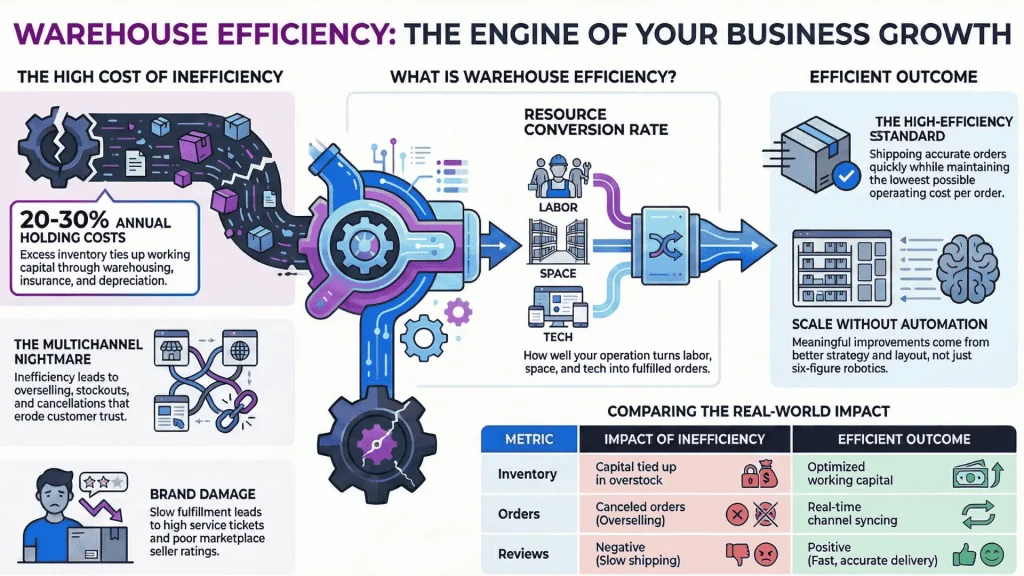
Warehouse efficiency measures how well your operation converts resources — labor hours, storage space, technology — into fulfilled orders. A highly efficient warehouse ships accurate orders quickly while keeping operating costs per order as low as possible.
For growing businesses, warehouse efficiency is not an abstract metric. It directly impacts your bottom line and customer experience. Consider what inefficiency actually costs:
- Stockouts result in lost revenue and erode buyer trust. A customer who encounters an “out of stock” message on your Shopify store is unlikely to wait around.
- Overselling across channels creates a fulfillment nightmare. When your Amazon listing and WooCommerce store both sell the last five units of a popular SKU, someone gets a cancellation email instead of a package.
- Slow fulfillment drives up customer service tickets, increases return rates, and damages your seller rating on marketplaces.
- Excess inventory ties up working capital. Holding costs — including warehousing, insurance, and depreciation — typically run between 20% and 30% of inventory value per year.
The good news: you do not need a massive automation overhaul to see meaningful improvement. The strategies below are designed to deliver measurable results within weeks, not months.
Optimize Your Warehouse Layout for Faster Fulfillment
Your warehouse layout has a direct effect on picking speed, packing accuracy, and overall labor productivity. A poorly organized space forces your team to walk farther, search longer, and make more mistakes.
Slot Fast-Moving SKUs Near Packing and Shipping Zones
Quick Win — Start by identifying your highest-velocity products. These are the SKUs that appear most frequently in orders. Place them as close to your packing stations and shipping area as possible to minimize travel time.
Use the Pareto principle as a guide: roughly 20% of your products will account for 80% of your order volume. Those top-performing SKUs deserve prime real estate — eye-level shelving within a few steps of where orders are packed. Seasonal products should rotate in and out of these high-access zones as demand shifts.
If you are tracking sales data in an inventory management system, run a product sales report sorted by volume. That single report gives you the slotting strategy your warehouse needs.
Use Vertical Space and Bin Locations to Maximize Capacity
Long-Term Investment — Many warehouses underutilize vertical space. Before leasing additional square footage, look up. Taller shelving units, mezzanine platforms, and stackable storage bins can dramatically increase your usable capacity without expanding your footprint.
Assign each product variant a specific bin location — a labeled address within your warehouse (e.g., A3-B2). When every item has a defined home, your pickers spend less time searching and more time fulfilling. Bin locations also make onboarding new team members significantly faster because they do not need to memorize where things are stored.
Pro Tip: Update bin locations whenever you rearrange your warehouse. A pick list referencing an outdated bin location is worse than no bin location at all.
Centralize Your Inventory Across Every Sales Channel
If you sell on more than one platform — a Shopify store, Amazon, a B2B wholesale portal — then inventory accuracy across channels is one of the biggest efficiency levers you can pull.
Why Multichannel Sync Eliminates Overselling and Stockouts
Quick Win — Overselling happens when two platforms sell the same unit simultaneously because neither has real-time visibility into the other. The result is a canceled order, a disappointed customer, and often a marketplace penalty.
Centralizing your inventory into a single system that syncs stock levels across Shopify, WooCommerce, Amazon, and your B2B channels in real time eliminates this problem. When a unit sells on one channel, available stock updates everywhere else within seconds.
This is also the fastest way to reduce stockouts. With a unified view of your inventory, you can see exactly what is available, what is committed to open orders, and what is incoming from suppliers — all in one place.
How Real-Time Inventory Tracking Works in Practice
Long-Term Investment — Real-time tracking means every transaction that affects inventory — a sale, a return, a purchase order receipt, a stock transfer between warehouses — automatically updates your stock on hand.
In practice, this requires an inventory management system that serves as your single source of truth. Your eCommerce platforms pull available stock from this central system, and every order flows back into it. The result is a closed loop where inventory data is always current.
For businesses still managing stock in spreadsheets, this is a transformational shift. Spreadsheets cannot sync with sales channels, cannot update in real time, and cannot prevent two people from editing conflicting data simultaneously.
Standardize Your Pick, Pack, and Ship Workflow
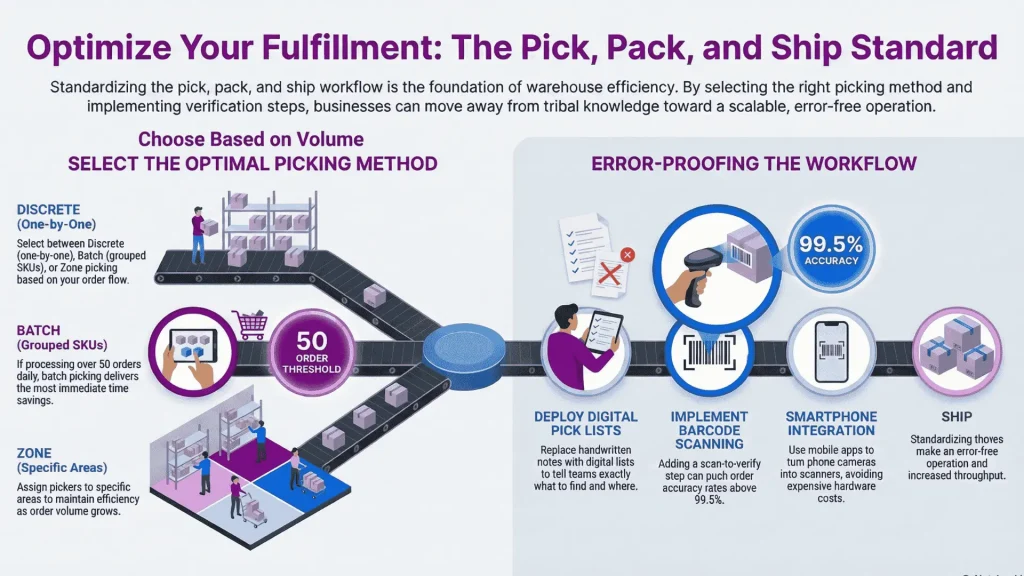
Order fulfillment is where warehouse efficiency either delivers or breaks down. A standardized pick, pack, and ship process reduces errors, speeds up throughput, and makes your operation less dependent on any single team member’s knowledge.
Choose the Right Picking Method for Your Order Volume
Quick Win — The picking method that works best depends on your order profile:
- Discrete picking (one order at a time) works well for low-volume operations or businesses with large, complex orders.
- Batch picking groups multiple orders together so a picker collects items for several orders in a single trip through the warehouse. This is ideal for businesses shipping a high volume of orders with overlapping SKUs.
- Zone picking assigns pickers to specific areas of the warehouse. Each picker handles only the items in their zone, and orders move between zones until complete. This scales well as order volume grows.
If you are processing more than 50 orders per day, batch picking will likely deliver the most immediate time savings.
Reduce Errors with Barcode Scanning and Pick Lists
Quick Win — Manual picking based on memory or handwritten notes is the fastest path to shipping errors. Each wrong item shipped costs you return shipping, a replacement, and customer goodwill.
Printed or digital pick lists tell your team exactly what to grab and where to find it. Adding barcode scanning to the process introduces a verification step: scan the item, confirm it matches the order, then pack it. This simple addition can push order accuracy rates above 99.5%.
Many inventory management platforms, including mobile apps, now support barcode scanning directly from a phone camera — no expensive hardware required.
Implement Cycle Counting Instead of Annual Stocktakes
Quick Win — Annual physical inventory counts are disruptive. They often require shutting down operations for a day or more, and the results are only accurate the moment you finish counting.
Cycle counting is a better approach. Instead of counting everything at once, you count a small subset of your inventory on a regular schedule — daily or weekly. Over time, every SKU gets counted, and discrepancies are caught and corrected much sooner.
Use ABC analysis to prioritize your counts:
| Category | Description | Counting Frequency |
| A items | High-value or high-velocity SKUs (top 20% by revenue) | Weekly |
| B items | Moderate-value, moderate-velocity SKUs | Monthly |
| C items | Low-value, slow-moving SKUs | Quarterly |
This approach keeps your inventory accuracy high without ever shutting down your warehouse for a full-day count.
Set Reorder Points and Automate Replenishment
Long-Term Investment — Reorder points (ROPs) define the minimum stock level that triggers a new purchase order. Setting them correctly means you restock before you run out — but not so early that you pile up excess inventory.
A basic reorder point formula accounts for your average daily sales velocity and your supplier lead time:
Reorder Point = (Average Daily Sales x Lead Time in Days) + Safety Stock
Safety stock is your buffer against demand spikes or supplier delays. The right amount depends on how variable your sales and lead times are.
How Demand Forecasting Prevents Overstocking and Stockouts
Manually recalculating reorder points for hundreds of SKUs is impractical. This is where demand forecasting software earns its value. By analyzing your historical sales data, forecasting tools predict how many units you are likely to sell over a given period and recommend exactly how much to reorder.
The result is a replenishment process that is proactive rather than reactive. Instead of discovering a stockout when a customer complaint arrives, you receive a restock recommendation days or weeks before you would have run out.
For businesses with seasonal demand patterns — think holiday spikes for gift products or summer surges for outdoor gear — forecasting is especially valuable. It helps you build stock ahead of demand without blindly over-ordering.
Track the Right Warehouse KPIs
What gets measured gets improved. But tracking too many metrics creates noise. Focus on four KPIs that directly reflect warehouse efficiency for growing product businesses:
| KPI | What It Measures | Formula | Benchmark |
| Order Accuracy Rate | Percentage of orders shipped without errors | (Error-Free Orders / Total Orders) x 100 | 99%+ |
| Inventory Turnover | How often you sell and replace your stock | Cost of Goods Sold / Average Inventory Value | Varies by industry (4-8x is common for eCommerce) |
| Order Cycle Time | Time from order placement to shipment | Ship Date – Order Date | Under 24 hours for most eCommerce |
| Cost per Order | Total warehouse operating cost divided by orders shipped | Total Warehouse Costs / Total Orders Shipped | Track monthly trend, aim to reduce over time |
Review these metrics monthly. If your order accuracy is slipping, investigate your picking process. If inventory turnover is dropping, look at your purchasing and demand forecasting. Each KPI points to a specific area of your operation.
Pro Tip: Automating KPI tracking through your inventory management software eliminates the manual reporting burden and gives you access to real-time dashboards instead of month-old spreadsheets.
Ditch Spreadsheets for Inventory Management Software
Spreadsheets are a natural starting point. They are free, familiar, and flexible. But there is a ceiling, and most growing businesses hit it faster than they expect.
Signs you have outgrown spreadsheet-based inventory management:
- You have oversold a product because stock levels were not updated in time
- Multiple team members edit the same spreadsheet, causing version conflicts
- You spend hours each week manually reconciling orders across channels
- You cannot answer “how much of Product X do we have right now?” without checking multiple sources
- Reorder decisions are based on gut feeling rather than data
Inventory management software replaces this fragile process with a centralized, real-time system. When evaluating platforms, prioritize these capabilities for a growing business:
| Capability | Why It Matters |
| Multichannel sync | Prevents overselling across Shopify, Amazon, WooCommerce, and B2B |
| Multi-warehouse support | Tracks stock accurately across locations |
| Reorder points and alerts | Automates replenishment decisions |
| Demand forecasting | Turns historical data into purchase recommendations |
| Accounting integration | Syncs with Xero or QuickBooks to eliminate double entry |
| Barcode scanning | Improves picking accuracy and speeds up receiving |
The transition from spreadsheets to software typically pays for itself within the first quarter through reduced errors, faster fulfillment, and better purchasing decisions.
Qoblex helps growing eCommerce and wholesale businesses make this switch with an all-in-one platform that connects inventory, orders, purchasing, and accounting — set up in days, not months. Start a free 14-day trial to see how it works with your business.
Integrate Your Warehouse with Accounting and eCommerce Platforms
Long-Term Investment — A warehouse does not operate in isolation. It connects to your sales channels (where orders originate), your accounting system (where costs are tracked), and your suppliers (where replenishment starts).
Why Disconnected Systems Kill Efficiency
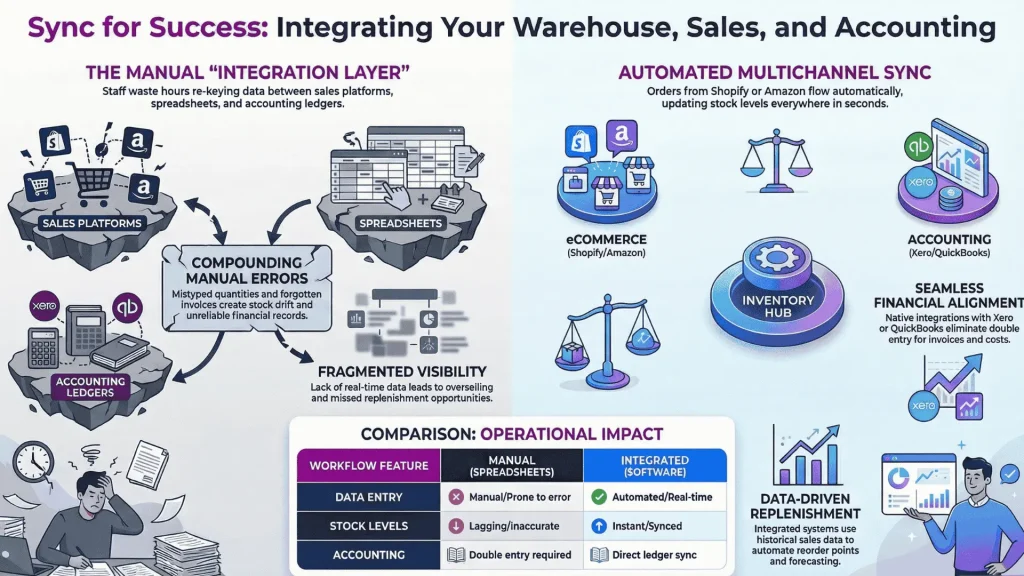
When these systems are not integrated, your team becomes the integration layer. They manually enter sales orders from one platform into another, re-key invoice data into accounting software, and reconcile stock levels across tabs and tools.
Every manual handoff introduces delay and error. A mistyped quantity on a purchase order, a forgotten invoice in your accounting system, or a stock adjustment that never gets recorded — these small failures compound.
Native integrations between your inventory system and platforms like Shopify, WooCommerce, Amazon, Xero, and QuickBooks eliminate this manual work. Orders flow in automatically. Invoices sync to your accounting ledger. Stock levels update across every connected channel in real time.
Invest in Your Warehouse Team
Technology and processes matter, but your team executes the work. Investing in the people who run your warehouse operation is one of the highest-ROI efficiency strategies available.
Cross-Training and SOPs for Consistency
Quick Win — Standard operating procedures (SOPs) ensure that every team member follows the same steps for receiving, picking, packing, and shipping. When processes live in someone’s head rather than in a documented procedure, you are one sick day away from a fulfillment breakdown.
Cross-training takes this further. When multiple team members can perform every warehouse function, you gain scheduling flexibility and eliminate single points of failure. Your operation does not grind to a halt when your best picker is on vacation.
Safety Practices That Also Boost Productivity
Quick Win — A safe warehouse is a productive warehouse. Cluttered aisles slow down pickers. Poorly stacked inventory creates hazards that lead to downtime and injury claims. Clear walkways, proper shelving load limits, and organized workstations keep your team moving efficiently.
Use Manufacturing Workflows to Control Production Costs
Long-Term Investment — If your business manufactures its own products — whether you are making candles, assembling electronics kits, or mixing skincare formulas — your warehouse efficiency is tied directly to your production process.
Bills of materials (BOMs) define every component that goes into a finished product, along with associated costs like labor and packaging. Managing BOMs in a structured system ensures you know the true cost of each unit you produce, not just the raw material cost.
Production orders track the transformation of raw materials into finished goods. When a production run is complete, your inventory system should automatically deduct the components used and add the finished goods to your sellable stock.
Production reconciliation accounts for waste, yield variance, and unused materials. Without it, your inventory records gradually drift from reality, and your cost calculations become unreliable.
For brands that both make and sell their own products, connecting manufacturing workflows to your inventory and order management system closes a critical loop that spreadsheets simply cannot handle.
Build a Scalable Foundation for Growth
Warehouse efficiency is not a one-time project. It is an ongoing discipline that scales with your business. The strategies in this guide are designed to work together: a well-organized layout feeds into a faster pick-pack-ship process, centralized inventory data enables accurate forecasting, and integrated systems eliminate the manual work that slows everything down.
Start with the quick wins — reslotting your top SKUs, implementing cycle counts, standardizing your picking process. Then build toward the long-term investments — demand forecasting, system integrations, and manufacturing workflows — as your order volume and complexity grow.
The businesses that invest in warehouse efficiency today are the ones positioned to scale profitably tomorrow. Every minute saved per order, every stockout prevented, and every picking error eliminated compounds over time.
Ready to centralize your inventory and streamline your warehouse operations? Try Qoblex free for 14 days — no credit card required — and see how an all-in-one platform handles inventory, orders, fulfillment, and accounting for growing product businesses.
Frequently Asked Questions
What is the most effective way to improve warehouse efficiency?
The single most impactful step is centralizing your inventory data into one system that syncs across all sales channels in real time. This eliminates overselling, reduces manual reconciliation, and gives you the accurate data needed to make better purchasing and fulfillment decisions. Combined with a logical warehouse layout that places fast-moving SKUs near packing zones, these two changes alone can deliver measurable improvements within weeks.
How do you measure warehouse efficiency?
Warehouse efficiency is measured through a set of key performance indicators. The four most important for growing businesses are order accuracy rate (percentage of error-free shipments), inventory turnover (how frequently you sell through stock), order cycle time (speed from order to shipment), and cost per order (total operating costs divided by orders fulfilled). Tracking these monthly reveals trends and highlights which areas of your operation need attention.
What are the best warehouse KPIs to track?
For small and mid-sized product businesses, focus on order accuracy rate, inventory turnover, order cycle time, and cost per order. These four metrics cover the core dimensions of warehouse performance: quality, capital efficiency, speed, and cost control. Avoid tracking too many KPIs at once — a focused dashboard is more actionable than a cluttered one.
How can small businesses improve warehouse operations without a large budget?
Several high-impact improvements cost little or nothing. Reslotting your top-selling products closer to your packing area, implementing cycle counting instead of annual stocktakes, creating written SOPs for your pick-pack-ship process, and cross-training your team are all quick wins. When you are ready to invest, inventory management software replaces error-prone spreadsheets and typically pays for itself through reduced mistakes and faster fulfillment.
What is the difference between a WMS and inventory management software?
A warehouse management system (WMS) is designed primarily for large-scale warehouse operations and focuses on warehouse-floor activities like advanced picking routing, labor management, and dock scheduling. Inventory management software takes a broader approach, managing stock levels, purchase orders, sales orders, multichannel sync, and often accounting integration. For growing eCommerce and wholesale businesses, inventory management software typically provides the features you need without the complexity and cost of an enterprise WMS.
Key Takeaways
- Layout matters: Slot your top 20% of SKUs by velocity near packing zones to reduce travel time and speed up fulfillment.
- Centralize inventory: Real-time sync across all sales channels prevents overselling and stockouts — the two biggest efficiency killers for multichannel businesses.
- Standardize fulfillment: A documented pick, pack, and ship process with barcode scanning pushes order accuracy above 99%.
- Count smarter, not harder: Cycle counting with ABC prioritization keeps inventory accurate without shutting down operations.
- Automate replenishment: Reorder points and demand forecasting replace gut-feel purchasing with data-driven decisions.
- Track four KPIs: Order accuracy, inventory turnover, order cycle time, and cost per order tell you everything you need to know about warehouse health.
- Graduate from spreadsheets: Inventory management software pays for itself through fewer errors, faster fulfillment, and better purchasing decisions.