

Get your free purchase order template
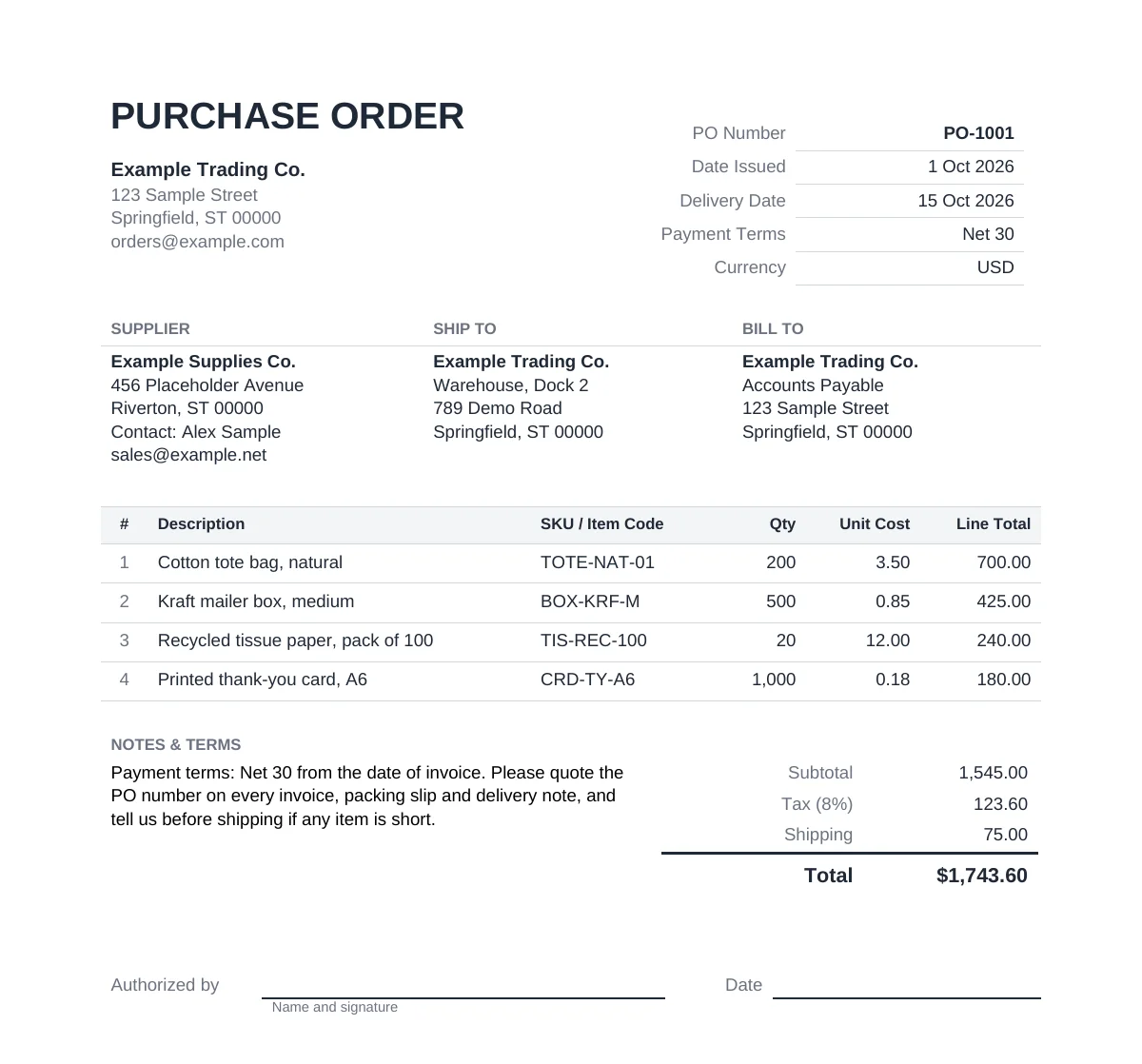
Pick the format you already work in. All three carry the same filled-in sample order, so you can see every field before you choose.
- Download for Excel (.xlsx) (live formulas, also opens in Google Sheets and LibreOffice)
- Download for Word (.docx) (letter-style, no formulas)
- Download as PDF (print-ready, send as is)
No sign-up, no email gate, no time limit.
What to include on a purchase order
A purchase order tells a supplier exactly what you want, where it should go, and what you’ve agreed to pay, in a form both sides can check later.
Header fields
| Field | Notes |
|---|---|
| PO number | A unique, sequential reference such as PO-1001. The supplier quotes it on the invoice, which is how you match it back. |
| Date issued | The day you created the order. |
| Requested or expected delivery date | When you need the goods. |
| Supplier (vendor) | Name, address and contact person. |
| Ship-to address | Where the goods should arrive. |
| Bill-to address | Where the supplier should send the invoice, if it differs from the ship-to address. |
| Payment terms | For example Net 30. |
| Currency | The currency the prices are in, such as USD. |
Line item fields
Each line on the template carries these fields. If your supplier uses item codes, copying theirs saves a round of “which one did you mean?” emails.
| Field | Notes |
|---|---|
| Line number | Sequential position on the order. |
| Description | Product or service description. |
| SKU / item code | Optional. |
| Quantity | Numeric. |
| Unit cost | Numeric, currency. |
| Line total | Quantity x Unit cost. |
Totals and the totals formula
In the Excel version, each line total and the four rows below the lines calculate themselves:
| Row | Formula |
|---|---|
| Line total | Quantity x Unit cost |
| Subtotal | SUM of the line totals |
| Tax | Subtotal x tax rate (the rate sits in its own labeled cell, so you change it once rather than editing a formula) |
| Shipping | A flat amount you type in |
| Total | Subtotal + Tax + Shipping |
The approval line
The footer has an “Authorized by” name, signature and date. On a one-person business it feels like a formality, but it answers “did we agree to this?” three months later, and makes handing purchasing to someone else easy.
For the wider purchasing workflow around this document, see our guide to purchase order management.
Purchase order template by format
All three formats carry the same sample order, so the numbers match no matter which one you open.
| Format | Formulas | Opens in | Best for |
|---|---|---|---|
| Excel (.xlsx) | Live (line totals, subtotal, tax, total) | Excel, Google Sheets, LibreOffice Calc | Editing on desktop or in Google Sheets |
| Word (.docx) | None, static totals | Word or another word processor | A plain letter-style PO to send as is |
| None, static totals | Any PDF viewer | A print-ready copy to send today |
Excel (.xlsx)
Live formulas for every line total, the subtotal, tax and the grand total. Opens in Excel and LibreOffice Calc, and in Google Sheets if you upload it to Drive and open it there.
Word (.docx)
A plain, letter-style purchase order with no formulas, so update the totals by hand when you change a line.
A filled, print-ready copy of the sample order, for when you need a finished example today.
Purchase order vs invoice: what’s the difference
They carry many of the same lines but travel in opposite directions. A purchase order goes from the buyer to the supplier before the goods ship. It’s a commitment to buy these items, in these quantities, at these prices.
An invoice goes from the supplier to the buyer after the goods ship. It’s a request to be paid.
Before you pay, you check one against the other. That check gets harder once deliveries arrive in pieces. Longer arrangements, such as a blanket purchase order covering repeat orders over a period, are covered in the purchasing guide linked above.
Is a purchase order legally binding?
Once a supplier accepts your purchase order, usually by confirming the order, it generally works as a contract for the goods, prices and terms written on it. So get the quantities, prices and terms right before you send it. This is general commercial practice, not legal advice for your jurisdiction.
When a spreadsheet purchase order is enough
Who this fits
If you buy from one or a few suppliers, into one location, and orders usually arrive complete in a single delivery with no import freight or duty to spread across the goods, this template is enough. A clean, numbered spreadsheet PO with an approval line is a perfectly good purchasing system at that stage, and plenty of businesses run on one for years.
What starts to hurt
The template holds one order as one flat record. Three things break that:
- Partial deliveries. Half the order arrives now, the rest in three weeks. One row can’t cleanly show what’s in, what’s still due, and what the supplier has billed so far.
- Freight and duty. A single freight or duty charge covers many lines. Getting the true unit cost means spreading it across those lines, and a flat “Shipping” cell doesn’t do that.
- Checking the bill. Before paying, someone has to compare the supplier’s bill line by line against what was ordered and what actually arrived. On spreadsheets that means three documents side by side, and someone remembering to do it.
Where Qoblex fits
Qoblex keeps the order, the goods receipt and the supplier bill as three linked records, so a short delivery or a mismatched invoice is visible rather than missed. Goods can be received in full or in several partial receipts, each creating its own goods receipt note, and the order shows as partly received until the rest arrives.
Freight, duty and other charges go on the purchase order as their own lines, and Qoblex spreads them across the line items by value, so each item’s unit cost reflects its landed cost before anything is sold. When you close the order, Qoblex runs a three-way check that ordered, received and billed quantities and totals all match, and won’t close it until they do.
Purchase orders, supplier bills and payments sync to Xero or QuickBooks Online, which stay your accounting book of record. Each accounting connection is a paid integration; see pricing for the current details.
If none of those three pains show up in your week, keep the template.
FAQ
Is this purchase order template really free?
Yes. No sign-up, no email gate and no time limit.
What’s the difference between a purchase order and an invoice?
A purchase order is what the buyer sends before the goods ship, a commitment to buy at agreed quantities and prices. An invoice is what the supplier sends after, a request to be paid. The two get checked against each other before payment.
Do I need special software to use this template?
No. The Excel version works in Excel, LibreOffice or Google Sheets. The Word and PDF versions need nothing beyond a word processor or a PDF viewer.
Is a purchase order legally binding?
Once a supplier accepts a purchase order, it generally functions as a contract for the goods, prices and terms it states. That’s general commercial practice, not legal advice for a specific jurisdiction.
When do I need purchase order software instead of a spreadsheet?
When deliveries regularly arrive in parts, when freight or duty must be spread across line items to get true unit cost, or when supplier bills need checking against what actually arrived. See how Qoblex handles purchase orders and landed costs.