



You run your store on WooCommerce, and for selling online it does the job. Then a supplier flags a bad batch and a customer wants to know which lot their order came from. Or a case of product quietly expires on the shelf because nobody knew it was next to go. Or you go to raise a purchase order for the next delivery and realize there’s nowhere to put it. You open WooCommerce to find the batch number, the expiry date, or the warehouse the stock is sitting in, and there is simply no field for any of it.
That is not a setup mistake. WooCommerce was built to be your storefront, and it’s a good one: product listings, order capture, a working stock count. But the moment you need to know which lot to pick, when stock expires, which location has it, or how to raise a supplier order, you hit an operational wall the storefront was never designed to handle.
This page is for that operator. It names exactly what WooCommerce does and doesn’t do for inventory, why the usual workarounds break, and how you can add real lot/batch, expiry, multi-warehouse, and purchasing while WooCommerce stays your storefront.
WooCommerce includes basic stock-quantity tracking but has no native lot or batch tracking, no expiry date management, no multi-warehouse support, and no purchase order system, and all of those require third-party plugins. To close those gaps while keeping WooCommerce as the storefront, most product businesses add a dedicated inventory operations layer. Qoblex handles lot/batch, expiry, multi-warehouse, and purchasing, and syncs stock levels back to WooCommerce automatically.
What does WooCommerce inventory management actually cover? (the short answer)
Short answer: WooCommerce covers the storefront side of inventory well, and the operations side not at all.
What WooCommerce tracks natively
WooCommerce manages product SKUs and quantity on hand, sets stock status (in stock, out of stock, on backorder), sends low-stock notifications, handles backorders, and tracks stock across simple product variations. As of v10.3 (October 2025) it also has Cost of Goods Sold in core, so you can record a product cost and see it flow into reporting. For a store selling straightforward finished goods, that is a genuinely usable stock counter.
One precision worth making here, because it’s easy to get wrong: WooCommerce does track COGS. It has since v10.3. What it does not do is layer costs FIFO-style: it uses the product’s current cost at the time of purchase, not historical per-purchase cost layers, and the release notes describe FIFO as “on the radar” rather than implemented. That distinction matters for a finance conversation, but it is not the gap this page is about.
What it doesn’t track natively
What WooCommerce has no field for is the operational layer: lot or batch numbers, expiry dates, multi-warehouse locations, purchase orders, and bills of materials. Each of those requires a third-party plugin or an external system. If you sell something perishable, lot-controlled, made from components, or held in more than one place, that’s the wall, and it’s the same wall whether you’re a food brand, a supplement seller, a cosmetics maker, or any product business that has outgrown a single stock count.
The operations wall: five things WooCommerce can’t do
None of these are WooCommerce failing at its job. They’re jobs the storefront was never built to do. Here they are, named precisely.
No lot or batch tracking
In WooCommerce’s data model, every unit of a SKU is identical. There is no field for a batch number, a received date, or a supplier lot. Batch tracking requires a third-party plugin. The existence of a dedicated WooCommerce Marketplace extension, “Product Batch & Expiration Tracking”, is itself the confirmation that this isn’t native. Related capability: for units you track individually rather than by batch, see serial number tracking, which is a separate discipline again.
No expiry date tracking
There is no native expiry-date field, no FEFO (first-expired-first-out) picking logic, and no alert when a batch is approaching its expiry. The same plugin dependency applies. For a business selling anything with a shelf life, this is usually the first gap that hurts, because the cost of getting it wrong is written-off stock.
No multi-warehouse or multi-location stock
WooCommerce holds one global stock count per product. That’s an architectural constraint, not a settings toggle you’ve missed. The platform is designed around a single stock pool per SKU. If your stock sits across a warehouse, a retail location, and a 3PL, WooCommerce can tell you the total but not where any of it actually is. Real per-location quantities require a third-party multi-inventory plugin or an external inventory system.
No purchase orders or supplier management
WooCommerce has no native purchase order workflow, no supplier records, and no inventory receiving. When 100 units arrive from a supplier, the only way to reflect them is to manually edit the stock level on the product. There’s no open-PO visibility, no record of what’s incoming, and no link between the order you placed and the stock you received.
No BOM or raw-material tracking
WooCommerce is finished-goods-only. It has no concept of a bill of materials, no component deduction when you build a product, and no work-in-progress. A bill-of-materials feature is an open request on WooCommerce’s own platform rather than a shipped capability. If you make what you sell, WooCommerce can track the finished item on the shelf but nothing about the components that went into it.
Why the common workarounds break
Because there’s no field for these things, WooCommerce sellers improvise. The workarounds are reasonable at first, and then they stop being reasonable.
Typing batch numbers and expiry dates into product fields
The most common lot/expiry workaround is to type a batch number and expiry date into the product description, a variation name, or a custom order note. It works for a handful of products. Then it doesn’t: there are no per-lot quantities, so WooCommerce still sees one lump of stock; nothing sorts by expiry, so nothing tells you what to sell first; there’s no FEFO enforcement when you pick; there’s no recall trace if a supplier flags a bad lot; the description fields bloat into something no one can read; and none of it rolls up into a report you could hand to an inspector.
Separate installs or location variants for multi-warehouse
To fake multi-warehouse, sellers either run separate WooCommerce installs per location or split a single SKU into location-specific variants. Both break under load. Syncing stock across separate installs is fragile and manual. Variant proliferation balloons the product catalog, and even then you don’t get real per-location reservation, just more rows to keep in sync by hand.
A parallel spreadsheet or standalone PO tool
For purchasing, the workaround is a spreadsheet or a standalone PO system running alongside WooCommerce. The problem is the handoff: after stock is received, someone has to remember to update WooCommerce’s stock level manually. There’s no single source of truth for what’s incoming, and the two systems drift apart exactly when volume makes that drift expensive.
None of these were bad ideas. They’re sensible ways to stretch a storefront a little further. They just cap out at the point where lots, locations, and purchase orders actually start to matter.
What proper inventory operations actually require (the operator’s checklist)
If you’ve hit that wall, here’s the capability bar, described in plain terms, not jargon. This is what “real” inventory operations means, whether you buy it from Qoblex or anyone else.
- Per-lot/batch stock records. Each lot is its own tracked quantity, with its received date, supplier, quantity, and expiry date, held separately from the product master, not crammed into a name field.
- FEFO picking. When you fulfill an order, the system points you to the soonest-to-expire batch first, as an enforceable rule rather than a reminder someone has to remember. That’s the difference between FEFO and FIFO picking: FEFO sorts by expiry date, FIFO by arrival order, and for perishable stock, expiry is what you care about.
- Multi-warehouse stock. Real per-location quantities, so you know not just how much you have but where it is, with the ability to move stock between locations and count each one.
- A purchase order workflow. Raise a PO to a supplier, receive against it, and have stock update automatically, so incoming stock is visible before it lands and accurate the moment it does.
- BOM and raw-material tracking for businesses that make things, so components deduct when a production run completes, not just the finished good.
How Qoblex adds the operations layer to WooCommerce (WooCommerce stays your storefront)
This is the part worth being clear about, because it’s easy to assume the fix is “replace WooCommerce.” It isn’t. Qoblex is the operations layer that runs behind WooCommerce. WooCommerce stays your storefront and order-capture system; Qoblex handles the inventory operations it was never built for. It isn’t a WooCommerce plugin that extends the storefront. It’s a separate operations platform that integrates with it.
The architecture: storefront in front, operations behind
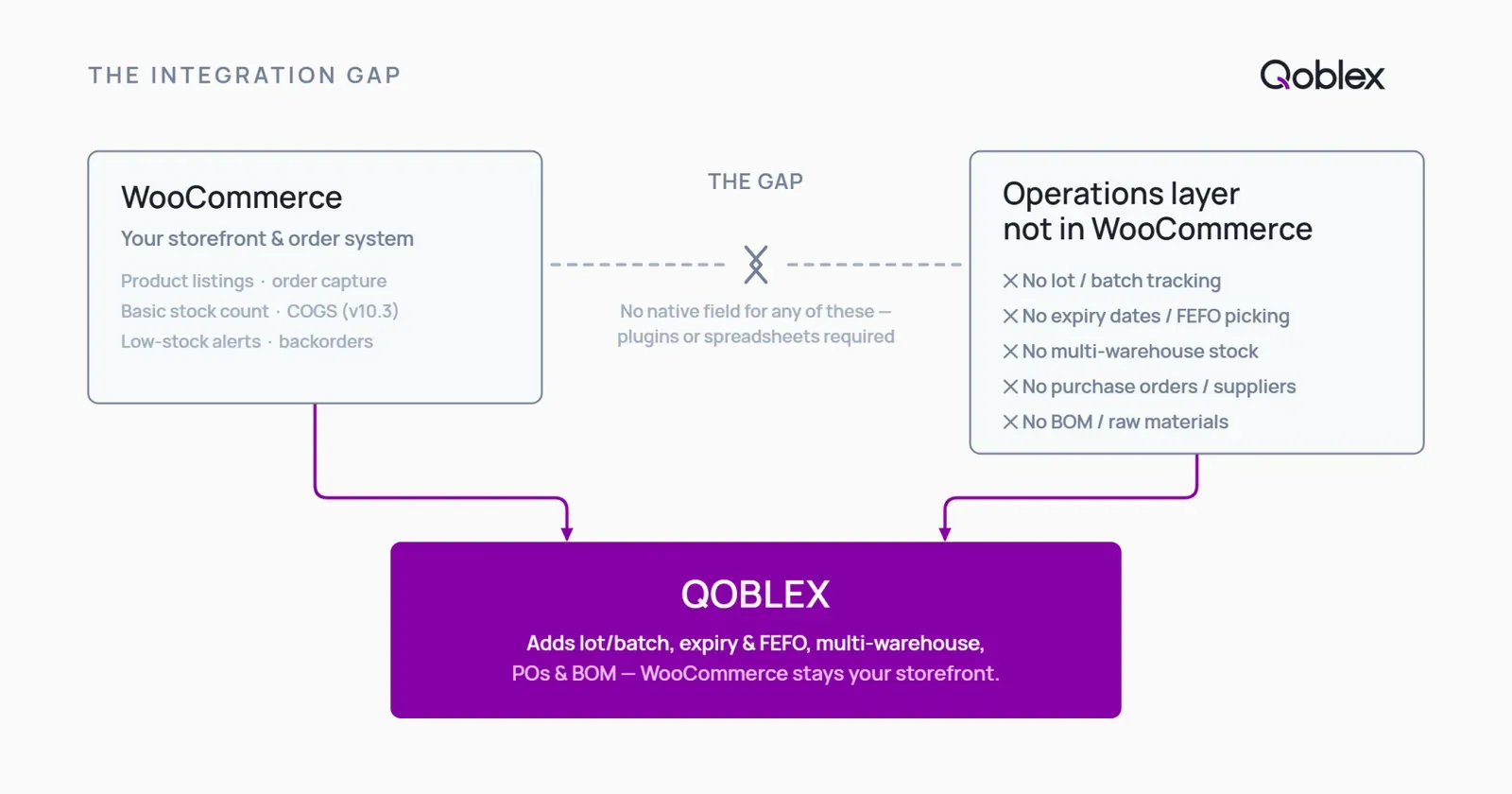
When an order lands in WooCommerce, it flows into Qoblex for fulfillment. Qoblex fulfils from the correct lot and warehouse, then syncs the updated stock count back to WooCommerce so the storefront never oversells. WooCommerce keeps doing what it’s good at: listings, checkout, customer-facing orders. Qoblex handles receiving, lots, expiry, locations, and purchasing underneath. WooCommerce does not become Qoblex; Qoblex runs behind it.
Lot/batch and expiry date tracking
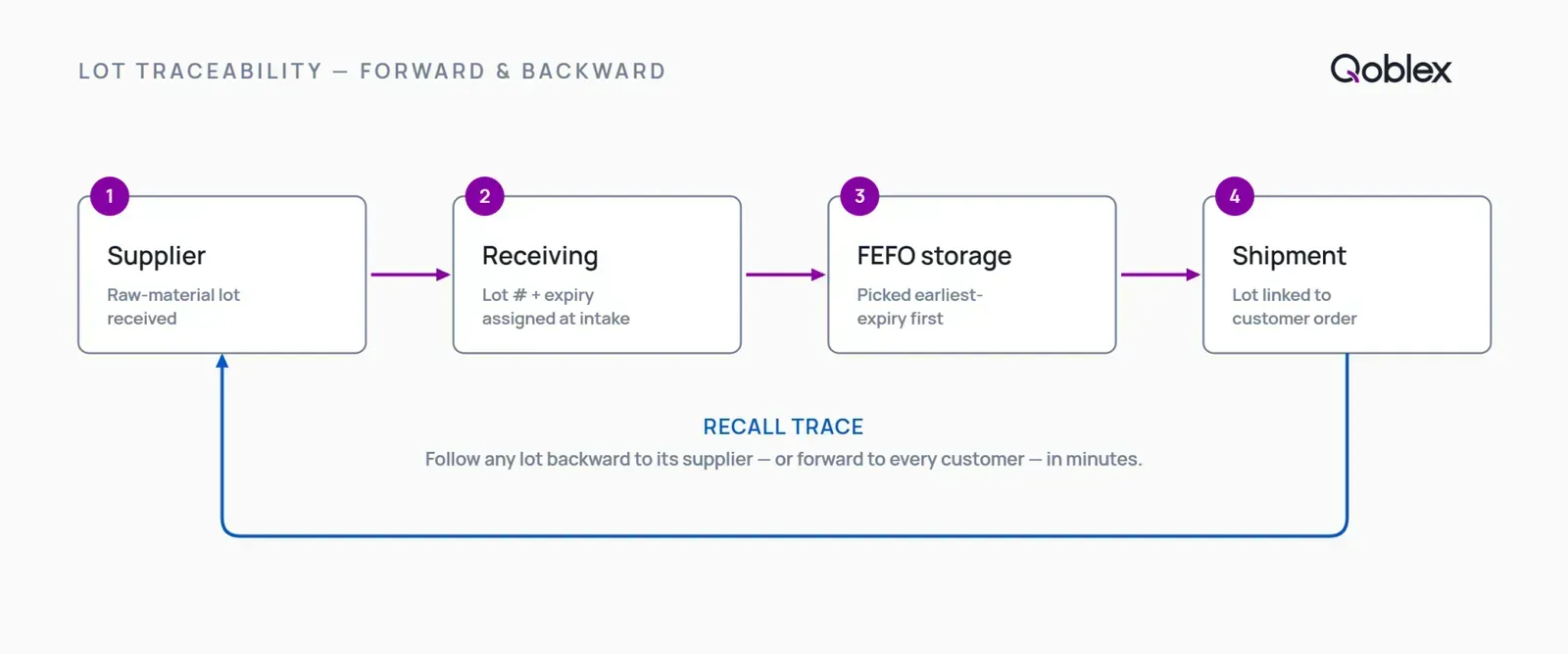
Each lot or batch is its own tracked quantity in Qoblex, with its received and expiry dates. Picking is enforced by FEFO, soonest-to-expire goes first, and you get forward and backward traceability: trace a supplier lot to every order it shipped in, or an order back to every lot that went into it. That’s what recall readiness actually is. If your need is deeper lot control across the whole business, that’s the lot control software layer this connects to.
Multi-warehouse
Real per-location stock instead of a single global total, with transfer orders to move stock between locations and stock counts per warehouse. You know how much you have and where it physically is.
Purchase orders and supplier management
Raise a purchase order to a supplier, receive against it, and stock updates automatically. Incoming stock is visible before it arrives, and there’s one record of what was ordered, what was received, and at what cost.
BOM and lightweight MRP
For sellers who make products, Qoblex handles bills of materials and production runs: define the components, and Qoblex deducts raw materials when a run completes and tracks work-in-progress. MRP and BOM are included on all Qoblex tiers.
Who this is for
Food and beverage, supplements and nutraceuticals, cosmetics, pharma, and any product seller running on WooCommerce who has hit the platform’s native operations ceiling. If you can be asked to prove which lot shipped where, or you’re managing stock across locations and suppliers, this is the operational context you need.
How one WooCommerce seller uses this in practice. A specialty retailer of high-end bicycles and components (name withheld at their request) runs their storefront on WooCommerce but builds much of what they sell to order: custom wheelsets and complete bikes assembled from expensive, serialized parts. WooCommerce captures the sale, but it has no way to hold the bill of materials for a built wheelset or to record the serial number of each frame, hub, or groupset that goes into it. That’s exactly what they use Qoblex for: a BOM per build, so components are deducted correctly the moment an assembly is completed, and serial number tracking on the individual parts, so any unit can be traced from supplier receipt through to the customer order it shipped in. WooCommerce stays the storefront; Qoblex is the build-and-trace layer behind it.
When WooCommerce alone (or WooCommerce plus a light plugin) is enough
Adding an operations layer isn’t the right move for everyone. Here’s when WooCommerce on its own, or WooCommerce plus something lighter, is genuinely the better call.
- You sell finished goods with no perishables, no batch recalls, and no serialized units. If nothing you sell has an expiry date or a lot number that matters (simple consumer products, digital goods, non-regulated items), WooCommerce’s native stock counter does the job, and there’s nothing here to fix.
- You run a single location with a small SKU count. Under roughly 50 SKUs, one warehouse, no compliance requirement, a spreadsheet beside WooCommerce may still tell the truth, or a free plugin like ATUM’s base tier may be all you need. Spreadsheets are how a lot of good businesses started; there’s no reason to add a platform before the workflow actually strains.
- You need lot or expiry tracking but at very low volume. A narrow single-purpose WooCommerce plugin, such as the Marketplace “Product Batch & Expiration Tracking” extension, costs less per month than a full operations platform. If your batch-tracking need is narrow and you have no purchase order, multi-warehouse, or BOM requirement alongside it, a plugin is the right call.
- You genuinely need full ERP-grade operations. Qoblex is a mid-market operations platform. If you need a full warehouse management system with RF scanning and slotting, a tier-1 ERP, or a purpose-built regulated-industry system, those are legitimate alternatives Qoblex wouldn’t displace. Name the real requirement and match the tool to it.
If you sell real volume across many lots, locations, and suppliers, those lighter options run out fast, but it’s worth knowing where the line is.
Adding it up: what the operations layer costs
A quick, honest note on cost, because it belongs near a decision even though it isn’t the reason to make one.
In Qoblex, lot/batch/serial/expiry tracking is a paid add-on on top of the base plan. It’s an add-on, not something bundled into the base plan for free. MRP and BOM are included on all tiers. For current plans and figures, see Qoblex plans and pricing.
For fair context: the WooCommerce route to these capabilities also carries a running cost: ATUM’s premium modules, multi-inventory extensions, and third-party PO tools each carry monthly or annual fees. The comparison isn’t “Qoblex versus free”; it’s Qoblex consolidating what would otherwise be several separate plugin subscriptions into one operations layer.
Comparison: WooCommerce native vs Qoblex + WooCommerce
| Capability | WooCommerce (native) | Qoblex + WooCommerce |
|---|---|---|
| Lot / batch tracking | No (requires a plugin) | Yes |
| Expiry date tracking | No (requires a plugin) | Yes |
| FEFO picking | No | Yes |
| Multi-warehouse / multi-location stock | No (single global stock pool by design) | Yes |
| Purchase orders / supplier management | No (manual stock-edit only) | Yes |
| BOM / raw-material tracking | No (finished goods only) | Yes (included all tiers) |
| COGS tracking | Yes (since v10.3, Oct 2025; no FIFO cost layers) | Stays in WooCommerce; Qoblex records per-lot purchase costs |
| Storefront / order capture | Yes (system of record) | Stays in WooCommerce |
FAQ
Does WooCommerce have inventory management built in?
Yes. WooCommerce includes basic stock-quantity tracking, low-stock alerts, backorder handling, stock-status management, and (since v10.3) Cost of Goods Sold. What it lacks natively is the operations layer: lot/batch tracking, expiry date management, multi-warehouse stock, purchase orders, and BOM/raw-material tracking.
Does WooCommerce track lot numbers and expiry dates?
No. WooCommerce has no native lot, batch, or expiry-date field. Every unit of a SKU is treated as identical. Batch and expiry tracking requires a third-party plugin, such as the WooCommerce Marketplace “Product Batch & Expiration Tracking” extension.
Does WooCommerce support multiple warehouses?
Not natively. WooCommerce holds one global stock count per product, a single stock pool by design. Real per-location stock requires a third-party multi-inventory plugin or an external inventory system.
Does WooCommerce have purchase order management?
No. WooCommerce has no native purchase order system or supplier management. Adding stock after a delivery means manually editing the stock level. PO management requires a plugin or an external operations platform.
Does WooCommerce track COGS?
Yes. WooCommerce added Cost of Goods Sold to core in v10.3 (October 2025). It does not, however, use FIFO cost layers: it applies the product’s current cost at the time of purchase rather than historical per-purchase cost layers, with FIFO described as “on the radar.”
Does Qoblex replace WooCommerce?
No. Qoblex is the operations layer behind WooCommerce. WooCommerce stays your storefront and order-capture system; Qoblex handles inventory operations (lot/batch, expiry, multi-warehouse, purchase orders, BOM/MRP) and syncs stock levels back to WooCommerce.
How do I add lot tracking and expiry dates to WooCommerce?
Two routes: a narrow WooCommerce plugin for light needs (the Marketplace “Product Batch & Expiration Tracking” extension), or a full operations platform like Qoblex for sellers who also need multi-warehouse, purchase orders, and BOM. Qoblex integrates with WooCommerce and syncs stock automatically.
How much does it cost to add lot/expiry tracking with Qoblex on WooCommerce?
Lot/batch/serial/expiry tracking is a paid add-on on top of the base plan; MRP and BOM are included on all tiers. See Qoblex plans and pricing for current plans and figures.
See also
- The same gap on other platforms: QuickBooks Online, Xero, and Shopify.
- Capability hubs: lot control software for WooCommerce sellers and serial number tracking.