



Quick answer: Yes, Xero has inventory management built in. It tracks up to 4,000 items, values them at average cost and posts cost of goods sold when you invoice. That suits a business selling from one place. For several locations outside the US, lot and expiry tracking, production or several sales channels, you add an inventory app, and Xero stays your book of record.
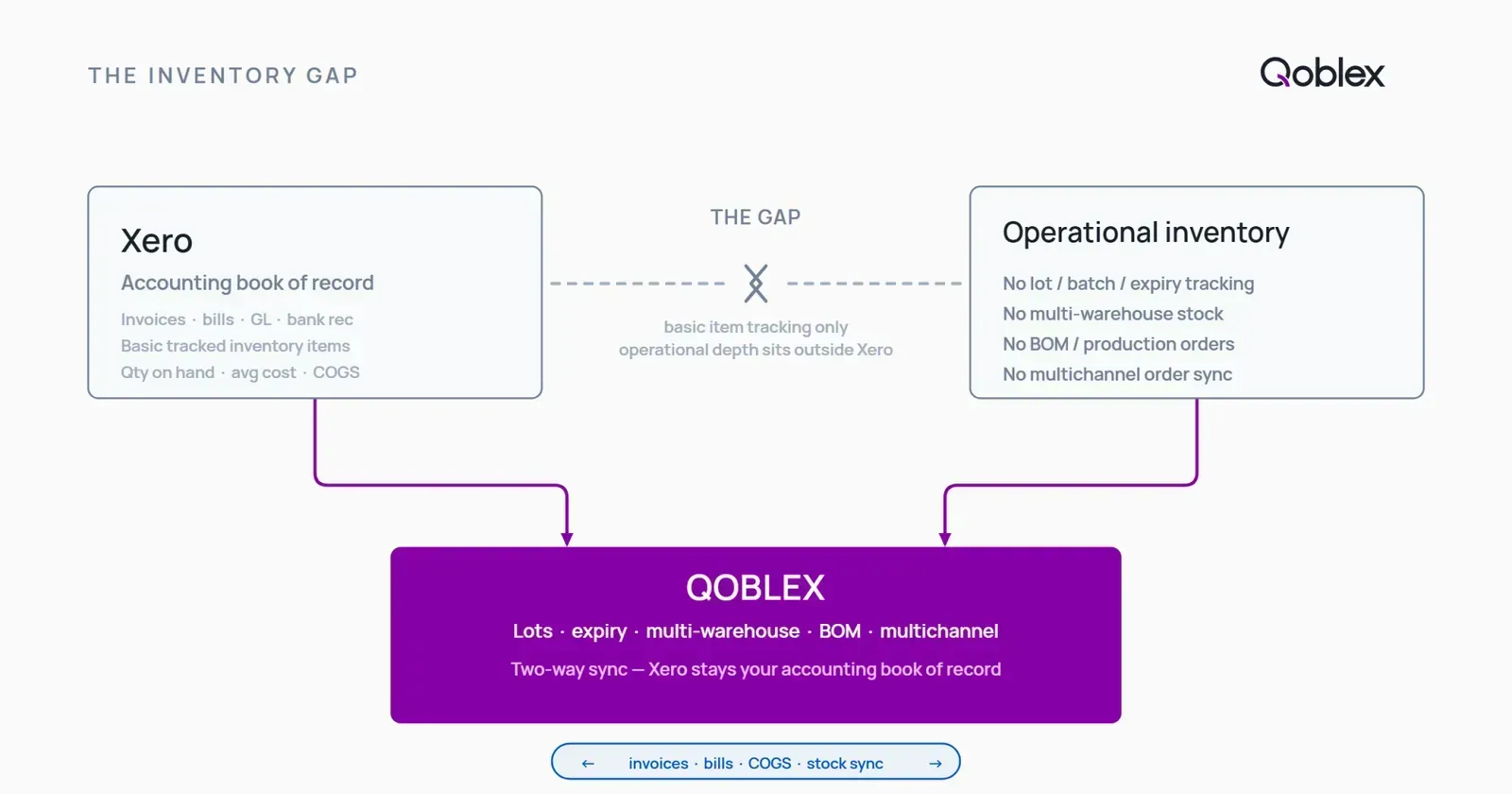
You run your books on Xero and you sell physical products. For a good while Xero’s inventory did the job: stock went up when you billed a purchase and down when you invoiced a sale, and cost of goods sold looked right at month-end. Then something changed. A customer asked which batch their order came from. A second location opened. Orders started arriving from Shopify as well as your own invoices. You went into Xero to sort it out and found it was keeping exactly what it promised, a quantity and an average cost per item, and nothing about the rest.
That is not a setup mistake. Xero is an accounting system, and a very good one, and its inventory is built to keep your books right. This guide sets out what Xero’s inventory covers, the four ways to manage stock with Xero, and how to tell which one you need.
What does Xero inventory management do?
Xero lets you save the things you buy and sell as items, and choose whether each one is tracked. A tracked item has a quantity on hand that moves on its own: up when you add it to a bill, down when you add it to an invoice. According to Xero’s own stock and inventory page, you can organise up to 4,000 items this way, each with its own code such as a SKU.
Xero also does the accounting that goes with the stock. It calculates cost of goods sold automatically, fills item details into quotes, invoices and purchase orders, and reports sales and profit per item over the dates you choose. For a business that buys and sells a manageable range from one place, that is a complete, joined-up system: one set of numbers, in the software your accountant already uses.
What costing method does Xero use?
Average cost. Xero values a tracked item at its average cost: each sale is costed at the running average of what you paid, and the value of what is left is the quantity times that average. Average cost is a widely accepted method, and for most small product businesses it is the right one.
How do you set up inventory in Xero?
You create the item, mark it as tracked, and give it its opening quantity and value. From then on, bills and invoices that use the item keep its quantity and value up to date. Xero’s help centre walks through it in track your inventory, and it is worth reading before you add your first tracked item, because the opening balance is easier to get right at the start than to correct later.
What are the options for managing inventory in Xero?
There are four, and they suit different businesses. Most businesses move down this list as they grow.
| Option | What it does | Best for |
|---|---|---|
| Untracked items | Saves names, codes and prices for documents; no quantities | Services, or stock you count elsewhere |
| Tracked items in Xero | Quantity and average cost per item, cost of goods sold posted for you, up to 4,000 items | One location, a manageable range, invoices rather than many channels |
| Xero Inventory Plus | Stock across several locations, Shopify and Amazon (FBA) orders, shipping labels and returns | Ecommerce businesses in the United States |
| An inventory app from the Xero App Store | Runs stock, purchasing and orders in its own system and posts the accounting into Xero | Several locations outside the US, lots and expiry dates, manufacturing, wholesale and retail together |
Is Xero Inventory Plus available outside the US?
No. Xero Inventory Plus is Xero’s own app for businesses selling through Shopify, Amazon and their own stores from several locations. On 22 October 2026 the Xero App Store in the United Kingdom, Australia and New Zealand each said it was not available there. Outside the US, the step after tracked items is an app from the Xero App Store.
When does a business outgrow Xero’s built-in inventory?
Xero’s tracked items keep one quantity and one average cost per item, for the whole business. That is the right model for the books. It stops being enough when the warehouse needs to know more than the books do. These are the usual signs.
A second location
Core Xero does not track inventory in multiple locations; Xero says so on its own page. Once you hold stock in a warehouse and a shop, or two warehouses, you need to see what is where, reorder for each place, and move stock between them. In the US, Inventory Plus covers this. Elsewhere, an inventory app does.
Lots, batches and expiry dates
Xero values stock as a quantity at an average cost, so it does not hold which batch a unit came from or when it expires. If you sell food, supplements, cosmetics or anything a supplier might recall, you need every receipt and sale tied to a lot, so you can answer “who received batch 2604?” in minutes. We cover this in full in lot and expiry tracking for Xero users.
You make or assemble what you sell
A finished product built from components needs a bill of materials: the recipe that says which components go into it, and in what quantities, so that building ten deducts the right stock and costs the result. That is manufacturing work rather than accounting work, and it lives in an inventory system.
Several sales channels
Selling on Shopify, WooCommerce or Amazon as well as by invoice means orders arriving from several places, each needing the same stock figure. Outside the US, keeping those channels in step is an inventory app’s job, with the sales then posted to Xero.
Freight and duty that belong in the cost
When you import, the freight and duty on a shipment are part of what the goods cost you. Spread across the shipment, they raise each unit’s cost, and your margin is only right if they do. An inventory app captures them on the purchase and puts them into the unit cost before the stock value reaches Xero.
Should Xero track your inventory if you use an inventory app?
No, and this is the setting most worth getting right. If an item stays tracked in Xero while an inventory app also values it, Xero costs each sale at its own average while the app costs it at the cost it knows, including freight and duty. The same sale is costed twice, differently, and the two systems stop agreeing.
The clean set-up gives stock value one owner. The app keeps quantities and costs, and posts the value of what moved to Xero as journals for stock on hand, cost of goods sold and adjustments. In Xero the products stay as untracked items, so they still appear on invoices and bills without Xero valuing them a second time. We explain the set-up step by step in why products stay untracked in Xero.
How does an inventory app work with Xero?
Xero stays the book of record: the ledger, bank reconciliation, tax, payroll and reporting. The app runs the stock and sends Xero the accounting consequences. With Qoblex, for example, the connection works like this:
- Sales. An invoice reaches Xero within minutes of being authorized, each line on the sales account and tax rate you mapped, and customer payments follow it.
- Purchases. A supplier bill posts against your Purchases account, and the goods receipt clears it, so a balance left there is something billed but not yet received.
- Stock value. Once a day, journals carry stock on hand, cost of goods sold and adjustments, valued at moving average or FIFO with freight and duty included.
- Rules. Postings go to the account and tracking category you choose by location, sales channel, order tag, product type or brand, so a channel or a site can be reported on its own in Xero.
Your accountant keeps working in Xero, and nobody types an invoice twice. The full detail, account by account, is on inventory management software for Xero.
What is the best inventory app for Xero?
The one that closes the gaps you actually have. Start from the signs above, then check that the app:
- posts invoices, bills, payments and stock value to the Xero accounts you choose, with rules for the exceptions;
- keeps your products untracked in Xero, so stock is valued once;
- holds stock by location, and tracks lots and expiry dates if you need them;
- costs what you make, if you manufacture;
- brings in orders from the channels you sell on.
Unleashed, inFlow, Katana and Cin7 each serve a different slice of this market, and we compare them in the best inventory software for Xero. Qoblex has been a Xero app partner since 2017, is a Featured app on the Xero App Store, and is rated 4.96 out of 5 from 27 reviews there.
When is Xero’s built-in inventory enough?
More often than software vendors like to admit. If you sell products with no batch identity or expiry date, from one location, through invoices rather than several channels, Xero’s tracked items cover quantity and cost well, and adding a system would only add work.
A very small operation, one or two people who touch every order and a handful of products, can also run well on Xero and a careful spreadsheet. Spreadsheets are how a lot of good businesses started. The signal to add a proper inventory system is when the spreadsheet starts disagreeing with the shelf: a third person in the warehouse, a second location, or a second sales channel.
At the other end, a business that needs multi-plant scheduling or full EDI may be better served by an ERP. Qoblex is built for the messy middle between spreadsheets and enterprise ERP, and knowing which stage you are at is more useful than any feature list.
FAQ
Does Xero have inventory management?
Yes. Xero tracks up to 4,000 items, keeps a quantity on hand for each tracked item, values it at average cost and posts cost of goods sold when you invoice. That suits a business selling from one place. For several locations, lots and expiry dates, manufacturing or several sales channels, businesses add an inventory app from the Xero App Store.
How many inventory items can Xero track?
Up to 4,000 items, according to Xero’s own inventory pages.
What costing method does Xero use for inventory?
Average cost. Each sale is costed at the running average of what you paid for the item, and remaining stock is valued at quantity times that average.
Can Xero track inventory in more than one location?
Not in core Xero. In the US, Xero Inventory Plus adds several locations. Elsewhere, businesses use an inventory app from the Xero App Store that holds stock by location and posts the accounting into Xero.
Is Xero Inventory Plus available in Australia, New Zealand or the UK?
No. On 22 October 2026 the Xero App Store in all three countries said Xero Inventory Plus was not available there. It is offered in the United States.
Should I track inventory in Xero if I use an inventory app?
No. Keep the products untracked in Xero and let the app own stock value, posting it to Xero as journals. If both systems track the same item, each costs the sale its own way and the books stop agreeing.
Does Qoblex replace Xero?
No. Xero stays the accounting system of record. Qoblex runs stock, purchasing, orders and production, and posts invoices, bills, payments and stock value into Xero.
What is the best inventory app for Xero?
The one that closes the gaps you have: locations, lots and expiry dates, manufacturing or sales channels, with a clean posting of invoices, bills, payments and stock value into Xero. Unleashed, inFlow, Katana, Cin7 and Qoblex each serve different businesses. Qoblex is a Featured app on the Xero App Store, rated 4.96 out of 5 from 27 reviews.