



At a glance: A cosmetics importer and wholesale distributor buys skincare and cosmetics from several overseas brands, pays shipping and customs duties, and sells wholesale to retailers, including chains with many stores. Its stock carried no batch or expiry records, and stock that passes its date is worthless. Now the warehouse team receives each batch on the purchase order with its expiry date, the earliest-expiring batch goes on the chain’s order, and cost stays on moving average cost, because Qoblex sorts the pick by expiry while the costing method is set separately.
What happens to a cosmetics importer’s stock when it holds no batch or expiry records?
A cosmetics importer and wholesale distributor that holds its stock with no batch or expiry records cannot tell which units are close to their date, and stock that reaches its date becomes worthless. For a long time one quantity per product was a reasonable record, because the question that mattered was how many units were in the building. It worked while every carton was as good as the next.
Once dates matter, two cartons of the same serum stop being the same thing, because a later delivery can carry an earlier date. With no batch or expiry in the record, the person who packed a chain’s order had nothing to choose between, and stock that passed its date was worth nothing after the business had paid for the goods, the freight and the duty. A chain’s order is large enough that one pick decides where a lot of units end up.
The owner was also unsure whether shipping the earliest-expiring stock first meant changing how the business costs its stock. So the useful question came first: what would the team need to know about a unit before choosing which one goes on the chain’s order? The answer was a batch number and an expiry date recorded on arrival, and the team walked its own day through how Qoblex records them.
How does a cosmetics importer and wholesaler ship the earliest-expiring batch first in Qoblex?
A cosmetics importer and wholesaler ships the earliest-expiring batch first in Qoblex by receiving each delivery on the purchase order as batches with an Expires At date, then picking the batch that expires first on the chain’s sales order, where Qoblex sorts and suggests the lots by expiry and the packer confirms the batch that is actually going into the carton. Once per product, the owner sets the variant’s Inventory Tracking Option to Batch Tracked on its Inventory tab, so Qoblex records units per batch, each with its own expiry date. That needs the Lot, Serial & Expiry Dates feature, a paid add-on on Starter and Business, included on Scale (see pricing).
When a shipment lands, the warehouse team receives the goods on the approved purchase order, clicks Authorize, and in Batch / Serial number details enters the Batch Number, Quantity and Expires At from the supplier’s label, using Add Batch when one line arrived as two batches, then clicks Receive (receiving batches). The batch quantities must match the quantity received, and a batch number already at that location must keep its expiry date. Freight and duty ride on the same purchase order as landed cost, so the units arrive at landed cost and the moving average is recalculated (more on import purchase orders).
With a date on every batch, the owner filters the Batches list by Expire At, and a warning beside each batch number marks it expiring soon within a fixed 10 days or expired once its date has passed (expiring stock). An expired batch is marked, not blocked, so the team sets it aside and removes it with a stock adjustment when it must leave inventory.
For a chain’s order, the person who packs it opens the sales order line, clicks Ship, enters the To Ship quantity and clicks Pick. Qoblex sorts the lots by expiry and suggests the nearest date first, and the packer selects the batch and its quantity, adds a second with Add Batch if needed, and clicks Confirm (shipping batches). Picking reserves those quantities, and Pack then Dispatch reduces stock from those batch records and keeps the batch details linked to the shipment.
| What the team needs to do | Before Qoblex | In Qoblex |
|---|---|---|
| Know what the stock record holds | The quantity of each product, with no batch or expiry date | Each batch with its number, quantity and expiry date |
| Receive a shipment | The quantity received | Batch Number, Quantity and Expires At entered on the purchase order's receipt |
| Choose what goes on a chain's order | No batch to choose between | Qoblex suggests the earliest expiry first, the packer confirms the batch on the shipment, and the picked quantities are reserved |
| Spot short-dated stock | No expiry date in the record to look at | The Batches list, filtered by Expire At, with a warning beside the batch number: expiring soon within 10 days, expired once past |
| Know what the order costs | Unclear whether picking by expiry would change the costing | Cost of goods sold recorded at dispatch: quantity shipped times the moving average cost at that moment |
Everything after the receipt reads the batch’s date. That is why the owner cared most about the last row: if the pick follows the date on the carton, does the cost of the order follow it too? One product and one order answer that.
What does one serum, two batches and a chain-store order cost a cosmetics wholesaler on moving average cost?
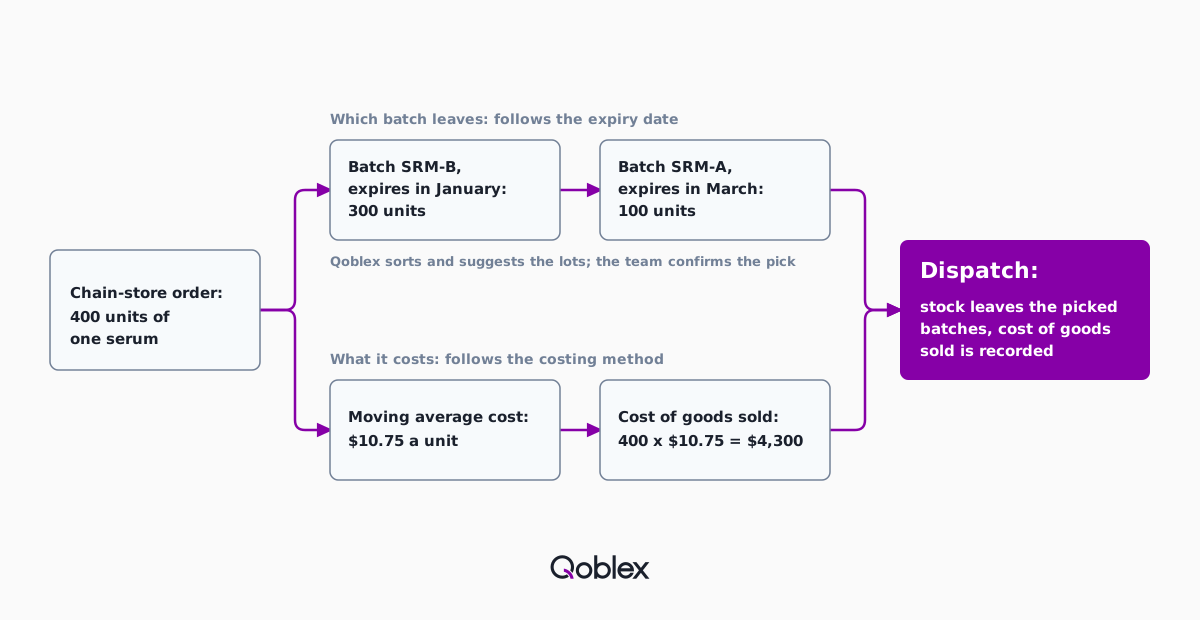
Once a cosmetics wholesaler’s serum is on moving average cost, a chain-store order picked across two batches in Qoblex is costed at the quantity shipped times the serum’s moving average cost at dispatch, so the cost of goods sold is the same whichever batch leaves. Let’s assume the serum arrives in two deliveries, with no sales in between: batch SRM-A first, 500 units at a landed unit cost of $10.00, expiring in March, then batch SRM-B, 300 units at $12.00, expiring in January. The later delivery expires first, which is when picking by date changes which carton leaves.
The warehouse now holds 800 units worth $8,600: $5,000 of SRM-A and $3,600 of SRM-B. Moving average cost is the value of the stock held divided by its quantity, so the serum’s is $8,600 divided by 800, or $10.75 a unit, one figure for the variant, not one per batch. The moving average cost calculator reproduces the sum.
A chain then orders 400 units. The packer picks by expiry, so all 300 units of SRM-B go first and 100 units of SRM-A make up the rest. At dispatch, Qoblex records the cost of goods sold as 400 times $10.75, which is $4,300. The 400 units of SRM-A left are worth $8,600 less $4,300, or $4,300, still $10.75 a unit. Two questions followed, in the order the team raised them: does picking by expiry tie the business to FIFO costing, and how does stock already on the shelves get its batches?
Does picking cosmetics by expiry date (FEFO) force a wholesaler onto FIFO costing?
No: a cosmetics wholesaler in Qoblex picks by expiry date without moving to FIFO costing, because the batch that leaves is chosen on the shipment while the costing method, Average Cost or FIFO, is set per variant, and on moving average cost the cost of goods sold is the quantity shipped times the product’s moving average cost at dispatch. Two of the three ideas share a name. FEFO, first expired, first out, is a picking rule that sends the batch expiring first. FIFO as a picking rule sends the oldest arrival first, and the two agree only when arrival order matches expiry order, which the serum’s deliveries show they need not.
FIFO as a costing method is something else: it values the cost of goods sold using the oldest inventory costs first (FIFO as a costing method). Moving average cost charges every sale the one average instead, and in Qoblex a business chooses Average Cost or FIFO for each variant.
This business kept moving average cost, so the batch the packer picks never enters the sum. Qoblex sorts and suggests the lots by expiry but does not enforce the order, which is why the packer still confirms the batch in the carton. The second check was about the serum already on the shelves.
How does a cosmetics wholesaler start batch and expiry tracking on stock it already holds?
A cosmetics wholesaler starts batch and expiry tracking on stock it already holds by setting each variant’s Inventory Tracking Option to Batch Tracked, bringing the untracked quantity to zero first, and then loading the stock back in as batches through the Import batches / serial numbers stocktake. Qoblex refuses to move a variant off Standard while any of its stock is on hand or allocated to orders. So the owner notes the quantity and cost at each location, the warehouse team writes on-hand to zero with a stock adjustment, and the owner then switches the variant.
To bring the stock back as batches, the team opens Import batches / serial numbers on Inventory > Products, chooses the location, and clicks Prepare Template, then Download Template (batch CSV stocktake). The template’s columns are Id, Product, Sku, Batch/Lot Number, Expiry Date and Quantity. The team leaves Id as downloaded and gives every row a batch number, never the same one twice for a variant in one file, and rows with a quantity of 0 are ignored.
The import adds stock at zero unit cost, so the owner then sets the serum’s Moving Average Cost on the product page or with Edit by CSV, and Qoblex revalues the counted stock and posts an accounting adjustment (opening stock). Each expiry date comes off the carton or the supplier’s paperwork and is never invented to finish a file. The flow reads best as one order, receipt to dispatch.
How does one chain-store order run from the purchase order to dispatch, step by step?
A cosmetics importer and wholesaler runs one chain-store order through Qoblex in seven steps, from receiving a batch on the purchase order to dispatching the earliest-expiring batch first. The screen names match what the team sees.
- Once per product, set the variant’s Inventory Tracking Option to Batch Tracked on its Inventory tab.
- Receive the goods on the approved purchase order and click Authorize.
- In Batch / Serial number details, enter the Batch Number, Quantity and Expires At for each batch, with Add Batch for a second batch, then click Receive; totals must match the quantity received.
- Filter the Batches list by Expire At to see batches marked expiring soon (within 10 days) or expired.
- On the chain’s sales order, select the line, click Ship, enter the To Ship quantity and click Pick.
- In Batch / Serial number details, select the batch that expires first and its quantity, use Add Batch for the next, and click Confirm; Qoblex reserves the quantities picked.
- Click Pack, then Dispatch: stock leaves those batch records, the batch details stay linked to the shipment, and cost of goods sold is recorded.
The same steps carry over to several neighbouring businesses.
Does this fit your business?
The Qoblex batch and expiry flow fits a cosmetics importer and wholesaler and equally skincare and haircare brands that sell wholesale, fragrance distributors, supplement and food distributors with best-before dates, and pharmacy-channel suppliers, each keeping a batch number and an expiry date on every delivery and picking by expiry on every order. A supplier of controlled or regulated products confirms its own expiry policy before dispatching near-expiry stock, because Qoblex identifies the date and the business decides. The health and beauty, wholesale distributor and importer pages cover the wider setup, with lot tracking and cosmetics batch traceability for recalls.
The flow does not fit a business that needs the system to block an expired batch or hold the packer to the pick order, because Qoblex suggests lots and marks expired batches without blocking them. If blocking or enforcing is a must, talk to us before you decide; a system built to enforce pick rules is the honest answer for that part. The 10-day expiring-soon window is fixed, too.
A business with no dates that matter, or only a handful of dated lines, may need only a Standard variant, which tracks quantity only, or the record it already keeps. Spreadsheets carried plenty of good businesses this far.
Frequently asked questions
Does picking by expiry date force me to use FIFO costing?
No. Picking the earliest-expiring batch is a pick rule; FIFO costing is a costing method. In Qoblex the packer chooses the batch on the shipment, the costing method is set per variant, and on moving average cost the cost of goods sold is the quantity shipped times the moving average cost at dispatch.
What is the difference between FEFO and FIFO?
FEFO (first expired, first out) ships the batch that expires first. FIFO as a picking rule ships the oldest arrival first. FIFO as a costing method is separate again: it values the cost of goods sold using the oldest inventory costs first. The pick rules agree only when arrival and expiry order match.
Does picking from a different batch change cost of goods sold?
On moving average cost, no. Qoblex records cost of goods sold at dispatch as the quantity shipped times the product’s moving average cost at that moment, and the average is one figure for the variant. A 400-unit serum order at a $10.75 average costs $4,300 whichever batches the packer takes.
Does Qoblex stop me shipping an expired batch?
No. Qoblex marks a batch as expiring soon within a fixed 10 days and as expired once its date has passed, but it does not block the batch, and FEFO sorts and suggests lots without enforcing them. The business decides, setting expired stock aside and removing it with a stock adjustment.
Can one order be filled from two batches?
Yes. On a Qoblex shipment, the packer clicks Pick, selects the first batch and its quantity, uses Add Batch for the next, and clicks Confirm. The quantities must add up to the line’s To Ship quantity, and Qoblex reserves them on pick and reduces those batches on dispatch.
Is batch and expiry tracking included in every plan?
No. Lot, batch, serial and expiry traceability is a paid add-on on the Starter and Business plans and is included on Scale. Without it, Qoblex will not save a variant as Batch Tracked, so check the plan before switching products over. See pricing for current figures.
Can I start batch tracking on stock I already hold?
Yes. In Qoblex, write the variant’s on-hand quantity to zero with a stock adjustment, set it to Batch Tracked, and load the stock back with the Import batches / serial numbers stocktake. Then set the Moving Average Cost, since the import adds stock at zero unit cost. Open orders that block the switch have their own steps.