



At a glance: An importer and distributor of professional audio-visual equipment sells hardware individually and as locally assembled kits, almost entirely wholesale to businesses by email, plus a recently launched Shopify store. It buys from suppliers in Europe and Asia in euros and dollars, and Xero is the books. Unit costs and accounting entries drifted whenever a purchase was in a foreign currency. Now each purchase order carries its own exchange rate in Qoblex, which spreads freight and duty into the landed unit cost and sends each bill to Xero in the currency the accountant chooses.
How did an AV equipment importer know it was time to move beyond hand-costing and Xero alone?
The same doubts came back every month:
- A euro invoice had two values, and nobody could say which rate produced the one in the books.
- A dollar purchase order was recorded at a value that did not match the shipment’s real cost, worked out by hand beside Xero.
- Freight and duty landed after the goods, so a projector’s real landed cost was a month-end estimate.
- Kits mixed parts bought in two currencies with local components, so a kit’s cost was only as good as its weakest guess.
- A new Shopify store was one more place where prices had to agree.
- Sales in a customer’s currency left payments that never quite matched the invoice.
None of this was careless: with one foreign supplier, Xero plus a hand-built cost works. Two questions test it. What has to be checked by hand before anyone trusts a unit cost? Which rate did this purchase use, and where is it written down?
What are the options for buying in euros and dollars while reporting in your own currency?
The Xero column quotes Xero’s own pages, checked 27 October 2026.
| Question | Stay put: hand-built costs beside Xero | Xero’s own features | An inventory system such as Qoblex, with Xero as the books |
|---|---|---|---|
| Where is a foreign-currency purchase entered? | A Xero bill, with unit cost worked out by hand | Xero converts a foreign-currency invoice or bill to the base currency at the current rate, and you can override the rate on any individual invoice, bill or payment | On a purchase order in the supplier’s currency, with its own Exchange rate and a base-currency Total |
| Who sets the rate? | Whoever typed the cost | Xero applies the current rate; override on any document | The stored rate fills the order’s Exchange rate; changeable until the first bill |
| Landed cost (freight, duty) into item cost | By hand per shipment | Not compared here | Add Additional Cost, Type Landed Costs, spread by value into landed unit cost at receipt |
| Base-currency freight or customs bill after the goods | By hand | Not compared here | A separate Freight Order allocated across the purchase orders it covers |
| Stock quantity and average cost | By hand | Tracked inventory: quantity on hand, adjust quantity, average cost or value (US stock control page: up to 4000 finished items) | Held per item in Qoblex; products reach Xero untracked |
| Plan needed | Your existing Xero plan | Xero’s pricing pages list multi-currency as included on Established (US page) and on Comprehensive and Ultimate (UK page) | The Xero integration is a paid add-on on Starter and Business; see pricing |
| What it asks of you | Discipline and a careful accountant | Little extra if foreign currency is occasional | A setup session for currencies, rates and the two Xero presentment settings |
What does Xero itself do with a foreign-currency bill?
Xero’s US multi-currency page says Xero “automatically converts the amount to your base currency using the current exchange rate”, and that “you can override the rate on any individual invoice, bill, or payment in Xero.” Plans differ by region (US, UK), so check yours. Xero stays the books; Qoblex adds a rate on each purchase order, landed cost in unit cost, and the Freight Order.
When is staying put the right call?
Often: a few foreign-currency purchases a month in one currency, small freight, wide margins, stock that fits Xero’s tracked inventory, or suppliers who all invoice in your base currency. If nobody asks “what did that actually cost to land?”, stay put. If Xero’s multi-currency covers what you do, you do not need a second system for currency alone (when Xero’s own inventory is enough).
What does the switch to Qoblex look like for a business that buys in euros and dollars?
In Qoblex, each purchase order carries its own exchange rate, freight and duty entered in the order’s currency are spread across the items by value into the landed unit cost at receipt, and each bill reaches Xero in the supplier’s currency or in the base currency, depending on one setting. Xero stays the book of record.
Where do currencies and exchange rates get set up?
Under Account, then Currencies. Set Base Currency first: it locks once there are integrations (a Shopify store, say) or saved exchange rates. Under Foreign Currencies, Add Exchange Rate takes the rate from base to foreign, shown as 1 GBP = 1.15 EUR, never the inverse. Automatic Exchange Rate Update keeps rates current from OpenExchangeRate and shows Last updated; Price Ceiling rounds converted prices up. Rate changes never rewrite finished documents.
What does a foreign-currency purchase order show?
A supplier with its own currency switches the order to it, and an Exchange rate field appears, filled from the stored rate. Changing the rate re-prices lines and extra costs; the Total also shows in base currency. Currency and Exchange rate lock as soon as any bill exists, whatever the receiving state.
How do freight and duty get into the landed unit cost?
On the order, Add Additional Cost and set the Type: Landed Costs are spread across the items, Expenses are not (for taxes you do not load onto stock). Their prices are entered in the order’s currency. Qoblex spreads Landed Costs by value (net price times quantity), recalculates on save, and carries the result into item cost at receipt under moving average cost or FIFO (more on landed cost on a purchase order).
What if the freight or customs bill arrives in the base currency after the goods?
It goes on a separate Freight Order, recorded after receipt: a purchase order with no product lines, only Add Additional Cost, allocated across the purchase orders it covers.
What does Xero receive, bill by bill?
On the Purchases tab, Sync bills in presentment currency is off by default. On, the bill goes in the supplier’s currency with its exchange rate; off, Qoblex converts it to base first. The Purchases account is a goods received / invoice received clearing account: the bill debits it, the receipt journal credits it, and it nets to zero once billed and received at the same value. Freight or duty spread across items stays on Purchases; Expenses-type lines go to the Expenses Account. Qoblex posts invoices and bills, with optional two way payment sync (what it posts).
How do sales in a foreign currency work?
A sales order has its own Currency and Exchange rate, locked once invoiced, and payments convert at that rate. On the Sales tab, Sync invoices in presentment currency sends the invoice in its own currency or in base.
| Document or setting | Which rate | When it stops changing | What Xero gets |
|---|---|---|---|
| Currencies page | Stored rate, 1 base = rate foreign | Future documents only | Nothing |
| Foreign-currency purchase order | The order’s Exchange rate | At the first bill | The bill, per Sync bills in presentment currency |
| Landed Costs line on that order | The order rate | Once billed | Part of the bill, on the Purchases account |
| Freight Order in base currency | None needed | Once billed | The bill in base currency either way |
| Foreign-currency sales order | The order’s Exchange rate | Once invoiced | The invoice, per Sync invoices in presentment currency |
| Payment on a foreign-currency invoice | Invoice currency, converted at the order’s rate | n/a | Per the payment sync setting |
| Shopify store in another currency | Needed if the synced price list’s currency differs from the store’s | n/a | n/a |
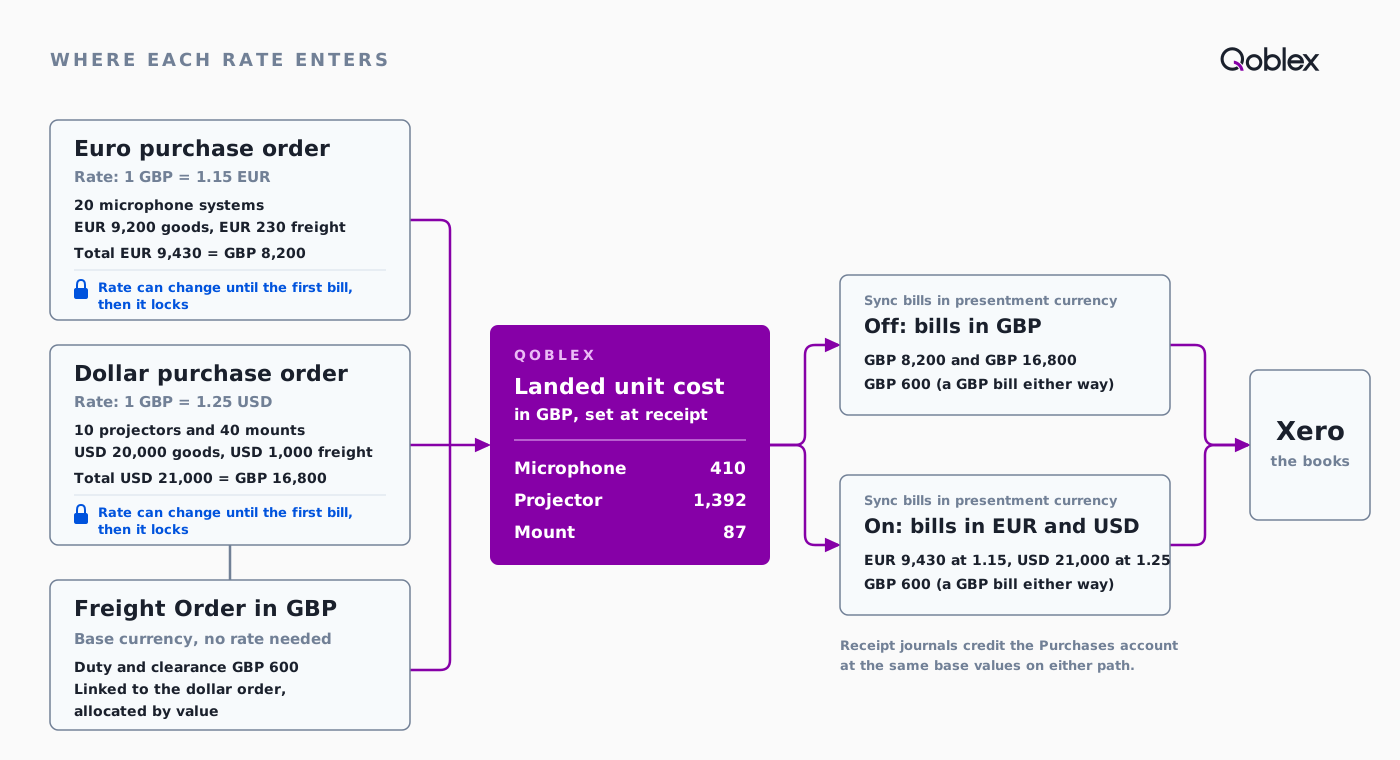
What does one shipment from a European and an Asian supplier look like, end to end?
Let’s assume a distributor whose base currency is GBP places two purchase orders, with rates as Qoblex shows them: 1 GBP = 1.15 EUR and 1 GBP = 1.25 USD.
- Day 1, euro order. 20 wireless microphone systems at EUR 460 (EUR 9,200), plus EUR 230 supplier freight as a Landed Costs line. Total EUR 9,430, GBP 8,200 at 1.15. Landed unit cost GBP 410 (400 goods plus 10 freight).
- Day 3, dollar order. 10 laser projectors at USD 1,600 (USD 16,000) and 40 ceiling mounts at USD 100 (USD 4,000), plus USD 1,000 sea freight. Total USD 21,000, GBP 16,800 at 1.25. Freight of GBP 800 splits by value 80/20: GBP 640 to the projectors (64 a unit), GBP 160 to the mounts (4 a unit).
- Day 21, euro goods received; day 24, the supplier’s bill arrives. The euro order’s currency and rate now lock.
- Day 38, dollar goods received; day 40, the customs broker’s bill. Duty and clearance of GBP 600 go on a Freight Order in GBP, allocated by value 80/20 across the lines it covers: GBP 480 to the projectors (48 a unit), GBP 120 to the mounts (3 a unit).
- Landed unit cost:
| Item | Qty | Goods, supplier currency | Goods, GBP | Supplier freight, GBP | Broker duty and clearance, GBP | Landed total, GBP | Landed unit cost, GBP |
|---|---|---|---|---|---|---|---|
| Wireless microphone system (EUR order) | 20 | EUR 9,200 | 8,000 | 200 | 0 | 8,200 | 410 |
| Laser projector (USD order) | 10 | USD 16,000 | 12,800 | 640 | 480 | 13,920 | 1,392 |
| Ceiling mount (USD order) | 40 | USD 4,000 | 3,200 | 160 | 120 | 3,480 | 87 |
| Total | 24,000 | 1,000 | 600 | 25,600 |
- What Xero receives:
| Bill | Sync bills in presentment currency off | Sync bills in presentment currency on |
|---|---|---|
| European supplier (euro order) | GBP 8,200 | EUR 9,430 with the order’s rate of 1.15, which is GBP 8,200 |
| Asian supplier (dollar order) | GBP 16,800 | USD 21,000 with the order’s rate of 1.25, which is GBP 16,800 |
| Customs broker (Freight Order, base currency) | GBP 600 | GBP 600 |
Receipt journals credit the Purchases account at the same base values, so it nets out once everything is billed and received. Stock is worth GBP 25,600, exactly the three bills, and every foreign amount was converted at its own order’s rate.
What did the business ask when it checked the workflow in Qoblex?
These came up on the call, as the team checked how its own workflow would run in Qoblex.
We buy and sell in three currencies. How do purchases, sales and landed costs in foreign currency reach Xero correctly?
A third currency works like the two in the example. Purchase orders hold their rate, landed costs spread by value into unit cost, and bills follow Sync bills in presentment currency. Sales orders hold their rate, payments convert at it, and invoices follow Sync invoices in presentment currency.
We keep our books in our local currency but place some purchase orders in US dollars. Can the inventory system handle multi-currency purchasing and sync correctly to Xero?
Yes, as in the dollar order above. The order takes the supplier’s currency, shows its rate and its base-currency Total, and the bill reaches Xero per the presentment setting. Your Xero plan must include multi-currency; check with your accountant.
Does this fit your business?
Other AV and electronics importers selling by quote: the same flow, different products (electronics).
Equipment and spare-parts suppliers with a service desk. Parts bought in dollars work the same way. Labour invoices that move no stock can stay in Xero; parts used on service jobs are stock, so check how you will record them.
Importers buying from several countries. Same pattern (importers, landed costs).
Wholesalers selling in a customer’s currency. The sales order carries the rate (wholesale distributors).
Kit builders. Bills of materials are on every plan, so a kit is costed from what its imported and local components cost to land.
Who it does not fit. A group needing two base currencies in one company: Qoblex has one base currency per company, so talk to us first or look elsewhere. A business whose few foreign-currency documents Xero already handles. A business that needs its inventory system to post realised exchange gains and losses: that stays your accountant’s entry in Xero. The Xero integration is a paid add-on on Starter and Business (see pricing).
Frequently asked questions
Which exchange rate fixes the landed unit cost of an imported item?
The exchange rate on the purchase order. Freight and duty entered on that order, in its currency, use the same rate. A Freight Order in your base currency needs no rate. Check the order’s rate before the first bill, when it locks.
When does the exchange rate on a purchase order lock?
Currency and Exchange rate lock as soon as any bill exists on the order, whatever the receiving state. Until then a rate change re-prices the product lines and extra costs. A landed cost line also locks once billed, so settle freight and duty first.
Should I turn on Sync bills in presentment currency?
Off by default. On, Xero keeps the supplier’s currency and the order’s rate; off, it receives base-currency values. In the example both give the same GBP values. Decide with your accountant, and check your Xero plan includes multi-currency. Sync invoices in presentment currency is the same choice for sales.
Why does Qoblex say “Please define a currency exchange rate first” when I save Shopify settings?
That message belongs to the Shopify settings page. When the synced price list’s currency differs from the store’s, Qoblex needs a rate before it saves those settings: use Setup Exchange rate, then save. A zero rate on a sales order is a different message: “Invalid exchange rate”.
How is a customer’s payment in a foreign currency converted?
The payment is entered in the invoice currency, the currency the customer was billed in. For a foreign-currency order, Qoblex converts it using the order’s exchange rate when it stores the payment. Whether payments pass between Qoblex and Xero depends on your payment sync setting.
Where does an exchange gain or loss on paying a supplier go?
Qoblex keeps cost at the order’s rate. A different bank rate on payment day creates an exchange gain or loss: Xero’s multi-currency accounting guide (checked 27 October 2026) says “exchange rate movements create realised gains or losses when invoices are settled”. That entry is one your accountant makes in Xero.
What goes wrong when a one-currency system records a dollar purchase order?
The foreign amount is keyed as base currency: a USD 100 mount costed at GBP 100 instead of GBP 80, a EUR 460 microphone at GBP 460 instead of GBP 400. Every dollar cost is overstated by 25 percent and every euro cost by 15 percent. An order with its own rate prevents it.