


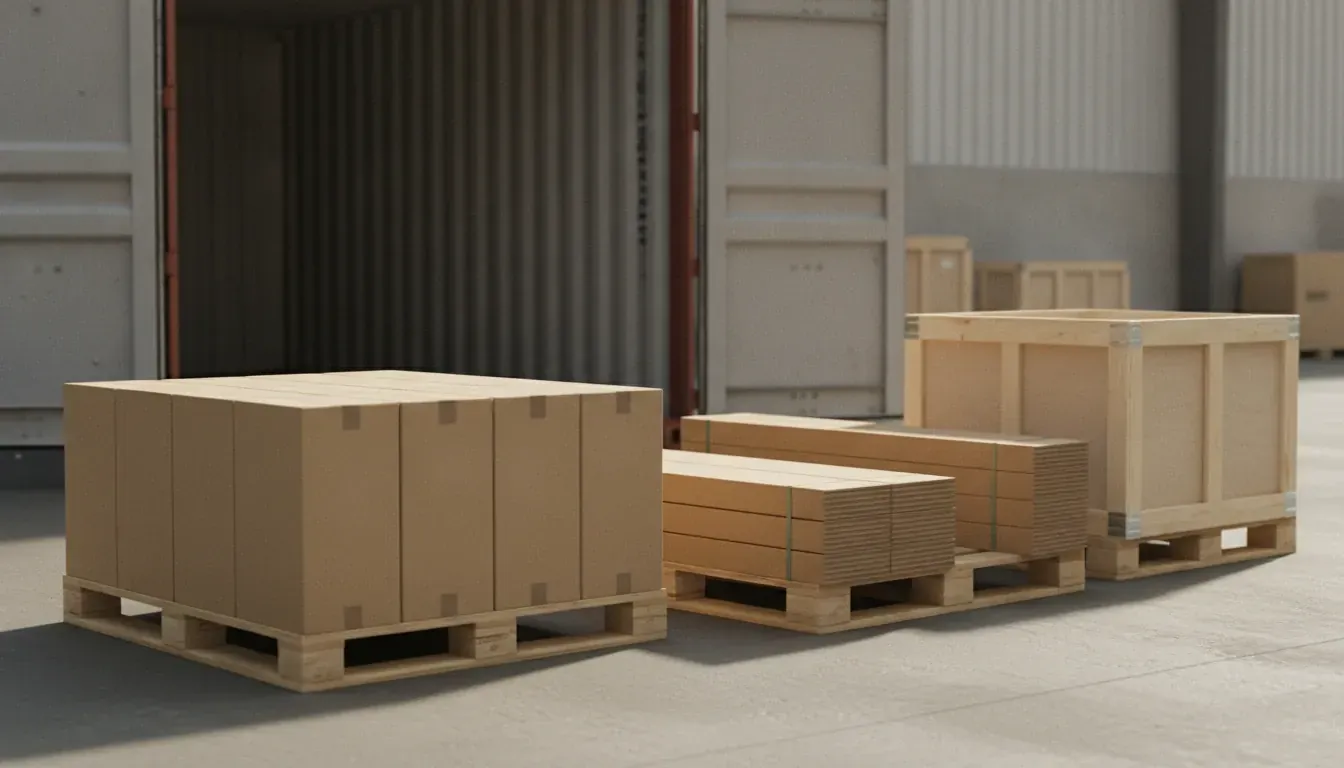
At a glance: A home improvement products retailer sells flooring, tile and bathroom vanities, some as kits, through Shopify and keeps its books in QuickBooks Online. It imports containers from suppliers in several countries, and working out landed cost by hand took hours and let product costs drift. Now freight, duty and port charges go on the purchase order as Landed Costs lines, Qoblex spreads them by value into each product’s unit cost at receipt, and product cost data can sync one way from Qoblex to Shopify.
What happens to product cost when a flooring and tile importer works out landed cost by hand?
A home improvement products retailer that imports flooring, tile and bathroom vanities in containers from several countries finds that its product costs go out of date once containers arrive often, because every container’s freight and duty has to be worked out line by line in a spreadsheet and typed into the Shopify cost field by hand. The spreadsheet made good sense while containers were few, because splitting one container’s charges by hand took an afternoon.
Growth changed that. Suppliers in more countries meant each container arrived with its own freight, duty and port charges, so keeping product costs current took hours, and in a busy week the costs drifted. Because the cost behind every Shopify margin was typed in by hand, it was only as current as its last update.
Let’s assume a carton of tile is bought at $10.00 and sold at $18.00. On the supplier price the carton earns $8.00, but with $2.00 of freight, duty and port charges added it earns $6.00, so a cost field still holding the supplier price shows every carton earning $2.00 more than it does. The question worth asking of any importer is what has to be worked out by hand before anyone trusts a unit cost, and here the answer was every landed cost on every container. So when the team saw how Qoblex handles an inbound shipment, it checked its own containers against it, and its questions follow in the order they came up, starting with the most direct: could the arithmetic run by itself?
How can a flooring and tile importer automate landed cost on every container?
A flooring and tile importer automates landed cost in Qoblex by entering each container’s freight, duty and port charges as Landed Costs lines on the purchase order, which Qoblex spreads across the product lines by value and carries into each product’s unit cost when the goods are received. The team, which buys from suppliers all over the world, asked whether the system could take over the landed cost sums it had been doing by hand. On the purchase order, the buyer adds each charge to the Other Costs table under the product lines, with Add Additional Cost on an empty order or Add a custom line item after that, and sets its type to Landed Costs.
Qoblex recalculates the distribution every time the order is saved, so there is no separate allocation step. At receipt, the landed unit cost flows into each product’s moving average cost; Qoblex also supports FIFO, but the example below uses moving average cost. The landed costs overview covers the feature and the free landed cost calculator checks one shipment by hand.
What does one container of tile, flooring and vanities work out to?
Let’s assume a flooring and tile importer’s container carries one purchase order in one currency with 1,600 cartons of porcelain tile at $10.00, 1,000 boxes of vinyl flooring at $14.00 and 200 bathroom vanities at $50.00, so $40,000 of goods, and that once Qoblex spreads the Landed Costs lines by value the container works out to $12.00 a carton of tile, $16.80 a box of flooring and $60.00 a vanity. The buyer adds three Landed Costs lines: sea freight of $5,000, import duty of $2,000 and port and brokerage of $1,000. That is $8,000 in all, one fifth of the goods value.
| Line | Qty | Goods | Share of goods value | Sea freight $5,000 | Import duty $2,000 | Port and brokerage $1,000 | Landed total | Landed unit cost |
|---|---|---|---|---|---|---|---|---|
| Porcelain tile (cartons) | 1,600 | $16,000 | 40% | $2,000 | $800 | $400 | $19,200 | $12.00 |
| Vinyl flooring (boxes) | 1,000 | $14,000 | 35% | $1,750 | $700 | $350 | $16,800 | $16.80 |
| Bathroom vanities | 200 | $10,000 | 25% | $1,250 | $500 | $250 | $12,000 | $60.00 |
| Total | $40,000 | 100% | $5,000 | $2,000 | $1,000 | $48,000 |
Every line carries a fifth of its own goods value on top, because the charges are a fifth of the goods and each one is split by the same value shares. The $12.00 tile carton is the carton from the margin sum with its $2.00 now inside its cost, and the buyer sees each line’s portion in the Other Costs column once the goods are received. Containers rarely land on an empty shelf, though, so the team asked about stock already there.
What does the new average cost look like when stock is already on hand?
When a flooring and tile importer already holds stock, Qoblex’s moving average cost blends each landed unit cost with the cost of the units on the shelf, so the average rises by less than the landed cost does. Let’s assume the importer already holds 400 cartons of tile at an average of $11.00, 500 boxes of flooring at $15.00 and 50 vanities at $55.00 when the container arrives. Moving average cost is the total cost of the items divided by the number in stock, so the landed value received joins the value on the shelf. Tile comes to $4,400 plus $19,200 over 2,000 cartons, or $11.80; flooring to $7,500 plus $16,800 over 1,500 boxes, or $16.20; and the vanities to $2,750 plus $12,000 over 250, or $59.00.
The new average sits between the old one and the new landed cost, weighted by units, which is why tile moves to $11.80 rather than $12.00. The free moving average cost calculator runs the same sum. The charges were split by goods value, though, and a vanity fills far more of a container than a carton of tile, which led to the team’s next question.
How is freight allocated across items, and can a flooring and tile importer choose quantity, value or volume?
A flooring and tile importer using Qoblex has each Landed Costs line on a purchase order allocated across the product lines by value, in proportion to each line’s net price times quantity, and that is the only allocation method Qoblex uses. The team first asked whether freight is divided by unit count, so that $1,000 over 100 units is $10 each, or by line value. On the container above, the $8,000 is not divided by the 2,800 units: a tile carton takes $2.00, a flooring box $2.80 and a vanity $10.00, because each line takes its share of the $40,000 goods value.
The team then asked whether the bulky vanities could be split by volume and other products by quantity. Qoblex allocates by value, the same way for every product on the order. A charge typed Expenses, such as taxes, stays on the order but out of the split and out of unit cost. With the unit cost clear, the team turned to its Shopify store.
Will the inventory system calculate landed cost and send it to the cost field in Shopify?
Yes: Qoblex carries each product’s landed unit cost into its product cost when a home improvement importer receives a container, and with “How would you like to sync your product cost data?” set to Sync from Qoblex to Shopify in the Qoblex Shopify settings, Qoblex’s product cost goes one way, from Qoblex to Shopify. The team asked because typing cost into Shopify by hand was where its costs had drifted. The Shopify sync settings pair Qoblex’s product cost with the inventory item cost in Shopify, and the other choice there, Do not sync, sends no cost at all.
The setting is a direction rather than a mirror: cost comes the other way only when an import first creates a variant, and a cost added or changed in Shopify later is never copied into Qoblex, so the team decides once which system owns cost. Prices have their own direction setting. A cost in the field matters for the store’s own reporting, since Shopify’s help centre says that “Profit is reported only for products and variants that had a cost recorded at the time they were sold.” The same unit cost has to reach the books too, but kits come first, because a kit’s cost is built from its parts.
Does landed cost carry into the kits a flooring and tile importer sells?
In Qoblex, a bundle’s moving average cost for a flooring and tile importer is the sum of each part’s moving average cost times its quantity in the bundle, so a kit made of imported parts carries the landed cost of those parts. A kit such as a bathroom set is set up as a bundle, and only its parts are recorded in the inventory ledger. When a kit ships, its cost of goods sold is the cost of the parts shipped, and when a part’s cost changes, every bundle above it is updated.
Let’s assume the importer sells a bathroom kit made of one vanity and two boxes of vinyl flooring. Using the averages above, the kit costs $59.00 for the vanity plus two boxes at $16.20, which comes to $91.40 with each part’s share of freight, duty and port charges already inside. Those part costs are also what the bookkeeper works with, which brings the story to QuickBooks Online.
How does landed cost reach QuickBooks Online for a Shopify importer?
A flooring and tile importer that connects QuickBooks Online to Qoblex enters freight and duty once, on the Qoblex purchase order, and Qoblex posts the supplier bill with its landed-cost lines to QuickBooks Online once the bill is authorized, with cost of goods sold worked out at landed cost. Buyers often ask how to add freight and duty to product cost in QuickBooks Online. From Qoblex’s side the answer is the purchase order, and QuickBooks Online stays the book of record.
The sync runs one way, from Qoblex to QuickBooks. Sales invoices, supplier bills and payments arrive within a few minutes of authorization, and inventory journals go once a day overnight. Each inventory movement posts a journal entry with Stock On Hand and Cost Of Goods Sold lines, plus GR/IR lines where goods received but not yet invoiced carry value, on accounts the bookkeeper chooses on the Inventory tab. Each bill line posts to the default Ledger account.
The QuickBooks connection is a paid add-on on the Starter and Business plans. The pricing page has the current figures, and the Shopify and QuickBooks integration guide covers the wider picture. Put together, one container reads as a short set of steps.
How does one container run from supplier invoice to Shopify cost and QuickBooks, step by step?
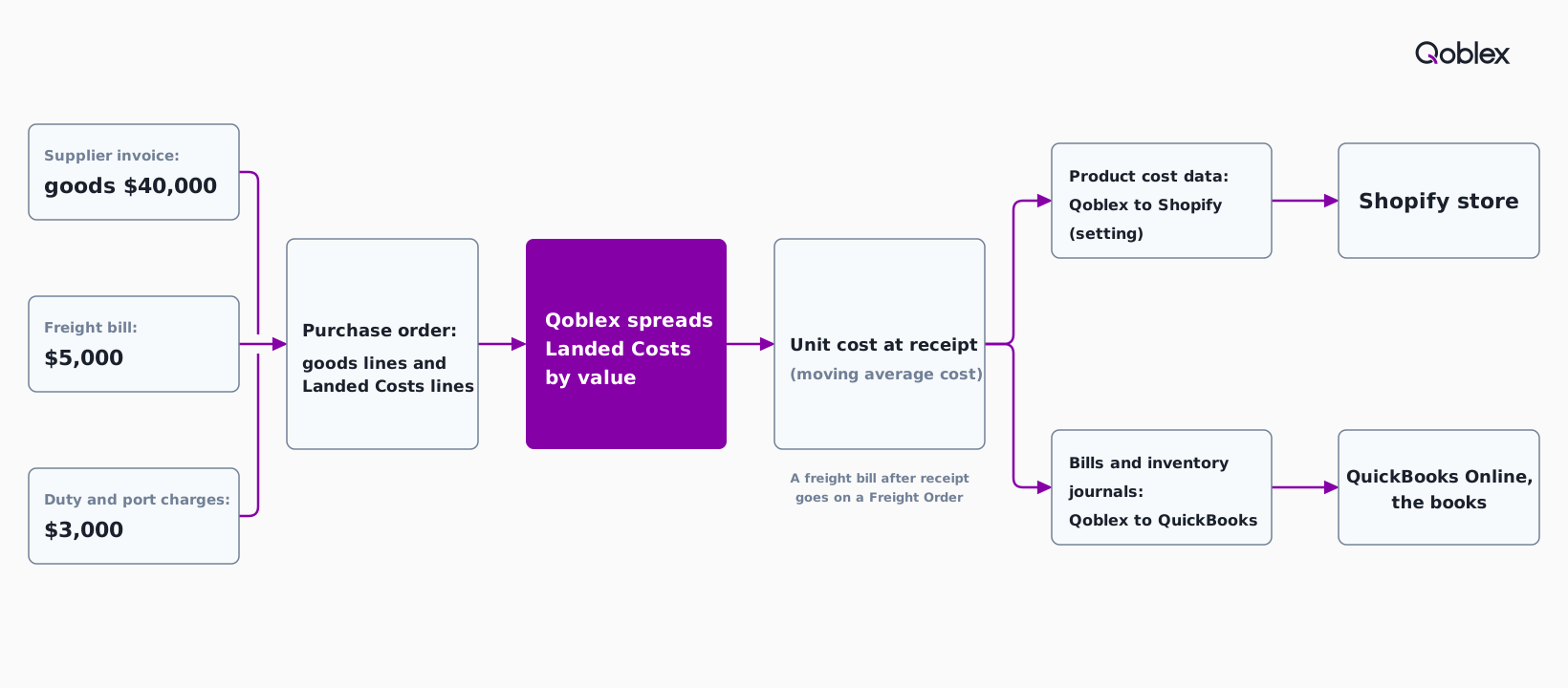
A flooring and tile importer runs one container through Qoblex in seven steps, from the purchase order with its Landed Costs lines to the cost in Shopify and the bill and journals in QuickBooks Online. The buyer does the first step once, and the rest repeat for every container.
- Once, set “How would you like to sync your product cost data?” in the Shopify settings to Sync from Qoblex to Shopify, if Qoblex should be the source of cost.
- Create a Regular Order for the supplier with the tile, flooring and vanity lines, quantities and unit prices.
- Select Add a custom line item under the product lines and add a Landed Costs line each for sea freight, import duty and port and brokerage, with a description, a price in the order’s currency and a tax class.
- Save the order, and Qoblex recalculates the split by value.
- Approve the order and receive the goods, and the landed unit cost goes into each product’s moving average cost.
- Read each line’s Other Costs column for its share of the extra costs.
- Authorize the supplier bill, which posts to QuickBooks Online within minutes, with the inventory journals following overnight.
The diagram below shows the same run for the container in the example.
Does this fit your business?
The Qoblex purchase order with Landed Costs lines fits a home goods importer that buys by the container, sells online and keeps its books in an accounting platform. Tile and stone importers and flooring retailers or distributors that import run the same container with their own lines, bathroom and kitchen fittings importers add taps, basins and cabinets, and furniture, lighting and other home goods importers fit wherever bulky and small items share a container. The store can be on Shopify or WooCommerce and the books in QuickBooks Online or Xero. The inventory software for importers page covers the wider workflow, and the foreign-currency purchase order use case shows the same flow with Xero and another currency.
If your freight should follow weight or volume for each product inside the system, talk to us before you decide: Qoblex allocates by value, so a different split would be worked out outside it. A business that needs flooring-trade features such as roll and remnant cutting, estimating or installer job scheduling is better served by a flooring-trade suite for that part. A business that does not import, or brings in a few containers a year from one supplier with small freight bills, is fine on a spreadsheet.
Frequently asked questions
What if the freight bill arrives after the container is received?
A freight bill that arrives after the goods goes on a separate Freight Order in Qoblex, recorded after receipt and allocated across the purchase orders it covers. Charges known up front go on the purchase order itself as Landed Costs lines before the goods are received.
Should a charge be typed Landed Costs or Expenses?
On a Qoblex purchase order, use Landed Costs for a charge that belongs in product cost: Qoblex distributes it across the received lines by value, raising unit cost. Use Expenses for charges such as taxes: the line stays on the purchase order but is not distributed, so unit cost and moving average cost do not change.
Does Qoblex allocate freight by value, quantity or volume?
Qoblex allocates a purchase order’s landed costs across its product lines by value. Each line’s share is its net value, net price times quantity, against the order’s total net value. The same method applies to every product on the order, and Expenses lines are left out.
Does saving the purchase order recalculate the split?
Yes. Qoblex recalculates the landed cost distribution every time the purchase order is saved, with no separate step. It is best to have the charges right before receiving the goods; if a landed cost is added or changed after receiving, save the order again to update the distribution.
Can I change a landed cost line after it is billed?
No. A landed cost line on a Qoblex purchase order cannot be edited or removed once it has been billed, because its price locks as soon as any quantity of that charge is on an authorized bill. Charges cannot be added once the purchase order is closed, so settle landed costs before billing or closing.
What if the supplier invoices in a different currency?
Each landed cost line is priced in the purchase order’s currency. If the order is in a currency other than the base currency and its exchange rate changes, Qoblex re-converts the existing landed cost prices. The foreign-currency purchase order use case walks through a shipment bought in more than one currency.
Does Qoblex use moving average cost or FIFO?
Qoblex carries landed unit cost into a product’s unit cost at receipt under either moving average cost or FIFO. Under moving average cost, the value of the stock on hand and the landed value received are added together and divided by the units in stock after receipt, so the new average sits between the old one and the new landed cost.
Does the QuickBooks Online connection run both ways?
No. The QuickBooks Online sync in Qoblex is one-directional, from Qoblex to QuickBooks. Bills, invoices and payments go across within minutes of authorization and inventory journals overnight, while QuickBooks Online stays the book of record. The connection is a paid add-on on the Starter and Business plans.