



A plain answer to the question most growing product businesses ask at some point: can one piece of software run both my books and my stock?
It usually starts with a sale you type twice. The order comes in, you knock the item off the stock spreadsheet, then raise the same invoice in your accounting software. A delivery arrives, and you update the sheet and enter the supplier bill in the books. None of it is hard. It is the same fact recorded in two places by the same tired person, and at some point the two places stop agreeing.
So you go looking for one tool, one entry, one number. That is a reasonable thing to want. The honest answer depends on what you actually sell.
Do you need one tool, or two that talk to each other?
What people searching for “inventory and accounting software” are really asking
Almost nobody wants a bigger accounting system. They want to stop entering things twice, and to trust that the stock number and the money number agree. Two tools sharing one record automatically gets you that, without forcing one product to be good at two different jobs.
And they are different jobs. Accounting software is built around the general ledger; its inventory features exist so the ledger has a stock value and a cost of goods sold (COGS). Dedicated inventory software is built around the goods: which location, which batch, what they cost once freight is added, what to order or make next. One tracks stock for the books. The other tracks stock for the people moving it.
The short, honest answer: keep your books, add an inventory layer that syncs to them
For most small businesses holding real stock, the answer is two tools that talk to each other. Keep Xero or QuickBooks Online as the book of record, where your accountant works and your tax is filed from. Add an inventory system that owns the stock and posts the results into your books on its own. Your accounting software stays exactly where it is. If you are weighing a full ERP instead, our guide to enterprise resource planning covers that bigger decision; for many small teams it is more system than the problem needs.
What do Xero and QuickBooks Online actually do with inventory natively?
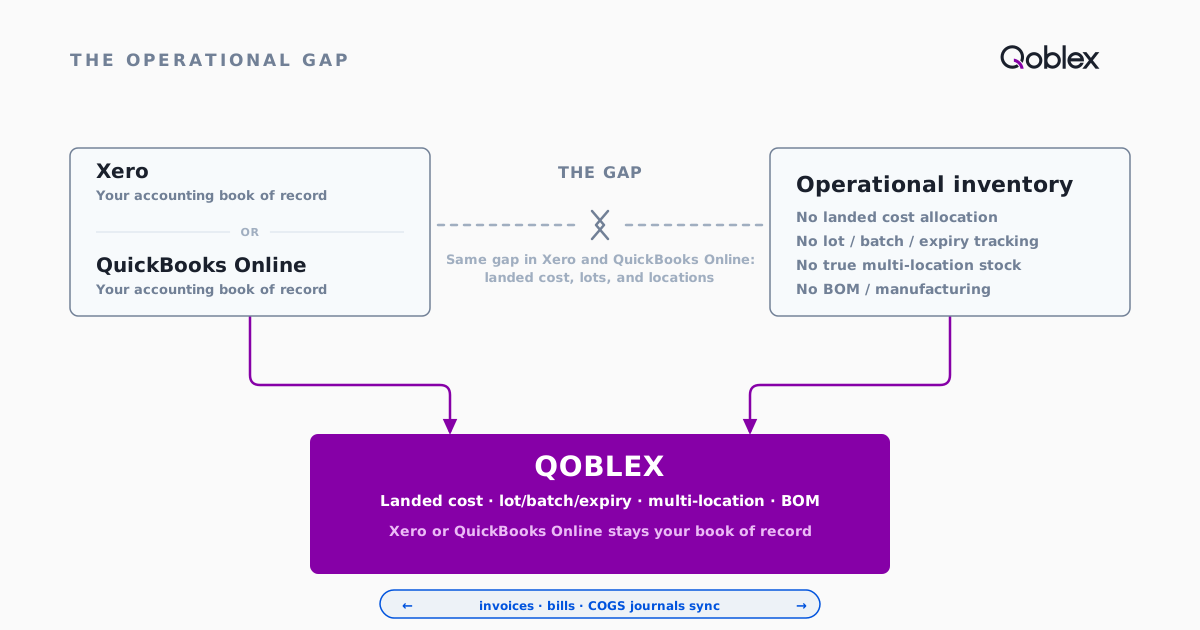
Both platforms have real, usable inventory tracking. The gap only makes sense once you know what that tracking covers, so start there.
Xero: tracked items, average cost, up to about 4,000 items
As of September 2026, Xero’s own inventory page describes real-time stock levels, up to about 4,000 items, and profitability by product. Core Xero values them at average cost (AVCO) only, with no FIFO (Jacrox, July 2026). The US-only Xero Inventory Plus add-on adds FIFO and basic multi-location (inFlow, July 2026). For a manageable range of finished goods, that is a solid base.
The same Xero page mentions no costing method, multiple locations, or lot tracking, and names Cin7 Core, Unleashed, and ZapInventory as apps to add for “greater automation over multiple sales channels.” Xero itself points this reader toward a dedicated app. More in our Xero inventory management guide.
QuickBooks Online: quantity, FIFO, reorder points, and purchase orders on Plus and Advanced
As of September 2026, Intuit’s pricing page shows inventory tracking, with quantity on hand, reorder points, and purchase orders, on the Plus and Advanced plans only. QBO values inventory using either FIFO, the default, or Moving Average Cost. The choice is made in settings before your first inventory item exists; create an item without choosing and QBO locks you into FIFO. There is no LIFO option. The QuickBooks inventory management guide maps every plan.
What both leave out
The gap sits in the same four places on both platforms.
- Landed cost. Neither has a native landed-cost allocation feature: Xero’s own product-ideas board carries an open, unroadmapped request to allocate freight and duty to inventory (Xero product ideas), and Intuit’s landed-cost help articles are scoped only to QuickBooks Desktop Enterprise, not QuickBooks Online. Either way, an importer’s margins run on a cost that is too low until freight and duty are added.
- Lot, batch, serial, and expiry tracking. Xero has no native field for any of them in any tier (inFlow, July 2026). QuickBooks Online has no native lot or batch tracking and no true serial tracing (Katana, July 2026; confirmed by Intuit); those live in QuickBooks Desktop Enterprise with Advanced Inventory, a separate product.
- Stock across several locations. Core Xero keeps one stock pool. QBO’s “location” field tags a transaction for reporting but holds no quantity per warehouse (Method, July 2026); true per-site quantity tracking is a QuickBooks Desktop Enterprise feature.
- Bills of materials and manufacturing. Xero has no bill of materials (BOM); its own product-ideas board shows the request still open and unroadmapped (Xero product ideas). QuickBooks Online has no native BOM, assembly, or production workflow; those live in QuickBooks Desktop and Desktop Enterprise (Digit, July 2026).
Xero, QuickBooks Online, and a synced inventory layer, side by side
| Capability | Xero (native) | QuickBooks Online (native, Plus/Advanced) | Qoblex + either |
|---|---|---|---|
| Quantity on hand | Yes, up to about 4,000 items | Yes, Plus and Advanced only | Yes, per location, synced to your books |
| Costing method | AVCO only in core Xero | FIFO (default) or Moving Average Cost, chosen in settings before the first item | Moving average cost (default) or FIFO, calculated in Qoblex and posted to your books as journals |
| Landed cost (freight, duty into unit cost) | No landed-cost allocation feature | No landed-cost allocation feature; Intuit’s landed-cost help is scoped to Desktop Enterprise | Yes, spread across the receipt by value |
| Lot, batch, serial, expiry | No, in any tier | No in QBO; only in QuickBooks Desktop Enterprise | Yes, a paid add-on |
| Multi-location stock | Single stock pool; Inventory Plus (US-only) adds basic multi-location | “Location” tags a transaction, not stock per warehouse; true per-site tracking is Desktop Enterprise only | Yes, separate stock per location, with a bin number recorded for where it sits |
| Bill of materials, manufacturing | No | No native BOM; basic assemblies only in QuickBooks Desktop | Yes, multi-level BOMs and production orders |
| Purchase orders with goods received and a three-way check | Basic purchase orders; no partial receiving in core Xero, only via the paid Inventory Plus add-on | Basic purchase orders | Yes, order, goods receipt, and bill on one record |
| General ledger, invoicing, tax | Yes, book of record | Yes, book of record | Stays in Xero or QuickBooks Online |
Why does running inventory in a separate spreadsheet (or an unsynced app) backfire?
Spreadsheets next to the books are how many good businesses got going. The later trouble is structural, not a matter of discipline.
The double-entry problem: the same sale typed twice, and the two numbers drift
People call this double entry, though it has nothing to do with double-entry bookkeeping: every sale, delivery, and return recorded once in the stock sheet and once in the accounts. Each copy is a chance for a typo or a return that lands in one place and not the other. The drift is small, so nobody notices until a month-end when the two stock values disagree and nobody can say which is right. A second app that does not sync to your books does not fix this; it just gives the spreadsheet a nicer interface.
Tracking the same item as inventory in both places
The other trap catches people who do add an inventory app. If the product is also a tracked item in Xero or QuickBooks Online, both systems value it, each with its own method. The same sale produces two costs of goods sold, the stock value is counted twice, and the two never reconcile.
The fix is one owner for stock. The inventory system tracks quantity and cost and posts the value to your books as journals; the accounting platform treats the product as untracked, showing it on invoices without valuing it again.
What does a proper accounting and inventory sync look like?
“Integrates with Xero” can mean many things. A useful sync does three.
Stock value and COGS post to your books automatically, not as a month-end journal
When goods sell, COGS should reach your ledger on its own and your stock-on-hand balance should move with it. If someone calculates COGS in a spreadsheet and posts a month-end journal, the integration is skipping the part that matters.
Landed cost reaches unit cost before it reaches your margin report
Landed cost is the full cost of getting stock onto your shelf: supplier price plus freight, import duty, and handling. If the freight bill sits in an expense account while products are costed at supplier price, every margin on those goods flatters you. A good inventory system spreads freight and duty across the receipt, so unit cost is right before anything sells.
Sales orders become invoices, purchase orders become bills, refunds become credit notes
Your accountant’s documents should appear without retyping: an invoice when you sell, a bill when you buy, a credit note when you refund, and the payments. Channels such as a Shopify or WooCommerce store feed orders into the inventory system, which feeds the accounting.
How does Qoblex do this with Xero and QuickBooks Online?
This is the messy middle Qoblex is built for, between spreadsheets and a full ERP.
Qoblex is the operations layer; your accounting platform stays the book of record
Qoblex does not replace Xero or QuickBooks Online: your ledger, invoicing, bank reconciliation, and tax stay put. Qoblex owns stock, purchasing, and manufacturing, and syncs the results through its Xero integration or QuickBooks Online integration. Products sit in your accounting platform as untracked items, so they appear on invoices and bills while Qoblex stays the single source of stock value, which avoids the double-counting above.
What syncs, and how often
Qoblex posts sales invoices and their payments, credit notes for refunds, supplier bills and payments, and manufacturing costs into Xero or QuickBooks Online, on the ledger accounts you choose. Sales and purchase documents arrive within a few minutes of being authorized in Qoblex. The journals that post stock value and cost of goods sold run once a day, overnight.
What Qoblex adds beyond native tracking
- Landed cost. Freight, duty, and handling are spread across the received items by value, raising each unit cost as goods arrive.
- Costing. Moving average cost (MAC), the default, or FIFO, with COGS posted as orders are fulfilled.
- Lot, batch, serial, and expiry tracking. Captured at receiving, transfer, adjustment, and shipment, with expiring stock flagged; a paid add-on.
- Per-location stock. Each location holds its own count, with a bin number noting the shelf or bin the product sits in, and stock moves between locations on a transfer.
- Manufacturing. Multi-level bills of materials and production orders, what Qoblex calls MRP, on every plan.
- Purchase orders. The order, the goods received note (GRN), and the supplier bill sit on one record, so the three-way check is a screen, not an exercise.
When is your accounting platform’s built-in inventory enough?
A second system is not always the right call. Native inventory genuinely covers a lot of businesses.
You sell a modest, steady range from one location, with nothing to trace
If you sell a steady set of products from one stockroom, with no batches, serial numbers, or expiry dates to record, native tracking does the job. You need quantity on hand and a costing method, and both platforms provide them.
Your supplier costs are stable and you don’t import
If you buy locally and freight is small and predictable, there is no landed cost worth spreading. Average cost in Xero or FIFO in QBO gives a margin close enough to trust.
You don’t assemble or make anything
If everything you sell arrives finished, there is no bill of materials to maintain and no components to deduct, which removes one of the biggest reasons businesses outgrow accounting-only inventory.
You’re early, and a spreadsheet next to your books still tells the truth
If you are pre-revenue or in your first stretch of selling, with one or two people touching every order, a spreadsheet beside your accounting platform is a sensible setup, and adding a dedicated inventory app at that stage would be overkill. The signal to change is not a revenue number. It is the first time the sheet and the books disagree and nobody knows which is right, or the day a second location, an imported container, or a batch-coded product arrives.
What does it cost to add inventory software to Xero or QuickBooks Online?
How Qoblex pricing is shaped
Qoblex plans are set by order volume, and manufacturing is on every plan. On the smaller plans, each connection (one Xero or QuickBooks Online account, one Shopify or WooCommerce store) is a paid add-on, and lot, serial, and expiry tracking is a separate paid add-on; the largest plan includes both. Current figures are on the pricing page.
Any dedicated inventory app is a second line item
Whichever inventory app you choose, expect its own monthly cost on top of your accounting subscription. Xero’s and QuickBooks Online’s own native inventory tracking already comes bundled with your accounting plan; it is a dedicated inventory app closing the landed cost, lot tracking, and multi-location gaps that is priced separately, not included free. Compare it against the hours now spent re-entering sales and reconciling two stock numbers, not against zero.
FAQ
Is there one piece of software that handles both accounting and inventory well?
Not usually, once you hold real stock. Xero and QuickBooks Online both track quantity on hand and a costing method, but neither handles landed cost, lot and batch tracking, or stock across several locations. Most businesses that need those keep their accounting platform and add an inventory app that syncs back to it.
Should I use my accounting platform’s built-in inventory, or add a separate app?
It depends on what you sell. A modest range from one location, with no batches, expiry dates, or manufacturing, may be fine on native inventory. Once you need landed cost, lot tracking, multiple locations, or a bill of materials, add a dedicated app rather than a workaround spreadsheet.
What happens if I track the same product as inventory in both my accounting platform and a separate inventory app?
Both systems value the same sale, each with its own method, so the stock value is counted twice and never reconciles. The fix is to let the inventory app be the single source of truth for stock, post its value to your books as journals, and keep the product untracked in the accounting platform.
Does inventory software sync stock value and COGS to my accounting platform automatically?
With Qoblex, yes. Sales invoices, supplier bills, credit notes, and payments sync to Xero or QuickBooks Online within a few minutes of being authorized. The journals that post stock value and cost of goods sold sync once a day, overnight.
When is my accounting platform’s built-in inventory enough?
When you sell a steady, modest range from one location, don’t track lots or expiry dates, don’t import, and don’t assemble anything. Then Xero’s tracked items or QuickBooks Online’s Plus and Advanced inventory, plus a plain spreadsheet for the rest, genuinely covers it.
How much does it cost to add inventory software to Xero or QuickBooks Online?
It is a separate line item on top of your accounting subscription, usually a recurring fee, often with extras for connections and lot tracking. See the Qoblex pricing page for current terms.
Does Qoblex replace Xero or QuickBooks Online?
No. Qoblex is the inventory, purchasing, and manufacturing layer. Xero or QuickBooks Online stays the accounting system of record for the general ledger, invoicing, and tax. The two sync so nobody re-enters the same transaction twice.