



A small distributor should judge wholesale software on four things: a B2B portal, customer-specific pricing, one stock shared with a Shopify store, and which way the Xero or QuickBooks sync runs. This page checks inFlow, Cin7 Core, Unleashed, Zoho Inventory and Qoblex on those four, using each vendor’s own pages read on 12 November 2026. We make Qoblex, so weigh our view accordingly.
The moment usually arrives with a reorder email. The person taking it finds one customer’s agreed price in last year’s tab and another’s discount in the sales rep’s head, then has to check whether the last few cases already went out through the web store. The four criteria below are for that moment.
What should a small wholesale distributor look for in inventory software?
A small wholesale distributor should look for a B2B portal where trade customers reorder themselves, a price for each customer that applies without anyone looking it up, one stock shared between wholesale and any web store, and an accounting sync whose direction matches who owns the books.
Each criterion prevents one familiar mistake: an order re-keyed from an email, where a 12 quietly becomes a 21; the wrong price on an invoice; a web order and a trade order both claiming the last case of a line; and a payment entered twice.
Spreadsheets carried all of this well while the business was small, and they deserve credit for it. They strain when agreed prices multiply faster than the people who remember them, and that is the point to test software, one step at a time:
- List your trade accounts and the price each one has agreed.
- Note which price list or tier each account is on.
- Count the stock locations and the people who need a login.
- Decide which system owns the books and which way payments should flow.
- Ask each vendor which plan includes a B2B portal, or what the add-on costs.
- Ask whether the web-store sync sends a quantity for each location or one total.
- Ask for a quote in your own currency with every add-on on it.
- In the trial, run one real trade order and one web order through to the invoice in the accounting system.
Steps five to seven are where the vendors differ most, so the next section sets five tools side by side.
Which inventory software fits a small wholesale distributor: how do five tools compare?
On 12 November 2026, inFlow, Cin7 Core, Unleashed and Zoho Inventory all document a B2B portal or customer portal, a way to price for individual customers or groups, a Shopify connection and an integration with Xero and QuickBooks Online, and they differ in what each describes and what each sells as an add-on. Qoblex, which we make, is the fifth row.
We read inFlow’s Inventory plans, Cin7 Core (Cin7 Omni pricing is “tailored to your specific requirements”), Unleashed’s Lite, Core and Pro, and the US edition of Zoho Inventory’s pricing page.
| Tool | B2B portal | Price for each trade customer | Wholesale and Shopify from one stock | Xero sync, in the vendor's words | QuickBooks Online sync, in the vendor's words | Paid plans, US dollars |
|---|---|---|---|---|---|---|
| inFlow Inventory | Showroom: "Add-on" on Lite and Core, add-on "39 USD/mo."; included on Pro and Max | Pricing schemes, one assigned to each customer record; "custom pricing" "for each showroom" | "Push product + stock info back to Shopify"; "Connect to multiple Shopify stores" | "Payments sync both ways" | "Payments sync both ways"; "one way or both" can be configured | Lite $99, Core $299, Pro $499, Max $699 a month, billed annually |
| Cin7 Core | B2B Portal: "Add-on" on Standard, Pro and Advanced; add-on price not stated on vendor page | "multiple pricing tiers" for "different customer groups"; per-customer prices: not stated on vendor page | "two-way" sync (Cin7's word); "Map your products and locations" | "Two-way sync keeps both systems aligned without duplicate entries" | Asked if "bi-directional": "Yes." | Standard $349, Pro $599, Advanced $1,199 a month; USD, excluding taxes; billing term not stated on vendor page |
| Unleashed | "B2B eCommerce Store", "From $129 /month" as printed, "Optional with Unleashed Pro & Unleashed Core", with "From £99/month" in the same row (confirm in a quote) | "Customer-Specific Pricing Rules" for "individual customers or customer groups"; up to 10 price tiers | "central inventory hub for multiple Shopify stores and warehouse locations" | Syncs "inventory movements, purchases, sales, stock values and financial transactions"; payment direction not stated on vendor page | "sends key sales and purchasing data to QuickBooks Online"; payment direction not stated on vendor page | Lite $99, Core $399, Pro $729 a month, paid monthly (usual price; offer for new Core and Pro subscriptions to 30 November 2026) |
| Zoho Inventory | "Customer portal" listed on Standard; buyers "view their orders, invoices, and shipment status"; ordering in the portal not stated on vendor page | "custom price lists" for "B2B/wholesale customers"; a price list can be associated with a customer contact | A Warehouse Mapping preference: "Multiple Warehouse" maps warehouses to Shopify Locations; stock "combined across all warehouses" can sync as one total | Syncs "from Zoho Inventory to Xero"; invoice payments listed as "One-way sync" | Syncs "from Zoho Inventory to QuickBooks Online"; invoice payments listed as "One-way sync" | Standard $29, Premium $79, Plus $129, Enterprise $249 per organization a month, billed annually (US edition; confirm in a quote) |
| Qoblex | Paid add-on on Starter and Business | Portal prices from the customer's own price list, otherwise the portal's Default Price List; customer groups set collections and minimums, not prices | Portal orders take stock from a default warehouse location; stock sent to Shopify for each mapped location | Invoices and bills post to Xero; optional Two way payment sync setting | One way, from Qoblex to QuickBooks Online | See pricing (Starter, Business, Scale) |
Price sits last on purpose, because a plan that misses the first four criteria is expensive at any figure. Where a vendor’s own pages disagree, the cell ends “confirm in a quote” and the section on that criterion quotes both lines, starting with the portal, where the trade customer meets the system.
Which tools have a B2B portal, and is it included or an add-on?
On 12 November 2026 inFlow lists its Showroom B2B portal as an add-on on Lite and Core, Cin7 lists its B2B Portal as an add-on on every Core plan, Unleashed sells a B2B eCommerce Store as a separate line on its pricing page, and Zoho Inventory lists a customer portal on its Standard plan.
A portal changes who does the typing. The trade customer logs in, sees its own price and places the reorder, so nobody re-keys it from an email.
inFlow’s pricing page says Showroom helps a business “create a B2B portal in just a few clicks”, marks it “Add-on” on Lite and Core, and marks it included on Pro and Max. Cin7’s B2B page says “both Core and Omni offer B2B Portal functionality” as “an add-on module”.
Unleashed’s pricing page prints “From $129 /month” for its “B2B eCommerce Store”, “Optional with Unleashed Pro & Unleashed Core”, so not on Lite, and, in the same row of a page priced in US dollars, “From £99/month”, so confirm in a quote. Zoho Inventory’s FAQ describes a customer portal “where buyers can view their orders, invoices, and shipment status”; the page does not say whether buyers can place orders in it. A portal is only as good as the price it shows, which is the next criterion.
How does each tool set a price for each trade customer?
inFlow assigns a pricing scheme to each customer record, Cin7 supports pricing tiers for customer groups, Unleashed offers customer-specific pricing rules and up to 10 price tiers, and Zoho Inventory lets a price list be associated with a customer contact.
The difference that matters is the unit the price attaches to. A scheme or tier is shared by many customers, while a rule or list for one customer carries that customer’s own agreed numbers. A distributor whose larger accounts each negotiated their own prices should look closely at how one account’s deal is handled.
inFlow’s help page on special pricing has the person setting up an account choose “the pricing scheme for that customer”, and recommends “adding no more than 50 pricing schemes”; its Showroom page adds “Set custom pricing” “for each showroom”. Cin7’s B2B page says it “supports multiple pricing tiers, order minimums, and quantity multiples” for “different customer groups”, and the page does not mention a price set for one individual customer.
Unleashed’s customer pricing page offers “up to 10 customisable price tiers for different customer segments”, “Customer-Specific Pricing Rules” for “individual customers or customer groups”, and “Volume-Based Quantity Discounts”. Zoho Inventory’s price list help page says “Under the Other Details section you can associate a price list” on a customer contact. A price is only right if the stock behind it is real, and with a web store that stock is shared.
Can a distributor sell wholesale and run a Shopify store from the same stock?
inFlow documents pushing product and stock information back to Shopify and connecting multiple Shopify stores, Cin7 documents a “two-way” Shopify sync that also keeps a B2B wholesale portal’s inventory in step, Unleashed documents acting as a central inventory hub for multiple Shopify stores and warehouse locations, and Zoho Inventory documents both mapping warehouses to Shopify locations and sending stock combined into a total.
One stock means the case sold to a trade account and the case sold on the web come off the same shelf count. Shopify runs the storefront well and keeps stock by location, so the question is what the inventory tool tells each Shopify location.
inFlow’s Shopify page says “You can set each sales channel to pull inventory from a different location.” Cin7’s Shopify page says that for “your own B2B wholesale portal, Cin7 keeps your inventory synced across every one.” Unleashed’s Shopify page says it “updates Shopify as stock moves”, and the page does not say how it treats each location.
Zoho Inventory’s Shopify help page offers a Warehouse Mapping preference with two options: under Multiple Warehouse, “You can map Zoho Inventory warehouses with Shopify Locations.”, while the page also says “Stock updates in Zoho Inventory combined across all warehouses and sync to Shopify as total available quantity.”, so ask which option your setup needs. Ask every vendor whether the web store gets a number for each location or one total, because once order, price and stock agree, the invoice still has to reach the books.
Which way does the sync to Xero or QuickBooks Online run in each tool?
On 12 November 2026 inFlow says “Payments sync both ways” with Xero and with QuickBooks Online, Cin7 answers “Yes.” when asked whether its Xero and QuickBooks Online integrations are “bi-directional”, Unleashed describes sending data to Xero and QuickBooks Online without stating a payment direction, and Zoho Inventory describes syncing from Zoho Inventory to both.
The bookkeeper’s question is simple: if I record a customer payment in the accounting system, does the inventory system hear about it? Xero and QuickBooks Online are where the books belong for most small distributors. If payments flow one way, the team records them in the inventory tool; if they flow back, the bookkeeper reconciles in the books and nobody types a payment twice. Either works when the direction matches who owns the books.
inFlow’s Xero page describes how you “record a payment in inFlow and it reflects in Xero, or have your accountant reconcile in Xero and it comes back into inFlow”, and its QuickBooks page says “You can configure the sync to go one way or both”. Cin7’s Xero page says “Two-way sync keeps both systems aligned without duplicate entries”, and its QuickBooks Online page lets a business choose data to “sync back to Cin7 such as payments”.
Unleashed’s Xero page says it “syncs inventory movements, purchases, sales, stock values and financial transactions with Xero”, and its QuickBooks Online page says it “sends key sales and purchasing data to QuickBooks Online”; neither page says whether payments come back. Zoho Inventory’s Xero and QuickBooks Online help pages describe syncing documents “from Zoho Inventory to” each, and list invoice payments as “One-way sync”. Direction settles who does the work, and price settles what it costs.
What does each tool cost on the vendor’s own page today?
On 12 November 2026 inFlow’s Inventory plans run from 99 to 699 US dollars a month billed annually, Cin7 Core’s from 349 to 1,199 US dollars a month, Unleashed’s from 99 US dollars a month at the usual price, and Zoho Inventory’s US edition from 29 to 249 US dollars a month billed annually, and the B2B portal is a separate add-on or line at inFlow on Lite and Core, at Cin7 and at Unleashed.
inFlow’s pricing page says “All plans include Unlimited products, sales, purchases, and integrations”, and Core and up carry a “Required one-time cost” of 499 USD for an onboarding package, optional on Lite. Cin7’s pricing page says “Prices are in USD and exclude taxes”, and the page does not say whether those prices are billed monthly or annually.
Unleashed’s pricing page shows Core at “Usually $399” and Pro at “Usually $729”, each “Paid monthly”. New Core and Pro subscriptions taken by 30 November 2026 pay “Now $40” and “Now $73” for “an initial 3 month contract followed by a rolling monthly contract”, so we compare on the usual price; confirm in a quote. Zoho Inventory’s US pricing page prices plans “per organization / month billed annually”. Check which edition you are quoted in and confirm in a quote.
Qoblex’s plans are Starter, Business and Scale, with figures on our pricing page. The B2B portal and integrations, Xero and QuickBooks Online among them, are paid add-ons on Starter and Business, and Starter allows 2 warehouse locations and 2 users. The picks below start from the kind of distributor.
Which tool fits which kind of small distributor?
A distributor starting out with a handful of trade accounts should look first at Zoho Inventory and inFlow, one that lives on price tiers and volume discounts at Unleashed and Cin7, and one with Xero books that wants a portal, customer price lists and a Shopify store on one stock should compare how each tool handles all four. These picks are our reading of the table, not vendor claims.
Starting out with a handful of trade accounts
Zoho Inventory’s Standard plan has the lowest listed price of the four vendors priced in the table and lists the customer portal, and Zoho mentions custom price lists for wholesale customers. Zoho is candid about where it stops: its FAQ says “Businesses with heavy EDI requirements for large retail partners may find dedicated distribution platforms go deeper on that specific need.” inFlow Lite or Core suits a distributor that wants a published price ladder and a showroom with its own pricing.
Volume pricing and price tiers
For a distributor whose prices come in tiers and breaks, Unleashed documents up to 10 price tiers, customer-specific pricing rules and quantity discounts, and Cin7 documents pricing tiers, order minimums and quantity multiples for customer groups. Both start above Zoho Inventory’s entry price, before the portal, so they suit a budget that fits their ladders.
Xero books, a portal, price lists and a Shopify store on one stock
This is the case we build Qoblex for, so weigh it accordingly. Qoblex prices each customer’s portal orders from that customer’s own price list, keeps one stock that also feeds a Shopify store, and posts invoices and bills to Xero with optional payment sync back. The portal and integrations are paid add-ons on Starter and Business, and Starter allows 2 locations and 2 users.
For a distributor on QuickBooks Online who wants payments recorded there to come back, the Qoblex sync runs one way, from Qoblex to QuickBooks, while inFlow says “Payments sync both ways” and Cin7 answers “Yes.” to “bi-directional”, so on that criterion inFlow or Cin7 fits better. Some distributors, though, do not need a new tool yet.
When is another tool, or no new tool, enough?
A distributor with a few trade accounts, one price list and books in Xero or QuickBooks Online that already tracks stock can often keep what it has, and a distributor already running one of these tools well does not need a different one.
Xero’s inventory page says “Tracked inventory in Xero shows the quantity on hand and total value of up to 4000 items, and both figures change as you buy and sell”, recording cost of goods sold “using the average cost method”. QuickBooks Online’s inventory page says “With QuickBooks Online, always know what’s in stock and what’s on order”, with tracking “Available in QuickBooks Online Plus and QuickBooks Online Advanced.” A distributor taking email orders from fewer than a dozen accounts, where nobody prices from memory, can run well on its accounting system and one price list. It stops being enough when a price is quoted from an old sheet, a web order and a trade order meet over the last case, or a payment is entered twice.
When a new tool is due, each competitor suits some distributors better than the one we make. inFlow fits a distributor that wants payments to sync both ways with QuickBooks Online and a published price ladder. Cin7 fits a larger operation that can afford its tiers and wants portal customers to pay through what its B2B page calls “Cin7 Pay, powered by Stripe”. Unleashed fits one that wants up to 10 price tiers and volume discounts, and Zoho Inventory one that wants the lowest entry price with a customer portal and price lists. Whichever tool makes the shortlist, trial it with one real trade order and one web order; here is that order in the tool we make.
How does this look in Qoblex?
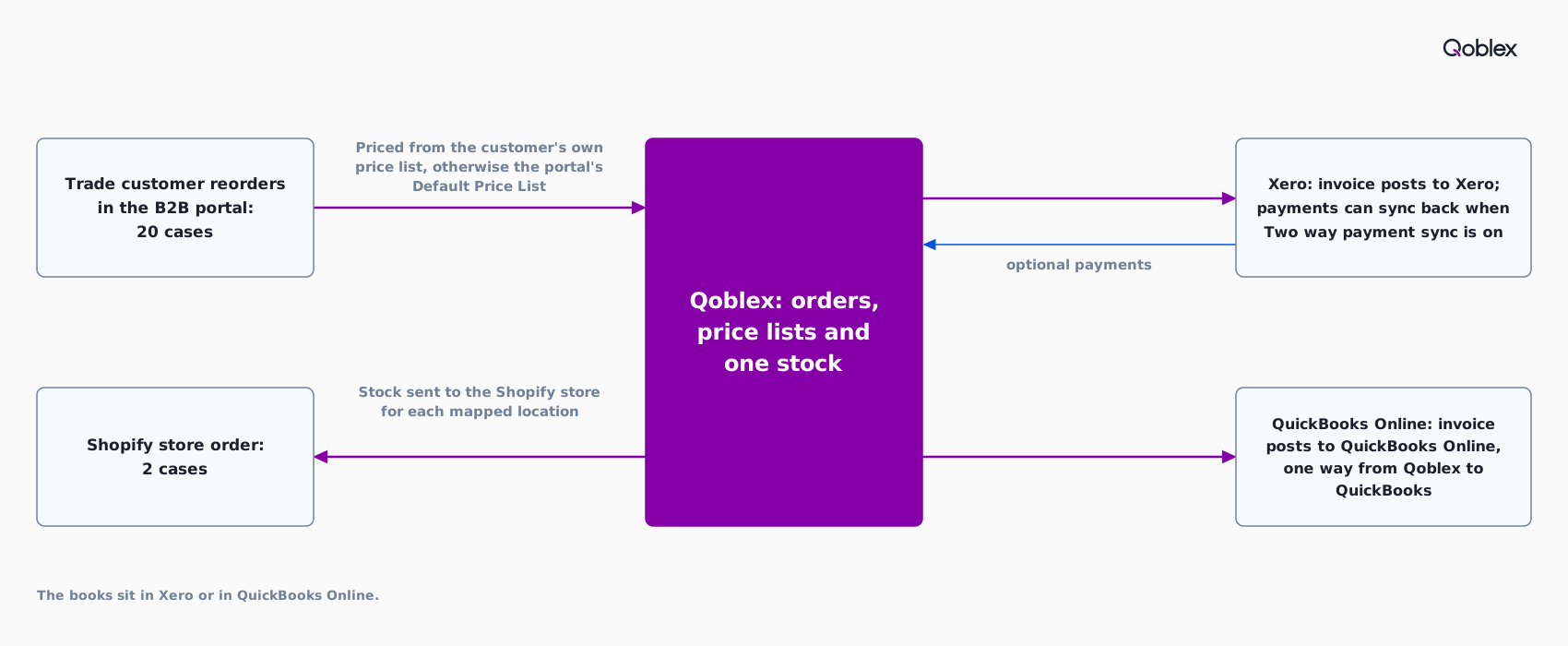
Qoblex lets a distributor price each trade customer’s portal orders from that customer’s own price list, falling back to the portal’s Default Price List, and sells to a Shopify store from the same stock; invoices and bills post to Xero, and the QuickBooks Online sync runs one way, from Qoblex to QuickBooks.
We make Qoblex, so weigh this section accordingly. Let’s assume a distributor sells 300 cases a month to 40 trade accounts, with 25 of those accounts on their own agreed price list and the other 15 on the Wholesale list, and also sells a few cases a month through a Shopify store, with the books in Xero.
Each of the 25 customer records carries its own Price List, and the portal prices that customer’s orders from it. In B2B Portal Settings, the person who set up the portal chose the reserved Wholesale list as the Default Price List, so the other 15 accounts see wholesale prices. Two Customer Groups decide what each set of accounts sees: the independent grocers get their own Collections and a Minimum Order Quantity of 12 cases, and the restaurants a different collection and a Minimum Order Value. Groups set collections and minimums only; prices come from the customer’s own price list or the default.
The Default Warehouse Location names where portal orders take their stock. On Monday morning a grocer reorders 20 cases in the portal at its own prices, and a Shopify order for 2 cases of the same line arrives the same morning. Both draw on one count in Qoblex, and with the inventory sync direction set to Sync from Qoblex to Shopify, Qoblex sends each mapped Shopify location its own quantity wherever that location’s Sync Inventory? setting is on.
At month end the bookkeeper opens the Sync Status tab in the Xero settings. Invoices reach Xero in the state chosen under Sync Document Status (Draft, Authorized or Submitted), and with Two way payment sync turned on, customer payments recorded in Xero come back to Qoblex. A distributor on QuickBooks Online has the same invoices posted one way, from Qoblex to QuickBooks, so the books stay in QuickBooks Online while stock and orders stay in Qoblex.
The help centre covers the B2B portal, price lists, Xero sales settings, the QuickBooks Online connection and Shopify product and inventory sync. See also inventory software for wholesale distributors, the B2B ecommerce portal, the Xero, QuickBooks and Shopify integrations, pricing, a skincare brand’s wholesale portal and an AV distributor’s wholesale-only products.
Frequently asked questions
What should I look for in inventory software for a wholesale distributor?
Look for four things: a B2B portal where trade customers reorder themselves, a price for each customer that applies without anyone looking it up, one stock shared with any web store, and an accounting sync whose direction matches who owns the books. Test a shortlist with one real trade order and one web order.
Do I need a B2B portal for wholesale orders?
Not always. A handful of accounts ordering by email can run well without one; a portal earns its place when re-keying orders causes mistakes. On 12 November 2026 the portal is an add-on or separate line at inFlow (Lite and Core), Cin7 and Unleashed, and Zoho Inventory lists a customer portal on Standard.
How do inventory systems handle customer-specific pricing?
On 12 November 2026 inFlow assigns a pricing scheme to each customer, Cin7 describes pricing tiers for customer groups, Unleashed offers customer-specific pricing rules and up to 10 price tiers, and Zoho Inventory associates a price list with a customer contact. Ask each vendor how one account’s negotiated price is handled.
Can I sell wholesale and run a Shopify store from the same stock?
Yes, when the inventory tool holds the stock and tells Shopify what each location can sell. inFlow, Cin7, Unleashed and Zoho Inventory each document a Shopify connection. Ask whether the store receives a quantity for each location or one total; Zoho’s help page offers mapping warehouses to Shopify Locations as an option and also describes syncing one combined total.
Does inventory software sync with Xero or QuickBooks Online in both directions?
It depends on the tool. On 12 November 2026 inFlow says “Payments sync both ways” with Xero and QuickBooks Online, and Cin7 answers “Yes.” when asked whether both integrations are “bi-directional”. Zoho Inventory’s help pages list payment sync as “One-way sync”, and Unleashed describes sending data to the accounting system without stating whether payments come back.
How much does wholesale inventory software cost for a small distributor?
On 12 November 2026 inFlow lists 99 to 699 US dollars a month billed annually, Cin7 Core 349 to 1,199 a month, Unleashed from 99 a month paid monthly at the usual price, and Zoho Inventory’s US edition 29 to 249 a month billed annually. Portals cost extra at several vendors. Confirm in a quote.
Where do Qoblex B2B portal prices come from, and what do customer groups control?
A Qoblex portal customer sees prices from its own price list, and a customer without one sees the portal’s Default Price List. Customer groups set which collections their members see and their minimum order quantity and value, not prices. The B2B portal is a paid add-on on Starter and Business.