



At a glance: A skincare brand sells its range direct on Shopify, through a pharmacy distributor and to overseas wholesalers, keeps its books in Xero and ships through a 3PL. The distributor’s monthly spreadsheet was retyped by hand into orders, discounts and an invoice. Now stockists order in a Qoblex wholesale ordering portal at the prices on their own price list, from the same stock the Shopify store sells. Each order arrives as a quote, the team turns it into an order with Create Order, and the invoice it then raises posts to Xero.
What does one month of pharmacy distributor orders cost a skincare brand that retypes them by hand?
For a skincare brand selling through a pharmacy distributor, one month of distributor orders retyped by hand costs the same sale twice: once when the distributor sends its spreadsheet, and again when someone types its lines, discounts and invoice into the books. Let’s assume the distributor orders 600 units across 12 SKUs a month, priced from the brand’s Wholesale price list less an agreed discount, which comes to 12,240.
The person who takes the distributor’s order opened Xero beside the spreadsheet, retyped the 12 lines and applied the agreed price by hand, because the agreement lived in an email. That took about two and a half hours a month. Then came the month one line of 50 units went in at the list price of 24.00 instead of the agreed 20.40. The invoice read 12,420, the distributor paid the 12,240 it expected in one lump sum, and the bookkeeper spent the next morning working out why 180 was still open and which line it came from.
Retyping was reasonable while it lasted: one distributor, a spreadsheet that arrived on schedule, and a pharmacy channel small beside the Shopify store. But the figures were right in the agreement and wrong only where someone typed them, so the first job was to hold each price and rule in one place the distributor ordered from directly.
How does a B2B ordering portal price an order for a pharmacy distributor, a pharmacy stockist and an overseas wholesaler?
In Qoblex, a B2B ordering portal for a skincare brand prices each stockist’s order from the price list on that stockist’s customer record, and a stockist with none sees the portal’s Default Price List, which can be a saved price list or the reserved Retail or Wholesale list. Here the default is the Wholesale list, which the small pharmacies see, while the distributor’s customer record carries a saved Distributor price list at the agreed 20.40 a unit. The overseas wholesalers’ customer records each carry a saved Export price list of their own, so they never see the Wholesale price the pharmacies pay. The distributor and the overseas wholesalers also each sit in a customer group, which sets the collections they browse and their minimum order but not their prices. So the agreed price lives on the distributor’s own record rather than in an email, and the table builds its month from the Shopify shelf price down.
| Step | Per unit | 600 units |
|---|---|---|
| Retail price on the Shopify store | 40.00 | 24,000 |
| Wholesale price list price | 24.00 | 14,400 |
| Distributor’s own price list, 15% below the Wholesale list | 20.40 | 12,240 |
| Difference against the Wholesale list | 3.60 | 2,160 |
| Group Minimum Order Value for the distributor | 5,000 | |
| Headroom over the group minimum | 7,240 |
The portal checks each basket against the stockist’s own group, so a normal distributor month passes easily. A small pharmacy with no group is checked against the portal-wide Minimum Order Quantity and Minimum Order Value instead: 48 units at 24.00 is 1,152, which clears a portal-wide minimum of 500. The brand chooses those minimums, and the team sets them before anyone is invited.
What does a skincare brand set up before it invites stockists to a B2B ordering portal?
Before a skincare brand invites stockists to its Qoblex B2B ordering portal, the team sets the portal’s defaults (tax, warehouse location, price list), its minimum order rules, the Collections stockists browse, the Customer Groups that give some stockists their own collections and minimums, and a price list on each customer record with agreed prices, then checks the result with Preview. In B2B Portal Settings, the operations lead first picks the Default Sales Tax and the Default Warehouse Location, which is required because it supplies portal orders: the 3PL’s location or the own warehouse, whichever should serve stockists.
Next they set the Default Price List to Wholesale and fill Send Order Notification Emails To with the people who review incoming portal orders. They choose Show Quantity or Show In Stock, set the portal-wide minimums, and build Collections, saved filters by product tag, product type, brand or supplier that become browsing tabs showing the trade range rather than every gift set. Then they create the Customer Groups, one for the distributor and one for the overseas wholesalers, and assign the saved Distributor price list on the distributor’s customer record so that the agreed price is the one the portal shows.
Preview saves the settings first, so validation errors must be fixed before it opens, and the help centre advises previewing with the group a customer will use and placing a test order before going live. Which plans carry the portal is on the pricing page (see pricing). Once each group looks right, the stockists can be let in.
How do pharmacy stockists and overseas wholesalers get access to a wholesale ordering portal?
A skincare brand gives pharmacy stockists access to its Qoblex wholesale ordering portal by approving Signup Requests from new stockists or by inviting existing customers, and links sale agents to the overseas wholesalers they look after. Whoever reviews requests opens More to see a pharmacy’s phone number, a business registration number, whether it has a bricks-and-mortar store or sells online only, and its website, then chooses Yes to create a customer contact or No to delete the request.
For accounts that already order by email, the team selects them on Contacts > Customers, opens Bulk Actions, chooses Invite Customers under B2B PORTAL, and uses Assign Groups from the same menu to put the distributor in its group. The B2B column then shows “Customer invited to B2B”, so nobody invites an account twice (inviting customers and sale agents). The overseas wholesalers deal through sale agents, so the team uses Invite Sale Agents to link each agent to those customers and checks the Sale Agents list for Joined or Pending. Once stockists are ordering, what matters most is what their orders do to the stock the Shopify store sells.
Does a wholesale portal order draw on the same stock as the Shopify store?
For a skincare brand on Shopify, a Qoblex portal order draws on the stock at the portal’s Default Warehouse Location, in the same Qoblex stock record the Shopify store sells from, but reserves that stock only once the team turns the quote into an order. A quote never holds stock, and Qoblex allocates the order when someone chooses Create Order (when Qoblex allocates stock). Available stock is on hand less allocated less buffer, which is the number Qoblex sends to Shopify, so the store’s count falls once the distributor’s order is confirmed.
Between the stockist pressing submit and the team pressing Create Order, those units are still on offer to Shopify shoppers, so the person who reviews portal orders clears new quotes the same day. If stock is short at that point, Qoblex allocates what it can and the order shows Awaiting Stock. Which location’s stock the store shows depends on its location mapping, covered in running a 3PL and an own warehouse by channel. With the stock committed, the invoice comes next.
How does a wholesale portal order become a Xero invoice for a skincare brand?
For a skincare brand on Xero, a Qoblex portal order becomes a Xero invoice in three steps the team controls: turning the quote into an order with Create Order, creating the invoice from the order, and letting the Xero Sales settings post it. Qoblex does not create an invoice while the order is still a quote (invoices and payments). Once the order is open, the person who handles billing chooses Invoice, checks the quantities on the Draft and authorises it, and every line already carries the price the distributor saw at checkout.
Xero stays where the accountant keeps the books and reconciles the bank, and does that well. The accountant set Sync Document Status once in the Xero Sales settings (Draft, Authorized or Submitted), and invoices and customer payments flow from Qoblex to Xero. Products reach Xero as untracked items, so stock is not counted twice. What Qoblex adds in front of the Xero ledger is the portal, the quote step and the stock, and one order shows how they fit.
What does one distributor order look like from the portal to Xero?
One pharmacy distributor order of 600 units across 12 SKUs for a skincare brand runs from the Qoblex portal to a Xero invoice in eight steps, with the price and the rules entering at the points shown in the diagram. The person who takes the distributor’s order now checks the 12,240 instead of typing it.
- The distributor’s buyer signs in to the portal and adds the 12 SKUs from its group’s collections, at the prices on the distributor’s own price list.
- The portal checks the order against the group’s Minimum Order Quantity and Minimum Order Value (5,000) before submission; 12,240 clears it.
- The order arrives in Qoblex as a quote, and the employees chosen under Send Order Notification Emails To are notified.
- A person on the team opens the quote on the Sales list and checks the lines and prices against the agreement.
- The team selects Create Order, which turns the quote into an open order and allocates stock from the Default Warehouse Location.
- Whoever ships from that location, the brand’s own warehouse team or the 3PL, picks and ships the order as they do the brand’s other orders.
- The team selects Invoice on the order, checks the quantities and authorises the invoice.
- Qoblex posts the invoice to Xero under the Sales settings, and the bookkeeper records the distributor’s payment against that invoice in Qoblex, which pushes it to Xero.
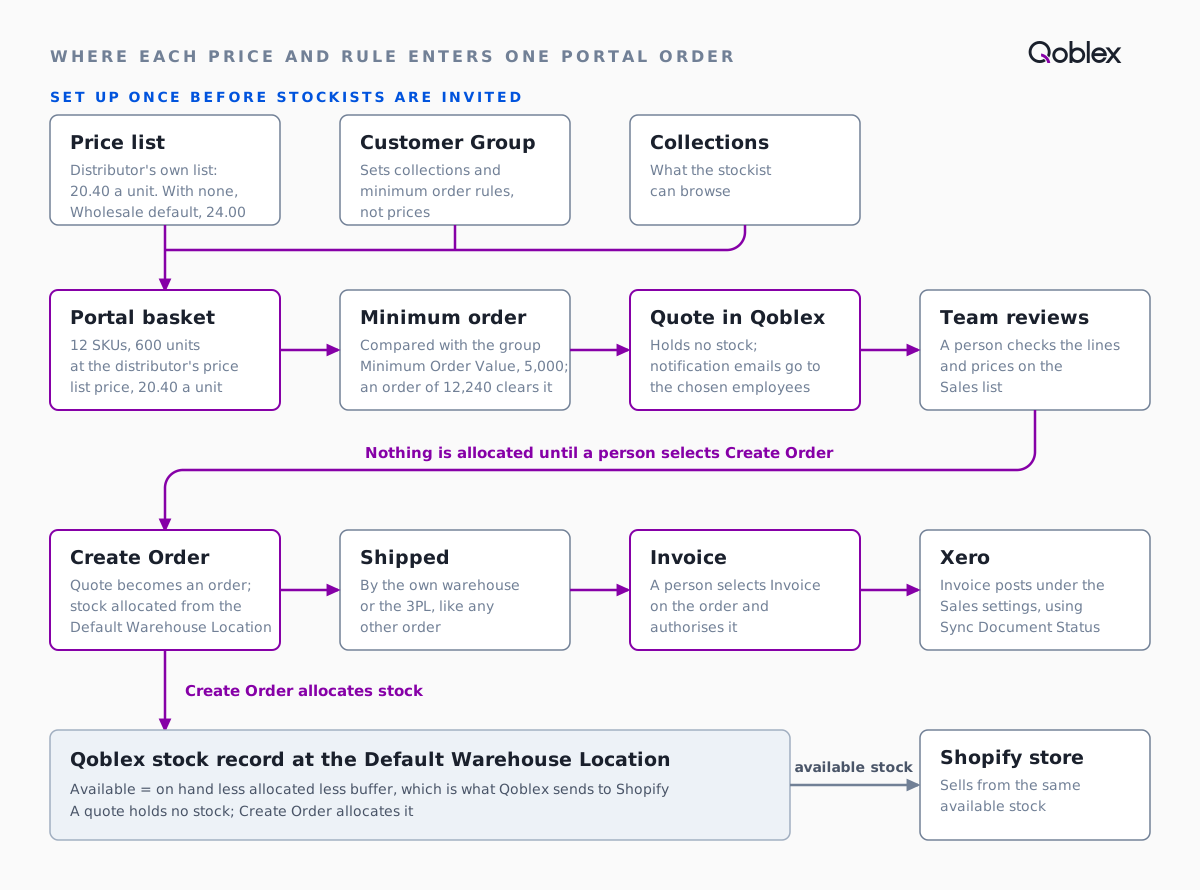
Steps 6 and 8 meet the 3PL and the books, which is where the brand checked hardest when it walked through its own workflow.
What did the brand ask about running the portal with its 3PL and Xero?
The skincare brand asked three things about running a Qoblex wholesale portal with its 3PL and Xero: whether stockists’ orders could be billed without anyone re-keying them, how a portal order would reach the 3PL, and what each stockist would be able to see. The first had the shortest answer, because nobody types the lines or prices again.
Then came the 3PL. Qoblex’s B2B portal page says “Once confirmed, a portal order is picked, shipped and invoiced like any other order.” So a portal order reaches the 3PL the way the brand’s other orders do, which depends on how the 3PL connects. Where ShipStation is the route, Qoblex pushes orders to it one way through Send to Shipstation on saved orders that are no longer quotes; anything else is worth confirming with the 3PL.
The brand also checked what stockists see. The same page says “Customers you invite set up a sign-in; your wholesale prices are not a public page”, and each stockist sees only its group’s collections, at the prices on its own price list or the portal’s default. That settled the last question, because a pharmacy should never see what the overseas wholesalers pay.
Does this fit your business?
A Qoblex wholesale ordering portal fits a skincare brand with a trade channel beside a Shopify store, where trade customers need their own prices and someone reviews each order first. Other cosmetics, haircare and personal care brands selling to pharmacies or retailers run the same way, as do supplement brands selling through health stores (batch and expiry tracking is a separate subject). Food and drink producers and wholesale distributors with trade accounts and a Xero ledger will recognise it too, and how Qoblex syncs with Xero and Shopify covers the plumbing.
It does not fit a brand with a handful of wholesale accounts whose only system is Shopify, because Shopify’s own B2B may be enough. Shopify’s B2B guide, checked on 30 October 2026, says “B2B features are available on the Basic, Grow, Advanced, and Plus plans”, with company profiles, payment terms and quantity rules, and that “Basic, Grow, and Advanced allow up to three active catalogs across all B2B markets using Shopify Markets” while “Plus offers unlimited catalogs and direct assignments to specific companies or locations.” That brand should start there; Qoblex adds one stock record across Shopify, a 3PL and an own warehouse, and invoices posted to Xero.
Nor does it suit a brand that wants wholesale orders in fulfilment with nobody reviewing them, since portal orders need Create Order, or one expecting orders to reach a 3PL with no person or integration in between. A business with one or two wholesale customers who email a short order needs less than a portal.
Frequently asked questions
Does a wholesale portal order reserve stock for a skincare brand?
No. In Qoblex, an order a stockist places in the portal arrives as a quote, and a quote holds no stock. Stock is allocated when the team turns the quote into an order, for example with Create Order. Until then those units stay available to the Shopify store, so review portal quotes promptly.
Why is a stockist blocked from placing a portal order?
Check Minimum Order Quantity and Minimum Order Value in the Qoblex portal first. Both can be set for the whole portal and again for a customer group, and a group’s rule can differ from the portal-wide one. Look at the stockist’s assigned group before changing the portal-wide rule, because the group may be the rule that blocks them.
Which price does a stockist see, the default price list or its own?
Qoblex prices a portal order from the price list on the stockist’s customer record. A stockist with no price list sees the portal’s Default Price List, which can be a saved list or the reserved Retail or Wholesale list. Customer groups set collections and minimum orders, not prices. If a price looks wrong, check the stockist’s own price list and the portal default before touching product prices.
What happens if I approve a signup request for a company already in Contacts?
Approving a signup request in Qoblex creates a customer contact, so a company already on file can end up duplicated. Before selecting Yes, search Contacts for the same company name or email. After approving, open the new contact and confirm its group, price list, payment terms and addresses before sending the portal invitation.
How does a distributor’s payment reach Xero from Qoblex?
Customer payments recorded in Qoblex push to Xero when the invoice syncs. Turning on Two way payment sync also pulls payments recorded in Xero back into Qoblex. Decide first which system is the record of customer payments, and avoid entering the same payment in both.
How does a confirmed portal order reach our 3PL?
A confirmed portal order is picked, shipped and invoiced like any other Qoblex order, so it reaches the 3PL the way your other orders do. How that happens depends on how the 3PL connects, so confirm it with them. If it works through ShipStation, Qoblex pushes the order to it, one way.
Does a portal order invoice automatically?
Not by itself. A Qoblex portal order arrives as a quote, so the invoice follows once the team has turned it into an order. Invoice creates the invoice from the order, Close Order can dispatch and invoice every remaining line in one step, and the invoice then posts to Xero under your Sales settings.