



We make Qoblex, so weigh this with that in mind. Katana is built around the shop floor: operators, routings, scheduling and outsourced production. Qoblex is built around the stock, the cost and the books: batch tracking, landed cost on the purchase order, Shopify stock and Xero or QuickBooks Online. A small maker with those problems can compare both. One who needs shop-floor control should pick Katana.
Is Qoblex an alternative to Katana MRP for a small maker, and who is each built for?
Qoblex can be the Katana alternative for a small maker whose hard problems are stock, cost and books, while Katana is built for the maker who runs the day from the shop floor. This is one vendor’s view, checked against Katana’s own pages, and a later section says plainly when Katana’s strengths in operator tasks, routings and outsourcing make it the better choice.
Picture a supplement or cosmetics maker with a Shopify store, a few wholesale accounts and an accountant closing the month in Xero or QuickBooks Online. For years a spreadsheet of recipes and batch codes sat between the two, which was reasonable while one person knew every batch by heart.
Growth changes that. What has to be checked by hand before anyone trusts the stock figure? Where does a batch number live today: on the label, in a notebook, or in a cell nobody else edits? Who turns the freight bill into a unit cost, and how long after the goods arrived? If the answers depend on one person remembering, the gap sits between the platforms, and the two products approach it from different ends.
How do Katana and Qoblex compare side by side?
Katana and Qoblex overlap on bills of materials, production orders, batch traceability and the Shopify, Xero and QuickBooks Online connections; Katana goes further on the shop floor, scheduling and outsourcing, and Qoblex’s case rests on batch handling documented from purchase order to Shopify sale and Xero invoice. The table compares Katana’s paid plan, Advantage, with Qoblex’s plans.
| Capability | Katana (Advantage, its paid plan) | Qoblex (Starter, Business, Scale) |
|---|---|---|
| Plans | Free (up to 30 SKUs) and Advantage, a custom annual contract | Starter, Business and Scale (see the pricing page) |
| Price | Advantage has no fixed price; it is personalized to your needs | Plan prices are on the pricing page |
| BOMs and production | BOMs and shop floor tasks, plus manufacturing routings | BOMs, production orders, assembly and disassembly on every plan; multi-level BOMs, with a separate production order for each sub-assembly |
| Shop floor | Operators start, pause and resume tasks; time spent on tasks is tracked | No work-centre scheduling or sequencing; choose Katana for floor tasks |
| Scheduling | "Floor-level control from scheduling to task prioritization" | No work-centre scheduling or sequencing |
| Outsourced production | Outsourced purchase orders for contract manufacturing | No subcontracting |
| Batch, lot, serial, expiry | Batch and serial traceability listed on the pricing page; the help centre calls it an add-on: confirm in a quote | Paid add-on on Starter and Business, included on Scale |
| Landed cost | Additional costs on purchase orders, allocated by value or by quantity | Landed Costs line on the purchase order, allocated by value only, carried into unit cost at receipt |
| Forecasting | Demand planning and forecasting listed on the pricing page | Business and Scale only |
| Customer-specific pricing | Price lists | B2B portal prices an order from the customer's own price list |
| Shopify | Native integration; inventory synced; manufacturing orders updated from Shopify sales order changes | Two-way stock sync; orders flow from Shopify to Qoblex |
| Xero | Sends finalized sales and purchase order data to Xero as invoices and bills | Posts invoices and bills; optional Two way payment sync |
| QuickBooks Online | Invoices from sales orders, bills from purchase orders, inventory balance sync | One way, from Qoblex to QuickBooks |
What Katana documents about people on the floor (who is on which task, how long it took, what comes next) has no counterpart in Qoblex, and we would rather say so here than in a demo. Katana also lets the buyer spread freight by quantity as well as value, and lists an inventory balance sync with QuickBooks Online.
Qoblex earns its place on the path a batch takes: the person receiving stock records batch and expiry against a purchase order that already carries the freight, the finished batch is picked on the Shopify sale, and the invoice posts to Xero. Both products list traceability, but around it Katana’s own pages stop agreeing.
What do the plans include today, and where do Katana’s own pages disagree?
Katana’s pricing page now lists two plans, Free and Advantage, while Qoblex sells Starter, Business and Scale. On 6 November 2026 Katana’s pricing page said “Katana is packaged as Advantage, a custom annual contract”, with no fixed price because it is personalized to your needs. The Free plan is $0 with no card required, covers up to 30 SKUs, and “includes all Katana features, within a 30 SKU limit”. Core and the other older tiers are no longer listed; the page keeps a question for customers “on Standard, Professional, Professional Plus or Core”.
Katana’s pricing page lists traceability in the price, while its help centre calls it an add-on. The pricing page names traceability among what “is in the price” and lists end-to-end traceability “via batch or serial numbers”. The help centre article is titled “Overview of the Traceability add-on” and says pricing and plan details are on the pricing page. A third Katana page, the traceability add-on page, still describes it as an add-on sold on specific plans. We could not reconcile the two from Katana’s pages, so ask for a written quote that says what traceability costs on your plan.
On the Qoblex side, BOMs, production orders, assembly and disassembly come with every plan. Lot, batch, serial and expiry traceability is a paid add-on on Starter and Business and included on Scale, and the Shopify, Xero and QuickBooks Online integrations are paid add-ons on Starter and Business. Forecasting is on Business and Scale, and Starter caps at 2 warehouse locations and 2 users. Current figures are on the Qoblex pricing page.
Compare paid against paid: a written Katana Advantage quote beside the Qoblex plan that fits, with traceability and integrations priced into both, after trying Katana’s Free plan if it helps. Plans only say what is switched on, so here is one batch in Qoblex.
What does one batch look like in Qoblex, from the raw-material PO to the invoice in Xero?
In Qoblex, one batch runs from a purchase order carrying landed cost, through batch-numbered receiving and a production order that records which batches went in, to a Shopify sale that picks the finished batch and an invoice posted to Xero. Let’s assume a small supplement maker sells a vanilla protein powder on Shopify and keeps its books in Xero. It buys 200 kg of protein powder at $20 per kg and 50 kg of vanilla flavour at $16 per kg, $4,800 of product, and knows the $480 freight before the goods ship.
The buyer puts the freight on the purchase order before receiving, because Qoblex spreads a landed cost on a purchase order by value and recalculates it on every save, so the received stock carries the right cost. The powder is $4,000 of the $4,800, so it takes $400 and lands at $22.00 per kg; the flavour takes $80 and lands at $17.60 per kg. As the first receipt of each, that landed cost is also the moving average cost.
A 1 kg tub takes 0.9 kg of powder and 0.1 kg of flavour, $19.80 plus $1.76, or $21.56. A production order for 100 tubs consumes $1,980 of powder and $176 of flavour, and the maker adds $200 of labour and overhead ($2 a tub). Qoblex values the finished goods as consumed component value plus labour and overhead over the Yield Quantity: $2,356 over 100, or $23.56 per tub, as batch VP-1107, expiring 31 October 2027, before the powder it was made from.
- Set the powder, flavour and tub to Batch Tracked under Inventory Tracking Option on each variant’s Inventory tab before stock moves (batch and lot tracking is a paid add-on on Starter and Business, included on Scale).
- Create the purchase order with both product lines, select Add a custom line item in the Other Costs table, name it “Freight”, set Type to Landed Costs, enter $480 and save.
- On the approved order select Receive Goods, then Authorize, enter Batch Number, Quantity and Expires At in Batch / Serial number details (PW-2611-A, 200 kg, 30 November 2027; FL-2611-A, 50 kg, 28 February 2028) and Receive.
- In Manufacturing, select Create, choose the Manufacturer, Production Type Assembly, the Finished Product (the BOM), the Location and Quantity To Produce 100, add the $200 with Add Labor / Overhead cost, then Save and Start Production.
- Select Complete; in the Receive Batch dialog, Add Batch under Finished Product Batch / Serial numbers (VP-1107, 100, Expires At), select PW-2611-A and FL-2611-A under Consumed Raw Materials Batch / Serial numbers, and Confirm.
- A paid Shopify order for 4 tubs at $45 arrives in Qoblex as a sales order, and Qoblex raises and authorizes the $180 invoice.
- On the sales order select Ship and Pick, choose VP-1107 in Batch / Serial number details, quantity 4, Confirm, then Pack and Dispatch.
- The invoice posts to Xero in the state set under Sync Document Status on the Sales tab (Draft, Authorized or Submitted); the maker checks it on the Sync Status tab.
A question about batch PW-2611-A is now a lookup: it went into VP-1107, and 4 tubs of VP-1107 left on one Shopify order. Batches on a completed production order are locked, so a later correction goes through an inventory adjustment. How the same batch runs in Katana is a question for Katana’s setup, and part of it is how each product connects to the maker’s platforms.
How do Shopify, Xero and QuickBooks Online connect to each?
Katana and Qoblex both connect to Shopify, Xero and QuickBooks Online, but they differ in which way the data flows, while Shopify stays the storefront and the accounting app stays the books in either setup.
On Shopify, Katana’s integration page says it syncs inventory with the webshop and updates manufacturing orders when a sales order changes in Shopify; Shopify is also the only e-commerce integration on Katana’s Free plan. Qoblex’s Shopify integration keeps stock in step both ways and brings orders into Qoblex as sales orders.
On Xero, Katana’s Xero page says the integration “sends finalized sales and purchase order data to Xero”, as invoices and bills. Qoblex’s Xero integration posts invoices and bills too, and an accountant who records customer payments in Xero can turn on Two way payment sync to pull them back into Qoblex (see inventory software that works with Xero and Shopify).
QuickBooks Online is where the difference is clearest. Qoblex’s QuickBooks Online integration syncs one way, from Qoblex to QuickBooks. Katana’s QuickBooks Online page lists invoices, bills, and syncing the inventory balance between QuickBooks Online and Katana. For wholesale, the Qoblex B2B portal prices each customer’s orders from that customer’s own price list, and Katana lists Price lists for customer-specific pricing. Differences like these lead to the cases where Katana is the better fit.
When is Katana the better choice?
Katana is the better choice when operators need tasks, time tracking, routings and scheduling on the shop floor, when part of production is subcontracted, or when the maker wants to allocate landed cost by quantity or sync an inventory balance with QuickBooks Online.
The shop floor is the clearest case: Katana’s production management page describes operators “who can start, pause, and resume tasks”, time spent on tasks tracked, and “floor-level control from scheduling to task prioritization”, and its Shop Floor Control app lets production teams monitor tasks in real time. Qoblex has no work-centre scheduling or sequencing, so a maker with a floor team who needs tasks, time and routings should choose Katana.
Outsourcing is the second. Katana says it can track outsourced production alongside in-house operations, using outsourced purchase orders to follow ingredient availability, stock flows and costs. Qoblex has no subcontracting, so a maker who sends a blend to a contract partner is better served by Katana. Katana also lets the buyer allocate an additional cost by value or by quantity where Qoblex allocates by value only, and its help centre documents a Traceability explorer showing “where a batch or serial number came from, what it went into, who received it and what is still in stock, in one screen”. The Free plan lets a maker try it on up to 30 SKUs.
For a small maker whose hard problems are batch numbers, landed cost and the books, Qoblex records the batch at receiving, carries the freight on the purchase order into unit cost, and posts the invoice to Xero, with production orders and BOMs on every plan. If the maker’s day is run from the floor, choose Katana; if the hard problems are the stock, the cost and the books, Qoblex is worth comparing.
How do you decide between Katana and Qoblex, and when is neither needed?
A small maker can decide between Katana and Qoblex with three questions: whether operators need shop-floor tasks and time tracking, whether any production is outsourced, and whether the hardest problems are batch numbers, landed cost and wholesale next to Shopify. The first two point to Katana whatever the third answer is.
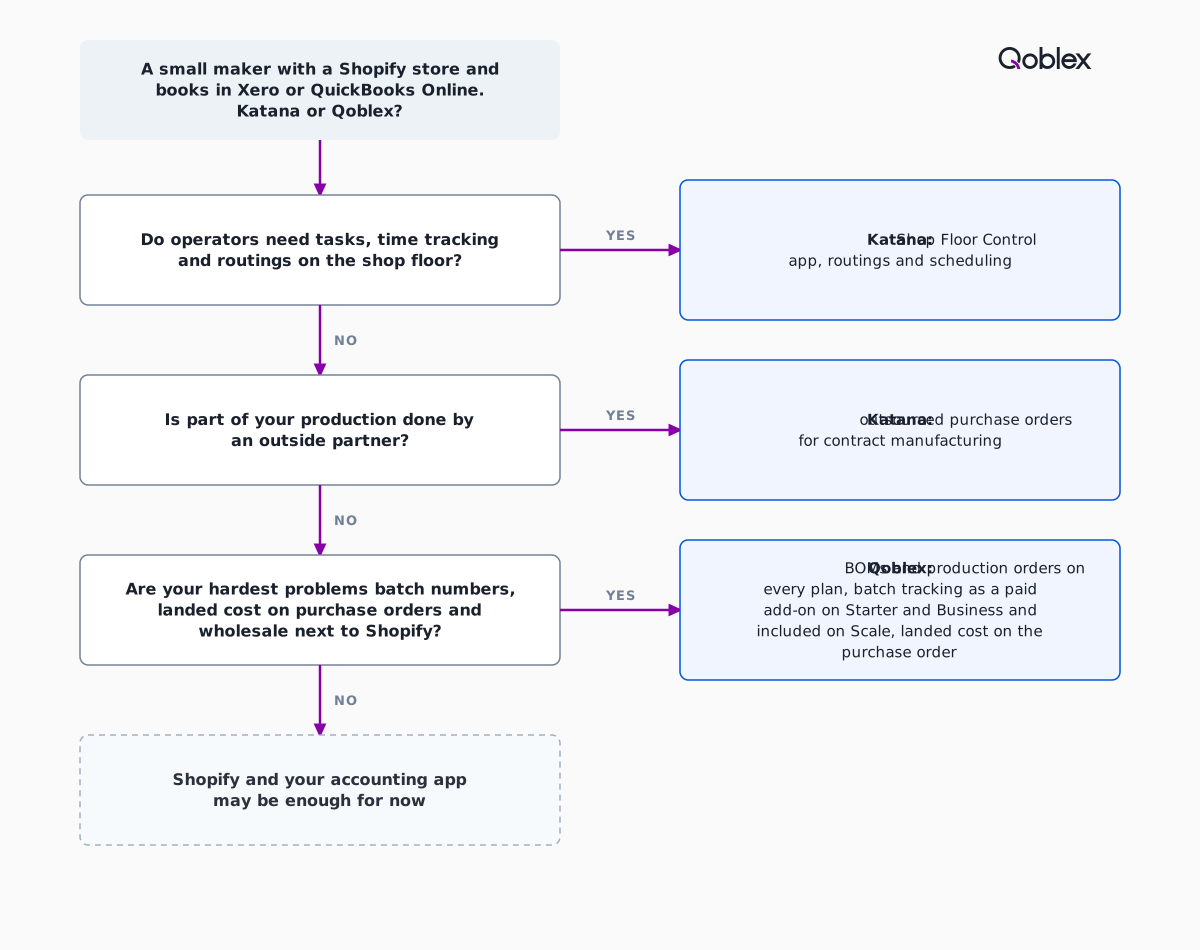
Neither may be needed yet. A maker with no recipes yet, or whose batch codes still answer a recall question the same day, may be fine on Shopify plus Xero or QuickBooks Online for a while. A careful spreadsheet has carried plenty of good businesses through their first years; the time for a system is when the stock figure needs checking before anyone trusts it.
Qoblex does not fit a maker who needs work-centre scheduling or sequencing, subcontracting, or shop-floor control, and those makers should look at Katana first. If neither fits, the wider field is in our ranked list of Katana alternatives.
Frequently asked questions
Is Qoblex a Katana alternative for a small maker?
Yes, for a small maker whose hard problems are batch numbers, landed cost, wholesale next to Shopify and the books in Xero or QuickBooks Online. Qoblex has BOMs and production orders on every plan. It has no work-centre scheduling and no subcontracting, so a maker who needs those should stay with Katana.
Does Katana have a free plan?
Yes. Katana’s pricing page lists a Free plan at $0 with no card and says “Free includes all Katana features, within a 30 SKU limit.” It adds that for e-commerce, only Shopify currently integrates with Free. Its paid plan is Advantage, a custom annual contract with no fixed price.
Is batch traceability an add-on in Katana?
Katana’s own pages disagree. Its pricing page lists traceability in the price and the Free plan, while its help centre article is titled “Overview of the Traceability add-on” and points back to the pricing page for plan details. Ask for a written quote that says what traceability costs on your plan.
Does Qoblex do production scheduling or shop-floor control?
No. Qoblex has BOMs, production orders, assembly and disassembly on every plan, and multi-level BOMs, but each sub-assembly needs its own production order. It has no work-centre scheduling or sequencing and no subcontracting. Katana’s pages list a Shop Floor Control app, routings and outsourced purchase orders, so a maker who needs those should choose Katana.
How does landed cost work in Qoblex compared with Katana?
In Qoblex, freight and similar charges go on the purchase order as a Landed Costs line, are spread across the lines by value, and reach the unit cost when the goods are received. Katana’s help centre lets you choose to allocate an additional cost by value or by quantity. Qoblex offers by value only.
How do Katana and Qoblex connect to Xero and QuickBooks Online?
Katana’s Xero page says it sends finalized sales and purchase order data to Xero. Qoblex posts invoices and bills to Xero, with an optional Two way payment sync for customer payments. For QuickBooks Online, Qoblex syncs one way, from Qoblex to QuickBooks. Katana’s QuickBooks Online page lists syncing the inventory balance.
How much does Katana cost compared with Qoblex?
Katana’s Advantage plan has no fixed price: Katana says it is personalized to your needs and sits under one annual contract. Qoblex lists Starter, Business and Scale on its pricing page, with traceability and integrations as paid add-ons on Starter and Business. Compare a written Katana quote with the Qoblex plan that fits.