



You run your books on Xero and you sell on Shopify. At some point you connected them, and for the everyday stuff it works: sales flow into Xero, payouts reconcile, your revenue looks right. Then you start looking at stock. Xero’s item count does not match Shopify’s item count, and neither of them matches what is actually on the shelf. So you keep the real number somewhere else, a spreadsheet or your own head, and you update it by hand. The two systems are both doing their jobs. What is missing is anything that holds one stock truth between them and keeps it honest as orders come in.
That is not a setup mistake, and it is not a reason to abandon either tool. Xero is a good accounting system and Shopify is a good storefront. The gap sits in the space between them, in the part that runs the warehouse, and neither platform was built to fill it. This page names exactly what the native Xero-Shopify connection does and does not do, explains why the Xero-native upgrade path is off the table for Australian, New Zealand, and UK businesses, and shows how an operations layer closes the gap while Xero stays your book of record.
Does the native Xero-Shopify connection sync inventory?
If Xero is the half of this that matters most to you, the Xero inventory management software page goes deeper on the accounting side of the sync.
The native Xero-Shopify connector syncs sales and payouts, but it does not update stock levels in real time and it skips cost of goods sold. An inventory operations layer, with Qoblex sitting between the two, receives Shopify orders, pushes updated stock levels back to Shopify, and posts invoices and COGS entries to Xero automatically. Xero stays the book of record. Shopify stays the storefront. Qoblex holds the one stock truth.
The native connection is a sales-and-accounting bridge, and it is genuinely useful for that. It moves your Shopify sales data and payouts into Xero so your revenue and fees reconcile. What it does not do is keep your stock levels honest between the two systems. It does not sync inventory quantities in real time, and it does not post cost of goods sold when an item sells.
This is not a fringe complaint. Xero’s own product ideas forum has carried an open, unresolved request for direct Xero-Shopify inventory integration since March 2023, with no roadmap commitment. Practitioners who set these connections up for a living say the same thing: the integration primarily syncs sales data rather than inventory levels, and the connector skips COGS while inventory lags actual sales by several days. Because payout timing drives when data lands, a weekend of sales can leave your numbers out of step until you match them by hand at month-end. The drift you are seeing is the expected behaviour of the tools, not a fault in how you set them up.
What about Xero Inventory Plus, does it solve the Shopify gap?
The obvious next thought is to stay inside the Xero ecosystem and upgrade. Xero Inventory Plus is Xero’s own paid inventory add-on, and it does add real capability: FIFO costing, basic multi-location stock, and connections to sales channels including Shopify and Amazon. If you are in the United States and your gap is costing method and basic locations, it is worth a look.
For businesses in Australia, New Zealand, and the UK, though, there are two problems. First, as of mid-2026 Xero Inventory Plus is available in the US only, with rollout to other regions sitting at “Gaining Support” on Xero’s own product ideas forum and no roadmap commitment. The Xero-native upgrade path is simply not available to you. Second, even where it is available, Inventory Plus does not add lot numbers, batch codes, serial numbers, or expiry date tracking in any tier. So for a food, supplement, or cosmetics seller, it would not close the traceability gap anyway. We cover Xero’s native inventory in full, including the costing question, on our Xero inventory management page.
What inventory gaps remain even after connecting Xero and Shopify?
Even with the native connection running and Inventory Plus set aside, there are operational jobs neither platform does. It helps to separate them, because Xero and Shopify were built for different halves of your business.
Xero’s inventory gaps (for the books, not the warehouse)
Xero has real tracked inventory: perpetual quantity on hand, average-cost valuation, automatic COGS on invoices, and basic purchase orders. That is accounting inventory, and it is good at it. What it does not do is run a warehouse. Independent Xero guides confirm there is no lot, batch, serial, or expiry field in any Xero tier, including Inventory Plus, and no FEFO picking, and that core Xero holds a single stock pool with no multi-warehouse or bin-level tracking, no bill of materials or manufacturing, and no native multichannel sync. Xero was built for the books, not the warehouse floor. The full treatment is on our Xero inventory management page.
Shopify’s inventory gaps (for selling, not for operations)
Shopify tracks stock too: quantities per location, adjustments, transfers, and low-stock alerts. What it does not do is treat units as anything other than identical. There is no native lot number, batch code, serial number, or expiry date field; every unit of a SKU is the same to Shopify, which also means no FEFO picking and no bill of materials or raw materials tracking. Purchasing is a gap too: Shopify has no native purchase order management, and Stocky, the app that filled that role, shuts down permanently on 31 August 2026. Shopify’s Spring 2026 update did bring a large batch of inventory changes, but the new “batch fulfillment” is order-batching, a way to process many orders at once, not lot or expiry tracking. Shopify was built to sell, not to run a warehouse. For the traceability side specifically, see Shopify expiry and lot tracking.
What does an inventory operations layer between Xero and Shopify do?
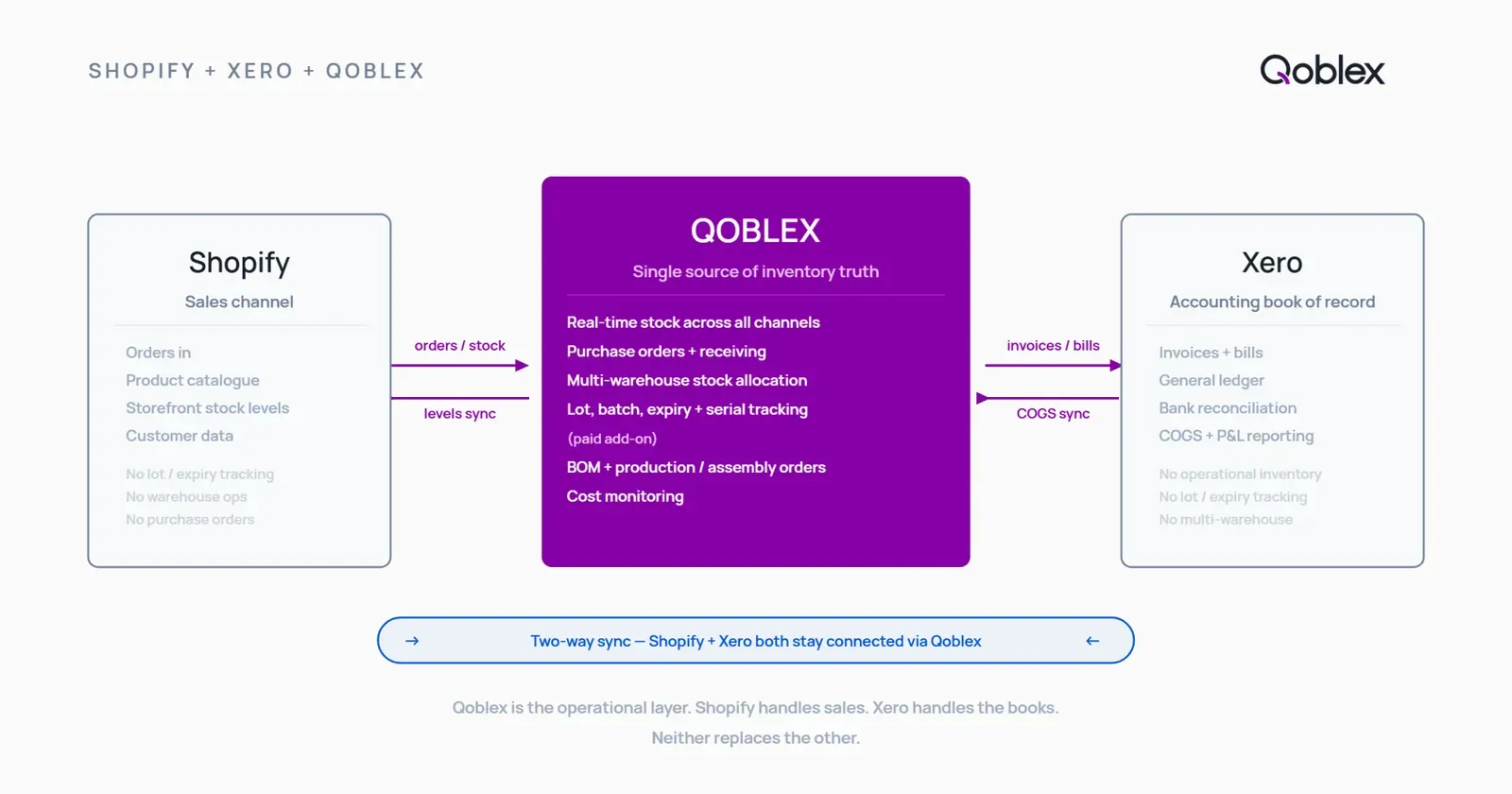
An operations layer sits between your storefront and your books and holds the one true stock count. It receives channel orders as they come in, reserves the units for each order the moment it is placed, pushes the corrected available count back to Shopify, and posts the accounting documents to Xero. Neither system is replaced. Shopify keeps selling, Xero keeps the books, and the layer keeps the number that both of them read from.
The mechanism that stops overselling is allocated, or committed, stock. The instant an order is placed, those units are reserved and taken out of the available-to-sell figure, before the channel count has finished updating. Available stock becomes what you physically hold minus what you have already promised. Because Shopify reads its available figure from that shared, already-reduced number, the same units cannot be sold twice. Overselling stops being something you react to on your busiest weekend and becomes something the system prevents by design.
How does Qoblex sync with both Xero and Shopify?
Qoblex is that operations layer. It is the system between a spreadsheet and a bloated ERP: the part that sits behind your storefront and in front of your books, holding the stock truth neither Xero nor Shopify holds on its own. Here is what the two syncs actually move.
The Shopify side: what Qoblex receives and sends back
On the Shopify side, Qoblex works two ways. It captures Shopify sales orders as they come in, pushes updated stock levels back to Shopify after allocation, supports multiple Shopify stores from one dashboard, reserves committed stock to prevent overselling, and links different price lists to different stores. If you run more than one Shopify store, or Shopify alongside another channel, they all read from the same master count.
The Xero side: what Qoblex posts to your books
On the Xero side, the accounting documents flow automatically. Qoblex syncs sales orders to Xero as invoices, purchase orders as bills, and returns as credit notes, and posts stock and COGS as daily journal entries, with smart sync rules that route to specific ledger accounts or tracking categories and contact sync for customers and suppliers. Qoblex is also listed on the Xero App Store in Australia, New Zealand, the UK, and other regions, so it is a first-class Xero connection rather than a workaround.
The setup requirement: Qoblex is the stock of record, Xero is the book of record
There is one setup decision worth being upfront about, because it is the whole point of adding a layer rather than switching systems. Qoblex becomes the source of truth for stock. For the products you manage in Qoblex, you turn off Xero’s own item tracking so the two systems do not double-count. Qoblex owns the stock, Xero owns the books. Your accountant never leaves Xero, and your warehouse team never loses traceability. This is the intended architecture, not a limitation to work around.
Capability comparison table
| Capability | Xero native (AU/NZ/UK) | Shopify native | Qoblex + Xero + Shopify |
|---|---|---|---|
| Real-time stock sync between Xero and Shopify | No (open forum request since March 2023) | No | Yes, via Qoblex as the middle layer |
| COGS posted to Xero automatically | Lags actual sales via payout sync (source) | Not applicable | Yes, daily journal entries |
| Lot / batch / serial / expiry tracking | No field in any tier (source) | No field; units treated as identical (source) | Yes, a paid add-on |
| FEFO picking | No | No | Yes (lot tracking) |
| Multi-warehouse / bin-level | No (Inventory Plus US-only) (source) | Location-level only, no bins | Yes (warehouse management) |
| Purchase orders with 3-way check | Basic PO creation only (source) | No (Stocky sunsets 31 Aug 2026) | Yes (purchase orders) |
| BOM / assembly / manufacturing | No (source) | No (source) | Yes (manufacturing) |
| Multiple Shopify stores in one dashboard | Not applicable | Separate admin per store | Yes (Shopify sync) |
| Accounting book of record | Yes, stays in Xero | Not applicable | Stays in Xero |
What else does the operations layer add?
Once the sync is in place, the layer also covers the operational jobs neither platform does. Which of these matters depends on your business, so weight it toward what you need next.
- Lot, batch, serial, and expiry tracking with FEFO. For food, supplement, or cosmetics sellers, Qoblex records which lot fulfilled which order and ships earliest-expiring stock first, with batch traceability from receipt to sale. This is a paid add-on rather than part of the base plan; see current pricing. Deeper treatments live on our lot and expiry tracking for Xero users and Shopify expiry and lot tracking pages.
- Multi-warehouse and bin-level stock. When a second location opens, Qoblex tracks stock per warehouse with bin-level detail, pick lists per location, and transfers that preserve lot identity.
- Purchase orders that fill the Stocky gap. With Stocky sunsetting, Qoblex provides purchase orders with lot-level receiving, freight cost tracking, a 3-way check between PO, goods received, and bill, and barcode scanning.
- Bills of materials and production orders. If you build or assemble what you sell, Qoblex handles bills of materials, production orders, assembly and disassembly, and batch tracking through production.
- The everyday controls. Underneath all of it, real-time stock on hand, reorder point alerts, barcode scanning, cost management, and multi-currency. For the broader picture if you sell on more than just Shopify, see multichannel inventory management software.
When might you not need a third tool yet?
It would be dishonest to pretend every Xero-and-Shopify business needs a layer between them. For plenty of sellers, the native connection is genuinely enough, and there is no prize for adding a system before the problem is real.
If you sell non-perishable, non-regulated products with no lot or expiry requirement, operate from a single location, and run one sales channel, Xero’s tracked inventory handles quantity and AVCO costing while the native connector handles the sales-to-accounting sync. You have no recall risk tied to batch numbers, no multichannel drift to reconcile, and no manufacturing or BOM needs. Xero itself positions its native inventory for relatively simple inventory needs, and that framing is fair. A well-kept setup like this can run for a long time without a third tool.
The friction points are specific, and you will recognise them when they arrive. A second location opens and stock stops agreeing with itself. A second sales channel goes live and the counts drift. A customer asks which batch their order came from and you have nowhere to look. Month-end reconciliation quietly becomes a manual matching job rather than a quick check. Any one of those is manageable. Two or three at once is the signal that keeping stock honest by hand has become a job, and that is the moment a layer earns its place.
FAQ
Does the native Xero-Shopify integration sync inventory? The native connector syncs sales data and payouts but does not update stock levels in real time and skips COGS. Xero’s own product ideas forum has carried this as an open, unresolved request since March 2023 with no roadmap commitment. In practice, stock drifts between the two systems and cost of goods sold has to be handled another way.
Is Xero Inventory Plus available in Australia, New Zealand, or the UK? No. As of mid-2026, Xero Inventory Plus is available in the US only. Xero’s product ideas forum shows rollout to other regions at “Gaining Support” status with no roadmap commitment, so AU, NZ, and UK businesses cannot take the Xero-native upgrade path. Inventory Plus also does not add lot, batch, or expiry tracking in any region.
Does Shopify track lot numbers or expiry dates natively? No. Shopify has no native lot number, batch code, serial number, or expiry date fields, and it treats every unit of a SKU as identical. The Spring 2026 inventory update added order-batching for fulfillment, which processes many orders at once, not lot or expiry tracking. For batch-level traceability you need an operations layer on top.
Does Qoblex replace Xero or Shopify? No. Qoblex is the operations layer between them. Xero stays the accounting book of record: general ledger, bank reconciliation, payroll, tax, and invoicing. Shopify stays the customer-facing storefront and checkout. Qoblex holds the stock of record, syncs orders and stock levels between the two, and adds the operational capabilities neither provides natively.
What is the Qoblex-Xero setup requirement for inventory tracking? For products you manage in Qoblex, you turn off Xero’s own item tracking so the two systems do not double-count. Qoblex becomes the stock of record and Xero stays the book of record. This is the intended two-system architecture, not a workaround, and it keeps your accountant in Xero while your warehouse team keeps full traceability.
When do you need an inventory layer on top of Xero and Shopify? When the native sync’s limits create real operational pain: stock numbers drifting between systems, COGS lagging actual sales, month-end reconciliation becoming a manual job, a second location or sales channel opening, or a customer asking which batch their order came from. Small single-location sellers with no lot or expiry needs may not need one yet.