



Written for Shopify operators who opened a profit report, saw a margin that did not match reality, and went looking for the reason.
You probably got here the same way most people do. A profit report looked off. Margin on a good seller read healthier than it should for a season in which your supplier raised prices twice. You opened the product, saw a number in the Cost per item field, decided it was not obviously wrong, and moved on. Then it happened on another SKU.
Nothing is broken. Shopify is doing what it documents itself as doing, which is narrower than most growing merchants assume, and the gap only surfaces months after the buying decision that caused it. For the wider picture of Shopify’s native inventory, see our Shopify inventory management guide. This page takes one line from it: the cost field.
Does Shopify update your product cost automatically?
No. It holds whatever you last typed.
Where the Cost per item field lives
Cost per item sits on the product itself, in the pricing section of a product or variant in your Shopify admin, next to price and compare-at price, per Shopify’s product pricing documentation. One product, one field, one value. Bigger catalogues use the bulk editor or the API, but the mechanism is the same: something outside Shopify decides the number, and someone types it in.
It is a static number, not a running average
Shopify’s own wording is worth reading slowly. “The Cost per item field contains static data, which means that the data in your profit reports is only relevant to a specific point in time,” per the Help Center’s profit reports documentation. The same page notes that Shopify reports profit only for products that had a cost recorded at the time they were sold.
Static is the operative word. The field is a stored value, not a calculation, and nothing inside Shopify watches your buying and adjusts it. The same page is candid about the consequence: when cost changes over time, its documented options are to run your financial reports in another business system such as an ERP or accounting system, to use a reporting app, or to calculate costs and profits manually.
What happens when you receive a purchase order at a new price
Nothing, unless you go and edit the field. Merchants in Shopify’s own community forum describe editing cost during purchase-order receiving and finding the product’s cost unchanged once the PO is received, because Shopify keeps one cost per variant: the last price paid.
So the one moment when you genuinely learn what a unit costs is the moment the number does not move.
Why do Shopify margin and profit reports drift when supplier prices change?
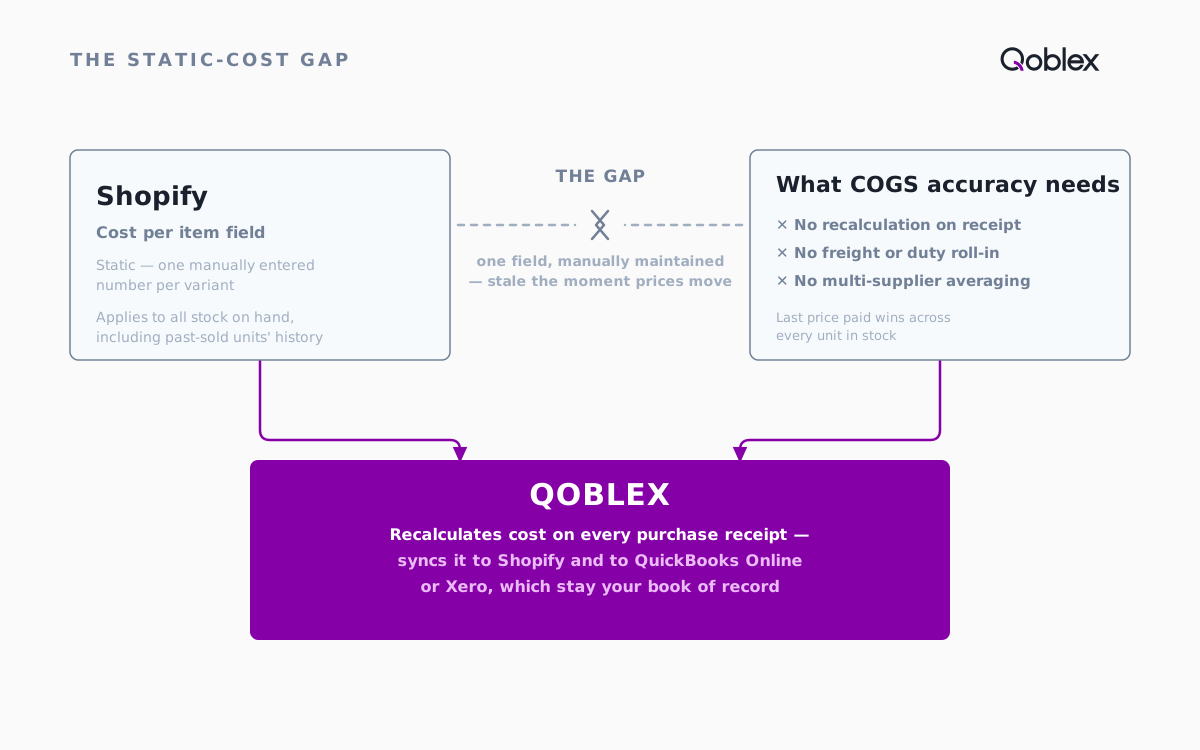
One field, two jobs it cannot both do
Start with what is not happening. Shopify is not running a costing method behind that field: no cost layers, no running average, no engine deciding which units you sold. There is the value you last entered, and reporting built on top of it.
Past orders keep the cost recorded when they sold, which sounds reassuring until you see the flip side: if the field was stale when those orders shipped, correcting it today does not repair the margin history already reported with the wrong number. And the stock you still hold has only that same field to describe it. Type in a new, higher price and it applies across existing stock, so margin reporting stays inaccurate until someone notices, as merchants in that community thread describe.
What this looks like for a multi-supplier seller
Say you buy the same SKU from two suppliers, or from one supplier across a rising market. Two prices, one bin, one storefront, plus whatever other channels run off that stock pool. Shopify can hold one of those numbers. Not the blend. The last price paid becomes the cost of everything, and your margin per order, your bestseller ranking by profit and your reorder decisions all sit on top of it. This is usually where a merchant starts keeping a parallel spreadsheet of real costs. Reasonable response, and it works right up until it is a month behind.
Does the Cost per item field include landed costs like freight and duties?
Not automatically. Freight, duty and brokerage are things you work out elsewhere and add into the same static number by hand.
Plenty of merchants do exactly that, and for a stable import lane it is fair enough. The catch is that the entry describes one shipment. The next container has different freight, and the field does not know. Our moving average cost calculator does that arithmetic on your figures.
Allocating those charges across the lines of a purchase order, so the cost lands on the right units, is its own subject, and it happens on the purchase order rather than in a product field.
How to get true, automatically-updating COGS for a Shopify store
What “true” means here
A true cost recalculates when stock arrives instead of waiting for you to remember. The test: after you receive a purchase order at a new price, does your reported cost change without anyone touching a field? App Store tools exist that report on cost and profit, and the distinction worth holding on to is whether a tool reports on the cost you maintain, or maintains the cost for you.
How this works in Qoblex on a Shopify purchase receipt
Qoblex recalculates when the goods land. Per Qoblex’s moving average cost documentation, the average cost of each inventory item in stock is re-calculated after receiving inventory purchase orders, and the cost of ending inventory and the cost of goods sold are set at that average.
A Shopify-shaped example. You hold 200 units bought at 8.00 and receive 300 more at 9.50. Shopify’s field, once someone updates it, reads 9.50 for all 500 units. The blended cost of what you hold is 8.90, and that is the figure Qoblex carries into COGS and margin the moment the receipt is posted. Run the calculator on your own two purchases.
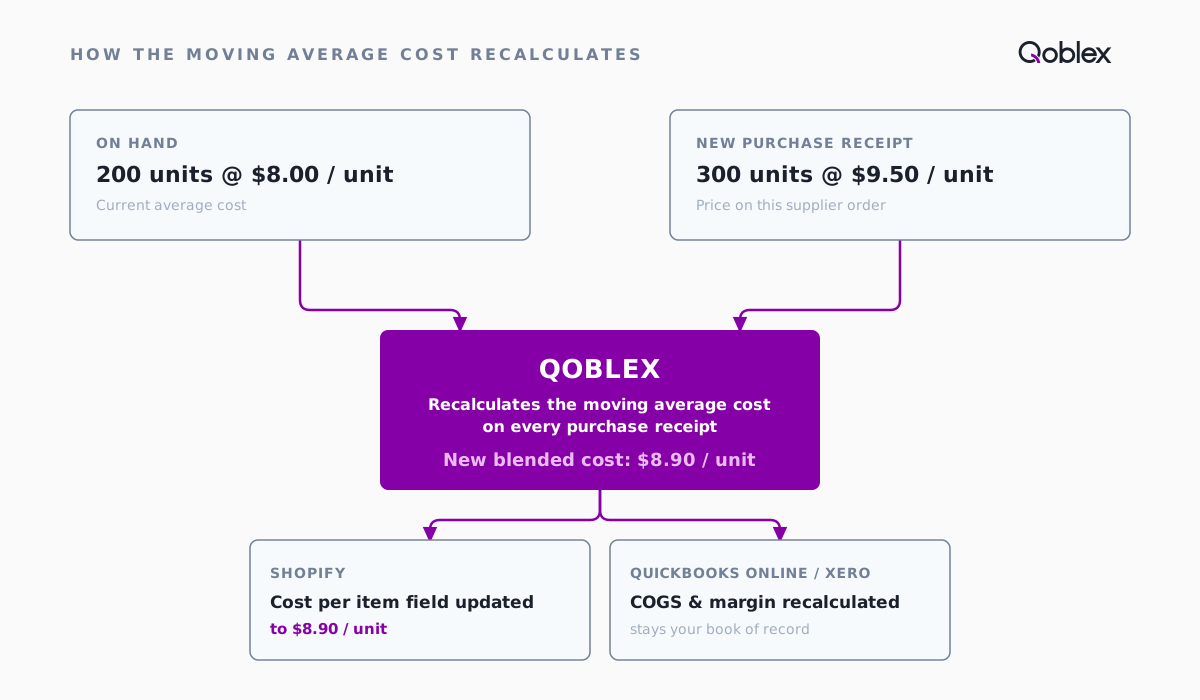
Extra supplier charges belong in there too: Qoblex supports shipping and freight charges on a purchase order.
How the cost gets back to Shopify and to your accounting platform
Your storefront should show the corrected number, and your accountant should not have to hear about any of it. As Qoblex for Shopify documents, Qoblex syncs product details including cost to Shopify and updates stock levels as items sell, and it integrates with QuickBooks Online and Xero, which stay your book of record. Margin and COGS reporting lives in Qoblex’s reporting.
Shopify native versus Shopify with a costing layer
| Capability | Shopify (native Cost per item field) | Qoblex + Shopify |
|---|---|---|
| Per-variant cost storage | Yes, one static value | Yes, plus the purchase history behind it |
| Recalculates on receipt at a new price | No, re-entered by hand | Yes, after receiving a purchase order |
| When cost changes | Past orders keep the cost recorded at time of sale; the new value applies to stock on hand | Traceable to the receipt that caused them |
| Freight and duties in cost | No, hand-calculated and typed in | Shipping and freight charges supported on the purchase order |
| Multi-supplier, multi-price handling | No, last price paid wins | Yes, a weighted average across purchases |
| Accounting as book of record | Not applicable | Integrates with QuickBooks Online or Xero |
| Cost to use | Included with Shopify | Part of Qoblex, see pricing |
The wider capability, costing that recalculates across every purchase channel rather than one storefront, sits on Qoblex’s inventory costing page.
When is Shopify’s built-in Cost per item field enough?
It genuinely is enough for a lot of stores, and moving to something heavier before you need it is its own mistake.
One supplier, stable prices. If a SKU costs what it cost last year, a static field is an accurate field. Automation would recalculate its way to the same number.
Few enough SKUs that a manual update is a five-minute job. Thirty products, a quarterly price list, a bulk edit, done. Small process, not a broken one, and small processes are allowed to stay manual.
No need for per-purchase margin precision. Early-stage and side-project stores need to know roughly whether the maths works, not which receipt a unit came from. The free calculator, run by hand once a quarter, covers it.
The line to watch for is not a revenue number. It is the day you buy the same SKU at two prices and have to decide which one to type in. That has no right answer inside a single field, and your margin history absorbs the difference.
FAQ
Does Shopify update cost of goods sold automatically?
No. Cost per item is a single, manually entered number per variant, and Shopify’s documentation describes it as static data relevant only to a specific point in time. Receiving a purchase order at a new price does not change it.
Why is my Shopify cost per item wrong, or my margin report inaccurate?
Because one field is carrying every unit you own. Profit is reported using the cost recorded when an item sold, so stale entries stay in your history, and merchants on Shopify’s community forum report that receiving a PO at a new price leaves the last figure you typed applied across your stock.
Does Shopify’s Cost per item field include freight or landed costs?
Not automatically. Freight, duties and other landed costs have to be worked out separately and added into the same static number. For the calculation, use the moving average cost calculator; for allocating them across the units on a shipment, the work belongs on the purchase order rather than in the product field.
How do I get COGS that updates automatically for a Shopify store?
Use a costing layer that recalculates when stock is received instead of a field someone maintains. Qoblex recalculates the moving average cost after receiving purchase orders and syncs cost back to Shopify, with QuickBooks Online or Xero as the book of record.
When is Shopify’s Cost per item field good enough on its own?
When you have one supplier, stable prices, a catalogue small enough to update by hand, and no need for per-purchase margin precision. The moment you buy the same SKU at different prices, or run several channels off one stock pool, it starts costing you accuracy you cannot see.