



A guide written from the point of view of an operator who sells on Shopify and keeps hitting the edge of what its built-in inventory can do.
Shopify tracks inventory quantities per location natively: stock adjustments, transfers between locations, and basic low-stock notifications. What it does not include is lot and batch number tracking, expiry or best-before date management, serial number tracing, FEFO picking, bill-of-materials or manufacturing workflows, and robust purchase order management (Stocky, which filled that role, is sunset 31 August 2026). For those capabilities, merchants add a dedicated operations layer while Shopify stays the commerce platform.
You sell on Shopify. For a long stretch its inventory did the job: you set up your products, quantity on hand moved down when an order came in, you split stock across a couple of locations, and the low-stock email nudged you before you ran out. Then the questions started arriving that Shopify had no field for. A customer asked which batch their order shipped from. A retailer wanted best-before dates on the pallet. You began building finished goods out of components and there was nowhere to record the recipe. And then Stocky, the app you leaned on for purchase orders and forecasting, showed up with a shutdown notice.
That is not a setup mistake, and it is not a sign you chose the wrong platform. Shopify is a strong commerce platform, and its native inventory is genuinely good at one thing: tracking how much of each product sits in each location. What it was never built to be is an operations layer for lots, expiry dates, serial numbers, assembly, and deep procurement. This page names exactly what Shopify’s inventory does and does not do, clears up two things the market gets confused about (the Stocky sunset and Spring 2026 “batch fulfillment”), and shows how to add the missing depth while Shopify stays your storefront and checkout.
What does Shopify inventory management actually do?
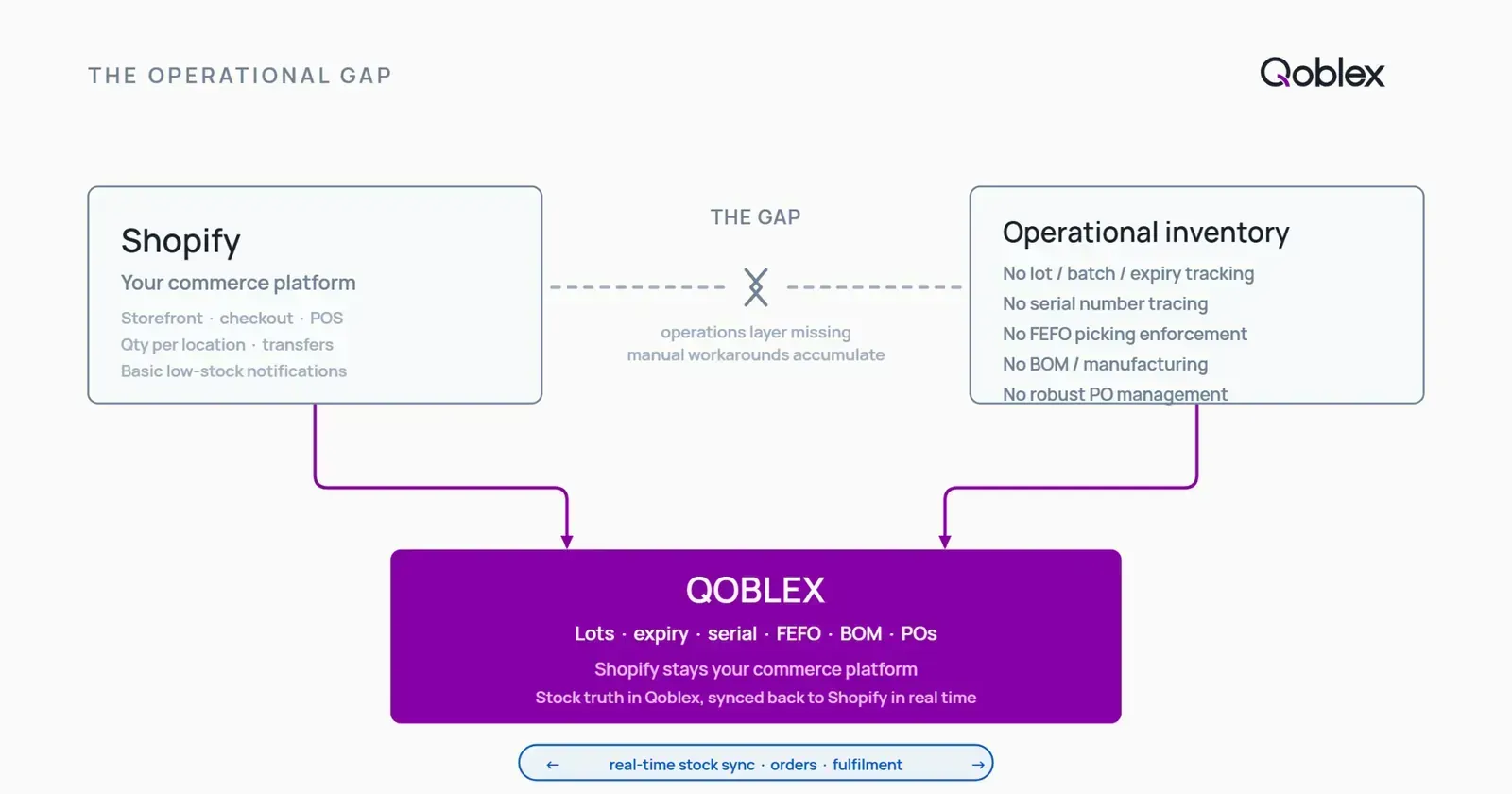
Shopify does have inventory management built in, and it is better than it often gets credit for. The point worth being precise about is what that built-in inventory covers, because the gap only makes sense once the starting point is clear.
Per-location stock tracking: Shopify’s genuine strength
This is where Shopify is strong, and it deserves to be said plainly. Shopify tracks a stock quantity for every product at every location you run, and per Shopify’s own inventory documentation you can operate up to 1,000 locations on most plans. If you sell from a warehouse, two retail stores, and a 3PL, Shopify holds a separate on-hand number for each and shows you the total. That is real multi-location inventory, not a workaround, and for a lot of merchants it is the single most important thing native Shopify gets right.
What Shopify inventory management covers natively
Alongside per-location quantities, Shopify handles the day-to-day stock movements. You can make inventory adjustments with a recorded adjustment history, so a stocktake correction or a write-off leaves a trail. You can run transfers between locations as a native admin workflow, moving stock from an origin to a destination with formal tracking. And Shopify will send a basic low-stock notification to staff when a product drops below a threshold. Be clear-eyed about that last one, though: it is a single store-wide threshold set under Settings, not a per-SKU alerting system. Per-SKU automation needs Shopify Flow (Shopify Plus only) or a third-party app. Call it what it is, a basic low-stock notification, and it is fine for what it is.
Does Shopify have purchase orders?
Yes, with a caveat that matters. Per Shopify’s own purchase-order documentation, Shopify has basic native purchase orders in the admin: you can create a PO, add products, quantities, costs, and supplier details, receive stock against it, and generate a linked transfer. What those native POs do not do is the procurement math a growing operation relies on. The documented fields cover order cost and supplier terms, but there is no retail-price column during receiving, no margin calculation, and no weighted-average cost update after you receive, so your unit costs do not move when your buying prices do. Merchants have raised exactly these limits in Shopify’s own community forum. For a merchant processing a handful of POs a month, native POs are workable. For one processing hundreds of SKUs a week, they are not, and that gap used to be filled by Stocky. More on the Stocky sunset below.
What Shopify inventory management doesn’t do natively
Shopify’s inventory is quantity tracking for commerce. The operational layer, the part that traces a physical unit through its life and turns components into finished goods, is a different job. Here is what Shopify does not do natively.
No lot numbers, batch codes, or expiry dates
Shopify’s own inventory documentation describes the quantity, adjustment, and transfer fields Shopify tracks, and it lists no lot number, batch code, or expiry-date field. To Shopify, every unit of a SKU is identical: there is no place to record that these 200 units came from batch A with a March expiry and those 200 came from batch B with a July one. Merchants who need it reach for third-party apps, Batchly being one example, or for a dedicated operations layer. If you sell food, supplements, cosmetics, or anything with a shelf life or a recall exposure, this is usually the first wall you hit.
No serial number tracking
Shopify does not track serial numbers per unit: the fields documented in Shopify’s inventory help cover quantities and locations, with no per-unit serial identifier. You can type a serial into an order note, but it is a note, not a traced identifier: there is no way to know which specific serialized unit went to which customer, or to search your stock by serial. Genuine per-unit serial tracing needs a third-party app (for example, Serializer) or an operations platform built for it.
No FEFO picking enforcement
Because Shopify has no expiry data, it cannot enforce FEFO, first-expired-first-out picking, where the units closest to expiry are shipped first. There is nothing to sort on. This is not a setting that is switched off; the underlying batch and date information simply is not there for Shopify to act on.
No bill of materials, assemblies, or manufacturing workflows
If you build finished goods from components, Shopify has no bill of materials, no raw-material inventory, and no production or assembly workflow. Shopify’s inventory documentation documents finished-SKU quantity tracking only, with no component or production-order feature. It tracks the finished SKU you sell, not the components that go into it, so making ten units does not draw down the parts you consumed. Merchants who assemble, kit, or manufacture use third-party apps (Assemblified, BOMEasy, Craftybase) or an operations layer with BOM and production built in.
No robust purchase order management (Stocky sunset 31 August 2026)
This one is timely. Shopify’s own dedicated purchasing and forecasting app, Stocky, is being discontinued. Per Shopify’s own transition guidance, Stocky will not be available after 31 August 2026, and it was delisted from the Shopify App Store on 2 February 2026. Stocky is what gave many Shopify merchants their deeper purchase order and demand-forecasting layer. What is left after it goes is the basic native PO workflow described above: create, receive, supplier records, but no cost-layer update on receipt, no margin calculation, no demand forecasting, and no landed-cost computation. So the accurate way to describe Shopify’s procurement today is not “no purchase orders,” it is “basic native POs, with the fuller layer that Stocky provided going away at the end of August 2026.” If Stocky was part of your workflow, this is the gap to plan for now rather than in September.
A note on Shopify’s Spring 2026 “batch fulfillment”
Worth clearing up, because the naming causes real confusion. Shopify’s Spring 2026 update introduced batch fulfillment, and it is easy to assume from the word “batch” that Shopify added lot tracking. It did not. Batch fulfillment groups many orders together so warehouse staff can pick, pack, scan, and ship them in one efficient pass. It is an order-batching workflow, entirely distinct from product batch codes, lot numbers, or expiry dates. Shopify still has no native lot or expiry tracking. If you came looking for traceability and found “batch fulfillment,” those are two different meanings of the same word.
The capability gap at a glance
Here is the full picture, native Shopify against Shopify with a dedicated operations layer (using Qoblex as the example, since it integrates directly with Shopify).
| Capability | Shopify (native) | Qoblex + Shopify |
|---|---|---|
| Quantity on hand per location | Yes, up to 1,000 locations on most plans | Yes, syncs back to Shopify in real time |
| Stock adjustments and history | Yes | Yes |
| Transfers between locations | Yes | Yes |
| Low-stock notifications | Basic staff notification, single store-wide threshold | Yes, with reorder-point rules |
| Purchase orders | Basic native POs (create/receive/supplier); no cost-layer update, no margin, no landed cost; Stocky sunset 31 Aug 2026 | Yes, with supplier records, receiving, and landed-cost computation |
| Lot / batch number tracking | No; requires third-party apps | Yes, a paid add-on |
| Expiry / best-before tracking | No; requires third-party apps | Yes, a paid add-on |
| Serial number tracking | No; requires third-party apps | Yes, a paid add-on |
| FEFO picking enforcement | No | Yes |
| BOM / assemblies / manufacturing | No; requires third-party apps | Yes, built in |
| Bundle/kit without pre-packing stock | Limited natively | Yes |
| Multiple Shopify stores in one dashboard | No native cross-store rollup | Yes |
| Accounting / financials (COGS, GL, invoicing) | Not in Shopify’s scope | Syncs to Xero or QuickBooks Online |
Can Shopify add lot, batch, and expiry tracking?
Yes, but not from inside Shopify’s own inventory settings, and the how depends on how much traceability you actually need. Since Shopify holds no batch identity or date on a unit, adding lot and expiry tracking means a layer that sits alongside Shopify, records the batch and expiry against received stock, and drives picking by expiry. Single-purpose apps can bolt a lot field onto Shopify; an operations platform does the same while also handling purchasing, transfers, and, if you need it, FEFO across all your channels from one place.
For regulated categories, food, supplements, cosmetics, pharma, this is less about a field and more about being able to answer a recall question or a retailer audit quickly and completely. That is a deeper topic than this overview should try to cover, so if lot, batch, expiry, and FEFO are your core need, read our dedicated guide on Shopify expiry and lot tracking, which walks through the operations-layer approach, FEFO mechanics, and recall readiness in full. This page stays at the level of the whole inventory picture; that one goes deep on traceability.
What is the best inventory management app for Shopify?
There is no single answer, because “best” depends entirely on which wall you hit. It is worth being honest about that before naming any tool.
What to look for in a Shopify inventory operations app
Start from your gap, not from a feature list. If your only need is per-SKU low-stock automation, a light app or Shopify Flow may be enough. If you need lot and expiry tracking, look for real batch and date fields with FEFO picking. If you assemble or manufacture, you need a bill of materials and production orders. If Stocky’s sunset leaves a hole, you need proper purchase orders with landed cost and cost updates on receipt. And if you sell across more than one Shopify store or channel, you need a single dashboard that rolls stock up rather than making you reconcile stores by hand. Several tools serve these needs at different points, Linnworks, inFlow, and Katana among them, each aimed at a slightly different segment. Match the tool to the specific gap rather than to the loudest marketing.
How Qoblex and Shopify work together
Qoblex is one option that covers the operations-layer gaps in a single system, and it integrates directly with Shopify. The important thing to understand is the relationship: Qoblex does not replace Shopify. Shopify stays your commerce platform, storefront, checkout, and point of sale, while Qoblex handles the inventory operations behind it. Per the Qoblex Shopify integration page, Qoblex captures your Shopify sales orders immediately and guides fulfillment, then pushes updated stock levels back to Shopify in real time, so your storefront reflects what you actually have without manual re-entry.
On top of that sync, Qoblex adds the depth Shopify lacks natively: lot, batch, serial, and expiry tracking as a paid add-on (not part of the base plan; see pricing), purchase orders with supplier records, receiving, and landed cost to cover the ground Stocky is vacating, and bill of materials and production orders for merchants who build rather than only resell.
The Qoblex and Shopify sync in plain terms
In practice it works like this. An order comes into Shopify. Qoblex picks it up right away and reserves the stock as committed, which prevents overselling the same unit across Shopify and your other channels. You fulfill, and Qoblex pushes the new stock levels back to Shopify. If you run more than one Shopify store, Qoblex coordinates them from one dashboard, and it supports Shopify POS and multi-currency selling in more than 200 currencies. If you also sell on other marketplaces, the same committed-stock logic applies across all of them, which is the multichannel inventory problem in one view. And because Shopify is not your accounting system, Qoblex syncs the financial side out to Xero or QuickBooks Online, so commerce, operations, and the books stay in agreement.
When is Shopify’s built-in inventory enough?
Plenty of Shopify merchants do not need a third tool, and it would be dishonest to suggest otherwise. Here is the fair read.
Simple merchants with no lot, expiry, or serial requirements
If you sell products that are not perishable, not batch-controlled, and not serialized, Shopify’s native inventory genuinely covers you. Per-location quantity tracking, adjustments, transfers, and a basic low-stock notification are enough to run a clean operation, even across several locations. Multi-location is exactly where Shopify is strong, so a merchant with three stores and no traceability needs is well served without adding anything.
Early-stage merchants where quantity tracking is plenty
If you are early and volume is modest, resist adding tools before you feel the pain. Shopify’s quantity tracking and its basic notifications are enough while your SKU count is small and your buying is simple. Adding an operations layer before you have an operations problem is just cost and complexity you do not need yet. The right time to add one is when the questions start (a batch query, a second stockroom that stops reconciling, a Stocky-shaped hole in your purchasing) not before.
When a full ERP is the right answer instead
At the other end, if you are large enough to need deep financial consolidation, complex multi-entity accounting, and heavy configuration, a dedicated operations layer may not be enough either, and a full ERP might be the honest answer. Most growing Shopify SMBs sit in the middle: past what native Shopify covers, well short of needing enterprise ERP weight. That messy middle is exactly the space an operations layer is built for.
Frequently asked questions
Does Shopify have native inventory management?
Yes. Shopify tracks inventory quantities per location natively, up to 1,000 locations on most plans, with stock adjustments, adjustment history, transfers between locations, and basic low-stock notifications, per Shopify’s inventory documentation. What Shopify does not include natively is lot and batch number tracking, expiry or best-before dates, serial number tracing, FEFO picking, bill of materials or manufacturing, and robust purchase order management (Stocky, which provided that, is sunset 31 August 2026 per Shopify’s transition guidance).
What does Shopify inventory management not include natively?
Shopify has no native lot number or batch code tracking, no expiry or best-before date fields, and no serial number tracking, since Shopify’s inventory documentation lists quantity and location fields only, with no lot, batch, or serial field, and every unit of a SKU is identical to Shopify. It has no FEFO picking rules, no bill of materials, and no assembly or manufacturing workflows. It also has no robust purchase order management: basic native POs exist in the admin but lack cost-layer update on receipt, margin calculation, and landed-cost computation, and Stocky, which provided fuller PO management, is sunset 31 August 2026 per Shopify’s transition guidance.
Does Shopify’s Spring 2026 “batch fulfillment” add lot tracking?
No. Shopify’s Spring 2026 batch fulfillment feature groups multiple orders together so staff can pick, pack, scan, and ship them in one efficient workflow. It is entirely distinct from lot-code assignment or expiry-date tracking. The word “batch” here means batching orders for pick-pack-ship efficiency, not product batch codes or lot numbers. Shopify still has no native lot or expiry tracking.
What is the best inventory management app for Shopify?
The right option depends on which gaps you need to close. For merchants needing lot, batch, serial, and expiry tracking, manufacturing or BOM, robust purchase orders after Stocky’s sunset, and multi-store coordination in one dashboard, Qoblex provides a native Shopify integration: Shopify orders are captured immediately, updated stock levels push back to Shopify in real time, and oversell prevention reserves committed stock across channels. Other options such as Linnworks, inFlow, and Katana serve different segments.
Does Qoblex replace Shopify?
No. Qoblex is the operations and inventory layer; Shopify stays the commerce platform handling storefront, checkout, and point of sale. Per the Qoblex Shopify integration page, Qoblex captures Shopify sales orders immediately, guides fulfillment, and pushes updated stock levels back to Shopify in real time, keeping both systems accurate without manual re-entry.
When is Shopify’s built-in inventory enough?
Shopify’s native inventory is enough when you sell non-perishable, non-lot-controlled products with no serial, expiry, or BOM requirements, and per-location quantity tracking with basic low-stock notifications covers your operational needs. The moment you need to track batches, manage expiry dates, trace serial numbers, enforce FEFO picking, or run manufacturing or assembly workflows, you need a dedicated operations layer alongside Shopify.