



For managing Amazon and Shopify stock in one place, Qoblex maintains a single shared stock pool across both channels. Amazon orders flow into Qoblex automatically every few minutes and are deducted from that pool, and committed-stock logic reserves units the moment an order lands, so your Shopify listings sell from a number that already accounts for Amazon sales. Amazon’s own listing quantities stay managed in Seller Central. Purchase-order and invoice data flows automatically to Xero or QuickBooks Online.
Platforms in this space range from channel-sync and basic inventory apps (Sumtracker, Nembol) to mid-market operations platforms (Cin7 Core, Zoho Inventory) to enterprise retail management systems (Brightpearl, Linnworks). Qoblex sits in the mid-market, SMB-focused tier: deeper than a sync widget, lighter than an enterprise ERP, and built around the specific problem of keeping one reliable stock pool across channels while keeping your accounting platform as book of record.
What is multichannel inventory management software?
Multichannel inventory management software centralizes stock data across all your sales channels and storage locations, then synchronizes quantities automatically so each channel reflects true available stock. It prevents overselling by tracking committed (allocated) inventory separately from available inventory, and gives you one operational record of every purchase, sale, transfer, and production run, regardless of which channel originated it.
That definition covers the mechanics. The reason it matters is more concrete. When you sell on more than one channel, each storefront keeps its own idea of how much you have. They only stay in agreement if something sits between them holding the master number and pushing the correct count back to each channel as stock moves. Without that layer, every channel is guessing, and the guesses drift apart fastest exactly when you are busiest.
What does “single source of truth” mean for inventory across channels?
A single source of truth is one system that holds the authoritative stock number, so every channel reads from the same figure instead of keeping its own. When a sale happens anywhere, that system updates first, then the channels update from it. The alternative, which most sellers start with, is a set of independent counts that each drift on their own schedule, plus a spreadsheet that tries to referee between them. The spreadsheet is not the enemy here. It got you to two channels. It just cannot stay true fast enough once orders arrive on several fronts at once.
What is the difference between multichannel and omnichannel inventory management?
The two terms get used interchangeably, but they describe different operations. Multichannel means you sell on several channels that each draw from one shared stock pool, and they operate independently: an Amazon order and a Shopify order are separate transactions against the same inventory. Omnichannel adds unified fulfillment across those channels, things like buy-online-pickup-in-store (BOPIS) and ship-from-store, where the customer experience crosses channels in a single journey. Most growing sellers need multichannel done properly long before they need omnichannel. Omnichannel adds fulfillment complexity that only pays off at a certain scale and store footprint. Worth being clear up front: the operations layer described on this page, including Qoblex, is a multichannel system. It is not a BOPIS or ship-from-store platform.
How do I sync inventory between Amazon and Shopify?
The short answer: connect both channels to a single inventory operations layer that holds the master stock count and pushes the corrected available figure back to each storefront every time a sale or adjustment moves stock anywhere.
Without a central layer, Shopify and Amazon each keep independent tallies. If an order lands on Amazon at 9:00 am and the Amazon-to-Shopify sync runs every 15 minutes, Shopify still shows those units as available until 9:15. On a slow day, that window is harmless. On your best SKUs during a peak, a Shopify order can land at 9:08 for the same units. The result is a confirmed sale you cannot fulfill.
The mechanism that fixes this is not faster syncing intervals. It is committed stock: the moment any order lands, those units are reserved and removed from the available-to-sell figure inside the operations layer before the channel-by-channel count has finished updating. Shopify reads from the already-reduced master number. Amazon reads from the same master number. Neither can sell what the other has already claimed.
Qoblex runs one centralized dashboard across Shopify, WooCommerce, and Amazon: Amazon orders flow into Qoblex automatically and are deducted from the same stock pool, so your Shopify and WooCommerce listings reflect Amazon sales. Amazon’s own listing quantities stay managed in Seller Central. For a deeper look at how this works on the Shopify side specifically, see Shopify inventory management: native features and gaps and the dedicated guide to Amazon inventory management software.
What happens when two channels sell the last unit at the same time?
This is the scenario every multichannel seller worries about, and the answer depends entirely on whether your system uses committed stock.
Without committed stock: the operations layer holds, say, 10 units. An Amazon order lands for 3 units. A Shopify order for 4 units lands 30 seconds later, before the Amazon count has pushed back to the master. Both orders are confirmed against 10 available. You have 7 units to fulfil 7 units worth of orders, but you owe 10. Someone gets a cancellation.
With committed stock: the operations layer holds 10 units. An Amazon order lands for 3. Immediately, the layer marks those 3 as committed, so the available figure drops to 7. A Shopify order for 4 units arrives 30 seconds later. It sees 7 available, the order confirms against 7, and 4 are committed. Available is now 3. Both orders are fulfillable because neither channel was allowed to sell stock the other had already claimed.
The key word is “immediately.” Committed stock works only if the reservation happens at the moment the order is placed, not after a sync cycle. Qoblex reserves committed stock across channels the moment an order reaches it, so the same units cannot be double-sold regardless of how close together the orders arrive.
What problems does multichannel inventory management solve?
Three operator pains show up again and again once a business is live on more than one channel. Each has a specific mechanical cause, which is worth naming because the fix follows from the cause.
Overselling. You sell the same units twice because nothing reserved them the moment the first order was placed. Channels update their available count on their own cadence, so between an order landing on Amazon and that reduction reaching Shopify, both listings still show the stock as sellable. The window is small, but on your best-selling SKUs it is exactly when two orders arrive close together. The result is a cancellation, a refund, and a marketplace metric ding you did not deserve.
Split stock. Your inventory gets divided across channel accounts inconsistently, so you are constantly deciding how many units to “give” each channel and rebalancing by hand. Hold too much back for Amazon and Shopify stocks out on a live SKU. Lean the other way and Amazon shows unavailable while stock sits in the back. Splitting stock by hand is a tax you pay on every restock, and it never reconciles cleanly.
No single view. With no system holding the master number, nobody can answer the basic questions quickly: how many do we actually have, how many are already committed, and how many are genuinely available to sell right now. The answer lives in someone’s head or in a file that was last right this morning. Decisions that should take seconds turn into a reconciliation exercise.
How does allocated (committed) inventory prevent double-selling?
The mechanism that closes the overselling gap is allocated stock, sometimes called committed inventory. The idea is simple: the instant an order is placed on any channel, those units are reserved and removed from the available-to-sell figure, before the channel-by-channel count has finished updating. Available stock becomes “what you physically hold, minus what is already promised.” Because every channel reads its available figure from that shared, already-reduced number, the same units cannot be sold twice. Overselling stops being something you react to and becomes something the system prevents by design.
What must multichannel inventory software include?
When you evaluate options, these are the capabilities that separate a real multichannel operations layer from a simple sync widget that only pushes a number between two apps.
Real-time channel sync and allocated stock
The core job is keeping every channel’s available count true as stock moves. A sale on any channel should update the master count automatically, and the corrected figure should flow back to every connected storefront without you touching a spreadsheet. Qoblex does this from one centralized dashboard across Shopify, WooCommerce, and Amazon: a sale on any of them updates the master count, and the corrected figure flows back to your Shopify and WooCommerce stores. Amazon orders are deducted from the same pool; Amazon’s own listing quantities stay managed in Seller Central. Sitting underneath that sync is the allocated stock mechanism, which reserves committed stock across channels so the same units cannot be double-sold. Sync keeps the counts current; allocation keeps them honest under pressure.
Multi-warehouse visibility
Most multichannel sellers hold stock in more than one place, a main warehouse, a fulfillment partner, a retail back room, and they need one view across all of them rather than a separate count per site. The system should track stock per location with real-time transfers and per-location updates, so you can see where the units for a pending order actually sit before you commit them. Without this, a multichannel setup just multiplies the number of places your count can be wrong.
Lot, batch, and expiry tracking across channels
If you sell food, beverages, supplements, cosmetics, or anything with a shelf life or a regulatory paper trail, you need to know which lot fulfilled which order, no matter which channel the order came from. Here the distinction matters, so be precise about where the detail lives. Your Shopify or WooCommerce listing shows the customer a single available number: the synced aggregate count (on Amazon, the quantity you manage in Seller Central). The lot, batch, and expiry detail does not live in the storefront. It lives in the operations layer. Qoblex applies lot, serial number, and expiry date tracking across Purchases, Sales, Transfers, Adjustments, and Manufacturing, so every sale from every channel is recorded against the specific lot that fulfilled it. The value is one traceable record: when a supplier flags a bad ingredient lot, you trace forward to every order that shipped it, whether it sold on Amazon, Shopify, or your WooCommerce store. This is what lets expiry-driven picking (first-expired-first-out, or FEFO, where you ship the earliest-expiring stock first rather than simply the oldest received) work as one policy across all your channels instead of channel by channel.
For sellers whose whole business runs on shelf life, our guides to lot control software and food and beverage inventory management go deeper, and there is a Shopify-specific walkthrough of expiry and lot tracking. Lot, batch, serial, and expiry tracking is a paid add-on rather than part of the base plan; see qoblex.com/pricing for current details.
Accounting integration (Xero and QuickBooks Online)
Selling happens on the channels. Inventory operations happen in the operations layer. Your books live in Xero or QuickBooks Online, and there is no reason to move them. The right multichannel system sits between the two and syncs the financial results back, so accounting stays current without re-keying. Qoblex integrates two ways with both platforms: invoices for inventory sales and purchase orders push automatically to Xero and to QuickBooks Online, with return and refund data syncing back. You keep your accounting platform as book of record. If lot and expiry detail also needs to reach your books, see our guides to lot and expiry tracking with Xero and batch and expiry tracking with QuickBooks Online. For sellers who also need their inventory data to flow through Xero alongside their Shopify sales, see inventory software that syncs with Xero and Shopify.
Do I need a multichannel platform or a channel-specific app?
This is worth answering honestly because the two serve different needs and the wrong choice costs money.
A channel-specific app (a Shopify inventory app, a standalone Amazon replenishment tool) is the right call when your problem is single-channel. If you sell only on Shopify, a Shopify-native inventory app has lower cost, simpler setup, and more Shopify-specific features than a cross-channel platform. Same logic applies to Amazon-only sellers using Seller Central’s native tools or an FBA-focused replenishment app. Channel-specific apps also tend to have deeper integrations with channel-specific features (Shopify metafields, Amazon FBA reorder triggers) that a general multichannel layer may not match.
A multichannel platform becomes the right call when you are actively selling on two or more channels at the same time and need a single stock pool shared between them. At that point, channel-specific apps each hold their own count, they do not automatically share a master figure, and keeping them in agreement becomes a manual job. A multichannel layer adds cost and complexity, but it earns its keep by replacing that manual job.
The test is simple: if you are rebalancing stock between channels by hand, or if you have oversold because a channel had not synced, a multichannel platform has already paid for itself in time and canceled-order recovery. If you have not hit either of those problems on a single channel, a channel-specific app is probably enough for now.
Who needs dedicated multichannel inventory software, and who can wait?
Signs you have outgrown channel-native stock management
You do not need a threshold to know you have hit this. The signs are specific and operational:
- You oversold on one channel because another channel’s order had not synced yet.
- The “real” stock number lives in a spreadsheet outside your channel accounts, and that file is the only thing you fully trust.
- You cannot answer, in under two minutes, which warehouse has available stock for a pending order.
- A rush order on Amazon now means manually adjusting Shopify’s available quantity so you do not oversell.
Any one of these is manageable. Two or three at once is the sign that keeping stock honest by hand has quietly become a job, and a source of mistakes, rather than a quick check.
When a single-channel seller might not need multichannel software yet
It would be dishonest to pretend every seller needs this. If you run all your sales through one channel, Shopify only, say, and you have no near-term plan to add a second, and that channel’s native inventory tools keep up with your volume, you do not need a multichannel operations layer. Channel-native inventory management (Shopify, WooCommerce, or Amazon Seller Central on its own) is genuinely adequate for straightforward single-channel operations, and there is no prize for buying a second system before the problem is real.
The right moment to invest is a specific one. It arrives when you are actively selling on two or more channels at the same time and the channel-native tools can no longer maintain one shared, reliable stock pool between them. Until that is true, adding another system is adding complexity without a return. When it becomes true, the manual gap has become the problem worth solving.
When an enterprise platform like Brightpearl is the right call instead
Qoblex is built for SMB scale. If your operation has reached the point where you need RF-scanning warehouse management with WMS-level directed-put-away, EDI connectivity with major retailers and 3PLs, or a retail operating system built for multi-site and multi-warehouse scale at enterprise volume, you are past the middle Qoblex serves. Brightpearl, Linnworks, and Cin7 Omni are built for that tier. They carry corresponding pricing, implementation overhead, and contract lengths that only make economic sense at a certain revenue scale. For sellers evaluating Brightpearl as an option, see best Brightpearl alternatives, and for Cin7 Omni, see best Cin7 Omni alternatives. The honest question is not which platform has the most features, but which one matches where your operation actually is today.
How Qoblex handles multichannel inventory in practice
Here is where Qoblex fits, without embellishment. Qoblex is the operational system between a spreadsheet and a bloated ERP: the layer that sits behind your storefronts and in front of your books, holding the one stock truth your channels cannot hold between them.
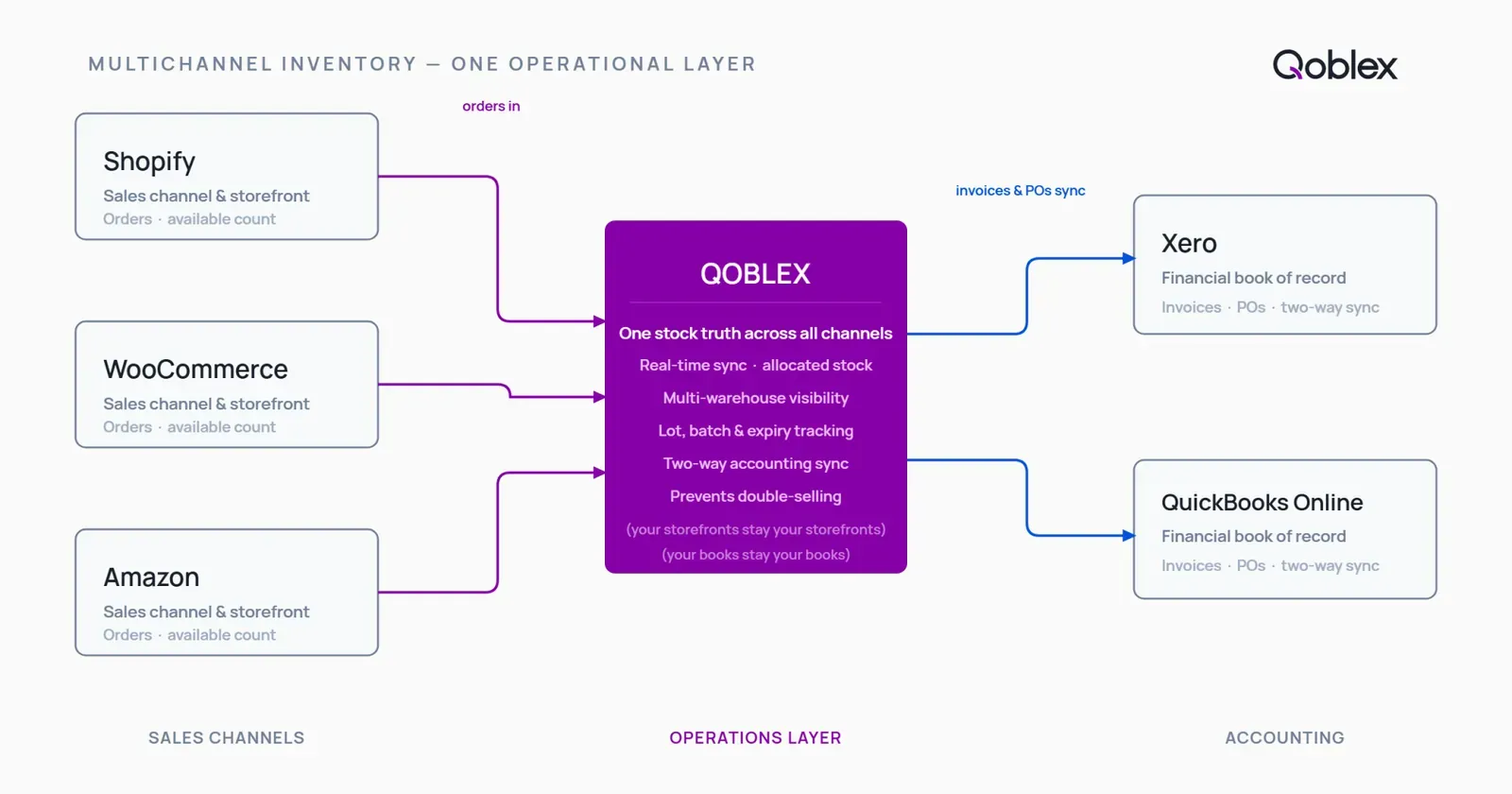
One centralized dashboard. You connect your channels and warehouses to a single dashboard that spans all of them, including multiple Shopify stores, multiple WooCommerce stores, and Amazon orders. That dashboard holds the master stock count.
A sale on any channel updates the master count automatically. When an order lands, Qoblex reduces the master figure and syncs the corrected available count back to your Shopify and WooCommerce stores, so they stay true without a manual adjustment. Amazon orders come in automatically and draw down the same count; Amazon’s own listing quantities stay managed in Seller Central.
Allocated stock prevents double-selling. The units on a new order are committed the moment it is placed and removed from available stock before the channel counts finish updating, so the same units cannot be sold twice across channels.
Lot and expiry tracking applies at the operations layer to every order. Each sale, from any channel, is recorded against the specific lot and expiry that fulfilled it, giving you one traceable record across the whole business. The storefront still shows only the aggregate available count; the lot-level detail lives in Qoblex.
Accounting stays current. Invoices and purchase orders sync two ways to Xero or QuickBooks Online, and your accounting platform remains the book of record.
Sellers who also make what they sell get the manufacturing side in the same system: Qoblex ships bill-of-materials and lightweight material requirements planning (MRP) included in its plans, so a production run draws down components and adds finished goods to the same master count your channels read from. Our guides to manufacturing inventory software and production planning software cover that in depth.
What is included on each plan
On plan structure: BOM and MRP are included in Qoblex’s plans. Lot, batch, serial, and expiry tracking is a paid add-on rather than part of the base plan, so you add traceability only if your products need it. Demand forecasting is available on higher-tier plans. Qoblex offers a free trial so you can test it against your own catalog before committing. For current figures, see qoblex.com/pricing.
What Qoblex does not cover
Qoblex is built for SMB scale, and it is not the right tool for every operation. If you need RF-scanning warehouse management, electronic data interchange (EDI) with major retailers, or a tier-1 ERP footprint across many legal entities, you are past the middle Qoblex serves, and that is genuinely enterprise WMS or ERP territory. Qoblex is also a multichannel operations layer behind storefronts, not an omnichannel fulfillment platform: it does not run BOPIS or ship-from-store. On channels, the confirmed native integrations are Shopify (including multiple stores), WooCommerce (including multiple stores), and Amazon (inbound: orders, returns and refunds come in; stock levels are not sent to Amazon). If a channel you rely on is not on that list, it is worth confirming support before you commit.
FAQ
What is the best inventory software for managing Amazon and Shopify stock in one place? The right answer depends on your operation’s scale. Entry-level platforms like Sumtracker suit sellers who need multichannel sync and basic operations at a lower price point. Mid-market platforms like Qoblex, Cin7 Core, and Zoho Inventory add committed-stock logic, multi-warehouse tracking, and accounting integration for growing SMBs. Enterprise systems like Brightpearl suit large operations needing retail ERP and EDI. For most SMBs selling on both Amazon and Shopify with Xero or QuickBooks, a platform that maintains one shared stock pool with real-time committed-stock reservation is the right tier.
What is multichannel inventory management software? Multichannel inventory management software centralizes stock data across all your sales channels and storage locations, then synchronizes quantities automatically so each channel reflects true available stock. It prevents overselling by tracking committed (allocated) inventory separately from available inventory, and gives you one operational record of every purchase, sale, and transfer, regardless of which channel it came from.
What is the difference between multichannel and omnichannel inventory management? Multichannel means several channels sell independently from one shared stock pool. Omnichannel adds unified cross-channel fulfillment, such as buy-online-pickup-in-store and ship-from-store, where a single customer journey crosses channels. Most growing sellers need multichannel handled well before omnichannel is worth its added fulfillment complexity. Qoblex is a multichannel operations layer, not a BOPIS or ship-from-store platform.
Does multichannel inventory software track lot numbers and expiry dates? Yes, at the operations layer. Qoblex records which lot and expiry fulfilled each order, no matter which channel the order came from, across purchases, sales, transfers, adjustments, and manufacturing. The channel storefront shows customers only the aggregate available count; the lot-level detail lives in Qoblex, which is what makes a full trace a single query rather than a channel-by-channel scramble.
How does multichannel inventory software prevent overselling? Through allocated (committed) stock. The moment an order is placed on any channel, those units are reserved and removed from the available-to-sell figure, before the individual channel counts finish updating. Because every channel reads its available number from that shared, already-reduced figure, the same units cannot be sold twice. Overselling becomes something the system prevents rather than something you clean up.
Can I use multichannel inventory software with Xero or QuickBooks? Yes. Qoblex integrates two ways with both Xero and QuickBooks Online. Invoices for inventory sales and purchase orders push to your accounting platform automatically, and return and refund data syncs back. You keep your existing accounting platform as your book of record; Qoblex adds the inventory operations layer between your channels and your books rather than replacing either.
When do I need multichannel inventory management software? When you are actively selling on two or more channels at the same time and your channel-native tools can no longer maintain one shared, reliable stock count between them. Concrete triggers: you have oversold because a channel had not synced, your true stock number lives in a spreadsheet, or a rush order on one channel forces a manual adjustment on another. Single-channel sellers usually do not need it.
How much does multichannel inventory management software cost? Pricing varies by provider. For Qoblex, BOM and MRP are included in its plans; lot, batch, serial, and expiry tracking is a paid add-on rather than part of the base plan; demand forecasting is available on higher-tier plans. A free trial is available. See qoblex.com/pricing for current plan details.