



SOS Inventory lists assemblies on every plan, Shopify as one of the connections each plan allows, and work orders on Pro only. This page reads SOS’s own pricing and help pages, dated 20 November 2026, against the same jobs in Qoblex. We make Qoblex, so weigh our view accordingly.
A business that has run on QuickBooks Online and SOS Inventory for a few years usually arrives at this question after something changed: a second Shopify store opened, or the back room started producing in weekly batches. At that point the owner stops asking whether SOS does the job and starts asking which plan, with how many connections and users, and what SOS’s own pages say the setup takes. SOS is a serious tool built to work inside QuickBooks Online, which is why the question deserves a careful read of its own pages.
How much does SOS Inventory cost, and where do its own pages disagree?
On 20 November 2026 SOS Inventory’s pricing page lists Companion at $74.95 a month, Plus at $144.95 and Pro at $199.95, with 2, 3 and 5 users included and $30 for each additional user on the plan cards.
On the Annual billing setting, SOS’s pricing page, read on 20 November 2026, shows $749.50, $1,449.50 and $1,999.50 a year, each marked “With 2 Months Free”, and $300 a year for each additional user. The same page’s FAQ says SOS offers a 14-day free trial and both monthly and annual billing, and that it occasionally offers discounts to new customers. It gives no discount amount, so neither do we.
Whoever budgets for SOS should know that its own pages give different readings of the user and connection charges. The plan cards say “$30 Each Additional User”, and the feature table heads its connection row “External Connections Allowed ($30 USD per month per connection)”, with 1, 2 and 3 under Companion, Plus and Pro and a note that the row “Includes Shopping Carts (Shopify, BigCommerce, and PayPal) and FTP Sites”. Further down the same page, the FAQ says “additional users cost $25 per month each” and that external connections “are also available for $25 per month per connection.” SOS’s help centre, on its page about standard and billable connections read the same day, says each plan includes one, two or three cart or FTP connections “as standard features” and that “A charge is assessed for any connections over the plan limit.”
We do not pick a reading. The worked example further down uses the $30 on the plan cards for users and shows each reading for connections side by side, so the range is visible. Before signing, ask SOS to confirm in a quote what an extra user and each Shopify connection will cost on the plan you choose. Work from SOS’s own page on the day you buy. Price is only half of what each plan holds, though; the other half is what it includes.
What does each SOS Inventory plan include for Shopify, production and QuickBooks Online?
On 20 November 2026 SOS Inventory’s Companion plan lists one location and one allowed connection, Plus adds unlimited locations, serial and lot tracking and two connections, and Pro adds work orders, work centers and three connections.
| Job | SOS Companion | SOS Plus | SOS Pro | Qoblex (by plan name) |
|---|---|---|---|---|
| Monthly price listed on 20 Nov 2026 | "$74.95 /mo." | "$144.95 /mo." | "$199.95 /mo." | Starter, Business and Scale; figures on the pricing page |
| Users included | "2 Users Included" | "3 Users Included" | "5 Users Included" | Starter: 2; Business and Scale: "Unlimited" |
| Stock locations | "1" | "Unlimited" | "Unlimited" | Starter: 2; Business and Scale: "Unlimited" |
| Shopify connection | 1 connection allowed | 2 allowed | 3 allowed | Integrations are a paid add-on on Starter and Business, included on Scale; orders in, stock out per mapped location |
| Cancelled Shopify order | SOS's help: "Canceling an order in Shopify does not update SOS Inventory. You must manually delete the corresponding transaction in SOS." (a connection fact, all plans) | A cancelled Shopify order cancels the matching Qoblex sale order | ||
| Assemblies and BOM | "Assemblies" on every plan; "BOM Levels" "Unlimited" | BOMs and production orders on every plan; multi-level BOMs, production orders do not cascade | ||
| Work orders, work centers, WIP, labor, process and variable-yield manufacturing, job costing, landed costs | Not listed on this plan | Not listed on this plan ("Contract Manufacturing" is listed) | Listed | Production orders (assembly and disassembly) on every plan; no work-centre scheduling; landed cost captured on the purchase order |
| Serial and lot tracking | Not listed on this plan | Listed | Listed | Paid add-on on Starter and Business, included on Scale |
| QuickBooks Online | SOS's help: the records it lists (purchase orders, estimates, invoices, sales receipts, payments, customers, vendors, items) "can be created, edited, or deleted in either QuickBooks Online or SOS Inventory"; other transactions go to QuickBooks Online as journal entries. SOS wins this row. | One way, Qoblex to QuickBooks; Xero also supported | ||
A growing business on SOS tends to bring three questions to a table like this. The person who runs the Shopify stores counts stores, because each store is a connection, and the allowance on each plan is shared with any BigCommerce, PayPal or FTP connection the business already runs. The office manager counts logins, since included users run out once the warehouse and production room need access. The production lead asks whether a weekly batch is an assembly built from a bill of materials, which every plan lists, or a work order with its own costs, which only Pro lists.
Two rows favour SOS outright: the records SOS lists, including invoices, purchase orders, payments, customers and items, can be created or edited in either SOS or QuickBooks Online, and its Pro plan lists work centers and work-in-progress, where the tool we make has no work-centre scheduling. The row that most often catches a growing business out is the connection count, because each Shopify store is a connection with its own setup, so it is worth reading how SOS describes that setup.
How does SOS Inventory connect to Shopify and send stock to it?
SOS Inventory’s help centre describes a Shopify connection made with a custom app built in Shopify’s Dev Dashboard, with Shopify orders posting to SOS Inventory and inventory data flowing back to Shopify.
Whoever sets up the connection does most of the work on the Shopify side, following SOS’s V9 Shopify cart connection checklist, read on 20 November 2026. The checklist’s main steps include:
- On the Shopify cart page in SOS, choose “Shopify App Credentials” from the Shopify app type dropdown.
- If the business has several locations, choose from the Location dropdown the one connected to the store.
- In Shopify, click Apps, then Develop Apps, and allow custom app development if prompted.
- Choose Build apps in Dev Dashboard, create the app, select the scopes the checklist lists, and install it.
- Copy the Client ID and Client Secret into the matching fields on the Shopify cart page in SOS.
- After editing or adding items later, come back to the cart connection page and select Save and close again.
Sending stock to the store has conditions of its own, which SOS sets out in its article on Shopify item matching and inventory levels, a V8 page read the same day. SOS “will not send inventory information to Shopify until the item has been matched”, and for quantities to update in Shopify it asks for “SKU/SKU matching”, with Track quantity kept enabled on each Shopify item. Two SOS settings need to be on as well: Update inventory on the cart connection page, and Update inventory in Shopify on the item record. Where no match can be made, the article says “a new item will be created in SOS Inventory”, and after items change it asks the person to “resave the page to remap the items”.
Locations need a decision of their own. By default, the same article says, the quantity SOS sends is “the available amount across all locations”, so a business with a warehouse and a production room shows one combined figure in Shopify unless it sets up more. To send quantities per location, the person setting up has to make the location names “identical in case, spacing, and characters” in both systems, which means the team agrees on one name for each location and keeps it.
Cancellations are the last thing to plan for. SOS’s checklist says a cancellation in Shopify does not update SOS, so whoever handles orders deletes the matching SOS transaction by hand. A team that plans for this from day one, with clean SKUs, one agreed name per location and a cancellation step in the order routine, runs the connection calmly. With stock reaching the store, the next question is the stock the business makes itself.
Which SOS Inventory plan runs production, and what does Pro add?
On 20 November 2026 SOS Inventory lists assemblies with unlimited BOM levels on every plan, contract manufacturing from Plus, and work orders, work centers, work-in-progress, labor tracking, process manufacturing, variable-yield manufacturing and job costing on Pro only.
An assembly turns components into finished stock according to a bill of materials, through as many BOM levels as the product needs, and every SOS plan lists it. Work orders sit on Pro alone.
A maker that builds to stock from a fixed recipe, say a candle maker pouring the same scents every week, may find assemblies enough and never need a work order. A production lead who wants every batch costed to the job, with time and overhead attached and a view of what sits half-finished on the floor, is reading Pro. SOS’s own V8 page on plans and features says Pro “is most often useful for companies using advanced manufacturing”, and that “the Pro plan supports landed costs, work orders, job costing, multiple work centers, work-in-progress (WIP), labor” among its features.
If the weekly batch runs as a work order, the plan is Pro, which raises the practical question of what Pro costs once a real team logs in.
Which SOS Inventory plan does a QuickBooks Online business with two Shopify stores and a weekly production run need?
A QuickBooks Online business with two Shopify stores, a weekly production batch run as a work order and six people using the system needs SOS Inventory Pro, which is $229.95 a month on the plan-card prices of 20 November 2026 before any connection charge.
Let’s assume a business keeps its books in QuickBooks Online, sells on two Shopify stores, makes one batch each week from a bill of materials with two sub-assemblies, and has six people logging in: two in the office, one buying, two in the warehouse and a production lead. The table prices each SOS plan against those jobs on monthly billing.
| Plan | Base per month | Users included | Extra users needed | Subtotal | Connections allowed (two Shopify stores needed) | Work orders |
|---|---|---|---|---|---|---|
| Companion | $74.95 | 2 | 4 at $30 = $120 | $194.95 | 1 | Not listed on this plan |
| Plus | $144.95 | 3 | 3 at $30 = $90 | $234.95 | 2 | Not listed on this plan |
| Pro | $199.95 | 5 | 1 at $30 = $30 | $229.95 | 3 | Listed |
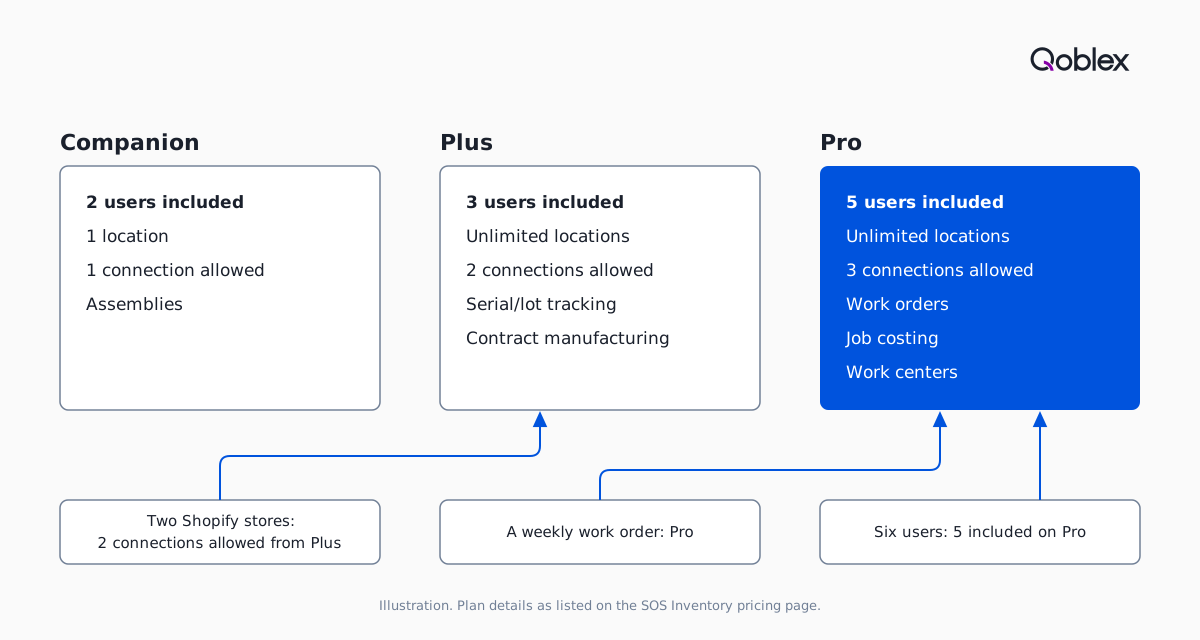
At six users, Pro’s subtotal is $5 a month less than Plus’s, because Pro includes two more users.
Connections are where SOS’s pages give a range. If the two Shopify stores sit inside the three connections Pro includes, as SOS’s help centre words it, the total stays $229.95 a month. If each store is charged at the $30 the pricing table prints, the total is $289.95 ($229.95 plus $60). On the FAQ’s $25 figures, it is $274.95 ($199.95, plus $25 for the sixth user, plus $50 for the two stores). Confirm in a quote which of these applies.
On annual billing, Pro is $1,999.50 a year and the sixth user $300 a year, so $2,299.50 a year before any connection charge. If the weekly batch is simply an assembly build with no work order, Plus also covers both stores within its two allowed connections, at $234.95 a month for six users, but at six users Pro is still $5 a month cheaper before any connection charge. On these numbers this business is a good fit for SOS, which makes the next question a fair one: when is SOS the better fit outright?
When is SOS Inventory the better choice?
SOS Inventory is the better choice for a business that keeps QuickBooks Online as its only other system, whose production is assemblies or work orders it wants costed to the job, and for which depth inside QuickBooks Online matters more than anything else.
QuickBooks Online is the clearest case. SOS’s transaction data exchange page, read on 20 November 2026, says the records it lists “can be created, edited, or deleted in either QuickBooks Online or SOS Inventory”, and its QuickBooks Online overview says “SOS Inventory was designed to work with QuickBooks Online from the ground up.” Qoblex’s QuickBooks Online sync is one way, from Qoblex to QuickBooks, so SOS wins this row. A bookkeeper who works in QuickBooks Online every day and wants records made there to reach the inventory side has a direct reason to choose SOS. For how Cin7, Finale and inFlow compare on sync direction, see our comparison of inventory software that syncs with QuickBooks Online and Shopify.
Production is the second case. Pro lists work centers, work-in-progress, labor tracking, overhead, process and variable-yield manufacturing and job costing, and Qoblex production orders do not schedule work centers. A production lead who runs batches through work centers and tracks labor and work-in-progress should read Pro first.
The third case is the small one. A business with a single Shopify store, one location and assembly builds has a fair starting point in Companion’s listed plan, which covers one location, one connection and assemblies. Compare it with Qoblex Starter, whose figures are on our pricing page, and decide on the jobs rather than on this page. And a business already running SOS well does not need a different tool at all; if you are still shortlisting, our list of inventory software for QuickBooks covers the QuickBooks-only options.
The signs that SOS has stopped being enough come from the business, never from SOS. A Shopify channel whose cancellations and location names now cost someone an hour a week is one. A user count that pushes the plan total up every time the team grows is another, and a book of record other than QuickBooks Online is a third. When one shows up, it is worth seeing how the same jobs would run in the tool we make.
How would the same jobs run in Qoblex?
Qoblex sends stock to Shopify for each mapped location, cancels the Qoblex sale order when Shopify reports an order cancelled, and runs production orders from a Bill Of Material on every plan; Shopify and QuickBooks Online integrations are a paid add-on on Starter and Business and are included on Scale.
We make Qoblex, so weigh this section accordingly. In the same business, with two Shopify stores, a weekly batch and six people, the plan comes first. Six users is past Starter’s cap of two, so the owner reads Business or Scale, both of which list unlimited users and locations on the pricing page. Integrations, which include Shopify and QuickBooks Online, are a paid add-on on Business and included on Scale. Our pricing page counts one Shopify store as one integration, much as SOS counts each store as a connection, so on Business each of the two stores is its own add-on.
The person who runs the stores sets each one up from its own settings page. Orders come in, and stock goes out per mapped location. When Shopify reports an order cancelled, Qoblex cancels the matching sale order. The help centre covers Shopify locations and mapping and how Shopify orders sync and update, and our Shopify page has the overview.
The production lead runs the weekly batch as a production order, on any plan. The order starts from a Finished Product that is a Bill Of Material, with a Quantity To Produce; Start Production reserves the components, and completing the order consumes them and adds the finished product to stock. The two sub-assemblies sit in a multi-level BOM, but production orders do not cascade, so each sub-assembly gets its own production order. There is no work-centre scheduling, which is the honest line between this and SOS Pro. The help centre covers the manufacturing overview and the production order lifecycle, and our manufacturing page sets out the module.
The bookkeeper keeps QuickBooks Online as the books. Invoices, bills and payments post to QuickBooks Online one way, from Qoblex to QuickBooks, and Xero is the other accounting platform Qoblex connects to; our QuickBooks page has the detail. That is the row SOS wins, as the section above says. If the business also needs lot, serial or expiry traceability, that is a paid add-on on Starter and Business and included on Scale.
Frequently asked questions
How much does SOS Inventory cost?
On 20 November 2026 SOS Inventory’s pricing page listed Companion at $74.95 a month, Plus at $144.95 and Pro at $199.95, with 2, 3 and 5 users included and annual billing shown with two months free. Extra users cost $30 on the plan cards and $25 in the page’s FAQ, so confirm user and connection charges in a quote.
What do SOS Inventory reviews say?
This page reads no ratings and summarises no review sentiment; reviews of SOS Inventory sit on third-party sites and the QuickBooks App Store. On 20 November 2026 SOS’s pricing FAQ offered a 14-day free trial, which is the more useful test: run one Shopify order, one cancelled order and one production batch against your own jobs.
Which SOS Inventory plan includes work orders and Shopify?
On 20 November 2026 SOS Inventory’s pricing page listed work orders, work centers, work-in-progress, job costing, and process and variable-yield manufacturing on Pro only. Its table allowed 1, 2 and 3 external connections on Companion, Plus and Pro, shared with BigCommerce, PayPal and FTP sites. SOS’s pages state the connection charge differently, so confirm it in a quote.
What are the alternatives to SOS Inventory for a QuickBooks Online business?
SOS Inventory suits a business that keeps QuickBooks Online as its only other system. A business that wants Shopify stock sent per mapped location, production orders on every plan, or Xero as an option can look at Qoblex, which we make, where QuickBooks Online sync runs one way, Qoblex to QuickBooks. Our sync-direction comparison also covers Cin7, Finale and inFlow.
SOS Inventory vs Fishbowl: how do their plans compare?
Both list work orders at their manufacturing tier. On 20 November 2026 SOS Inventory listed them on Pro, and Fishbowl’s pricing page listed “Work orders & made-to-order builds” on its Advanced Manufacturing plan, part of Fishbowl Advanced, with QuickBooks Online, Desktop and Enterprise integration. Fishbowl publishes starting prices billed annually and quotes final pricing, so compare quotes on the same billing basis.
How does SOS Inventory send stock to Shopify?
On 20 November 2026 SOS Inventory’s help centre said stock updates need SKU/SKU matching, Track quantity enabled on each Shopify item, and two SOS update settings switched on. By default it sends the available amount across all locations; per-location quantities need identical location names. A Shopify cancellation does not update SOS, so the transaction is deleted by hand.