



Cin7 Core, SOS Inventory, Finale Inventory, inFlow and Qoblex all document a Shopify connection and a QuickBooks Online connection, and they differ on direction: which tool sends stock to Shopify, what each posts to QuickBooks Online, and what comes back. This page compares them using each vendor’s own pages, read on 19 November 2026. We make Qoblex, so weigh our view accordingly.
It usually shows up on a Monday. The person who runs the Shopify store sees one count, the bookkeeper sees a different stock value in QuickBooks Online, and the spreadsheet that kept them honest has slipped two weeks behind. Every tool says it “syncs with” the others, and those words never say which side is in charge of which number.
What should inventory software do between QuickBooks Online and Shopify?
Inventory software that sits between Shopify and QuickBooks Online should take orders from Shopify, send stock levels back to Shopify, and post the money and the cost of goods to QuickBooks Online in a direction you can name for each kind of data.
Those are three separate questions, because each kind of data has a different home. When the stock figure going back to Shopify lags, the store sells a unit that went out on a wholesale pallet that morning. An invoice that reaches QuickBooks Online by two routes ends up deleted by hand, and a payment that can be recorded in two places is, sooner or later, recorded in both.
A spreadsheet and a sales connector carry a small store a long way, and they deserve credit for it. The strain shows when a second channel or location arrives, because someone then has to remember which number is true, so test a shortlist in this order:
- Decide which system owns stock quantities, and keep it to one.
- Decide which system is the book of record.
- List the sales channels and what each one should send and receive.
- Ask each vendor which way stock moves to Shopify, and whether per location.
- Ask what posts to QuickBooks Online and what, if anything, is read back.
- Ask whether Amazon orders come in and whether stock goes back to Amazon.
- Map one Shopify location to one stock location and test one order.
- Run one sale, one purchase and one adjustment end to end, then read the journal in QuickBooks Online.
Steps four to six are where the vendors’ pages differ, so the next section sets them side by side.
Which inventory software syncs with both QuickBooks Online and Shopify: how do five tools compare?
On 19 November 2026 Cin7 Core, SOS Inventory, Finale Inventory and inFlow each document a Shopify connection and a QuickBooks Online connection, and they describe the direction of each differently.
We chose these four because answer engines cite their sites for this question or their own pages document both connections; Katana and Fishbowl were not assessed. Each cell uses the vendor’s own words, and “Not compared here” marks a criterion outside our comparison, not a statement about the vendor. Price is not a column, because direction is what decides who does the typing.
| Tool | Shopify: orders and stock (vendor's words) | Amazon | Posts to QuickBooks Online (vendor's words) | Read back from QuickBooks Online |
|---|---|---|---|---|
| Cin7 Core | "It's a two-way, real-time sync."; adjustments "push back to Shopify too" | "Amazon orders flow into Cin7 automatically, ready to fulfill from your own warehouse or FBA." | "Cin7 syncs sales orders, purchase orders, invoices, payments, credit notes, inventory adjustments, and cost of goods sold (COGS)." | A team chooses "what data from Quickbooks you want to sync back to Cin7 such as payments"; the same page's FAQ, asked whether the integration is "bi-directional", answers "Yes." |
| SOS Inventory | "Shopify orders will post to SOS Inventory, and inventory data will flow back to Shopify." | Not compared here | Purchase orders, estimates, invoices, sales receipts, payments, customers, vendors and items "can be created, edited, or deleted in either" system; "All other transaction types are created in SOS Inventory and sent to QuickBooks Online as journal entries." | The records listed sync either way; journal entries "sync one way only (from SOS Inventory to QuickBooks Online)"; its FAQ says "bidirectionally" (confirm in a demo) |
| Finale Inventory | "Orders placed on your Shopify store are imported every 5 minutes into Finale Inventory for prompt processing."; quantity changes "are updated to Shopify within five minutes" (the same page also says "instantly"; confirm in a demo) | "automatically import Amazon orders every five minutes"; "Sellers can sync FBA and FBM inventory" | Under "Effortless Bi-Directional Sync": "synchronize inventory valuation, purchase orders, bills, credit memos, and product data" | Vendor video: "because I marked it paid in QuickBooks, Finale is showing that it is paid on our side as well." |
| inFlow | "Pull orders down from Shopify"; "Push product + stock info back to Shopify" | "Pull orders down from Amazon"; "Push available stock back to Amazon" | "Sales become invoices. Purchases become bills. Payments sync both ways." | "When a payment is recorded in QuickBooks, inFlow pulls the update."; "You can configure the sync to go one way or both" |
| Qoblex | Shopify orders come into Qoblex; stock goes from Qoblex to Shopify for each mapped location | Inbound only: orders every 5 minutes, returns every 30 minutes; no stock sent to Amazon; FBA not supported | Invoices, refunds, bills, payments, inventory movements, adjustments and manufacturing costs; documents within a few minutes of authorization, inventory journals once a day overnight | One way, Qoblex to QuickBooks; Qoblex reads accounts, classes, locations and tax codes to fill its settings lists |
Finale’s own pages, read on 19 November 2026, differ on two points, and neither needs a verdict from us. Its Shopify page gives five minutes each way and also says “Finale Inventory ensures your inventory adjusts instantly after every sale”; the page uses both framings, so confirm the timing in a demo. Its QuickBooks page says “The QuickBooks Online integration is available on the Platinum plan.”, while its pricing page names plans Essentials, Growth and Enterprise with a features row reading “Shopify, Amazon, Walmart, QuickBooks and more.”; confirm in a demo which plan includes QuickBooks Online. SOS Inventory’s wording is a third case, which belongs with the books, after the store.
Which way does stock move between Shopify and each inventory tool?
On 19 November 2026 Cin7 describes a “two-way, real-time” Shopify sync, SOS Inventory says Shopify orders post to SOS and inventory data flows back to Shopify, Finale says it imports Shopify orders every 5 minutes and updates Shopify within five minutes of a stock change, and inFlow says it pulls orders down from Shopify and pushes product and stock information back.
One stock means that a Shopify sale and a purchase received in the warehouse move the same number. Cin7’s Shopify page says that adjustments made “from a purchase order, a return, or a stocktake” go back to Shopify too. The question to put to every vendor is whether the store gets a number for each location or one total, because a business with two stockrooms sells from both.
SOS Inventory’s help page on Shopify inventory levels, read on 19 November 2026, answers that directly: “The default quantities that SOS Inventory sends to Shopify are the available amount across all locations.” For location-specific quantities, it asks the person setting up to “make sure the location name in both systems is identical in case, spacing, and characters.” Cin7’s setup step is to “Map your products and locations so SKUs, variants, and warehouses line up.”, and inFlow’s Shopify page says “Connect to multiple Shopify stores”. Finale’s feature page describes stock “down to the bin level”, so put the per-location question to Finale too. Stock in the store is only half the sync, because every sale also has to reach the books.
What does each tool post to QuickBooks Online, and what comes back?
On 19 November 2026 Cin7 says it syncs sales orders, purchase orders, invoices, payments, credit notes, inventory adjustments and cost of goods sold with QuickBooks Online, inFlow says sales become invoices and purchases become bills with payments syncing “both ways”, Finale describes a “Bi-Directional Sync” of inventory valuation, purchase orders, bills, credit memos and product data, and SOS Inventory lists the records that sync either way and says every other transaction is sent to QuickBooks Online as a journal entry.
The bookkeeper’s question is practical: if I record a payment in QuickBooks Online, does the inventory tool hear about it? QuickBooks Online keeps the books well, so the inventory tool’s job is to feed it cleanly. Cin7’s QuickBooks Online page says “QuickBooks Online stays your source of truth for accounting and financial reporting.”, and inFlow’s QuickBooks page puts the return path in one line: “Pay it in QuickBooks and inFlow knows.” Finale’s QuickBooks page offers cost of goods sold “with detailed or summarized journal entries”, a trail for every sale or a short ledger.
SOS Inventory needs the most careful reading, because direction differs within its own integration. Its transaction data exchange page, read on 19 November 2026, says the records in the table “can be created, edited, or deleted in either QuickBooks Online or SOS Inventory”, while other transactions go across as journal entries that “sync one way only (from SOS Inventory to QuickBooks Online)”. The same page says “Inventory quantities do not update from SOS to QuickBooks Online.”, which is SOS describing how it posts value rather than quantity. Its connection overview says that “For SOS Inventory to be your inventory management solution, you MUST turn off Track inventory quantity on hand in your QuickBooks account settings.”
SOS’s FAQ describes the same integration as “syncing data bidirectionally in real time”. Both pages are SOS’s own and they use different words for one connection, so confirm in a demo which data goes which way, record by record. If your books are in Xero, see our comparison of inventory software that syncs with Xero and Shopify. For a seller also on Amazon, the third channel is where direction differs most.
How does Amazon fit when a business sells on Shopify and Amazon and keeps its books in QuickBooks Online?
On 19 November 2026 Cin7, inFlow and Finale each document bringing Amazon orders into the inventory tool, and the vendors differ on what goes back to Amazon: inFlow says it pushes available stock back to Amazon, Cin7 describes stock, orders and FBA inventory synced with every other channel, and Finale says it syncs FBA and FBM inventory.
Selling on both channels from one stock without manual updates comes down to three directions to test: Amazon orders into the inventory tool, stock out to each channel so neither sells what the other already sold, and sales into QuickBooks Online. The person running the store feels the first two daily and the bookkeeper the third, because one Amazon sale can arrive as one posting or inside a daily summary, so ask which.
inFlow’s Amazon page states its two halves plainly: “Pull orders down from Amazon” and “Push available stock back to Amazon”. Cin7’s Amazon page says it “syncs your stock, orders, and FBA inventory with every other channel you sell on, in real time.”, and Finale’s Amazon page says “Prevent overselling by syncing warehouse inventory with Amazon orders automatically.” Our guide to syncing inventory across multiple platforms covers the general practice. Direction decides the daily work, and three other criteria decide whether a tool fits the stock itself.
What else should be checked besides sync: landed cost, lot and expiry, and locations?
Beyond sync direction, a seller on Shopify and QuickBooks Online should check three things in any inventory tool: whether freight and duty reach unit cost, whether lots and expiry dates are tracked, and how many stock locations a plan allows.
Freight is the quiet one, because margin looks healthy until the shipping bill lands elsewhere. Finale’s landed cost page, read on 19 November 2026, says “Finale landed costs distribution is based on value, quantity, weight, volume, or total quantity.” and “Once applied, these values automatically update the average cost of each product”. For Cin7, SOS Inventory and inFlow, ask the vendor whether freight and duty reach unit cost and by what split.
Lots and expiry dates matter to sellers of food, supplements or cosmetics, and our guide to batch and expiry tracking with QuickBooks Online goes deeper. Locations matter because a second stockroom changes the plan and the Shopify mapping.
| Tool | Lot and expiry | Stock locations |
|---|---|---|
| Cin7 Core | Lists "Batch & Expiration Tracking" among its features on its pricing page | "Inventory Locations" "Unlimited" on every Core plan |
| SOS Inventory | "Track groups of items with lot tracking software to manage expiration dates, production batches, or supplier shipments." | Not compared here |
| Finale Inventory | "Finale tracks serial numbers, lot IDs, expiration dates, and detailed stock history." | "stock visibility, down to the bin level, across all warehouse locations" |
| inFlow | "Set a Near expiry period in days before the expiry date to flag lots before they expire."; "inFlow suggests the lot closest to expiry at the order's location" | Plans range from one location with no sublocations to "Unlimited" |
| Qoblex | Paid add-on on Starter and Business, included on Scale; batches expiring within 10 days are marked expiring soon | Starter 2 locations; Business and Scale "Unlimited" on the pricing page |
Read together, the two tables turn into a short list for each kind of business.
Which tool fits which kind of Shopify and QuickBooks Online business?
A business that sells in QuickBooks Online and wants QuickBooks to stay the single set of books should look first at SOS Inventory, one that sells on Shopify and Amazon with FBA should look at Cin7 or Finale, and one that wants payments recorded in QuickBooks Online to come back into the inventory tool should shortlist inFlow, Cin7, SOS Inventory or Finale.
These picks are our reading of the tables, not a ranking. A business that raises its invoices in QuickBooks Online, with a bookkeeper who works there daily, should look first at SOS Inventory. Its FAQ says it is “built specifically to integrate with QuickBooks Online”, its QuickBooks integration page talks about “continuing to use QuickBooks for accounting, payroll, and payments”, and its Shopify help pages document orders coming in and inventory data flowing back. We recommend a competitor here because, for that business, the fit is plain.
A business on Shopify and Amazon that uses FBA, or one selling across several channels, should look at Cin7 or Finale. Cin7’s Amazon page says its FBA integration “tracks fulfillment center stock separately from your warehouse”, and Finale’s Amazon page says “Sellers can sync FBA and FBM inventory”. Either suits a seller splitting fulfilment between Amazon and its own team.
A bookkeeper who records payments in QuickBooks Online and wants the inventory tool to know should shortlist inFlow, Cin7, SOS Inventory or Finale. inFlow says “Payments sync both ways”, Cin7 lets a team sync payments back, SOS Inventory lists payments among the records that move in either direction, and Finale’s video shows a bill paid in QuickBooks showing as paid in Finale. One-way posting suits other bookkeepers, since payments are then recorded in one place.
A fourth kind keeps Shopify and Amazon stock in one place and accepts one-way posting to QuickBooks Online; that is the case the tool we make is built for, and its section near the end says where it fits and where it does not. For a QuickBooks-only view, see our list of QuickBooks inventory management software. Current figures are on each vendor’s pricing page: Cin7, SOS Inventory, Finale and inFlow. Some sellers, though, do not need any of these tools yet.
When is QuickBooks Online plus a Shopify connector, or no new tool, enough?
A seller with one stock location, one sales channel and a stock count that a person can reconcile by hand can often keep QuickBooks Online and a Shopify connector, and a seller already running one of these tools well does not need a different one.
QuickBooks’ inventory page, read on 19 November 2026, says a business can “Enable automatic import of all Shopify orders and refunds.”, with inventory tracking “Available in QuickBooks Online Plus and QuickBooks Online Advanced.” Its Shopify integration page adds “Products automatically match to inventory in QuickBooks, helping keep quantities and costs aligned.”, and Shopify’s own guide to inventory software says “When a product sells, its available quantity updates at the assigned location.”
For a store with one location and one channel, a connector app between Shopify and QuickBooks Online can be the whole answer. Our guide to the Shopify and QuickBooks integration covers what the two exchange with no third tool, and when the two stop agreeing, the 12 common causes of a Shopify and QuickBooks sync that stops is the place to start.
The signs that this setup has run its course come from the business, never from either platform: a second channel that holds its own stock, such as Amazon or wholesale; a second location; lots with expiry dates; freight and duty that must reach unit cost; or an hour a week spent keeping two numbers equal. When those appear, the picks above apply, several of them favouring a competitor over the tool we make. Whichever tool makes the shortlist, test it with one Shopify order, one Amazon order, one purchase and one adjustment, then read the journal in QuickBooks Online. Here is that test in the tool we make.
How does this look in Qoblex?
Qoblex sends stock levels to Shopify for each mapped location, takes Shopify orders in, brings Amazon orders in every 5 minutes, and posts invoices, bills, payments and inventory journals to QuickBooks Online one way, from Qoblex to QuickBooks.
This is our own product, so weigh this section accordingly. Let’s assume a store sells 400 units a week on Shopify and 60 on Amazon, holds stock in two locations, and keeps its books in QuickBooks Online. Whoever sets up the store connection chooses Sync from Qoblex to Shopify as the inventory direction, maps each Qoblex location to a Shopify location under Location Mapping, and turns on Sync Inventory? for both. Shopify orders then come in, each mapped location gets its own available quantity, and because Qoblex owns the stock numbers, the team adjusts stock in Qoblex rather than in Shopify.
Amazon orders arrive as Qoblex sale orders every 5 minutes, under the default customer and location the team picked on the Amazon Settings tab, after matching listings by ASIN on the Product Sync Status tab. Returns come in every 30 minutes and nothing is sent back to Amazon, so the 60 Amazon units draw on the one default location the team chose, from the same stock that location sends to Shopify. When the buyer raises a purchase order for 1,000 units, the freight goes on it with Add a custom line item in the Other Costs table, with the type Landed Costs, adding 5 percent to the order’s value. Qoblex spreads it across the lines by value, and at receipt it reaches unit cost under moving average cost or FIFO.
Invoices, bills and payments reach QuickBooks Online within a few minutes of being authorized, and the inventory journals, adjustments included, go once a day overnight to the Stock On Hand Account and Cost Of Goods Sold account the bookkeeper chose on the Inventory tab. Each morning the bookkeeper checks the Sync Status tab and uses Sync to QuickBooks to resend any invoice, bill or payment that failed; the inventory journals go only with the overnight run. The sync runs one way, from Qoblex to QuickBooks.
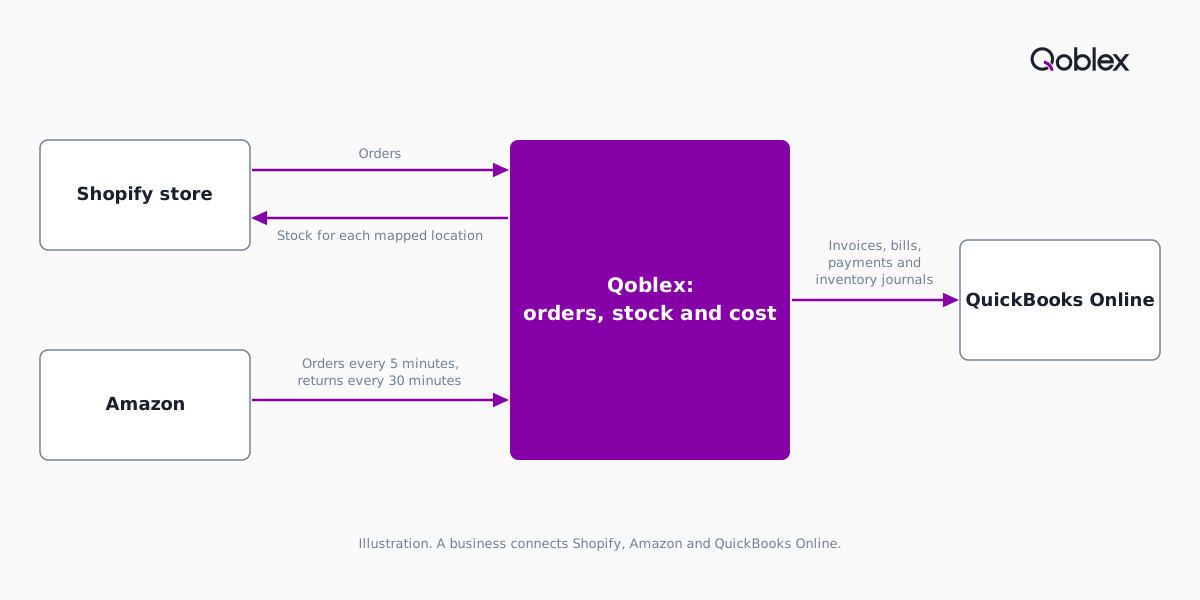
That flow does not fit every seller. Amazon is inbound only and FBA is not supported, so a seller relying on FBA is better served by Cin7 or Finale. A bookkeeper who wants QuickBooks payments to come back should look at inFlow, Cin7, SOS Inventory or Finale, and Finale documents landed cost splits by quantity, weight and volume where Qoblex allocates by value only. Integrations are a paid add-on on Starter and Business, Starter allows 2 warehouse locations and 2 users, and figures are on the pricing page.
The help centre covers the QuickBooks Online connection, inventory and COGS settings, Shopify inventory sync, the Amazon integration and landed costs; see also the QuickBooks, Shopify and Amazon pages.
Frequently asked questions
Does inventory software sync with both QuickBooks Online and Shopify?
Many inventory tools do. On 19 November 2026 Cin7 Core, SOS Inventory, Finale Inventory and inFlow each documented both connections. They differ on direction: which tool sends stock to Shopify, what it posts to QuickBooks Online, and what comes back. Ask each vendor which data goes which way.
Which way does stock sync between Shopify and inventory software?
On 19 November 2026 Cin7 called its Shopify sync “two-way”, SOS Inventory said inventory data flows back to Shopify, Finale said stock changes reach Shopify within five minutes while the same page also says “instantly”, and inFlow said it pushes stock info back. Confirm timing and per-location stock in a demo.
What does inventory software post to QuickBooks Online?
On 19 November 2026 the vendors listed invoices, bills or purchase orders, payments, credit notes, inventory adjustments and cost of goods sold. SOS Inventory sends other transactions, shipments among them, as journal entries that sync one way, and Finale offers detailed or summarized journals. Ask which records come back.
Can inventory software sync Shopify, Amazon and QuickBooks without manual updates?
Several tools document parts of a Shopify, Amazon and QuickBooks sync. On 19 November 2026 Cin7, Finale and inFlow described bringing Amazon orders in, and inFlow said it pushes available stock back. Test three directions: Amazon orders into the tool, stock out to each channel, and sales reaching QuickBooks Online per sale or as a summary.
Which system should own stock quantities when I add an inventory tool?
One system should own stock quantities, usually the inventory tool, while QuickBooks Online owns the books. On 19 November 2026 Cin7 said QuickBooks Online “stays your source of truth for accounting and financial reporting”, and SOS Inventory told customers to turn off “Track inventory quantity on hand” in QuickBooks for SOS to be their inventory management solution.
Is QuickBooks Online plus a Shopify connector enough, or do I need inventory software?
A connector often is enough for one location and one channel. On 19 November 2026 QuickBooks Online’s pages said its Shopify connection imports orders and refunds and matches products to inventory. Look further at a second channel holding its own stock, a second location, lots with expiry dates, or freight that must reach unit cost.
How does Qoblex sync with QuickBooks Online, Shopify and Amazon?
Shopify orders come into Qoblex, and Qoblex sends stock to Shopify for each mapped location. Amazon orders arrive every 5 minutes and nothing is sent back to Amazon. Invoices, bills, payments and inventory journals post to QuickBooks Online one way, from Qoblex to QuickBooks. Integrations are a paid add-on on Starter and Business.