



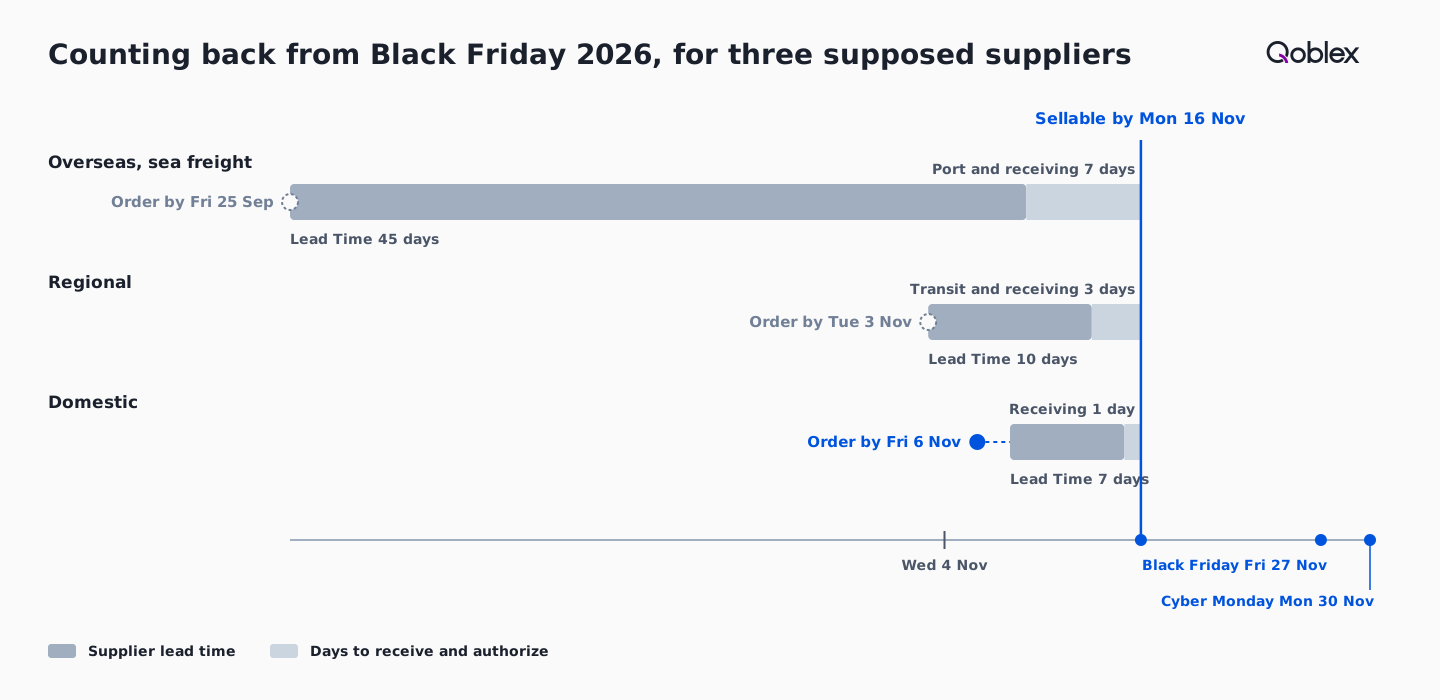
Stock is sellable for Black Friday (27 November 2026) only once it is received, authorized and available in the store. Set that sellable-by date first, here Monday 16 November, then subtract each supplier’s lead time and receiving days. In our example the last order dates are Friday 6 November for a domestic supplier, Tuesday 3 November for a regional one and Friday 25 September for an overseas one.
The date on a supplier’s order confirmation is the natural one to count back from. The order date that matters is earlier, because stock only sells once someone has received it, counted it and the store can show it.
What does “sellable in time” mean for Black Friday stock?
Black Friday stock is sellable in time when it has been received, authorized as on hand and is available in the store before the promotion starts, which for Black Friday on 27 November 2026 means a sellable-by date set earlier than the day itself, here Monday 16 November. Counting backwards, the buyer takes the receiving days off the sellable-by date, including any port or road time the lead time does not cover, then takes off the supplier’s lead time and lands on the order date.
Monday 16 November is eleven days before Black Friday and one week before Thanksgiving week begins on Monday 23 November, with Thanksgiving on Thursday 26 November. It is the same Monday our Black Friday and Cyber Monday statistics piece lands its stock by, and that piece works out how much to buy. Landing then leaves Tuesday 17 and Wednesday 18 November for the team to count the stock and set a Buffer on its best sellers, work that our lessons from the last two Black Fridays finishes by the Wednesday. With the end date fixed, the rest is subtraction.
How do you work out the last safe order date for each supplier?
The last safe order date for a supplier is the sellable-by date minus the supplier’s lead time minus the days the team needs to receive the goods, counted in calendar days and moved back to the Friday when it lands on a weekend. In Qoblex the lead time sits on each product variant’s Suppliers tab, in a row per supplier beside its Purchase Price, Min. Order Qty and an Is Default? flag. The help centre warns that an understated lead time “can make reorder planning look safer than it is.” The receiving allowance is not a Qoblex field, so the buyer agrees it with the person who receives the goods.
Days are counted here in calendar days, with the receiving days added after the supplier’s lead time, and an order date that lands on a Saturday or Sunday moves back to the Friday before. Three suppliers show how that plays out.
What are the last order dates for a domestic, a regional and an overseas supplier?
For stock to be received and authorized by Monday 16 November 2026, a domestic supplier with a 7-day lead time must be ordered by Friday 6 November, a regional supplier with a 10-day lead time by Tuesday 3 November and an overseas sea freight supplier with a 45-day lead time by Friday 25 September.
Let’s assume a small brand buys from three suppliers. The domestic one has a Lead Time of 7 days, and the team needs 1 day to receive and authorize. The regional one is a nearshore maker delivering by road, with a Lead Time of 10 days and 3 days for delivery and receiving. The overseas one ships by sea, with a Lead Time of 45 days and a week for the port and receiving.
| Supplier (supposed) | Lead Time plus days to receive | Last order date for stock sellable by Monday 16 November | Where that stands on Wednesday 4 November | Sellable on, if ordered on Wednesday 4 November |
|---|---|---|---|---|
| Domestic | 7 + 1 = 8 days | Fri 6 Nov (8 days back is Sun 8 Nov) | 2 days left | Thu 12 Nov |
| Regional | 10 + 3 = 13 days | Tue 3 Nov | Passed 1 day ago | Tue 17 Nov |
| Overseas, sea freight | 45 + 7 = 52 days | Fri 25 Sep | Passed 40 days ago | Sat 26 Dec |
Only the domestic date moves under the weekend rule, and only by two days. The receiving allowance grows with distance, because the further the goods travel, the more days sit between leaving the supplier and being authorized on the shelf. The 7, 10 and 45 days belong to this brand’s suppliers, not to any freight mode, so a buyer swaps in the lead times on their own Suppliers tab and their team’s receiving days. The fourth column is the one to read twice, because two of the three dates have already passed.
What if a supplier’s last order date has already passed?
When a supplier’s last order date has already passed, stock ordered now from that supplier will not be sellable for the promotion, so the decision is which part of the plan moves to a nearer supplier and which part moves to next year. For the overseas supplier the date was Friday 25 September, 40 days before 4 November, and even counting back from Cyber Monday on Monday 30 November it was Friday 9 October, 26 days before. An overseas order placed on 4 November would be sellable around Saturday 26 December, 26 days after Cyber Monday, so that stock is January stock, and next year’s overseas order date belongs in the diary now: 52 days before next year’s sellable-by date.
The regional date was Tuesday 3 November. A regional order placed on 4 November is sellable on Tuesday 17 November, one day after the target and a day before the Wednesday 18 November count and Buffer, so it still reaches Black Friday with the margin gone. The domestic date, Friday 6 November, is two days away, so that order still has to go out this week.
For a line the overseas supplier cannot deliver in time, the buyer checks whether a domestic or regional supplier is already on the variant’s Suppliers tab. The Pick Suppliers table in Qoblex shows each supplier’s Lead Time side by side, and Quick Bulk Action can pick the one with the shortest lead time. Where no nearer supplier carries the line, the buyer sizes the promotion to the stock on hand and on the way.
How do you take a purchase order from Reorder Inventory to sellable stock in Qoblex?
Qoblex’s Reorder Inventory report lets a small brand check each supplier’s Lead Time against its last order date, because the Pick Suppliers table shows Purchase Price, MOQ, MOV and Lead Time for every selected variant before Qoblex creates one draft purchase order per supplier. The report’s low-stock filters compare stock with each variant’s alert level, so a variant with no alert level is not matched. Total Incoming Quantity shows what is already on order, and the Sales date sets the window behind Total Sold Quantity, so the buyer sets it before reading that column.
- Open Reporting, then Inventory, select the Reorder Inventory tab, set the Sales date to the weeks of last year’s demand you want to read, and read the quantity columns.
- Select the rows whose supplier is still inside its last order date, then choose Reorder Actions and Create Purchase Order.
- Compare the Lead Time column on Pick Suppliers with your calendar and pick one supplier per variant, or use the quickest-delivery option in Quick Bulk Action, then choose Next.
- Choose the Receiving Location on each Create Purchases card, set each line’s Quantity (Fill to minimum or Fill to maximum works once the location is set) and clear any MOQ or MOV warning.
- Leave each card as a new order, or use the option to merge into an existing open order where the supplier has one, then select Create, and Qoblex creates one draft purchase order per supplier.
- Open each draft, check the lines, select Approve (or Request Approval if you cannot approve), then print or email the order to the supplier; approval counts the quantities as incoming stock.
- Open the approved order when the goods arrive, choose Receive or With a Barcode Scanner, and check the draft goods receipt note against the delivery.
- Select Authorize, enter batch or serial details if Qoblex asks for them, and the received quantity comes into stock at the Receive At location.
Fill to minimum and Fill to maximum bring each line back to the variant’s reorder levels, adding up the shortfall across all locations, so the buyer edits each quantity to the promotion figure the statistics piece works out. Creating the orders does not receive the stock; that waits for Authorize.
What makes received stock sellable in the store?
Received stock becomes sellable in the store when a goods receipt note is authorized, because authorizing brings the stock into inventory at the Receive At location, and what reaches the store is whatever is left after Qoblex allocates the new stock to orders that were waiting for it. A draft receipt does not move stock; Authorize moves it and locks the quantities. If a line is batch or serial tracked, the Receive Batch dialog opens first, and cancelling it leaves the receipt a draft.
The person at the bench can also receive with a barcode scanner, which matches each scan to an order line and creates a draft goods receipt note to authorize. When the receipt is authorized, Qoblex allocates the stock to sales orders linked to the purchase order first, then to other open orders that are Awaiting Stock, oldest first, and only what is left reaches the store, which shows on hand minus allocated minus buffer. Our lessons piece explains why old open orders matter here, and the help centre shows how to clear open sales orders before receiving stock.
A delivery that arrives in parts is received in parts, because each receipt creates its own goods receipt note, and Move to Back Order moves the lines not yet received onto a new purchase order, as our partial deliveries use case shows. Receiving is the day each date in the calendar is really met or missed, which makes the receiving allowance the date to protect.
When is a calendar reminder enough?
A calendar reminder and a spreadsheet are enough for a small brand that buys Black Friday stock from one or two suppliers it knows well, receives into one location and keeps its stock count in one place, because the arithmetic in this piece is three subtractions. The calendar and the supplier’s order confirmation do the same subtraction a system would.
The picture changes when many variants come from several suppliers with their own lead times, when stock lands in more than one location, or when orders need approval, deliveries arrive in parts and the stock has to be allocated and shown in the store on receipt. That is where the Reorder Inventory report, one draft order per supplier and the goods receipt note save the checking. Whichever way a brand plans, the date to write down first is the sellable-by date.
Frequently asked questions
When should I order stock for Black Friday 2026?
Work back from the sellable-by date, Monday 16 November 2026, through each supplier’s lead time and your receiving days. In our example that gives Friday 6 November (domestic), Tuesday 3 November (regional) and Friday 25 September (overseas). An overseas order placed on 4 November is January stock.
How do I calculate the last order date for a supplier?
Subtract the supplier’s lead time and your team’s receiving days from the date the stock must be sellable, in calendar days. If the result falls on a weekend, move it back to the Friday: Monday 16 November minus 8 days is Sunday 8 November, so the order goes out by Friday 6 November.
Where does Qoblex show a supplier’s lead time?
Each product variant’s Suppliers tab has a row per supplier with its Lead Time in days. When you create purchase orders from the Reorder Inventory report, the Pick Suppliers table shows Purchase Price, MOQ, MOV and Lead Time side by side, and Quick Bulk Action can pick the quickest supplier.
Does creating a purchase order from Reorder Inventory add stock?
No. Qoblex creates each purchase order as a draft, and creating it does not receive the stock. Approving the order counts its quantities as incoming stock. The stock comes into inventory only when someone receives the goods and authorizes the goods receipt note, at its Receive At location.
What if a delivery arrives in two parts?
Receive each part as it arrives: every receipt creates its own goods receipt note, so one purchase order can take several partial receipts. If the rest will come later, Move to Back Order splits the lines not yet received onto a new purchase order, so they are tracked separately.
Can I receive a Black Friday delivery with a barcode scanner?
Yes. On the approved purchase order, choose With a Barcode Scanner next to Receive and scan the products. Qoblex matches each scan to an order line by barcode, limits the quantity to the line’s, and creates a draft goods receipt note for you to review and authorize.
Does Qoblex work out the order date for me?
The Reorder Inventory report shows each supplier’s Lead Time, and the buyer works out the calendar. Forecasting, on the Business and Scale plans, works backwards from a projected shortage through the supplier’s lead time to the date an order has to be placed, and can draft those orders; see pricing for plans.