


At a glance: A cosmetics importer and wholesale distributor sells imported skincare and cosmetics from several brands to retailers, including chains with many stores. It buys from overseas suppliers in a foreign currency and pays shipping and customs duty, with the books in an accounting system such as Xero or QuickBooks Online. Receiving, supplier invoices and payment happened at different times, so nobody could say what was still owed or still coming. Now each Qoblex purchase order shows receiving, billing and payment as three separate badges, and Close PO runs a three-way check.
How does a cosmetics importer know its purchase orders have outgrown a spreadsheet beside the books?
A cosmetics importer knows its purchase orders have outgrown a record kept by hand beside the books when one order arrives, is invoiced and is paid in parts, and its single status can no longer say which part is which. A shipment from an overseas supplier came in two lorries, the supplier’s invoice landed before, between or after them, and shipping and customs duty followed on bills of their own. So when the buyer asked what was still owed to that supplier, the answer took a call to the bookkeeper and a walk to the shelf.
None of this was careless: with a few single-delivery orders a month, one status and a note in the margin work well. The strain shows when a deposit paid at order time sits in the books with no link to any delivery, and chains with many stores need the stock right before their orders go out. Two questions then test the setup. What has to be checked by hand before anyone trusts the figure for what is still owed, and where does someone have to remember what the books do not know? When the answer is “ask whoever handled it”, it is time to compare the options.
What are the options for tracking what a purchase order has received, been invoiced for and been paid?
A cosmetics importer has three options for tracking what a purchase order has received, been invoiced for and been paid: work it out by hand beside the books, use the accounting platform’s own purchase orders and bills, or add a system like Qoblex that keeps all three answers on the purchase order. The Xero cells quote Xero’s US purchase order page and the QuickBooks Online cells quote Intuit’s help article on purchase orders, both checked on 29 October 2026.
| Question | Stay put: a spreadsheet beside the books | The accounting platform’s own purchase orders and bills | A system like Qoblex, with the books in Xero or QuickBooks Online |
|---|---|---|---|
| How is a part delivery billed? | The bill is typed into the books and the sheet notes what is left | Xero: “bill what you received” for a partial delivery. QuickBooks Online: you “can add just those parts to a bill or expense” | Bill selected bills the lines you tick, Quantity is editable on the draft bill, and one order can carry several bills |
| What shows where the order stands? | A status column someone keeps current | Xero shows “which orders have been sent, filled, and billed, and which are still open” | Separate Receiving, Billing and Payment badges beside the Approved status, driven by goods receipt notes, bills and payments |
| How is a delivery recorded? | Typed on the sheet | Not compared here | One goods receipt note per delivery, optionally With a Barcode Scanner; authorizing it brings the stock in |
| Where does a deposit go? | A line in the books, tied to the order by memory | Not compared here | Add Deposit on the order, allocated to a bill later |
| What happens to lines that will arrive separately? | A note | Xero: the order “stays open so you can bill the rest as it arrives” | Move to Back Order puts unreceived lines on a new purchase order |
| Is there a check before the order is finished? | The bookkeeper’s eye | Not compared here | Close PO runs a three-way check of ordered, received and billed quantities and amounts |
| Plan needed | Your existing books | QuickBooks Online: purchase orders are “only available in QuickBooks Online Plus and QuickBooks Online Advanced”. Xero: check your own plan | Advanced purchase orders are on every Qoblex plan; the Xero or QuickBooks Online integration is a paid add-on on Starter and Business (see pricing) |
| What it asks of you | Discipline and a careful bookkeeper | Little extra if every order is received and billed in one go | A setup session for the accounting connection and the habit of receiving each delivery on the order |
The rows differ in who keeps the answers current. Xero and QuickBooks Online work from the bills, as an accounting platform should, and Qoblex adds the receiving side, so a delivery is on record the day it lands. “Not compared here” means the page we read did not cover the point, and both pages are US versions, so check your own region and plan.
When is staying put the right call?
Staying put is the right call for a cosmetics importer whose purchase orders nearly always arrive in one delivery, are invoiced once and are paid on invoice with no deposit. It holds best when one person both receives and pays, and when retail accounts are few enough that a late bill never holds up a shelf.
Both platforms handle a short delivery well. Xero’s page says to “Copy the purchase order to a bill and edit the quantities to match what turned up”, and Intuit’s article notes that adding just the parts received to a bill or expense “links multiple transactions to the same purchase order”. If nobody ever asks “what do we still owe on that order, and what is still on the water?”, stay put, and see when Xero’s own inventory or QuickBooks Online’s is enough. When that question comes up every week, the switch is worth a look.
What does the switch to Qoblex look like for a cosmetics importer that takes deliveries in parts?
In Qoblex, a purchase order for a cosmetics importer shows receiving, billing and payment as three separate badges beside its Approved status, so a part-shipped, part-billed and part-paid order always says what is still coming, what the supplier has not yet invoiced and what is still unpaid. Xero or QuickBooks Online stays the book of record.
The buyer approves the order and records the supplier’s deposit on it with Add Deposit. The receiving team receives each delivery as its own goods receipt note, only the lines and quantities that came, typed in or With a Barcode Scanner. Whoever handles the supplier’s invoice uses Bill selected for its lines, or Bill All for everything still unbilled, and matches the quantity on the draft bill to the paper. The bookkeeper then allocates the deposit to a bill and adds payments as they are made.
Because each badge follows its own documents, nobody sets one by hand, and lines a supplier will ship separately can go onto a new purchase order with Move to Back Order. Each authorized bill and bill payment goes to the books: Xero receives them, with an optional Two way payment sync (Xero purchase settings), and QuickBooks Online receives them one way, Qoblex to QuickBooks (QuickBooks purchase settings). Advanced purchase orders are on every plan, and the Xero and QuickBooks Online integrations are paid add-ons on Starter and Business (pricing). The order stays Approved through all of it, until someone selects Close PO.
What is a three-way match, and where does Qoblex run it on a purchase order?
For a cosmetics importer, a three-way match checks what the purchase order ordered against what the goods receipt notes received and what the supplier’s bills charged, and Qoblex runs that check when someone selects Close PO on the purchase order. A match on two documents compares only the order and the bill; a 3 way match adds the goods receipt note, the document that shows the serums actually arrived.
Close PO appears only when the order is Received and Billed, and it closes the order if the ordered, received and billed quantities and amounts all match. Otherwise the Three-Way-Check Failed dialog lists the mismatches with a single Ok button, and nothing changes until someone corrects the order, its goods receipt notes or its bills and selects Close PO again. Closing is final, with no reopen action. Bookkeepers know the same idea from the books: with Qoblex connected to Xero, the Purchases account acts as the goods received and invoice received clearing account, netting to zero once goods are billed and received at the same value (Xero purchase settings). In both places the match is only as good as its received side, which depends on stock being recorded the day it arrives.
How does a purchase order update stock while it is only part delivered?
For a cosmetics importer in Qoblex, an approved purchase order counts its ordered quantities as incoming stock at the ship-to location, and each authorized goods receipt note brings the received quantity into inventory at the Receive At location and reduces the incoming quantity. With two deliveries, incoming stock falls delivery by delivery, so what is still on the water is the ordered quantity less what has arrived. The Receiving badge moves with it, from no badge to Partially-Received to Received.
Bills and payments never move stock, and receipt quantities lock at Authorize, so the receiving team checks the count first (receiving guide). Qoblex stays the source of truth for stock: products reach Xero as untracked items, with Qoblex posting the inventory value journals (what Qoblex posts to Xero), and for QuickBooks Online Qoblex posts the inventory movements. One worked order makes this concrete.
What does one part-shipped purchase order look like from deposit to Close PO?
One part-shipped purchase order for a cosmetics importer runs in Qoblex from Add Deposit through two goods receipt notes, two bills and staged payments to Close PO. Let’s assume a skincare importer orders 500 vitamin C serums at EUR 8.00, 400 niacinamide serums at EUR 6.00 and 600 retinol serums at EUR 10.00 on one purchase order, EUR 12,400 in all. The order carries the serums only, to keep the badges in view; freight and duty would ride on it as landed costs, and its currency and exchange rate lock from the first bill, as the foreign-currency article shows.
The buyer pays a 30 percent deposit, EUR 3,720, when the order is placed, and the supplier short-ships the retinol, sending 400 of the 600 first and the last 200 three weeks later. Because the supplier invoices each shipment, the order ends up with two bills, and the deposit counts against the first of them. The table follows the three badges week by week while the order status stays Approved until Close PO.
| When | Event | Order status | Receiving | Billing | Payment |
|---|---|---|---|---|---|
| Week 0 | Order approved; deposit of EUR 3,720 recorded | Approved | No badge yet | Not Billed | Deposit recorded, not yet on a bill |
| Week 6 | Shipment 1 received on a goods receipt note (retinol short by 200) | Approved | Partially-Received | Not Billed | Deposit recorded, not yet on a bill |
| Week 7 | Bill 1 for EUR 10,400 authorized; deposit allocated | Approved | Partially-Received | Partially Billed | Partially Paid (deposit applied; EUR 6,680 due on bill 1) |
| Week 8 | EUR 4,000 paid on bill 1 | Approved | Partially-Received | Partially Billed | Partially Paid (EUR 2,680 due on bill 1) |
| Week 9 | Shipment 2 received (the 200 retinol) | Approved | Received | Partially Billed | Partially Paid |
| Week 10 | Bill 2 for EUR 2,000 authorized | Approved | Received | Billed | Partially Paid |
| Week 11 | EUR 2,680 paid on bill 1, EUR 2,000 on bill 2 | Approved | Received | Billed | Paid |
| Week 11 | Close PO; three-way check matches | Closed | Received | Billed | Paid |
At the screen, the order takes eight steps:
- Approve the order, open Bills, choose Add Deposit, set Deposit type to Percentage with Deposit % at 30, enter the mandatory Reference, and select Save & close.
- When the first delivery arrives, tick the lines that came, set the quantity to receive (400 on the retinol line), choose Receive (or With a Barcode Scanner), check the draft goods receipt note and select Authorize.
- When the first invoice arrives, tick the three lines, open Bills, choose Bill selected, change Quantity on the retinol line to 400, Save, then Authorize.
- On that bill open Payments, under DEPOSITS choose Allocate and the deposit, then Add Payment, lower Paid amount to EUR 4,000 and Save & close.
- When the second delivery arrives, tick the retinol line, set the quantity to 200, choose Receive and Authorize the second goods receipt note.
- When the second invoice arrives, open Bills, choose Bill All, which bills the remaining 200 retinol at EUR 2,000, and Authorize.
- Open each bill, then Payments, then Add Payment for the amount due (the dialog fills the full outstanding amount).
- With Received and Billed showing, select Close PO; Qoblex runs the three-way check and, when ordered, received and billed all match, closes the order.
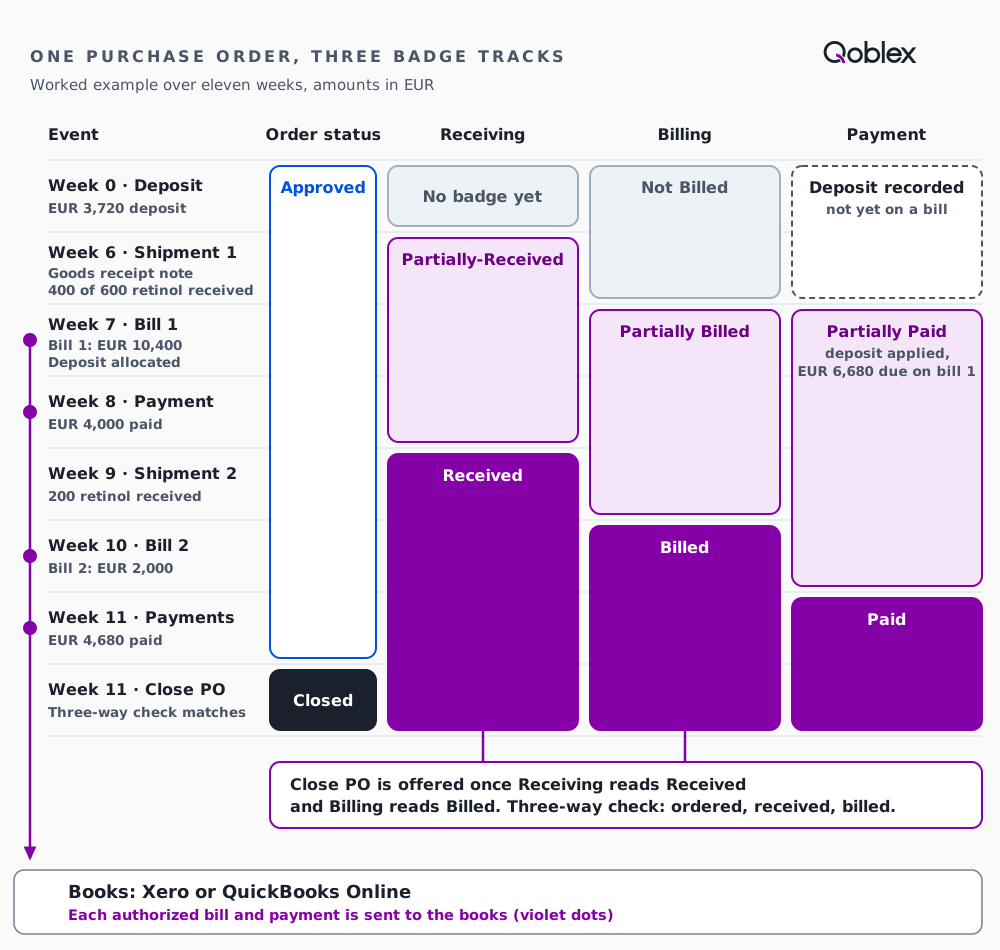
Close PO needed only Received and Billed, and the Payment badge ran beside them without standing in the way. In week 10 the order was fully billed with money still owed on it, which is the question the team wanted settled.
On a purchase order, does fully billed mean fully paid?
For a cosmetics importer using Qoblex, fully billed does not mean fully paid: a purchase order shows Billing and Payment as separate badges, so an order can read Billed while its Payment badge still reads Partially Paid. The example order did exactly that in week 10, and the team asked this when it checked how its own way of working would run in Qoblex, along with how to keep received, invoiced and paid apart on one order.
The badges move apart because Billing follows the supplier’s bills, while Payment follows the payments and allocated deposits recorded against them, and an unallocated deposit changes no bill’s amount due. So the buyer reads what is still on the water from Receiving, what is not yet invoiced from Billing, and what is still owed from Payment and the Amount Due on each bill. Billing only the received goods, paying in instalments and reconciling ordered, invoiced and received all happen on that same order, and the FAQ answers each briefly.
Does this fit your business?
Qoblex purchase orders fit a cosmetics importer, or any business, that buys from overseas, often on a deposit, takes deliveries in parts and gets a supplier bill per delivery. Fragrance, haircare and personal care importers and distributors buy the same way, and so do supplement importers, for whom batch and expiry tracking is a separate paid add-on on Starter and Business, not covered here. Other importers and wholesale distributors will recognise the order, and a wholesaler selling to chains with many stores can see from the Receiving badge that part of an order is still on the water, and from its incoming stock how much, before it plans their orders (cosmetics inventory).
It does not fit a business whose orders arrive, are billed and are paid in one go, where Xero’s or QuickBooks Online’s own purchase orders and bills already do the job. A team that mainly wants supplier invoices captured and matched automatically before payment is looking at accounts payable automation, a different category. Closing an order in Qoblex is final, so it suits teams that close only finished orders. QuickBooks Online sync runs one way, Qoblex to QuickBooks, and Xero users should agree with their bookkeeper on Two way payment sync and which system is the source of truth for supplier payments.
Frequently asked questions
Does fully billed mean fully paid on a Qoblex purchase order?
No. Billing and Payment are separate badges on a Qoblex purchase order, so an order can read Billed while Payment still reads Partially Paid. Billing follows authorized bills; Payment follows payments and the deposits allocated to those bills. Close PO needs the order Received and Billed, not Paid.
How do I bill only the goods that arrived on a part-shipped order?
Tick the lines that arrived, open Bills and choose Bill selected, then change Quantity on the draft bill to match the supplier’s invoice and Authorize. A purchase order can carry more than one bill, so later deliveries get their own bill, or use Bill All for everything still unbilled.
When should I use Move to Back Order?
Use Move to Back Order for lines not received at all, when the supplier will deliver them separately: Qoblex moves them to a new purchase order. It is blocked for any line already on a goods receipt note or a bill, and hidden once the order is fully received. A line short-shipped in part stays on its order.
How do I pay one large order in instalments?
Record a deposit with Add Deposit, as an Amount or a Percentage, allocate it to a bill, then use Add Payment for each instalment, lowering Paid amount from the default. The Payment badge reads Partially Paid until every bill’s amount due reaches zero. A payment needs an authorized bill.
How do I reconcile ordered, invoiced and received quantities?
Select Close PO once the order is Received and Billed. Qoblex compares ordered, received and billed quantities and amounts and closes the order if they match. On a mismatch it opens Three-Way-Check Failed and lists the differences. Correct the order, its goods receipt notes or its bills, then select Close PO again.
Can I reopen a purchase order after Close PO?
No. Closing a Qoblex purchase order is final: a closed order cannot be received or billed, and there is no reopen action on the purchase order screen. Only the bill-to location and the tax-inclusive setting can still change. Select Close PO only when the order is genuinely finished.
How does a purchase order update inventory?
Approving a Qoblex purchase order counts its quantities as incoming stock at the ship-to location. Authorizing a goods receipt note brings the received quantity into inventory at the Receive At location and reduces the incoming quantity. Bills and payments do not move stock, so an early invoice adds nothing.
Does each supplier bill reach Xero or QuickBooks Online separately?
Yes. Each bill syncs on its own: QuickBooks Online receives it once it is authorized, and a bill still in draft in Qoblex goes to Xero as a draft. With Xero’s optional Two way payment sync, payments recorded against a bill in Xero are pulled back into Qoblex; QuickBooks Online sync is one way, Qoblex to QuickBooks. Both integrations are paid add-ons on Starter and Business.