



Katana suits a small food, supplement or cosmetics maker that wants a vendor-guided setup and a free plan to try first; MRPeasy suits one that wants published per-user prices, with expiry dates from Professional. We make Qoblex, so weigh our view accordingly.
Most small makers reach the week when the spreadsheet stops agreeing with itself: the recipe tab, the batch log and the Shopify count each say something different. A first system now has to hold recipes, batches and expiry dates together, keep the store’s stock honest, and hand clean documents to the accountant.
How do Katana and MRPeasy compare, paid plan against paid plan, on 10 November 2026?
The table sets Katana Advantage, its only paid plan, beside the two MRPeasy plans a small maker is most likely to weigh, read from Katana’s pricing page and MRPeasy’s pricing page that day.
| Capability | Katana Advantage (its only paid plan) | MRPeasy Starter ($49 per user per month) | MRPeasy Professional ($69 per user per month) |
|---|---|---|---|
| Billing | Annual contract per the pricing page; monthly or annual per the help centre (confirm in a quote) | Monthly, or annual with 1 month free | Same as Starter |
| Users | Unlimited | Per user; from the 11th user $79 per 10 users | Same as Starter |
| Free option | Free plan, $0, up to 30 SKUs (separate from Advantage) | 15 + 15 day free trial, no card | Same trial |
| Lot and batch tracking | On the pricing page; the help centre calls it the Traceability add-on (confirm in a quote) | Lot Traceability | Lot Traceability |
| Expiry dates | Part of batch tracking per the help centre; plan placement unclear (confirm in a quote) | Not in the Starter list | Expiry Date, listed under Professional functions |
| Serial numbers | Batch or serial numbers on the pricing page (confirm in a quote) | Not in the Starter list | Serial Numbers, listed under Professional functions |
| Routings | A pricing-page row; the help centre says manufacturers need an add-on (confirm in a quote) | Listed in the plan table | Listed in the plan table |
| Scheduling | Drag-and-drop order priority (confirm in a quote) | Listed in the plan table | Listed in the plan table |
| Subcontracting or outsourcing | Outsourced purchase orders for contract manufacturing | Not in the Starter list | Subcontracting, listed under Professional functions |
| Shopify | Native; pushes stock levels automatically, no interval stated | Included; stock to Shopify once per hour in individual-order mode | Same |
| Xero | Sales orders as invoices, purchase orders as bills; imports customers and suppliers | Purchasing and sales documents; daily summary journal only in the optional in-depth mode | Same |
| QuickBooks Online | Invoices, and bills or expenses; QuickBooks Online only; payment status reflected back | Purchasing and sales documents; daily summary journal only in the optional in-depth mode | Same |
MRPeasy’s price grows with the team: “From the 11th user $79 per 10 users”, Enterprise at $99 and Unlimited at $149 per user per month (Unlimited with a “minimum 2 users”), and “1 month free” on annual billing. The page shows “$” with no currency code, so readers outside the US should check the currency. Which plan holds expiry dates matters more than the headline price, because it decides what a perishable maker pays for.
Which plan does each tool need for lots, batch numbers and expiry dates?
MRPeasy lists lot tracking on all four plans but expiry dates, serial numbers and subcontracting only from Professional, while Katana’s own pages disagree on whether batch tracking and expiry dates sit in the price or in a Traceability add-on. On MRPeasy’s pricing page, “Lot Traceability” sits in every plan’s main functions and “Expiry Date”, “Serial Numbers” and “Subcontracting” in the Professional list, so a maker that dates its batches should price Professional.
On 10 November 2026 Katana’s pricing page lists “end-to-end traceability for materials and products via batch or serial numbers” in both the Free and Advantage columns. Its help centre article, “Overview of the Traceability add-on”, says “The Traceability add-on gives you access to batch/lot and serial number tracking.”, includes “Add expiration dates for shelf-life control.” and refers to the pricing page for plans. An older Katana page still says “Traceability is available to purchase on the Standard plan”, a plan the pricing page no longer sells. These pages do not agree, so confirm in a quote what traceability and expiry dates cost on your plan.
Let’s assume a supplement maker has 3 products, 12 ingredients and 5 packaging items, 20 SKUs in all, and two people on the system. MRPeasy Professional comes to 2 x $69 = $138 a month, billed monthly; Starter, at 2 x $49 = $98, covers lot tracking, but expiry dates are listed under Professional. On Katana, its Free plan article promises “full access to all features (including add-ons)”, so a trial on Free should include traceability; confirm it before relying on it.
Once lots are recorded, both tools turn a recall into a lookup: MRPeasy’s lot tracking page describes recording each event in a lot’s life, and Katana’s traceability explorer shows “where a batch or serial number came from, what it went into, who received it”. The real difference is what each tool is built to do well.
Where does Katana win for a small food, supplement or cosmetics maker?
Katana wins for a small maker that sells mainly on Shopify, wants to try a free plan with up to 30 SKUs first, and would rather the vendor guided and built the setup than do it alone. On 10 November 2026 Katana’s pricing page offers Free at “$0, no card required” for “Up to 30 SKUs”, and its help centre says the plan runs “without a time limit”. Advantage includes unlimited users, so a new packer costs nothing per seat, and it comes with a team that guides the setup and builds custom integrations, reports and automations.
For perishable stock, Katana assigns batches on orders completed through a connected sales channel by “first expired first out (FEFO) with a fallback to first in, first out (FIFO)”. A maker that uses a co-packer can raise outsourced purchase orders, which Katana says “lets you send part or all of your production to external partners.”
Manufacturing management needs a written answer, though: confirm in a quote what it includes, along with traceability, how often stock reaches Shopify, and whether Xero or QuickBooks Online connects on Free. MRPeasy prints most of those answers on its pricing page, which is where its case starts.
Where does MRPeasy win for a small food, supplement or cosmetics maker?
MRPeasy wins for a small maker that wants a published per-user price, a free trial instead of a sales call, and routings, operations scheduling and subcontracting listed in its plan table, with lot tracking on every plan and expiry dates from Professional. Its pricing page says on 10 November 2026 “You are not required to pay extra for mandatory implementation or training packages to get started.”, training is optional at “$150 per hour”, and the trial is “Try MRPeasy free for 15 + 15 days” with “No credit card required”.
Its plan table also carries “Routing” and “Operations scheduling (MRP II, finite capacity)” rows, and its production scheduling page describes scheduling jobs “based on resource availability or due dates.” Ask during the trial which plan carries the scheduling you need. A maker also weighing a third tool can read our MRPeasy vs Fishbowl comparison. Scheduling only pays off if orders arrive cleanly and the books close, so the connections deserve their own look.
Which connects better to Shopify, Xero and QuickBooks Online?
Katana and MRPeasy both connect to Shopify, Xero and QuickBooks Online, and for a Shopify maker the difference is in how stock returns to the store and what reaches the books: MRPeasy posts sales and purchase documents in its core accounting integration and adds a daily summary journal only in its optional in-depth mode, while Katana’s pages describe invoices, bills and automatic stock levels.
How does each tool talk to Shopify?
Katana’s Shopify page says on 10 November 2026 that Katana “pushes accurate stock levels to Shopify automatically”, without stating how often, and that “When a sale is made in Shopify, it is immediately reflected in Katana.” Ask what interval applies.
MRPeasy’s Shopify manual says that in individual-order mode “Each order is imported individually into MRPeasy”, and “Once per hour, MRPeasy will update the available quantities of products in Shopify”. In bulk mode, fulfilled items come in once per hour as a single customer order and automatic stock updates are “disabled in this mode.” A Shopify fulfilment creates an MRPeasy shipment in which “all items are automatically marked picked”, except serialized items, which someone picks by hand.
What reaches Xero or QuickBooks Online from each?
Katana’s Xero overview sends sales orders as invoices and purchase orders as bills, imports customers and suppliers, and syncs inventory data. Its QuickBooks Online overview sends purchase orders “as bills or expenses”, works “only with QuickBooks Online, not QuickBooks Desktop”, and will “Reflect invoice payment statuses from QuickBooks back to Katana.”
MRPeasy’s Xero and QuickBooks Online manuals both say “The core integration includes synchronization of purchasing and sales documents.” An optional in-depth integration adds inventory and manufacturing transactions: in Xero the accountant selects “Inventory transactions” during setup, maps “Several additional accounts” and grants advisor access. Only in that mode does a summary of inventory and manufacturing transactions reach the books as a manual journal “once per day”. The QuickBooks manual says to leave inventory transactions off if QuickBooks Online values inventory by the periodic method, and to turn off QuickBooks inventory tracking for items MRPeasy manages, so the accountant should decide before setup.
Katana’s pages do not say whether the Free plan connects to Xero or QuickBooks Online. On 10 November 2026 the pricing page’s Free card lists “Unlimited users, integrations and inventory locations”, the same page’s FAQ says “For e-commerce, only Shopify currently integrates with Free.”, and the Free plan article gives “3 locations”. Ask Katana before counting on connected books from day one, because Free-plan limits also shape how each tool starts.
Which is easier to start with, and is there a free plan?
For a small maker choosing a first system, Katana offers a Free plan up to 30 SKUs with no time limit and MRPeasy offers a 15 + 15 day free trial with no card, and neither is clearly quicker to set up because Katana’s own pages give three different setup timescales. Even Katana’s Free window reads two ways on 10 November 2026: the pricing page says “For your first 15 days you can work with unlimited SKUs.”, while the help centre says “A 15-day grace period begins” once the account reaches 30 SKUs. On setup, the pricing page says “Most Advantage setups are ready in weeks.”, the manufacturing features page says “Katana is designed to be up and running in days.” and the manufacturing page says “50% of businesses are set up and fully onboarded within 3 months.” Confirm both in the quote. MRPeasy’s pricing page says on 10 November 2026 that “Most customers migrating from previous systems import the bulk of their data within a few days.”
The fairest test is the same for both: one real recipe, one supplier delivery with a batch number and expiry date, one Shopify order and one posting to the accountant’s file, run through each trial instead of demo data. It also shows whether either tool is needed yet.
When is neither Katana nor MRPeasy needed?
A small food, supplement or cosmetics maker with a handful of products, short recipes and a few batches a quarter can often run on Shopify for sales and Xero or QuickBooks Online for the books, with a spreadsheet of batch codes, until a recall question takes longer than a day to answer. Shopify sells and fulfils well and the accounting app keeps the books well; the extra layer starts where recipes, lots and expiry dates have to live together.
The signs are practical: tracing one flagged ingredient lot to customers takes an afternoon, ingredients run short on the morning of a run, the same recipe cost lives in two places with two answers, and one person holds the batch log in their head. Where does someone have to remember what the system does not know? If the honest answer is nowhere yet, stay put.
When the signs show, pick by the work, not the category. A maker that needs operations scheduled across work centres should look at MRPeasy first, and one that sends work to a subcontractor should look at either tool above. One whose hard problems are recipes, batches and stock beside Shopify has one more option.
How does this look in Qoblex?
Qoblex fits a small food, supplement or cosmetics maker that sells on Shopify and keeps its books in Xero or QuickBooks Online: BOMs, production orders, assembly and disassembly are on every plan, and lot, batch, serial and expiry tracking is a paid add-on on Starter and Business and included on Scale.
We make Qoblex, so weigh this section accordingly. Multi-level BOMs are supported, but production orders do not cascade, so each sub-assembly, such as a base blend, needs its own production order. There is no work-centre scheduling or sequencing, and no subcontracting, so a maker that needs scheduling should look at MRPeasy first, and one that sends work to a co-packer should look at MRPeasy Professional or Katana’s outsourced purchase orders. For Qoblex against Katana alone, see our Katana comparison.
The Shopify, Xero and QuickBooks Online connections are paid add-ons on Starter and Business, Starter caps at 2 users and 2 warehouse locations, and the QuickBooks Online sync runs one way, from Qoblex to QuickBooks. Current figures are on the pricing page, and there is a 14-day free trial. For more, see lot tracking, expiry and lot tracking with Shopify, batch and expiry tracking with QuickBooks Online and inventory software for supplement makers.
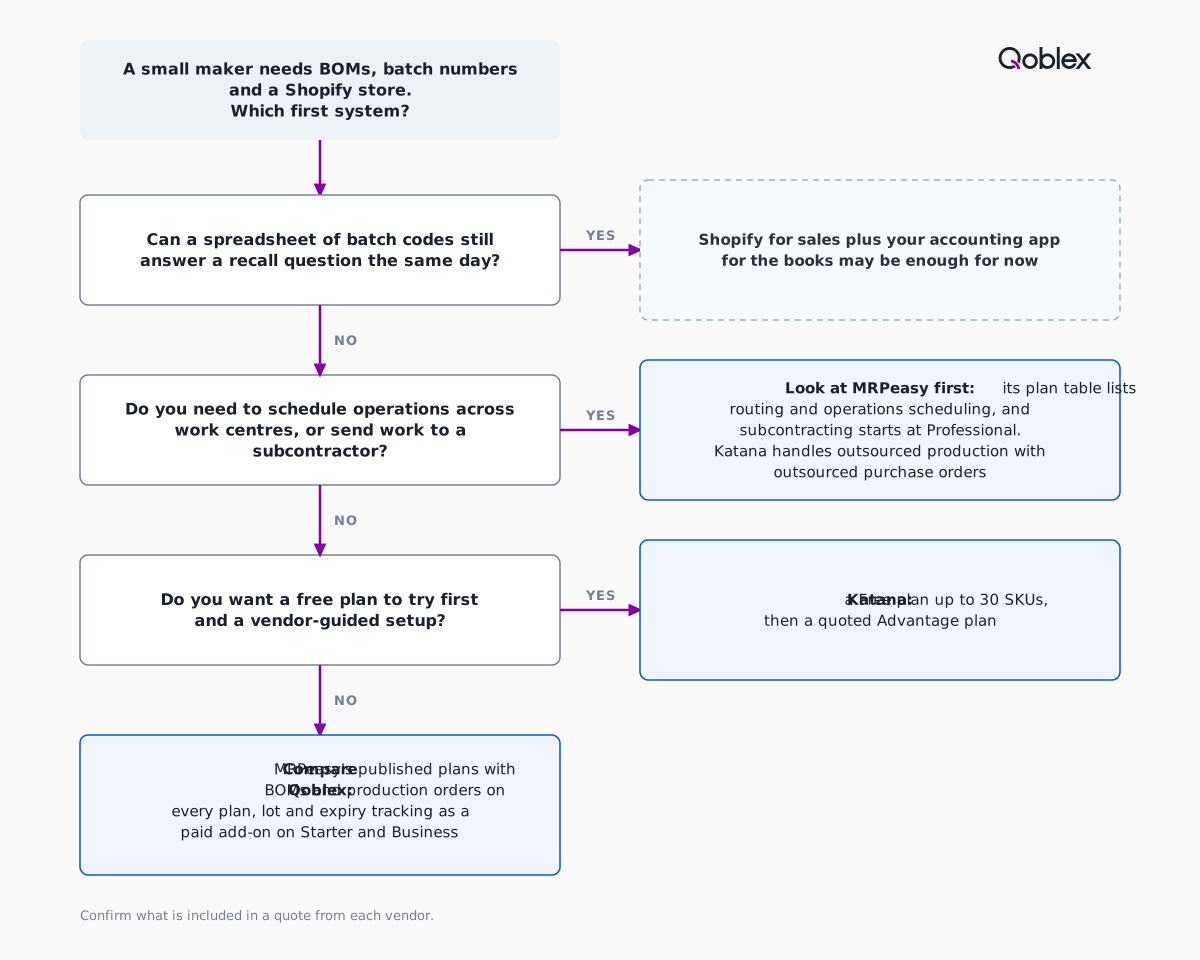
Whichever tool makes the shortlist, run one real batch through it, from recipe to Shopify order to the books, before anyone signs.
Frequently asked questions
Does Katana still have a free plan?
Yes. On 10 November 2026 Katana’s pricing page lists a Free plan at “$0, no card required” for “Up to 30 SKUs”, with all Katana features. Its help centre counts product and material variants, archived items included, and sets no time limit.
Which MRPeasy plan has expiry dates for a food or supplement maker?
On 10 November 2026 MRPeasy’s pricing page lists Expiry Date, Serial Numbers and Subcontracting under Professional, at $69 per user per month. Starter, at $49 per user per month, lists Lot Traceability without them. A maker that dates its batches should price Professional and check the currency the page shows.
Is traceability an add-on in Katana?
Katana’s own pages disagree. Its pricing page lists batch and serial traceability in both the Free and Advantage columns, while its help centre article is titled “Overview of the Traceability add-on” and points back to the pricing page for plans. An older page sells it by legacy plan. Ask for a written quote.
Does MRPeasy post a daily journal to Xero or QuickBooks Online?
Only in its optional in-depth integration. MRPeasy’s core integration with Xero or QuickBooks Online syncs purchasing and sales documents. Selecting “Inventory transactions” during setup turns on the in-depth mode, which posts a daily manual journal summarising inventory and manufacturing transactions and needs extra account mapping.
How does each tool update Shopify stock?
Katana says it pushes stock levels to Shopify automatically, but its integration page does not state how often. MRPeasy updates available quantities in Shopify once per hour when orders are imported individually; in bulk mode, which brings fulfilled items in hourly as one customer order, automatic stock updates are disabled.
Which is easier to set up, Katana or MRPeasy?
Neither is clearly quicker. Katana’s pages say setups take weeks, that Katana runs in days, and that half of businesses are onboarded within 3 months, so ask for a timeline in writing. MRPeasy has no mandatory implementation package and says most data imports take a few days. Trial both with one real batch.
When does a small maker not need Katana or MRPeasy, and where does Qoblex fit?
Shopify plus Xero or QuickBooks Online is often enough while a recall question is answered the same day. Qoblex, which we make, adds BOMs and production orders on every plan, with lot and expiry tracking a paid add-on on Starter and Business. It has no work-centre scheduling, so scheduling-heavy makers should look at MRPeasy first.