


At a glance: A medical supplies distributor buys sterile dressings, gloves and other consumables from manufacturers and suppliers on purchase orders. It sells them to clinics, care homes and pharmacies. It also sells serial-numbered equipment, and it keeps its accounts in Xero. Each delivery can mix lots with different expiry dates, and invoices name the product but not the lot. When a customer or a supplier asks which lot went where, someone rebuilds the answer from paperwork, one order at a time.
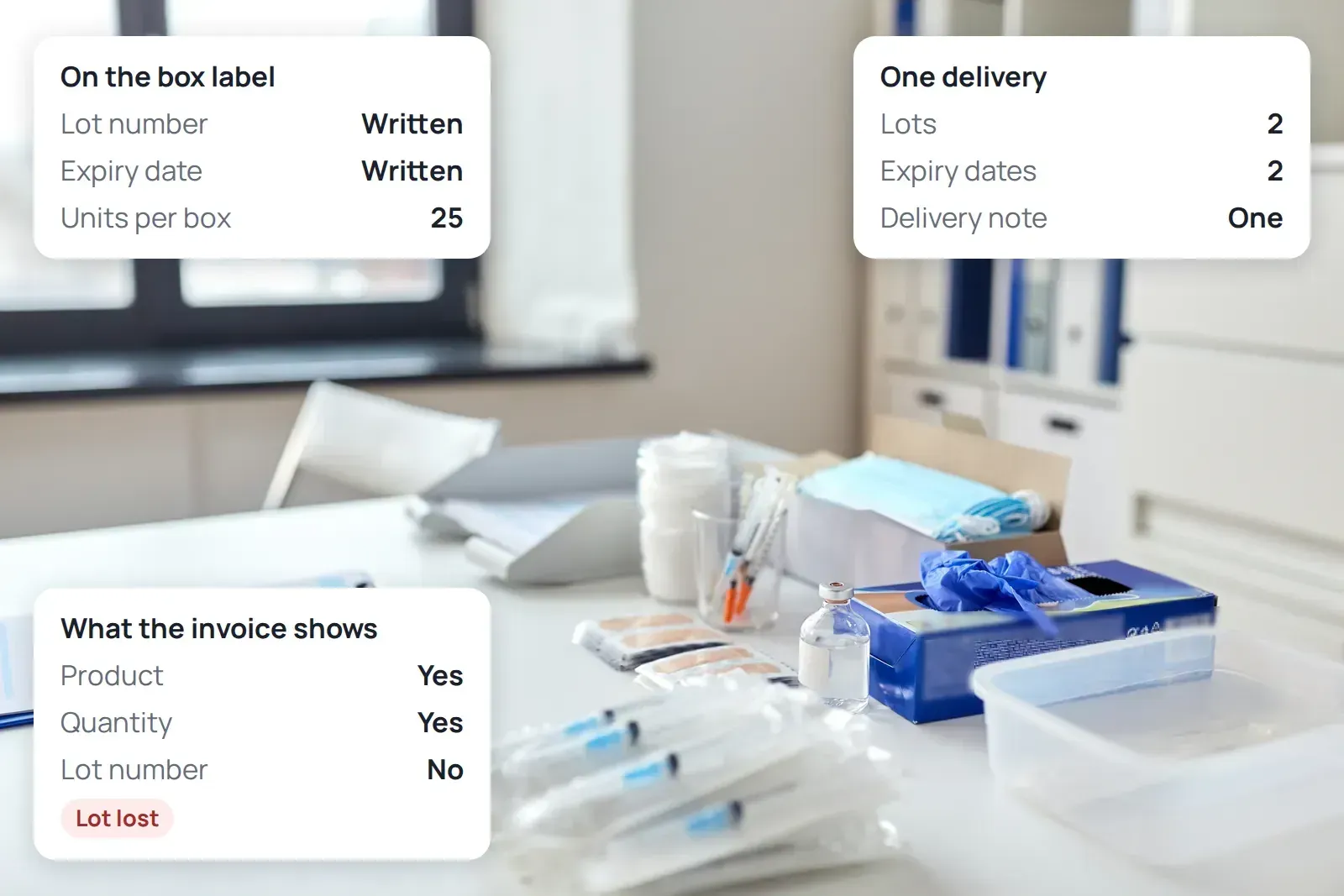
- On the box labelLot numberWrittenExpiry dateWrittenUnits per box25
- One deliveryLots2Expiry dates2Delivery noteOne
- What the invoice showsProductYesQuantityYesLot numberNoLot lost
How do medical supplies distributors track lot numbers and expiry dates on consumables?
A medical supplies distributor tracked lot numbers and expiry dates on consumables by reading them off each box label at receipt and writing them down. Serial-numbered equipment was a separate matter, because each unit carried its own number.
The consumables were where lots and dates piled up. A purchase order line usually arrived as boxes of 25 units. One delivery note could cover 2 lots with 2 expiry dates for the same product. The person receiving read each lot number and date off the labels and wrote them down. That was slow. With two lots mixed in one delivery, it was also easy to copy a number against the wrong boxes.
On the shelf, the lots sat side by side. The earlier date was supposed to go out first, and that rested on the picker noticing the label. Invoices and delivery notes named the product and the quantity, so the lot lived on the box and in the team’s memory. None of this was careless. While the range and the customer list were small, labels and a good memory covered it. The trouble came later, when a lot mattered after the box had left.
What happens when a customer or a supplier asks which lot went where?
When anyone asked a medical supplies distributor which lot a customer had received, the team rebuilt the answer from delivery notes and invoices. The sale named the product, not the lot. A picker had taken boxes for each order, and nobody wrote the lot on the order. So a clinic, a care home or a pharmacy received a lot the distributor had never recorded against it.
The question could come from three directions. A supplier could raise a concern about one lot. A customer could ask which lot it had been sent. Or the team could notice a date coming close on stock that had partly gone out. Each time, someone went through every order since that delivery and matched boxes to customers from memory and paper.
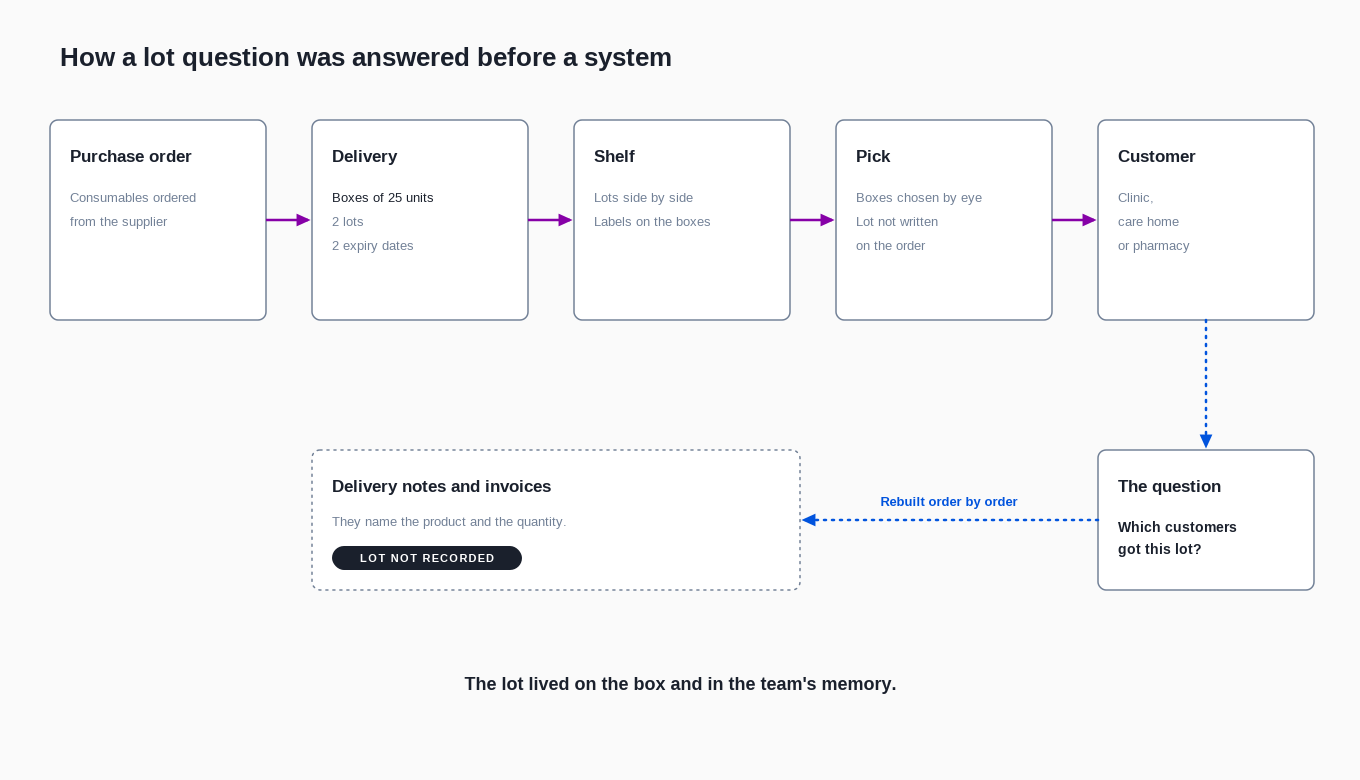
That search showed where the old way had stopped holding. Nobody could trust the answer until someone had checked every order by hand. Someone had to remember which lot went where, because no record said so. Any decision about what to tell customers waited until that person finished digging. So the plain question became: what should the software remember, so that nobody has to?
What should inventory software do for a medical supplies distributor?
Medical inventory management software for a distributor of consumables should record each lot once at receipt and name every customer who received that lot. In between, it should tie every shipment to the lots it took. A buyer can hold any vendor to those three jobs.
The first test is the delivery. Ask how a delivery with two lots of one product gets recorded. The right answer is one entry per lot, with its quantity and date, never a number typed per unit. At picking, the software should show the earliest-expiring lot first, so nobody relies on spotting a label. It should also show lots close to their date, while someone can still act on them.
Then it should follow one lot forward to every customer who received it, with the quantity each took. The accounts should stay where they are. An accountant who works in Xero should not have to move the books to get lot records. The same system should handle serial-numbered equipment next to the consumables. Here is how that runs for one delivery in Qoblex.
How do you record lot numbers and expiry dates on a medical supplies delivery in Qoblex?
A medical supplies distributor records lot numbers and expiry dates in Qoblex on the goods receipt, entering one row per lot when the delivery arrives. Each row carries a Batch Number, a Quantity and an Expires At date. The rows must add up to the quantity received.
Let’s assume a distributor receives one delivery of sterile wound dressings on a purchase order, 500 units in 20 boxes of 25. The delivery arrives on 1 December 2026 and holds two lots. Lot A, LOT-2026-031, is 300 units in 12 boxes and expires on 30 April 2027. Lot B, LOT-2026-047, is 200 units in 8 boxes and expires on 31 October 2027.
Before the first delivery, the owner sets the dressings variant to Batch Tracked. Tracking is set per variant, so a product with no lots stays on Standard. When the dressings arrive, the person receiving them enters lot A and lot B as two rows. Qoblex blocks the receipt if the rows do not add up to the 500 received.
A lot is entered once with its quantity, never once per unit, so 500 units take 2 rows, not 500 entries. If the same lot number turns up again at that location, Qoblex reuses it only when the expiry date matches. Lot tracking, with serials and expiry dates, is a paid add-on on Starter and Business and included on Scale (see pricing). A distributor that wants to track lot numbers and expiry dates in Xero keeps Xero for the accounts and records the lots in Qoblex. With both lots on the shelf, the next job is the pick.
How do you pick the earliest-expiring lot first for a medical supplies order in Qoblex?
A medical supplies distributor picks the earliest-expiring lot in Qoblex because FEFO suggests that lot at picking and the picker checks the carton. FEFO means first expired, first out: the nearest date leaves before the lot that simply arrived first.
On 8 December 2026 a group of clinics orders 100 units, all from lot A. On 15 December a care home orders 250 units. Lot A has only 200 left, so the picker takes the last 200 of lot A and 50 of lot B. Both lots go on the one shipment, each with its own quantity. On 22 December a pharmacy orders 80 units, all from lot B.
After three orders, 430 units have gone out. Lot A is used up, all 300 units, and lot B has 70 left. Once the picker records the lots, the picked quantity shows as reserved, so no other shipment takes the same boxes. At dispatch, the stock comes off those same lots, and the lots stay linked to the shipment. A wrong lot on a dispatched shipment is corrected from the shipment.
FEFO suggests the earlier lot and does not enforce it, so the picker’s look at the carton still matters. Qoblex also flags a lot within 10 days of its expiry date, a fixed window. A lot past its date is marked as expired. What to do with near-dated stock stays the distributor’s decision. Every pick now records which lot went to which customer, and the next question needs exactly that.
How do you find every customer who received one lot in Qoblex?
A medical supplies distributor finds every customer who received one lot by running a Trace on that lot in Qoblex. The trace lists every sale the lot went out on, and each sale row shows its sales order number and the customer.
Suppose that in January a supplier asks which customers got lot A. The owner runs a Trace on LOT-2026-031, one of the lots kept in the Batches list. The summary reads received 300, sold 300, remaining 0 and reserved 0. Downstream lists two sales: the clinics’ order for 100 units and the care home’s order for 200. The Overview graph shows the lot joined to its purchase order and to those customers.
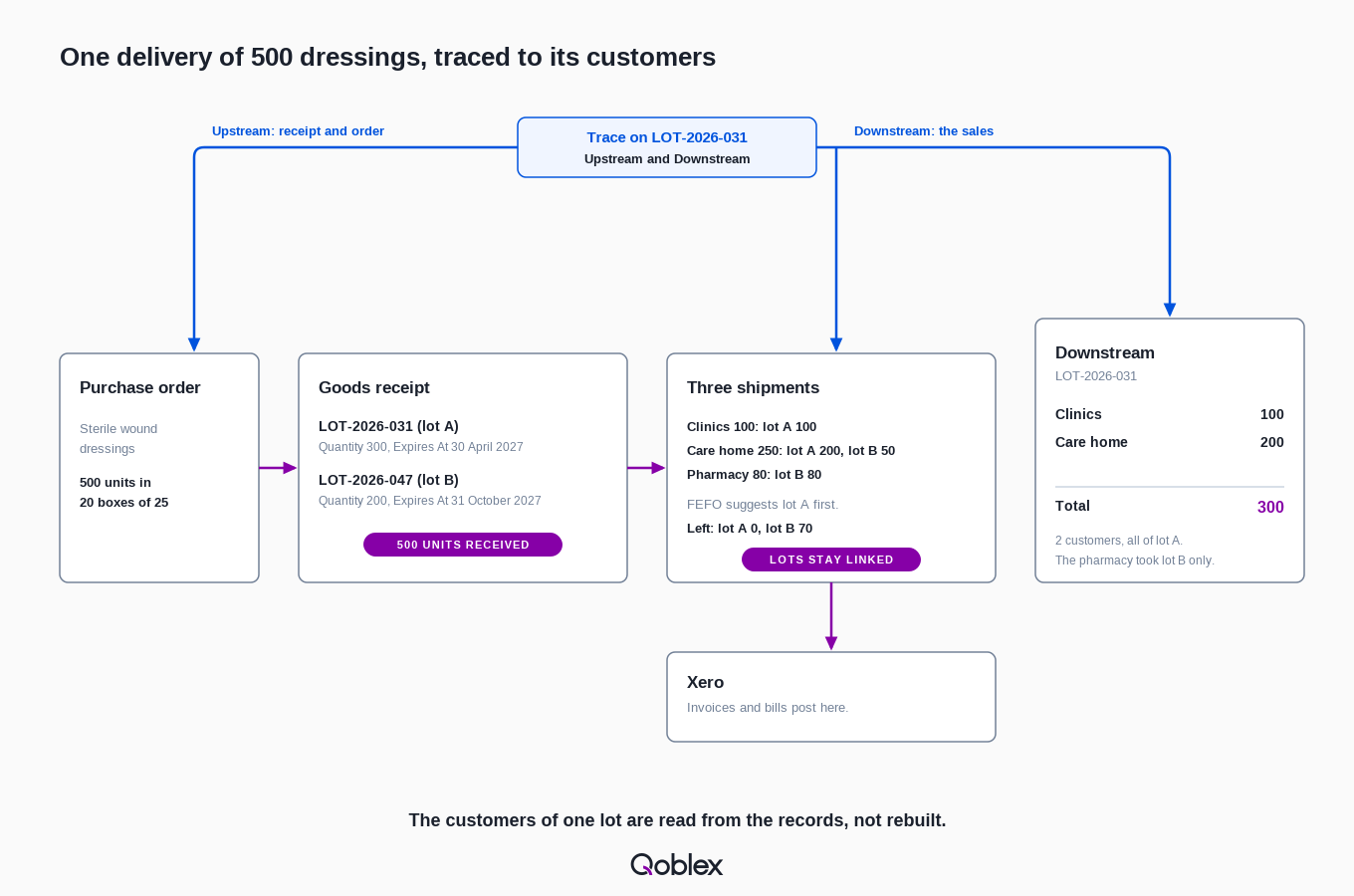
Upstream runs the other way, back to the goods receipt and purchase order where the lot was entered. So the answer is two customers and 300 units, all of lot A. The pharmacy is not on the list, because its 80 units came from lot B. The care home also holds 50 units of lot B, a different lot and a separate trace.
Lot B still has 70 units on the shelf. What happens next, from calling the two customers to deciding about lot B, is the team’s own call. Qoblex records where the lot went. A trace follows one lot at one location, so a lot held in two locations has two rows to trace. The answer is read from the records instead of rebuilt from paperwork, and the accounts never had to move.
Can a medical supplies distributor keep Xero for the accounts and track lots in Qoblex?
Yes, a medical supplies distributor can keep its accounts in Xero while Qoblex holds the lot and expiry records. Qoblex posts the invoices and bills to Xero, and payment sync can run both ways as an option. The Xero integration is a paid add-on on Starter and Business.
Xero keeps the books and does that job well, and the accountant keeps working there. The person who takes a clinic’s order raises it in Qoblex, and the invoice posts to Xero. Invoices follow the sales settings and supplier bills the purchases settings. Lot numbers, expiry dates and who got which lot are kept in Qoblex. The Xero page covers setup, and lot and expiry tracking for Xero users gives the general walk-through.
Day to day, the change shows at the receiving bench, at the pick and at the lot question. The table sets the old way beside the new one, step by step.
| Step | Before | In Qoblex |
|---|---|---|
| Lot and expiry at receipt | Read off the box labels and written down by hand | One row per lot on the goods receipt, with Quantity and Expires At; the rows must add up to the quantity received |
| A delivery with two lots | Two sets of numbers on one delivery note | Two rows on one receipt line; each lot stays separate |
| Picking | The picker chose boxes by eye | FEFO sorts and suggests the earliest-expiring lot; the picker confirms against the carton |
| Lots close to their date | Spotted on the shelf by whoever looked | The Batches list flags a lot within 10 days of its date |
| Which customers got a lot | Rebuilt from delivery notes and invoices | Trace on the lot, read Downstream |
| The accounts | Xero | Xero, with Qoblex posting invoices and bills |
The Before column was never careless work. It was a team covering, with labels and memory, for records nobody had yet. Each row on the right is one less thing a person carries in their head. Once the distributor saw its own delivery run this way, it had questions of its own.
What did a medical supplies distributor ask about running lots in Qoblex?
A medical supplies distributor checking how its own workflow would run in Qoblex asked about entering lots, scanning and serial-numbered equipment. The first question was whether a lot meant hundreds of entries, and the receiving day above already answers it: one row per lot, however many units it holds. The other two are answered in the order they came up on the calls.
The team then asked about scanning. On an approved purchase order, Qoblex offers a barcode scanner option for receiving goods. Each scan is matched to an order line by its barcode, and the quantity is limited to what the line ordered. Qoblex then creates a draft goods receipt from the scanned items. That receipt follows the same batch rules as one entered by hand: one row per lot, and the rows add up to the quantity received.
The equipment question came from a supplier that also sells and repairs equipment, and its answer rests on one setting. A variant set to Serial Tracked holds one serial per unit. Each serial is its own row with a quantity of 1 at receipt, and the picker chooses one serial per unit. Trace works the same way, because a serial is a batch of one. So one distributor can run lots on dressings and serials on equipment, product by product. With those answers in hand, one order can be followed from start to finish.
How does one lot-tracked order run end to end for a medical supplies distributor?
One order for a medical supplies distributor on Qoblex and Xero runs in five steps, from the lots on the receipt to the named customers. Each step follows the work in the order it happens, from the supplier’s delivery to the accountant’s books.
- Buy the consumables on a purchase order and receive the delivery, one row per lot with its quantity and expiry date.
- Take the customer’s order and pick the stock, with the earliest-expiring lot suggested and the picker confirming it against the carton.
- Dispatch the order, so the lots that left stay linked to the shipment.
- Answer any lot question by tracing the lot to the sales it went out on and reading the customers.
- Let the invoices and bills post to Xero, where the accountant keeps the books.
The photo that follows carries lot A through those records. Its 300 units start on the goods receipt, and the last 200 leave on the care home’s shipment. The Trace on lot A then shows nothing left and two customers to call.
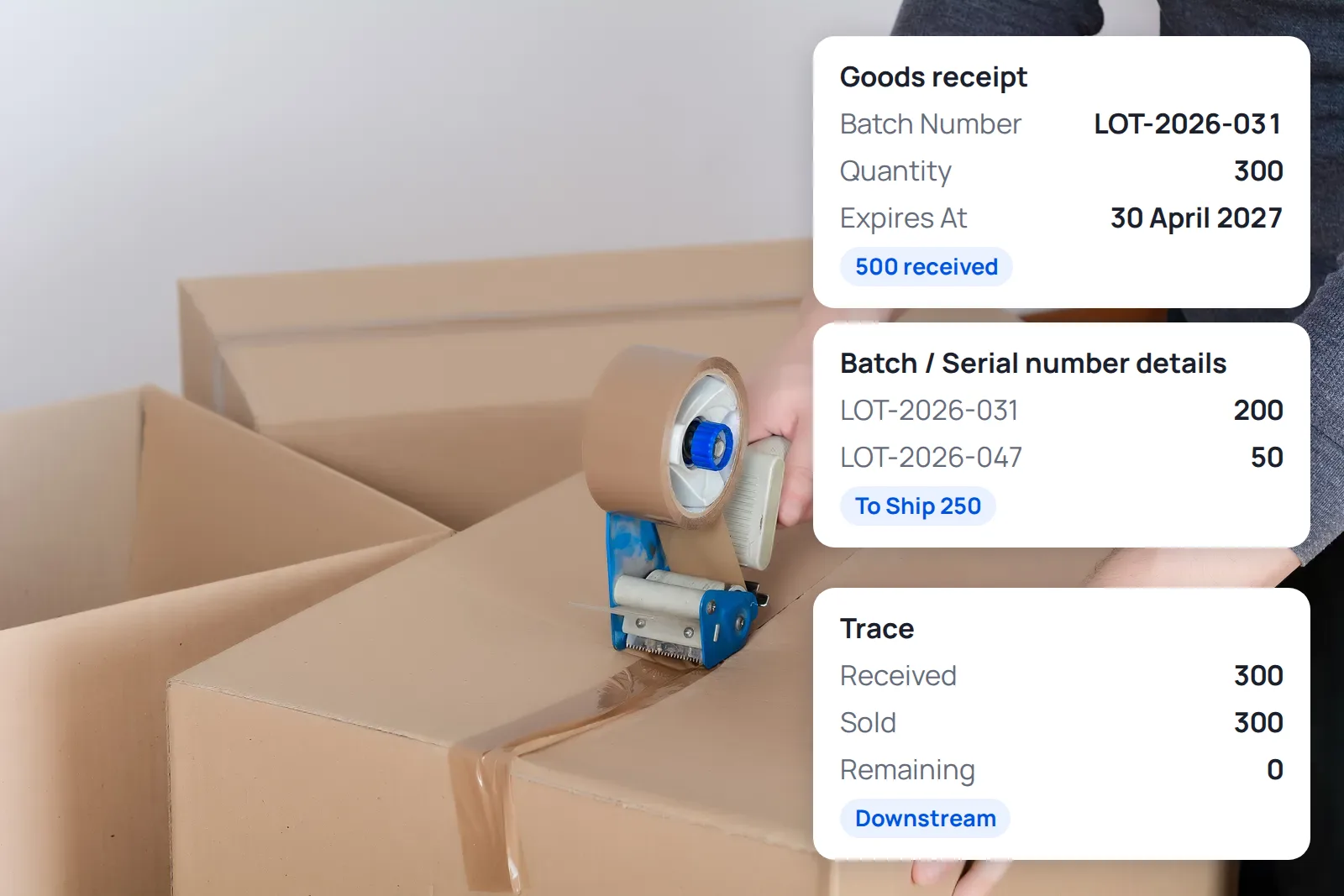
- Goods receiptBatch NumberLOT-2026-031Quantity300Expires At30 April 2027500 received
- Batch / Serial number detailsLOT-2026-031200LOT-2026-04750To Ship 250
- TraceReceived300Sold300Remaining0Downstream
Those records suit a medical consumables distributor well. Whether they suit a neighbouring business depends on one thing: does it need lots recorded, or lots controlled?
Does this fit your business?
The Qoblex flow from goods receipt to Trace fits a medical consumables distributor and any business that must say which customer received which lot. Dental and veterinary supply distributors work the same way, and so do lab consumables and first-aid kit suppliers. A pharmacy wholesaler fits when it needs lots, expiry and which customer got what, without a validated system.
A supplier that also sells equipment fits too, with lots on consumables and serials on equipment. The cosmetics distributor’s story traces one batch to every retailer the same way. The wholesale distributors page covers the wider setup.
The flow does not fit a business that needs lots put on hold, or expired stock stopped from shipping. Qoblex flags near-dated lots and suggests the earliest one, and it does neither of those things. A regulated pharmaceutical wholesaler that needs a validated system or regulator reporting should look at a system built for that. A distributor whose range is a handful of products without lots or dates needs none of this. Xero alone does that job well. Licences and duties to regulators stay with the business. Qoblex records lots, dates and which customer received each lot.
Frequently asked questions
How do I track lot numbers and expiry dates with Xero?
A distributor that wants to track lot numbers and expiry dates in Xero keeps Xero for the accounts and records the lots in Qoblex. Qoblex posts invoices and bills to Xero. Each lot is entered once at receipt, and Trace follows it to its customers. Traceability is a paid add-on on Starter and Business, included on Scale.
Do I enter a lot number for every unit or once per lot?
Once per lot. In Qoblex each lot is one row on the goods receipt, with its Batch Number, Quantity and Expires At. The rows must add up to the quantity received, so a delivery of 500 units in 2 lots takes 2 rows. Serial-tracked equipment is the exception, with one row per serial.
Does Qoblex block expired lots or put a lot on hold?
No. Qoblex flags a lot within a fixed 10 days of its expiry date and marks a lot past its date as expired. It does not block that lot from shipping. FEFO suggests the earliest-expiring lot at picking without enforcing it. Qoblex has no hold or quarantine status for a lot, so near-dated stock is the team’s call.
How do I find every customer who received a lot?
In Qoblex, a Trace on the lot lists every sale the lot went out on, and each sale row shows its sales order number and the customer. Because the lot was entered once at receipt and recorded on each shipment, the list comes from records, not from delivery notes. A lot held in two locations has two rows in the Batches list, so trace each one to get the full answer.
Can Qoblex track serial-numbered equipment as well as consumables?
Yes. Each variant is set to Batch Tracked for consumables or Serial Tracked for equipment, so one distributor can run both side by side. A serial is a batch of one, entered as one row per unit at receipt and picked one serial per unit. Trace works the same way on a serial as on a lot.
Which Qoblex plan includes lot and expiry tracking, and what does Xero need?
Lot, serial and expiry traceability is a paid add-on on the Starter and Business plans and is included on Scale. The Xero integration is also a paid add-on on Starter and Business. Plan names and current prices for both add-ons are listed together on the Qoblex pricing page.
Does Qoblex make a distributor compliant with medical regulations?
No software does that alone. Qoblex records lot numbers, expiry dates and which customer received each lot, which gives the team the facts when a question comes. Licences, validated systems and reporting to regulators stay with the business. A distributor that needs a validated system should look for one built for that purpose.