



At a glance: A cosmetics importer and wholesale distributor buys imported skincare and cosmetics from several brands in a foreign currency, pays shipping and customs duties, and sells wholesale to retailers, including chains with many stores. Without batch records, a quality or expiry problem could not be traced to the customers who received the stock. In Qoblex, the team records batch and expiry when stock is received, picks the batch on each sales order shipment, and reads the Trace sheet on a batch to list every sale that batch reached.
What does a cosmetics distributor need to know about a batch when a brand calls?
A cosmetics importer and wholesale distributor that sells into retail chains needs three facts about a batch the moment a brand calls: which customers received it, how many units each one took, and when, which Qoblex answers from the Trace sheet on the batch. Each brand’s stock arrives with its own lot numbers and dates. When a brand reports a quality issue on one lot, the question is always the same: which of our customers has it?
Before batch records, an invoice named the product and quantity but not the lot, so the answer was rebuilt order by order. With a few brands and customers, memory and paperwork were enough. The chains changed it, because a chain with many stores reorders from the same stock and one lot spreads across many orders. Audits and insurance ask the same question, so the importer wanted batch and expiry on every product.
None of that takes an ERP. Cosmetics batch tracking for distributors means writing the lot down at the two moments stock moves, in and out, and batch tracking software earns its place only if nobody has to remember which lot went where. The first moment is the delivery.
How does a cosmetics importer record batch and expiry when stock arrives?
A cosmetics importer records batch and expiry in Qoblex when a delivery arrives, by receiving the goods on the approved purchase order and typing the brand’s lot number as the Batch Number, the units in that lot as the Quantity and the date as Expires At in Batch / Serial number details. Beforehand, the owner sets each variant that carries a lot to Batch Tracked in its Inventory Tracking Option. Lines with no lot stay on Standard.
The importer’s questions, once it saw the flow, began with batch and expiry on every product. The answer is the dock, where the person who receives the delivery chooses Authorize and fills in the batch rows. Add Batch adds a row when a delivery holds two lots, and the rows must add up to the quantity received or Qoblex stops the receipt (receiving batches). A number already at that location is reused only with the same expiry date, because a different date means a different lot.
Freight and duty sit on the purchase order, as the importer’s three-way match story shows. The Lot, Serial & Expiry Dates add-on is paid on Starter and Business and included on Scale (pricing). The next question was what happens when the batch leaves.
How does a distributor record which batch went to which retail chain order?
A cosmetics distributor records which batch went to which retail chain order by picking the batch on the order’s shipment in Qoblex: on the sales order the picker chooses Ship, then Pick, then selects the Batch Number and the Quantity taken from it, and Qoblex holds that batch quantity for the shipment until it is dispatched. The person who takes the chain’s order raises it under Sales. When the goods are ready, the picker confirms the Ship From Location, enters To Ship and chooses Pick.
In the batch dialog the picker checks any suggested lot against the carton, uses Add Batch for a second lot, and chooses Confirm, then Pack and Dispatch (shipping batches). Until dispatch the units show as reserved, so no other shipment takes them; afterwards the batch stays linked to the shipment. A wrong lot is corrected through Edit Shipment, and a chain’s reorder is simply another shipment, which sets up the question the routine exists for.
Can a distributor see every customer that received a batch, with the date and the units?
A cosmetics importer and distributor finds every customer that received a batch by choosing Trace on that batch’s row in the Qoblex Batches list and reading the Downstream tab, which lists the sales the batch reached, each opening to its sales order, where the customer, the units shipped from that batch and the dispatch date are read. Let’s assume a brand’s face serum arrives as one batch of 2,400 units. The importer receives it on 2 March 2026 under the brand’s lot number LOT-2026-114, expiring 30 September 2028, into one location, and over three and a half months it leaves on nine sales orders to six retail chains. Months later, the brand calls about LOT-2026-114.
The owner opens Batches, finds the row by Batch Number and chooses Trace. The summary reads received 2,400, sold 2,400, remaining 0 and reserved 0, above three tabs: Overview (the trace graph), Upstream (earlier operations) and Downstream (later ones, here the nine sales). Where Qoblex can link an operation to its source record, the sale opens from the trace table (help article).
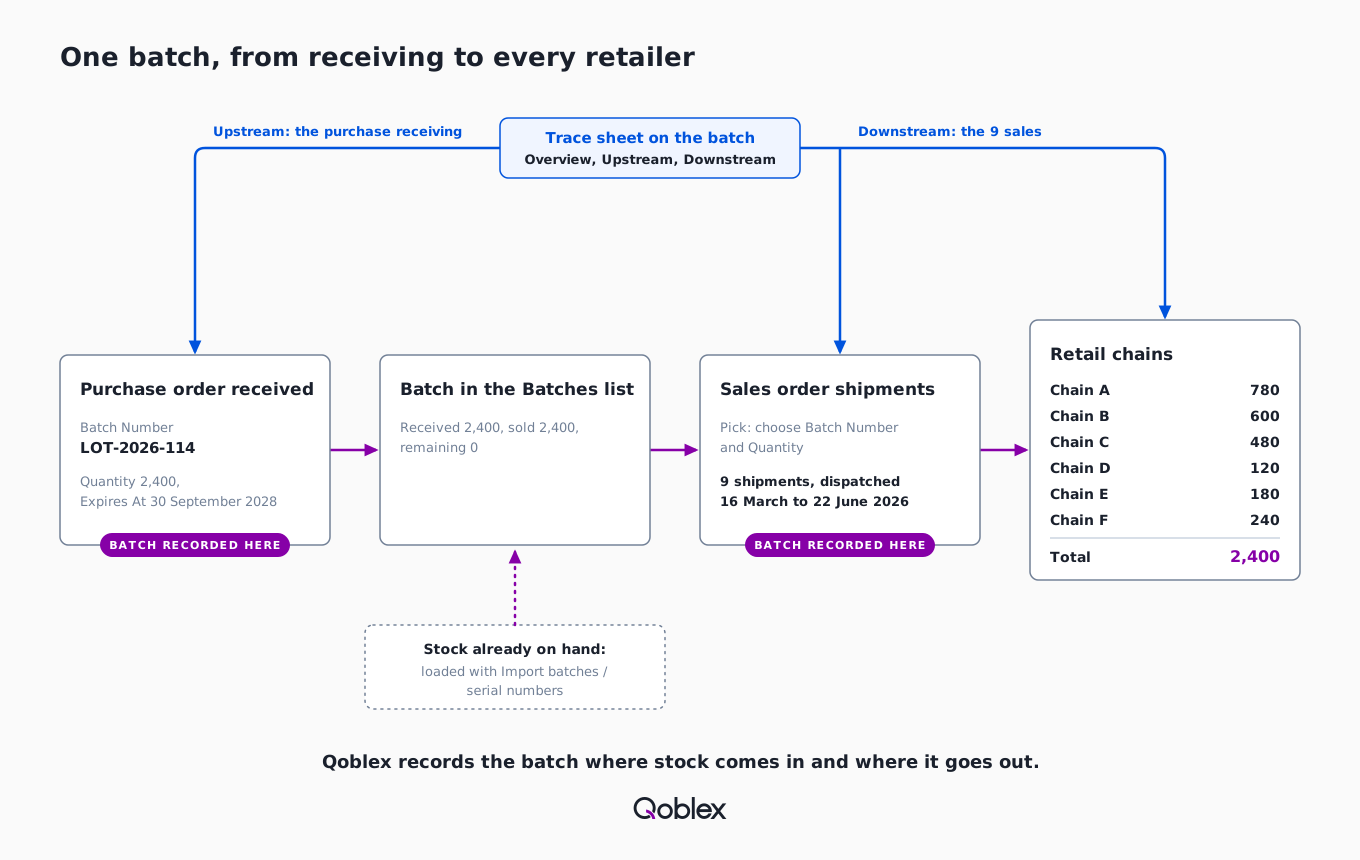
The nine sales the Downstream tab lists, and what each one holds:
| # | Customer | Dispatched | Units |
|---|---|---|---|
| 1 | Chain A (pharmacy) | 16 March 2026 | 480 |
| 2 | Chain B (department store) | 23 March 2026 | 360 |
| 3 | Chain C (beauty specialist) | 30 March 2026 | 240 |
| 4 | Chain A (pharmacy) | 20 April 2026 | 300 |
| 5 | Chain D (supermarket) | 27 April 2026 | 120 |
| 6 | Chain B (department store) | 11 May 2026 | 240 |
| 7 | Chain E (pharmacy) | 18 May 2026 | 180 |
| 8 | Chain C (beauty specialist) | 8 June 2026 | 240 |
| 9 | Chain F (regional drugstore) | 22 June 2026 | 240 |
| Total, 9 sales, 6 customers | 2,400 |
Six customers sit behind nine sales because Chain A, Chain B and Chain C each ordered twice: Chain A received 780 units over its two sales, Chain B 600 and Chain C 480. The dates show how long stock has been on each shelf. Each sale names the customer it was raised for, so the answer reads by chain or by store depending on how the importer set up its customers. Contacting retailers is the team’s job; Qoblex records where the batch went, so the answer is read from records instead of rebuilt from invoices. The brand may also ask where the lot came from.
How does a distributor trace a batch back to its supplier and its components?
A cosmetics importer traces a batch back by opening the Upstream tab on the batch’s Trace sheet in Qoblex, which lists the earlier operations that led into the batch, and for a bought-in batch that is the purchase receiving, where the supplier’s lot number was typed as the Batch Number. Where the receiving links to its source record, it opens from the trace table and leads to the purchase order. The lot number on the label matches the batch row, so a brand’s call finds the right row.
For an importer, “back” ends at the supplier, because the ingredients belong to the brand’s records. A brand that makes its own stock with Qoblex production orders records component and finished batches through Lots & Serial, so Upstream reaches the component lots, as in the food maker’s ingredient trace. Each trace covers one batch at one location, so the routine is worth writing down.
How does a team run a batch trace for a recall at the screen, step by step?
A cosmetics distributor runs a batch trace in Qoblex in eight steps, from the Batches list to the Trace sheet’s Downstream and Upstream tabs, ending with the customers, units and dates for the affected batch and the purchase receiving it came in on.
- Go to Batches.
- Narrow the list with the Batch Number filter (and SKU or Location if the same lot sits in more than one place), using the brand’s lot number.
- On the batch’s row, choose Trace.
- Read the summary quantities at the top of the trace sheet: received, sold, remaining and reserved.
- Open Downstream to see the later operations that used or moved the batch, such as sales, transfers, adjustments and returns.
- Open each sale from the table to its sales order and note the Customer, the units shipped from the batch and when the order shipped (the Shipped On date).
- If Downstream lists a transfer, repeat from step 2 for the batch at the receiving location, because each location holds its own row.
- Open Upstream and open the purchase receiving to read which delivery and purchase order the batch came in on.
Before contacting a retailer, the team notes the row’s Location, since a lot in two warehouses has two rows and a stock transfer keeps the same number and expiry. It checks Expire at against the brand’s label. Reserved Quantity shows whether any of the lot still waits on a shipment, and the date leads to the next question.
Does Qoblex flag stock close to its expiry date, and does it stop an expired batch shipping?
A cosmetics distributor sees stock close to its date in Qoblex because the Batches list marks a batch expiring within 10 days as expiring soon and a batch past its date as expired, and the Expire at filter finds both, but Qoblex does not block an expired batch from being shipped. The 10-day window is fixed, and the flag needs the Expires At date typed at the dock. Filtered by Location and Product Variant, it shows one brand’s near-dated stock in one warehouse.
FEFO sorts and suggests lots, and the picker confirms the batch in the carton; see the importer’s picking by expiry and the lot tracking page. Expired stock is the business’s call, and the expiry article suggests quarantine, then an adjustment when it must leave inventory. Qoblex keeps one date per batch, the Expires At date, so for a product that carries only a period-after-opening (PAO) symbol the importer types the rotation date the brand gives for that lot, and the flag and FEFO work from it. The last question was about stock already on the shelves.
How does a distributor start batch tracking on stock it already holds?
A cosmetics distributor starts batch and expiry tracking on stock already on the shelf by switching each variant to Batch Tracked and loading the counted stock back through Import batches / serial numbers, with a Batch/Lot Number and an optional Expiry Date for every row. Qoblex refuses to move a variant off Standard while stock is on hand or allocated, so the team first writes it to zero with a stock adjustment. From Inventory > Products, someone picks the Location, uses Prepare Template and Download Template, and fills the columns from the labels, never inventing a date (CSV batch stocktake). The import adds stock at zero unit cost, so the Moving Average Cost is set afterwards.
The importer’s FEFO picking article has the full walkthrough. Stock sold before the import has no batch record, so a trace follows only later sales. A sensible start is the lines whose customers the importer would most need to reach.
Does this fit your business?
The Qoblex batch flow, from receiving to Trace, fits a cosmetics importer or distributor and any health and beauty business that must say which customer received which lot. The closest neighbour is a cosmetics brand whose products are made by contract manufacturers and sold direct and through a distributor. It receives finished goods as batches, picks them on wholesale shipments and reads the same Trace sheet, though Upstream stops at that receipt, since raw-material lots stay with the manufacturer. If a third-party warehouse ships orders outside Qoblex, only shipments picked in Qoblex carry the batch.
Supplement, food and beverage importers and pharmacy or medical-supply distributors fit the same way; licence and regulator duties stay their own. See importers, food and beverage and wholesale distributors, and GMP batch records for supplements. The regulatory frame for cosmetics is in cosmetics batch traceability.
It does not fit everyone. Goods with no lot or date can stay on Standard without the add-on, and batch release, deviation handling or regulator reporting need a quality-management system, not covered here. A business that ships entirely outside Qoblex gets no batch on its sales. Before you decide, check what your own platform records against a sale.
Frequently asked questions
How do I trace a batch to every customer that received it?
In Qoblex, open Batches, find the batch by Batch Number, choose Trace and read Downstream, which lists the sales it reached. Each sale opens to its sales order, showing the customer, the units shipped from that batch and the dispatch date. Repeat for each location.
Can I see every customer who got a batch, when, and how many units, to recall it?
Yes. In Qoblex, the batch’s Trace sheet lists every sale the batch reached under Downstream, and opening a sale shows the customer, the units shipped from that batch and when it shipped. The answer is read from the records instead of rebuilt from invoices.
How do I trace a batch back to its supplier and components?
In Qoblex, open the batch’s Trace sheet and read Upstream, the earlier operations behind the batch. For an importer, that is the purchase receiving where the supplier’s lot number became the Batch Number. For a brand making its own stock, it can include the component batches consumed in manufacturing.
How do I start batch and expiry tracking on stock I already hold?
Qoblex will not switch a variant to Batch Tracked while stock is on hand or allocated. Adjust the quantity to zero, switch, then load the counted stock through Import batches / serial numbers, with a Batch/Lot Number and optional Expiry Date per row. Set Moving Average Cost afterwards.
Does Qoblex stop an expired batch from shipping?
No. Qoblex marks a batch expiring soon within a fixed 10 days and expired once its date passes, but does not block it. FEFO suggests lots without enforcing them, so the picker confirms the batch in the carton and the business decides about expired stock.
How does a distributor handle PAO-only cosmetics in Qoblex?
Qoblex keeps one expiry date per batch, typed as Expires At at receiving. For a product that carries only a period-after-opening (PAO) symbol, the importer enters the rotation date the brand supplies for that lot, such as manufacture date plus shelf life. The 10-day flag, the Expire at filter and FEFO suggestions then work from that date.
Which Qoblex plan includes batch tracking and the Trace sheet?
Lot, batch, serial and expiry traceability is a paid add-on on the Starter and Business plans and is included on Scale. The Batches page appears only when the account has it. Plan names and current prices are on the Qoblex pricing page.
Do I have to track every product by batch?
No. In Qoblex, tracking is set per variant with the Inventory Tracking Option: Standard, Batch Tracked or Serial Tracked. A product can mix tracked and standard variants. Tracked variants ask for batch details whenever stock moves, while Standard variants track only the total quantity.
What if the same batch sits in more than one warehouse?
In Qoblex, batch identity and quantity are location-specific, so each location shows its own row. A stock transfer creates a matching batch at the destination with the same number and expiry date, so a recall trace covers every location by tracing each row.