


A guide for operators who already ship their own orders and are deciding whether the pick, pack and dispatch step needs its own software.
Most people search for pick and pack software the day after something went wrong. A customer found the blue one in the box instead of the black one. The packing slip listed six items and the box held four, because the order shipped in two parts. Or a retailer asked which batch a delivery came from, and the answer took an afternoon.
None of that means the team was careless. Picking from a printed order and a good memory works for a long time. It stops working when variants start to look alike, when orders leave in more than one shipment, and when some products need a record of exactly which unit went out.
What is pick and pack software?
Pick and pack is the part of fulfilment between “order confirmed” and “parcel gone.” The software gives that work a structure: it tells the picker what to collect, records what was packed, and marks the moment the goods leave.
Pick, pack, and the stage that actually matters: dispatch
Everyone names the first two stages. The third is the one that changes your numbers. Picking and packing are physical steps; dispatch is where the system records that stock has left the building.
What it produces: a pick list, a packing slip, and a label
A pick list tells a warehouse worker what to collect. A packing slip documents what is actually in the box. The pick list is an instruction; the packing slip is a record. A label goes on the outside of the box for whoever carries it.
Why do mis-picks and mismatched packing slips happen?
The wrong-item pick: reading instead of scanning
A picker working from a printed order is matching words on paper to products on a shelf. That breaks down with look-alike variants: the picker reads correctly and still grabs the neighbour. The fix is not “be more careful.” It is scanning the item, so the check happens against the barcode instead of someone’s eyes.
The packing slip that describes the order, not the box
An order for ten items arrives, seven are in stock, and seven go out today. If the slip is printed from the order, it lists all ten, and the customer emails you. The slip was right about the order and wrong about the shipment. Whenever orders ship in parts, the paperwork has to come from the shipment being sent.
No record of which batch or serial number left
For products with lot numbers, expiry dates or serial numbers, “we shipped 40 units” is not enough. Recalls, warranty claims and retailer audits ask which units. If nobody records the batch or serial while the item is in the picker’s hand, it gets reconstructed later from memory and delivery notes.
What should pick and pack software actually do?
The operator’s checklist:
- Print the pick list and packing slip from the shipment, not the order. That one design choice removes the mismatched-slip problem.
- Let the picker scan instead of read. Scanning at the shelf should catch the wrong variant before it’s boxed. For hardware, see our guide on choosing the right barcode scanner.
- Treat partial and multiple shipments as normal. Ship what is ready, leave the rest on the order, and ship again later, each shipment with its own carrier, tracking and dates.
- Record which batch or serial shipped, when the product needs it. For tracked products the pick shouldn’t complete until the units are recorded.
Here is how Qoblex answers each point.
| What to look for | Why it matters | Qoblex |
|---|---|---|
| Pick list and packing slip per shipment | A partial shipment’s slip won’t list items that aren’t in the box | Yes. Each shipment holds its own to-ship quantities, and the paperwork prints from the open shipment |
| Barcode scanning at pick | Catches the wrong variant before it’s boxed | Yes. The mobile app scans with the phone camera while you pick and catches the wrong variant; the web app builds shipment lines from the barcodes you scan |
| Batch or serial capture at pick | “Which unit shipped” needs an answer, not a guess | Yes. The pick can’t finish until every tracked unit is recorded |
| FEFO on expiring stock | Nearer-expiry lots go out first | Yes, automatic and overridable (lot, serial and expiry add-on) |
| Partial and multiple shipments | Real fulfilment rarely leaves in one truck | Yes, each with its own carrier, tracking code and dates |
| One record for stock, cost and shipment | Nothing to reconcile against a separate picking app | Yes. Dispatch reduces stock and commits cost of goods in one step |
| Labels | Needed to hand the parcel over | Yes. Pick lists, packing slips and labels print from the shipment |
How does Qoblex handle pick and pack?
Most pages that rank for this term are built for 3PL and high-volume shipping operations, or describe one feature inside a larger warehouse system. Qoblex is the inventory system that already holds your stock and sales orders, so pick and pack isn’t a separate app to keep in sync.
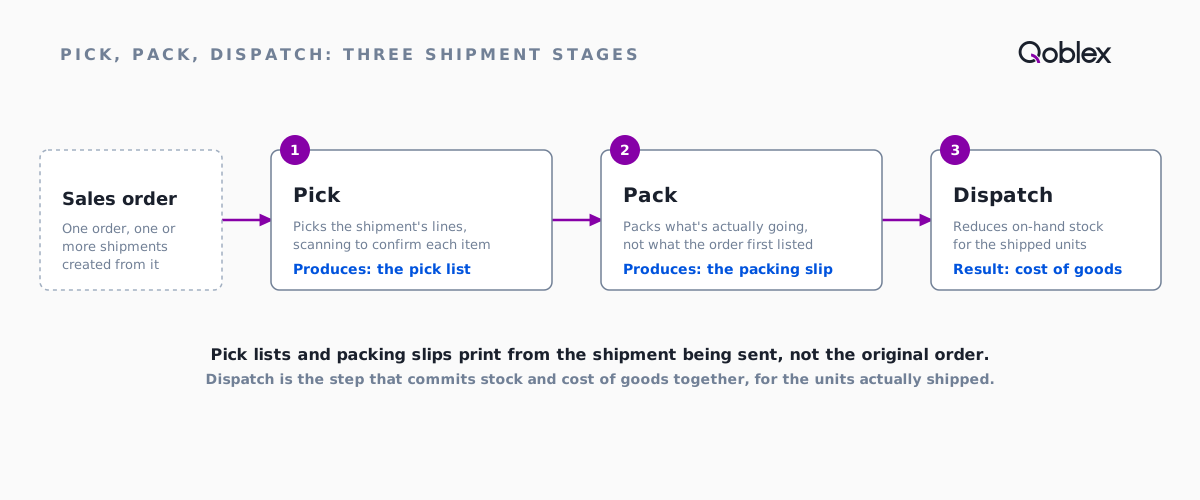
Pick, pack and dispatch as three shipment stages
You fulfil an order by creating a shipment for some or all of its lines. Per the shipments help article, the shipment moves through three stages, Pick, Pack and Dispatch. Dispatch is the one that reduces on-hand stock and commits cost of goods for the shipped units. If you don’t track picking and packing separately, you can dispatch directly.
Each shipment has its own ship-from location, carrier, tracking code and dates, and one order can have as many shipments as it needs. Pick lists, packing slips and labels print from the shipment, which is why a partial shipment’s slip matches the box. The sales order list also prints them in bulk. Allocating stock before shipping is optional, but recommended when stock is tight so the units you plan to ship are reserved.
Scanning in the web app, or with the phone camera
In the web app, the dropdown next to the Ship button has a barcode option. It opens a scanner, and the quantities you scan become the shipment lines, instead of lines you tick by hand.
On the mobile app, the phone’s camera is the scanner, so there’s no extra hardware. You work through the day’s shipments on the phone: pick, pack and dispatch. As the order management page puts it, scanning as you pick is what catches the wrong variant before it goes in the box rather than after it reaches the customer.
Batch and serial capture, and FEFO on expiring stock
When you pick a shipment containing batch- or serial-tracked products, Qoblex asks which batches or serials are going out before the pick can finish. Serial-tracked items get one entry per unit, and the batch quantities have to add up to the quantity shipped.
On lots with an expiry date, per the lot tracking page, Qoblex picks first-expired-first-out (FEFO), shows each batch’s expiry date while you pick, and lets you override the choice when an order needs a longer shelf life. FIFO ships the oldest stock received; FEFO ships the stock closest to its date. The full mechanics are in our FEFO picking guide.
One record, from pick through invoicing
Because the shipment lives on the sales order, there’s no second system to reconcile. Once a shipment is dispatched you can raise the invoice for the shipped lines from the same record, and Qoblex syncs the financial side to Xero or QuickBooks Online. The picker, the stock count and the books are looking at the same event.
Orders from every channel in one list
A pick list shouldn’t care where an order came from. Orders from Shopify, WooCommerce, wholesale and Amazon all become sales orders in Qoblex (sales imports and channel sync). The Amazon integration is inbound: orders and returns flow in, and Qoblex doesn’t push stock back out to Amazon.
For picking strategy itself (batch, zone or wave picking, and the KPIs behind them), see our complete guide to warehouse picking.
When don’t you need dedicated pick and pack software?
You ship a handful of orders a day from a small space
If one or two people pack every order, the shelves are within reach, and a printed order still gets it right, software won’t fix a problem you don’t have. The signal to watch isn’t volume on its own. It’s the first wrong-item complaint nobody can explain, or the first slip that didn’t match the box.
A 3PL already picks and packs for you
If a third-party logistics provider fulfils your orders, the picking happens in their warehouse on their systems. Your problem is knowing what they hold and what they shipped: inventory visibility, not pick and pack.
You sell one SKU, or products nobody could mix up
Scanning earns its keep when products look alike. If you sell one product, or a few obviously different ones, the wrong-item pick barely exists. Unless you need batch or serial records, a printed order is enough.
And at the other end
A large, multi-site distribution operation with dedicated warehouse staff, slotting rules and wave planning may need a full warehouse management system. Most growing operators sit in between: past the clipboard, nowhere near needing enterprise warehouse software. That messy middle is where pick and pack inside the inventory system makes the most sense.
What does pick and pack software cost?
In Qoblex, shipments, pick lists, packing slips, and multiple or partial shipments are part of every plan. Two things are paid add-ons on Starter and Business and included on Scale: the mobile app, which is where camera scanning lives, and lot, serial and expiry tracking, which covers batch and serial capture at pick and FEFO. Current figures are on the pricing page.
A 3PL platform or a single-purpose scanning app also carries a monthly cost, so compare total cost against how many systems you’ll keep in agreement.
Frequently asked questions
What is pick and pack software?
Software that turns a sales order into a pick list, tracks it through packing, and produces a packing slip and a label for the shipment. In Qoblex this happens on the shipment: pick, pack and dispatch are three separate stages, and dispatch commits stock and cost of goods for the units shipped, per the shipments help article.
What is the difference between a pick list and a packing slip?
A pick list tells a warehouse worker what to collect. A packing slip documents what’s actually in the box. In Qoblex both print from the open shipment, not the original order, so a partial shipment’s packing slip matches what’s really being sent.
Does pick and pack software need barcode scanning?
It doesn’t have to, but scanning catches a mis-pick before the box is sealed. In Qoblex’s web app, the Ship button’s barcode option builds the shipment lines from the barcodes you scan. The mobile app uses the phone’s camera, so scanning as you pick catches the wrong variant before it goes in the box.
Does Qoblex support FEFO picking?
Yes, on stock with an expiry date. Per the lot tracking page, Qoblex picks first-expired-first-out automatically, and a picker can override the suggested batch. It’s part of the lot, serial and expiry tracking add-on; the FEFO picking guide covers the mechanics.
Do I need dedicated pick and pack software for a small business?
Not always. If you ship a handful of orders a day from a small space, or sell products nobody could mix up, a printed order and a careful eye can be enough. Dedicated software earns its cost once mis-picks, mismatched packing slips, or “which batch shipped” questions start costing time or trust.
What does pick and pack software cost?
In Qoblex, pick lists, packing slips, and multiple or partial shipments are part of every plan. The mobile app (camera scanning) and lot, serial and expiry tracking (including FEFO) are paid add-ons on Starter and Business, and included on Scale. See the pricing page for current figures.