



At a glance: A skincare brand has its products made by contract manufacturers, some offshore and some local, and supplies the packaging components to the factory. It sells through a Shopify store fulfilled by a 3PL, a distributor that supplies pharmacies, and overseas wholesalers by region. Xero is the books. Adding its own warehouse for wholesale meant stock per location and a rule for which warehouse ships which order. In Qoblex, the Shopify 3PL is a mapped location whose stock Shopify is sent, wholesale orders ship from the own warehouse, and a stock transfer tops up the 3PL.
How did a skincare brand with a 3PL, a distributor and overseas wholesalers run its stock before Qoblex?
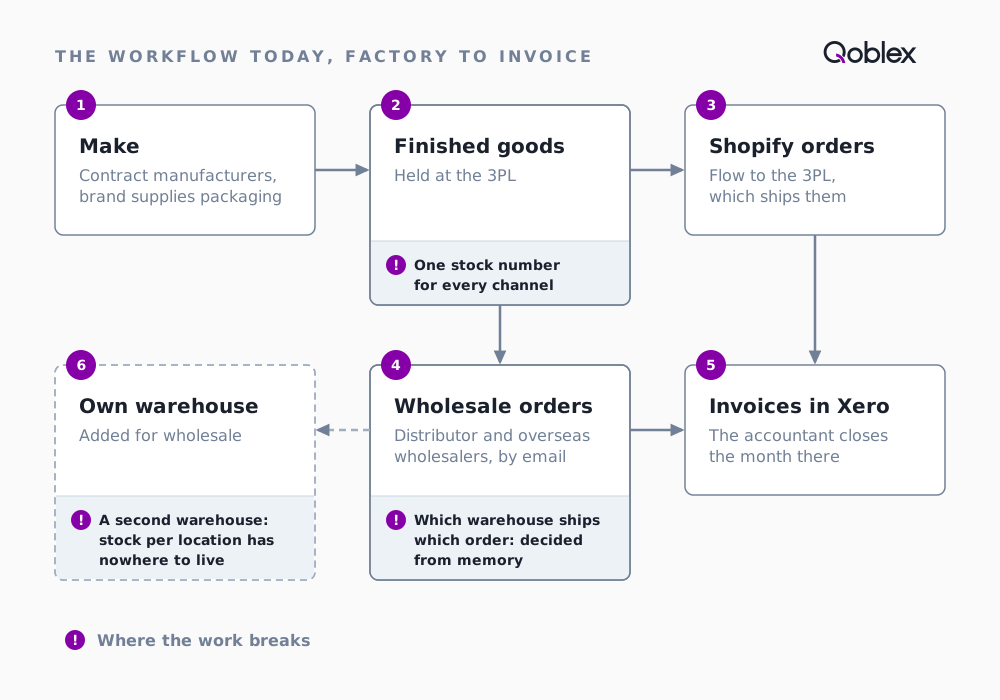
A skincare brand of this shape, some of its lines registered as medicines, usually runs in six steps:
- Make. Contract manufacturers produce the range, some offshore, some local.
- Supply the factory. The brand buys packaging components and sends them to the manufacturer.
- Store. Finished goods arrive at the 3PL.
- Sell online. Shopify orders flow to the 3PL, which ships them.
- Sell wholesale. Orders from the pharmacy distributor and the overseas wholesalers arrive by email and are fulfilled from the same stock.
- Invoice. Invoices go to Xero, and the accountant closes the month there.
With one warehouse and one 3PL, a single pool of stock was the simplest thing that worked. In Shopify, a location is “any physical place where you sell products, fulfill orders, or stock inventory”, and a 3PL can be one of them.
Growth broke it in three places:
- One stock number served every channel. A distributor order agreed by email and the units the store offered drew on the same figure, until someone corrected it by hand.
- Which warehouse ships which order lived in people’s heads. Every exception was a message to someone who remembered it.
- The day the brand took its own warehouse for wholesale, stock per location had nowhere to live. Shopify keeps locations apart by design: “Each location’s inventory is independent and can’t be shared or pooled with other locations.” That is the right model, and it means the brand needs one record of what sits in each warehouse, what is promised to wholesale and what is free for the store.
How does it run in Qoblex, with a 3PL for Shopify and its own warehouse for wholesale?
Shopify is still the store, the 3PL still ships online orders, and Xero is still the books. What changes: each warehouse is its own location, and each order knows where it ships from.
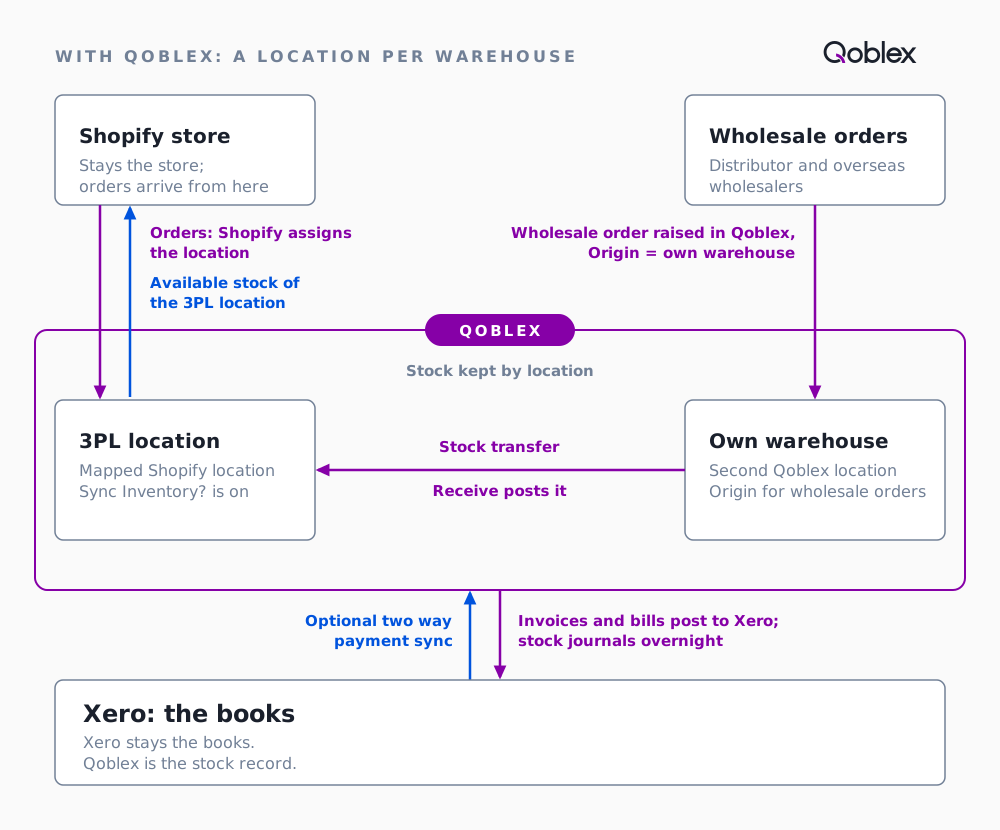
- Map the 3PL. In Qoblex’s Location Mapping, each active Shopify location, the 3PL’s included, is matched to a Qoblex location. Create location builds the Qoblex side from the Shopify details.
- Add the own warehouse. The brand’s warehouse is a second Qoblex location, holding the wholesale stock.
- Decide what Shopify is sent. Inventory levels Synchronization is set to Sync from Qoblex to Shopify, and Sync Inventory? is switched on for the 3PL’s row.
- Sell online. Shopify assigns each order a location through its own order routing. Qoblex mirrors the order and allocates at that location, falling back to the default web-channel location.
- Sell wholesale. The team raises the distributor or overseas wholesaler order in Qoblex with its Origin set to the own warehouse. Create Order opens it and allocates the stock there.
- Ship. When the 3PL has shipped a Shopify order, the fulfillment recorded in Shopify reaches Qoblex, and the shipment is written when the order syncs.
- Top up the 3PL. A stock transfer from the own warehouse to the 3PL moves the stock; Receive posts it.
- Invoice. Xero receives the invoices. Qoblex is the stock record.
In Qoblex, each Shopify location, including a 3PL’s, maps to its own Qoblex location, Shopify is sent the available stock of the locations whose Sync Inventory? switch is on, and a wholesale order raised in Qoblex ships from its Origin, the own warehouse, where it is allocated.
| Step | Before Qoblex | In Qoblex |
|---|---|---|
| What Shopify is told about stock | One figure for the whole pool, wholesale commitments included | The available quantity of the 3PL location, whose Sync Inventory? switch is on |
| Where wholesale stock lives | In the same pool as the store’s stock | At the own warehouse, its own Qoblex location |
| Which warehouse a Shopify order uses | The 3PL, from the shared pool | The location Shopify assigned, matched through Location Mapping |
| Which warehouse a wholesale order ships from | Whichever one someone remembered | Its Origin, the own warehouse, where Create Order allocates it |
| Topping up the 3PL | A message to the 3PL and a hand correction to the shared figure | A stock transfer, kept as a draft until the pallet arrives, then Receive |
| Where invoices go | Xero | Xero, posted from Qoblex once authorised |
Shopify’s own order routing still assigns locations. Xero stays the books: Qoblex posts authorised invoices to Xero, and payments recorded in Xero come back only if Two way payment sync is turned on. More on what Qoblex posts to Xero. The Shopify and Xero integrations are a paid add-on on Starter and Business (see pricing).
What did the business ask about running it in Qoblex?
These came up on the call, as the team checked how its workflow would carry over to several locations.
Can the 3PL be one location and our own warehouse another?
Yes. In Shopify’s words, “Some apps, including dropshipping apps and third-party logistics services, can also be considered locations.” In Qoblex each Shopify location maps to one Qoblex location; a location backed by a custom fulfillment service is listed with a “(fulfillment service)” suffix. The own warehouse is a second Qoblex location. Whether a given 3PL’s location shows in Shopify depends on how that 3PL connects, so confirm it with the 3PL.
How do we choose which stock Shopify can sell?
With the Sync Inventory? switch on each mapped row. It appears once inventory is set to Sync from Qoblex to Shopify, and the brand turns it on for the 3PL’s row. Shopify is then sent that location’s available quantity: on hand, less what is allocated to orders, less any buffer. Once sync is on, Qoblex owns the stock numbers, so stop adjusting stock in Shopify.
How does a wholesale order choose its warehouse?
From its Origin. A new sales order takes the company default shipping location as Origin, the location the stock ships from, and the team can change it while the order is still a quote. Create Order allocates the stock at that location.
Can a Shopify order be fulfilled from another location?
Yes. The default web-channel location is only a default; as the setting itself says, “you will still be able fulfill online orders from other locations”. Qoblex uses the location Shopify assigned to the order, then the default web-channel location, then the first mapped location. Shopify’s own order routing makes that assignment.
What happens in Qoblex when the 3PL ships a Shopify order?
The fulfillment recorded in Shopify reaches Qoblex and the order’s stock is re-allocated. The shipment, with its tracking and location, is written when the order is next edited in Shopify, which Shopify usually sends alongside the fulfillment. Dispatch is what takes the units out of stock.
How do we move stock from our own warehouse to the 3PL?
With a stock transfer: pick the Transfer from location and the Receiving location, add the lines, and Save it as a draft. Choose Receive when the pallet has arrived; Receive is the step that moves the stock, so the location figures change then. Stock transfers are among the movements that bring the Shopify quantity back into line.
Is there a limit on how many locations we can set up?
On Starter, yes: it caps at 2 warehouse locations, so a 3PL and an own warehouse fit. For more, see pricing.
What does one week look like, from a pharmacy distributor order to a top-up transfer?
Let’s assume the brand sells two products, a cleanser and a serum. On Monday morning nothing is allocated. The 3PL location holds 400 cleansers and 250 serums; the own warehouse holds 1,500 cleansers and 900 serums.
- Monday 9:00. The pharmacy distributor orders 600 cleansers and 300 serums. The team raises the order in Qoblex with the own warehouse as Origin, and Create Order allocates it there. The 3PL is untouched, so the store still sells 400 and 250.
- Monday to Thursday. Shopify orders arrive, the first a Tuesday 10:00 order for two cleansers and a serum. Shopify assigns each to the 3PL location, Qoblex allocates it there, and the 3PL ships it. By Thursday 17:00 the store has sold 100 cleansers and 50 serums.
- Wednesday 8:00. The distributor’s pallet is dispatched from the own warehouse.
- Wednesday 11:00. The brand drafts a stock transfer from the own warehouse to the 3PL: 300 cleansers and 150 serums. The location figures change when the transfer is received, not before.
- Friday 14:00. The 3PL confirms the pallet is in, and the team chooses Receive. Qoblex reconciles the 3PL location’s quantity with Shopify as a correction of the available quantity.
| When | Event | 3PL on hand | Own warehouse on hand | Available to Shopify | Available to wholesale |
|---|---|---|---|---|---|
| Monday, start | Opening stock | 400 cleansers, 250 serums | 1,500 cleansers, 900 serums | 400 cleansers, 250 serums | 1,500 cleansers, 900 serums |
| Monday 9:00 | Distributor order allocated at the own warehouse | 400, 250 | 1,500, 900 | 400, 250 | 900, 600 |
| Wednesday 8:00 | Distributor pallet dispatched | 400, 250 | 900, 600 | 400, 250 | 900, 600 |
| Thursday 17:00 | Week’s Shopify orders shipped by the 3PL | 300, 200 | 900, 600 | 300, 200 | 900, 600 |
| Friday 14:00 | Stock transfer received at the 3PL | 600, 350 | 600, 450 | 600, 350 | 600, 450 |
After Friday, the store can sell 600 cleansers and 350 serums from the 3PL, and wholesale has 600 cleansers and 450 serums at the own warehouse. In Xero, the distributor’s invoice is created from the order and, once authorised, posts within a few minutes (or once a day with invoice batching). Each Shopify order’s invoice is raised when it is paid and authorised automatically. The stock-movement journals post overnight.
Does this fit your business?
Apparel and footwear brand with DTC and wholesale stock. The mechanics are the same. Qoblex keeps stock by location and available stock is worked out per location, so the two pools are two locations.
Parts and equipment retailer with several locations behind an online store. Location Mapping decides which Qoblex locations push stock to Shopify, and each mapped row has its own Sync Inventory? switch.
Supplement and food brands with a 3PL and a distributor. The same shape, with Xero as the books.
Who it does not fit, and when Shopify is enough. A DTC-only brand with one or two locations and no wholesale. Shopify’s own setup covers it: with locations a merchant can “Track inventory separately at each physical location”, and “You can use order routing rules to automatically assign online orders based on inventory availability and proximity.” Nor does a business with one warehouse, or one that never holds wholesale stock apart from DTC stock. This page matters once a second location, a second channel and an accounting system that is not tracking stock have to agree. Xero is the books and stays the books: Qoblex sends products to Xero as untracked items, so Xero is not valuing the stock a second time. For when Xero’s own tracking is enough, see Xero inventory management.
Frequently asked questions
Does Qoblex integrate directly with my 3PL?
In Qoblex the 3PL appears as the Shopify location it fulfils from, and that location maps to a Qoblex location. Mapping is done on the Shopify settings page, under Location Mapping, where a custom fulfillment service location carries a “(fulfillment service)” suffix. How the 3PL’s location appears in Shopify depends on how the 3PL connects, so confirm that with the 3PL.
How do I stop Shopify selling stock held for wholesale?
Hold wholesale stock at the own warehouse’s Qoblex location and raise wholesale orders in Qoblex with that location as Origin, so they are allocated there. With inventory set to Sync from Qoblex to Shopify, the 3PL location’s row has Sync Inventory? on, and Shopify is sent that location’s available quantity. Qoblex owns the numbers, so stop adjusting stock in Shopify.
How do I route wholesale orders to my own warehouse and Shopify orders to the 3PL?
Shopify assigns a location to each of its orders and Qoblex follows: the mapped assigned location, then the default web-channel location, then the first mapped location. A wholesale order raised in Qoblex ships from its Origin, so make the own warehouse the company default shipping location or set it on each order. Qoblex does not route orders by channel on its own; the Origin and Shopify’s assignment decide.
What if a wholesale order is bigger than my own warehouse’s stock?
Qoblex allocates what it can and the order becomes Awaiting Stock. Stock that sits at another warehouse does not reach it. Receiving a stock transfer at the own warehouse makes Qoblex look for waiting orders there. To move the order’s reservations to another warehouse instead, use Change Location on the order’s Pending shipment screen.
Can one Qoblex location be mapped to two Shopify locations?
No. Qoblex blocks the save with the message “Location [name] in Qoblex is mapped to multiple locations in Shopify”, and asks you to check the mapping. Give each Shopify location its own Qoblex location; the Create location button in each row builds one, pre-filled from the Shopify details.
How many warehouse locations can I have on Starter?
Starter caps at 2 warehouse locations and 2 users. A 3PL location plus your own warehouse fits within that. For a third warehouse, compare plans on the pricing page. The Shopify and Xero integrations are a paid add-on on Starter and Business.
How do invoices from both channels reach Xero?
A wholesale invoice is created from the order in Qoblex and posts to Xero within a few minutes of being authorised, or once a day with invoice batching. A Shopify order’s invoice is raised when the order is paid and authorised automatically. Stock-movement journals post once a day, overnight. Payments recorded in Xero come back only with Two way payment sync turned on.
When is Shopify’s own multi-location setup enough?
When you sell direct to consumers only, from one or two locations, with no wholesale. Shopify lets you “Track inventory separately at each physical location” and use order routing rules to assign online orders. A separate inventory system earns its place once wholesale, a second warehouse and Xero have to agree.