


A pallet arrives on the dock. The paperwork says it is the ingredient you ordered, and the cases carry a supplier lot code and a best-before date printed somewhere on the label. Right now, the difference between a food business that can trace a batch and one that cannot comes down to what happens in the next sixty seconds: does that lot number get recorded against the purchase order, or does it get shelved and forgotten. Most operators start out doing this in a spreadsheet, or in the notes field of their accounting software, and for a while it holds. Then a retailer asks for lot numbers on every line, or a customer calls about a specific batch, and the manual record turns out to have gaps.
This page is about the day-to-day mechanics: how a lot number gets assigned at receiving, how first-expired-first-out picking is enforced on the floor, how a raw-ingredient lot carries into a finished production batch through the recipe, and what records come out the other end when a retailer or an auditor asks. It is written for the operations lead or warehouse manager who already knows they need lot and batch tracking and wants to understand how the workflow actually runs.
Lot and batch tracking assigns a unique number to every group of raw materials or finished goods, recording the supplier, receipt date, and expiry date the moment stock arrives, then follows that number through production, storage, and dispatch. It lets a food operator trace any unit to its origin or destination in a single query, enforce FEFO picking, and produce retailer and audit records without reconstructing them from paper.
How does lot tracking work in food and beverage, and what is a batch number?
Before the workflow, the vocabulary, because the terms trip people up. Lot tracking is simple in principle and specific in practice: you group units that share an origin, give the group a number, and record everything that happens to that number from receipt to shipment.
What is a lot number in food manufacturing?
A lot number identifies a group of units that share a common origin or a single production run. That might be a pallet of raw sugar from one supplier delivery, or a thousand bottles from Tuesday’s bottling run. The number itself is not the point. What matters is what the number captures and connects: the supplier and purchase order the stock came in on, the quantity received and the quantity still on hand, the expiry or best-before date, every location it has sat in, the production run it fed into if you manufacture, and every outbound order it left on. In food distribution, a lot number is assigned either from the supplier’s own lot code or generated by your system at receipt, and it is the thread that ties “what a supplier sent us” to “what a customer received.”
What is the difference between a lot number and a batch number in F&B?
In practice, they are the same thing used in different parts of the chain. “Lot” is the term more common in food distribution and regulation (the FDA’s traceability rule uses “lot code”). “Batch” is more common in manufacturing, where a batch is a production run: the output of one recipe executed once. Both describe a group of units sharing a common origin, and both are tracked the same way. Good software handles them in one module, so you do not have to care which word your retailer or your auditor happens to use.
Why a lot-number field in a text box is not the same as lot tracking
Here is the distinction that decides whether any of this works at audit time. Typing a lot code into a description field, a memo, or a spreadsheet cell stores a label. It does not connect that label to a movement. Real lot tracking ties the number to every transaction: the receipt that brought it in, the transfer that moved it between sites, the production run that consumed it, and the shipment that sent it out. A system that stores the number but cannot tie it to movements gives you a lot code you can read and a trace you cannot run. This is the food-and-beverage expression of lot control software, tuned for perishables and shelf life.
The day-to-day lot tracking workflow for a food business (receipt to dispatch)
Here is what lot tracking actually looks like as stock moves through a food operation, one stage at a time.
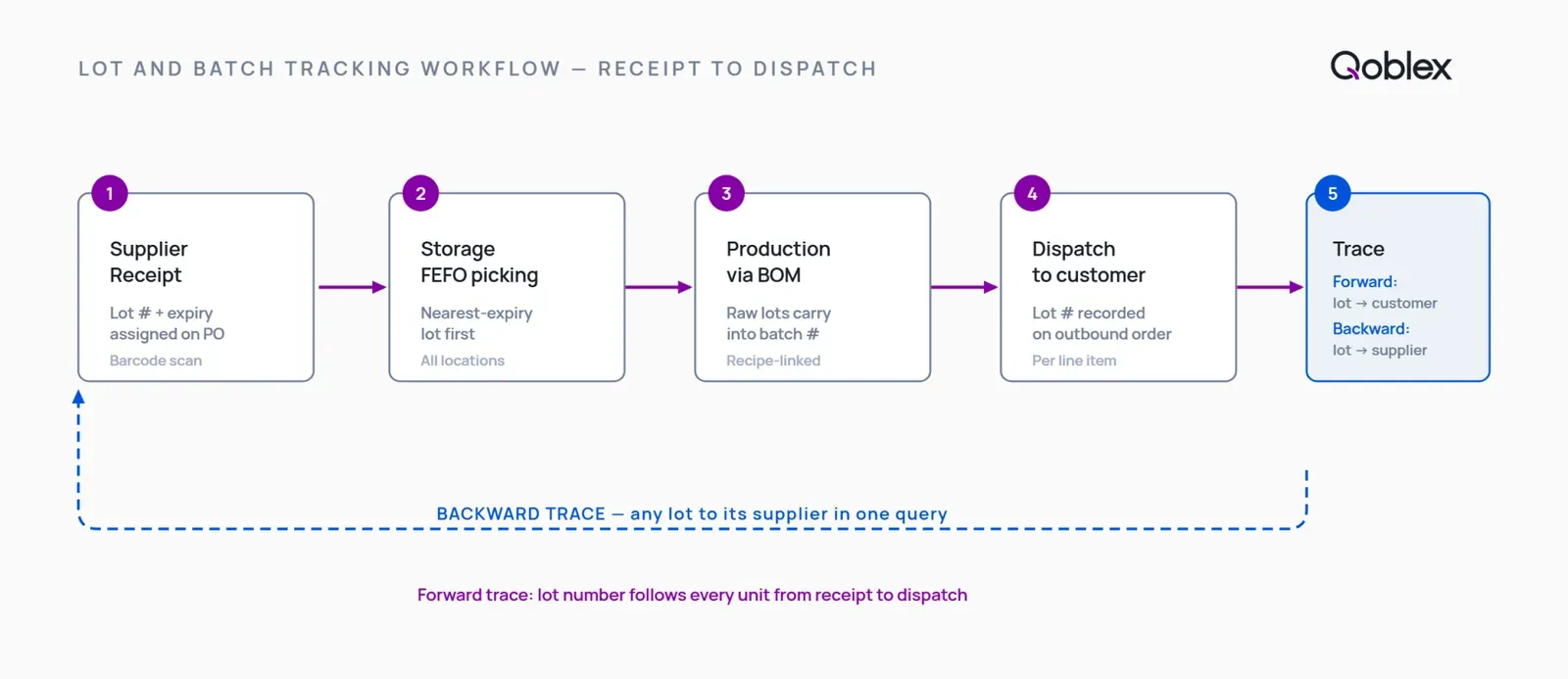
Step 1: Receiving, assigning lot numbers and expiry dates when stock arrives
Lot tracking starts at the dock. When a delivery arrives against a purchase order, the receiver records a lot or batch number and its expiry or best-before date, then confirms the quantity received. The lot number can come straight from the supplier’s label or be generated by the system, and it is stamped onto the purchase order line so the lot points back to the supplier and receipt it came in on. This is where barcode scanning earns its place: a handheld scan reads the lot and captures the quantity in one motion, which cuts the keying errors that make a manual log untrustworthy later. Get this step right and everything downstream has something true to build on. Skip it, and no amount of software downstream can invent the record that was never taken.
Step 2: Storage and FEFO, how the system picks the right lot at pick time
Once stock is in, perishable goods have a clock running. The right picking method for food is FEFO, First Expired First Out: pick the stock with the nearest expiry date first, regardless of when it arrived. That is different from FIFO, First In First Out, which picks by arrival order. For perishables the two can disagree, because a batch received later may expire sooner, and expiry order is the one that keeps near-dated stock moving and out-of-date stock from reaching a customer. FEFO only works if an expiry date was recorded at the lot level at receiving, and if the system surfaces the correct lot at the moment of picking rather than leaving the picker to guess. Done well, it reduces waste you already paid for.
Step 3: Production, how raw-ingredient lot numbers carry into a finished batch
If you manufacture, the workflow has a step that pure distributors skip, and it is the one most systems handle badly. A production run consumes specific raw-material lots according to a recipe or bill of materials, and produces a finished-goods batch with its own new batch number. When lot tracking is wired into the bill of materials, the system records which raw-ingredient lot numbers fed into which finished batch. That link is what lets a trace pass through production instead of stopping at the finished-goods shelf: if a supplier flags a raw ingredient, you can see every finished batch that used it. A batch number is assigned to the run itself, so the output of Tuesday’s run is one queryable group tied to the exact ingredient lots it was made from. For the deeper recall-readiness and end-to-end picture, see food traceability software.
Step 4: Dispatch, recording which lot went to which customer
The last step closes the loop. When an order ships, the system records which lot numbers went out on which outbound order, and therefore to which customer. This is the half of traceability people forget until they need it. Knowing which supplier lot you received is only useful if you also know which customers received it. With dispatch recorded at the lot level, “which customers got batch 4471?” is a report, not an afternoon of cross-referencing packing slips. That is the difference between a forward trace that takes minutes and one that takes days.
What lot tracking records look like, and who asks for them
The workflow above produces records. It helps to know what those records are for, because three very different requests all need the same underlying data.
Retailer and distributor requirements: lot numbers on every line item
Grocery, foodservice, and pharmacy buyers increasingly will not onboard a supplier who cannot put a lot number and expiry date on every line of an order. It shows up on the onboarding form as a flat requirement, often on a tighter timeline than any regulation asks for. If your records live in a spreadsheet beside your accounting software, meeting that requirement means transcribing by hand under time pressure, which is exactly when errors get made. When dispatch is already recorded at the lot level, the lot and expiry data prints on the document because the system already holds it.
Audit trail records: what a forward and backward trace looks like in practice
An audit trail is the queryable movement history of every lot. Two directions matter. A backward trace answers “where did this come from?”, pointing a finished product back through the bill of materials to the raw-ingredient lots and the suppliers and purchase orders they arrived on. A forward trace answers “where did this go?”, pointing a flagged lot forward to every production batch that consumed it and every customer shipment that carried it, plus what is still on hand and where. When a supplier or a regulator flags a lot, those two queries are what let an operator isolate the affected units quickly instead of reconstructing the trail from paper. For the full mock-recall walkthrough, see food traceability software.
FSMA 204 and traceability records
For US food businesses, the FDA’s Food Safety Modernization Act Section 204 requires certain foods to carry documented traceability records, built around key data elements captured at defined points in the supply chain. The compliance date was extended to July 20, 2028, which is a preparation window, not a fire drill: the records the rule expects are the same lot, receipt, production, and shipment records a lot-tracking workflow already produces. This page keeps FSMA 204 brief on purpose. For the full treatment of the rule, its key data elements, and how to run a mock recall against it, see food traceability software.
Why a spreadsheet or your accounting platform breaks down for lot tracking
None of this is a criticism of the tools you started with. It is a description of where they stop.
The spreadsheet problem: manual lot records that do not connect to movements
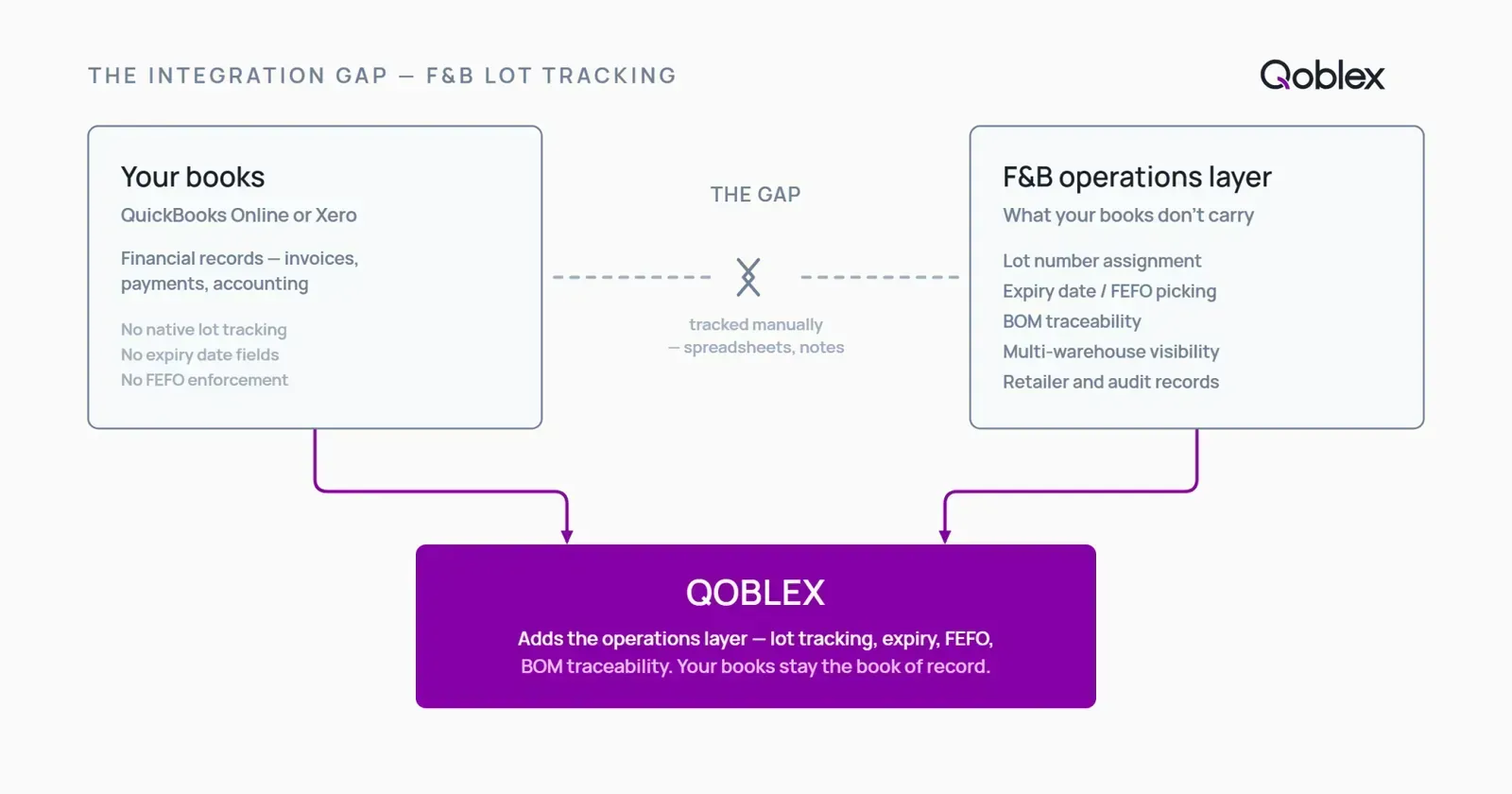
A spreadsheet can hold lot numbers. What it cannot do is connect them to the movements that happen after you type them in. The receipt, the transfer, the production run, and the shipment all live in other places, so the spreadsheet drifts out of agreement with reality the moment someone forgets to update it. During a recall that gap becomes the problem: the trace depends on a record that was only as complete as the last person’s memory, and the one lot you need to find is often the one nobody logged. Spreadsheets got a lot of good food businesses off the ground. They just were not built to stay true once stock is moving between locations and through production.
QuickBooks Online and Xero: no native lot tracking, no expiry fields, no FEFO enforcement
Your accounting platform is good at accounting. It is not built for physical traceability. QuickBooks Online does not support lot or batch number tracking, expiry date recording, or FEFO picking natively (lot and serial number tracking is a feature of QuickBooks Desktop Enterprise, not QBO). Xero does not either, and that includes Xero Inventory Plus, which is currently available in the US only, prices in USD, and adds no lot, batch, expiry, or serial capability. The gap is not about how these platforms value stock for the books, which they do fine. The gap is the physical lot, expiry, and FEFO layer, which they were never designed to hold. For the platform-specific detail, see lot and expiry tracking for QuickBooks Online and lot tracking for Xero users.
What “a lot-number field in the description box” actually means at audit time
Some operators work around the gap by typing lot codes into a line-item description or a memo field. It looks like tracking until someone asks you to trace a batch. A lot code in a text field is not tied to the quantity received, the locations it moved through, or the shipments it left on, so it cannot answer “how much of lot 4471 is still on hand and which customers got the rest?” At audit time that is the only question that matters, and a description-box entry cannot answer it. The label is there. The trace is not.
How these tools compare: spreadsheet or accounting platform vs a dedicated lot tracking layer
The table below maps the capabilities that matter for a food or beverage operator against what each option actually delivers.
| Capability | Spreadsheet or accounting platform (QBO / Xero) native | Qoblex (inventory operations layer) |
|---|---|---|
| Lot number assignment at receiving | No (manual entry or text field only) | Yes (against the PO line, barcode-scannable) |
| Expiry date capture and alerting | No | Yes (per lot, with near-expiry alerts) |
| FEFO picking enforcement at pick time | No | Yes (nearest-expiry lot surfaced at pick) |
| Lot tracking through production (BOM: raw ingredient to finished batch) | No | Yes (raw-material lots carry into finished batch) |
| Multi-warehouse lot visibility (same lot across sites and 3PLs) | No | Yes (all locations in one view) |
| Forward trace (lot to customer shipment) | No | Yes (report, not reconstruction) |
| Backward trace (lot to supplier and receipt) | No | Yes (report, not reconstruction) |
| Retailer / auditor lot records as a report | No | Yes |
| Integration with existing accounting platform (QBO / Xero) | Native (it is the accounting platform) | Yes (syncs financial results back) |
| Integration with existing sales channels (Shopify / WooCommerce) | No | Yes (orders and stock in sync) |
How Qoblex handles lot and batch tracking for F&B businesses
Once the requirement is clear, here is where Qoblex fits. It is the inventory operations layer that sits on top of the tools you already run, not a replacement for them.
Capturing lot numbers and expiry dates at receiving (against a purchase order)
Qoblex captures the lot or batch number and expiry date at receipt, recorded against the purchase order line so the lot points back to the supplier it came from. Barcode scanning captures the lot and quantity in one motion at the dock, which is where the record has to be right for everything downstream to hold.
FEFO picking enforcement: nearest-expiry lot surfaces at pick time across all locations
Because expiry dates are recorded at the lot level, Qoblex surfaces the nearest-expiry lot at pick time rather than leaving it to the picker’s judgment, and it does this across every warehouse, co-packer, and 3PL you hold stock in. Multi-warehouse lot visibility means FEFO works across sites, not just within one, so near-dated stock in a second location does not quietly expire because nobody could see it.
Batch numbers in production: raw-material lots carry into the finished-goods batch via BOM
Manufacturing (MRP and bill of materials) is included on all Qoblex tiers, so a production run consumes specific raw-material lots against the recipe and produces a finished batch whose number is tied back to the exact ingredient lots it was made from. That is the link that lets a trace pass through production. For the full BOM traceability and recall-readiness picture, see food traceability software.
Lot, batch, serial, and expiry tracking itself is a paid add-on rather than part of the base plan. See qoblex.com/pricing for current plan figures. One boundary worth naming: Qoblex is the inventory operations layer, not a HACCP platform. If your gap is a documented food-safety program with audit questionnaires and inspection forms, that is a different category of tool.
How the integration works: Qoblex handles operations, QBO or Xero stays the book of record
The point of the operations layer is that it does not ask you to leave the tools that already work. Qoblex integrates with QuickBooks Online and Xero, syncing financial results back so your accounting platform stays the book of record, and it connects to Shopify and WooCommerce so orders and stock stay in agreement without re-keying. Qoblex owns lot tracking, expiry dates, FEFO picking, production, and multi-warehouse visibility. Your accounting and your storefront keep doing what they are good at. If you are earlier in the research, the food and beverage inventory software hub maps the whole picture.
When a spreadsheet or your existing setup is still enough (the honest version)
Lot and batch tracking adds real operational overhead. You have to record a lot number at every inbound shipment and every production run, and your team has to actually scan or enter it, every time. That discipline is worth it when the business needs it, and premature when it does not. Here is the honest read.
You sell non-perishable goods with no lot-number requirement from any customer or regulator
If you buy and resell finished, shelf-stable goods with no expiry risk, no production step, and no customer or regulator asking for lot numbers, dedicated tracking is solving a problem you do not have yet. There is no prize for buying software before the requirement arrives.
Your volume is small enough that a manual log beside your accounting software still tells the truth
For a very small single-SKU operation, a well-kept spreadsheet or log can genuinely stay accurate, because one person can hold the whole picture in their head and update it reliably. The moment that stops being true is usually the moment a second location or a second person enters the workflow.
When dedicated lot tracking software starts to earn its place
Lot tracking is not required by law for every food business, but it becomes the right move the moment any of these arrive: a retailer asks for lot numbers on line items, a customer or auditor asks you to trace a batch and you cannot answer from a report, you start losing money to expired stock because picking is guesswork, or you add a second location and lot visibility disappears. If one or more of those describe you, the manual workaround has quietly become the risk. If none do, keep the spreadsheet.
FAQ
What is lot tracking in food manufacturing?
Lot tracking assigns a unique lot number to every group of raw materials or finished goods, recording the supplier, receipt date, expiry date, and quantity at receipt. Every subsequent movement (production, storage, dispatch) is tied to that number, so any unit can be traced to its origin or destination in a single query. In manufacturing, lot tracking also connects raw-ingredient lots to finished batches through the bill of materials.
What is the difference between a lot number and a batch number in food?
In practice, they are the same thing in different contexts. “Lot” is more common in food distribution and regulation (the FDA uses “lot code”); “batch” is more common in manufacturing, where a batch is a production run. Both describe grouping units by shared origin and tracing that group end to end, and both are tracked the same way in software.
Does QuickBooks Online support lot tracking for food products?
No. QuickBooks Online does not support lot or batch number tracking, expiry date recording, or FEFO picking natively. To add lot tracking while keeping QBO as the book of record, operators add a dedicated inventory operations layer such as Qoblex that syncs financial results back to QBO.
What is FEFO and how is it different from FIFO for food businesses?
FEFO (First Expired, First Out) picks the stock with the nearest expiry date first, regardless of arrival order. FIFO (First In, First Out) picks by arrival order. For perishable goods, FEFO is the correct picking method because it keeps near-dated stock moving and out-of-date product from reaching a customer. Lot tracking software enforces FEFO by recording expiry at the lot level and surfacing the right lot at pick time.
How does lot tracking help with food product recalls?
When a supplier or regulator flags a lot, the operator runs a forward trace from that lot to every customer shipment, and a backward trace to the supplier and receipt. Because lot tracking connects raw-ingredient lots to finished batches via the bill of materials, a contamination in a raw ingredient traces forward to every finished product that used it. A software trace takes minutes. See food traceability software for the full recall-drill walkthrough.
How does lot tracking work in food manufacturing with a bill of materials?
Each production run uses specific raw-material lots according to the recipe or bill of materials. When lot tracking is wired into the BOM, the system records which raw-ingredient lot numbers fed into which finished-goods batch. This matters most at recall: a flagged ingredient traces forward through the BOM to every finished product that used it. Without BOM-level lot tracking the trace stops at the finished-goods shelf.
What records does lot tracking produce for a food retailer or auditor?
A queryable movement history for every lot: the supplier and purchase order it came from, the quantity received and remaining, every warehouse and production location it passed through, every finished batch it fed into (if manufactured), and every customer shipment it left on. For a retailer, that means lot number and expiry date on every line item. For an FSMA 204 audit, it is the key data elements at each defined tracking point, available as a report.
How much does lot tracking software cost for a food business?
For Qoblex, lot, batch, serial, and expiry tracking is a paid add-on. See qoblex.com/pricing for current plan figures. Manufacturing (MRP and BOM) is included on all Qoblex tiers.
Does Qoblex replace my accounting software?
No. Qoblex integrates with QuickBooks Online and Xero, acting as the inventory and operations layer while accounting stays in the existing platform. It also connects to Shopify and WooCommerce so orders and stock stay in agreement without re-keying. The accounting platform stays the book of record; Qoblex owns lot tracking, expiry dates, FEFO picking, production, and multi-warehouse visibility on top of it.