


At a glance: A food maker grows and harvests its main crop on its own farm, buys in a few other ingredients, processes and packs in-house, and sells through two Shopify stores. It kept no batch records linking one step to the next, so a question about one harvest lot would have meant matching harvest notes, production sheets and order lists by hand. Now the harvest lot is booked into stock, assigned on each production order, and Trace in Qoblex follows it to the finished batches and the Shopify orders they shipped on.
What does a food maker that grows its own crop have to piece together when one harvest lot is in question?
A food maker that grows its main crop, buys in a few other ingredients, processes in-house and sells through two Shopify stores has to be able to show where one harvest lot went, and with no batch records linking harvest, production and orders, that would have meant matching three sets of records by hand. The person who runs the farm and the kitchen brings the crop in from the field, other ingredients arrive with their suppliers’ lot numbers, and everything is processed, jarred and packed in-house.
The jars go out on orders from two Shopify stores, and each step kept its own record: the farm’s harvest notes, the kitchen’s production record, each store’s orders. That was reasonable for a business of this size, because the people doing the work knew the story behind every record. What no record held was the link between them.
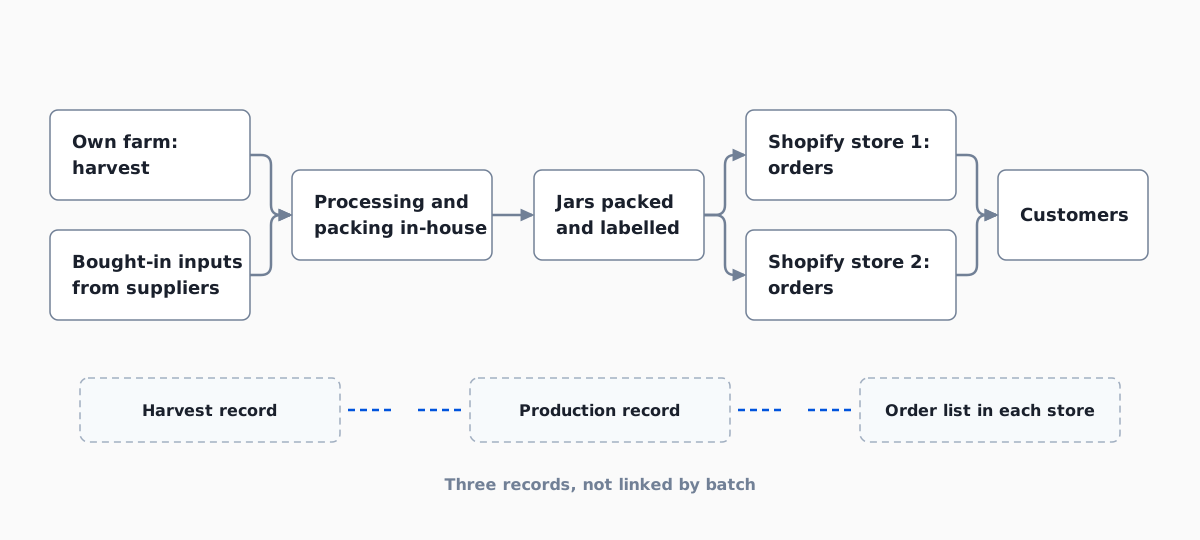
Anyone asked where one lot went would have needed to know which production days used it, which jars those days made and which orders took them, with each answer in a different place. Every step would have had to be checked by hand before anyone could trust the answer. So the team looked at how Qoblex records a lot at the three moments the goods change form: coming into stock, becoming jars, and leaving on an order.
How does a food maker that grows its own crop record harvest, bought-in ingredients and production in Qoblex?
A food maker that grows its own crop records each harvest lot in Qoblex as a batch of a Batch Tracked ingredient, records bought-in ingredients as batches on their purchase orders, and assigns the lots it used and the finished batch it made on the production order, in the Receive Batch dialog, when the order is completed. Before any stock arrives, the owner sets the Inventory Tracking Option on the crop, each bought-in ingredient and the finished jar to Batch Tracked. Packaging that nobody needs to trace stays on Standard, which tracks quantity only.
The harvest has no supplier, so the owner books it in with a stock adjustment under the business’s own reason, such as Harvest, entering the harvest lot number as the batch. The person who handles deliveries receives bought-in ingredients on the purchase order with the supplier’s lot as the Batch Number.
Production runs on a production order built from the jar’s bill of materials, both on every Qoblex plan. Completing the order opens the Receive Batch dialog: under Finished Product Batch / Serial numbers the person who runs the kitchen clicks Add Batch and enters the run’s Batch Number and Quantity (not Auto Generate, which makes one batch per unit), and under Consumed Raw Materials Batch / Serial numbers picks, from the lots at that location, the lot each ingredient came from, adding a row when a run drew from two lots. Qoblex completes the order only when the quantities reconcile, and once it is Completed the batch fields lock, so the person who runs the kitchen assigns the lots that were on the bench that day before completing it. That leaves one link: from a finished batch to the orders that carry its jars.
How do the finished batches reach orders on two Shopify stores in Qoblex?
A food maker with two Shopify stores sees each store’s orders in Qoblex as sale orders, and the team picks the finished batch on the shipment, so the batch stays linked to the shipment and Qoblex creates the fulfilment, with tracking, on the Shopify order. Shopify stays where customers shop and pay, and Qoblex’s Shopify integration brings each connected store’s orders across as sale orders, each belonging to one store.
On an order, the packer clicks Ship, sets To Ship, clicks Pick and, in Batch / Serial number details, selects the finished batch and the number of jars, with Add Batch when the jars come from two batches (shipping batches on sales orders). Confirm reserves them, and Pack then Dispatch reduces stock from those batch records, keeps the batch details linked to the shipment and creates the fulfilment on the Shopify order with its tracking. That pick is why the team ships batch-tracked jars from Qoblex: it is where a jar’s batch meets a customer’s order.
The food and beverage page covers the wider setup. The last row below is the one the others exist for, and it set the team’s next check: could the trace be read both ways?
| What the team needs to do | Before | In Qoblex |
|---|---|---|
| Record a harvest | Kept in the farm's own harvest record | Entered as a batch by stock adjustment, under the business's own reason |
| Record a bought-in ingredient | The supplier's lot on the delivery paperwork | The supplier's lot entered as the Batch Number when the purchase order is received |
| Record what went into a finished batch | A production record held apart from stock | Lots assigned to each consumed ingredient and to the finished batch on the production order |
| Record what shipped on an order | An order list in each store | The finished batch picked on the shipment and kept linked to it |
| Answer "where did this lot go?" | Match the three records by hand | Trace on the lot, then on each finished batch, reading Downstream and Upstream |
Can a food maker trace one ingredient lot forward to customer orders, and one jar back to its ingredient lots, in Qoblex?
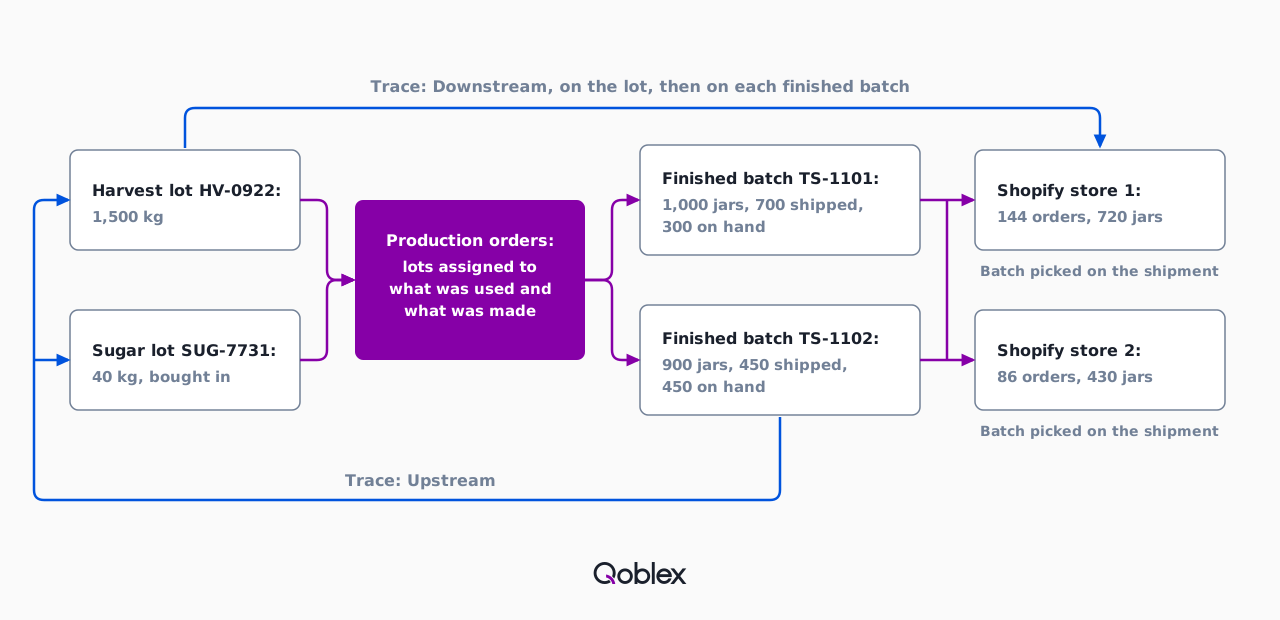
Yes: a food maker opens Trace on a harvest lot in the Qoblex Batches list and reads its Downstream tab for the production orders that used it, then opens Trace on each finished batch for the sales it shipped on, and reads a finished batch’s Upstream tab the other way for the production order that made it, whose Lots & Serial shows the lots that went in. That was the team’s own question when it walked through its workflow: could each ingredient batch be followed through production to the customer orders?
Forward: from a harvest lot to the orders it shipped on
A food maker traces a harvest lot forward in Qoblex by filtering the Batches list by Batch Number and choosing Trace on the lot’s row (viewing and tracing batches). The trace sheet shows summary quantities, an Overview graph, and Upstream and Downstream lists covering purchase receiving, manufacturing, transfers, sales, sale returns, supplier returns and stock adjustments. A row opens its source transaction where Qoblex can link one.
A harvest lot never leaves on an order itself, so its Downstream lists the production orders that used it. The owner then opens Trace on each finished batch those orders made, and its Downstream lists the sales, each row opening its source transaction where Qoblex can link one. Forward is two traces, read one after the other.
Back: from a finished jar to the lots inside it
A food maker traces a finished jar back to the lots inside it by starting from the batch number on the label, because a customer asking about a jar turns the question round. Trace on that finished batch opens the same sheet, and Upstream lists the production order that made it; opening that order and choosing Lots & Serial shows the lots it consumed, the harvest lot and the bought-in ingredient’s lot alike.
That answer is only as good as the lots the kitchen assigned at completion. Qoblex stops at showing where a lot went and sends no recall notice; what happens next is the team’s decision. That leaves the jars that never left the shelf.
What does a food maker do with the finished jars of an affected batch that have not shipped?
A food maker moves the unshipped jars of an affected batch to a quarantine location with a stock transfer that names the batch in Batch / Serial number details, or takes them out with a stock adjustment against the batch if they are destroyed, and Qoblex leaves that decision to the business. The trace summary shows how many jars remain and how many are reserved, and the packer settles any open shipment first, because stock it holds may not be available to transfer.
The transfer, under Stock Control > Stock Transfers, keeps the same batch number and expiry date at quarantine, the adjustment against the batch for destroyed jars sits under Stock Control > Adjustments, and either movement shows in the batch’s trace. Qoblex does not lock or hold the batch, so quarantine is a move the team makes; a business on Starter, which allows two warehouse locations, checks its count before adding one. The whole sequence reads best as one drill on one lot.
What does a recall drill on one harvest lot look like in Qoblex, from the lot number to the order list?
A grower-processor runs a recall drill in Qoblex in eight steps, from filtering the Batches list for one harvest lot to reading the sale orders each finished batch shipped on. Let’s assume the farm brings in harvest lot HV-0922 on the Monday of week 1, 1,500 kg booked into stock by adjustment, and that a 40 kg sugar lot, SUG-7731, came in earlier on a purchase order. On Tuesday a production order uses 600 kg of HV-0922 and 20 kg of SUG-7731 to make finished batch TS-1101, 1,000 jars, and on Thursday a second uses 540 kg and 18 kg to make TS-1102, 900 jars.
Through weeks 2 and 3, TS-1101 ships 700 jars on 140 orders and TS-1102 ships 450 jars on 90 orders, which makes 1,150 jars on 230 orders: 720 jars on 144 orders from store 1 and 430 on 86 from store 2. That leaves 300 jars of TS-1101 and 450 of TS-1102 on hand, 750 in all. At 9:00 on the Friday of week 3 the team decides to run a mock recall drill on lot HV-0922, whose trace reads 1,140 kg consumed and 360 kg remaining.
- Go to Batches and filter the list by Batch Number for the harvest lot.
- On the lot’s row, choose Trace and read the summary quantities.
- Open Downstream, which lists the production orders that used the lot.
- Open each production order and use Lots & Serial to see the finished batch it made and the lots it consumed.
- Filter Batches for each finished batch, choose Trace, and open Downstream to list the sales it shipped on.
- Open each sale’s order to read the customer and the quantity.
- Use Upstream on a finished batch to open the production order that made it, and Lots & Serial there to see the other lots that went into it, such as the bought-in ingredient.
- Move the jars still on hand to a quarantine location with a stock transfer naming the batch, or adjust them out if they are destroyed.
By step 6 the team holds the 230 orders, and step 8 deals with the 750 jars on the shelf. Contacting those customers, and deciding what a real recall would require, is the team’s own work. Run on a quiet Friday, the drill shows whether the records hold up before a real question arrives.
Does this fit your business?
The Qoblex batch trace flow fits other grower-processors, such as a farm making preserves, sauces, dried herbs, spices, tea or oils from its own crop. A food maker that buys every ingredient runs it without the harvest adjustment, and a contract packer, a small-batch maker selling on Shopify and wholesale, or a supplement or cosmetics maker has the same batch-to-order question. Shopify keeps the orders and Qoblex adds the lots behind them; lot tracking, manufacturing, a broader guide to food traceability and the supplier-to-shelf view cover the wider picture.
A business whose foods fall under the FDA’s Food Traceability Rule should start from the rule, under which persons subject to it “who manufacture, process, pack, or hold foods on the FTL, maintain records containing Key Data Elements (KDEs) associated with specific Critical Tracking Events (CTEs)”. Qoblex records and links lots, and its help centre documents the trace sheet rather than any FDA-specific record format, so confirm what you need before you decide; the FSMA 204 traceability guide goes further.
The flow does not fit a business that needs the system to stop a recalled lot from being picked or sold, or to send recall notices or customer emails, because Qoblex does neither; if blocking or notices are a must, talk to us before you decide. A product made through an intermediate, such as a base cooked first and jarred later, needs a production order and batch at each stage, because production orders do not cascade, and disassembly carries no batch tracking. And a business with a handful of products and a few orders a week, where a lot code on the label and a careful notebook already answer where a jar went, may need only a Standard variant or the record that has carried it this far.
Frequently asked questions
Can I pull a report showing every customer who got a batch, when, and how many units, to recall it?
In Qoblex, open Trace on the finished batch and read its Downstream tab, which lists the sales the batch shipped on. A row opens its source transaction where Qoblex can link one, and the sale order it belongs to names the customer. For an ingredient lot, trace the lot first, then each finished batch. The team contacts those customers itself.
Does Qoblex make a food maker FSMA 204 compliant?
No. Qoblex records batch and lot details at receiving, production and shipping and links them in a trace sheet, but it makes no compliance claim. The FDA’s Food Traceability Rule decides which foods and records are covered, so check its page and the FSMA 204 traceability guide for your products.
How do I bring a harvest into stock as a batch when there is no supplier?
In Qoblex, set the ingredient to Batch Tracked, then record a stock adjustment that increases stock under your own adjustment reason, such as Harvest, and enter the harvest lot number as the batch. Bought-in ingredients still arrive on purchase orders with the supplier’s lot.
Which plan includes lot traceability for a food maker?
In Qoblex, lot, batch, serial and expiry traceability is a paid add-on on the Starter and Business plans and is included on Scale. Production orders and the bill of materials are on every plan. See pricing for current figures.
Does this work with two Shopify stores?
Yes, Qoblex handles two Shopify stores. Each connected store’s orders arrive in Qoblex as sale orders, and each order belongs to one store. The team picks and dispatches from Qoblex, so the finished batch is linked to the shipment whichever store the order came from.
What if we fulfil an order in Shopify instead of Qoblex?
For batch-tracked jars, pick and dispatch in Qoblex. Qoblex’s help centre documents batch selection only when the team picks the shipment in Qoblex, so fulfilling from Qoblex is what keeps each jar’s batch on its order.
Can I fix a wrong lot after a production order is completed?
In Qoblex, not on the order itself: once a production order is Completed, its batch fields lock. Correct the finished-product or component batch stock with an inventory adjustment, and note the production order number, the SKU and the batch, so the correction stays tied to the original run.
Can I trace a finished jar back to the ingredient lots inside it?
Yes. In Qoblex, open Trace on the finished batch and read the Upstream tab, which lists the production order that made it, then open that order’s Lots & Serial to see the lots it consumed, including the bought-in ingredient’s lot. Qoblex records those lots when the team assigns them on the production order at completion, so they must match what was physically used.