



At a glance: A games and puzzle brand sells its own-designed range on Shopify and to retailers, and keeps its books in Xero. It takes about 150 wholesale orders a year, almost all by email. Each one means reading the message, looking up the retailer’s price, checking stock and typing the order again. That takes about 20 minutes. The retailers have nowhere to browse the range, see their prices or check an order. Stock promised by email is also not held back from the web store.
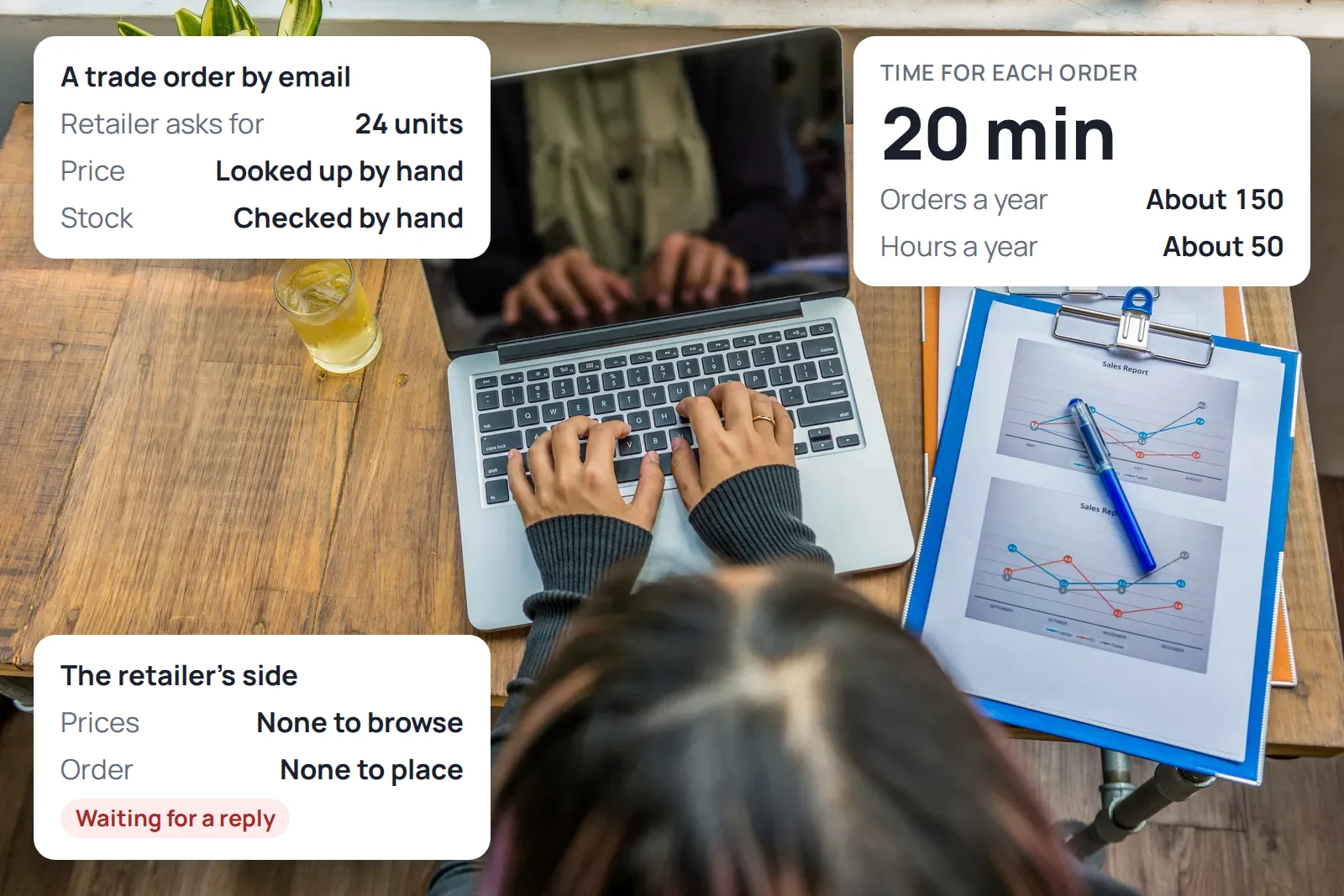
- A trade order by emailRetailer asks for24 unitsPriceLooked up by handStockChecked by hand
- Time for each order20 minOrders a yearAbout 150Hours a yearAbout 50
- The retailer's sidePricesNone to browseOrderNone to placeWaiting for a reply
What does it cost a games and puzzle brand when its retailers order by email?
For a games and puzzle brand that sells to retailers by email, each trade order costs someone a slice of the day. The same order is read, priced, checked against stock and typed again before anyone replies.
A brand of this shape designed its own puzzles and brought in finished stock from a supplier. It sold direct on its Shopify store and to gift shops, toy shops and bookshops. The catalogue was simple, with no variants. The books were kept in Xero. Wholesale was the smaller side, but it arrived as a steady run of small repeat orders, mostly by email.
A typical order came from a shop’s buyer with a quantity, such as 24 units of a best-selling puzzle. The person who took it found that shop’s agreed price in a price sheet or an old message. Then they checked the Shopify admin for stock. The order was typed into a sales record, then again into an invoice. Let’s assume the brand takes about 150 wholesale orders a year, and each one costs about 20 minutes. That comes to about 50 hours a year of reading, looking up and retyping.
The retailer’s buyer saw the other half of the problem. They could not browse the range or see their prices without asking. They could not place the order or see how it was going, so they emailed again. Meanwhile, the 24 units promised in a reply were not held back from the web store. Online shoppers could still buy them until someone packed the box.
None of this was careless work. Email ordering made sense while the brand had a handful of retailers and knew each one well. But each new shop added another 20 minutes per order, and another price to remember. So the real question became what a portal would need to do to take that work out of the inbox.
What should a B2B ordering portal do for a games and puzzle brand?
A wholesale ordering portal for a games and puzzle brand should let each retailer log in, see its own prices and order for itself. Any vendor can be held to those three jobs, and the rest follows from them.
The portal should be private, open by invitation or by a request the brand approves. Trade prices then never sit on a public page. Each retailer should see its own price and never another shop’s. The brand should choose what each retailer can browse, and set a minimum order. Those rules protect the margin without anyone checking each order by hand.
Stock matters most to a brand that also sells online. A portal order should draw on the same stock as the web store, so no box is promised twice. The brand should see each order before stock is committed, because retailers make mistakes too. The invoice should then reach the books without being retyped. And the team should still be able to take a phone order from a retailer that would rather not log in.
Put plainly, the brand needs software for managing wholesale orders and stock, not a second web shop. Shopify already runs the web store well, and Xero already keeps the books well. The portal’s job is to join the trade orders to both. Here is how that runs in Qoblex for one retailer’s reorder.
How does a games and puzzle brand run a B2B ordering portal in Qoblex?
A games and puzzle brand runs a B2B ordering portal in Qoblex where invited retailers order at their own prices, from the Shopify store’s stock. Each price comes from the price list on the retailer’s customer record. Each order lands in Qoblex for the brand’s team to confirm.
Let’s assume a retailer reorders 24 units of one best-selling puzzle. The puzzle sells for 30.00 on the Shopify store, and the brand holds 240 units. The owner set up the B2B portal as a branded storefront and previewed it before inviting anyone. The retailer’s buyer got in through an invitation sent from the brand’s customer list, as invite customers and sale agents to B2B describes.
When the buyer logs in, the puzzle shows at 18.00 a unit. That figure comes from a saved price list called Retailers, assigned to the shop’s customer record. The shop also sits in one of the brand’s customer groups, which sets the collections it sees and its order minimums. The buyer orders 24 units, and the order comes to 432.00.
The order draws on the same 240 units the web shoppers buy from. Qoblex keeps the Shopify store’s stock in step through its Shopify product and inventory sync, and Shopify orders come into Qoblex. Once the order is packed and invoiced, the invoice posts to Xero under the brand’s Xero sales settings. The accountant finds it there without anyone typing it in.
The B2B portal page shows the portal as a whole. Each step of that reorder raises its own question. The first is how a retailer gets in and sees the right price.
How can trade customers log into their own portal and see their wholesale prices?
A games and puzzle brand’s trade customers log into the Qoblex B2B portal by invitation, or through a signup request the brand approves. Once in, each retailer sees prices from the price list on its own customer record.
Getting retailers in at the right price was the first thing the brand asked about when checking its own workflow in Qoblex. The owner invites retailers from the customer list, which suits the shops already buying. A new shop can ask for access instead. When the owner approves the request, Qoblex creates the customer. The help centre advises checking that customer’s price list and details before the shop orders.
The price rule is short. Each customer record can carry an assigned price list, and the portal prices that customer’s orders from it. A customer with no list of its own sees the portal’s Default Price List. The default can be a saved list or the reserved Retail or Wholesale list. Here the owner has set it to the Wholesale list, which prices the puzzle at 20.00.
So the shop on the Retailers list pays 18.00 a unit, and its 24 units come to 432.00. A shop with no list of its own sees 20.00, so the same 24 would cost 480.00. That is 48.00 more on one order, decided only by which list sits on the record.
Customer groups do a different job, and they carry no prices. A group sets which collections its members see, along with a Minimum Order Quantity and a Minimum Order Value. This retailer’s group asks for at least 12 units and an order worth at least 300. The order of 24 units clears the first, and 432.00 clears the second with 132.00 to spare. An order below the minimum cannot be placed, so the owner picks the minimums before inviting anyone.
With the price settled, the brand turned to the shelf. A brand that also sells online needs to know what a trade order does to its web store’s stock.
How does a wholesale portal work alongside our Shopify store?
A games and puzzle brand’s Qoblex B2B portal works alongside its Shopify store because both sell from one stock count in Qoblex. Qoblex keeps the store’s quantities in step with that count, and Shopify orders come into Qoblex.
The owner decides what retailers can browse by choosing collections, which are saved filters over the product list. Retailers can see the exact available quantity or simply whether a puzzle is in stock, as the owner prefers. Either way, the figure comes from the stockroom that supplies portal orders, which for this brand is where the 240 puzzles sit.
A portal order arrives in Qoblex as a quote, and a quote holds no stock, as when Qoblex allocates stock automatically explains. So the team sees every portal order before stock is committed to it. Suppose the retailer’s 24-unit order comes in on Monday morning. By Monday afternoon, the person who handles trade orders confirms it with Create Order. That reserves 24 units and leaves 216 to sell, and the Shopify store’s quantity follows.
On Tuesday the web store sells 4 of the same puzzle, which leaves 212. Web shoppers and retailers now draw on one number, so the shop’s 24 are not offered online a second time. The table sets the email way beside the portal for the same 24-unit order.
| Step | Before, by email | In Qoblex |
|---|---|---|
| The retailer asks | An email asking for 24 units | The retailer logs in and places the 24 units itself |
| The price | Looked up by hand in a price sheet | 18.00 a unit from the retailer's price list, 432.00 in all |
| The stock | Checked by hand, and not held back from the web store | 240 units in one count; 24 reserved once the order is confirmed, leaving 216 |
| The brand's side | The order typed in again | The order arrives as a quote with the retailer, its prices and the location already on it |
| The invoice | Typed into the books | Posted to Xero once the invoice is authorized |
The left column was reasonable work for a small trade side. Its weakness was that every step leaned on a person’s memory, and the stock step leaned on timing too. In the portal, the retailer’s buyer does the asking and the price arrives already set. The team keeps the one decision that matters, which is confirming the order. What remains is the order itself, from the buyer’s click to the invoice in Xero.
How do trade customers place an order, and how does the brand follow it through to Xero?
A games and puzzle brand’s retailers place their own orders in the Qoblex portal, and each one arrives as a quote. The team follows the order from that quote to dispatch, and the invoice posts to Xero.
For the retailer’s 24 units, the work runs in five steps.
- The retailer’s buyer logs in, picks 24 units and places the order, which clears the group’s minimums.
- The buyer receives an email confirmation, and the staff the brand chose are notified.
- The brand reviews the quote and turns it into an order, which reserves the stock.
- The team packs and dispatches the 24 units on Wednesday, from the same stock the web store sells from.
- The brand invoices the order, and the invoice for 432.00 posts to Xero once it is authorized.
Because the order is a quote first, the person who reviews it can still change it before confirming. A common change is a shipping and freight line, as create and edit a sales order shows.
On Wednesday, after dispatch, the team creates the invoice from the order, as invoices and payments covers. Nobody types the sale into Xero, so the accountant keeps working there as before, with the Xero integration doing the posting.
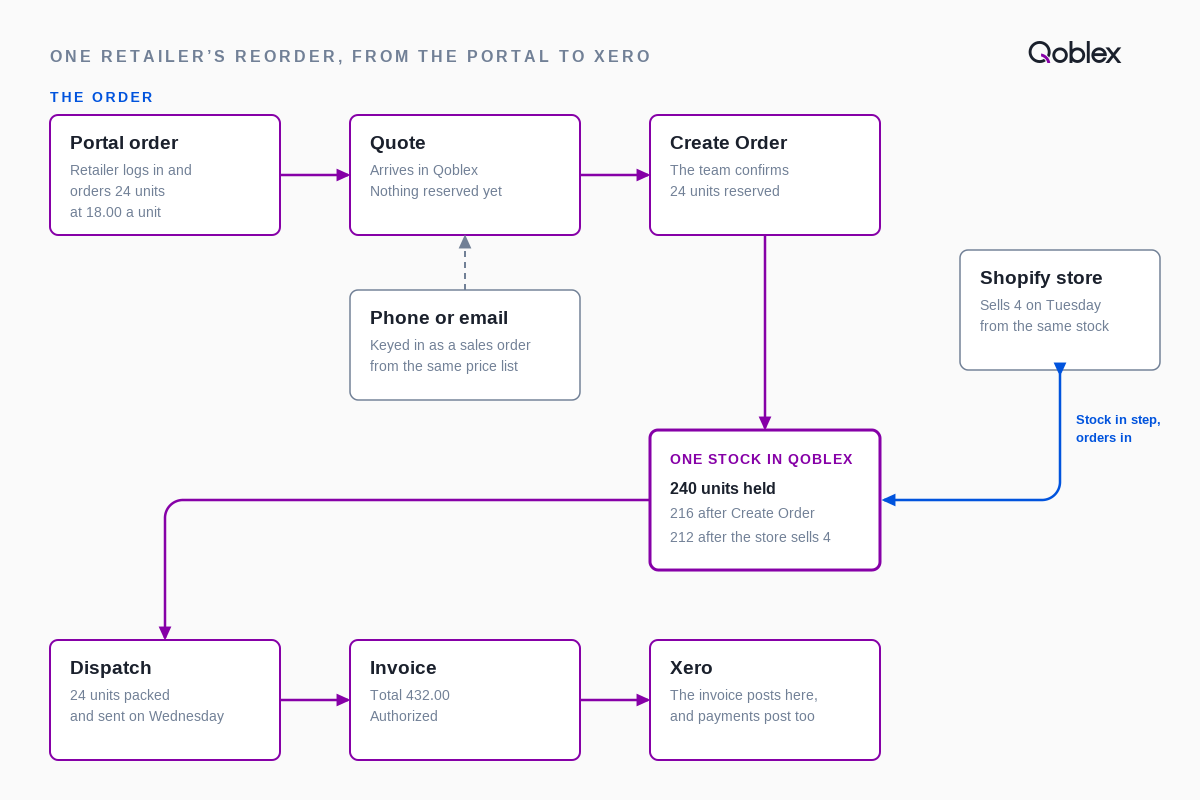
The diagram puts the whole reorder on one page, from the buyer’s login to the books. Nobody retypes the order, the price or the invoice. The hands-on moments are the ones a brand wants to keep: confirming, packing and authorizing. Not every retailer will log in, though, and the brand asked about those shops too.
Can the brand still take a retailer’s order by phone or email?
A games and puzzle brand can still key in a retailer’s phone or email order as a sales order in Qoblex. The order starts from that retailer’s own price list, just as a portal order does.
So when a toy shop phones for 24 of the same puzzle, the person who answers raises a sales order for that shop. The price comes in at 18.00 from the Retailers list. The stock comes from the same count as the portal and the web store. The invoice then follows the same route to Xero.
Phone and email orders join the portal orders in one list, so the team keeps no second pile. Each one is keyed once in Qoblex and never again in the books, and the accountant sees it in Xero like any portal order.
The portal works by invitation, so each retailer can move to it when it is ready. A bookshop that has always phoned can keep phoning, and its orders still land in the same place. Nobody is pushed onto the portal to make the system work.
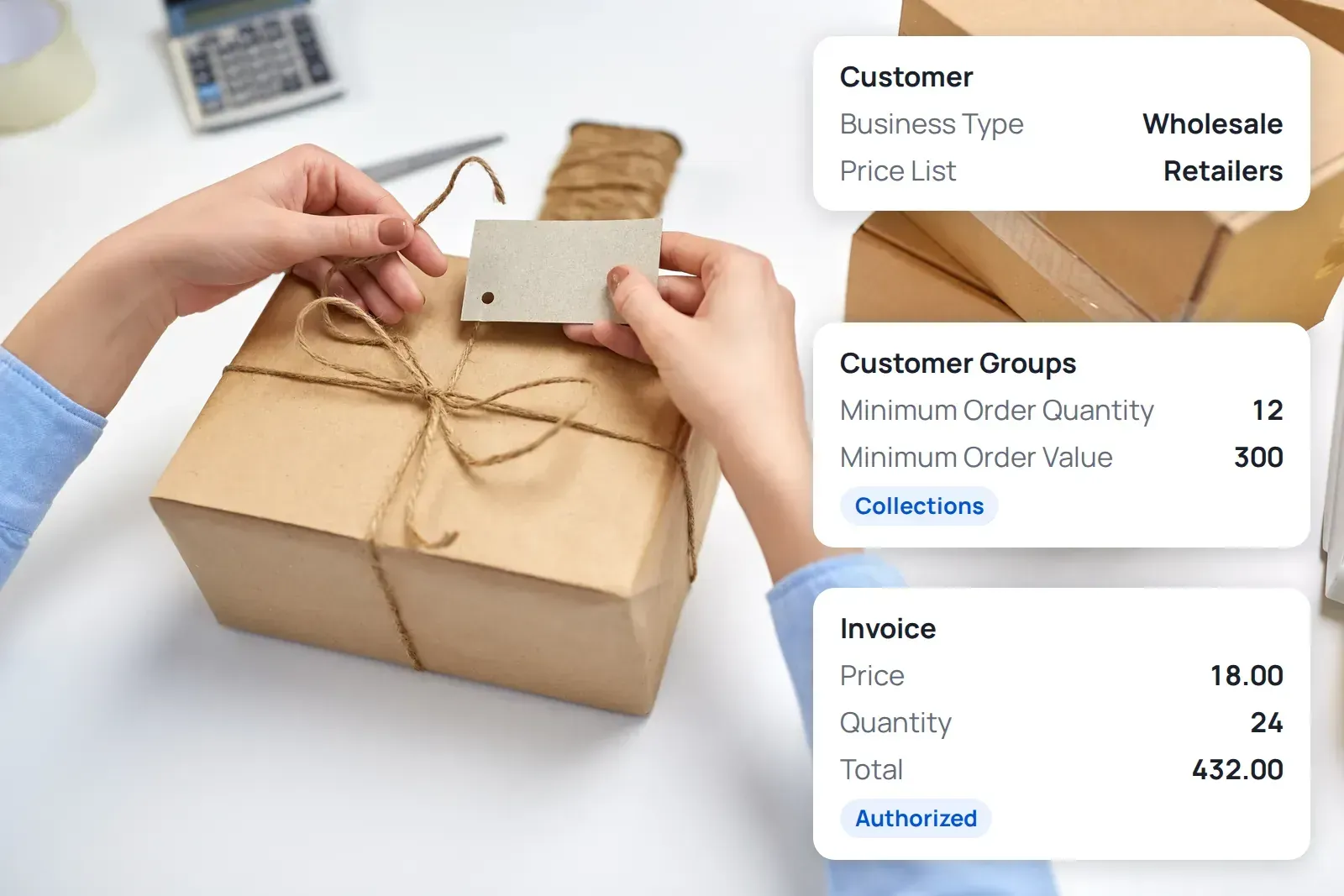
- CustomerBusiness TypeWholesalePrice ListRetailers
- Customer GroupsMinimum Order Quantity12Minimum Order Value300Collections
- InvoicePrice18.00Quantity24Total432.00Authorized
Taken together, the portal, the phone orders and the web store run on one stock count and one price rule. Whether that suits a particular brand depends on the shape of its trade side.
Does this fit your business?
A B2B ordering portal on Qoblex fits a games and puzzle brand with a Shopify store and a few dozen to a few hundred retailers. It also fits any small brand that sells direct and to trade from one stock.
The same story works for card and board game publishers, gift and stationery brands, and hobby and craft brands. It also fits book publishers and booksellers with trade accounts. Their orders often carry multi-packs and bundles of titles, and phone and email orders are keyed by hand. A brand with several kinds of stockist, from distributors to overseas buyers, can see how a skincare brand prices each kind of stockist. A trade-first business adding its first web store is the reverse of this story, and the AV distributor piece follows that path.
Some brands should look closer before deciding. A brand that sells only direct has no trade side for a portal to serve. A bookseller that sells mostly on Amazon should know how Qoblex handles it. Amazon orders come into Qoblex, but Qoblex pushes no stock to Amazon and does no FBA. For that seller, the portal covers the Shopify and trade side only.
For some brands, the platform they already run is enough. A brand with a handful of retailers may be happy to keep trade orders inside Shopify. For that brand, Shopify’s own B2B features may do the job. Shopify’s help centre states that “Shopify B2B is available on the Basic, Grow, Advanced, and Shopify Plus plans.” What Qoblex adds is one place where portal, phone and Shopify orders draw on the same stock. Qoblex keeps the store’s quantities in step and posts each invoice to Xero.
Frequently asked questions
Can wholesale customers order through a private portal with their own prices?
Yes. The Qoblex B2B portal opens by invitation or by a signup request the brand approves. Each customer record can carry its own price list, and the portal prices that customer’s orders from it. The retailer logs in, sees its own prices and places the order. It arrives in Qoblex as a quote for the brand to confirm.
Which price does a retailer see if it has no price list of its own?
A retailer with no price list of its own sees the portal’s Default Price List. That default can be a saved list or the reserved Retail or Wholesale list. A retailer with its own list sees that list instead. Set the default before inviting anyone, and check a newly approved customer’s price list before its first order.
Do customer groups change a retailer’s prices?
No. A customer group in Qoblex sets which collections its members see, plus their Minimum Order Quantity and Minimum Order Value. Prices come from the price list on the customer record, or from the portal’s Default Price List when the customer has none. To change what a retailer pays, change the price list on its record.
Does a portal order take stock from the Shopify store’s count?
Not until the brand confirms it. A portal order arrives in Qoblex as a quote, and a quote holds no stock. When the team turns the quote into an order, the stock is reserved and the Shopify store’s quantity follows. From then on, the portal and the store sell from one count in Qoblex.
Can we still take retailers’ orders by phone or email?
Yes. Someone on the team raises each one as a sales order in Qoblex for that customer. The order starts from the customer’s own price list. It draws on the same stock as portal and Shopify orders and is invoiced the same way. Nobody has to key the order again in Xero.
Does the invoice reach Xero without retyping?
Yes. Once an invoice is authorized in Qoblex, it posts to Xero, and the customer’s payments post too. A two-way payment sync is optional. Xero stays the brand’s books, and the accountant works there as before. The Xero connection is a paid add-on on the Starter and Business plans, and the pricing page lists the plans.
What happens if a retailer’s order is below the minimum?
The portal does not let the retailer place it. The brand sets a Minimum Order Quantity and a Minimum Order Value for the whole portal, and can give a customer group its own. If a retailer reports that it cannot place an order, check its group’s minimums before the portal-wide ones.