



The right pick depends on how many sites you run. On 11 November 2026, inFlow includes 1 location on Lite and 5 on Core, Zoho Inventory’s pricing page includes 2 to 10 by plan, both sell extra locations as an add-on, and Qoblex Starter allows 2. Two sites fit inFlow Core, Zoho Standard or Qoblex Starter. Past five locations, check inFlow Pro, Cin7 Core or Qoblex Business first. We make Qoblex, so weigh our view accordingly.
The moment usually arrives with a second site: a stock room across town or pallets at a third-party warehouse, and the single stock number that served for years stops saying how many can ship from here today. From then on a transfer has to say where the stock is, keep the lot and expiry date attached, and tell the web store what each location can sell.
How do small businesses handle multi-warehouse inventory?
A small business with more than one stock location handles multi-warehouse inventory by keeping a separate quantity for each location, moving stock between them with a transfer document instead of an adjustment, keeping lot and expiry identity attached to the stock, and sending the right per-location quantity to each sales channel.
Most businesses start with a spreadsheet, and for one site that is a sensible choice. A second site strains it in two familiar ways. One is a combined number everyone trusts too much: the total says 300, but 280 sit two hours away. The other is moving stock with a negative adjustment at one site and a positive one at the other, so the quantities end up right while the history says nothing about why.
So five criteria decide whether software does those four jobs: locations per plan, how a transfer moves from sent to received, whether batch-tracked stock keeps its lot, whether each location’s stock reaches Shopify, and price. The next section sets five tools against them.
Which multi-warehouse inventory software fits a small business: how do five tools compare on the same five criteria?
On 11 November 2026, inFlow, Zoho Inventory, Erplain, Cin7 and Qoblex differ most on how many locations each plan allows and on whether a transfer has an in-transit step, while all five document some way of moving stock between locations. We read inFlow’s Inventory plans only (not Manufacturing or Stockroom) and price Cin7 Core, since Cin7 Omni is quote-only. Every price and limit below was checked on the vendors’ own pages on 11 November 2026, and where a page says nothing, the cell says so.
| Tool | Locations included per plan | Transfer workflow | Batch-tracked transfers | Per-location stock to Shopify | Price (US, paid tier) |
|---|---|---|---|---|---|
| inFlow Inventory | Lite 1, Core 5, Pro and Max Unlimited; extra locations on Lite and Core at "39 USD/mo." | In transit, then Receive transfer; help page says available on select plans or add-ons (confirm in a quote) | Lot number assigned on each line of the stock transfer; lot tracking plan differs across three pages (confirm in a quote) | "Connect to one location" or "Connect to all inFlow locations" | Lite $99, Core $299, Pro $499, Max $699 a month, billed annually; lot add-on "39 USD/mo." |
| Zoho Inventory | Free 2, Standard 2, Professional 4, Premium 6, Enterprise 10 on its German pricing page, extra locations sold as an add-on; plans vary by region (confirm in a quote) | Initiate Transfer sets In Transit; receipt done manually; at least two warehouses needed | Batches and quantities chosen on the transfer order, destination batch reference; batch tracking plan differs between pages (confirm in a quote) | Warehouses map to Shopify locations; the same page describes stock combined and sent as a total (confirm in a quote) | Priced by region; ask for a US dollar quote |
| Erplain | Not stated per plan on its pricing page; help centre ties multiple locations to Premium (confirm in a quote) | Stock movement stays Pending, no stock update until "Products have been transferred" | Not stated on vendor page | Location mapping screen; per-location quantities not stated on vendor page | No verifiable US price (page says prices are in EUR) |
| Cin7 Core | "Unlimited" inventory locations; the Standard Warehouse Management mobile app supports one warehouse location (confirm in a quote) | Warehouse management page: transfers initiated in the platform and tracked "until it's received at the destination warehouse"; steps not set out (ask for a demo) | Not stated on vendor page | "Map your products and locations so SKUs, variants, and warehouses line up." | Standard $349, Pro $599, Advanced $1,199 a month, in USD excluding taxes; Omni quote only |
| Qoblex | Starter 2; Business and Scale Unlimited | Draft, then Received; no separate in-transit status | Batch number and expiry date follow the stock; lot tracking a paid add-on on Starter and Business, included on Scale | An on or off switch for each mapped Shopify location, when stock syncs from Qoblex to Shopify | See pricing |
Price sits last on purpose, because a plan that misses the other four criteria is expensive at any figure. The vendors’ own pages disagree most on prices and limits, so those come next.
How many locations does each plan allow, and what does the plan cost in US dollars?
On 11 November 2026 inFlow includes 1 location on Lite and 5 on Core, sells extra locations on both, and allows unlimited on Pro and Max; Zoho Inventory’s pricing page includes 2, 4, 6 and 10 locations on its four paid plans and sells more as an add-on; Cin7 lists unlimited inventory locations on every Core plan; Erplain’s pricing page states no limit and its help centre ties multiple locations to Premium; and Qoblex Starter allows 2.
inFlow’s pricing page shows Lite with “1 location”, Core with “5 locations” and Pro and Max with “Unlimited”. The four plans are listed at $99, $299, $499 and $699, each “USD/mo., billed annually”, and Lite and Core can add locations at “39 USD/mo.”
Zoho Inventory sets its plans and prices by region, and its German pricing page on 11 November 2026 lists 2 locations on Free and Standard, then 4, 6 and 10 on Professional, Premium and Enterprise, so check the edition for your own region. Its FAQ instead lists “the Free, Standard, Premium, or Enterprise plans” and mentions “Plus”. The same page sells extra locations (“Standorte”) as an add-on. Confirm in a quote which plan you are buying.
Cin7’s pricing page lists Cin7 Core at $349 (Standard), $599 (Pro) and $1,199 (Advanced) a month, and says “Prices are in USD and exclude taxes.” Every Core plan shows “Unlimited” inventory locations; the Standard Warehouse Management mobile app row reads “One warehouse location supported.”, and a separate Advanced Warehouse Management app is listed “for multiple warehouse locations”, so confirm in a quote which app plan a multi-site warehouse team needs. For Cin7 Omni, “Pricing is tailored to your specific requirements”, and the Omni column mentions Cin7 Core, so confirm in a quote which product you are priced for.
Erplain’s FAQ says “Erplain offers 4 different plans that you can choose from, based on your business needs.” Its pricing page shows three unnamed priced cards plus a custom plan, while a help article says “Managing multiple stock locations is available in the Erplain Premium subscription.” No card is labelled Premium, so confirm in a quote.
Zoho Inventory prices its plans by region, and Erplain’s cards print dollar signs beside “Displayed prices are in EUR, exclude taxes and are monthly rates billed annually.” Ask each for a dollar quote. Qoblex figures are on our pricing page. A location count says nothing about how stock moves between locations, which comes next.
How does each tool run a stock transfer, from draft to received?
inFlow and Zoho Inventory document an In transit status between sending and receiving a transfer, Erplain documents a Pending stock movement that changes no stock until it is marked transferred, Cin7’s public pages on 11 November 2026 do not set out its transfer steps, and Qoblex transfers have two statuses, Draft and Received.
Once an inFlow transfer is sent, its help page says “the order status is now set to In transit to the destination location”. The receiving site then uses the Receive transfer button, and “This completes the transaction.” The same page says “this feature is only available on select plans or add-ons”, while inFlow’s feature overview marks “Stock transfers” as “Included” for Inventory, so ask which plan includes transfers.
Zoho Inventory’s transfer orders page says that after Initiate Transfer “The transfer order’s status will be set as In Transit, and the stock receipt has to be done manually.”, and the receiving person clicks Mark as Received; at least two warehouses are needed. Erplain’s stock movements page says a new movement’s “status is ‘Pending’ and no stock update is done” until someone clicks “Products have been transferred”.
Cin7’s public pages read on 11 November 2026 do not set out its transfer steps, so ask for a demo of one; its warehouse management page says “Stock transfer recommendations help you move inventory between warehouses before shortages happen.” In Qoblex a transfer stays a draft until someone receives it, and the stock moves at receipt.
An in-transit status earns its place when goods spend days on a truck; when the sites are minutes apart, a draft followed by a receipt tells the team enough. A batch-tracked transfer adds a second question: does the lot arrive with the goods?
Can each tool transfer batch-tracked stock and keep the lot?
Zoho Inventory documents choosing batches and quantities on a transfer order and a destination batch reference, inFlow documents assigning the lot number on each line of a stock transfer, Erplain’s stock-movement page does not mention batches, Cin7’s own pages read on 11 November 2026 do not describe batch transfers, and Qoblex keeps the batch number and expiry date when tracked stock moves.
Picture a supplier calling about one lot, part of which went to the 3PL on a pallet with a second lot. If the transfer kept each lot’s number and expiry date, the answer is a lookup; otherwise it is an afternoon with packing slips.
Zoho Inventory’s transfer orders page lets the sender “Choose the batches and the quantity picked from each batch” and describes a “Destination Batch Reference#” for the new batches at the destination. On 11 November 2026 its pricing page lists “3. Batch Tracking” under Professional, while its FAQ says “batch tracking and expiry alerts (available from the Premium plan upward)”. Confirm in a quote.
inFlow’s lot numbers help page says “you assign the lot number on each line of the stock transfer”. On 11 November 2026 its pricing page offers an add-on, “Manage lots, batches, and expiry dates.”, at “39 USD/mo.”, the same page’s feature table marks “Lot numbers and expiry dates” as “Included” for Inventory, and the help page says “Lot tracking is only available on select plans or add-ons”. Confirm in a quote.
Erplain’s stock-movement page does not mention batches, though its FAQ says “Erplain allows you to trace your products along the distribution chain using batch numbers (or lot numbers).”, so ask whether the lot follows a movement. Cin7’s pricing page lists “Batch & Expiration Tracking” under Manufacturing and its warehouse page says “Track products down to the batch and expiry level”, but whether the batch is kept at the destination is not stated on the pages we read. Once the lot is safe at the new site, the web store still has to hear about it.
Does each tool send per-location stock to Shopify?
inFlow lets each Shopify location connect to one inFlow location or to all of them, Zoho Inventory can map its warehouses to Shopify locations but its help page also describes stock combined across all warehouses and sent as a total, Erplain and Cin7 document location mapping screens without stating per-location quantities on the pages read, and Qoblex has a switch for each mapped Shopify location.
Shopify holds stock by location, and the inventory system decides what each location is told, so a 3PL shipping web orders needs its own number. inFlow’s Shopify help page says “Select either Connect to one location or Connect to all inFlow locations.” and recommends “mapping each Shopify location to a single inFlow location”.
Zoho Inventory’s Shopify help page says both “You can map Zoho Inventory warehouses with Shopify Locations.” and “Stock updates in Zoho Inventory combined across all warehouses and sync to Shopify as total available quantity.” without saying how the two relate, so confirm in a quote whether each warehouse’s quantity reaches its own Shopify location. Erplain’s Shopify help page points to “Apps > Configure Shopify > Locations”. Cin7’s Shopify page says “Map your products and locations so SKUs, variants, and warehouses line up.” Qoblex’s Shopify connection turns stock sync on or off per mapped location.
Ask every vendor which location feeds which Shopify location, and what happens to a location that is not mapped. With the criteria covered, the picks for three common setups follow from the table.
Which tool fits a two-site business, a 3PL setup, or a business with more than five locations?
A two-site business is served by inFlow Core, Zoho Inventory Standard or Qoblex Starter on the location limits each vendor states, a 3PL setup is mainly a question of whether goods in transit need their own status and the 3PL’s stock reaches the web store separately, and a business with more than five locations should look first at inFlow Pro, Cin7 Core or Qoblex Business. These picks are our reading of the criteria.
A two-site business
For two sites the question is workflow, not limits. If stock spends days between the sites, inFlow and Zoho Inventory document an In transit status. If the second site is across town and goods arrive the same morning, a draft followed by a receipt is enough, which is how Qoblex works.
A business that traces batches should confirm in a quote which inFlow or Zoho Inventory plan includes lot tracking. See how a beverage distributor runs stock transfers between depots.
A 3PL setup
A 3PL is easiest to manage as another location with its own quantity. If pallets travel for days to reach it, inFlow and Zoho Inventory document an In transit status for that gap. If the 3PL ships web orders, per-location Shopify mapping matters more: inFlow documents one Shopify location to one inFlow location, and Qoblex has a switch per mapped location.
Qoblex has no separate in-transit status, so a business with long transit times should weigh that. See a skincare brand’s 3PL and own-warehouse stock by channel.
More than five locations
On 11 November 2026 inFlow Pro and Max show “Unlimited”, Cin7 Core shows “Unlimited” inventory locations, and Qoblex Business and Scale show “Unlimited”. Zoho Inventory includes up to 10 on the edition we could read and sells extra locations as an add-on. Erplain states no per-plan limit, so ask.
At this size, confirm in a quote which Cin7 warehouse app covers several sites, and what each extra inFlow or Zoho Inventory location costs. A business of any size may also ask whether it needs a new tool at all.
When is another tool, or no new tool, enough?
A small business with two nearby locations, one person moving stock and no lots to trace can often keep a spreadsheet and a written transfer note, and a business that already runs one of these tools well does not need a different one. The signs it has stopped being enough are concrete: a lot question that takes an afternoon, a move entered at one end only, or the web store selling from an empty site.
Each competitor suits some businesses better than Qoblex. inFlow fits a business that wants an In transit status, one-or-all location choice for each Shopify location, and a published price ladder. Zoho Inventory fits one that wants In Transit and a destination batch reference and will settle the plan questions in a quote. Cin7 fits a larger operation whose budget suits its Core tiers and that wants the “Advanced warehouse management mobile app for multiple warehouse locations.” its pricing page lists (ask which plan includes it). Erplain fits a business that wants stock movements with a Pending step, after confirming currency and which plan carries locations.
Qoblex is not the right tool for a business that needs an in-transit status on every transfer, and lot tracking is a paid add-on on its Starter and Business plans. For one warehouse plus one retail stock room, Shopify’s own locations may be all a store needs. Whichever tool makes the shortlist, trial it with one real transfer of one real lot. Here is that transfer in the tool we make.
How does this look in Qoblex?
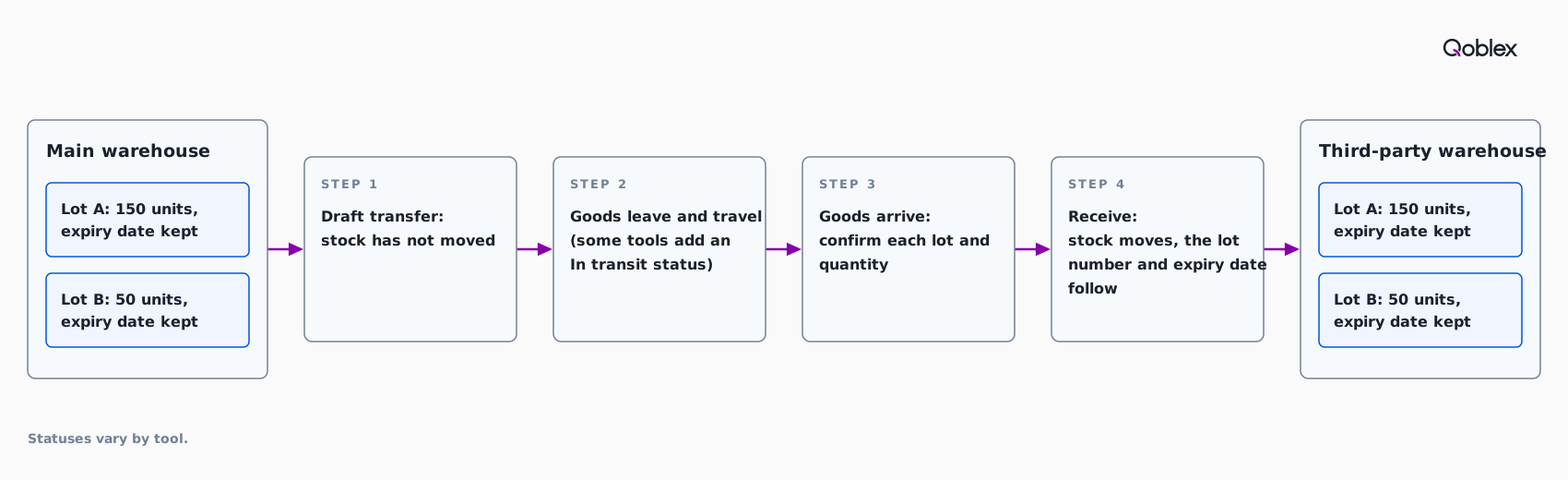
Qoblex lets a small business keep stock in several locations and transfer batch-tracked stock between them with the batch number and expiry date following the stock: Starter allows 2 warehouse locations and 2 users, and lot, batch, serial and expiry tracking is a paid add-on on Starter and Business and included on Scale.
We make Qoblex, so weigh this section accordingly. Business and Scale show “Unlimited” warehouse locations and users on the pricing page on 11 November 2026. A Qoblex transfer has two statuses, Draft and Received, with no separate in-transit status; the transfers guide says the product quantity in each location changes once the transfer has been received, so the team keeps it as a draft until the physical stock arrives.
Let’s assume a business moves 200 units of a batch-tracked SKU from its main warehouse to its 3PL on one pallet, in two lots of 150 and 50. On Monday at 9:00 the person at the main warehouse opens Transfers, sets Transfer from location to the main warehouse and Receiving location to the 3PL, adds the product with Add new line, enters 200 in Quantity to transfer and chooses Save. Nothing has moved yet.
On Wednesday the pallet arrives, the 3PL confirms the goods and the person chooses Receive. Because the SKU is batch-tracked, Qoblex opens the Receive Batch dialog before posting, so the person picks the first batch and enters 150, uses Add Batch for the second lot, enters 50 and clicks Confirm; the rows have to add up to 200. The status becomes Received, and the Batches page shows the quantity down at the main warehouse and up at the 3PL, with the same batch number and expiry date (transferring batch-tracked stock; lot tracking).
In the Shopify settings, each mapped Shopify location has a Sync Inventory? switch, so the team lets Qoblex set the 3PL’s Shopify stock only. The switch appears only when the inventory sync direction is Sync from Qoblex to Shopify (Shopify locations). Import Stock Transfers brings transfers in from a CSV file as drafts, each still to be reviewed and received. See also multi-warehouse inventory in Qoblex and our older note on transferring inventory across locations.
Frequently asked questions
How many locations do inFlow, Zoho Inventory and Cin7 allow?
On 11 November 2026 inFlow includes 1 location on Lite and 5 on Core, with extra locations as a paid add-on, and unlimited on Pro and Max. Zoho Inventory’s German pricing page includes 2, 4, 6 and 10 locations by plan, sells extra locations as an add-on, and its plans vary by region. Cin7 Core lists unlimited inventory locations on every plan. Confirm in a quote.
What is an In transit status on a stock transfer?
An In transit status marks goods that have left one location and not yet arrived at the other. In inFlow and Zoho Inventory, sending a transfer sets it to In transit until the receiving site confirms receipt. Erplain keeps a stock movement Pending until it is marked transferred. It matters when goods travel for days.
Can batch-tracked stock be transferred between warehouses without losing the lot?
Yes, in the tools that document it. Zoho Inventory lets the sender choose batches and quantities on a transfer order and set a destination batch reference. inFlow assigns the lot number on each line of a stock transfer. Both vendors’ pages disagree on which plan includes lot or batch tracking, so confirm in a quote.
How do I send each location’s stock to Shopify?
Map each inventory location to its own Shopify location. inFlow lets each Shopify location connect to one inFlow location or to all of them. Zoho Inventory maps warehouses to Shopify locations but also describes a combined total, so confirm in a quote. Ask each vendor what happens to unmapped locations.
Is a 3PL just another warehouse location in inventory software?
In practice, yes. Set the 3PL up as its own location and move stock with transfers, not adjustments. For long transit, use a tool with an In transit status. If the 3PL ships web orders, map its stock to its own Shopify location so the store sells what it holds.
Is a spreadsheet enough for two locations?
Often, when the two sites are close, one person moves the stock and there are no lots to trace; a spreadsheet and a written transfer note can carry that. It stops being enough when a lot question takes an afternoon, a move gets recorded at one end only, or the web store oversells.
Can Qoblex transfer batch-tracked stock between locations, and what does Starter allow?
Yes. When batch-tracked stock is received at the destination, the batch number and expiry date follow it. Qoblex transfers have two statuses, Draft and Received, with no separate in-transit status. Starter allows 2 locations and 2 users, and lot tracking is a paid add-on on Starter and Business and included on Scale. See the pricing page.