


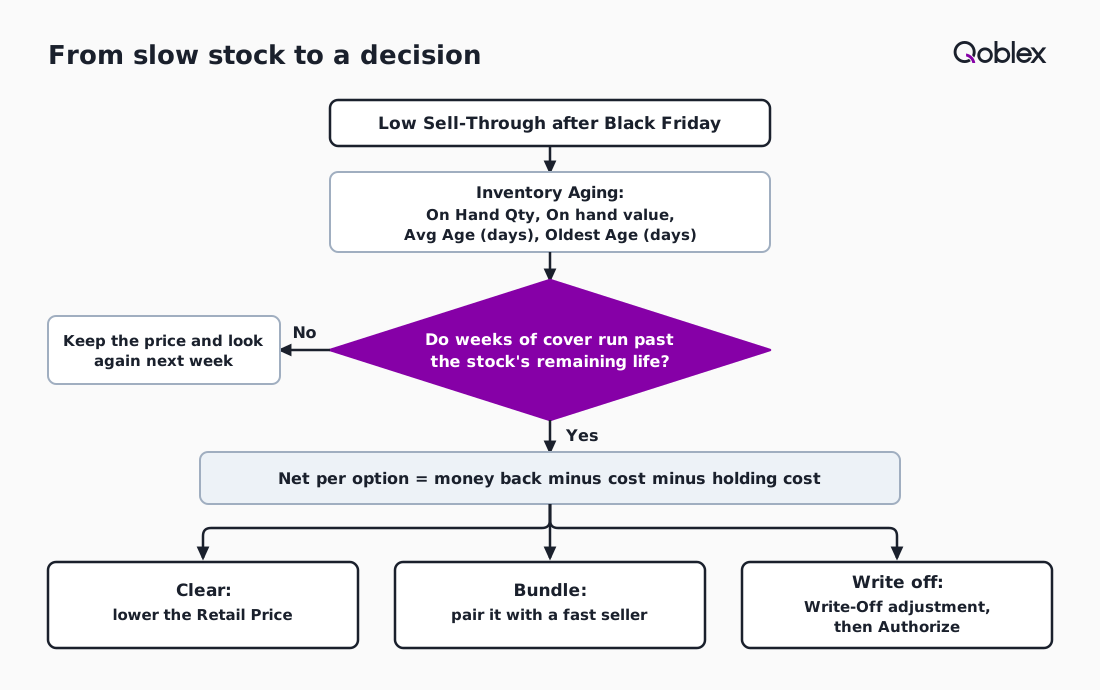
To clear slow stock after Black Friday, find the variants with the lowest Sell-Through in Qoblex’s Inventory Turnover report, read their age and On hand value in Inventory Aging, then compare weeks of cover with the stock’s remaining life. Choose to clear it at a markdown, bundle it with a fast seller or write it off in the first week of December, before holding costs add up.
Many small brands look at the shelf in January, see the gift tins still stacked where the November delivery was put, and work out what they cost to keep only once the best-before date is close. Over-ordering is the cost side of forecasting Black Friday stock from last year, and early December is when that cost is cheapest to deal with.
How do you tell which stock did not sell on Black Friday?
A small brand finds the stock that did not sell on Black Friday by opening the Inventory Turnover report in Qoblex and sorting by Sell-Through, which is Out Quantity divided by the sum of In Quantity and Opening Balance, so the variants with the lowest figure are the ones the season did not move. Sell-Through comes before age because stock bought for Black Friday arrived in October or November, so on 1 December it is young and an age report alone will not single it out.
The report opens on the last year; the stock person sets it to run from before the season to today, since Qoblex builds the figures from stock movements in that period. How much cash each low seller holds is Total Cost in the Stock on Hand report, the current stock value for the variant. Returns restocked in December add to the on-hand figure, which getting holiday returns back into stock covers. Our Black Friday and Cyber Monday statistics describe the market, not one shelf; Inventory Aging, the next report, says how long that stock has sat.
What does Inventory Aging show about the stock that is left?
Qoblex’s Inventory Aging report shows, for every variant, the On Hand Qty, the On hand value, the Avg Age (days) and the Oldest Age (days) of the stock still on hand, with the quantity and value in each age band from 0-30 days up to over 365 days, so a brand can see how long its surplus has been sitting before it decides what to do with it. Avg Age is the quantity-weighted average, Oldest Age the greatest age among the variant’s remaining stock, and Qoblex calculates both as of today.
Age here means time on the shelf, not time before expiry, so a brand selling dated food keeps its best-before date as a separate number. Inventory Aging has the same filters, sorting and column controls as Qoblex’s inventory reports, so the stock person filters it to the low sellers from Inventory Turnover. Acting early on a young line buys the most time, at a cost the next section prices.
What does it cost to keep slow stock for another month?
Keeping slow stock for another month costs its holding cost on every unit still on the shelf, and the stock’s weeks of cover, its on-hand quantity divided by its weekly sales, set against the weeks of life it has left, tells a brand how much of it will not sell in time. Holding cost is the brand’s own estimate per unit per week for space, handling and tied-up cash, not an industry average. Our guide to excess inventory covers the background.
Let’s assume a food brand has 300 gift tins left on 1 December, each with a best-before date 90 days away, on 1 March 2027. The brand stops selling 6 days before the date, on 23 February, which leaves 84 days, or 12 weeks, of selling time. Each tin cost 8.00 and sells for 20.00, and since the peak the tins have sold 10 a week at full price. The owner puts holding cost at 0.25 a tin a week, charged on the tins on the shelf at the start of each week. The tins cost 300 x 8.00 = 2,400.00.
At 10 a week the tins have 300 / 10 = 30 weeks of cover against 12 weeks of selling time. Full price sells 10 x 12 = 120 by 23 February, bringing in 120 x 20.00 = 2,400.00 and leaving 180 that cannot be sold in time, so the money back only matches the cost of the tins. The shelf starts the 12 weeks with 300, 290, 280 and so on down to 190 tins, which is 2,940 tin-weeks, and 2,940 x 0.25 = 735.00, so waiting at full price ends 735.00 down. Each further week the full 300 sit there costs 300 x 0.25 = 75.00.
A late supplier date often made the bigger order feel safer, which setting a last order date from supplier lead times deals with. With waiting priced, the three ways out can be compared.
Should you clear, bundle or write off 300 gift tins on 1 December?
A brand with 300 gift tins on 1 December and 12 weeks of selling time left should compare the net outcome of each option after holding cost, and in the supposition below a 30% markdown nets 1,537.50, a bundle with a fast seller nets 1,987.50, and writing the lot off now loses 2,400.00. A 30% cut on 20.00 gives 14.00 a tin at an expected 50 sales a week. The bundle pairs a tin with a jar that already sells well over 30 a week at 10.00, at 26.00 for the pair instead of 30.00; the jar would have sold anyway, so the tin earns 26.00 minus 10.00, or 16.00, at an expected 30 bundles a week.
Tin-weeks are counted as before: 300 + 250 + 200 + 150 + 100 + 50 = 1,050 for the markdown, and 300 + 270 + 240 and so on down to 30, which is 1,650, for the bundle.
| What the brand does | Clear at 30% off | Bundle with a fast seller | Write off now |
|---|---|---|---|
| Price received for a tin | 14.00 | 16.00 (the 26.00 bundle price less the jar's usual 10.00) | None |
| Weekly sales of the tins | 50 | 30 | None |
| Weeks to empty the shelf | 6 | 10 | None |
| Shelf empty by | 12 January 2027 | 9 February 2027 | 1 December 2026 |
| Money back for the 300 tins | 4,200.00 | 4,800.00 | 0.00 |
| Cost of the 300 tins | 2,400.00 | 2,400.00 | 2,400.00 |
| Holding cost at 0.25 a tin a week | 262.50 | 412.50 | 0.00 |
| Net outcome | +1,537.50 | +1,987.50 | -2,400.00 |
The table counts what comes back, because the 2,400.00 is spent whatever the brand picks. The markdown empties the shelf fastest at a lower price, the bundle holds a higher price only while the fast seller carries it, and the write-off stops the shelf cost at once but returns nothing. The sell rate is what flips the answer: either option must sell 300 / 12 = 25 tins a week to clear by 23 February, and a bundle selling 20 a week moves 240 by the cut-off, leaves 60 to write off and nets 870.00, below the markdown’s 1,537.50. Below the unit cost, (20.00 minus 8.00) / 20.00 = 60% off, each tin sells for less than it cost, but any price that more than covers the holding cost until it sells still returns more than writing it off, because the 8.00 is spent either way.
The 25 and the 60% are arithmetic each brand redoes with its own figures; the sell rates are the part only the brand can judge. A write-off is not the failure case: it is right for the tins no price the brand will accept sells before the cut-off, and here, where both the markdown and the bundle clear all 300, that is none of them. Most brands end up with a mix, running this table once per variant.
How do you run each option in Shopify and in Qoblex?
A brand clears stock by lowering the retail price, bundles it by pairing it with a faster seller, and writes it off with a stock adjustment, and in Qoblex the price change is Apply bulk discounts in Inventory Aging, which sets a new Retail Price on the Retail price list only. The stock person ticks the rows, opens Bulk Actions, chooses Apply bulk discounts, and either types a Retail Price per row or ticks Apply bulk discount (%) and enters 30, which turns a Current Retail Price of 20.00 into 14.00. Apply Changes saves only the new Retail Price; wholesale prices, purchase prices and cost are untouched. If the Shopify connection syncs prices from Qoblex to Shopify with the Retail list as the store’s price list, the new price reaches the store; anywhere else the brand sells, it sets the same price itself.
In Shopify, automatic discounts are “discounts that are automatically applied in the cart and at checkout when eligibility conditions are met”, and Shopify’s sale pricing help notes that “Managing discounts through Compare-at price shows original versus sale prices”. A brand with a few SKUs can run the whole markdown in Shopify, with a spreadsheet for the arithmetic. How deep the Black Friday offer itself ran belongs to what small brands learned from Black Friday 2024 and 2025. The same Bulk Actions menu holds Apply Mac Adjustment, an accounting action that corrects a genuinely wrong Moving Average Cost and revalues the selected variants’ on-hand inventory, changes no stock count or selling price, and carries Qoblex’s own warning not to use it to discount a selling price.
Bundling is a merchandising decision. Shopify describes a bundle as “a set of two or more related products, commonly offered at a discount”, and Shopify Bundles is “a free first-party bundles app” that “is available on all Shopify plans”. The brand pairs the slow tin with a product that already sells, checks there are enough of it, and prices the pair so the tin earns its 16.00.
Writing off is a stock adjustment. The stock person opens Stock Control, Adjustments, New Adjustment, picks Write-Off, one of Qoblex’s eight built-in reasons, and a Location, adds the variant with Add Products and sets the line to the quantity that should remain, 0 for the whole line. The adjustment stays a Draft until someone selects Authorize, and once authorized its lines and location are locked. Our guide to inventory write-offs covers the accounting side.
What do you do in the first week of December, step by step?
A small brand works through its post-Black Friday stock in seven steps in the first week of December: set the Sell-Through period, sort by Sell-Through, read Total Cost, read Inventory Aging, work out weeks of cover and holding cost, decide per variant, and then apply the discount or the Write-Off adjustment.
- Open Reporting, Inventory, Inventory Turnover and set the period to run from before the season to today.
- Sort by Sell-Through, lowest first, and note each low variant’s Out Quantity and Closing Balance.
- Open Stock on Hand and read Total Cost for those variants.
- Open Inventory Aging, filter to the same variants and read On Hand Qty, On hand value and the age columns.
- Divide On Hand Qty by the weekly sales rate for weeks of cover, and multiply the unit count by your holding cost per unit per week.
- Run the three options through the table for each variant and pick clear, bundle or write off.
- Apply the decision: Bulk Actions, Apply bulk discounts in Inventory Aging for a markdown, or an adjustment with the reason Write-Off, then Authorize, for a write-off.
Bundles are set up in the brand’s own store, and dated stock adds one more number.
What if the stock has a best-before date?
If the stock has a best-before date, the brand needs its own cut-off date for selling it, because Qoblex’s expiring-soon flag is fixed at 10 days and cannot be changed, expired lots are not blocked from sale, and FEFO suggests which lot to pick without enforcing it. Ten days is too late to start a 12-week clearance, so the plan starts from Inventory Aging and the brand’s own cut-off, 23 February in the example, six days before the date.
Because nothing in Qoblex stops an expired lot being sold, the cut-off is a decision the team makes and tells the people who pick and pack. Lot and expiry tracking in Qoblex is a paid add-on on Starter and Business and included on Scale.
Frequently asked questions
How do I find slow-moving stock after Black Friday in Qoblex?
In Qoblex, open Reporting, Inventory, Inventory Turnover, set the period to cover the season and sort by Sell-Through, lowest first. Then read those variants in Inventory Aging for On Hand Qty, On hand value and age. Stock bought for Black Friday is young, so Sell-Through finds it before age does.
Does Apply bulk discounts change my price in Shopify?
Apply bulk discounts sets a new Retail Price on Qoblex’s Retail price list for the variants you ticked; wholesale prices, purchase prices and cost stay as they are, and the percentage is not saved. If your Shopify price sync runs from Qoblex to Shopify with the Retail list as the store price, the new price reaches Shopify; otherwise set it there too.
Can I use Apply Mac Adjustment to mark down slow stock?
No. Apply Mac Adjustment is an accounting action that corrects a genuinely wrong Moving Average Cost and revalues on-hand inventory; it changes no selling price and no stock count. Use Apply bulk discounts to lower a Retail Price and a Write-Off adjustment to remove units.
How do I write off slow stock in Qoblex?
In Qoblex, open Stock Control, Adjustments, New Adjustment, choose the reason Write-Off and a Location, add the variant with Add Products and set the quantity that should remain, 0 for the whole line. The adjustment stays a Draft until you select Authorize, and once authorized its lines and location are locked.
When should I write off stock instead of clearing it?
Write off the units that will still be on the shelf at your cut-off date, because no price you will accept sells them in time. Selling below unit cost, past 60% off a 20.00 tin that cost 8.00, loses against cost but still beats a write-off, which returns nothing. Never write off stock that still sells.
Does Qoblex stop me selling stock after its best-before date?
No. Qoblex does not block expired lots, FEFO suggests which lot to pick without enforcing it, and the expiring-soon flag is fixed at 10 days, so set your own cut-off date. Lot and expiry tracking is a paid add-on on Starter and Business and included on Scale.