


At a glance: A beverage maker imports raw tea, coffee and botanicals, blends and packs them in-house, and sells a short range of finished SKUs wholesale through regional agents. Xero is the books. Every sale used to be invoiced in Xero, with the finished-stock count and the cost of goods kept up by hand. Now each agent order is entered once, in Qoblex, which holds stock and cost, posts the invoice to Xero within minutes and the cost of goods journal overnight.
How did the business run before Qoblex?
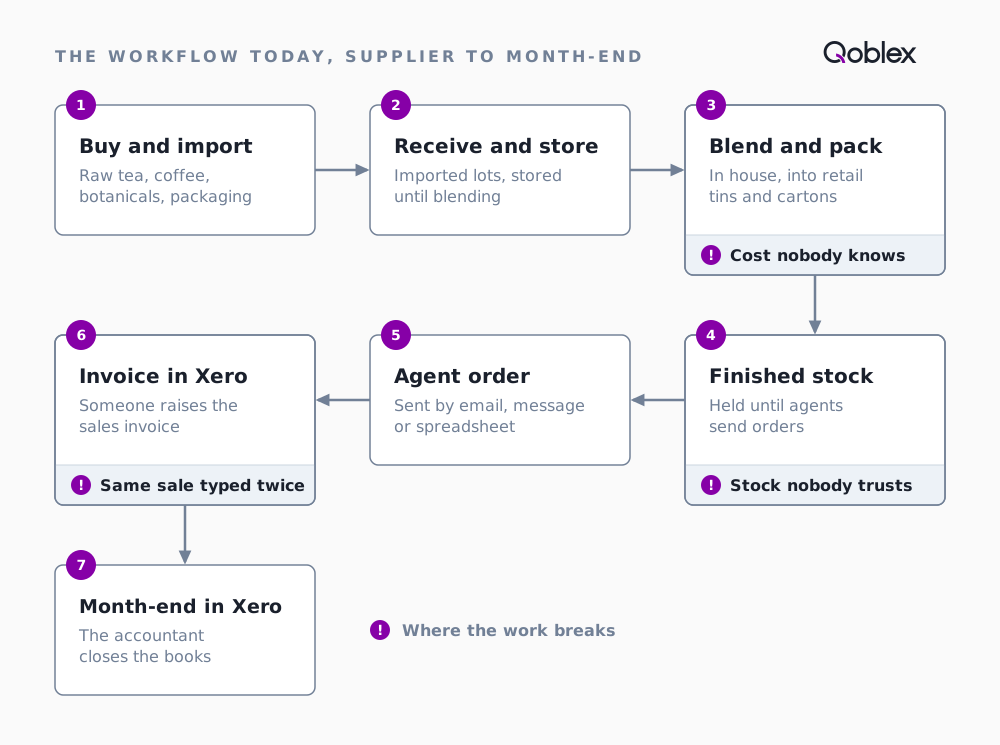
Like many food and beverage makers, the business ran in seven steps:
- Buy raw tea, coffee, botanicals and packaging from overseas suppliers, in several lots, each with its own freight and duty.
- Receive and store them.
- Blend and pack to a recipe, into tins, then cartons.
- Hold finished stock for orders.
- Take agent orders by email, message or spreadsheet.
- Invoice each order in Xero.
- Close the month in Xero, with the accountant.
That worked while one person invoiced and could see the shelves: Xero handled invoices, receivables, payments and the books, and stock lived in a spreadsheet and that person’s memory. With more agents, blends and people, it broke in three places:
- The same sale typed twice. An agent’s order was written up once to pick and pack, and again as a Xero invoice. The two copies could disagree.
- Stock nobody trusted. The finished-stock count lived in a spreadsheet updated by hand, so shelf and spreadsheet drifted apart until someone counted.
- Cost nobody knew. Each import lot landed at a different cost after freight and duty, and one blend draws on several lots. Without that cost carried through blending, cost of goods sold was a month-end estimate (see food COGS and landed cost).
What were the questions that started the search?
If we invoice in Xero, will our stock update?
Not once stock lives in an inventory system. Qoblex holds the quantity and the cost of each product and sends products to Xero as untracked items, so Xero shows the code and price on an invoice without counting stock. Stock moves where it is managed: in Qoblex, when an order ships.
Do orders have to start in the inventory system?
For anything that moves stock, yes, and that is what removes the second copy. In Qoblex the invoice is created from the sales order, and Xero receives it once it is authorised.
Can the team keep quoting the way they do now?
The quote moves into Qoblex too, and it saves work: the quote and its order are the same record at different stages, so an accepted quote becomes the order without being retyped. Quotes for services that move no stock can stay in Xero.
How does it run in Qoblex?
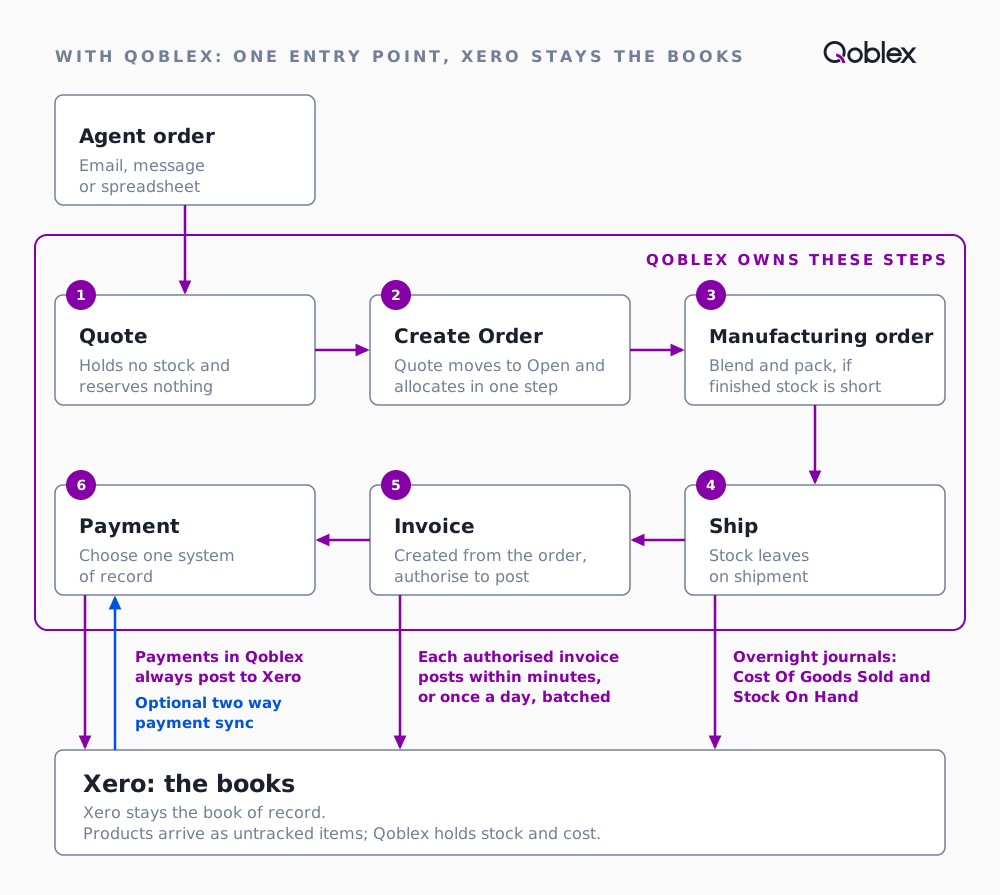
Agents order as before, and Xero is still the books. What changes is the office: each order is entered once, in the system that knows the shelf and the cost.
- Quote the agent in Qoblex. A quote holds no stock.
- The agent accepts. Create Order turns the quote into an open order and allocates the cartons in one step, reserving them without moving them.
- Blend and pack, when finished stock is short, on a manufacturing order from the blend’s bill of materials. It uses up tea, botanicals, tins and labels at their cost, freight and duty included, and adds finished cartons.
- Ship. Stock leaves when the order ships.
- Invoice from the order. Once authorised, the invoice reaches Xero within minutes, or once a day with invoice batching.
- Overnight, Qoblex posts the cost of goods and stock on hand journal to Xero, from the shipment.
- Month-end, the accountant closes in Xero with sales, cost of goods and stock value already posted. Qoblex’s Sync Status shows what posted.
| Before | In Qoblex | |
|---|---|---|
| Agent order | Written up to pick and pack, then retyped as a Xero invoice | Entered once, as a quote that becomes the order |
| Finished stock | A spreadsheet updated by hand | Moves with each manufacturing order and shipment |
| Cost of a carton | A month-end estimate | Built from the components’ landed cost, freight and duty included |
| Invoice in Xero | Typed by hand | Posted from Qoblex within minutes of authorising |
| Cost of goods in Xero | Worked out at month-end | Posted overnight from each shipment |
More on what Qoblex posts to Xero.
What does one agent order look like, end to end?
Let’s assume an agent orders 40 cartons of a breakfast blend (12 tins a carton) at $110: $4,400. In Qoblex the landed unit cost is $62 a carton: imported tea and botanicals, with freight and duty on the purchase order, plus tins, labels and carton, used up by a manufacturing order. Cost of goods is 40 × $62 = $2,480; gross profit $1,920. No tax, no discount; Xero receives invoices as Authorized.
| Step | Where | Stock | What lands in Xero |
|---|---|---|---|
| 1. Quote the agent | Qoblex | Nothing committed | Nothing |
| 2. The agent accepts: Create Order | Qoblex | 40 cartons allocated | Nothing |
| 3. Make more if finished stock is short | Qoblex, manufacturing order | Tea, botanicals, tins and labels used up; finished cartons added | Overnight, the manufacturing order’s own inventory journal |
| 4. Ship the cartons | Qoblex | 40 cartons leave stock | Nothing yet |
| 5. Invoice from the order and authorise it | Qoblex | No change | Within minutes (or the daily batch): revenue $4,400, receivable $4,400 |
| 6. Overnight | Qoblex posts the journal | No change | Cost of goods $2,480 debit, stock on hand $2,480 credit |
The order is entered once, and Xero shows $4,400 of revenue, $2,480 of cost of goods and $1,920 of gross profit for it.
Does this fit your business?
Coffee roaster. Green coffee in, roasted out, the roast as the manufacturing order. Coffee lost beyond the recipe quantity goes in the Wastage field, so stock consumed matches what went into the roaster.
Spice blender. Almost identical, only the ingredients change.
Contract packer. Fits for your own range. If you pack for others, check how you will hold their stock.
Wine and spirits trader selling to businesses. No blending, and purchases often in several currencies. The same one-entry flow holds, and Qoblex’s Xero settings can sync invoices and bills in the document’s own currency rather than the base currency.
Other agent-led wholesalers. Parts, medical supplies, toys and gifts follow the same flow without production.
Who it does not fit. A business with no stock; one that only invoices services; one with a small range in one place whose costing Xero’s own tracked inventory already covers (see when Xero’s built-in inventory is enough). It starts to pay once you need allocation against orders, lots or production. Bills of materials and production orders are on every plan; the Xero integration is a paid add-on on Starter and Business, and lot traceability is a paid add-on on Starter and Business, included on Scale (see pricing).
Frequently asked questions
Do I have to raise quotes in the inventory system if my accounts are in Xero?
For stock sales, yes. In Qoblex a quote is a sale order in Quote status, and when the customer accepts, the same record becomes the order, so nothing is retyped. Quotes for services that move no stock can stay in Xero.
When does a quote start holding stock?
A quote holds no stock; choosing Create Order moves it to Open and allocates it in one step. Allocation reserves the stock for that order without moving it. The stock leaves when the order ships, and the invoice is created from the order.
How soon does an invoice appear in Xero, and when does cost of goods sold post?
An authorised Qoblex invoice reaches Xero within a few minutes, or once a day if invoice batching is on. The Cost Of Goods Sold and Stock On Hand journal posts separately, once a day on the overnight sync, from the shipment rather than the invoice.
Does Xero still track the stock?
No. Qoblex sends products to Xero as untracked items and holds quantity and valuation itself. Leave them untracked in Xero, or Xero values them a second time.
Do payments recorded in Xero come back into Qoblex?
Only if Two way payment sync is turned on in Qoblex’s Xero sales settings. Payments recorded in Qoblex always push to Xero when the invoice syncs. Pick one system to record customer payments.
What happens if the same sale is keyed in Xero and in the inventory system?
Revenue and the receivable appear twice in Xero once both invoices are approved, because Qoblex posts its own invoice for the order. Cost of goods posts once, from the single shipment, so profit looks far better than it is. That is why every stock sale starts in Qoblex.