



The best inFlow Inventory alternatives in 2026 are Qoblex, Katana, Fishbowl, MRPeasy, Unleashed, Cin7 Core, Zoho Inventory, and Odoo. inFlow is a solid choice for most small businesses, but regulated operators in food, beverage, supplements, and cosmetics who need production-grade lot and expiry traceability in a generally-available product today should check the current status of inFlow’s lot tracking, which is in beta. Qoblex is the top pick for that buyer.
Why look for an inFlow alternative?
inFlow has earned its reputation. It is affordable, genuinely easy to learn, and it ships one feature most tools at its price point do not: a built-in B2B Showroom ordering portal where wholesale customers can place orders against your live catalog. It runs on the web, a Windows desktop app, and iOS and Android, and it connects natively to Shopify, Amazon, Xero, and QuickBooks Online. Most operators who land on a page like this are not unhappy with inFlow overall. They have hit one specific operational wall.
What inFlow does well, and where the limits are
For straightforward stock management, inFlow is a clean, capable tool. Stock levels, purchase orders, sales orders, and reporting all work the way a busy operator expects, and the Showroom portal is a real differentiator for anyone selling wholesale.
The friction that sends people looking usually falls into one of three places.
Lot and expiry traceability is still maturing. inFlow’s serial number tracking is generally available on select plans, and that part is solid. But its lot and batch tracking with expiry dates is in beta as of mid-2026, opt-in only, with no general-availability date announced. If lot and expiry traceability is the reason you are buying, that timing matters, and you should confirm the current status with inFlow before you commit.
Manufacturing is assembly, not planning. inFlow supports bills of materials and manufacture orders, so kitting, assembly, and disassembly are covered. What it does not ship is demand-driven MRP. For a small maker who assembles finished goods from components, inFlow handles the build. For one who wants the system to plan component requirements against forecast and orders, it stops short.
Integration slots are metered by plan. inFlow’s integrations are native, which is a strength. The nuance is that integration slots are counted by plan tier: the entry Entrepreneur tier includes one slot. A business that wants both Shopify and QuickBooks Online connected natively on the entry tier may need to move up a tier or add a slot. This is a structural fact, and inFlow is transparent about it, not a criticism.
None of this makes inFlow the wrong choice. It makes it a specific choice, for a specific kind of operation. The question is whether that is you.
Who finds inFlow’s current feature set a constraint
The operator who outgrows inFlow is usually a regulated product brand: a food or beverage maker, a supplement label, a cosmetics business. That operator needs lot capture on receipt or production, an expiry date attached to every lot, picking that sends the soonest-to-expire stock out first, and a clean trace back through production if a recall question ever comes up. They need that in a product they can rely on today, not a feature on a beta track. inFlow can grow into some of this, but for a business that carries a real regulatory requirement right now, the current lot/expiry beta timeline is the wall. If you are weighing this on Xero, our guide to Xero lot and expiry tracking walks through what production-grade traceability actually looks like.
What to look for in an inFlow alternative
Before you compare tools, get clear on what you actually need to run. For an SMB that outgrew a spreadsheet but is not ready for an enterprise rollout, a good inFlow alternative usually covers most of this:
- Traceability you can rely on today. If you handle food, beverage, supplements, or anything with an expiry date, lot and batch tracking with expiry dates should be a generally-available capability, not a beta you opt into and hope reaches GA on your timeline.
- Flexible accounting sync. A real two-way connection to Xero or QuickBooks Online, so your accounting stays your book of record regardless of which platform you run.
- Native multichannel. Two-way sync with Shopify, Amazon, and WooCommerce if you sell online, without stacking a per-channel bill where you can avoid it.
- Light manufacturing when you need it. Bill of materials and production orders for real assembly work, without buying and staffing a full manufacturing ERP.
- A pricing structure that fits how you grow. Several alternatives here offer flat, self-serve subscriptions with monthly billing and no mandatory long-term contract, so you can start without a multi-year commitment.
- Self-serve onboarding. You should be able to import your data and be operational in days, not sign up for a formal implementation project.
Most tools on this list clear the basics. What separates them is whether traceability is generally available today, whether the accounting sync is equal on both Xero and QuickBooks, and how the manufacturing depth matches your work.
The 8 best inFlow alternatives in 2026: quick comparison
Here is the shortlist at a glance, ranked and compared on the capabilities that actually decide the choice. Capability details for each tool are based on their published product documentation, verified in July 2026; confirm current scope with each vendor before you commit.
| Tool | Lot / batch / serial / expiry traceability | Light manufacturing (BOM / MRP) | Multichannel + accounting sync | Best for |
|---|---|---|---|---|
| Qoblex | Lot, batch, serial, and expiry tracking (paid tracking add-on); links cleanly with your accounting | Yes: lightweight MRP and BOM, production orders | Shopify, WooCommerce, Amazon; two-way Xero and QuickBooks Online | Regulated SMBs needing GA traceability, light manufacturing, and dual accounting sync now |
| inFlow | Serial tracking generally available (select plans); lot/batch with expiry dates in beta as of mid-2026, confirm current status with vendor | BOM and manufacture orders (assembly, kitting, disassembly); no demand-driven MRP | Shopify, Amazon, Xero, and QuickBooks Online native; integration slots metered by plan | Small teams wanting simple inventory plus a built-in B2B Showroom |
| Katana | Batch, serial, and expiry via the Traceability add-on; Katana no longer publishes its cost | Yes: MRP is the core strength | Shopify, WooCommerce, Amazon; Xero and QuickBooks Online | Small manufacturers whose core problem is production scheduling |
| Fishbowl | Lot, batch, serial, and expiry as built-in part-tracking types | Yes: multi-level BOM, work orders, MRP | QuickBooks and Xero native; Shopify via Commerce hub | QuickBooks-tied manufacturers ready for an implementation |
| MRPeasy | Lot and serial tracking with expiry dates | Yes: full MRP is the core strength | Shopify, WooCommerce; native Xero and QuickBooks Online | Lean manufacturers wanting MRP depth with traceability included |
| Unleashed | Batch and serial tracking with expiry dates and FEFO batch selection on all plans | Multi-level BOM (managed manually); MRP via add-on | Shopify, Amazon; Xero-first, QuickBooks Online supported | Xero-anchored wholesale and distribution businesses |
| Cin7 Core | Batch, serial, and expiry on all plans; FEFO enforcement on higher-tier WMS | Assembly and BOM on all plans; full MRP on higher tiers | Multichannel metered by plan; Shopify, Amazon, Xero, QuickBooks Online | Growing businesses wanting mid-market WMS depth |
| Zoho Inventory | Batch tracking with expiry and FEFO batch selection; serial tracking | Kits and bundles via composite items; no BOM or MRP module | Shopify, Amazon, WooCommerce; Zoho Books, Xero, QuickBooks Online | Teams already living in the Zoho ecosystem |
| Odoo | Lot and serial tracking with expiry-date categories | Yes: full MRP with multi-level BOM, routings, capacity planning | Amazon via native connector; Shopify, Xero, and QuickBooks reached through third-party App Store connectors | Tech-savvy teams wanting open-source and configurability |
A note on cost. inFlow sells on a four-tier subscription (Entrepreneur, Small Business, Mid-Size, Enterprise) that scales by team size and order volume, billed monthly or annually, with integration slots metered by tier. The lighter tools here tend to be flat, self-serve subscriptions you can start without a formal implementation, while Fishbowl and Cin7 Core are heavier platforms that expect a setup effort to match their depth. If budget is a primary driver, flat-subscription tools are generally lighter-cost for a small team than per-seat or module-stacking models. We are keeping specific figures off this page because they move; check each vendor’s own pricing page for current numbers, and Qoblex’s pricing here.
Detailed reviews
1. Qoblex, the best inFlow alternative for regulated SMBs
Qoblex is the operational system between a spreadsheet and a bloated ERP. It handles inventory, purchasing, order management, light manufacturing, and traceability in one place, and it connects natively to Shopify, WooCommerce, Amazon, Xero, and QuickBooks Online. That last part is the point for an inFlow shopper carrying a traceability requirement: Qoblex closes your inventory and traceability gap while your existing accounting and sales channels stay your book of record, whether those books are on Xero or QuickBooks.
The reason Qoblex ranks first for the regulated buyer is timing. Where inFlow’s lot and expiry tracking is on a beta track, Qoblex ships lot, batch, serial, and expiry tracking as a generally-available capability today, delivered as a paid tracking add-on. You also get purchase orders, multi-warehouse, and native lightweight MRP and bill of materials in the same platform, so the trace runs through production rather than stopping at the finished-goods shelf. Setup is self-serve, with no mandatory implementation project, and there is a 14-day free trial with no credit card required. The current structure and figures are on the pricing page.
Best for: food, beverage, supplement, and cosmetics brands, and other growing SMBs that want generally-available traceability alongside purchasing and light manufacturing, with equal Xero or QuickBooks Online sync.
The trade-off, honestly: Qoblex ships lightweight MRP, not a heavy shop-floor scheduler or deep WMS, and it does not have inFlow’s built-in B2B Showroom portal. If your core problem is complex production scheduling with real-time capacity planning, or a native wholesale ordering portal is central to how you sell, another tool on this list may fit better. Those are covered below.
2. Katana
Katana is manufacturing-first. It is built around a real-time production scheduler, BOM management, and shop-floor visibility, and for a maker whose core problem is production it does that job well. It connects natively to Shopify, WooCommerce, Amazon, Xero, and QuickBooks Online. Worth knowing for the regulated buyer: batch, serial, and expiry tracking live in Katana’s Traceability add-on. Katana documents a Traceability add-on for batch/lot and serial tracking but no longer publishes what it costs; its pricing page now lists a free 30-SKU tier and a custom-quoted Advantage plan (checked 17 October 2026). Where inFlow handles assembly through manufacture orders, Katana’s automated scheduling is the step up if production is your center of gravity.
Best for: small manufacturers whose center of gravity is production scheduling and who are comfortable adding the traceability module on top.
3. Fishbowl
Fishbowl is a manufacturing and inventory platform with deep QuickBooks ties. It ships lot, batch, serial, and expiry tracking as built-in part-tracking types, multi-level BOMs, work orders, and MRP, and it connects to both QuickBooks and Xero natively. The trade-off is weight: its manufacturing-depth tier expects a formal implementation, which is more than a lean SMB usually wants. We cover it in detail in our Fishbowl alternatives comparison.
Best for: QuickBooks-tied manufacturers with genuine production depth and the appetite for an implementation.
4. MRPeasy
MRPeasy is the closest like-for-like if what you want is a real manufacturing engine with lot and serial traceability and expiry dates in the same tool, not a separate layer. It is a genuine MRP tool for small manufacturers, with production planning, BOM, and stock control, and it connects natively to Xero and QuickBooks Online. Where inFlow handles assembly but stops short of demand-driven planning, MRPeasy automates the production planning around the BOM.
Best for: lean manufacturers who want MRP depth with traceability included in the same tool.
5. Unleashed
Unleashed is a capable wholesale and distribution platform, strongest for Xero-anchored businesses in Australia, New Zealand, and the UK. It ships batch and serial tracking with expiry dates and FEFO batch selection on every plan, so its traceability is generally available, unlike inFlow’s beta. The friction for a small brand tends to be its per-seat pricing and add-on modules, and a wholesale orientation heavier than a small direct-to-consumer brand needs. We cover it in detail in our Unleashed Software alternatives comparison.
Best for: Xero-anchored wholesale and distribution businesses that want traceability in the base plan.
6. Cin7 Core
Cin7 Core is a step up in weight: a mid-market inventory and warehouse platform with batch, serial, and expiry tracking on all plans and real warehouse depth. Worth knowing for a regulated buyer: FEFO enforcement, the pick validation that blocks a non-FEFO pick, sits in the higher-tier WMS. That depth is the appeal and the friction: it expects a setup effort and a team to run it. We cover it in detail in our Cin7 alternatives comparison.
Best for: growing businesses that need mid-market WMS depth and are ready to invest in setup.
7. Zoho Inventory
If your business already runs on Zoho, Zoho Inventory is the path of least resistance. It handles multichannel orders, batch tracking with expiry dates and FEFO batch selection, and warehouse basics, and it slots neatly into Zoho Books, Xero, and QuickBooks Online. The catch is that its manufacturing is limited to kits and bundles via composite items, with no BOM or MRP module, so a maker who needs real production workflows will feel the ceiling sooner than they would with inFlow’s manufacture orders.
Best for: small teams already committed to the Zoho ecosystem.
8. Odoo
Odoo is an open-source business platform with a modular inventory app covering lot and serial tracking with expiry-date categories, plus a full Manufacturing module with multi-level BOMs, routings, and capacity planning. One thing to check for your stack: only Amazon connects through a native Odoo module, while Shopify, Xero, and QuickBooks are reached through third-party App Store connectors, so confirm the sync depth you need before you commit. Odoo rewards teams with the technical appetite to configure it.
Best for: tech-savvy teams that want open-source and are willing to configure.
Lot tracking, expiry dates, and the traceability gap
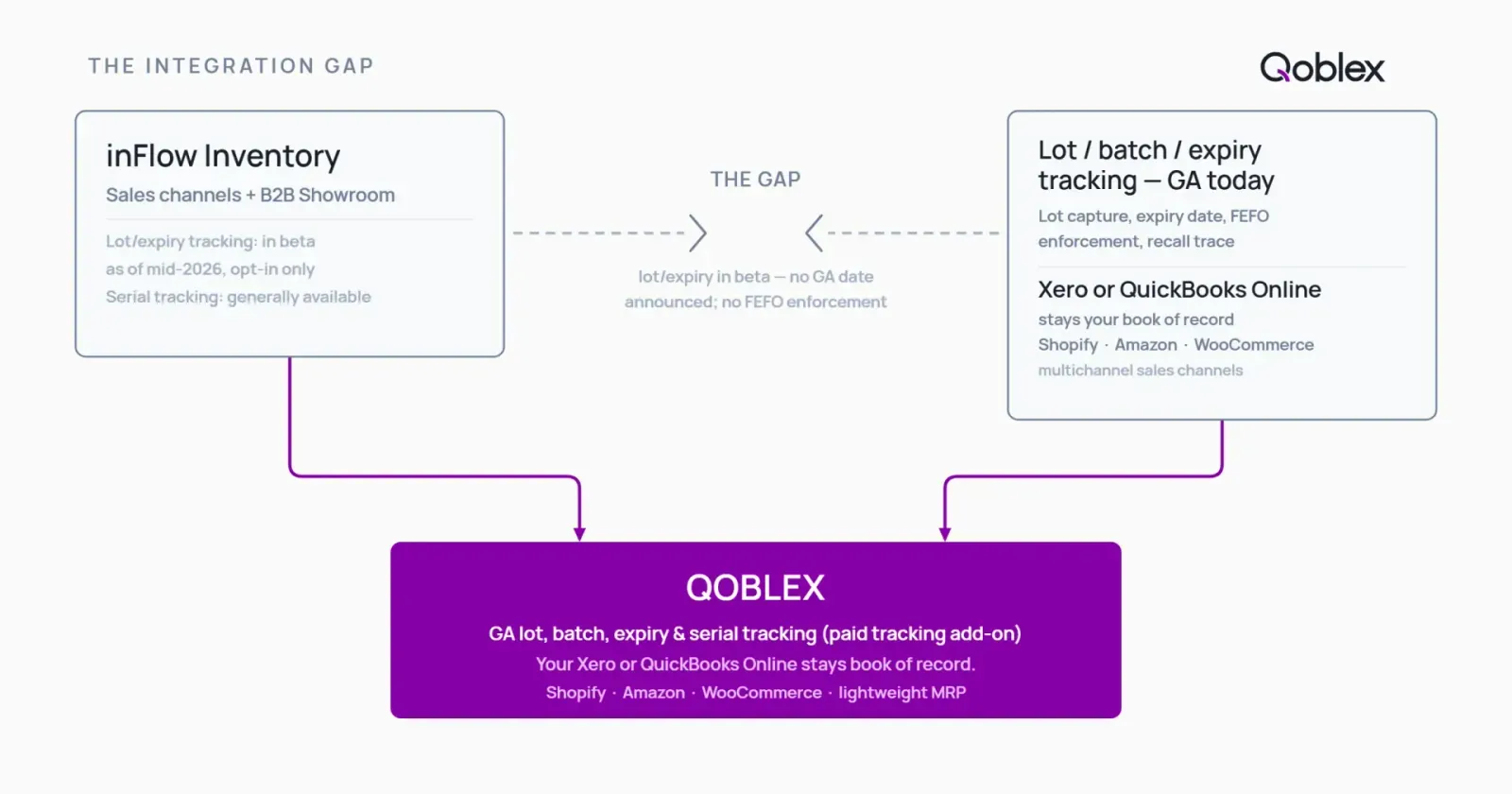
This is the section that decides the page for a regulated buyer, so it is worth being precise. inFlow is not missing traceability. Its serial number tracking is generally available on select plans, and that works today. The specific gap is lot and expiry, and it is a maturity gap, not an absence.
What inFlow’s current lot/expiry beta covers, and what it does not enforce
inFlow’s lot and batch tracking with expiry dates is in beta as of mid-2026, opt-in only, with access granted by request. The beta is meaningful: it covers lot creation, expiry-date assignment, and FEFO-style picking. The nuance that matters for a compliance-driven operator is how that FEFO behaves. The beta documentation describes FEFO-style picking, surfacing the lot closest to expiry, rather than documenting hard FEFO enforcement, where the system blocks a non-FEFO pick outright. Whether the current beta actually prevents a non-FEFO pick or only suggests the order is worth confirming directly with inFlow, and it may change when the feature reaches general availability. If your process depends on the system preventing the wrong lot from shipping, that is the distinction to nail down.
What a regulated SMB actually needs
The real-world requirement runs as a chain: capture the lot on receipt or production, attach an expiry date, pick so the soonest-to-expire stock goes first (FEFO, which orders picking by expiry rather than by receipt date the way FIFO does), and keep the trace intact so a recall question can be answered quickly: which lots are affected, and where did they go? For a food, beverage, supplement, or cosmetics brand, that chain has to survive production too, so the link from raw-material lot to finished-goods batch lives inside the system rather than in a spreadsheet beside it. If you want the fuller picture, see our guides to lot and batch tracking, expiry date management and FEFO, recall readiness, and food and beverage inventory management.
How Qoblex covers it as a GA capability at SMB scale
Qoblex gives you lot, batch, serial, and expiry tracking as a paid tracking add-on on top of its base plan, as a generally-available capability rather than a beta, with self-serve setup and no mandatory implementation. Because Qoblex also ships lightweight MRP and bill of materials, the trace passes through production rather than stopping at the finished-goods shelf, and your purchasing and multichannel sync sit in the same system. For the operator comparing against inFlow, the difference is not that inFlow lacks the feature idea; it is that Qoblex delivers lot and expiry traceability you can rely on today, with equal accounting sync to Xero and QuickBooks Online. The current structure and figures are on the pricing page.
What happens when you edit a Shopify order?
If you sell on Shopify, editing an order after the customer places it, changing a quantity, adding or removing a line, is an everyday event, and whether your inventory tool follows that edit is a real dividing line. Shopify applies the change in place rather than raising a fresh order.
inFlow’s Shopify integration brings an order into inFlow when it is placed and pushes fulfillment back, but it does not document a path for re-syncing a later edit. Like most connected inventory tools built to sync at order creation rather than to act on Shopify’s order-edit event, a change you make in Shopify after the order has synced is not automatically reflected in inFlow, and an edited order can reappear as a duplicate you reconcile by hand.
Qoblex handles order edits natively. As Qoblex’s Shopify sync documentation describes, editing an order in Shopify runs the full order update: Qoblex re-reads the changed order, rebuilds its shipments from Shopify’s fulfillments, and runs the refund and return sync, so the edit flows through instead of leaving your records on the original order.
| What happens on a Shopify order edit | Qoblex | inFlow |
|---|---|---|
| The edit is picked up automatically | Yes | Not documented as supported |
| How the edit flows in | Automatic re-read and rebuild | Not re-synced; edited orders can duplicate |
| Merchant action needed | None | Reconcile the order by hand |
How to pick your inFlow alternative
A quick way to narrow it down:
- You sell food, beverage, supplements, or cosmetics and need traceability you can rely on today, with equal Xero or QuickBooks sync: Qoblex.
- Your core problem is production scheduling and you want full MRP: MRPeasy, or Katana if you also want tight Shopify integration and are happy to add the traceability module.
- QuickBooks is central and you want deep manufacturing integration with it: Fishbowl.
- You are already in Zoho: Zoho Inventory.
- You run Xero-anchored wholesale or distribution: Unleashed, or inFlow itself if the B2B Showroom fit is strong.
- You have genuinely grown into mid-market WMS needs: Cin7 Core.
- You want open-source and have the technical appetite: Odoo.
For a food startup specifically, the honest answer is the tool that gives you generally-available lot and expiry traceability without a heavy implementation, on a self-serve subscription you can start without a multi-year commitment or per-seat cost that climbs as you hire. That points to Qoblex or MRPeasy, depending on how much manufacturing depth you need.
When inFlow is genuinely the right call
inFlow earns its reputation for the business it is built for, and no shortlist should talk you out of it if it fits. Choose or stay on inFlow when:
- You need clean, simple inventory management without the overhead of a heavier platform. Stock levels, purchase orders, sales orders, and reporting, learned fast, running on the web with a Windows app. inFlow is well-suited to that use case.
- The B2B Showroom is a core part of how you sell. If you sell wholesale and want a built-in ordering portal where trade customers place orders against your live catalog with customer-specific pricing, inFlow’s Showroom is genuinely differentiated and most alternatives at this price point do not offer it natively. The Showroom Pro add-on adds a custom domain and branding controls.
- You need serial number tracking today, and lot or expiry traceability is not yet a requirement, or you are comfortable waiting for inFlow’s lot/expiry beta to reach general availability and you are not in a regulated sector that requires it now.
- Your accounting is on Xero or QuickBooks Online and you also sell on Shopify or Amazon, and you are comfortable with inFlow’s integration metering, noting the entry Entrepreneur tier includes one integration slot and higher tiers include more.
- Your team is small and you value ease of use over depth. If you do not need full MRP, complex BOMs, or production scheduling, you are not paying for depth you will not use.
The honest question is not whether inFlow is a good tool. It is whether the current lot/expiry beta timeline and the feature depth match where your business is today. If they do, inFlow is a sound choice.
How to move from inFlow to a new platform
If you decide to move, a controlled transition beats a rushed one. A sequence that works:
- Export everything before you cancel. Pull your products, stock levels, suppliers, customers, BOMs, and open orders while you still have full access to inFlow.
- Reconcile your stock first. Run a full stocktake so you migrate accurate numbers, not accumulated drift.
- Map your accounting ledgers. Identify the accounts your new tool will post to in Xero or QuickBooks, so the sync lands cleanly from day one.
- Run both systems in parallel for a week or two. Confirm the new platform agrees with reality before you fully cut over.
- Train the team in short, role-based sessions. Purchasing, warehouse, and sales each need a focused walkthrough, not one long generic demo.
Done in this order, a switch is a controlled project, not a leap. Most SMB migrations settle within a few weeks rather than months.
FAQ
Does inFlow Inventory have lot tracking? inFlow’s serial number tracking is generally available on select plans. Its lot and batch tracking with expiry dates is in beta as of mid-2026, opt-in by request. If lot traceability is your reason for buying, confirm the current status with inFlow before you commit.
Does inFlow support FEFO picking? In the current lot/expiry beta, FEFO is a picking suggestion: inFlow surfaces the lot closest to expiry, but a picker can override it. That is different from FEFO enforcement, which blocks a non-FEFO pick. This is the present beta behaviour and may change at general availability.
Does inFlow have MRP or production planning? inFlow’s manufacturing coverage is bills of materials and manufacture orders for assembly, kitting, and disassembly, but it does not ship demand-driven MRP.
Does inFlow integrate with both Xero and QuickBooks Online? Yes, both natively. The nuance is that integration slots are metered by plan tier: the entry Entrepreneur tier includes one slot, so a buyer who wants both connected natively on the entry tier may need to move up a tier or add a slot.
Which inFlow alternative is best for food and beverage? Qoblex is the top pick: generally-available lot and expiry traceability as a tracking add-on, lightweight MRP, native multichannel, and equal Xero and QuickBooks Online sync. For the full picture see our food and beverage inventory guide.
Which inFlow alternative is best for small manufacturers? Katana for production-scheduling-first, MRPeasy for full MRP with traceability included, and Qoblex for light manufacturing, traceability, and multichannel in one tool.
Is inFlow Inventory good for small businesses? Yes. inFlow is a strong fit for a small business that needs simple inventory plus a built-in B2B Showroom portal and does not require generally-available lot or expiry tracking today. See when inFlow is genuinely the right call above.
What is inFlow’s B2B Showroom? The Showroom is inFlow’s built-in B2B ordering portal, with public and private showrooms, customer-specific pricing, and real-time inventory sync. A Showroom Pro add-on adds a custom domain and branding removal.
Which inFlow alternatives work with both Xero and QuickBooks Online? Qoblex, Katana, MRPeasy, Unleashed, and Zoho Inventory all connect to both. Confirm the direction and depth of each sync against the vendor’s current documentation for your setup.
What happens to a Shopify order in inFlow if I edit it after it’s placed? inFlow’s Shopify integration brings an order in at creation and pushes fulfillment back, but it does not document re-syncing a later edit. Like most connected tools that sync at order creation, a change made in Shopify afterward is not automatically reflected in inFlow, and an edited order can come through as a duplicate to reconcile by hand. Qoblex handles order edits natively: editing the order in Shopify triggers Qoblex to re-read it and rebuild its shipments automatically.
Can I try Qoblex before switching from inFlow? Yes. Qoblex offers a 14-day free trial with no credit card required, so you can load your own data and confirm the fit before committing. See qoblex.com/pricing for current terms.
Your next move
inFlow is a genuinely good inventory tool for the operator it is built for. If your world is simple stock management with a wholesale Showroom, on Xero or QuickBooks with Shopify or Amazon alongside, and lot or expiry traceability is not a requirement today, inFlow can be exactly right.
But if the reason you are looking is that you carry a real traceability requirement now, in food, beverage, supplements, or cosmetics, the honest question is whether a lot/expiry feature on a beta track matches where your business is. Start by writing down the one operational problem that made you search for an alternative. If it is getting traceable, multichannel, and connected to whichever accounting platform you run, with lot and expiry tracking you can rely on today, that is the gap to close first, and it is the gap Qoblex was built for.