


At a glance: A beverage maker that blends tea and coffee, and also trades spirits and soft drinks, imports its raw materials, blends and packs in-house, sells wholesale through regional distribution agents and keeps its books in Xero. Imported ingredients became finished packs with no record of what each batch used, so nobody could say what a pack cost. In Qoblex, a bill of material for each blend and a manufacturing order for each run consume the ingredients, record wastage, cost every pack and send the result to Xero.
What does one 200 g pack of blended tea cost to make?
For a tea blender that imports its leaf, one 200 g pack costs the landed cost of the tea and flavouring in it, plus a pouch, a label, a share of the blending labour and the material lost in blending; on a Qoblex manufacturing order that makes 1,000 packs from tea landed at 9.50 per kg and flavouring at 24.00 per kg, that comes to 2.84 a pack.
Let’s assume a blender buys black tea that lands at 9.50 per kg once freight and duty are spread across the purchase order, and flavouring at 24.00 per kg, both the moving average cost of the stock on hand, in the business’s own currency before tax. A pouch costs 0.22 and a label 0.04. One manufacturing order makes 1,000 packs in a single shift, with 8 hours of blending and packing labour at 25.00 an hour.
The recipe calls for 182 kg of tea and 18 kg of flavouring, but dust, sweepings and the first pouches of a run take their share, so the order consumes 200 kg of tea and 20 kg of flavouring. The run is worth 2,840.00, or 2.84 a pack, and at the agents’ price of 4.60 before freight and tax the margin is 1.76, about 38 percent.
That number rests on four things people usually carry in their heads: the landed cost, the amount in a pack, the loss, and what packaging and labour add. So why was it a guess for so long?
How does a blender that imports its tea end up guessing what each batch used?
A blender that imports its tea ends up guessing what each batch used when the recipe and the quantities live in someone’s memory instead of a system. A beverage maker of this shape imported tea and flavouring, blended and packed on its own bench, sold to regional agents and kept its books in Xero. Every invoice was in order, but nothing recorded what a batch had consumed or produced.
That made sense for a long time, because with a handful of blends and one person who knew every recipe, the bench was the record. Then the range grew and more than one person blended. Stock counts stopped matching what the purchase invoices implied, and nobody could say what had to be checked by hand before the stock figure was trusted, or what someone was remembering that no system knew.
Costing a pack from the tea alone carried 182 g at 9.50 per kg, about 1.73, and read a margin of 2.87 on the same 4.60 price, when the run really carried 2.84 and a margin of 1.76. The first thing to fix was the recipe.
How does a tea or coffee blender set up a recipe as a bill of material?
A tea and coffee blender sets up a recipe in Qoblex by converting the finished pack’s product variant into a bill of material with Convert to Bill of Material, then adding one line per part with Add line and entering each amount in Quantity in Bom. The parts (tea, flavouring, pouch and label) must exist as products first. The recipe holds the amount for one pack, and each manufacturing order multiplies it by Quantity To Produce to set the order’s component quantities.
Each part line shows its SKU, In stock, Allocated, Incoming and Cost, so the production lead sees what the recipe costs and whether it can be made, then chooses Save & Close. The recipe can be edited at any time, but a change can affect consumption and cost on orders that rely on it, so the production lead checks open orders first.
A blender that packs one bulk blend into several sizes can build two levels: multi-level bills of material are supported, but production orders do not cascade, so the bulk blend needs its own manufacturing order first. Next is where each line’s cost comes from.
How does the landed cost of imported tea and flavouring reach the cost of each pack?
For a blender that imports its tea, the landed cost of each shipment enters Qoblex on the purchase order and becomes part of the product’s moving average cost when the goods are received, and that moving average cost is what the manufacturing order picks up as each component’s Unit Cost. The buyer enters freight and duty known up front on the purchase order with Add a custom line item and the type Landed Costs, and Qoblex spreads them across the product lines by value.
A charge such as VAT takes the type Expenses, which raises no product’s cost. Entering landed costs before receiving keeps the cost baked into the received stock right, which is how the tea comes to sit at 9.50 per kg and the flavouring at 24.00. The landed cost works the same way for importers of other goods.
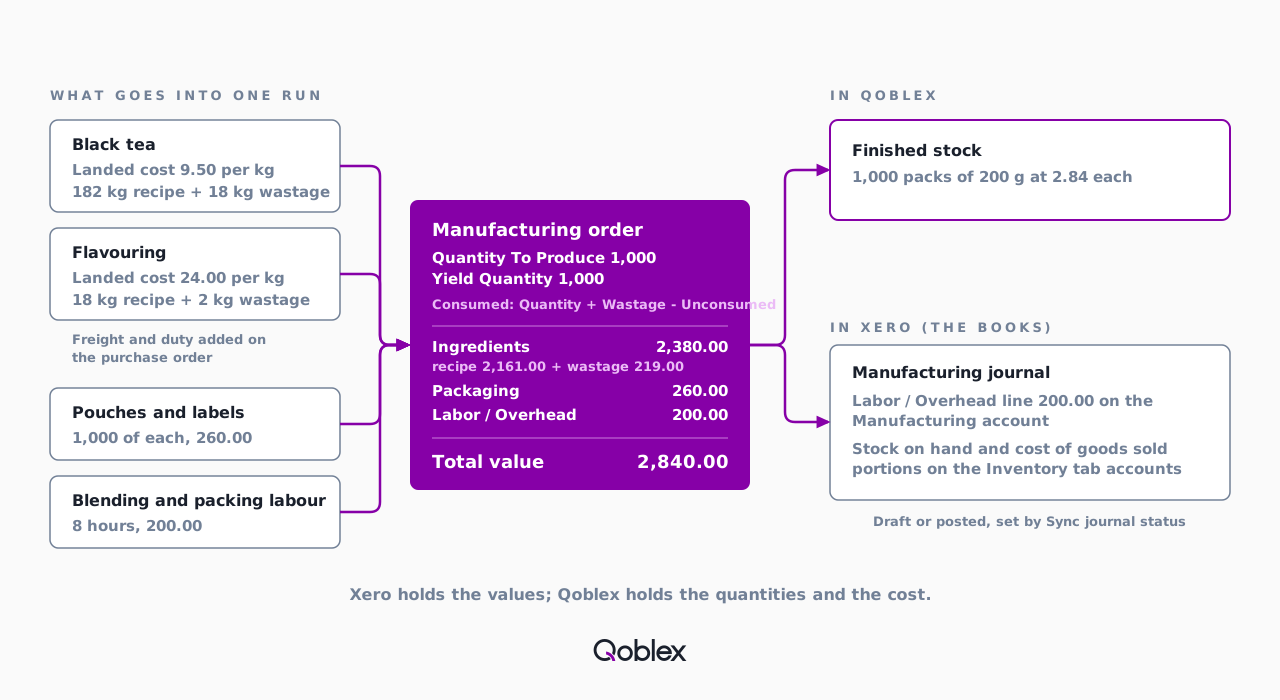
When the production lead chooses the Finished Product on a manufacturing order, each component’s Unit Cost is captured from the moving average cost at that moment, so before completing the order the production lead checks it against the current moving average cost. Then the blend goes on the bench.
How does a manufacturing order turn imported ingredients into packed stock?
A blender runs a batch in Qoblex as a manufacturing order in Assembly mode, which moves through Draft, In Production and Completed: starting it reserves the ingredients and packaging, and completing it consumes them and adds the finished packs to stock. The production lead creates the order from the Manufacturing page.
Wastage and Quantity To Produce change only in Draft. Start Production reserves each component plus its wastage, or leaves the order in Draft with an out-of-stock message if a component cannot be fully reserved. While the order is In Production, the person blending can record Unconsumed material, such as a sack reserved and not used, and Amend returns the order to Draft, moving no on-hand stock, if the Wastage needs correcting. Nothing is scheduled: the team decides what to blend this week, and Qoblex records and costs the run.
- Receive the tea, flavouring, pouches and labels on purchase orders, with freight and duty entered as Landed Costs lines before receiving.
- Tick the finished pack’s variant, choose Convert to Bill of Material, use Add line for each part, enter its Quantity in Bom and choose Save & Close.
- Go to Manufacturing, select Create, choose the Manufacturer and leave Production Type as Assembly.
- In Finished Product pick the blend’s bill of material, choose the Location, enter Quantity To Produce (1,000) and select Save.
- On the Bill Of Material tab enter Wastage on the tea (18 kg) and flavouring (2 kg) lines, then select Add Labor / Overhead cost for the labour.
- Select Start Production so Qoblex reserves each component plus its wastage.
- After the run, enter Unconsumed on any line not fully used, check the figures against the production notes (Amend to correct Wastage, then start again) and select Complete.
- Open the manufacturing journal in Xero once it has synced, from the link in Qoblex’s notification.
Until the team has confirmed consumption and wastage against the production notes, the order stays In Production, because completion posts stock and cost exactly as the order stands. Then the cost of a pack has its answer.
Does wastage raise the cost of a pack, and how is the cost per pack worked out?
Yes: for a blender that records Wastage on a Qoblex manufacturing order, the wastage is consumed on top of the recipe quantity, so the material lost in blending raises the cost of every pack, because the finished pack’s unit cost is the value of everything consumed plus Labor / Overhead, divided by the Yield Quantity.
| Cost line | How it is worked out | Amount |
|---|---|---|
| Black tea, recipe quantity | 182 kg x 9.50 | 1,729.00 |
| Flavouring, recipe quantity | 18 kg x 24.00 | 432.00 |
| Wastage on the tea | 18 kg x 9.50 | 171.00 |
| Wastage on the flavouring | 2 kg x 24.00 | 48.00 |
| Pouches | 1,000 x 0.22 | 220.00 |
| Labels | 1,000 x 0.04 | 40.00 |
| Labor / Overhead: blending and packing | 8 hours x 25.00 | 200.00 |
| Total value of the run | Consumed components plus Labor / Overhead | 2,840.00 |
| Unit cost per pack | 2,840.00 / Yield Quantity 1,000 | 2.84 |
The tea and flavouring at recipe quantity come to about 2.16 a pack, and the wastage lifts the ingredients to 2,380.00 for the run, which is why leaving loss out reads a kinder margin than the real one. Yield Quantity is the number of good packs the order posts as produced; the total value does not depend on it, so fewer packs would each carry more. The figure is this run’s cost, and the next run captures the costs current when it is drafted. At 4.60, the margin is 1.76 a pack, and the bookkeeper sees the run in Xero.
What reaches Xero when a production run is completed?
For a tea and coffee blender on Qoblex and Xero, completing a manufacturing order syncs the run’s inventory movements to Xero as a manual journal, with the Labor / Overhead amount posted to the account chosen on the Manufacturing tab of the Xero settings and the stock on hand and cost of goods sold portions of the same entry posted to the accounts on the Inventory tab. That is manufacturing and BOM inventory that integrates with Xero: the run happens in Qoblex and its value reaches the books as a journal.
Starting, amending and cancelling an order post nothing. The journal line reads MO #<order number> - <product variant> - Manufacturing and here carries the 200.00 of labour. Qoblex creates the journal as a draft, and Sync journal status on the Inventory tab decides whether it is posted automatically or left for the accountant. The journal sync runs one way, Qoblex to Xero.
Xero keeps the books and does that job well. Products reach it as untracked items, so Xero shows the item on invoices and bills while Qoblex holds the quantity and the cost, and the stock value reaches Xero through the journals Qoblex posts. Because Do Not Sync on the Manufacturing account skips the whole entry, the bookkeeper chooses that account with the accountant; the skincare brand’s story covers the sales side and the Xero integration page the setup. Then came the business’s own questions.
Can a simple blend-and-pack step run in Qoblex without scheduling or MRP planning?
A beverage maker that imports bulk ingredients and runs a simple mixing and packing step can run it in Qoblex’s manufacturing module, which is what MRP means at Qoblex: bills of material, production orders, assembly and disassembly, on every plan, recording and costing each run. Its questions on the calls checked how its own workflow would run.
It asked how the flow runs from a recipe to finished goods in stock, which the sections above answer. It asked whether the system could handle a light production step, and it can, as one order per run. And it asked whether a standard bill of material per blend would make production consume the right ingredients automatically: the order loads them from the recipe, multiplies them by Quantity To Produce and consumes them on completion.
Manufacturing is on every plan, and the Xero integration is a paid add-on on Starter and Business (see pricing). Turning demand into a materials list is forecasting, on Business and Scale. Qoblex does not schedule work centres or handle subcontracting, and ingredient lots on an order need lot tracking, a paid add-on on Starter and Business, included on Scale. Those limits decide fit.
Does this fit your business?
The Qoblex flow of one bill of material per product and one manufacturing order per run fits small makers that buy ingredients, mix them and pack finished goods into stock, starting with coffee roasters. Anyone looking for coffee roaster inventory software will recognise the run: green coffee is the component, the roasted bag the finished product, and green coffee lost beyond the recipe is recorded as Wastage.
A spice or herbal blender, a soft-drink or spirit blender with a simple mix-and-pack step, and a co-packer that buys its own ingredients and packs into its own stock follow the same story. Related stories cover a beverage maker with stock in several places or quoting and invoicing with Xero and a food maker tracing an ingredient batch; the food and beverage page covers the wider setup.
The flow does not fit a business that needs scheduling, sequencing or capacity planning of the production floor, or that sends material to an outside manufacturer for processing; a dedicated production-planning system is the honest answer for that shape. A business that only buys and resells finished goods has no recipe to cost, and the guide to Xero inventory management fits it better. A maker on QuickBooks Online has its own manufacturing story, with QuickBooks’s settings in place of Xero’s.
Frequently asked questions
Does wastage raise the cost of a finished pack?
Yes. In Qoblex, wastage is extra component input lost during the run, consumed on top of the recipe quantity. A pack’s unit cost is the consumed component value plus any labor and overhead, divided by the Yield Quantity, so a recorded loss raises the cost of each pack.
Is it enough to cost a pack from the tea price alone?
Not safely. The tea price alone leaves out the flavouring, the pouch and label, the labour and the material lost in blending. A Qoblex manufacturing order adds them all: consumed ingredients including Wastage, packaging lines and Labor / Overhead, divided by the packs produced.
Do we need a supplier record to make our own blends?
Yes. Qoblex requires a Manufacturer on every production order, chosen from the supplier list, and a new manufacturer contact can be added from the same field. A business that blends in-house can therefore add a contact for itself. The order will not save without one.
Can one bill of material cover a bulk blend that goes into several pack sizes?
Yes, in two levels. In Qoblex, the bulk blend is one bill of material and each pack size another that uses the blend as a part. Multi-level bills of material are supported, but production orders do not cascade, so each level needs its own manufacturing order.
Does a manufacturing order post to Xero when I start it?
No. Starting a Qoblex manufacturing order only reserves component stock. Completing it is the only step that posts an inventory result, which then syncs to Xero as a journal. Sync journal status on the Inventory tab decides whether that journal stays a draft or is posted automatically.
Is manufacturing included on every plan, and what does Xero need?
Manufacturing, with bills of material, production orders, assembly and disassembly, is on every Qoblex plan. The Xero integration is a paid add-on on Starter and Business. Current prices are on the pricing page, and the add-on is not needed to run production inside Qoblex.
Does Qoblex do MRP for a small food manufacturer?
At Qoblex, MRP means the manufacturing module: bills of material, production orders, assembly and disassembly, on all plans. It records and costs each production run. It does not schedule work centres or sequence jobs, and the demand-to-materials breakdown is forecasting, on the Business and Scale plans.
Where does the cost of a production run land in Xero?
In Qoblex, the Manufacturing tab of the Xero settings holds the ledger account that receives the Labor / Overhead amount, with optional override rules by Production Location or Order tags. Setting it to Do Not Sync skips the whole manufacturing entry, so choose the account with your accountant.