



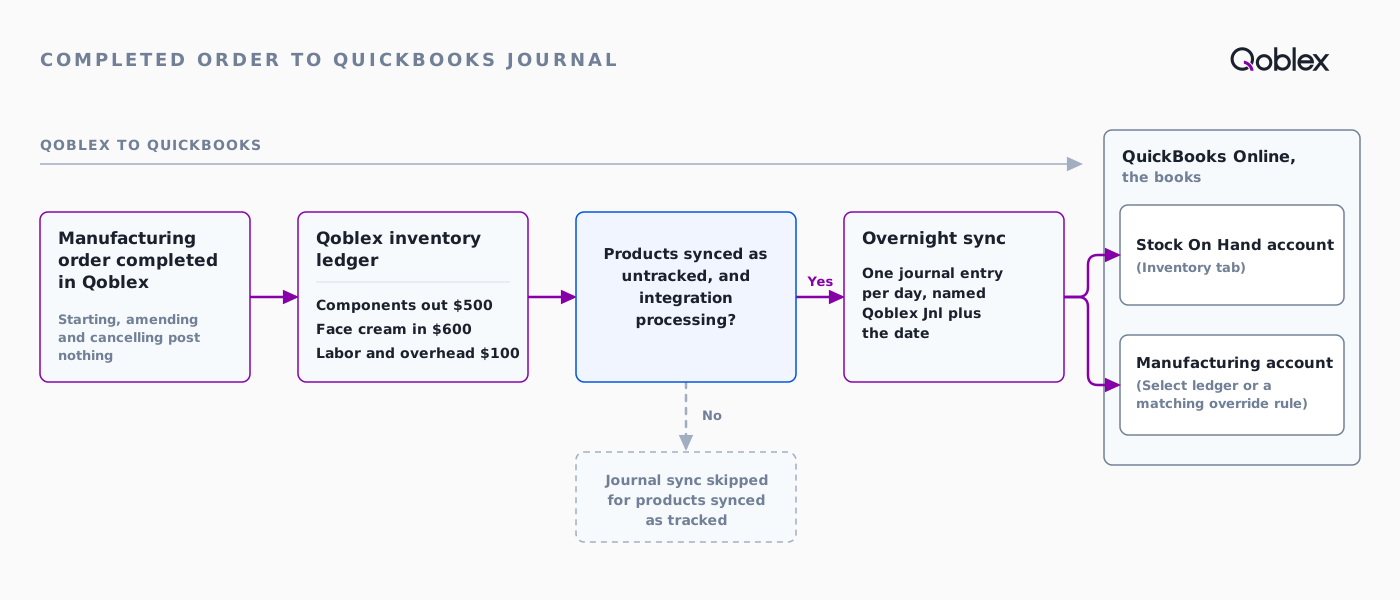
With Qoblex running production beside QuickBooks Online, only completing a manufacturing order reaches your books. Qoblex values the components and the finished product, then posts the movement on its overnight sync as a journal entry named Qoblex Jnl plus the date. It posts only when products sync as untracked. The Manufacturing tab picks the QuickBooks account that receives the labor and overhead amount.
The batch was finished on Tuesday afternoon: 200 jars filled, capped and labeled. On Wednesday you look in QuickBooks Online for a document named after the production order. Nothing is lost: Qoblex sends production to the books as part of a daily journal entry, a different shape from a sale.
Which manufacturing records reach QuickBooks Online, and which stay in Qoblex?
In Qoblex, completing a manufacturing order is the only step that reaches QuickBooks Online. The movement posts on the overnight sync as part of one journal entry per day, named Qoblex Jnl plus the date, and the labor and overhead amount lands in the QuickBooks account you choose on the Manufacturing tab.
When does a manufacturing order post anything to QuickBooks?
Only at Complete. Each step of the production lifecycle does this:
| Step in Qoblex | What happens to stock in Qoblex | Reaches QuickBooks? |
|---|---|---|
| Create and save (Draft) | Nothing is reserved or moved | No |
| Start Production | Components are reserved at the production location (quantity plus any wastage); on-hand stock does not move | No |
| Amend (back to Draft) | Reservations are released; on-hand stock does not move | No |
| Cancel | No stock movement is reversed | No |
| Complete | Reservations are released, components are consumed, the finished product is added at the Yield Quantity and a manufacturing ledger entry is posted | Yes, in the next overnight journal, when products sync as untracked |
Qoblex posts neither the bill of materials nor the manufacturing order to QuickBooks as a document.
Does QuickBooks send anything back to Qoblex?
No. The sync is one-directional, Qoblex to QuickBooks. QuickBooks receives the accounting result and stays the books, the job it does well.
Why do sales invoices arrive in minutes but production arrives overnight?
Sales and purchase documents are sent within minutes, while inventory-accounting journals, manufacturing included, are sent once a day on an overnight sync. Invoices, refunds, bills and payments go within a few minutes once authorized. The Sync Status tab lists documents, not journals, so check a journal in QuickBooks itself.
What is the one setting that decides whether production reaches QuickBooks at all?
Sync products as Untracked, on the Inventory tab, together with the integration having started processing. Both must be true.
What does Sync products as Untracked mean?
It means QuickBooks does not manage stock on hand or cost of goods sold for your items. The Inventory tab describes it as “Item codes appear on QuickBooks invoices without QuickBooks managing SOH/COGS.” Your items are Non-inventory in QuickBooks. Qoblex holds stock value and posts it as the daily journal. The help centre advises keeping Qoblex-managed products Non-inventory rather than tracked Inventory items.
How do I check it, and how do I change it?
You check it on the Inventory tab, where the switch is shown but read-only. To change it, contact Qoblex support; items with stock history in QuickBooks are affected, so involve your accountant. The journal sync reads only movements recorded since the integration started processing.
What happens if products sync as tracked?
QuickBooks manages the products, and Qoblex skips the inventory-ledger journal sync, manufacturing included.
| Products synced as untracked (Sync products as Untracked on) | Products synced as tracked (off) | |
|---|---|---|
| Who manages stock value | Qoblex | QuickBooks |
| Items in QuickBooks | Non-inventory | Inventory |
| Daily inventory and manufacturing journal from Qoblex | Posts (once the integration has started processing) | Skipped |
| Manufacturing tab accounts used | Yes | No |
How do I set up the Manufacturing tab for QuickBooks Online?
Set the Inventory tab accounts first, then the default account on the Manufacturing tab, then test the setup with one completed order.
- In Integrations, open the QuickBooks integration’s Inventory tab. Choose the Stock On Hand and Cost Of Goods Sold accounts (both accounts, or both Do Not Sync; Qoblex blocks a mixed save) and confirm Sync products as Untracked is on. Save changes.
- On the Manufacturing tab, choose an account in Select ledger and, optionally, a class in Select tracking class. Add override rules only for narrow cases. Save changes.
- Complete one representative manufacturing order.
- After the next overnight sync, review the Qoblex Jnl entry in QuickBooks.
| Control | What it does | Reaches the journal line? |
|---|---|---|
| Select ledger (Manufacturing tab) | The default QuickBooks account for the manufacturing line | Yes |
| Select tracking class | The QuickBooks class for the manufacturing line | Yes, as the line’s class |
| Select tracking location | Saved with the settings | No, not written to manufacturing journal lines |
| Override rule | If it matches, its account and class replace the defaults; first match in priority order wins | Yes (account and class); a rule’s location is resolved but not written |
| Stock On Hand and Cost Of Goods Sold accounts (Inventory tab), Purchases settings | The accounts for lines described with SOH, COGS and GR/IR (goods received, not invoiced) | Yes |
Which QuickBooks account should Select ledger point to?
The one that should receive each completed order’s labor and overhead amount, the Manufacturing Cost account “(labor, services, machinery, and similar)” in the manufacturing overview. Which account that is in your chart is your accountant’s call.
What do tracking class and tracking location do?
The class is written to the manufacturing line, so you can report by it. The location is saved but not written; set one in QuickBooks after the journal posts if you need it. Both lists fill only when class and location tracking are on in QuickBooks.
When should I add an override rule?
When only a narrow group of orders needs a different account or class. Rules are checked from the top and the first match wins, so put specific rules above broad ones. Changes apply to future syncs only.
What does one batch of face cream look like, from BOM to QuickBooks journal?
Let’s assume a small skincare maker makes 200 jars of face cream in one batch. The cream base is counted in 50 g portions, one per jar; Wastage and Unconsumed are 0, and component costs stay as they are until the order completes.
- Monday 9:00. In Manufacturing, the maker selects Create: Manufacturer (required), Production Type Assembly, Finished Product face cream (it must be a BOM), Location, Quantity To Produce 200. Qoblex sets Yield Quantity to 200 and loads each component at its moving average cost. The maker uses Add Labor / Overhead cost (description, price and tax required) and saves.
- Monday 9:30. Start Production reserves 200 of each component. On-hand stock has not moved; nothing has gone to QuickBooks.
- Tuesday 16:30. The team confirms 200 good jars and the maker selects Complete. Stock moves in Qoblex at once and the ledger entry is recorded.
- Overnight. The daily journal sync reads the movement and posts it to QuickBooks.
- Wednesday 8:00. The maker opens Qoblex Jnl plus the date in QuickBooks and finds the lines described Manufacturing Order #1042.
What goes on the order?
The BOM for 200 jars and one Labor / Overhead line:
| Component | Per jar | For 200 jars | Moving average cost | Value |
|---|---|---|---|---|
| Cream base (50 g portion) | 1 | 200 | $1.60 | $320 |
| Jar and lid | 1 | 200 | $0.80 | $160 |
| Label | 1 | 200 | $0.10 | $20 |
| Components total | $500 |
| Labor / Overhead | Quantity | Unit Cost | Total |
|---|---|---|---|
| Filling, capping and labeling | 4 (hours) | $25 | $100 |
What does Qoblex post to its inventory ledger when the order completes?
Each component goes out at moving average cost for Quantity + Wastage – Unconsumed (200 + 0 – 0). The finished product comes in at the Yield Quantity, valued at consumed components plus the Labor / Overhead total, divided by the Yield Quantity for unit cost (costs, wastage and yield).
| Ledger line | Quantity | Value | Unit cost |
|---|---|---|---|
| Cream base out | 200 | $320 | $1.60 |
| Jar and lid out | 200 | $160 | $0.80 |
| Label out | 200 | $20 | $0.10 |
| Face cream in (Yield Quantity 200) | 200 | $600 | $3.00 |
$600 is $500 of consumed components plus $100 of labor and overhead, and $600 divided by 200 jars is $3.00 a jar (cream base $1.60, jar $0.80, label $0.10, labor and overhead $0.50).
What reaches QuickBooks, and in which account?
The stock value goes to the Stock On Hand account and the labor and overhead amount goes to the Manufacturing account.
| Amount in the Qoblex ledger | QuickBooks account | How the line is described |
|---|---|---|
| Stock value: $500 of components out, $600 of face cream in | Stock On Hand account (Inventory tab) | Manufacturing Order #1042, a product name, then SOH |
| Labor and overhead: $100 | Manufacturing account (Select ledger, or a matching override rule), with the class from Select tracking class if one is set | Manufacturing Order #1042 and a product name |
All of it sits in the day’s Qoblex Jnl entry; Qoblex posts no separate document for order 1042. Of the jars’ $600, $500 was already stock and moves from the components into the jars. The extra $100 is labor and overhead, mapped to the Manufacturing account.
A line is posted only when its amount is non-zero. Lines described with COGS or GR/IR appear where they apply. If the Manufacturing account cannot be resolved, the movement is skipped rather than posted incomplete. Review the first Qoblex Jnl entry in QuickBooks before relying on the setup.
What do wastage and unconsumed quantity change?
Both change how much of a component is consumed. Wastage is input scrapped or lost, editable in Draft, and adds to what is reserved and consumed. Unconsumed is input reserved but not used, editable while In Production, and reduces what is consumed.
How do I check the journal in QuickBooks the morning after?
After the overnight sync, open the journal entry named Qoblex Jnl plus the date and find the lines described Manufacturing Order plus the order number. If nothing is there, see the FAQ checks below. If a line sits in the wrong account, fix the setting; it applies to later syncs.
Should I use a BOM with production orders, or a bundle?
Use a BOM when you make something and want it costed and counted as its own stock; use a bundle for a sellable kit. A bundle is a kit whose stock is calculated from its parts, and it cannot be manufactured. A bill of materials is the recipe a manufacturing order assembles into finished stock, with cost and labor; a production order needs a BOM. BOMs and production orders are on every plan. Multi-level BOMs work, but orders do not cascade: each sub-assembly needs its own order. See BOM software for small manufacturers.
Is QuickBooks Online enough on its own, or do I need an inventory system for production?
Sometimes it is: it depends on your QuickBooks edition and how you build.
What does Intuit say about manufacturing in QuickBooks?
Intuit says manufacturing features are available in Intuit Enterprise Suite. Its help article Get started with manufacturing orders and assemblies (checked 27 October 2026) says: “Manufacturing features are currently available in Intuit Enterprise Suite.” It adds: “The system creates a background Build assembly transaction to post accounting entries and compute the actual cost.” If you run that edition and it fits how you build, keeping production in QuickBooks is a good answer.
When does the Qoblex route fit?
When stock, purchasing, channels and production run in an inventory system and QuickBooks is the books. When a batch’s cost should come from Qoblex’s moving average costing, landed cost included, rather than being keyed in again. When you also need lot, batch and expiry traceability, a paid add-on on Starter and Business, included on Scale. The QuickBooks Online integration is a paid add-on on Starter and Business (see pricing). More: manufacturing, manufacturing inventory software, QuickBooks Online inventory management, QuickBooks integrations.
Who is this setup not for?
A business that wants QuickBooks itself to hold item quantities and cost (Qoblex syncs products as untracked), wants a document per manufacturing order in QuickBooks (it gets one journal entry per day), or expects QuickBooks changes to flow back (the sync is one-directional). And if you need work-centre scheduling or subcontracting, Qoblex does neither.
Supplement, candle and soap makers fit the same pattern (health and beauty), as do food makers and contract packers (food and beverage).
Frequently asked questions
Does starting a manufacturing order post anything to QuickBooks?
No. Start Production reserves components and on-hand stock does not move. Amending releases the reservations and cancelling reverses no stock movement, so neither posts anything. Only completing an order posts an inventory-ledger result, which reaches QuickBooks in the next overnight journal.
Why is my manufacturing order not in QuickBooks?
Check in order: Sync products as Untracked is on (tracked products skip the journal sync, manufacturing included); the integration has started processing; Select ledger or a matching rule supplies a Manufacturing account; the overnight sync has run. Look in the journal in QuickBooks, not on Sync Status.
Can I see a document for each manufacturing order in QuickBooks?
No, Qoblex posts no separate document per order. Each day’s movements are grouped into one journal entry named Qoblex Jnl plus the date. Open it and look for the lines described Manufacturing Order plus the order number to trace each line back to its order in Qoblex.
Can I switch Sync products as Untracked myself?
No. The switch is shown on the Inventory tab but is read-only there, because it reflects how your integration is configured. Contact Qoblex support to change it. Items that already carry stock history in QuickBooks are affected by a switch, so make that change with your accountant.
Which QuickBooks account should the manufacturing line post to?
The account chosen in Select ledger, which receives the labor and overhead amount. Which account suits your books is a chart-of-accounts decision for whoever owns your accounting. Use an override rule for a narrow group of orders instead of changing the default.
Does the tracking location on the Manufacturing tab reach the journal?
No. Select tracking location is saved with your settings but is not written to manufacturing journal lines; only the account and the class from Select tracking class reach the posted line. If you need a location on these journals, set it in QuickBooks after the journal posts.
Why is there no manufacturing line on my journal?
A line posts only when its amount is non-zero, and the whole movement is skipped if the manufacturing account cannot be resolved. Check that Select ledger (or a matching rule) is set, and that the order’s Labor / Overhead table has a value, since that is the amount the manufacturing line carries.
What happens to the unit cost if fewer good jars come out than planned?
Each jar carries a higher unit cost. The total value posted, consumed components plus labor and overhead, does not depend on yield, so fewer good jars share that same total. Before you complete an order, check the yield against the finished count.